

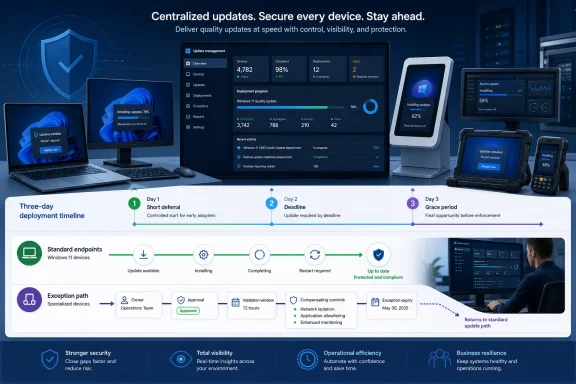
Enterprises should make Microsoft’s fast quality-update posture the baseline for ordinary Windows endpoints, while treating slower deployment as a temporary, measurable exception—not a standing right to delay patches. Microsoft’s July 2026 guidance calls for a quality-update deferral period of less than three days, a deadline of 0 or 1 day, and an update grace period of no more than 2 days. Microsoft’s update-policy documentation and WindowsForum’s report on the three-day deployment recommendation provide the reader-visible basis for that direction.
That guidance is not a promise that every PC will restart at one identical elapsed time after Patch Tuesday. The observed sequence depends on the organization’s update-management configuration and on when a device receives, installs, and, where applicable, restarts to finish an update. Microsoft recommends the three settings above; administrators should validate actual timing in their own management tooling before relying on it operationally.
WindowsForum’s coverage of Microsoft’s three-day deployment push frames the practical change clearly: routine quality-update deployment can no longer assume that weeks-long broad deferrals are a safe default. Its related reporting on blanket Windows Update delays and AI-driven exploit risk reflects Microsoft’s stated concern that attackers can use AI to analyze publicly known vulnerabilities and develop exploit paths faster than the traditional weeks-long enterprise patch cycle.
The operational question is not whether every Windows device must receive identical treatment. It is which systems need additional validation after the ordinary path, who owns that decision, what controls apply during the delay, and when the exception ends.
Microsoft recommends quality-update deferral of less than three days, a deadline of 0 or 1 day, and a grace period of no more than 2 days. Those values establish a fast baseline, but they do not eliminate pilot deployment, compatibility testing, maintenance planning, or documented risk acceptance. Microsoft’s Update Policy CSP documentation describes the available policy area, while WindowsForum’s deployment guidance report summarizes the recommended posture.
Quality-update deadline policies apply to Windows 10 version 1903 and later, including Windows 11 Pro, Enterprise, Education, and IoT Enterprise. Once the deadline is reached, restart behavior can override active hours and users cannot reschedule. Microsoft’s restart-policy guidance documents that deadline behavior and supported-policy scope.
Active hours therefore remain useful for reducing interruption before enforcement, but they are not an indefinite opt-out mechanism. Organizations should communicate that distinction plainly: users should save work and respond to restart prompts during the available period, while endpoint teams should validate how their configured policies behave on representative devices.
A standard knowledge-worker laptop and an endpoint attached to a specialized operational process can have different risk profiles. That difference should produce a documented, time-limited exception—not an informal or permanent exemption from routine servicing.
The distinction is between a device that needs a short validation period and a device that has become permanently excluded from routine servicing. The first can be governed through an exception workflow. The second is an ongoing security decision that should be explicitly owned and reviewed.
The management platform may be Intune, Group Policy, another supported endpoint-management product, or a combination of tools. Rather than assuming that every tenant or policy template exposes identical navigation labels, confirm the applicable quality-update deferral, deadline, grace-period, active-hours, and restart settings in the platform currently managing the device population. Microsoft states that restart behavior can be configured through Group Policy, mobile device management, or supported registry-based policy mechanisms, although it does not recommend directly editing the registry. Microsoft’s restart guidance
For the baseline, configure the organization’s managed quality-update policy to align with Microsoft’s recommendation:
Before broad deployment, test the configured policy on representative devices. Confirm what users see, how active hours behave before a deadline, and how the organization’s reporting tool identifies installed updates and devices that need further action. A restart requirement may be relevant to completion for a particular update, but administrators should use their management platform’s documented status reporting rather than infer completion from a single generic device state.
Require the following before placing a device or device group on an exception path:
Review the register after every quality-update cycle. Look for exceptions nearing expiry, groups that have remained outside the baseline for multiple cycles, and systems that should return to the normal assignment. An exception that renews automatically is no longer temporary and should trigger a review of the application, device design, vendor dependency, or operational process behind the delay.
That distinction matters. A healthy update program should have a routine path that is already fast enough for ordinary quality updates: a short validation stage, broad baseline deployment, and policy settings aligned with Microsoft’s recommendation. Expedited deployment is for circumstances that require faster action than the established routine.
Using expedited updates as a monthly substitute for a weak baseline creates unnecessary operational noise and can blur the difference between routine servicing and a genuine emergency. WindowsForum’s report on AI-related risks from broad delays reinforces the underlying governance issue: lengthy default exposure periods are difficult to justify when publicly known vulnerabilities can be analyzed and operationalized more quickly.
WindowsForum has also reported on Windows 11 update changes intended to give users more control, including changes discussed through Insider channels. Those reports should not be treated as a replacement for current production policy design. Organizations should continue to validate their own supported update-management settings, communicate expected user impact, and keep exceptions narrow.
The goal is not surprise enforcement. It is a predictable servicing process: users know what is expected, support teams can identify devices that need attention, and operational owners can demonstrate why any slower path remains necessary.
No. Microsoft recommends deferral of less than three days, a deadline of 0 or 1 day, and grace of no more than 2 days. Actual timing depends on the organization’s configured update-management tooling and on the device’s update sequence.
Can active hours prevent a restart after the deadline?
No. Active hours can reduce disruption before enforcement. After the quality-update deadline is reached, restart behavior can override active hours and users cannot reschedule. Microsoft’s restart-policy guidance
Should expedited quality updates be used for every monthly Patch Tuesday release?
No. Microsoft presents expedited quality updates as an exception tool for critical events, not the standard servicing method. Microsoft’s expedited-update documentation
The practical task is to make the ordinary Windows endpoint path fast, measurable, and predictable. Then require every slower path to have an owner, approval, controls, validation window, and expiry date before a routine delay becomes an unexamined security exposure.
That guidance is not a promise that every PC will restart at one identical elapsed time after Patch Tuesday. The observed sequence depends on the organization’s update-management configuration and on when a device receives, installs, and, where applicable, restarts to finish an update. Microsoft recommends the three settings above; administrators should validate actual timing in their own management tooling before relying on it operationally.
WindowsForum’s coverage of Microsoft’s three-day deployment push frames the practical change clearly: routine quality-update deployment can no longer assume that weeks-long broad deferrals are a safe default. Its related reporting on blanket Windows Update delays and AI-driven exploit risk reflects Microsoft’s stated concern that attackers can use AI to analyze publicly known vulnerabilities and develop exploit paths faster than the traditional weeks-long enterprise patch cycle.
The operational question is not whether every Windows device must receive identical treatment. It is which systems need additional validation after the ordinary path, who owns that decision, what controls apply during the delay, and when the exception ends.
 Microsoft Is Setting a Security Baseline, Not Eliminating Change Control
Microsoft recommends quality-update deferral of less than three days, a deadline of 0 or 1 day, and a grace period of no more than 2 days. Those values establish a fast baseline, but they do not eliminate pilot deployment, compatibility testing, maintenance planning, or documented risk acceptance. Microsoft’s Update Policy CSP documentation describes the available policy area, while WindowsForum’s deployment guidance report summarizes the recommended posture.Quality-update deadline policies apply to Windows 10 version 1903 and later, including Windows 11 Pro, Enterprise, Education, and IoT Enterprise. Once the deadline is reached, restart behavior can override active hours and users cannot reschedule. Microsoft’s restart-policy guidance documents that deadline behavior and supported-policy scope.
Active hours therefore remain useful for reducing interruption before enforcement, but they are not an indefinite opt-out mechanism. Organizations should communicate that distinction plainly: users should save work and respond to restart prompts during the available period, while endpoint teams should validate how their configured policies behave on representative devices.
A standard knowledge-worker laptop and an endpoint attached to a specialized operational process can have different risk profiles. That difference should produce a documented, time-limited exception—not an informal or permanent exemption from routine servicing.
Recommended Asset-Class Decision Matrix
The following classifications are a WindowsForum recommended operating model, not Microsoft-defined device categories or Microsoft policy.| Asset class | Recommended path | Conditions |
|---|---|---|
| Standard user endpoints | Baseline | Use deferral under three days, deadline of 0 or 1 day, and grace period no more than 2 days. Include managed laptops, office desktops, and ordinary shared productivity devices unless a documented exception applies. |
| Kiosks, specialized-peripheral devices, and operational devices | Temporary exception only | Allow an exception only with a named service owner, approver, expiry date, defined validation window, and documented compensating controls. |
| Devices with unresolved compatibility evidence | Temporary exception only | Limit the exception to affected models, applications, or configurations. Do not exempt an entire department because one workload needs validation. |
| Critical event response | Expedited quality update when justified | Use expedited deployment for urgent circumstances, not as the normal monthly servicing method. |
Implement the Baseline Without Guessing at Console Details
Start with a pilot or validation group that represents the applications, security tooling, hardware, and network conditions most likely to reveal a compatibility issue. Then move standard endpoints into the broad baseline group. Keep approved exception devices in separate assignments so their slower path remains visible in reporting.The management platform may be Intune, Group Policy, another supported endpoint-management product, or a combination of tools. Rather than assuming that every tenant or policy template exposes identical navigation labels, confirm the applicable quality-update deferral, deadline, grace-period, active-hours, and restart settings in the platform currently managing the device population. Microsoft states that restart behavior can be configured through Group Policy, mobile device management, or supported registry-based policy mechanisms, although it does not recommend directly editing the registry. Microsoft’s restart guidance
For the baseline, configure the organization’s managed quality-update policy to align with Microsoft’s recommendation:
- Quality-update deferral: fewer than three days.
- Quality-update deadline: 0 or 1 day.
- Update grace period: no more than 2 days.
Before broad deployment, test the configured policy on representative devices. Confirm what users see, how active hours behave before a deadline, and how the organization’s reporting tool identifies installed updates and devices that need further action. A restart requirement may be relevant to completion for a particular update, but administrators should use their management platform’s documented status reporting rather than infer completion from a single generic device state.
Short Implementation Verification Checklist
After each policy change and each quality-update cycle, verify:- Policy receipt: Representative baseline devices have received the intended update policy.
- Installation state: Reporting distinguishes devices that were offered the update from devices that installed it.
- Restart state: Where the deployed update requires a restart, reporting identifies devices still awaiting that action.
- Exception expiry: Every exception has an owner, approval, expiry date, and current validation status.
- Return to baseline: Devices whose exception has expired are removed from the exception assignment and returned to the ordinary baseline path.
Build a Measurable Exception Workflow
“Business critical” is not an exception workflow. It is a label that can conceal an unbounded delay. Every slower deployment path should have records, approvals, and review dates.Require the following before placing a device or device group on an exception path:
- Named service owner: The accountable owner of the application, kiosk service, operational process, or specialized peripheral workload.
- Required approver: A designated security, endpoint-management, change-management, or risk approver authorized to accept the temporary exposure.
- Specific reason: A concrete compatibility, safety, operational continuity, or vendor-validation reason.
- Validation window: The shortest defined period needed to test the quality update on representative devices.
- Expiry date: The date on which the exception ends unless renewed through a new approval.
- Maximum alternative window: A defined upper limit for the delayed deployment path; avoid “until further notice.”
- Compensating controls: Measures appropriate to the affected system, such as restricted network access, reduced administrative access, increased monitoring, or limits on untrusted content.
- Exception register entry: A central record available to endpoint, security, and service-management teams.
Review the register after every quality-update cycle. Look for exceptions nearing expiry, groups that have remained outside the baseline for multiple cycles, and systems that should return to the normal assignment. An exception that renews automatically is no longer temporary and should trigger a review of the application, device design, vendor dependency, or operational process behind the delay.
Keep Expedited Updates for Actual Urgency
Microsoft positions expedited quality updates as an exception mechanism for critical events, not the standard monthly servicing method. Microsoft’s expedited-update deployment documentation explains that expediting can override Windows Update for Business deferral policies so an update is installed as quickly as possible.That distinction matters. A healthy update program should have a routine path that is already fast enough for ordinary quality updates: a short validation stage, broad baseline deployment, and policy settings aligned with Microsoft’s recommendation. Expedited deployment is for circumstances that require faster action than the established routine.
Using expedited updates as a monthly substitute for a weak baseline creates unnecessary operational noise and can blur the difference between routine servicing and a genuine emergency. WindowsForum’s report on AI-related risks from broad delays reinforces the underlying governance issue: lengthy default exposure periods are difficult to justify when publicly known vulnerabilities can be analyzed and operationalized more quickly.
Make the Restart Experience Predictable
The implementation should be firm without being opaque. Tell users that quality updates are deployed promptly, that active hours help reduce disruption before deadline enforcement, and that specialized devices follow a documented owner-approved exception path.WindowsForum has also reported on Windows 11 update changes intended to give users more control, including changes discussed through Insider channels. Those reports should not be treated as a replacement for current production policy design. Organizations should continue to validate their own supported update-management settings, communicate expected user impact, and keep exceptions narrow.
The goal is not surprise enforcement. It is a predictable servicing process: users know what is expected, support teams can identify devices that need attention, and operational owners can demonstrate why any slower path remains necessary.
Frequently Asked Questions
Does this policy mean every device restarts exactly 72 hours after Patch Tuesday?No. Microsoft recommends deferral of less than three days, a deadline of 0 or 1 day, and grace of no more than 2 days. Actual timing depends on the organization’s configured update-management tooling and on the device’s update sequence.
Can active hours prevent a restart after the deadline?
No. Active hours can reduce disruption before enforcement. After the quality-update deadline is reached, restart behavior can override active hours and users cannot reschedule. Microsoft’s restart-policy guidance
Should expedited quality updates be used for every monthly Patch Tuesday release?
No. Microsoft presents expedited quality updates as an exception tool for critical events, not the standard servicing method. Microsoft’s expedited-update documentation
The practical task is to make the ordinary Windows endpoint path fast, measurable, and predictable. Then require every slower path to have an owner, approval, controls, validation window, and expiry date before a routine delay becomes an unexamined security exposure.
References
- Primary source: learn.microsoft.com
Manage device restarts after updates | Microsoft Learn
Use group policy settings, mobile device management (MDM), or registry to configure when devices will restart after a Windows update is installed.learn.microsoft.com - Independent coverage: windowscentral.com
Windows 11’s massive July 2026 update fixes 570 vulnerabilities and shows how AI is quietly reshaping Patch Tuesday itself | Windows Central
Microsoft says AI is reshaping Windows security, and the July 2026 Patch Tuesday update is the first major sign of what's coming.www.windowscentral.com - Independent coverage: support.microsoft.com
Windows Update: FAQ | Microsoft Support
Learn how to get the latest Windows updates. Find answers to FAQ about updating Windows to keep your PC up to date.support.microsoft.com - Primary source: WindowsForum
Windows 11 Quality Updates: Microsoft Urges 3-Day Deployment | Windows Forum
Microsoft is urging organizations to deploy Windows 11 quality updates within three days of release, a sharper timetable than many IT teams have...windowsforum.com
