

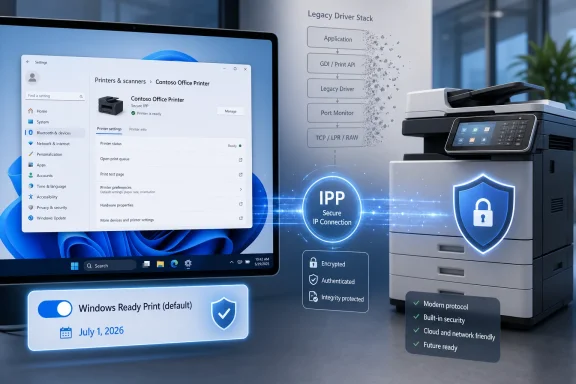
Microsoft is preparing Windows Ready Print as the default installation path for newly added supported printers starting July 1, 2026, shifting Windows 11 and Windows Server 2025 toward IPP-based, driver-light printing while keeping legacy vendor drivers available outside the new default workflow. The change is not a sudden guillotine for old printers, but it is a clear declaration of where Windows printing is going. Microsoft wants the print stack to behave less like a museum of vendor code and more like a modern platform service. The argument from Redmond is security and reliability; the anxiety from everyone else is control.
Printing has always been one of the strangest corners of Windows: mundane enough to be ignored, privileged enough to be dangerous, and old enough to contain layers of technical sediment from several eras of PC history. The average user experiences it as the ritual of finding a device, installing a driver, and hoping the next job does not vanish into the spooler. Administrators experience it as a fleet-management problem where a single model change can mean a new package, a new queue, a new compatibility test, and a new complaint from accounting.
Windows Ready Print is Microsoft’s latest attempt to end that pattern by making the built-in IPP class driver the path of least resistance. IPP, short for Internet Printing Protocol, is not new, and neither is Microsoft’s modern print push. What is new is the degree to which Windows is being steered away from the assumption that every printer needs its own vendor-supplied software stack.
That is why this is bigger than a settings toggle. Windows Ready Print sits at the intersection of three separate Microsoft projects: the retirement plan for third-party printer driver servicing, the rise of Windows Protected Print Mode, and the broader effort to make Windows behave more consistently across x86, Arm, local networks, USB connections, and cloud-managed environments.
The company’s pitch is sensible. If Windows can talk to a printer through standardized protocols, it should not need to load sprawling third-party drivers into a historically sensitive subsystem. But the print world has never moved on Microsoft’s schedule alone. Offices are full of devices that work precisely because some ancient package, vendor utility, finishing module, or management convention still behaves the way it did ten years ago.
That sounds bureaucratic, but defaults are policy in consumer clothing. Most users never override them. Many small businesses do not even know there is a decision to make. Once Windows starts choosing Windows Ready Print by default, the practical center of gravity shifts even if the old route remains available.
The new Windows 11 Insider builds already show the shape of this transition. A printer settings toggle allows users and administrators to decide whether supported printers should be installed using Windows Ready Print by default. When the toggle is enabled, Windows uses IPP for supported devices; when it is disabled, Windows may fall back to other installation methods, including vendor drivers where available.
That toggle matters because it softens the blow. Microsoft can say, accurately, that it is giving customers control. But the strategic direction is unmistakable: modern print becomes the normal path, and traditional drivers become the exception that must be chosen, justified, packaged, or retained.
For home users, this may feel like a cleaner setup experience. For enterprise IT, it is more complicated. A default change can silently alter testing assumptions, support scripts, imaging practices, print server behavior, and vendor escalation paths. Administrators do not fear new defaults because they are new; they fear them because defaults are often where “it worked yesterday” begins.
Windows Protected Print Mode is the hard-edged version of Microsoft’s response. When enabled, it removes third-party printer drivers from the equation and restricts printing to the modern Windows print platform. Printers that are not compatible with that model do not work while the mode is active.
That is the security bargain in its cleanest form. Fewer third-party drivers mean fewer privileged components from dozens of vendors, fewer legacy code paths, and fewer opportunities for a print driver to become a compromise vector. In a world where endpoint hardening increasingly means shrinking what can run with elevated privileges, this logic is hard to dismiss.
But security improvements that break workflows tend to be adopted slowly. Microsoft appears to understand that, which is why Windows Ready Print is being framed as simplification first and enforcement second. The company is not merely building a locked-down print mode; it is trying to normalize the driverless model before the locked-down model becomes operationally attractive.
That sequencing is important. If users and IT departments find that Windows Ready Print works well enough for common devices, Windows Protected Print Mode becomes less scary. If they find missing features, unreliable discovery, poor scanning support, or broken finishing options, protected printing will remain the security feature everyone respects but disables.
That clarification matters. The difference between “Windows will not support your printer” and “Windows will stop favoring new third-party driver distribution through Windows Update” is enormous. One is a compatibility cliff. The other is a managed decline.
The timeline still points in one direction. Microsoft announced the end-of-servicing plan for legacy third-party printer drivers in 2023. As of January 15, 2026, new printer drivers for Windows 11 and Windows Server 2025 are no longer broadly published through Windows Update without case-by-case approval. On July 1, 2026, Windows modifies driver ranking to prefer the IPP inbox class driver. On July 1, 2027, non-security updates for third-party printer drivers are largely cut off.
That is not a ban, but it is a retirement plan. Vendor drivers become supported baggage rather than the recommended future. Printer makers can still provide packages, but Microsoft is making clear that the Windows Update pipeline and default installation experience will not revolve around them forever.
The result is a two-track ecosystem. Modern printers that speak IPP cleanly get a smoother, standardized path. Older or specialized devices continue through legacy channels, but with more friction, less visibility, and a growing sense that they are living on borrowed time.
That is the clean architectural vision behind Windows Ready Print. Printing becomes less about each manufacturer shipping a mini-platform and more about Windows consuming standard device capabilities. Print Support Apps can provide customization without dragging the whole stack back into the old driver model.
The challenge is that printers are not merely printers. They are scanners, fax devices, badge-release endpoints, finishing systems, accounting meters, staplers, booklet makers, secure-release stations, departmental workhorses, and occasionally cursed appliances held together by a 2014 driver and a prayer. Standards can describe a lot, but real deployments often depend on the edge cases.
This is where the new model will be judged. Basic printing is not enough for enterprise acceptance. Administrators will want to know whether finishing options are exposed correctly, whether device status is accurate, whether authentication workflows survive, whether scanning behaves consistently, and whether vendor management tools still have a place.
Microsoft’s position is that modern protocols and app-based extensions can cover the gap. That may be true for mainstream printers and newer fleets. It will be less comforting in environments where printer replacement cycles are long, contracts are rigid, and devices are tied to regulated workflows.
A standards-based print path changes that equation. If Windows can use the same IPP class driver model across architectures, printers become less dependent on vendor-specific binaries. That is good for Arm laptops, cloud PCs, and any future Windows device category Microsoft wants to cultivate.
This is also why the change is not merely about security. It is about platform portability. Microsoft cannot credibly sell a more flexible Windows ecosystem while leaving basic peripherals chained to old driver models. Printing is one of those boring subsystems that becomes strategically important only when it blocks a larger hardware story.
For users, the benefit is simple: fewer hunts for the right download, fewer architecture mismatches, and fewer vendor utilities that feel like they were designed for another era. For Microsoft, the benefit is deeper. A standardized print model reduces the amount of third-party code that must exist, be trusted, be serviced, and be made compatible with every future Windows direction.
That is the kind of infrastructure change that does not look exciting in a keynote but matters enormously over time. Windows Ready Print is not flashy. It is Microsoft trying to make a stubborn old subsystem fit the operating system it wants Windows to become.
The new Group Policy controls are therefore not a footnote. They are the difference between a platform transition and a support incident. Administrators need to be able to enforce Windows Ready Print where it works, block it where it does not, and phase adoption by department, device class, or risk profile.
This is also where Microsoft’s strategy becomes politically delicate. Security teams may want Windows Protected Print Mode enabled as broadly as possible. Desktop engineering teams may want to avoid changing a print environment that took years to stabilize. Help desks will be caught between a better security posture and users who only care that the label printer stopped working.
The likely near-term pattern is selective adoption. Organizations with modern, Mopria-compatible fleets and cloud print ambitions may move quickly. Organizations with specialized hardware, heavy finishing requirements, print servers, or vendor-managed fleets will test slowly and preserve escape hatches.
That does not mean Microsoft’s plan fails. It means the transition will be uneven, just as Windows driver transitions always are. The company can set the platform direction, but the pace will be determined by procurement cycles, vendor readiness, and the oldest device still considered business-critical.
The old model gave manufacturers broad control over the experience: custom preferences panes, bundled utilities, status monitors, consumables prompts, scanning software, and various branded layers between the user and the printer. Some of that software was useful. Some of it was bloat. Much of it was fragile.
Microsoft’s preferred model moves customization into Print Support Apps and standardized capability descriptions. That is cleaner for Windows, but it forces vendors to express value without owning the whole driver path. The printer becomes more like a standards-compliant endpoint and less like a proprietary Windows subsystem.
That shift could be good for users. A world with fewer vendor installers is a world with fewer unwanted background services, fewer update agents, and fewer mystery processes named after printers that were removed years ago. But it could also flatten device experiences if vendors do not invest in modern app-based extensions.
The best outcome is that manufacturers compete on hardware, reliability, management features, and well-built support apps. The worst outcome is that advanced features become harder to discover, inconsistently exposed, or trapped behind separate tools that administrators must still deploy manually. Windows Ready Print reduces one category of complexity, but it does not magically eliminate the incentives that created printer software sprawl in the first place.
For these users, Windows Ready Print may be a blessing when buying a new printer. Setup should be faster, cleaner, and less dependent on downloading a vendor package from a support site full of model numbers and suspiciously similar executables. If the device supports the right protocols, Windows can do more of the work.
The risk comes when a printer’s advanced features require the old software path. Duplexing, tray selection, secure printing, scan-to-PC behavior, ink status, maintenance tools, and photo-specific settings are the kinds of features that can turn a theoretically compatible printer into an annoying compromise. Users may not know whether Windows Ready Print or a vendor driver is responsible; they will only know that something changed.
Microsoft’s decision to expose a toggle helps, but only if users can understand when to use it. A setting buried under printer preferences is not the same thing as an explanation at the moment a feature goes missing. If Microsoft wants trust, it needs transparent messaging when Windows chooses the modern path and clear guidance when the old path is more appropriate.
This is the recurring Windows problem: the technically correct architecture must survive contact with normal people. Driverless printing can be better and still feel worse if the user loses a feature with no explanation.
That is how modern platform governance works. Security improvements often arrive as a narrowing of options. App stores, driver signing, kernel protections, Smart App Control, and now protected printing all follow the same pattern: reduce arbitrary code paths, standardize behavior, and make exceptions explicit.
The problem is that Windows owes much of its success to the opposite instinct. It ran the odd peripheral, the strange business app, the old accounting printer, the industrial labeler, the discontinued scanner, and the device whose vendor site has not been redesigned since the Windows 7 era. Compatibility is not a side feature of Windows; it is part of the brand promise.
Windows Ready Print therefore has to walk a narrow line. If Microsoft pushes too softly, the legacy driver ecosystem lingers indefinitely, and the security and reliability gains remain partial. If it pushes too hard, it risks turning printers into another example of Windows modernization that users experience as coercion.
The smartest version of this strategy is not “driverless printing at all costs.” It is “standards by default, exceptions by design.” Users and administrators should be able to see what Windows is doing, understand why, and reverse course when a device or workflow demands it.
What it can do is set a better default. For supported printers, Windows should no longer need to rummage through vendor driver packages when a standards-based route exists. For new fleets, the modern path should become the expected path. For security-conscious environments, Windows Protected Print Mode should become more practical because fewer devices depend on the components it forbids.
Microsoft also needs to respect the transition costs. The company’s clarification that legacy printers will continue to work was not just damage control; it was necessary trust maintenance. Administrators need stable facts, not roadmap ambiguity. Printer vendors need clear certification targets. Users need to know whether their device is unsupported, merely not preferred, or fully compatible with the new model.
This is where the Windows Insider period matters. The toggle, policy controls, and installation behavior must be tested against messy real-world devices, not just ideal IPP implementations. If the feedback loop works, July 2026 becomes a managed turning point. If it does not, it becomes another printer story in which everyone agrees the old system was bad until the new system breaks something important.
 Microsoft Is Finally Treating Printing Like an Attack Surface
Printing has always been one of the strangest corners of Windows: mundane enough to be ignored, privileged enough to be dangerous, and old enough to contain layers of technical sediment from several eras of PC history. The average user experiences it as the ritual of finding a device, installing a driver, and hoping the next job does not vanish into the spooler. Administrators experience it as a fleet-management problem where a single model change can mean a new package, a new queue, a new compatibility test, and a new complaint from accounting.Windows Ready Print is Microsoft’s latest attempt to end that pattern by making the built-in IPP class driver the path of least resistance. IPP, short for Internet Printing Protocol, is not new, and neither is Microsoft’s modern print push. What is new is the degree to which Windows is being steered away from the assumption that every printer needs its own vendor-supplied software stack.
That is why this is bigger than a settings toggle. Windows Ready Print sits at the intersection of three separate Microsoft projects: the retirement plan for third-party printer driver servicing, the rise of Windows Protected Print Mode, and the broader effort to make Windows behave more consistently across x86, Arm, local networks, USB connections, and cloud-managed environments.
The company’s pitch is sensible. If Windows can talk to a printer through standardized protocols, it should not need to load sprawling third-party drivers into a historically sensitive subsystem. But the print world has never moved on Microsoft’s schedule alone. Offices are full of devices that work precisely because some ancient package, vendor utility, finishing module, or management convention still behaves the way it did ten years ago.
The Default Is the Message
Microsoft has learned, sometimes painfully, that Windows transitions rarely succeed by prohibition alone. The company is not saying every legacy printer stops working in July 2026. Instead, it is changing the ranking order so that, when a supported printer is newly installed, Windows prefers the Microsoft IPP inbox class driver.That sounds bureaucratic, but defaults are policy in consumer clothing. Most users never override them. Many small businesses do not even know there is a decision to make. Once Windows starts choosing Windows Ready Print by default, the practical center of gravity shifts even if the old route remains available.
The new Windows 11 Insider builds already show the shape of this transition. A printer settings toggle allows users and administrators to decide whether supported printers should be installed using Windows Ready Print by default. When the toggle is enabled, Windows uses IPP for supported devices; when it is disabled, Windows may fall back to other installation methods, including vendor drivers where available.
That toggle matters because it softens the blow. Microsoft can say, accurately, that it is giving customers control. But the strategic direction is unmistakable: modern print becomes the normal path, and traditional drivers become the exception that must be chosen, justified, packaged, or retained.
For home users, this may feel like a cleaner setup experience. For enterprise IT, it is more complicated. A default change can silently alter testing assumptions, support scripts, imaging practices, print server behavior, and vendor escalation paths. Administrators do not fear new defaults because they are new; they fear them because defaults are often where “it worked yesterday” begins.
The Ghost of PrintNightmare Still Haunts the Spooler
Microsoft’s print security posture cannot be understood without the memory of PrintNightmare. The 2021 vulnerability mess turned the Windows Print Spooler from a dull background service into a front-page enterprise risk. It exposed a truth administrators already knew: printing was a privileged, extensible, network-facing subsystem that had accumulated too much trust.Windows Protected Print Mode is the hard-edged version of Microsoft’s response. When enabled, it removes third-party printer drivers from the equation and restricts printing to the modern Windows print platform. Printers that are not compatible with that model do not work while the mode is active.
That is the security bargain in its cleanest form. Fewer third-party drivers mean fewer privileged components from dozens of vendors, fewer legacy code paths, and fewer opportunities for a print driver to become a compromise vector. In a world where endpoint hardening increasingly means shrinking what can run with elevated privileges, this logic is hard to dismiss.
But security improvements that break workflows tend to be adopted slowly. Microsoft appears to understand that, which is why Windows Ready Print is being framed as simplification first and enforcement second. The company is not merely building a locked-down print mode; it is trying to normalize the driverless model before the locked-down model becomes operationally attractive.
That sequencing is important. If users and IT departments find that Windows Ready Print works well enough for common devices, Windows Protected Print Mode becomes less scary. If they find missing features, unreliable discovery, poor scanning support, or broken finishing options, protected printing will remain the security feature everyone respects but disables.
The Legacy Driver Is Not Dead, but It Is Losing Its Throne
Microsoft’s third-party printer driver plan has already caused confusion, in part because the company’s messaging has had to be corrected. Earlier reporting suggested Windows 11 was ending support for legacy V3 and V4 printer drivers outright. Microsoft later clarified that this was not the case: existing printers and existing drivers can continue to work, and users can still install vendor-supplied packages.That clarification matters. The difference between “Windows will not support your printer” and “Windows will stop favoring new third-party driver distribution through Windows Update” is enormous. One is a compatibility cliff. The other is a managed decline.
The timeline still points in one direction. Microsoft announced the end-of-servicing plan for legacy third-party printer drivers in 2023. As of January 15, 2026, new printer drivers for Windows 11 and Windows Server 2025 are no longer broadly published through Windows Update without case-by-case approval. On July 1, 2026, Windows modifies driver ranking to prefer the IPP inbox class driver. On July 1, 2027, non-security updates for third-party printer drivers are largely cut off.
That is not a ban, but it is a retirement plan. Vendor drivers become supported baggage rather than the recommended future. Printer makers can still provide packages, but Microsoft is making clear that the Windows Update pipeline and default installation experience will not revolve around them forever.
The result is a two-track ecosystem. Modern printers that speak IPP cleanly get a smoother, standardized path. Older or specialized devices continue through legacy channels, but with more friction, less visibility, and a growing sense that they are living on borrowed time.
Standards Are the Cure, Until They Meet Printer Reality
IPP, eSCL scanning, Mopria compatibility, and Universal Print all sound like exactly what Windows printing should have become years ago. A PC should not need a vendor’s ancient installer to print a document or scan a receipt. A printer should describe its capabilities through a standard interface, and the operating system should handle the rest.That is the clean architectural vision behind Windows Ready Print. Printing becomes less about each manufacturer shipping a mini-platform and more about Windows consuming standard device capabilities. Print Support Apps can provide customization without dragging the whole stack back into the old driver model.
The challenge is that printers are not merely printers. They are scanners, fax devices, badge-release endpoints, finishing systems, accounting meters, staplers, booklet makers, secure-release stations, departmental workhorses, and occasionally cursed appliances held together by a 2014 driver and a prayer. Standards can describe a lot, but real deployments often depend on the edge cases.
This is where the new model will be judged. Basic printing is not enough for enterprise acceptance. Administrators will want to know whether finishing options are exposed correctly, whether device status is accurate, whether authentication workflows survive, whether scanning behaves consistently, and whether vendor management tools still have a place.
Microsoft’s position is that modern protocols and app-based extensions can cover the gap. That may be true for mainstream printers and newer fleets. It will be less comforting in environments where printer replacement cycles are long, contracts are rigid, and devices are tied to regulated workflows.
Arm PCs Make the Old Driver Model Look Even Older
One underappreciated reason Microsoft wants this shift is Windows on Arm. For years, printer compatibility has been one of the quiet frictions in moving Windows beyond x86 assumptions. If a device depends on a vendor driver that was built, tested, and distributed for traditional PCs, Arm users are at the mercy of whatever that vendor decided to support.A standards-based print path changes that equation. If Windows can use the same IPP class driver model across architectures, printers become less dependent on vendor-specific binaries. That is good for Arm laptops, cloud PCs, and any future Windows device category Microsoft wants to cultivate.
This is also why the change is not merely about security. It is about platform portability. Microsoft cannot credibly sell a more flexible Windows ecosystem while leaving basic peripherals chained to old driver models. Printing is one of those boring subsystems that becomes strategically important only when it blocks a larger hardware story.
For users, the benefit is simple: fewer hunts for the right download, fewer architecture mismatches, and fewer vendor utilities that feel like they were designed for another era. For Microsoft, the benefit is deeper. A standardized print model reduces the amount of third-party code that must exist, be trusted, be serviced, and be made compatible with every future Windows direction.
That is the kind of infrastructure change that does not look exciting in a keynote but matters enormously over time. Windows Ready Print is not flashy. It is Microsoft trying to make a stubborn old subsystem fit the operating system it wants Windows to become.
Enterprise IT Will Measure This in Exceptions
In a home office, the Windows Ready Print experience will be judged by whether the printer appears and whether the first page comes out correctly. In an enterprise, it will be judged by the exception list. How many models need legacy drivers? How many print queues behave differently? How many help desk tickets appear after the default changes?The new Group Policy controls are therefore not a footnote. They are the difference between a platform transition and a support incident. Administrators need to be able to enforce Windows Ready Print where it works, block it where it does not, and phase adoption by department, device class, or risk profile.
This is also where Microsoft’s strategy becomes politically delicate. Security teams may want Windows Protected Print Mode enabled as broadly as possible. Desktop engineering teams may want to avoid changing a print environment that took years to stabilize. Help desks will be caught between a better security posture and users who only care that the label printer stopped working.
The likely near-term pattern is selective adoption. Organizations with modern, Mopria-compatible fleets and cloud print ambitions may move quickly. Organizations with specialized hardware, heavy finishing requirements, print servers, or vendor-managed fleets will test slowly and preserve escape hatches.
That does not mean Microsoft’s plan fails. It means the transition will be uneven, just as Windows driver transitions always are. The company can set the platform direction, but the pace will be determined by procurement cycles, vendor readiness, and the oldest device still considered business-critical.
Printer Vendors Are Being Pushed Out of the Driver Business
For printer manufacturers, Windows Ready Print is both a relief and a threat. It relieves them of the burden of maintaining complex Windows driver packages for every version, architecture, and distribution path. It also reduces one of the traditional ways vendors differentiated their devices inside Windows.The old model gave manufacturers broad control over the experience: custom preferences panes, bundled utilities, status monitors, consumables prompts, scanning software, and various branded layers between the user and the printer. Some of that software was useful. Some of it was bloat. Much of it was fragile.
Microsoft’s preferred model moves customization into Print Support Apps and standardized capability descriptions. That is cleaner for Windows, but it forces vendors to express value without owning the whole driver path. The printer becomes more like a standards-compliant endpoint and less like a proprietary Windows subsystem.
That shift could be good for users. A world with fewer vendor installers is a world with fewer unwanted background services, fewer update agents, and fewer mystery processes named after printers that were removed years ago. But it could also flatten device experiences if vendors do not invest in modern app-based extensions.
The best outcome is that manufacturers compete on hardware, reliability, management features, and well-built support apps. The worst outcome is that advanced features become harder to discover, inconsistently exposed, or trapped behind separate tools that administrators must still deploy manually. Windows Ready Print reduces one category of complexity, but it does not magically eliminate the incentives that created printer software sprawl in the first place.
Small Offices Will Feel the Trade-Off First
Small office and home office users are the group most likely to benefit from Microsoft’s simplification story and the group least prepared for subtle compatibility changes. They often lack dedicated IT staff, rely on mixed old-and-new hardware, and keep printers far longer than PC upgrade cycles would suggest. A device that still prints invoices is not “legacy” to them; it is working equipment.For these users, Windows Ready Print may be a blessing when buying a new printer. Setup should be faster, cleaner, and less dependent on downloading a vendor package from a support site full of model numbers and suspiciously similar executables. If the device supports the right protocols, Windows can do more of the work.
The risk comes when a printer’s advanced features require the old software path. Duplexing, tray selection, secure printing, scan-to-PC behavior, ink status, maintenance tools, and photo-specific settings are the kinds of features that can turn a theoretically compatible printer into an annoying compromise. Users may not know whether Windows Ready Print or a vendor driver is responsible; they will only know that something changed.
Microsoft’s decision to expose a toggle helps, but only if users can understand when to use it. A setting buried under printer preferences is not the same thing as an explanation at the moment a feature goes missing. If Microsoft wants trust, it needs transparent messaging when Windows chooses the modern path and clear guidance when the old path is more appropriate.
This is the recurring Windows problem: the technically correct architecture must survive contact with normal people. Driverless printing can be better and still feel worse if the user loses a feature with no explanation.
The Real Fight Is Between Reliability and Choice
The TechSpot framing that Windows Ready Print could strip users of some choices while improving reliability gets to the heart of the issue. Microsoft is not removing every choice today. It is changing which choices are encouraged, which are hidden, and which require administrative intent.That is how modern platform governance works. Security improvements often arrive as a narrowing of options. App stores, driver signing, kernel protections, Smart App Control, and now protected printing all follow the same pattern: reduce arbitrary code paths, standardize behavior, and make exceptions explicit.
The problem is that Windows owes much of its success to the opposite instinct. It ran the odd peripheral, the strange business app, the old accounting printer, the industrial labeler, the discontinued scanner, and the device whose vendor site has not been redesigned since the Windows 7 era. Compatibility is not a side feature of Windows; it is part of the brand promise.
Windows Ready Print therefore has to walk a narrow line. If Microsoft pushes too softly, the legacy driver ecosystem lingers indefinitely, and the security and reliability gains remain partial. If it pushes too hard, it risks turning printers into another example of Windows modernization that users experience as coercion.
The smartest version of this strategy is not “driverless printing at all costs.” It is “standards by default, exceptions by design.” Users and administrators should be able to see what Windows is doing, understand why, and reverse course when a device or workflow demands it.
The July 2026 Switch Is a Test of Microsoft’s Discipline
The most important thing Microsoft can do before July 1, 2026, is avoid overclaiming. Windows Ready Print will not make printing universally painless. It will not instantly fix the economic incentives of printer vendors. It will not erase the complexity of enterprise print management. It will not make every old multifunction device behave like a modern network appliance.What it can do is set a better default. For supported printers, Windows should no longer need to rummage through vendor driver packages when a standards-based route exists. For new fleets, the modern path should become the expected path. For security-conscious environments, Windows Protected Print Mode should become more practical because fewer devices depend on the components it forbids.
Microsoft also needs to respect the transition costs. The company’s clarification that legacy printers will continue to work was not just damage control; it was necessary trust maintenance. Administrators need stable facts, not roadmap ambiguity. Printer vendors need clear certification targets. Users need to know whether their device is unsupported, merely not preferred, or fully compatible with the new model.
This is where the Windows Insider period matters. The toggle, policy controls, and installation behavior must be tested against messy real-world devices, not just ideal IPP implementations. If the feedback loop works, July 2026 becomes a managed turning point. If it does not, it becomes another printer story in which everyone agrees the old system was bad until the new system breaks something important.
Redmond’s Printer Reset Comes With a Checklist
The practical reading of Windows Ready Print is neither panic nor complacency. Microsoft is not killing every old printer this summer, but it is making the modern print path the default future. That gives users and administrators time to prepare, provided they treat the change as a fleet-readiness issue rather than a mere Windows setting.- Newly installed supported printers are expected to use Windows Ready Print by default beginning July 1, 2026.
- Existing legacy printer drivers are not being broadly disabled, and vendor-supplied installation packages can still be used where needed.
- Windows Protected Print Mode is stricter than Windows Ready Print because it removes third-party drivers from use while enabled.
- Organizations should test representative printers for finishing, scanning, authentication, tray handling, and line-of-business workflows before enforcing the new model.
- Printer purchases made from now on should be evaluated for IPP, eSCL, Mopria, and Windows Protected Print compatibility rather than only for old-style driver availability.
- The most successful deployments will use policy to make modern printing the default while preserving documented exceptions for devices that still require vendor drivers.
References
- Primary source: TechSpot
Published: Wed, 10 Jun 2026 19:13:00 GMT
Loading…
www.techspot.com - Official source: learn.microsoft.com

- Related coverage: tomshardware.com
Microsoft purges Windows 11 printer drivers, putting millions of devices on borrowed time — legacy printers face extinction as Microsoft stops distributing V3 and V4 drivers
Microsoft cuts off new third-party print driver releases via Windows Update.www.tomshardware.com
- Related coverage: myq-solution.com
Windows Protected Print (WPP) Mode and the end of third-party printer drivers | MyQ
Microsoft is moving Windows printing toward a new model built around the IPP class driver, Mopria compatibility, and Print Support Apps. The change…www.myq-solution.com - Related coverage: support.lexmark.com
Loading…
support.lexmark.com - Related coverage: windowscentral.com
Loading…
www.windowscentral.com
- Official source: techcommunity.microsoft.com
Loading…
techcommunity.microsoft.com - Related coverage: techradar.com
Microsoft says it isn't killing off your old printer for good after all
Although Microsoft commits to not bricking printers using legacy drivers, it still wants you to upgrade to the IPP Class Driver.www.techradar.com
- Related coverage: ezeep.com
Loading…
www.ezeep.com - Related coverage: reality-tech.com
Loading…
reality-tech.com - Official source: cdn-dynmedia-1.microsoft.com
Loading…
cdn-dynmedia-1.microsoft.com
