

Microsoft is not fixing the Windows Secure Lock screen clock “glitch” because, according to its own support document, it is not a bug at all. The clock on the Winlogon secure desktop can lag by as much as 30 seconds, but the underlying system time stays accurate and the behavior is by design. That distinction matters, because this is one of those Windows quirks that looks broken at a glance while actually reflecting a deliberate engineering tradeoff. (support.microsoft.com)
Windows users have long treated the lock screen as a simple, familiar part of the desktop experience, but Microsoft has actually split that experience into more than one path. The standard lock screen you get after pressing Windows key + L is not the same thing as the Secure Lock screen shown after startup, during initial sign-in, or when you press Ctrl+Alt+Delete. Microsoft says the two surfaces use different refresh logic, even though they both draw time from the same kernel clock. (support.microsoft.com)
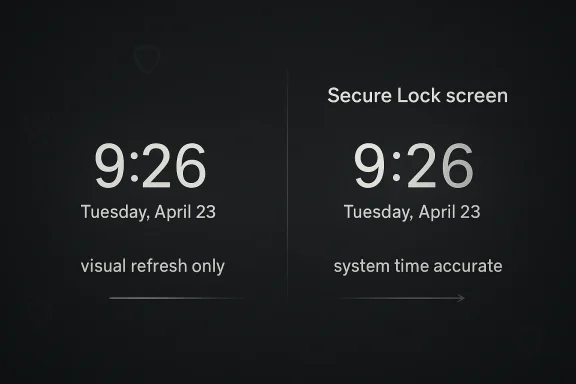
That separation explains why users sometimes notice one screen looking more “current” than the other. On the ordinary user lock screen, Windows uses a dynamic timer that updates at the next minute boundary. On the secure desktop, by contrast, the clock refreshes every 30 seconds. That means the display can be visibly late for a short period after the minute flips, even though the system itself is not behind. (support.microsoft.com)
The practical effect is more cosmetic than operational, which is why Microsoft has drawn a hard line around it. The company explicitly says there is no impact to system time accuracy, synchronization, event logs, authentication, or compliance scenarios. In other words, the visible clock is stale, but the machine is not. For an operating system that handles security prompts and credential entry on the secure desktop, that distinction is crucial. (support.microsoft.com)
It is also a useful reminder that not all “bugs” are created equal. Windows often exposes multiple UI layers with different ownership, permissions, and refresh behavior, and that complexity can produce odd-looking results that are technically intentional. Microsoft’s support note is unusually direct about that design choice, which makes the issue easier to explain, but not necessarily easier for casual users to accept. (support.microsoft.com)
The story has gained attention partly because it lands in a period when many Windows users are already sensitive to reliability, polish, and trust. When a clock seems wrong, even for a few seconds, it creates a small but immediate impression that something in the system is off. Microsoft’s answer here is effectively: the clock is fine, the screen is the thing being updated on a fixed schedule. (support.microsoft.com)
That detail matters because it makes clear this is a display refresh problem, not a timekeeping problem. The kernel clock remains the source of truth, and the support document says logging, auditing, NTP synchronization, authentication, and compliance all continue to use that same accurate time source. So the “bug” is really a mismatch between the cadence of the UI and the cadence of the clock. (support.microsoft.com)
For technical readers, this is exactly the kind of issue that can disappear into the seams between UI and OS architecture. Microsoft has to keep the secure desktop stable and predictable, and periodic refreshes are often easier to justify than minute-aligned redraw logic in that path. The result is a compromise that looks crude but is apparently acceptable inside Microsoft’s engineering model. (support.microsoft.com)
This is an important nuance because many headlines flatten the story into “Windows lock screen clock is broken.” That is not quite correct. The behavior affects a specific secure desktop path, not the more common lock screen surface people see when stepping away from a running PC. The distinction is technical, but it changes the story from an all-purpose defect to a narrow UI quirk. (support.microsoft.com)
There is still room to criticize the optics. A clock is a trust object; users assume it is right when they see it. If the screen can sit visibly behind for half a minute, some people will perceive that as sloppiness regardless of the technical rationale. The visual effect may be harmless, but perception is part of product quality too. (support.microsoft.com)
That said, Microsoft’s position is defensible in a security context. The secure desktop is not a casual wallpaper surface; it is part of the sign-in and credential boundary. Stability and predictability there may matter more than cosmetic exactness, especially if changing the refresh model would increase complexity or risk in a sensitive part of the shell. (support.microsoft.com)
For normal users, this means the right mental model is not “my clock is wrong,” but “this screen redraws on its own schedule.” Once that distinction is understood, the issue becomes much less alarming. It is still odd, but it is no longer evidence of a broken clock subsystem. (support.microsoft.com)
This also explains why the issue is not treated as a consumer-facing defect with a hotfix priority. If the clock is a little late but every credential, audit trail, and system timestamp remains correct, the operational case for a fix collapses quickly. Microsoft is essentially treating the display as a convenience layer, not a system-of-record. (support.microsoft.com)
There is an enterprise angle here as well. Administrators care deeply about timestamps, log integrity, compliance, and security behavior. Microsoft’s document explicitly says none of those are affected, which is a reassuring statement for IT teams trying to separate cosmetic annoyances from real incident risk. (support.microsoft.com)
This is especially true because the lock screen is one of the most visible parts of Windows. It is seen at startup, during sign-in, and whenever users need to secure a session quickly. In that context, even a minor inconsistency can leave an outsized impression of polish—or lack of it. (support.microsoft.com)
There is also a broader reputational layer. Windows enthusiasts have spent years watching Microsoft balance cosmetic cleanup against deeper platform work. A visual issue that Microsoft refuses to change can be read two ways: as disciplined engineering, or as indifference to detail. Which interpretation wins depends heavily on the user’s existing trust in the platform. (support.microsoft.com)
At the same time, Windows remains a very large and heterogeneous platform. The secure desktop, user session, lock screen, and kernel timekeeping are all separate moving parts. The more layers a system has, the easier it is for a small mismatch to become a public-facing oddity. (support.microsoft.com)
Microsoft goes out of its way to say the issue does not affect W32Time or NTP synchronization, event logs, auditing, authentication, or compliance scenarios. Those are the exact areas where a real clock defect would matter most. The company’s decision to spell them out suggests it knows where the alarm bells would otherwise ring. (support.microsoft.com)
That matters in enterprise environments where time drift can create real operational headaches. Here, Microsoft is telling admins that they do not need to investigate this as a synchronization failure or a security anomaly. The device is fine; the rendered clock is just late to the party. (support.microsoft.com)
There is also an argument that the company should not need to choose between security and polish. Users do not separate those qualities as neatly as engineers do. A well-behaved OS should feel both robust and precise, especially in UI surfaces that exist precisely to reassure users that the machine is under control. (support.microsoft.com)
The tension between those positions is part of what makes Windows such a difficult product to ship at scale. Microsoft is serving consumers, enthusiasts, enterprises, and compliance-sensitive organizations at once. Each audience weighs the significance of a bug differently, and this kind of issue sits right on the fault line between “acceptable” and “sloppy.” (support.microsoft.com)
It also reflects a more mature support posture. Microsoft increasingly publishes narrow, well-scoped articles that convert confusion into documented behavior instead of leaving users to guess. That is a good thing, even if the answer is not the one people wanted to hear. (support.microsoft.com)
The lesson for rivals is not that they should copy the exact behavior, but that they should pay attention to consistency in low-level shell components. Small polish details in sign-in, lock, and sleep states help reinforce trust. They are the kind of features that rarely win headlines but often win user goodwill. (support.microsoft.com)
For Microsoft, the competitive risk is reputational rather than functional. A support article saying “this is intended” can read as confidence, but it can also sound like the company is unwilling to smooth over visible rough edges. In a market where user patience is limited, that distinction matters. (support.microsoft.com)
What will matter more is whether Microsoft continues to explain similar quirks with this level of specificity. Users are generally willing to tolerate odd behavior when they understand the reason and know it has no functional consequence. The real issue is not the lag itself; it is whether Windows feels comprehensible. (support.microsoft.com)
Source: Windows Report https://windowsreport.com/microsoft-confirms-it-will-not-fix-windows-lock-screen-clock-glitch/
 Background
Windows users have long treated the lock screen as a simple, familiar part of the desktop experience, but Microsoft has actually split that experience into more than one path. The standard lock screen you get after pressing Windows key + L is not the same thing as the Secure Lock screen shown after startup, during initial sign-in, or when you press Ctrl+Alt+Delete. Microsoft says the two surfaces use different refresh logic, even though they both draw time from the same kernel clock. (support.microsoft.com)That separation explains why users sometimes notice one screen looking more “current” than the other. On the ordinary user lock screen, Windows uses a dynamic timer that updates at the next minute boundary. On the secure desktop, by contrast, the clock refreshes every 30 seconds. That means the display can be visibly late for a short period after the minute flips, even though the system itself is not behind. (support.microsoft.com)
The practical effect is more cosmetic than operational, which is why Microsoft has drawn a hard line around it. The company explicitly says there is no impact to system time accuracy, synchronization, event logs, authentication, or compliance scenarios. In other words, the visible clock is stale, but the machine is not. For an operating system that handles security prompts and credential entry on the secure desktop, that distinction is crucial. (support.microsoft.com)
It is also a useful reminder that not all “bugs” are created equal. Windows often exposes multiple UI layers with different ownership, permissions, and refresh behavior, and that complexity can produce odd-looking results that are technically intentional. Microsoft’s support note is unusually direct about that design choice, which makes the issue easier to explain, but not necessarily easier for casual users to accept. (support.microsoft.com)
The story has gained attention partly because it lands in a period when many Windows users are already sensitive to reliability, polish, and trust. When a clock seems wrong, even for a few seconds, it creates a small but immediate impression that something in the system is off. Microsoft’s answer here is effectively: the clock is fine, the screen is the thing being updated on a fixed schedule. (support.microsoft.com)
What Microsoft Actually Confirmed
Microsoft’s support article is not vague. It states plainly that the Secure Lock screen clock may appear up to 30 seconds behind after a minute changes, and that this behavior is intentional. The note applies to both Windows 11 and Windows 10, which is important because it shows the issue is not tied to one specific release train or servicing branch. (support.microsoft.com)The key technical detail
The support page says the Secure Lock screen runs on the Winlogon secure desktop under the SYSTEM account, and it refreshes the clock every 30 seconds. Because that interval does not line up with minute boundaries, the time displayed can remain stale for a short period after the real minute changes. Microsoft also notes that if the device time is ahead, the display may refresh earlier than expected. (support.microsoft.com)That detail matters because it makes clear this is a display refresh problem, not a timekeeping problem. The kernel clock remains the source of truth, and the support document says logging, auditing, NTP synchronization, authentication, and compliance all continue to use that same accurate time source. So the “bug” is really a mismatch between the cadence of the UI and the cadence of the clock. (support.microsoft.com)
For technical readers, this is exactly the kind of issue that can disappear into the seams between UI and OS architecture. Microsoft has to keep the secure desktop stable and predictable, and periodic refreshes are often easier to justify than minute-aligned redraw logic in that path. The result is a compromise that looks crude but is apparently acceptable inside Microsoft’s engineering model. (support.microsoft.com)
Why the lock screen users notice is not the same one
The support article also draws a line between the Secure Lock screen and the regular lock screen. The latter, shown after Windows key + L, runs in the user session through LockApp and uses a dynamic timer that updates at the next minute boundary. That is why most users do not notice the same lag in everyday lock-screen use. (support.microsoft.com)This is an important nuance because many headlines flatten the story into “Windows lock screen clock is broken.” That is not quite correct. The behavior affects a specific secure desktop path, not the more common lock screen surface people see when stepping away from a running PC. The distinction is technical, but it changes the story from an all-purpose defect to a narrow UI quirk. (support.microsoft.com)
- Secure Lock screen: can lag by up to 30 seconds.
- User lock screen: typically updates almost immediately.
- System clock: remains accurate in both cases.
- Security logs and timestamps: continue to use kernel time. (support.microsoft.com)
Why Microsoft Says It Does Not Need a Fix
Microsoft’s reasoning is straightforward: if the core system time is accurate and the issue is only visual, there is nothing material to repair. The support article labels the behavior visual-only and says no workaround is required because the display naturally updates within the normal 30-second refresh interval. That puts the issue squarely in the category of “annoying, but harmless.” (support.microsoft.com)Why “by design” is not just a legal dodge
When vendors say a behavior is by design, it can sound dismissive. In this case, though, Microsoft’s explanation is unusually complete: it describes the desktop, the account context, the refresh interval, the scope of impact, and the absence of security consequences. That makes the designation more credible than the usual support-page shrug. (support.microsoft.com)There is still room to criticize the optics. A clock is a trust object; users assume it is right when they see it. If the screen can sit visibly behind for half a minute, some people will perceive that as sloppiness regardless of the technical rationale. The visual effect may be harmless, but perception is part of product quality too. (support.microsoft.com)
That said, Microsoft’s position is defensible in a security context. The secure desktop is not a casual wallpaper surface; it is part of the sign-in and credential boundary. Stability and predictability there may matter more than cosmetic exactness, especially if changing the refresh model would increase complexity or risk in a sensitive part of the shell. (support.microsoft.com)
The engineering tradeoff underneath the decision
The underlying tradeoff appears to be between a simple fixed refresh cycle and a more precise minute-aligned update mechanism. Microsoft has chosen the simpler route for the secure desktop, likely because a fixed interval is easier to manage and test in a protected environment. That is a classic Windows design compromise: a less elegant UI behavior in exchange for a lower-risk implementation. (support.microsoft.com)For normal users, this means the right mental model is not “my clock is wrong,” but “this screen redraws on its own schedule.” Once that distinction is understood, the issue becomes much less alarming. It is still odd, but it is no longer evidence of a broken clock subsystem. (support.microsoft.com)
The Secure Desktop Matters More Than It Looks
The fact that this behavior lives on the Winlogon secure desktop is not incidental. That desktop is part of Windows’ protected sign-in pipeline, which is why changes there tend to be conservative and tightly controlled. Microsoft is effectively signaling that the secure path is optimized for reliability and consistency, not for tiny cosmetic refinements. (support.microsoft.com)Why the SYSTEM account detail is important
Microsoft says the secure desktop runs under the SYSTEM account. That implies a different operational context from the standard user session, and it helps explain why the refresh logic is handled differently. A secure desktop designed to host Ctrl+Alt+Delete and sign-in prompts is not just another window; it is part of the trust boundary. (support.microsoft.com)This also explains why the issue is not treated as a consumer-facing defect with a hotfix priority. If the clock is a little late but every credential, audit trail, and system timestamp remains correct, the operational case for a fix collapses quickly. Microsoft is essentially treating the display as a convenience layer, not a system-of-record. (support.microsoft.com)
There is an enterprise angle here as well. Administrators care deeply about timestamps, log integrity, compliance, and security behavior. Microsoft’s document explicitly says none of those are affected, which is a reassuring statement for IT teams trying to separate cosmetic annoyances from real incident risk. (support.microsoft.com)
Consumer confusion versus administrative reality
For home users, the visual mismatch may simply look buggy. For admins, the more useful question is whether any compliance, audit, or authentication flow is at risk. Microsoft’s answer is no, and it repeats that the clock discrepancy does not alter underlying time or security data. That is why the issue is more likely to become a help-desk curiosity than a support escalation. (support.microsoft.com)- The secure desktop is a special-purpose shell.
- Its refresh cadence is intentionally slower.
- The system clock remains the authoritative source.
- Security and compliance mechanisms are unaffected.
- The issue is therefore cosmetic, not functional. (support.microsoft.com)
The User Experience Problem Microsoft Cannot Ignore
Even when a problem is harmless, it can still shape how users feel about Windows. A clock that lags behind the real minute creates a tiny sense of unreliability, and that feeling matters in a product where trust is built through countless small interactions. The challenge for Microsoft is that visual correctness often influences user confidence more than technical accuracy does. (support.microsoft.com)Why small UI defects get disproportionate attention
People do not usually test system time when they see a clock. They simply assume the UI reflects reality. So when the secure desktop clock is late, users are likely to interpret the delay as a bug, even if the underlying system is perfectly synchronized. That reaction is rational from a human perspective, even if it is inaccurate technically. (support.microsoft.com)This is especially true because the lock screen is one of the most visible parts of Windows. It is seen at startup, during sign-in, and whenever users need to secure a session quickly. In that context, even a minor inconsistency can leave an outsized impression of polish—or lack of it. (support.microsoft.com)
There is also a broader reputational layer. Windows enthusiasts have spent years watching Microsoft balance cosmetic cleanup against deeper platform work. A visual issue that Microsoft refuses to change can be read two ways: as disciplined engineering, or as indifference to detail. Which interpretation wins depends heavily on the user’s existing trust in the platform. (support.microsoft.com)
What this says about Windows quality expectations
The fact that a 30-second lag can become a headline says something about the modern Windows experience. Users expect the operating system to be not just functional, but visibly coherent in every state. That expectation is reasonable, and it puts pressure on Microsoft to explain more of its design decisions more clearly. (support.microsoft.com)At the same time, Windows remains a very large and heterogeneous platform. The secure desktop, user session, lock screen, and kernel timekeeping are all separate moving parts. The more layers a system has, the easier it is for a small mismatch to become a public-facing oddity. (support.microsoft.com)
Why This Is Not a Security Issue
Microsoft’s support page is explicit that the behavior does not affect authentication or security. That statement is not just reassuring language; it is an assertion about where the time data comes from. Since the kernel clock remains accurate, the clock glitch does not change the timestamps used by security systems, logs, or compliance tools. (support.microsoft.com)The difference between displayed time and system time
This distinction is easy to miss. Displayed time is a user-interface artifact; system time is a core OS function. In this case, the UI can be stale while the actual timekeeping remains correct, which means the lock screen is visually misleading but computationally sound. (support.microsoft.com)Microsoft goes out of its way to say the issue does not affect W32Time or NTP synchronization, event logs, auditing, authentication, or compliance scenarios. Those are the exact areas where a real clock defect would matter most. The company’s decision to spell them out suggests it knows where the alarm bells would otherwise ring. (support.microsoft.com)
That matters in enterprise environments where time drift can create real operational headaches. Here, Microsoft is telling admins that they do not need to investigate this as a synchronization failure or a security anomaly. The device is fine; the rendered clock is just late to the party. (support.microsoft.com)
Why the bug is easier to dismiss than it looks
If the issue had touched logs, authentication, or NTP, it would have been a different story entirely. It might have implicated a broader servicing regression or a system-wide time service problem. Instead, Microsoft has framed it as a narrow display behavior with no downstream consequences, which makes a public fix much harder to justify. (support.microsoft.com)- No security impact
- No logging impact
- No compliance impact
- No synchronization impact
- No workaround required (support.microsoft.com)
How This Fits Microsoft’s Broader Windows Philosophy
This announcement fits a pattern in Microsoft’s recent Windows messaging: separate the visible quirk from the functional problem, define the exact boundary of impact, and decline to treat every anomaly as a servicing priority. That approach can frustrate users looking for perfection, but it also reflects a company trying to focus engineering effort where it matters most. (support.microsoft.com)Design restraint versus user expectations
There is a strong argument that Microsoft is being sensible here. A 30-second lag on a secure desktop clock is a rounding error in practical terms, while even small changes in secure sign-in paths can introduce regression risk. In that light, doing nothing may be the most stable option available. (support.microsoft.com)There is also an argument that the company should not need to choose between security and polish. Users do not separate those qualities as neatly as engineers do. A well-behaved OS should feel both robust and precise, especially in UI surfaces that exist precisely to reassure users that the machine is under control. (support.microsoft.com)
The tension between those positions is part of what makes Windows such a difficult product to ship at scale. Microsoft is serving consumers, enthusiasts, enterprises, and compliance-sensitive organizations at once. Each audience weighs the significance of a bug differently, and this kind of issue sits right on the fault line between “acceptable” and “sloppy.” (support.microsoft.com)
What the support article reveals about Microsoft’s documentation style
The support note is unusually transparent. It names the specific desktop, the account context, the refresh interval, and the exact reason the clock appears late. That level of detail is helpful because it avoids speculation and gives users a grounded explanation rather than a generic status note. (support.microsoft.com)It also reflects a more mature support posture. Microsoft increasingly publishes narrow, well-scoped articles that convert confusion into documented behavior instead of leaving users to guess. That is a good thing, even if the answer is not the one people wanted to hear. (support.microsoft.com)
Competitor and Market Implications
On its face, this is a tiny Windows issue with no direct market consequence. But small polish decisions matter in the broader desktop software market because they shape how users compare Windows to other platforms. Every visible inconsistency is another reminder that desktop operating systems are judged as much by feel as by features. (support.microsoft.com)The perception battle in desktop operating systems
Microsoft’s biggest competition is not just with other operating systems; it is with user expectations. A clock that looks wrong, even briefly, adds to the mental inventory of small irritations that users associate with Windows. That does not drive people to switch platforms overnight, but it does affect sentiment. (support.microsoft.com)The lesson for rivals is not that they should copy the exact behavior, but that they should pay attention to consistency in low-level shell components. Small polish details in sign-in, lock, and sleep states help reinforce trust. They are the kind of features that rarely win headlines but often win user goodwill. (support.microsoft.com)
For Microsoft, the competitive risk is reputational rather than functional. A support article saying “this is intended” can read as confidence, but it can also sound like the company is unwilling to smooth over visible rough edges. In a market where user patience is limited, that distinction matters. (support.microsoft.com)
Enterprise versus consumer interpretation
Enterprise admins are likely to shrug this off once they see the impact statement. Consumers, by contrast, may care more about whether the machine looks polished and accurate at a glance. That split is common in Windows issues: businesses look for operational risk, while home users react to the immediate user experience. (support.microsoft.com)- Consumers notice the appearance of wrongness.
- Enterprises care about downstream effects.
- Microsoft is clearly optimized for the latter in this case.
- The support note aims to prevent needless escalation.
- The competitive impact is mostly about perception, not functionality. (support.microsoft.com)
Strengths and Opportunities
Microsoft’s handling of this issue has some real strengths. The company documented the behavior clearly, scoped it narrowly, and separated a visual oddity from actual operational risk. That transparency gives Windows users and IT teams a better basis for decision-making than a vague “known issue” note would have done. (support.microsoft.com)- Clear explanation of the 30-second refresh interval.
- Explicit distinction between secure desktop and user lock screen.
- Strong reassurance that system time remains accurate.
- No need for admins to investigate compliance or NTP failures.
- Reduced support burden because the issue is documented as expected behavior.
- Better trust when Microsoft explains why something is odd instead of pretending it is normal.
- A chance to improve future documentation by calling out other intentional UI edge cases more proactively. (support.microsoft.com)
Risks and Concerns
The main risk is not technical; it is psychological. If users repeatedly encounter small inconsistencies that are technically benign, they may still lose confidence in the platform’s polish. That kind of trust erosion is subtle, but it accumulates over time. (support.microsoft.com)- The clock can look wrong even when it is correct.
- Casual users may not understand the secure desktop distinction.
- “By design” can sound dismissive if not explained well.
- Minor visual issues can feed broader doubts about Windows quality.
- Help desks may still need to spend time explaining the behavior.
- Users may assume the screen is less reliable than it really is.
- The issue highlights how much hidden complexity Windows carries in sign-in flows. (support.microsoft.com)
Looking Ahead
The most likely outcome is that nothing changes in the short term. Microsoft has been clear that no fix is required, and the behavior is tied to a deliberate refresh schedule in a sensitive desktop environment. Unless the company decides that user confusion outweighs implementation stability, the 30-second lag will remain part of the Windows experience on that specific screen. (support.microsoft.com)What will matter more is whether Microsoft continues to explain similar quirks with this level of specificity. Users are generally willing to tolerate odd behavior when they understand the reason and know it has no functional consequence. The real issue is not the lag itself; it is whether Windows feels comprehensible. (support.microsoft.com)
- Whether Microsoft adds more fine-grained explanations for other secure desktop behaviors.
- Whether user feedback pushes the company to improve the clock refresh logic anyway.
- Whether support teams see this issue surface as a recurring confusion point.
- Whether Microsoft uses the same style of documentation elsewhere in Windows.
- Whether the distinction between visual and functional problems becomes a bigger theme in future support notes. (support.microsoft.com)
Source: Windows Report https://windowsreport.com/microsoft-confirms-it-will-not-fix-windows-lock-screen-clock-glitch/
