

Microsoft acknowledged in late May 2026 that Windows Server 2016 systems can fail domain controller discovery after installing the May 12 KB5087537 security update when the server hostname is exactly 15 characters long. The bug is narrow, almost absurdly so, but it lands in one of the least optional pieces of Windows infrastructure: Active Directory lookup. A failure in DCLocator is not a cosmetic regression or a dashboard annoyance. It is the kind of small platform crack that can turn a routine patch cycle into a hunt through naming conventions, old build standards, and forgotten dependencies.
The confirmed issue affects Windows Server 2016 after KB5087537, the May 2026 cumulative security update that brings the platform to OS build 14393.9140. Microsoft’s known-issue language is concise: after installing the update, domain controller discovery might fail when the server hostname is 15 characters long. In practical terms, DCLocator calls such as
That error string is the giveaway that this is not a simple connectivity problem. A server that cannot reach a domain controller because of DNS, firewalling, replication lag, or site topology usually leaves administrators with a familiar chain of symptoms. This one is stranger because the affected condition is local and deterministic: the machine name length itself becomes part of the failure path.
The bug appears to affect only Windows Server 2016 systems with hostnames of exactly 15 characters. That matters because 15 characters is not a random number in Windows history. It is the old NetBIOS computer-name boundary, a limit that has survived long after most administrators stopped thinking of NetBIOS as a daily concern.
That is why this issue is more than a one-line patch warning. It is a reminder that Windows Server is not one clean stack; it is a layered system where modern identity, legacy naming, compatibility shims, and decades of administrative tooling still meet in production.
When that lookup works, nobody thanks it. When it fails, symptoms scatter across the estate. An administrator may see a management console hang, a script fail, a service account behave oddly, or a tool report that it cannot locate a primary domain controller. The immediate temptation is to start debugging DNS, ports, time sync, trust relationships, or the domain controllers themselves.
That is what makes this bug dangerous in the real world. A 15-character hostname is not the first thing most responders will check during an Active Directory incident. In many environments, server names are generated by convention: location code, workload code, role code, environment marker, and a sequence number. It is easy for a naming standard to land repeatedly on 15 characters without anyone treating that as a risk.
The affected machines do not have to be domain controllers to matter. A member server running administrative jobs, file services, monitoring agents, identity-aware applications, backup tools, or DFS-related workflows may depend on domain controller discovery. If the server is old enough to still be on Windows Server 2016 and happens to sit at the NetBIOS ceiling, the failure can look like a domain problem while actually being a patch-and-name-length problem.
That does not mean every 15-character hostname is bad, or that administrators have been doing something wrong by using the full limit. The point is subtler. Microsoft has long allowed 15-character computer names, and plenty of organizations have used them safely for years. The regression is that an update appears to have made a valid edge case invalid for one critical lookup path.
Edge cases like this are particularly punishing in server fleets because they often map onto standards. A company does not usually have one carefully hand-crafted 15-character server name. It has a naming template that may produce hundreds of them across branch offices, data centers, test labs, and disaster-recovery environments. If the template was designed years ago to squeeze meaning into the NetBIOS limit, it may have created exactly the condition KB5087537 now exposes.
This is why the bug feels familiar to veteran Windows administrators. Not because domain controller discovery fails every month, but because the root pattern is common: a modern update intersects with an old compatibility boundary, and the blast radius is determined by local conventions that Microsoft cannot see from Redmond.
That creates an ugly diagnostic split. One Windows Server 2016 system may process the May update and continue operating normally. Another, with the same operating system and patch level but a 15-character hostname, may fail DCLocator. If administrators compare only patch history, network placement, or domain membership, the key difference hides in plain sight.
It also complicates change management. Security teams want KB5087537 installed because it is a monthly security update. Operations teams want directory-dependent workloads to keep functioning. The bug forces both sides into a familiar but uncomfortable calculation: accept an Active Directory regression on a subset of systems, rename servers where feasible, delay deployment to vulnerable machines, or remove an update that was installed for a reason.
Microsoft has said it is investigating, but as of the reporting around the issue, there is no official fix. The obvious mitigation is also the most operationally awkward: change the affected server name so it is not exactly 15 characters. That may be easy for a disposable lab VM. It may be painful for a production server referenced in scripts, monitoring systems, backup policies, certificates, service principal names, documentation, firewall rules, and human memory.
For some member servers, a rename may be tolerable after impact analysis. For others, it may trigger a cascade of secondary work. Applications may store the old name. Legacy scripts may use it directly. Monitoring tools may treat the renamed machine as a new asset. Backup systems may need re-association. If the system participates in DFS Namespace management, remote administration, or certificate-bound services, the cleanup can be nontrivial.
That does not mean organizations should avoid renaming under all circumstances. If a server is lightly used, well documented, and not deeply embedded in external dependencies, changing a 15-character hostname may be the safest way to move forward while waiting for Microsoft. But administrators should treat it as a controlled change, not a casual tweak.
The more prudent first step is inventory. Find Windows Server 2016 machines. Determine which have KB5087537 installed. Identify which hostnames are exactly 15 characters. Then prioritize by dependency: systems that run identity-aware services, administrative tooling, scheduled jobs, DFS-related operations, or anything that performs domain controller discovery deserve attention before idle or isolated workloads.
But “supported” is not the same as “comfortable.” Server 2016 is now deep into the part of the lifecycle where organizations are often running it because applications are sticky, vendors are slow, budgets are constrained, or migration risk feels higher than maintenance risk. That is a defensible reality in many enterprises. It is also exactly the environment where a patch regression can be expensive.
Older server platforms tend to sit under older applications and older operational assumptions. They are more likely to have handcrafted scripts, legacy management agents, old naming standards, and fragile dependencies. A bug like this does not merely test Microsoft’s update quality. It tests whether an organization still understands the systems it has deferred replacing.
The deadline matters because January 2027 is not far away in infrastructure planning terms. If a Windows Server 2016 estate is still large enough that a hostname-specific DCLocator regression creates uncertainty, that is a migration signal. Not a panic signal, necessarily, but a clear indication that the platform is still carrying workloads important enough to deserve a modernization plan.
This incident is a case study in why asset intelligence matters. The difference between an uneventful update and a broken lookup path may be a hostname length. That is the sort of property many organizations can query easily if their configuration management is healthy, and cannot answer quickly if their inventory is a spreadsheet, a hope, and a half-remembered naming convention.
A serious Windows patch process should now include checks that feel annoyingly specific because real regressions are often annoyingly specific. Which systems are on Server 2016? Which installed KB5087537? Which hostnames are exactly 15 characters? Which of those machines run services that call into Active Directory? Which have already logged DCLocator failures?
This is also a useful reminder that test coverage should include boundary cases, not just representative systems. If an enterprise naming convention commonly produces maximum-length names, the test ring should include one. If branch servers differ from data-center servers, include both. If older OS versions remain in production, do not let the newest platform be the only one that receives meaningful predeployment validation.
That is the uncomfortable reality behind this incident. Active Directory is old, resilient, deeply understood, and deeply embedded. It can be boring for years and then become the center of a high-severity incident because some application, admin tool, or server role cannot find a domain controller at the wrong moment.
The affected command example,
Microsoft will likely fix the regression in a subsequent update, because the affected condition is specific and the failure mode is now public. But the operational lesson should survive the fix. Directory discovery remains a dependency worth testing directly after patching, especially on older server releases and on machines that run automation against the domain.
The more useful reading is that infrastructure risk increasingly hides in metadata. A hostname length, a certificate template, a service principal name, a site boundary, a dormant GPO, or an old script can be the hinge on which reliability turns. None of these are glamorous. All of them can decide whether a routine update behaves routinely.
For WindowsForum readers, the practical lesson is not to stop patching and not to assume every known issue will hit your estate. It is to make the estate knowable enough that narrow bugs stay narrow. Server 2016 is nearing the end of its ordinary supported life, Active Directory remains a central nervous system for many shops, and the next regression may be just as specific. The administrators who fare best will be the ones who can answer the boring questions quickly, because in Windows infrastructure, boring details are often where the outage begins.
 Microsoft Finds a Fifteen-Character Tripwire in the Server Room
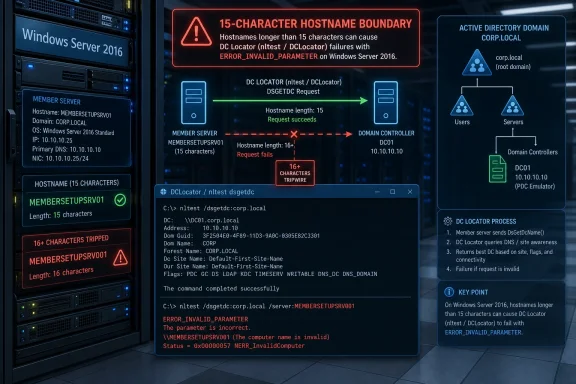
The confirmed issue affects Windows Server 2016 after KB5087537, the May 2026 cumulative security update that brings the platform to OS build 14393.9140. Microsoft’s known-issue language is concise: after installing the update, domain controller discovery might fail when the server hostname is 15 characters long. In practical terms, DCLocator calls such as nltest /dsgetdc:<domain> /pdc can return ERROR_INVALID_PARAMETER.That error string is the giveaway that this is not a simple connectivity problem. A server that cannot reach a domain controller because of DNS, firewalling, replication lag, or site topology usually leaves administrators with a familiar chain of symptoms. This one is stranger because the affected condition is local and deterministic: the machine name length itself becomes part of the failure path.
The bug appears to affect only Windows Server 2016 systems with hostnames of exactly 15 characters. That matters because 15 characters is not a random number in Windows history. It is the old NetBIOS computer-name boundary, a limit that has survived long after most administrators stopped thinking of NetBIOS as a daily concern.
That is why this issue is more than a one-line patch warning. It is a reminder that Windows Server is not one clean stack; it is a layered system where modern identity, legacy naming, compatibility shims, and decades of administrative tooling still meet in production.
Domain Controller Discovery Is Boring Until It Stops Working
Domain controller discovery is one of those mechanisms that becomes visible only when it fails. A Windows machine or application needs to find a suitable domain controller for authentication, directory queries, password operations, Group Policy processing, DFS Namespace management, or administrative tooling. DCLocator is the plumbing that helps the system locate the right domain controller for the domain, site, and requested role.When that lookup works, nobody thanks it. When it fails, symptoms scatter across the estate. An administrator may see a management console hang, a script fail, a service account behave oddly, or a tool report that it cannot locate a primary domain controller. The immediate temptation is to start debugging DNS, ports, time sync, trust relationships, or the domain controllers themselves.
That is what makes this bug dangerous in the real world. A 15-character hostname is not the first thing most responders will check during an Active Directory incident. In many environments, server names are generated by convention: location code, workload code, role code, environment marker, and a sequence number. It is easy for a naming standard to land repeatedly on 15 characters without anyone treating that as a risk.
The affected machines do not have to be domain controllers to matter. A member server running administrative jobs, file services, monitoring agents, identity-aware applications, backup tools, or DFS-related workflows may depend on domain controller discovery. If the server is old enough to still be on Windows Server 2016 and happens to sit at the NetBIOS ceiling, the failure can look like a domain problem while actually being a patch-and-name-length problem.
The NetBIOS Ceiling Never Really Went Away
The 15-character boundary is a fossil, but fossils can still break production. Windows has supported DNS-style names for decades, yet the short computer name remains part of the system’s identity model. Active Directory environments continue to carry both DNS names and NetBIOS-compatible names, and many Windows APIs, administrative tools, and compatibility paths still understand the world through that older lens.That does not mean every 15-character hostname is bad, or that administrators have been doing something wrong by using the full limit. The point is subtler. Microsoft has long allowed 15-character computer names, and plenty of organizations have used them safely for years. The regression is that an update appears to have made a valid edge case invalid for one critical lookup path.
Edge cases like this are particularly punishing in server fleets because they often map onto standards. A company does not usually have one carefully hand-crafted 15-character server name. It has a naming template that may produce hundreds of them across branch offices, data centers, test labs, and disaster-recovery environments. If the template was designed years ago to squeeze meaning into the NetBIOS limit, it may have created exactly the condition KB5087537 now exposes.
This is why the bug feels familiar to veteran Windows administrators. Not because domain controller discovery fails every month, but because the root pattern is common: a modern update intersects with an old compatibility boundary, and the blast radius is determined by local conventions that Microsoft cannot see from Redmond.
The Narrowness of the Bug Makes It Harder, Not Easier
A broad outage announces itself. A narrow regression whispers. If every Windows Server 2016 machine lost domain controller discovery after KB5087537, the industry would identify the problem quickly, correlate reports, and hold the patch at scale. A bug that affects only machines with 15-character hostnames is much harder to spot because unaffected servers sitting beside affected ones appear to prove the update is fine.That creates an ugly diagnostic split. One Windows Server 2016 system may process the May update and continue operating normally. Another, with the same operating system and patch level but a 15-character hostname, may fail DCLocator. If administrators compare only patch history, network placement, or domain membership, the key difference hides in plain sight.
It also complicates change management. Security teams want KB5087537 installed because it is a monthly security update. Operations teams want directory-dependent workloads to keep functioning. The bug forces both sides into a familiar but uncomfortable calculation: accept an Active Directory regression on a subset of systems, rename servers where feasible, delay deployment to vulnerable machines, or remove an update that was installed for a reason.
Microsoft has said it is investigating, but as of the reporting around the issue, there is no official fix. The obvious mitigation is also the most operationally awkward: change the affected server name so it is not exactly 15 characters. That may be easy for a disposable lab VM. It may be painful for a production server referenced in scripts, monitoring systems, backup policies, certificates, service principal names, documentation, firewall rules, and human memory.
Renaming a Server Is Not a Workaround, It Is a Project
“Rename the server” sounds simple only to people who do not operate Windows estates at scale. A hostname is not just a label. It is an addressable identity stitched into logs, dashboards, DNS records, Kerberos assumptions, certificates, file paths, scheduled tasks, deployment tools, documentation, and occasionally the habits of an entire support team.For some member servers, a rename may be tolerable after impact analysis. For others, it may trigger a cascade of secondary work. Applications may store the old name. Legacy scripts may use it directly. Monitoring tools may treat the renamed machine as a new asset. Backup systems may need re-association. If the system participates in DFS Namespace management, remote administration, or certificate-bound services, the cleanup can be nontrivial.
That does not mean organizations should avoid renaming under all circumstances. If a server is lightly used, well documented, and not deeply embedded in external dependencies, changing a 15-character hostname may be the safest way to move forward while waiting for Microsoft. But administrators should treat it as a controlled change, not a casual tweak.
The more prudent first step is inventory. Find Windows Server 2016 machines. Determine which have KB5087537 installed. Identify which hostnames are exactly 15 characters. Then prioritize by dependency: systems that run identity-aware services, administrative tooling, scheduled jobs, DFS-related operations, or anything that performs domain controller discovery deserve attention before idle or isolated workloads.
Windows Server 2016 Is Still Supported, But It Is Living on Borrowed Time
Windows Server 2016 is not abandonware. It remains in extended support until January 12, 2027, meaning Microsoft still ships security updates for organizations that continue to run it. After that, customers that need more time can use the Extended Security Updates program for critical security fixes while they migrate.But “supported” is not the same as “comfortable.” Server 2016 is now deep into the part of the lifecycle where organizations are often running it because applications are sticky, vendors are slow, budgets are constrained, or migration risk feels higher than maintenance risk. That is a defensible reality in many enterprises. It is also exactly the environment where a patch regression can be expensive.
Older server platforms tend to sit under older applications and older operational assumptions. They are more likely to have handcrafted scripts, legacy management agents, old naming standards, and fragile dependencies. A bug like this does not merely test Microsoft’s update quality. It tests whether an organization still understands the systems it has deferred replacing.
The deadline matters because January 2027 is not far away in infrastructure planning terms. If a Windows Server 2016 estate is still large enough that a hostname-specific DCLocator regression creates uncertainty, that is a migration signal. Not a panic signal, necessarily, but a clear indication that the platform is still carrying workloads important enough to deserve a modernization plan.
Patch Tuesday’s Real Risk Is the Unknown Local Variable
Every Patch Tuesday contains two opposing truths. Unpatched systems are exposed to known vulnerabilities, and patched systems can sometimes encounter regressions. Good administrators do not resolve that tension with slogans. They manage it with staged deployment, test rings, telemetry, rollback plans, and enough asset intelligence to know which systems are different.This incident is a case study in why asset intelligence matters. The difference between an uneventful update and a broken lookup path may be a hostname length. That is the sort of property many organizations can query easily if their configuration management is healthy, and cannot answer quickly if their inventory is a spreadsheet, a hope, and a half-remembered naming convention.
A serious Windows patch process should now include checks that feel annoyingly specific because real regressions are often annoyingly specific. Which systems are on Server 2016? Which installed KB5087537? Which hostnames are exactly 15 characters? Which of those machines run services that call into Active Directory? Which have already logged DCLocator failures?
This is also a useful reminder that test coverage should include boundary cases, not just representative systems. If an enterprise naming convention commonly produces maximum-length names, the test ring should include one. If branch servers differ from data-center servers, include both. If older OS versions remain in production, do not let the newest platform be the only one that receives meaningful predeployment validation.
Active Directory Still Sets the Terms of Windows Reliability
Cloud identity has changed the Windows estate, but it has not erased Active Directory. Many organizations now run hybrid identity architectures where Microsoft Entra ID handles modern cloud authentication while on-premises Active Directory continues to underpin servers, legacy applications, file services, Group Policy, Kerberos, LDAP integrations, and operational tooling. A DCLocator bug on Server 2016 therefore reaches into a world that still matters.That is the uncomfortable reality behind this incident. Active Directory is old, resilient, deeply understood, and deeply embedded. It can be boring for years and then become the center of a high-severity incident because some application, admin tool, or server role cannot find a domain controller at the wrong moment.
The affected command example,
nltest /dsgetdc:<domain> /pdc, is not exotic. It belongs to the toolbox of administrators who diagnose trust, discovery, and domain controller selection issues. If that call returns ERROR_INVALID_PARAMETER because of the local hostname length after a security update, the platform is violating an expectation administrators reasonably rely on.Microsoft will likely fix the regression in a subsequent update, because the affected condition is specific and the failure mode is now public. But the operational lesson should survive the fix. Directory discovery remains a dependency worth testing directly after patching, especially on older server releases and on machines that run automation against the domain.
The Patch Is Small; the Lesson Is Not
The most concrete response to this issue is straightforward: administrators should identify Windows Server 2016 machines with exactly 15-character hostnames, check whether KB5087537 is installed, and test domain controller discovery before a business process discovers the failure for them. That is not dramatic advice, but it is the kind that prevents dramatic weekends.- Organizations should inventory Windows Server 2016 systems and flag any hostnames that are exactly 15 characters long.
- Administrators should verify whether KB5087537 is installed before assuming a DCLocator failure is caused by DNS, networking, or domain controller health.
- Teams should test domain controller discovery from affected candidates using standard tools such as
nltestrather than waiting for dependent applications to fail. - Server renaming may avoid the trigger, but it should be handled as a controlled change because hostnames often appear in scripts, certificates, monitoring, backups, and documentation.
- Patch rings for older Windows Server releases should include edge-case machines that reflect real naming standards and legacy dependencies.
Microsoft’s Fix Will Not Fix Everyone’s Blind Spots
When Microsoft ships a repair, the immediate pressure will ease. DCLocator calls should stop tripping over the 15-character condition, and Server 2016 administrators will have one less reason to dread the May 2026 update. But the broader blind spot will remain if organizations treat the episode as merely another Microsoft patch mishap.The more useful reading is that infrastructure risk increasingly hides in metadata. A hostname length, a certificate template, a service principal name, a site boundary, a dormant GPO, or an old script can be the hinge on which reliability turns. None of these are glamorous. All of them can decide whether a routine update behaves routinely.
For WindowsForum readers, the practical lesson is not to stop patching and not to assume every known issue will hit your estate. It is to make the estate knowable enough that narrow bugs stay narrow. Server 2016 is nearing the end of its ordinary supported life, Active Directory remains a central nervous system for many shops, and the next regression may be just as specific. The administrators who fare best will be the ones who can answer the boring questions quickly, because in Windows infrastructure, boring details are often where the outage begins.
References
- Primary source: Petri IT Knowledgebase
Published: Fri, 29 May 2026 13:10:47 GMT

Windows Server 2016 Bug Affects Domain Controller Lookup
A Windows Server 2016 update bug disrupts domain controller lookup on systems with specific hostname conditions. petri.com
- Related coverage: windowsforum.com

Windows Server 2016 KB5087537 Breaks Domain Discovery on 15-Char Hostnames
Microsoft confirmed on May 22, 2026, that Windows Server 2016 systems can fail domain controller discovery after installing the May 12 KB5087537 security update when the server hostname is exactly 15 characters long. The failure is narrow, but it lands in one of the least forgiving parts of a... windowsforum.com
- Related coverage: windowsreport.com
- Related coverage: cryptika.com
- Related coverage: windowsnews.ai
Windows Server 2016 KB5087537: 15-Char Hostnames Break DC Discovery
Microsoft confirms KB5087537 (May 2026) breaks domain controller discovery on Windows Server 2016 when the hostname is exactly 15 characters. Workarounds,...windowsnews.ai
- Related coverage: bleepingcomputer.com
Microsoft: Domain Controller lookup may fail on Windows Server 2016
Microsoft has confirmed a new known issue affecting Windows Server 2016 systems that causes domain controller lookups to fail after installing the KB5087537 May 2026 security update.www.bleepingcomputer.com

- Related coverage: radar.offseq.com
Microsoft: Domain Controller lookup may fail on Windows Server 2016 - Live Threat Intelligence - Threat Radar | OffSeq.com
Detailed information about Microsoft: Domain Controller lookup may fail on Windows Server 2016. Get real-time updates, technical details, and mitigation strateg radar.offseq.com
- Related coverage: bitsavers.computerhistory.org
- Related coverage: hs.testout.com