

Microsoft is adding an opt-in Windows Update path that lets Windows Server 2019 and Windows Server 2022 systems perform an in-place upgrade to Windows Server 2025 from Settings or SCONFIG after installing the March 2026 cumulative update prerequisites. That sounds like a small delivery change. It is not. It is Microsoft turning the most conservative corner of the Windows estate into something that looks, at least mechanically, more like the client update world.
The important word is opt-in. Microsoft is not pushing Windows Server 2025 onto production machines in the middle of a maintenance window someone forgot to schedule. But by putting a server OS feature upgrade behind a registry key and a Windows Update prompt, Redmond is making a clear argument: for many workloads, the old ritual of finding media, mounting an ISO, and treating every server upgrade like a weekend migration project is increasingly unnecessary ceremony.
For years, Windows Server upgrades have lived in an awkward middle ground. Microsoft has supported in-place upgrades across defined version paths, but many administrators have still treated them as a last resort: acceptable in a lab, occasionally tolerable for a utility server, and suspicious on anything that mattered. Clean installs remained the cultural default because they were easier to reason about, easier to document, and easier to defend when something went wrong.
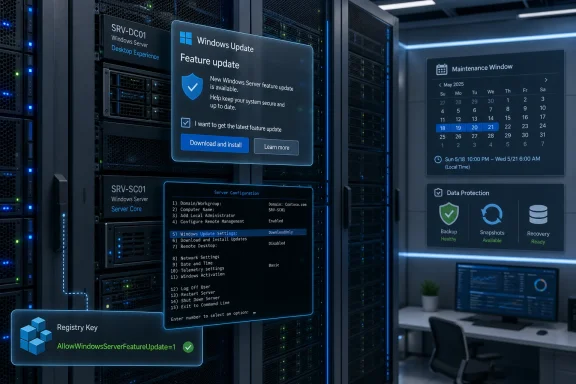
The new Windows Update offer changes the psychology more than the underlying engineering. Windows Server 2025 could already be installed using media, and Microsoft has already documented upgrade paths from Windows Server 2019 and Windows Server 2022. What is different now is the invitation. The upgrade can appear in the familiar Windows Update surface on Desktop Experience systems, or through SCONFIG on Server Core, once the administrator explicitly enables the policy.
That matters because user interface is policy by another name. A feature hidden behind installation media feels like a migration. A feature offered in Settings feels like servicing. Microsoft is not saying every server should be upgraded this way, but it is saying the servicing stack is now trusted enough to be a first-class route into a new server generation.
The company is also choosing its audience carefully. This is not a broad, automatic rollout. It requires a cumulative update baseline, a registry opt-in, administrator action, and a final decision to download and install. That is a long chain of consent, and it is exactly the right amount of friction for servers.
That registry key is doing more than enabling a UI offer. It is Microsoft’s line between modernizing server upgrades and triggering the nightmares every sysadmin has about surprise feature updates. The company knows the server world has a long memory, and it knows that “Windows Update” means very different things to a domain controller, a Hyper-V host, a SQL box, and a developer workstation.
The opt-in design also gives enterprises something they can automate without surrendering control. The same setting can be distributed through Group Policy, which means organizations can scope it to pilot organizational units, maintenance rings, or specific server roles. Microsoft is borrowing the language of client deployment rings, but it is doing so with a server-appropriate level of explicitness.
There is an implicit bargain here. Microsoft is saying: if you are current enough, backed up enough, and confident enough to set the key, we will meet you inside the Windows Update workflow. Administrators, in return, still own the decision to expose a machine to that workflow in the first place.
Microsoft’s latest guidance tries to pull in-place upgrade out of that swamp and put it into a managed process. The company recommends a gradual rollout, starting with the least critical servers, and explicitly encourages test upgrades before production deployment. It estimates that backup or snapshot work plus the upgrade itself commonly takes around two hours per server, with the actual duration depending on performance, installed applications, and user load.
That is not a promise; it is a planning anchor. Anyone who has watched a server spend an eternity at a percentage screen knows that averages are not maintenance windows. But the estimate is useful because it frames the upgrade as a repeatable operational task rather than a bespoke rebuild project.
The more striking claim is Microsoft’s confidence in application compatibility. The Server team says it aims for 100 percent application compatibility and expects most applications and services to continue working after the in-place move to Windows Server 2025. The caveat is embedded in the word “most,” and that caveat is where enterprise reality lives.
Compatibility is not binary in the server room. An application can launch and still have broken monitoring. A service can start and still have degraded performance because a driver changed. A workload can pass a smoke test and still fail under month-end load. Microsoft is right to emphasize compatibility, but administrators are right to treat it as a hypothesis that must be tested per workload.
That preference is not old-fashioned. It is often the mature choice. Domain controllers, security-sensitive infrastructure, heavily customized application servers, and systems with questionable lineage are all candidates for rebuilds rather than upgrades. A clean install gives IT a chance to rediscover what the server actually does, remove what it should no longer be doing, and document the result.
But clean installs also have costs that rarely appear in architecture diagrams. They require application installers, license keys, vendor support, configuration notes, service account knowledge, firewall exceptions, certificate handling, and downtime coordination. In many small and mid-sized environments, the server is less fragile than the institutional memory around it.
That is where the Windows Update route becomes attractive. It does not make in-place upgrades universally wise, but it makes them easier to operationalize where they are already the pragmatic answer. A file server with straightforward roles, a line-of-business application server with vendor-certified compatibility, or a lightly customized management host may be a better candidate for a controlled in-place upgrade than for a heroic rebuild.
For Windows Server 2022 Server Core, the path runs through SCONFIG after the prerequisite cumulative update is installed. Administrators use the update option, select feature updates, and proceed when Windows Server 2025 is offered. The experience is deliberately plain, but the message is significant: Server Core is not being left behind in the servicing modernization story.
There is a limitation worth noting. The described SCONFIG route applies to Windows Server 2022 Server Core, while the Desktop Experience flow covers both Windows Server 2019 and Windows Server 2022. That distinction will matter in mixed estates where older Server Core deployments exist. Microsoft’s documentation and offers should be checked closely before assuming parity across every installation type.
Still, the larger direction is clear. Server Core is often used by shops that care about smaller attack surfaces, reduced reboot noise, and automation-friendly operations. If those environments can consume a major OS upgrade through a controlled update flow, Microsoft gains credibility for the idea that Windows Server servicing can become less artisanal without becoming reckless.
That gating serves multiple purposes. It ensures the servicing stack and upgrade logic are recent enough. It gives Microsoft a known baseline for troubleshooting. It also reduces the odds that stale systems, missing fixes, or old update agents become the real cause of a failed upgrade that gets blamed on Windows Server 2025.
There is a quiet discipline in that design. Microsoft is effectively saying that a server old enough to be missing the current servicing baseline is not ready to be offered a new operating system through Windows Update. That may frustrate administrators who want a single magic button, but it is the right instinct. A feature upgrade is not a substitute for patch hygiene.
The prerequisite model also gives organizations a useful readiness test. If a server cannot reliably install the required cumulative update, reboot cleanly, and return to service, it has already failed the first stage of the Windows Server 2025 upgrade process. That failure is not a nuisance; it is a gift. Better to discover servicing rot before the operating system changes underneath the workload.
A backup that has not been restored is a theory. A snapshot that depends on storage infrastructure no one has tested under pressure is a theory with a nicer interface. In-place upgrade is attractive precisely because it reduces reinstall work, but it also concentrates risk onto the existing machine state. If that state cannot be recovered, the organization is gambling rather than upgrading.
Virtualized environments have an advantage here, but not immunity. Snapshots can simplify rollback, especially for simple servers, but they can also interact badly with databases, directory services, replication, and transactional workloads if used casually. Application-aware backup still matters. So does knowing whether the restore target can actually boot, authenticate, and serve users.
The restore test is the unglamorous center of this story. Microsoft can improve the upgrade mechanism, but it cannot know whether a third-party backup agent has been silently failing, whether the last successful backup excluded a critical data path, or whether the person with the encryption passphrase left the company two years ago. The new upgrade path makes preparation more important, not less.
The cleanest in-place upgrades are the ones where the workload is quiet. Databases should be quiesced according to vendor guidance. Application services should be stopped in a planned order. Monitoring should be adjusted so the outage does not trigger a false incident storm. Load balancers, DNS records, cluster roles, and dependent systems should know what is about to happen.
This is where the Windows Update interface could lull less experienced operators into under-planning. A familiar “Download and install” button does not make the operation equivalent to a monthly security update. It is still an operating system upgrade. The workflow is modernized; the blast radius remains server-shaped.
The right mental model is not “patch Tuesday, but bigger.” It is “media-based in-place upgrade, delivered through a safer and more discoverable channel.” That distinction keeps the convenience from becoming a trap.
That list is a useful corrective to anyone tempted to declare victory at the logon screen. The OS may be upgraded, but the server is not operationally upgraded until activation, policy, security posture, monitoring, and application validation are complete. Windows.old is not just reclaimable disk space; it is a temporary bridge back to the pre-upgrade state. Deleting it should be a deliberate milestone.
The Secure Boot and Secured-core references are especially telling. Windows Server 2025 is not merely a version number with a longer support runway. Microsoft is using the release to push the server estate toward newer hardware-rooted security assumptions. That does not mean every upgraded server will become a Secured-core exemplar, but it does mean the post-upgrade review should include firmware, boot trust, and platform security rather than stopping at “the app works.”
Telemetry settings also deserve attention because many server environments have strict policy requirements. An in-place upgrade should preserve intent, but administrators should verify the actual resulting state. The same applies to loopback adapters and other oddities that often exist for licensing, testing, legacy binding, or application compatibility reasons. The weird bits are where upgrades become interesting.
That continuity is reassuring. The delivery surface is changing, but the diagnostic model is not being hidden behind a consumer-style error code. Administrators still have logs, parsers, and support artifacts. The path may start in Settings or SCONFIG, but serious troubleshooting still lives in the file system.
The challenge is that upgrade failures are often not caused by the thing administrators first suspect. They can involve drivers, storage filters, antivirus products, low disk space, language packs, boot configuration, unsupported roles, firmware, or third-party agents. A failed upgrade is less an indictment of Windows Server 2025 than a stress test of everything installed beneath and around it.
For that reason, the smartest organizations will capture upgrade telemetry from pilots before broad deployment. Which roles succeeded? Which vendors caused friction? Which servers took two hours, and which took six? Which rollback procedures worked? The first ten upgrades should teach the next hundred how to behave.
By adding a Windows Update opt-in route in the 2026 servicing cycle, Microsoft is meeting the market at a more realistic moment. The earliest adopters have already had their turn. The cautious majority is now looking at hardware refreshes, support timelines, security baselines, and the operational burden of keeping older releases alive.
Windows Server 2019 and Windows Server 2022 are exactly the right sources for this offer. They are modern enough that Microsoft can plausibly argue for application compatibility and direct upgrade readiness, but old enough that many organizations are beginning to plan their next platform move. The feature is less about day-one enthusiasm for Server 2025 and more about reducing friction for the long middle of the adoption curve.
It also fits Microsoft’s broader servicing philosophy. Windows, Azure, Microsoft 365, and Endpoint Manager have all pushed IT toward rings, policies, staged rollout, and continuous compliance. Windows Server has moved more slowly because the stakes are different. This feature does not erase that difference, but it narrows the tooling gap.
The more complex the server, the more skepticism is warranted. Hyper-V hosts need host and guest planning. Clustered roles require cluster-aware sequencing. Domain controllers may be better replaced by introducing new Windows Server 2025 domain controllers and demoting old ones, depending on the environment. Servers running critical databases or tightly coupled vendor applications need vendor support confirmation, not just Microsoft optimism.
This is not a contradiction. It is the normal hierarchy of risk. The existence of an easier path does not mean all workloads should take it. It means administrators now have a better option for the class of servers that were never worth a full migration drama but still needed a supported future.
If Microsoft’s compatibility confidence proves justified, the operational savings could be substantial. Not because any single upgrade saves a heroic amount of time, but because estates are made of repetition. Shaving complexity from dozens or hundreds of routine server upgrades changes the economics of staying current.
Microsoft’s opt-in approach is an attempt to respect that history while still moving forward. The company is not asking administrators to accept a new default. It is asking them to grant permission, machine by machine or policy by policy, for a specific class of offer. That is how server modernization has to work: by earning consent rather than assuming it.
The risk for Microsoft is that one high-profile bad experience can poison the well. If administrators see unexpected offers, confusing applicability, weak rollback, or post-upgrade activation problems, they will retreat to media and manual controls. Server admins are not allergic to convenience; they are allergic to ambiguity.
The opportunity is just as real. If this works cleanly, Microsoft can make future server upgrades less exceptional. That does not mean annual feature churn for servers, and it should not. It means the act of moving from one long-term server release to the next could become less like a migration cliff and more like a governed lifecycle operation.
That balance is easy to miss because the interface is intentionally simple. Settings and SCONFIG are not project plans. They are entry points. The work still happens around them: choosing candidate machines, communicating downtime, freezing application changes, validating backups, and deciding what success looks like before the reboot begins.
For some organizations, this feature will be a convenience layered into existing update management. For others, it will be the first time an in-place server upgrade feels officially normal rather than merely allowed. The difference will depend less on Microsoft’s button than on each organization’s discipline.
The worst use of this capability would be opportunistic upgrading: noticing the offer, clicking through, and hoping. The best use is boring and staged: pilot, measure, adjust, expand. Microsoft has made the door easier to open. It has not changed what is on the other side.
Source: Microsoft - Message Center Opt-In Windows Server 2025 Feature Update from the WS 2022 and WS 2019 Settings Dialog | Microsoft Community Hub
The important word is opt-in. Microsoft is not pushing Windows Server 2025 onto production machines in the middle of a maintenance window someone forgot to schedule. But by putting a server OS feature upgrade behind a registry key and a Windows Update prompt, Redmond is making a clear argument: for many workloads, the old ritual of finding media, mounting an ISO, and treating every server upgrade like a weekend migration project is increasingly unnecessary ceremony.
 Microsoft Moves the Server Upgrade From the ISO Shelf to the Update Pane
For years, Windows Server upgrades have lived in an awkward middle ground. Microsoft has supported in-place upgrades across defined version paths, but many administrators have still treated them as a last resort: acceptable in a lab, occasionally tolerable for a utility server, and suspicious on anything that mattered. Clean installs remained the cultural default because they were easier to reason about, easier to document, and easier to defend when something went wrong.The new Windows Update offer changes the psychology more than the underlying engineering. Windows Server 2025 could already be installed using media, and Microsoft has already documented upgrade paths from Windows Server 2019 and Windows Server 2022. What is different now is the invitation. The upgrade can appear in the familiar Windows Update surface on Desktop Experience systems, or through SCONFIG on Server Core, once the administrator explicitly enables the policy.
That matters because user interface is policy by another name. A feature hidden behind installation media feels like a migration. A feature offered in Settings feels like servicing. Microsoft is not saying every server should be upgraded this way, but it is saying the servicing stack is now trusted enough to be a first-class route into a new server generation.
The company is also choosing its audience carefully. This is not a broad, automatic rollout. It requires a cumulative update baseline, a registry opt-in, administrator action, and a final decision to download and install. That is a long chain of consent, and it is exactly the right amount of friction for servers.
The Registry Key Is the Contract
The practical mechanism is almost comically simple. Administrators create a policy path under Windows Update and set anAllowWindowsServerFeatureUpdate DWORD value to 1. After that, eligible systems can see the Windows Server 2025 Feature Update through the appropriate update interface.That registry key is doing more than enabling a UI offer. It is Microsoft’s line between modernizing server upgrades and triggering the nightmares every sysadmin has about surprise feature updates. The company knows the server world has a long memory, and it knows that “Windows Update” means very different things to a domain controller, a Hyper-V host, a SQL box, and a developer workstation.
The opt-in design also gives enterprises something they can automate without surrendering control. The same setting can be distributed through Group Policy, which means organizations can scope it to pilot organizational units, maintenance rings, or specific server roles. Microsoft is borrowing the language of client deployment rings, but it is doing so with a server-appropriate level of explicitness.
There is an implicit bargain here. Microsoft is saying: if you are current enough, backed up enough, and confident enough to set the key, we will meet you inside the Windows Update workflow. Administrators, in return, still own the decision to expose a machine to that workflow in the first place.
In-Place Upgrade Gets a Respectable Suit
In-place upgrade has always had a reputation problem. Even when technically supported, it has carried the smell of compromise: something done when there is no documentation, no reinstall media for the business application, no appetite for a rebuild, or no one left who remembers how the server was assembled. That reputation is not entirely unfair. Long-lived Windows servers can accumulate years of drivers, agents, middleware, security tools, orphaned services, and registry archaeology.Microsoft’s latest guidance tries to pull in-place upgrade out of that swamp and put it into a managed process. The company recommends a gradual rollout, starting with the least critical servers, and explicitly encourages test upgrades before production deployment. It estimates that backup or snapshot work plus the upgrade itself commonly takes around two hours per server, with the actual duration depending on performance, installed applications, and user load.
That is not a promise; it is a planning anchor. Anyone who has watched a server spend an eternity at a percentage screen knows that averages are not maintenance windows. But the estimate is useful because it frames the upgrade as a repeatable operational task rather than a bespoke rebuild project.
The more striking claim is Microsoft’s confidence in application compatibility. The Server team says it aims for 100 percent application compatibility and expects most applications and services to continue working after the in-place move to Windows Server 2025. The caveat is embedded in the word “most,” and that caveat is where enterprise reality lives.
Compatibility is not binary in the server room. An application can launch and still have broken monitoring. A service can start and still have degraded performance because a driver changed. A workload can pass a smoke test and still fail under month-end load. Microsoft is right to emphasize compatibility, but administrators are right to treat it as a hypothesis that must be tested per workload.
The Clean Install Camp Still Has the Better Argument for Some Machines
The clean install has not been dethroned. It remains the gold standard when the goal is to reduce accumulated risk, remove undocumented dependencies, reset configuration drift, and impose a known-good baseline. If anything, Microsoft’s own wording reinforces that some organizations will still prefer reformatting the system drive, installing Windows Server 2025 fresh, and reinstalling applications and services.That preference is not old-fashioned. It is often the mature choice. Domain controllers, security-sensitive infrastructure, heavily customized application servers, and systems with questionable lineage are all candidates for rebuilds rather than upgrades. A clean install gives IT a chance to rediscover what the server actually does, remove what it should no longer be doing, and document the result.
But clean installs also have costs that rarely appear in architecture diagrams. They require application installers, license keys, vendor support, configuration notes, service account knowledge, firewall exceptions, certificate handling, and downtime coordination. In many small and mid-sized environments, the server is less fragile than the institutional memory around it.
That is where the Windows Update route becomes attractive. It does not make in-place upgrades universally wise, but it makes them easier to operationalize where they are already the pragmatic answer. A file server with straightforward roles, a line-of-business application server with vendor-certified compatibility, or a lightly customized management host may be a better candidate for a controlled in-place upgrade than for a heroic rebuild.
Server Core Gets the Same Deal, Which May Matter More
The Desktop Experience workflow will get the screenshots, because Settings is visually legible. But the Server Core support through SCONFIG may be the more important signal. Microsoft is not treating this as a convenience feature for GUI holdouts. It is integrating the upgrade path into the management surface used by administrators who already chose a leaner, less interactive server footprint.For Windows Server 2022 Server Core, the path runs through SCONFIG after the prerequisite cumulative update is installed. Administrators use the update option, select feature updates, and proceed when Windows Server 2025 is offered. The experience is deliberately plain, but the message is significant: Server Core is not being left behind in the servicing modernization story.
There is a limitation worth noting. The described SCONFIG route applies to Windows Server 2022 Server Core, while the Desktop Experience flow covers both Windows Server 2019 and Windows Server 2022. That distinction will matter in mixed estates where older Server Core deployments exist. Microsoft’s documentation and offers should be checked closely before assuming parity across every installation type.
Still, the larger direction is clear. Server Core is often used by shops that care about smaller attack surfaces, reduced reboot noise, and automation-friendly operations. If those environments can consume a major OS upgrade through a controlled update flow, Microsoft gains credibility for the idea that Windows Server servicing can become less artisanal without becoming reckless.
The Prerequisite Updates Are Microsoft’s Gatekeepers
The upgrade offer depends on March 2026 cumulative update prerequisites: one for Windows Server 2022 and one for Windows Server 2019. This is not administrative trivia. It is how Microsoft narrows the support matrix before inviting machines into a major version transition.That gating serves multiple purposes. It ensures the servicing stack and upgrade logic are recent enough. It gives Microsoft a known baseline for troubleshooting. It also reduces the odds that stale systems, missing fixes, or old update agents become the real cause of a failed upgrade that gets blamed on Windows Server 2025.
There is a quiet discipline in that design. Microsoft is effectively saying that a server old enough to be missing the current servicing baseline is not ready to be offered a new operating system through Windows Update. That may frustrate administrators who want a single magic button, but it is the right instinct. A feature upgrade is not a substitute for patch hygiene.
The prerequisite model also gives organizations a useful readiness test. If a server cannot reliably install the required cumulative update, reboot cleanly, and return to service, it has already failed the first stage of the Windows Server 2025 upgrade process. That failure is not a nuisance; it is a gift. Better to discover servicing rot before the operating system changes underneath the workload.
The Backup Step Is Not Boilerplate
Microsoft’s guidance places backup or snapshot work near the front of the process, and that placement should be read as a hard requirement rather than a compliance incantation. The company even suggests performing a restore test on a separate server if time permits. That phrase, “if time permits,” is where many bad weekends begin.A backup that has not been restored is a theory. A snapshot that depends on storage infrastructure no one has tested under pressure is a theory with a nicer interface. In-place upgrade is attractive precisely because it reduces reinstall work, but it also concentrates risk onto the existing machine state. If that state cannot be recovered, the organization is gambling rather than upgrading.
Virtualized environments have an advantage here, but not immunity. Snapshots can simplify rollback, especially for simple servers, but they can also interact badly with databases, directory services, replication, and transactional workloads if used casually. Application-aware backup still matters. So does knowing whether the restore target can actually boot, authenticate, and serve users.
The restore test is the unglamorous center of this story. Microsoft can improve the upgrade mechanism, but it cannot know whether a third-party backup agent has been silently failing, whether the last successful backup excluded a critical data path, or whether the person with the encryption passphrase left the company two years ago. The new upgrade path makes preparation more important, not less.
Stopping Services Is a Hint About the Real Risk
Microsoft recommends stopping applications and services before beginning the upgrade. That advice will seem obvious to administrators, but it reveals the gap between OS servicing and workload ownership. Windows can manage the operating system transition; it cannot guarantee that every application likes being carried through it while active.The cleanest in-place upgrades are the ones where the workload is quiet. Databases should be quiesced according to vendor guidance. Application services should be stopped in a planned order. Monitoring should be adjusted so the outage does not trigger a false incident storm. Load balancers, DNS records, cluster roles, and dependent systems should know what is about to happen.
This is where the Windows Update interface could lull less experienced operators into under-planning. A familiar “Download and install” button does not make the operation equivalent to a monthly security update. It is still an operating system upgrade. The workflow is modernized; the blast radius remains server-shaped.
The right mental model is not “patch Tuesday, but bigger.” It is “media-based in-place upgrade, delivered through a safer and more discoverable channel.” That distinction keeps the convenience from becoming a trap.
Activation, Telemetry, and Secure Boot Remind Us This Is a New OS
After the upgrade and reboot, Microsoft’s post-upgrade checklist shifts from installation to validation. Administrators are told to confirm applications and services, restore if necessary, activate Windows Server 2025 using KMS, Active Directory-based activation, or MAK tooling, check telemetry settings and loopback adapter settings, remove Windows.old once confident, run Windows Update again, and evaluate Secured-core and UEFI Secure Boot certificate updates.That list is a useful corrective to anyone tempted to declare victory at the logon screen. The OS may be upgraded, but the server is not operationally upgraded until activation, policy, security posture, monitoring, and application validation are complete. Windows.old is not just reclaimable disk space; it is a temporary bridge back to the pre-upgrade state. Deleting it should be a deliberate milestone.
The Secure Boot and Secured-core references are especially telling. Windows Server 2025 is not merely a version number with a longer support runway. Microsoft is using the release to push the server estate toward newer hardware-rooted security assumptions. That does not mean every upgraded server will become a Secured-core exemplar, but it does mean the post-upgrade review should include firmware, boot trust, and platform security rather than stopping at “the app works.”
Telemetry settings also deserve attention because many server environments have strict policy requirements. An in-place upgrade should preserve intent, but administrators should verify the actual resulting state. The same applies to loopback adapters and other oddities that often exist for licensing, testing, legacy binding, or application compatibility reasons. The weird bits are where upgrades become interesting.
Troubleshooting Still Starts in Panther
When the upgrade fails, Microsoft points administrators back to the familiar setup logs underC:\Windows\Panther, especially setupact.log and setuperr.log. SetupDiag remains the recommended analysis tool for parsing upgrade failures. Support may ask for the Panther directory contents, which is a reminder that even a Windows Update-delivered upgrade is still Windows Setup under the hood.That continuity is reassuring. The delivery surface is changing, but the diagnostic model is not being hidden behind a consumer-style error code. Administrators still have logs, parsers, and support artifacts. The path may start in Settings or SCONFIG, but serious troubleshooting still lives in the file system.
The challenge is that upgrade failures are often not caused by the thing administrators first suspect. They can involve drivers, storage filters, antivirus products, low disk space, language packs, boot configuration, unsupported roles, firmware, or third-party agents. A failed upgrade is less an indictment of Windows Server 2025 than a stress test of everything installed beneath and around it.
For that reason, the smartest organizations will capture upgrade telemetry from pilots before broad deployment. Which roles succeeded? Which vendors caused friction? Which servers took two hours, and which took six? Which rollback procedures worked? The first ten upgrades should teach the next hundred how to behave.
The Timing Is Not Accidental
Windows Server 2025 reached general availability in late 2024, but server adoption curves are not client adoption curves. Enterprises do not rush a new server OS into broad use simply because the bits are available. They wait for documentation, vendor support matrices, cumulative updates, early bug reports, and internal confidence.By adding a Windows Update opt-in route in the 2026 servicing cycle, Microsoft is meeting the market at a more realistic moment. The earliest adopters have already had their turn. The cautious majority is now looking at hardware refreshes, support timelines, security baselines, and the operational burden of keeping older releases alive.
Windows Server 2019 and Windows Server 2022 are exactly the right sources for this offer. They are modern enough that Microsoft can plausibly argue for application compatibility and direct upgrade readiness, but old enough that many organizations are beginning to plan their next platform move. The feature is less about day-one enthusiasm for Server 2025 and more about reducing friction for the long middle of the adoption curve.
It also fits Microsoft’s broader servicing philosophy. Windows, Azure, Microsoft 365, and Endpoint Manager have all pushed IT toward rings, policies, staged rollout, and continuous compliance. Windows Server has moved more slowly because the stakes are different. This feature does not erase that difference, but it narrows the tooling gap.
The Real Winner Is the Boring Server
The obvious candidates for this upgrade path are not the glamorous systems. They are the boring ones: utility servers, print servers where they still exist, management boxes, smaller file servers, internal application servers with known compatibility, and virtual machines whose recovery story is solid. These are the machines where a clean install may be ideal in theory but inefficient in practice.The more complex the server, the more skepticism is warranted. Hyper-V hosts need host and guest planning. Clustered roles require cluster-aware sequencing. Domain controllers may be better replaced by introducing new Windows Server 2025 domain controllers and demoting old ones, depending on the environment. Servers running critical databases or tightly coupled vendor applications need vendor support confirmation, not just Microsoft optimism.
This is not a contradiction. It is the normal hierarchy of risk. The existence of an easier path does not mean all workloads should take it. It means administrators now have a better option for the class of servers that were never worth a full migration drama but still needed a supported future.
If Microsoft’s compatibility confidence proves justified, the operational savings could be substantial. Not because any single upgrade saves a heroic amount of time, but because estates are made of repetition. Shaving complexity from dozens or hundreds of routine server upgrades changes the economics of staying current.
Microsoft Is Also Testing Trust
There is a deeper trust issue under all of this. Many administrators have spent years building fences around Windows Update on servers. They approve updates through WSUS, Configuration Manager, Azure Update Manager, or third-party tools. They schedule reboots. They suppress surprises. They do not want consumer update behavior anywhere near production infrastructure.Microsoft’s opt-in approach is an attempt to respect that history while still moving forward. The company is not asking administrators to accept a new default. It is asking them to grant permission, machine by machine or policy by policy, for a specific class of offer. That is how server modernization has to work: by earning consent rather than assuming it.
The risk for Microsoft is that one high-profile bad experience can poison the well. If administrators see unexpected offers, confusing applicability, weak rollback, or post-upgrade activation problems, they will retreat to media and manual controls. Server admins are not allergic to convenience; they are allergic to ambiguity.
The opportunity is just as real. If this works cleanly, Microsoft can make future server upgrades less exceptional. That does not mean annual feature churn for servers, and it should not. It means the act of moving from one long-term server release to the next could become less like a migration cliff and more like a governed lifecycle operation.
The Upgrade Button Does Not Replace the Change Window
The most useful way to read Microsoft’s announcement is not as a command to upgrade, but as a new deployment primitive. It gives IT another controlled mechanism for reaching Windows Server 2025. It does not remove the need for asset inventory, compatibility testing, backups, maintenance windows, rollback plans, or post-upgrade validation.That balance is easy to miss because the interface is intentionally simple. Settings and SCONFIG are not project plans. They are entry points. The work still happens around them: choosing candidate machines, communicating downtime, freezing application changes, validating backups, and deciding what success looks like before the reboot begins.
For some organizations, this feature will be a convenience layered into existing update management. For others, it will be the first time an in-place server upgrade feels officially normal rather than merely allowed. The difference will depend less on Microsoft’s button than on each organization’s discipline.
The worst use of this capability would be opportunistic upgrading: noticing the offer, clicking through, and hoping. The best use is boring and staged: pilot, measure, adjust, expand. Microsoft has made the door easier to open. It has not changed what is on the other side.
The Windows Update Path Rewrites the Server 2025 Adoption Playbook
The concrete lesson from Microsoft’s new opt-in flow is that Windows Server 2025 adoption no longer has to begin with installation media. That is a meaningful shift, but it is only useful when treated as a controlled upgrade program rather than a convenience click.- Windows Server 2019 and Windows Server 2022 Desktop Experience systems can be offered the Windows Server 2025 Feature Update through Settings after the required cumulative update baseline and opt-in registry policy are in place.
- Windows Server 2022 Server Core systems can use SCONFIG to find and install the Windows Server 2025 Feature Update when prerequisites are met.
- The registry opt-in is the safety boundary that lets administrators expose selected machines to the offer without making the upgrade automatic across the estate.
- Microsoft’s own guidance still expects backups or snapshots, workload shutdown, pilot testing, post-upgrade validation, activation, and additional update checks.
- Clean installs remain the better choice for some critical, messy, security-sensitive, or poorly documented systems.
- The most natural early candidates are lower-risk servers with strong backup coverage, known application compatibility, and clear rollback procedures.
Source: Microsoft - Message Center Opt-In Windows Server 2025 Feature Update from the WS 2022 and WS 2019 Settings Dialog | Microsoft Community Hub
