

This week’s Windows Store roundup landed squarely on two familiar signals: polished third‑party ports that bring mobile and indie games to Windows devices, and a handful of utility apps that aim to fill specific productivity gaps for desktop and tablet users — with Polarr Photo Editor taking the spotlight as app of the week in the original BetaNews selection.
The Microsoft Store has long been a mixed ecosystem: first‑party staples and major publishers sit alongside one‑person utilities, hobby projects and ports of successful mobile titles. That mix is useful — it surfaces niche tools and fresh entertainment options — but it also creates acute variability in quality, support and longevity. Weekly roundups such as the one published by BetaNews aim to do two things: highlight items worth trying now, and flag the practical caveats readers should vet before installing paid or API‑dependent apps.
This particular week’s list illustrates several recurring themes for Windows users and administrators:
For readers looking to act on the highlights, start with the free trials (Polarr, demo modes), verify controller or touch requirements for games (Space Marshals), and treat small paid utilities like Cortanium as convenience buys that need ongoing platform support to remain useful. The Store is a lively place, but longevity and security matter just as much as novelty.
Source: BetaNews Best Windows apps this week
 Background / Why this roundup matters
The Microsoft Store has long been a mixed ecosystem: first‑party staples and major publishers sit alongside one‑person utilities, hobby projects and ports of successful mobile titles. That mix is useful — it surfaces niche tools and fresh entertainment options — but it also creates acute variability in quality, support and longevity. Weekly roundups such as the one published by BetaNews aim to do two things: highlight items worth trying now, and flag the practical caveats readers should vet before installing paid or API‑dependent apps.This particular week’s list illustrates several recurring themes for Windows users and administrators:
- Developers keep bringing successful mobile games and indie titles to Windows, but input support and performance vary by port.
- Specialty utilities and Cortana extensions appear to be a healthy cottage industry, although many are small‑scale and rely on external services or platform APIs.
- Store prices, promotions (for example, Red Stripe Deals), and trial availability can change rapidly — so what’s listed one week may not be the same the next.
Overview of the week’s highlights
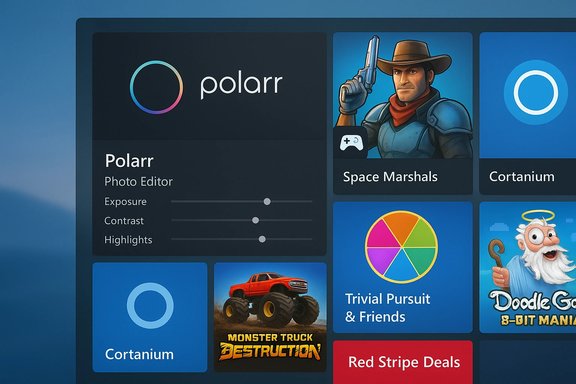
The BetaNews selection called out a mix of paid and free titles, with the following as the short list of featured apps and games:- Polarr Photo Editor — the week’s top pick (paid, free trial).
- Space Marshals — tactical top‑down shooter (paid).
- Cortanium — an extension that adds new commands to Cortana (paid).
- Trivial Pursuit & Friends — digital spin on the classic board game (social/freemium).
- Monster Truck Destruction — arcade‑style monster‑truck racer (free/paid variants on storefronts).
- Doodle God: 8‑bit Mania — a retro re‑skin of a long‑running puzzle franchise.
Polarr Photo Editor — deep editing in a Store wrapper
What BetaNews said
BetaNews picked Polarr Photo Editor as the best app of the week, describing it as “designed to be the ideal photo editor for bloggers, students and photo professionals,” and noting support for popular image formats including RAW, 50 presets, manual adjustment tools and batch export. A free trial and a paid full version were also mentioned.Verification and context
Polarr has been widely covered in tech press and Windows app roundups. Independent writeups and Store pages confirm the editor’s focus on rapid, high‑precision adjustments, support for a large set of image formats, and a pro tier with advanced features. Several reviews and Store descriptions specifically call out RAW support, interactive tutorials, and extensive preset/filter libraries. Historically the app has been sold at mid‑range Store prices (the exact price point has varied with region and promotions).Strengths
- Power without weight: Polarr’s UI is compact and focused on sliders and masks rather than a full DAM workflow, which makes it faster to learn for non‑professionals.
- RAW and batch workflows: For users who shoot in RAW and need quick edits across many images, the batch export and preset systems are real time‑savers.
- Touch + keyboard support: The app was designed for both touch and keyboard/mouse use, which helps on hybrid devices.
Risks and caveats
- Not a full replacement for Lightroom/Photoshop: Polarr is a capable editor, not a full DAM with cloud sync/asset management. Users with heavy cataloging needs will miss library features.
- Price and promotions fluctuate: The BetaNews week called out a fixed price and a free trial. Those are commonly true, but Store prices and promotions can change daily; confirm the current listing before purchasing.
- RAW support nuance: Some historical coverage and vendor pages describe RAW support as “experimental” or limited to specific camera models; heavy RAW workflows should be tested with sample files before committing.
Practical recommendation
If you’re a blogger, student or photo hobbyist who wants professional tools in a compact Store app, try the free trial with a few representative RAW files and run batch exports to measure speed and fidelity on your hardware. Use the trial to confirm plugin and metadata handling if that matters to your workflow.Space Marshals — tactical shooter, mobile port realities
What BetaNews said
Space Marshals was listed as a $4.99 tactical top‑down shooter that blends Western and Sci‑Fi elements, with mechanics similar to X‑COM. BetaNews warned the game “won’t work with mouse and keyboard, only touch or with a gamepad.”Verification and context
The developer, Pixelbite, explicitly documents input requirements for the Windows release: the game requires touch or a gamepad and does not support mouse and keyboard. That detail appears on official developer pages and release notes; it’s not a Store oddity but an intentional design choice reflecting the mobile‑first control scheme. The title itself is widely praised for level design and atmosphere, while the non‑traditional input requirement continues to be a recurring friction point for PC players.Strengths
- Tactical design on a small scale: Solid environmental stealth and cover mechanics make the game engaging despite its top‑down perspective.
- Polished mobile‑to‑PC port: Visual fidelity and level design are often called out as strong points.
Risks and caveats
- Input restrictions: No mouse/keyboard support disqualifies players who prefer traditional PC controls. If you do not own a controller, this app is not recommended.
- Performance and compatibility: As with many ports, behavior can vary with Windows builds and controllers; check developer notes and community threads for controller mapping tips.
Practical recommendation
Buy only if you have a compatible gamepad or prefer touch input on a Surface or Windows tablet. For desktop users without a controller, look to other tactical shooters that natively support keyboard/mouse.Cortanium — supercharging Cortana with dozens of commands
What BetaNews said
BetaNews described Cortanium as a $1.99 app that adds 20+ commands to the Cortana assistant, including TV and movie recommendations, daily horoscopes, OneDrive storage checks, password generation and Foursquare check‑ins.Verification and context
Multiple Windows outlets covered Cortanium as a third‑party “vitamin” pack for Cortana when Windows 10 initially rolled out. The app, from Liquid Daffodil, expanded Cortana’s voice command set and added whimsical features like fake phone calls for social situations. Independent coverage confirms the feature list and the developer’s stated aim to add more commands over time. Cortanium has historically been priced at a nominal fee and required Cortana availability in the user’s market to function.Strengths
- Convenience: Adds helpful shortcuts that would otherwise require web calls or multiple UI taps.
- Low cost: At the time of reporting, the price was modest relative to the convenience it provides.
Risks and caveats
- Dependency on Cortana APIs and services: If Microsoft changes Cortana’s surface area or retires specific APIs, an app like Cortanium can break or lose functionality.
- Privacy and permissions: Cortanium requires several permissions (microphone, location, online services). Users should evaluate whether the extra commands need those broad privileges.
Practical recommendation
Treat Cortanium as a productivity enhancer for casual Cortana users. Install only if you already rely on Cortana and are comfortable granting the required permissions. For enterprise use or in sensitive environments, evaluate privacy settings and prefer native enterprise workflows instead.Trivial Pursuit & Friends — a social spin with monetization mechanics
What BetaNews said
The roundup described a new take on Trivial Pursuit where players answer sets of three questions rather than moving across a board, with timed answers and social features like Facebook play and premium currency for conveniences like category re‑spins. BetaNews noted Facebook was optional.Verification and context
Trivial Pursuit & Friends was a licensed digital adaptation that followed free‑to‑play social patterns: short matches, currency systems, and assist items. Coverage shows it shipped with social features and in‑game purchases and, like many mobile‑first titles, has since been removed from some storefronts as publishers shifted strategies. Contemporary guides and player posts confirm both the changed game structure (questions sets rather than board movement) and the presence of a premium currency model.Strengths
- Fast, social gameplay: Short session length and social hooks made it a good fit for casual trivia fans.
- Accessible: Conserves the brand’s recognizable question set while simplifying the board game mechanics for a mobile audience.
Risks and caveats
- Monetization pressure: Free‑to‑play trivia often leans on time gating and IAP for progression or retries.
- Availability: Multiple accounts show the game has been delisted or is no longer actively maintained in many regions; players who value long‑term availability should prefer stable releases or local installs.
Practical recommendation
If you want a social trivia fix, confirm the game’s current storefront status and recent reviews before investing time or money. For persistent, offline trivia, board‑game or standalone PC adaptations are safer bets.Monster Truck Destruction — arcade fun with realistic physics
What BetaNews said
BetaNews described Monster Truck Destruction as a racing game that features single events and championships, truck customization, and practice modes with respectable visuals for a Store app.Verification and context
The Steam listing for Monster Truck Destruction emphasizes realistic physics, dynamic damage systems and multiple truck models, along with drag, freestyle and championship modes. System requirements are light by modern PC standards, which aligns with BetaNews’ takeaway that the game looks good for a Store/indie title but isn’t comparable to AAA PC racing sims.Strengths
- Accessible thrills: Straightforward event structure and upgrade progression make it easy to pick up.
- Vehicle variety and physics: Many users cite the truck handling and damage as compelling.
Risks and caveats
- Graphical and simulation limits: Don’t expect simulator fidelity; this is arcade‑oriented entertainment.
- Mixed reviews: Community feedback on storefronts is mixed; check recent player threads for stability notes.
Practical recommendation
Good for a casual racing diversion. Use the practice mode to evaluate handling and performance before investing in DLC or paid expansions.Doodle God: 8‑bit Mania — a successful retro re‑theme
What BetaNews said
Doodle God: 8‑bit Mania was noted as an 8‑bit spin‑off of the popular Doodle series — same core mix‑and‑match gameplay, newly pixelated visuals and retro soundtrack.Verification and context
Multiple storefronts (App Store, Steam) list the 8‑bit variant as a re‑skin with the original puzzle mechanics intact, plus added achievements and an 8‑bit soundtrack. It’s a straightforward nostalgia play that keeps the Doodle formula intact while offering a retro cosmetic layer. Steam and mobile store reviews confirm both the unchanged gameplay loop and the presence of in‑game purchases or upgrade bundles in some editions.Strengths
- Familiar mechanics: If you enjoyed the original Doodle titles, this is a low‑risk buy.
- Cross‑platform presence: Available across mobile and desktop storefronts, which improves longevity.
Risks and caveats
- Monetization: Mobile versions carry IAP/hints packages; PC editions sometimes bundle content differently. Confirm edition details before purchase.
Notable trends, risks and practical security guidance
Key trends spotted in this week’s selection
- Mobile‑first ports dominate the games list. That trend brings polished user interfaces but also input mismatches (e.g., touch/gamepad‑only titles on desktop).
- Utility apps expand platform features. Small paid utilities like Cortanium can materially change how users interact with digital assistants, but they increase the attack surface when they request broad device permissions.
- Store prices and deals fluctuate rapidly. BetaNews’ observation that Red Stripe Deals were back is a good reminder: the Store is promotional, and price claims must be verified at purchase time.
Security and privacy checklist before installing Store apps
- Confirm the publisher identity on the Store page and prefer established developers or major publishers.
- Read the permissions and ensure an app’s access is proportionate to its features (for example, Cortanium needing microphone/location is expected but should be evaluated).
- Check recent reviews for reports of breakage or suspicious behavior, and scan update notes for sudden permission changes.
- Use the Store’s trial or free tier when available to test performance and compatibility before buying.
- For apps that rely on third‑party services (e.g., Flickr clients, OneDrive integration), confirm the app’s update cadence and developer responsiveness.
Final assessment — what to install now and why
- Install now: Polarr Photo Editor (trial first) if you need a compact, powerful editor with batch processing and a strong preset system; verify RAW behavior with sample files.
- Install if you meet input requirements: Space Marshals if you have a controller or play on a touch device; otherwise skip it for desktop keyboard players.
- Try cautiously: Cortanium if you use Cortana daily and accept extra permissions; otherwise, it’s an optional convenience.
- Consider alternatives: Trivial Pursuit & Friends is fine for quick casual trivia but be mindful of IAPs and the title’s storefront availability over time.
- Casual buy: Monster Truck Destruction for arcade racing enjoyment; test performance in practice mode.
- Nostalgia pick: Doodle God: 8‑bit Mania if you liked the original game and enjoy pixel aesthetics; confirm the edition and platform IAPs before purchase.
Conclusion
This week’s BetaNews roundup is a practical snapshot of the Microsoft Store’s strengths and fragilities: it surfaces polished, portable entertainment and narrowly focused productivity tools, but also reminds users to read the fine print — input support, monetization strategies, permissions and API dependencies are the real differentiators between an app that sticks around and one that becomes a short‑lived curiosity. The best way to benefit from weekly lists like this is to pair them with a short verification checklist: try demos, confirm permissions and read recent reviews before purchasing.For readers looking to act on the highlights, start with the free trials (Polarr, demo modes), verify controller or touch requirements for games (Space Marshals), and treat small paid utilities like Cortanium as convenience buys that need ongoing platform support to remain useful. The Store is a lively place, but longevity and security matter just as much as novelty.
Source: BetaNews Best Windows apps this week
