

Windows “sucks,” said a former Microsoft engineer — and he didn’t mean that as a meme; he meant it as a product diagnosis with a concrete repair plan for how Microsoft could restore trust, predictability, and control to the desktop every power user still depends on.
For decades Windows has been both the workhorse of enterprise computing and the default desktop for billions of users. That longevity gives Microsoft enormous influence — and enormous responsibility — over how people work, how organizations secure fleets, and how privacy is protected on personal machines. In a widely circulated public post and video, veteran Windows engineer Dave Plummer — the developer credited with the original Windows Task Manager and early ZIP-folder integration — laid out a short list of why many experienced users feel betrayed by the OS’s recent direction and what Microsoft could feasibly change to fix it. Plummer’s central argument is simple: Windows has become too eager to help, to sell, and to default to cloud-first behaviors. Those changes improved adoption for mainstream audiences, but they also created a persistent experience problem for advanced users: an operating system that nudges, nudges again, and then reconfigures your environment without clear consent. His remedy focuses on a discoverable “Pro/Expert” mode, radical telemetry transparency (a “privacy ledger”), an authoritative control plane for settings, safer update semantics with rollback, and treating developer tooling as a first-class part of the OS.
The work required is not primarily technical; it is a product and organizational decision to treat user attention and consent as sacred. If Microsoft prioritizes trust and gives power users a durable, auditable environment, it can address the “why Windows sucks” sentiment not by shrinking the platform’s ambitions, but by restoring choice — letting the machine serve the person who owns it, rather than treating the desktop as prime ad space or an enrollment funnel for services.
Source: ZDNET Why Windows sucks and how to fix it, according to a former Microsoft engineer
 Background / Overview
For decades Windows has been both the workhorse of enterprise computing and the default desktop for billions of users. That longevity gives Microsoft enormous influence — and enormous responsibility — over how people work, how organizations secure fleets, and how privacy is protected on personal machines. In a widely circulated public post and video, veteran Windows engineer Dave Plummer — the developer credited with the original Windows Task Manager and early ZIP-folder integration — laid out a short list of why many experienced users feel betrayed by the OS’s recent direction and what Microsoft could feasibly change to fix it. Plummer’s central argument is simple: Windows has become too eager to help, to sell, and to default to cloud-first behaviors. Those changes improved adoption for mainstream audiences, but they also created a persistent experience problem for advanced users: an operating system that nudges, nudges again, and then reconfigures your environment without clear consent. His remedy focuses on a discoverable “Pro/Expert” mode, radical telemetry transparency (a “privacy ledger”), an authoritative control plane for settings, safer update semantics with rollback, and treating developer tooling as a first-class part of the OS.Why Plummer’s critique matters
Who is saying this, and why it’s credible
Dave Plummer is not a weekend pundit. He is widely credited with building Task Manager, bringing native ZIP support into Windows, and porting Space Cadet 3D Pinball to NT-era Windows — work that still shapes Windows behavior decades after it shipped. That engineering pedigree gives his criticisms a practitioner’s weight: he’s diagnosing design trade‑offs he helped navigate, not just reciting user complaints.The difference between feature creep and broken trust
The recent evolution of Windows emphasizes integration with Microsoft services, AI, and cloud features. Product teams measure engagement, activation, and service linkages. The consequence is an OS that too often looks and acts like a marketing layer for Microsoft services: recommendations in the Start menu, repeated prompts to sign into a Microsoft account, and AI experiences seeded across the UI. For many users this isn’t simply annoying — it’s a breach of the implied contract that a personal computer will do what the owner asks, not sell them things on behalf of its maker.The core complaints Plummer makes (and the evidence)
Below are Plummer’s high‑impact grievances, each paired with independent corroboration showing the problem is systemic rather than anecdotal.- Ads, nags and promoted apps in core UI surfaces. Start, Search, and other places sometimes surface “suggested” or “promoted” content that looks and functions like lightweight ads. Multiple outlets and community guides document how those nudges appear by default and frustrate users who want a clean desktop.
- Telemetry opacity. Windows collects diagnostic data at required and optional levels; Microsoft documents diagnostic categories and provides tools like the Diagnostic Data Viewer, but many users still find it hard to know exactly what’s leaving the machine and why. Plummer’s remedy — a plain‑English “privacy ledger” that records each telemetry item and its purpose — builds on existing tools but raises the usability bar. Microsoft’s own documentation confirms categorized diagnostic data and the Diagnostic Data Viewer, but it does not yet provide the kind of per‑packet, plain‑English ledger Plummer advocates.
- Forced or friction-full cloud identity. Windows 11 has tightened the requirement to sign in with a Microsoft account in Out‑Of‑Box Experience (OOBE), and Microsoft has been closing previously documented local‑account workarounds in Insider builds. Independent reporting has tracked the removal of bypass scripts and commands that users relied on to create local accounts during setup. That enforcement has intensified the sense that choosing a local account is being actively discouraged.
- Surprise updates and poor rollback. The cadence and behavior of Windows Update — especially when updates cause regressions or unexpected reboots — is repeatedly cited as a top pain point. Power users and admins want more graceful, reversible update semantics that prioritize the owner’s schedule. Industry coverage and community reporting show incidents where updates caused hardware problems or regressions that required vendor interventions or update blocks, demonstrating the problem in the wild.
- Scattered, inconsistent controls. Settings live in multiple places — Settings, Control Panel, Group Policy, Registry, OEM utilities — which forces power users to “scavenger hunt” for authoritative toggles. Plummer argues a single, discoverable control plane with unambiguous effects would dramatically reduce friction. Community audit threads and long‑running forum posts back up the claim that discoverability is the practical difficulty, not merely design elegance.
Chief proposals: what Plummer recommends
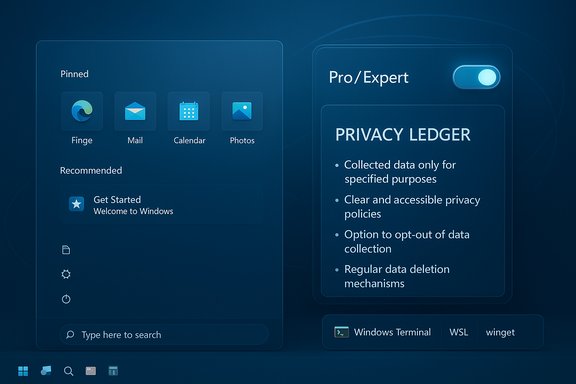
Plummer’s fixes are surgical, not revolutionary. They are small changes in defaults, discoverability, and transparency that would produce a qualitatively different experience for the technically proficient without taking away the friendly onboarding for novices.1) Ship a first‑class “Pro/Expert” mode (the clutch pedal)
- A single, discoverable system profile set at OOBE or from Settings that:
- Removes promotional placements and suggested apps.
- Disables web fallbacks for local search unless explicitly requested.
- Honors explicitly chosen defaults and does not auto‑reconfigure them.
- Exposes developer tooling (Windows Terminal, WSL, winget) as first‑class defaults.
2) A radical telemetry transparency system — the “privacy ledger”
- An always‑available log that records outbound telemetry events with:
- A plain‑English “why” for each item.
- Category muting that persists across updates unless explicitly re‑requested.
- Simple controls for per‑category opt-outs and clear documentation for when telemetry is required for security and servicing.
3) Restore clear local account choices at setup
- The OS should show a two‑choice screen: continue with a Microsoft account or continue with a local account — no dark patterns, no external connectivity requirement to decide. If the user chooses local, the OS should ask once and stop asking.
4) Safer updates: rollback-first semantics
- Rework update behavior so that:
- Updates are clearly explained in plain language before install.
- Rollback is a reliable one-click operation for feature updates in the first 30 days.
- Critical security patches are still prioritized, but non‑urgent feature pushes respect user windows.
5) Treat developer tooling as first-class
- Make Windows Terminal, PowerShell/PowerShell Core, WSL, ssh, tar, and winget accessible by default to professional installs.
- Put essential tools on PATH and make the console default intuitive for power users.
Why these fixes are plausible (and where the friction will be)
The technical work in Plummer’s plan is modest: it’s mostly defaults, discovery, and policy consolidation. Microsoft already ships components and admin tooling that can implement each recommendation. The real barriers are organizational and economic:- Many internal metrics (engagement, activation, service linkages) are tied to suggestions and upsells. Turning those off in a Pro mode reduces short‑term revenue or engagement KPIs.
- Telemetry is vital for security, driver compatibility, and diagnosing regressions on a massive hardware matrix; Microsoft will need to balance auditability with the ability to respond quickly to field issues.
- Enterprise and OEM relationships complicate a one‑size‑fits‑all approach. Some partners expect promotional positioning; others need centralized policy control.
The agentic OS controversy: AI, agents, and user pushback
While Plummer focuses on trust and configurability, Microsoft executives are publicly pushing an AI‑first vision for Windows. Pavan Davuluri, head of Windows at Microsoft, described Windows as “evolving into an agentic OS” that connects devices, cloud, and AI to unlock intelligent productivity. The announcement sparked a fierce public backlash with users warning that an “agentic” system — software that takes autonomous action — risks making unexpected changes and eroding control. Independent coverage and social reactions show that many users would prefer Microsoft to fix reliability, privacy and control issues before layering on proactive AI agents. Plummer’s recommendations are a direct counterweight: give users a proven, predictable environment first; then expose optional AI agents behind explicit, consented controls. That sequence — trust first, automation second — is the core of his design ethic.What Microsoft could do next: a practical roadmap
- Ship a discoverable “Pro/Expert” toggle in OOBE and Settings with clear explanations of what it changes.
- Build and expose a privacy ledger inside Settings → Privacy & security: a human‑readable audit of outbound telemetry and reasons, plus durable muting toggles.
- Reintroduce a straightforward local account path in OOBE and document it publicly to remove ambiguity.
- Harden rollback semantics: a reliable, user‑visible rollback path for feature updates in the first 30 days, with clear state snapshots.
- Make developer tools discoverable and default-enabled in Pro mode: Terminal, WSL, winget, ssh on PATH.
- Treat promotional placements as opt‑in for Pro mode and explain the revenue trade‑offs publicly.
What users and admins can do today (practical steps)
While waiting for Microsoft to adopt wholesale reforms, users and admins can take concrete steps to reduce friction now:- Disable Start menu recommendations: Settings → Personalization → Start → turn off “Show recommendations.”
- Audit and reduce telemetry: Settings → Privacy & security → Diagnostics & feedback; install the Diagnostic Data Viewer to inspect what’s being sent.
- Use Group Policy or registry tweaks on Pro/Enterprise machines to disable Microsoft consumer experiences and limit upsell prompts. Multiple how‑to guides document these steps.
- For fresh installs, advanced users can still use known OOBE bypasses or scripted unattended installs (where legal and policy‑compliant for the machine in question), understanding Microsoft has been closing some workarounds in preview builds.
- Harden update behavior by using active hours, pause options and staging updates through Windows Update for Business or other enterprise update rings to get time to validate builds before broad deployment.
Risks, tradeoffs, and cautionary notes
- Telemetry is not just monetization: a significant portion of diagnostics is essential to keep Windows secure across billions of hardware combinations. Any muting or blocking must be designed so that critical security telemetry remains functional and auditable. That tension will require careful engineering and legal oversight.
- Removing promotional pathways reduces engagement metrics that fund ecosystem investments. Microsoft will need a plan to offset those commercial incentives or accept a slower cadence of monetization tied to platform integrity rather than pushy UI placements.
- Agentic/AI features offer real productivity gains but also magnify risk if they act autonomously without clear guardrails. If Microsoft pursues an agentic vision, pairing that with the kind of “expert mode” Plummer demands is critical: give users ways to opt out, inspect agent actions, and revoke permissions. Public backlash to agentic messaging has already been widespread, showing the political risk of rushing autonomous features onto the desktop.
- Some of Plummer’s suggestions are organizational rather than technical: shipping them requires alignment among product, legal, finance, and platform teams. Expect friction and long timelines if the company does not prioritize trust metrics.
Conclusion
Dave Plummer’s diagnosis is less about nostalgia and more about contractual clarity: users gave their machines to Microsoft as trusted tools; in recent years those machines increasingly push marketing, cloud tie‑ins, and opaque telemetry into the foreground. Plummer’s lineup of pragmatic fixes — a discoverable Pro/Expert mode, a plain‑English privacy ledger, clearer local‑account choices, rollback‑friendly update semantics, and first‑class developer tooling — is an engineering roadmap that could restore control and trust without sacrificing Windows’ mainstream accessibility.The work required is not primarily technical; it is a product and organizational decision to treat user attention and consent as sacred. If Microsoft prioritizes trust and gives power users a durable, auditable environment, it can address the “why Windows sucks” sentiment not by shrinking the platform’s ambitions, but by restoring choice — letting the machine serve the person who owns it, rather than treating the desktop as prime ad space or an enrollment funnel for services.
Source: ZDNET Why Windows sucks and how to fix it, according to a former Microsoft engineer
