

Microsoft’s latest Windows Update guidance says devices that cannot scan, download, or validate updates are often being stopped by proxy, firewall, VPN, or DNS rules that fail to pass Microsoft’s update subdomains through untouched. The practical message is blunt: Windows Update is not just “web traffic,” and treating it like ordinary HTTPS can break it. For admins, the fix is less about opening the floodgates and more about understanding where security inspection collides with Microsoft’s own trust model.
For years, the folklore around Windows Update troubleshooting has been almost comically mechanical: check the service, clear the cache, restart the machine, try again. That advice still has its place, but it misses the architecture of modern Windows servicing. Today’s Windows Update path is a distributed, certificate-bound, policy-aware system that depends on DNS, TLS validation, endpoint reachability, and sometimes WSUS or cloud management layers all lining up at the same time.
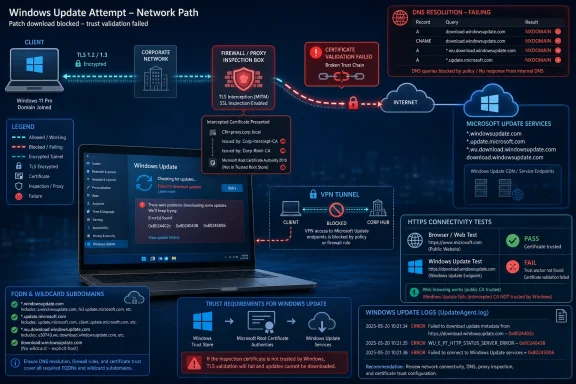
That is why Microsoft’s emphasis on proxy and firewall configuration matters. The failure mode is not always a broken Windows client. In many enterprise networks, the client is doing exactly what it was designed to do: refusing to trust a connection that looks like Windows Update from the outside but has been cryptographically altered in the middle.
This is the uncomfortable twist for security teams. A firewall or secure web gateway that improves visibility for ordinary browsing can become the thing that prevents machines from receiving security fixes. The problem is not that inspection is inherently bad; it is that some Microsoft update traffic is deliberately resistant to being inspected in the usual man-in-the-middle fashion.
Windows Update is therefore a useful case study in the limits of enterprise interception. The more Windows depends on pinned trust relationships and cloud-hosted servicing endpoints, the less realistic it becomes to treat every outbound TLS connection as something the organization can transparently decrypt, re-sign, and forward.
Windows Update is less accommodating. Microsoft’s guidance says the Windows Update client checks that the server certificate chains to a Windows Update trust anchor, not merely to some root the local device happens to trust. That is the difference between a browser accepting the proxy’s certificate and Windows Update deciding the connection is not authentic.
The design choice is not incidental. Update infrastructure is a high-value target because it sits at the privileged intersection of code distribution, operating system maintenance, drivers, and security remediation. If an attacker can tamper with update traffic, the potential blast radius is enormous. Microsoft’s certificate pinning is meant to reduce that risk by narrowing the set of certificates Windows Update will accept.
But good security design can look like operational failure when the network is not configured for it. A proxy that silently replaces certificates may be complying with corporate policy while violating the assumptions of the Windows Update client. The device then disconnects, logs an error, and leaves the administrator staring at a patching problem that was created by a control intended to reduce risk.
That is the core argument behind Microsoft’s post: stop trying to “fix” Windows Update by testing one endpoint in isolation. The update protocol involves multiple services and multiple names. A successful connection to one Microsoft host does not prove the full servicing path is healthy.
That distinction matters because Microsoft’s update infrastructure is not a single box called “Windows Update.” It is a collection of internet-hosted services used to discover, validate, download, and install many types of updates. Monthly cumulative updates are only one part of the picture; driver updates, .NET Framework updates, model updates, and other servicing payloads may all use the broader update plumbing.
Microsoft’s example is telling. A wildcard such as
That is why this issue can appear suddenly in otherwise stable environments. The organization may not have changed anything visible to the desktop team. Microsoft may have adjusted a hostname, a subdomain path, or a backend service dependency, and a proxy policy that was always too narrow finally becomes exposed.
This is also where DNS filtering products can create ambiguous symptoms. If a device cannot resolve a Windows Update service name, the update client may report a name resolution failure rather than an authentication failure. To the user, both look like “Windows Update is broken.” To the admin, they point to very different parts of the network.
The error
The error
The more interesting errors are
For IT teams, this is the most useful part of the guidance. The codes do not magically fix the problem, but they reduce the troubleshooting surface. They tell you whether to interrogate DNS, firewall reachability, proxy behavior, or certificate inspection rather than performing the traditional sequence of cache resets and service restarts.
Some VPN providers or configurations block update-related DNS lookups or high-volume downloads to protect network capacity. That is understandable from a provider’s perspective. Windows updates can be large, bursty, and multiplied across thousands of devices if every endpoint is forced through the same tunnel.
But from a security perspective, blocking or mishandling update traffic is a dangerous optimization. If remote devices only reliably update when disconnected from VPN, administrators inherit a compliance problem disguised as a bandwidth strategy. Users may remain connected all day, close the lid at night, and never give the machine a clean update path.
The better model is intentional routing. Organizations should decide whether Windows Update traffic goes directly to Microsoft, through a known proxy with proper pass-through exceptions, through Delivery Optimization, or through managed update infrastructure. What fails is the half-designed middle ground where update traffic is neither explicitly supported nor cleanly blocked.
That ambiguity is especially painful for help desks. A device can appear healthy, domain-joined, compliant with endpoint protection, and connected to the corporate network while still being unable to complete an update scan. The VPN icon becomes a symbol of trust to the user and a source of hidden routing complexity to the administrator.
But WSUS is not a license to ignore transport security. Microsoft has spent years pushing administrators toward TLS-protected WSUS configurations and, in Configuration Manager environments, certificate pinning for update scans. The direction of travel is clear: whether the update service is Microsoft-hosted or internally managed, the scan and metadata path should be protected against tampering.
This creates a different operational burden. Instead of allowing recursive Microsoft update subdomains through a proxy, WSUS administrators must ensure clients trust the WSUS server’s TLS configuration and that proxies or firewalls do not interfere with that pinned relationship. The problem moves inward, but it does not disappear.
The subtle risk is that some organizations treat WSUS as legacy plumbing and leave it running with assumptions inherited from older Windows servicing eras. That can work until newer client behavior, tighter certificate checks, or proxy-dependent scan paths expose weak configuration. The update chain is only as trustworthy as the path the client actually uses.
WSUS also does not eliminate the need to think about upstream connectivity. The WSUS server itself still needs to synchronize with Microsoft Update unless it receives content through another controlled process. A firewall problem may therefore move from thousands of clients to a smaller number of servers, but it remains a firewall problem.
That is how simple fixes become long incidents. If the desktop team does not know which secure web gateway policy applies, it may keep troubleshooting the client. If the network team does not know Windows Update pins certificates, it may insist the proxy certificate is trusted and therefore not the problem. If the security team treats all bypass requests as evasions, it may reject the very exception needed to maintain patch hygiene.
A mature approach starts with shared language. Windows Update traffic that requires pass-through is not the same as arbitrary internet access. Allow-listing Microsoft’s documented update FQDNs is not an admission that perimeter controls have failed. It is an acknowledgment that some security-critical systems enforce their own cryptographic checks and must not be broken by generic inspection.
There is still room for control. Organizations can log connection metadata, restrict destinations by FQDN, use update rings, manage deadlines through Windows Update for Business or Intune, and rely on WSUS or Configuration Manager where appropriate. What they cannot safely do is assume that decrypting and re-signing every TLS session is compatible with every Microsoft service.
The best firewall rule is therefore not the broadest one. It is the one that reflects how the service actually works. For Windows Update, that means respecting recursive subdomains, allowing required endpoints to remain certificate-authentic, and validating the outcome through Windows Update logs rather than through a single browser or curl test.
But the simplicity is deceptive because the change challenges a common enterprise habit. Many organizations have spent years centralizing visibility through inspection boxes and assuming that anything encrypted but not decrypted is a blind spot. Windows Update forces a more nuanced view: some encrypted traffic is safer precisely because it remains end-to-end authenticated.
That does not mean admins should casually bypass inspection for every Microsoft domain. The point is narrower and more defensible. Update infrastructure is part of the operating system’s security boundary. If the client is designed to reject altered certificates, then the network needs to accommodate that design rather than fight it.
The duplicated structure of Microsoft’s own post, as circulated in some feeds, almost accidentally reinforces the point. The message repeats because the failure pattern repeats: DNS blocked here, TLS inspection there, VPN routing somewhere else, WSUS assumptions in another corner. Windows Update is a distributed service, and distributed services fail at the seams.
For Windows enthusiasts at home, the takeaway is simpler. If updates fail only behind a VPN, security suite, DNS filter, or “privacy” firewall, disable that layer temporarily as a diagnostic step and inspect its rules. For sysadmins, the advice is broader: do not treat update failures as endpoint superstition until the network path has been proven clean.
Here is the practical shape of that work:
Windows Update’s stubbornness is the point: it is supposed to distrust impostors, even well-intentioned ones wearing a corporate proxy certificate. The next phase of Windows administration will belong to teams that stop treating that distrust as a nuisance and start designing their networks around it, because the machines that cannot verify their updates are the machines that will eventually fall behind.
Source: Microsoft - Message Center Configuring firewall and proxies for smooth Windows updates - Windows IT Pro Blog
 Windows Update Is Now a Trust Chain, Not Just a Download Pipe
For years, the folklore around Windows Update troubleshooting has been almost comically mechanical: check the service, clear the cache, restart the machine, try again. That advice still has its place, but it misses the architecture of modern Windows servicing. Today’s Windows Update path is a distributed, certificate-bound, policy-aware system that depends on DNS, TLS validation, endpoint reachability, and sometimes WSUS or cloud management layers all lining up at the same time.That is why Microsoft’s emphasis on proxy and firewall configuration matters. The failure mode is not always a broken Windows client. In many enterprise networks, the client is doing exactly what it was designed to do: refusing to trust a connection that looks like Windows Update from the outside but has been cryptographically altered in the middle.
This is the uncomfortable twist for security teams. A firewall or secure web gateway that improves visibility for ordinary browsing can become the thing that prevents machines from receiving security fixes. The problem is not that inspection is inherently bad; it is that some Microsoft update traffic is deliberately resistant to being inspected in the usual man-in-the-middle fashion.
Windows Update is therefore a useful case study in the limits of enterprise interception. The more Windows depends on pinned trust relationships and cloud-hosted servicing endpoints, the less realistic it becomes to treat every outbound TLS connection as something the organization can transparently decrypt, re-sign, and forward.
TLS Inspection Meets Its Least Forgiving Customer
TLS inspection is a familiar feature in corporate networks. A proxy intercepts an HTTPS connection, presents a locally trusted certificate to the client, opens its own connection to the destination, and gives the organization a chance to enforce policy. For browsers and many line-of-business apps, this often works because the client trusts the organization’s root certificate.Windows Update is less accommodating. Microsoft’s guidance says the Windows Update client checks that the server certificate chains to a Windows Update trust anchor, not merely to some root the local device happens to trust. That is the difference between a browser accepting the proxy’s certificate and Windows Update deciding the connection is not authentic.
The design choice is not incidental. Update infrastructure is a high-value target because it sits at the privileged intersection of code distribution, operating system maintenance, drivers, and security remediation. If an attacker can tamper with update traffic, the potential blast radius is enormous. Microsoft’s certificate pinning is meant to reduce that risk by narrowing the set of certificates Windows Update will accept.
But good security design can look like operational failure when the network is not configured for it. A proxy that silently replaces certificates may be complying with corporate policy while violating the assumptions of the Windows Update client. The device then disconnects, logs an error, and leaves the administrator staring at a patching problem that was created by a control intended to reduce risk.
That is the core argument behind Microsoft’s post: stop trying to “fix” Windows Update by testing one endpoint in isolation. The update protocol involves multiple services and multiple names. A successful connection to one Microsoft host does not prove the full servicing path is healthy.
The Real Culprit Is Often DNS, Not Port 443
Most enterprise firewall conversations begin with ports, and for Windows Update that instinct is only partly useful. Yes, the traffic largely rides over standard web protocols. But Microsoft’s warning is really about names: fully qualified domain names, recursive wildcard subdomains, and the difference between allowing a top-level pattern and allowing the actual service names Windows may use during a scan.That distinction matters because Microsoft’s update infrastructure is not a single box called “Windows Update.” It is a collection of internet-hosted services used to discover, validate, download, and install many types of updates. Monthly cumulative updates are only one part of the picture; driver updates, .NET Framework updates, model updates, and other servicing payloads may all use the broader update plumbing.
Microsoft’s example is telling. A wildcard such as
*.update.microsoft.com is not merely shorthand for one layer under the domain. For Windows Update purposes, the wildcard is recursive, meaning it can represent deeper subdomains as Microsoft changes hostnames for security, scale, and service design. A firewall rule that handles only the first obvious hostname may work until it does not.That is why this issue can appear suddenly in otherwise stable environments. The organization may not have changed anything visible to the desktop team. Microsoft may have adjusted a hostname, a subdomain path, or a backend service dependency, and a proxy policy that was always too narrow finally becomes exposed.
This is also where DNS filtering products can create ambiguous symptoms. If a device cannot resolve a Windows Update service name, the update client may report a name resolution failure rather than an authentication failure. To the user, both look like “Windows Update is broken.” To the admin, they point to very different parts of the network.
The Error Codes Tell a Network Story
Microsoft’s recommended diagnostic path starts with the Windows Update log, generated through PowerShell withGet-WindowsUpdateLog. That advice sounds mundane, but it is the difference between guessing at update repair rituals and identifying whether the device failed at DNS resolution, endpoint connection, redirector response, or certificate verification.The error
0x8024402c points toward name resolution trouble. In plain English, the device could not resolve the Windows Update server name to an IP address. That pushes the investigation toward DNS filtering, blocked FQDNs, malformed proxy rules, or VPN behavior that interferes with lookups.The error
0x80240438 means the name resolved, but the endpoint was unreachable. That is a different class of failure. It suggests a firewall, proxy, route, or policy allowed the client to learn where to go but prevented it from getting there.The more interesting errors are
0x80245006 and 0x80240437. Microsoft describes these as cases where the update interaction may have failed because the client could not validate the authenticity of the server, often because TLS inspection inserted a certificate that did not chain to the expected Windows Update trust anchor. In other words, the network did not simply block traffic; it changed the trust relationship.For IT teams, this is the most useful part of the guidance. The codes do not magically fix the problem, but they reduce the troubleshooting surface. They tell you whether to interrogate DNS, firewall reachability, proxy behavior, or certificate inspection rather than performing the traditional sequence of cache resets and service restarts.
VPNs Have Become an Accidental Patch Gatekeeper
Microsoft’s mention of VPNs may sound like a side note, but it is increasingly central to real-world patch reliability. Hybrid work has changed the path Windows clients take to reach Microsoft’s update services. A laptop may update on a corporate LAN one week, a home network the next, a hotel Wi-Fi network after that, and a full-tunnel VPN in between.Some VPN providers or configurations block update-related DNS lookups or high-volume downloads to protect network capacity. That is understandable from a provider’s perspective. Windows updates can be large, bursty, and multiplied across thousands of devices if every endpoint is forced through the same tunnel.
But from a security perspective, blocking or mishandling update traffic is a dangerous optimization. If remote devices only reliably update when disconnected from VPN, administrators inherit a compliance problem disguised as a bandwidth strategy. Users may remain connected all day, close the lid at night, and never give the machine a clean update path.
The better model is intentional routing. Organizations should decide whether Windows Update traffic goes directly to Microsoft, through a known proxy with proper pass-through exceptions, through Delivery Optimization, or through managed update infrastructure. What fails is the half-designed middle ground where update traffic is neither explicitly supported nor cleanly blocked.
That ambiguity is especially painful for help desks. A device can appear healthy, domain-joined, compliant with endpoint protection, and connected to the corporate network while still being unable to complete an update scan. The VPN icon becomes a symbol of trust to the user and a source of hidden routing complexity to the administrator.
WSUS Is Exempt From One Problem but Not From Trust
Windows Server Update Services changes the topology. In a WSUS environment, clients typically talk to an internal update server rather than reaching Microsoft’s public Windows Update endpoints directly. That means the same FQDN exceptions for Microsoft-hosted update services may not be required on every client path.But WSUS is not a license to ignore transport security. Microsoft has spent years pushing administrators toward TLS-protected WSUS configurations and, in Configuration Manager environments, certificate pinning for update scans. The direction of travel is clear: whether the update service is Microsoft-hosted or internally managed, the scan and metadata path should be protected against tampering.
This creates a different operational burden. Instead of allowing recursive Microsoft update subdomains through a proxy, WSUS administrators must ensure clients trust the WSUS server’s TLS configuration and that proxies or firewalls do not interfere with that pinned relationship. The problem moves inward, but it does not disappear.
The subtle risk is that some organizations treat WSUS as legacy plumbing and leave it running with assumptions inherited from older Windows servicing eras. That can work until newer client behavior, tighter certificate checks, or proxy-dependent scan paths expose weak configuration. The update chain is only as trustworthy as the path the client actually uses.
WSUS also does not eliminate the need to think about upstream connectivity. The WSUS server itself still needs to synchronize with Microsoft Update unless it receives content through another controlled process. A firewall problem may therefore move from thousands of clients to a smaller number of servers, but it remains a firewall problem.
The Security Team and the Endpoint Team Need the Same Map
The most practical lesson in Microsoft’s guidance is organizational rather than technical. Windows Update failures caused by proxy and firewall behavior sit between teams. Endpoint administrators see missing patches. Network teams see blocked or inspected traffic. Security teams see a policy exception request. Users see a restart that never seems to install anything.That is how simple fixes become long incidents. If the desktop team does not know which secure web gateway policy applies, it may keep troubleshooting the client. If the network team does not know Windows Update pins certificates, it may insist the proxy certificate is trusted and therefore not the problem. If the security team treats all bypass requests as evasions, it may reject the very exception needed to maintain patch hygiene.
A mature approach starts with shared language. Windows Update traffic that requires pass-through is not the same as arbitrary internet access. Allow-listing Microsoft’s documented update FQDNs is not an admission that perimeter controls have failed. It is an acknowledgment that some security-critical systems enforce their own cryptographic checks and must not be broken by generic inspection.
There is still room for control. Organizations can log connection metadata, restrict destinations by FQDN, use update rings, manage deadlines through Windows Update for Business or Intune, and rely on WSUS or Configuration Manager where appropriate. What they cannot safely do is assume that decrypting and re-signing every TLS session is compatible with every Microsoft service.
The best firewall rule is therefore not the broadest one. It is the one that reflects how the service actually works. For Windows Update, that means respecting recursive subdomains, allowing required endpoints to remain certificate-authentic, and validating the outcome through Windows Update logs rather than through a single browser or curl test.
The Easy Fix Is Only Easy After the Blame Moves Off the PC
Microsoft frames the remedy as relatively simple: configure proxies and firewalls to pass Windows Update connections through without generating their own TLS certificates, and ensure the relevant DNS hostnames and subdomains are allowed. In many environments, that may indeed be a short change-control item. Add or correct the FQDN patterns, exempt the traffic from TLS inspection, test the logs, and move on.But the simplicity is deceptive because the change challenges a common enterprise habit. Many organizations have spent years centralizing visibility through inspection boxes and assuming that anything encrypted but not decrypted is a blind spot. Windows Update forces a more nuanced view: some encrypted traffic is safer precisely because it remains end-to-end authenticated.
That does not mean admins should casually bypass inspection for every Microsoft domain. The point is narrower and more defensible. Update infrastructure is part of the operating system’s security boundary. If the client is designed to reject altered certificates, then the network needs to accommodate that design rather than fight it.
The duplicated structure of Microsoft’s own post, as circulated in some feeds, almost accidentally reinforces the point. The message repeats because the failure pattern repeats: DNS blocked here, TLS inspection there, VPN routing somewhere else, WSUS assumptions in another corner. Windows Update is a distributed service, and distributed services fail at the seams.
For Windows enthusiasts at home, the takeaway is simpler. If updates fail only behind a VPN, security suite, DNS filter, or “privacy” firewall, disable that layer temporarily as a diagnostic step and inspect its rules. For sysadmins, the advice is broader: do not treat update failures as endpoint superstition until the network path has been proven clean.
The Patch Pipeline Now Has Its Own Change-Control Checklist
The operational answer is not panic, and it is not opening unrestricted outbound access. It is a small but disciplined checklist that treats Windows Update as a critical dependency rather than background noise. The organizations that get this right will be the ones that document the path, test it regularly, and keep firewall rules aligned with Microsoft’s published endpoint behavior.Here is the practical shape of that work:
- Windows Update traffic that relies on Microsoft trust anchors should bypass TLS interception rather than be decrypted and re-signed by an enterprise proxy.
- Firewall and proxy policies should allow the documented Windows Update FQDNs, including recursive wildcard subdomains where Microsoft specifies that behavior.
- Windows Update logs should be used to distinguish DNS resolution failures, endpoint reachability failures, and certificate validation failures.
- VPN configurations should be checked for DNS filtering, blocked update destinations, and full-tunnel routing choices that unintentionally delay patching.
- WSUS environments still need deliberate TLS and certificate planning, even when clients do not connect directly to Microsoft’s public update services.
- Connectivity tests against a single Microsoft host should not be treated as proof that the full Windows Update protocol can complete successfully.
Windows Update’s stubbornness is the point: it is supposed to distrust impostors, even well-intentioned ones wearing a corporate proxy certificate. The next phase of Windows administration will belong to teams that stop treating that distrust as a nuisance and start designing their networks around it, because the machines that cannot verify their updates are the machines that will eventually fall behind.
Source: Microsoft - Message Center Configuring firewall and proxies for smooth Windows updates - Windows IT Pro Blog
