

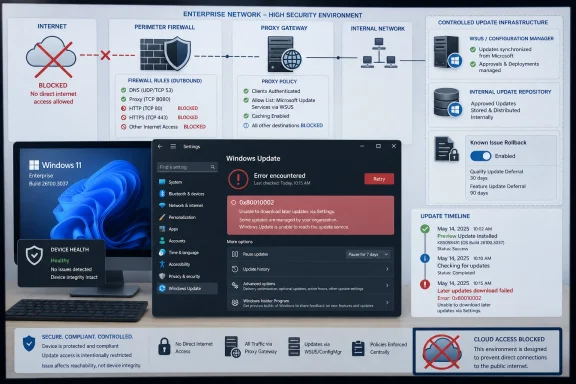
Microsoft has acknowledged a Windows Update failure affecting network-restricted environments after January 2026 optional preview updates, with affected Windows 11 and Windows Server 2025 systems unable to download later updates through Settings and returning error 0x80010002. The bug is narrow enough to sound like an edge case, but important enough to expose a recurring weakness in Windows servicing: the update pipeline increasingly assumes that machines can talk to Microsoft’s cloud on Microsoft’s terms. For administrators running air-gapped, firewalled, or tightly proxied estates, that assumption is not a nuisance. It is an operational risk.
The most important detail in Microsoft’s framing is what this bug is not. It is not a sign that affected devices are corrupted, compromised, or failing integrity checks. The systems may be otherwise healthy, and in some cases they may even have been able to pull the February 2026 security update before the failure became visible in later servicing cycles.
That distinction matters because Windows Update failures often send administrators down the most expensive troubleshooting path first. Error codes become a scavenger hunt through component store health, servicing stack state, proxy inspection logs, certificate chains, disk layout, and policy drift. Here, the signal is cleaner: the problem concerns the ability to download subsequent updates through Windows Update in restricted environments after installing January’s optional non-security preview updates.
The affected environments are exactly the ones where “just let the device reach the cloud” is not an acceptable workaround. Air-gapped systems, enclaves with strict egress rules, industrial control-adjacent networks, defense contractors, labs, and heavily firewalled enterprise segments exist because connectivity is risk. Their administrators do not casually open endpoints to satisfy a monthly servicing quirk.
Microsoft’s Known Issue Rollback guidance is therefore more than a technical mitigation. It is an admission that the faulty change must be neutralized inside the Windows servicing logic, not solved by weakening the perimeter around the affected machines.
That tradeoff can make sense for some environments. If a preview update fixes a painful production bug, waiting weeks for the security release may be worse than accepting the preview’s risk. But this incident reinforces why preview rings must remain small, observable, and reversible.
The uncomfortable part is that a preview update can introduce a failure that only becomes obvious later. According to the reporting around this case, affected devices might still obtain the February security update but then fail to download March, April, or later updates. That delay turns validation into a trap: a test ring that appears fine in the first month may still be carrying a servicing regression that only asserts itself when the next branch of the update sequence arrives.
This is where Windows’ cumulative update model cuts both ways. In theory, cumulative updates simplify life because each month supersedes the last and carries forward required fixes. In practice, the path from one monthly state to another still depends on servicing components, metadata interpretation, policy state, delivery paths, and Microsoft’s own staged mitigations. A cumulative update is not magic; it is a transaction. If the transaction layer breaks, the promise of cumulative simplicity does not help the machine that cannot fetch the package.
Modern enterprises segment aggressively. They route update traffic through WSUS, Configuration Manager, delivery optimization controls, content caches, private update workflows, allow lists, SSL inspection boundaries, and change windows that are enforced as much by compliance as by technology. Some systems are offline by design and updated only through controlled import processes. Others have internet access in theory but only through tightly governed paths that break when software silently changes its assumptions.
The phrase network-restricted environment can therefore hide a wide range of real-world deployments. It may mean a classified workstation with no internet route at all. It may mean a manufacturing cell where Windows systems exist behind a firewall maintained by an operations team that does not answer to corporate desktop engineering. It may mean a hospital segment where egress is restricted to reduce ransomware blast radius. It may mean a finance environment where update traffic must be inspectable, logged, and routed through approved infrastructure.
These are not edge cases from the perspective of enterprise Windows. They are some of the environments where Windows is most deeply entrenched, most difficult to patch, and most consequential when patching fails.
For consumer and unmanaged devices, KIR can often be delivered quietly through Windows Update. Users may never know that a problematic code path was rolled back. For managed enterprise devices, Microsoft typically provides special Group Policy templates that administrators deploy to affected machines. The policy disables the specific change that caused the regression, usually after policy refresh and a reboot.
That model is elegant when the affected machines can receive the rollback metadata automatically. It is less elegant when the very problem involves systems that cannot reliably download updates because of network restrictions. In those environments, KIR becomes another package that must be acquired, vetted, distributed, documented, and proven. It solves the regression, but it does not erase the operational cost of the regression.
There is also a messaging problem. To many administrators, a KIR policy feels backwards because enabling the rollback often means setting a policy to “Disabled,” depending on the template. That design reflects how the feature flag is wired, not how humans think under pressure during an outage. In a calm lab, that is a footnote. During a fleet-wide update failure, it is exactly the kind of detail that can waste hours.
That is why Microsoft’s acknowledgement matters. Without it, administrators seeing 0x80010002 after several monthly servicing attempts might reasonably suspect local corruption, proxy authentication, delivery optimization cache problems, certificate inspection, or a broken update agent. In tightly controlled networks, every one of those explanations is plausible.
The chronology narrows the field. The key pattern is installation of January 2026 optional non-security preview updates followed by later download failures in restricted environments. If March and April updates fail while the same process works elsewhere, the network team will naturally ask what changed. In this case, the better first question is what changed in Windows’ update behavior.
For IT teams, that means the playbook should start with scoping rather than repair. Which devices installed the January preview? Which of those sit behind restricted egress? Which update channel are they using? Which ones received February successfully but failed later? Which Windows versions map to the KIR packages Microsoft has provided? The faster an organization can answer those questions, the less time it spends performing ritualistic servicing repairs that were never going to fix the issue.
Microsoft has spent years pushing Windows toward a more continuously serviced model. That model has obvious security logic. Faster updates reduce exposure windows, cumulative releases simplify baselines, and cloud telemetry helps Microsoft detect regressions at scale. Known Issue Rollback itself depends on the idea that Microsoft can measure, decide, and distribute mitigation quickly.
But the environments most sensitive to update reliability are often the least able to participate in that feedback loop. Air-gapped machines do not produce timely telemetry. Firewalled machines may not receive automatic rollback metadata. Highly managed fleets may deliberately delay previews and security updates until validation is complete. The customers with the most rigorous controls are therefore also the customers most likely to experience servicing failures as manual incidents rather than invisible cloud mitigations.
This tension is not going away. If anything, it will become sharper as Windows adds more cloud-connected management, more staged rollout behavior, more AI-adjacent system components, and more security features that depend on current policy and reputation data. Microsoft can argue, fairly, that connected servicing improves outcomes for the average device. Enterprise administrators can reply, also fairly, that the average device is not the one they are paid to protect.
The rhythm is familiar. A monthly update ships. A subset of systems fails in a way that is not obvious from the error code. Microsoft acknowledges the issue after enough reports accumulate. A KIR, workaround, out-of-band update, or later cumulative fix follows. Administrators then have to decide whether to pause, roll forward, roll back, or carve out exceptions.
What makes this case especially aggravating is that it affects the path to future updates. A bug in printing, VPN connectivity, or USB behavior can be serious, but a bug that prevents later update downloads attacks the maintenance channel itself. It turns Windows Update from the remedy into the patient.
For security teams, that changes the risk calculation. A machine that cannot download March and April updates is not merely inconvenienced. It may drift out of compliance, miss vulnerability fixes, and trigger audit findings. If the environment is restricted because the systems are sensitive, the inability to patch becomes a concentrated risk in exactly the wrong place.
A preview ring should be small enough to inspect, representative enough to matter, and instrumented enough to catch failures that do not appear immediately. In this case, that means the validation period should not end when the preview installs successfully or when February’s security update appears to work. It should include the next servicing cycle, especially for devices behind restricted network paths.
That requires a change in what administrators measure. Update success is often reduced to installation status: installed, failed, pending reboot, superseded. But for restricted environments, download behavior is itself a testable dependency. Can the device discover updates? Can it download metadata? Can it retrieve payloads through the approved route? Can it do so again after the next cumulative update changes the servicing state?
Those checks are not glamorous, but neither is spending April reconstructing why a January preview silently poisoned the update path for a subset of locked-down machines.
The clean operational move is to treat the KIR as a controlled change. Download the appropriate policy package, import it into the management environment, target only affected systems, force or wait for policy refresh as appropriate, reboot where required, and then verify that update discovery and download behavior are restored. In a restricted network, the verification step is not optional. It is the point.
Administrators should also preserve the incident timeline. Which preview update was installed? When did February succeed? When did March or April fail? Which networks were affected? Which firewall or proxy paths were involved? Which KIR policy was applied? That documentation becomes useful if Microsoft later ships a permanent fix and the temporary rollback needs to be removed.
The goal is to avoid turning a Microsoft servicing regression into local configuration folklore. Six months from now, nobody wants to discover an unexplained rollback policy still sitting in Group Policy because it fixed “that update thing” during a rushed maintenance window.
If Microsoft wants those customers to trust Windows’ monthly cadence, it has to design update behavior as though restricted networks are first-class environments, not afterthoughts. Documentation should make dependencies explicit. Preview update notes should call out servicing-path changes that may affect constrained networks. KIR packages should be easy to identify by version and incident. Error codes should be paired with release-health guidance quickly enough to prevent days of speculative troubleshooting.
There is also a case for stronger offline validation from Microsoft itself. The company cannot reproduce every enterprise network, but it can test update flows under deny-by-default assumptions: no direct cloud reachability, strict proxying, delayed metadata, WSUS-like mediation, and staged import. Those are not hostile conditions. They are normal enterprise conditions.
The security irony is hard to miss. Microsoft urges customers to patch quickly because unpatched systems are dangerous. Customers restrict networks because overconnected systems are dangerous. When the patching mechanism falters in restricted environments, both sides of that argument collide.
For Windows administrators, the practical response is to assume that servicing health is now a continuous control. It is not enough to know that a machine is patched today. You need to know that it can become patched tomorrow through the approved path. That distinction is especially important in networks where direct remediation is slow, remote access is limited, and change windows are scarce.
This is also where Microsoft’s preview strategy needs humility. Optional previews are marketed as a way to get fixes early, but every preview that introduces a servicing regression teaches cautious customers to wait. That may be rational for individual organizations, but at ecosystem scale it undermines the feedback loop Microsoft relies on to improve quality before security updates ship.
 The Failure Is About Reachability, Not Trust
The most important detail in Microsoft’s framing is what this bug is not. It is not a sign that affected devices are corrupted, compromised, or failing integrity checks. The systems may be otherwise healthy, and in some cases they may even have been able to pull the February 2026 security update before the failure became visible in later servicing cycles.That distinction matters because Windows Update failures often send administrators down the most expensive troubleshooting path first. Error codes become a scavenger hunt through component store health, servicing stack state, proxy inspection logs, certificate chains, disk layout, and policy drift. Here, the signal is cleaner: the problem concerns the ability to download subsequent updates through Windows Update in restricted environments after installing January’s optional non-security preview updates.
The affected environments are exactly the ones where “just let the device reach the cloud” is not an acceptable workaround. Air-gapped systems, enclaves with strict egress rules, industrial control-adjacent networks, defense contractors, labs, and heavily firewalled enterprise segments exist because connectivity is risk. Their administrators do not casually open endpoints to satisfy a monthly servicing quirk.
Microsoft’s Known Issue Rollback guidance is therefore more than a technical mitigation. It is an admission that the faulty change must be neutralized inside the Windows servicing logic, not solved by weakening the perimeter around the affected machines.
Optional Preview Updates Keep Becoming Mandatory Lessons
The trigger point is January 2026’s optional non-security preview updates, which is exactly the class of release many conservative administrators treat with caution. Preview updates are useful because they give organizations early access to fixes that will usually roll into a later cumulative release. They are also where Microsoft’s servicing model asks enterprises to participate, implicitly or explicitly, in a broader pre-Patch Tuesday validation process.That tradeoff can make sense for some environments. If a preview update fixes a painful production bug, waiting weeks for the security release may be worse than accepting the preview’s risk. But this incident reinforces why preview rings must remain small, observable, and reversible.
The uncomfortable part is that a preview update can introduce a failure that only becomes obvious later. According to the reporting around this case, affected devices might still obtain the February security update but then fail to download March, April, or later updates. That delay turns validation into a trap: a test ring that appears fine in the first month may still be carrying a servicing regression that only asserts itself when the next branch of the update sequence arrives.
This is where Windows’ cumulative update model cuts both ways. In theory, cumulative updates simplify life because each month supersedes the last and carries forward required fixes. In practice, the path from one monthly state to another still depends on servicing components, metadata interpretation, policy state, delivery paths, and Microsoft’s own staged mitigations. A cumulative update is not magic; it is a transaction. If the transaction layer breaks, the promise of cumulative simplicity does not help the machine that cannot fetch the package.
Restricted Networks Are Not Strange Networks
It is tempting to file this as a niche failure affecting only unusually locked-down customers. That would be a mistake. Restricted networks are not exotic in 2026; they are normal in every serious risk-managed environment.Modern enterprises segment aggressively. They route update traffic through WSUS, Configuration Manager, delivery optimization controls, content caches, private update workflows, allow lists, SSL inspection boundaries, and change windows that are enforced as much by compliance as by technology. Some systems are offline by design and updated only through controlled import processes. Others have internet access in theory but only through tightly governed paths that break when software silently changes its assumptions.
The phrase network-restricted environment can therefore hide a wide range of real-world deployments. It may mean a classified workstation with no internet route at all. It may mean a manufacturing cell where Windows systems exist behind a firewall maintained by an operations team that does not answer to corporate desktop engineering. It may mean a hospital segment where egress is restricted to reduce ransomware blast radius. It may mean a finance environment where update traffic must be inspectable, logged, and routed through approved infrastructure.
These are not edge cases from the perspective of enterprise Windows. They are some of the environments where Windows is most deeply entrenched, most difficult to patch, and most consequential when patching fails.
Known Issue Rollback Is Useful, But It Is Not a Time Machine
Microsoft’s workaround relies on Known Issue Rollback, the servicing mechanism that can disable a problematic non-security change without forcing administrators to uninstall an entire update. KIR is one of the more pragmatic improvements Microsoft has made to Windows servicing in the last several years. It acknowledges a simple reality: a monthly update can contain dozens or hundreds of changes, and the cure for one bad change should not be removal of every good one.For consumer and unmanaged devices, KIR can often be delivered quietly through Windows Update. Users may never know that a problematic code path was rolled back. For managed enterprise devices, Microsoft typically provides special Group Policy templates that administrators deploy to affected machines. The policy disables the specific change that caused the regression, usually after policy refresh and a reboot.
That model is elegant when the affected machines can receive the rollback metadata automatically. It is less elegant when the very problem involves systems that cannot reliably download updates because of network restrictions. In those environments, KIR becomes another package that must be acquired, vetted, distributed, documented, and proven. It solves the regression, but it does not erase the operational cost of the regression.
There is also a messaging problem. To many administrators, a KIR policy feels backwards because enabling the rollback often means setting a policy to “Disabled,” depending on the template. That design reflects how the feature flag is wired, not how humans think under pressure during an outage. In a calm lab, that is a footnote. During a fleet-wide update failure, it is exactly the kind of detail that can waste hours.
The Error Code Is a Symptom, Not a Diagnosis
The reported error code, 0x80010002, is useful as a fingerprint but insufficient as an explanation. Windows Update error codes have always occupied a strange place in administrator culture. They are precise enough to search, automate around, and correlate, but often too generic to tell the story by themselves.That is why Microsoft’s acknowledgement matters. Without it, administrators seeing 0x80010002 after several monthly servicing attempts might reasonably suspect local corruption, proxy authentication, delivery optimization cache problems, certificate inspection, or a broken update agent. In tightly controlled networks, every one of those explanations is plausible.
The chronology narrows the field. The key pattern is installation of January 2026 optional non-security preview updates followed by later download failures in restricted environments. If March and April updates fail while the same process works elsewhere, the network team will naturally ask what changed. In this case, the better first question is what changed in Windows’ update behavior.
For IT teams, that means the playbook should start with scoping rather than repair. Which devices installed the January preview? Which of those sit behind restricted egress? Which update channel are they using? Which ones received February successfully but failed later? Which Windows versions map to the KIR packages Microsoft has provided? The faster an organization can answer those questions, the less time it spends performing ritualistic servicing repairs that were never going to fix the issue.
Microsoft’s Servicing Model Still Has a Perimeter Problem
The larger story is not that Microsoft shipped another update bug. Every operating system vendor does that. The larger story is that Windows servicing keeps colliding with the places where cloud-era assumptions meet perimeter-era governance.Microsoft has spent years pushing Windows toward a more continuously serviced model. That model has obvious security logic. Faster updates reduce exposure windows, cumulative releases simplify baselines, and cloud telemetry helps Microsoft detect regressions at scale. Known Issue Rollback itself depends on the idea that Microsoft can measure, decide, and distribute mitigation quickly.
But the environments most sensitive to update reliability are often the least able to participate in that feedback loop. Air-gapped machines do not produce timely telemetry. Firewalled machines may not receive automatic rollback metadata. Highly managed fleets may deliberately delay previews and security updates until validation is complete. The customers with the most rigorous controls are therefore also the customers most likely to experience servicing failures as manual incidents rather than invisible cloud mitigations.
This tension is not going away. If anything, it will become sharper as Windows adds more cloud-connected management, more staged rollout behavior, more AI-adjacent system components, and more security features that depend on current policy and reputation data. Microsoft can argue, fairly, that connected servicing improves outcomes for the average device. Enterprise administrators can reply, also fairly, that the average device is not the one they are paid to protect.
The Pattern Is Familiar Enough to Be Operationally Relevant
This incident lands after a run of Windows update problems that administrators will not have forgotten. Recent years have included update failures involving WSUS delivery, installation errors such as 0x80240069 and 0x800f0922, recovery environment breakage, BitLocker surprises, and out-of-band fixes for regressions that escaped into production. Not all of those issues are technically related, but they rhyme operationally.The rhythm is familiar. A monthly update ships. A subset of systems fails in a way that is not obvious from the error code. Microsoft acknowledges the issue after enough reports accumulate. A KIR, workaround, out-of-band update, or later cumulative fix follows. Administrators then have to decide whether to pause, roll forward, roll back, or carve out exceptions.
What makes this case especially aggravating is that it affects the path to future updates. A bug in printing, VPN connectivity, or USB behavior can be serious, but a bug that prevents later update downloads attacks the maintenance channel itself. It turns Windows Update from the remedy into the patient.
For security teams, that changes the risk calculation. A machine that cannot download March and April updates is not merely inconvenienced. It may drift out of compliance, miss vulnerability fixes, and trigger audit findings. If the environment is restricted because the systems are sensitive, the inability to patch becomes a concentrated risk in exactly the wrong place.
Preview Rings Need Evidence, Not Faith
The obvious lesson is not “never install preview updates.” That is too simple, and many organizations do need preview fixes before the next Patch Tuesday. The better lesson is that preview updates should be treated as experiments with exit criteria.A preview ring should be small enough to inspect, representative enough to matter, and instrumented enough to catch failures that do not appear immediately. In this case, that means the validation period should not end when the preview installs successfully or when February’s security update appears to work. It should include the next servicing cycle, especially for devices behind restricted network paths.
That requires a change in what administrators measure. Update success is often reduced to installation status: installed, failed, pending reboot, superseded. But for restricted environments, download behavior is itself a testable dependency. Can the device discover updates? Can it download metadata? Can it retrieve payloads through the approved route? Can it do so again after the next cumulative update changes the servicing state?
Those checks are not glamorous, but neither is spending April reconstructing why a January preview silently poisoned the update path for a subset of locked-down machines.
The Workaround Belongs in Change Control, Not Chat
Microsoft’s KIR workaround gives administrators a path forward, but it should not be deployed casually. The affected versions reportedly include Windows 11 26H1, Windows 11 25H2, Windows 11 24H2, and Windows Server 2025, with version-specific rollback policies. That version specificity matters because applying the wrong policy to the wrong estate can create false confidence.The clean operational move is to treat the KIR as a controlled change. Download the appropriate policy package, import it into the management environment, target only affected systems, force or wait for policy refresh as appropriate, reboot where required, and then verify that update discovery and download behavior are restored. In a restricted network, the verification step is not optional. It is the point.
Administrators should also preserve the incident timeline. Which preview update was installed? When did February succeed? When did March or April fail? Which networks were affected? Which firewall or proxy paths were involved? Which KIR policy was applied? That documentation becomes useful if Microsoft later ships a permanent fix and the temporary rollback needs to be removed.
The goal is to avoid turning a Microsoft servicing regression into local configuration folklore. Six months from now, nobody wants to discover an unexplained rollback policy still sitting in Group Policy because it fixed “that update thing” during a rushed maintenance window.
The Real Test Is Whether Microsoft Designs for the Offline Minority
Microsoft’s public servicing posture often emphasizes broad population health. That makes sense for an ecosystem of hundreds of millions of devices. But enterprise confidence is built in the exceptions: the lab that cannot phone home, the server segment that updates only through controlled channels, the workstation fleet that sits behind a proxy with no tolerance for undocumented endpoints.If Microsoft wants those customers to trust Windows’ monthly cadence, it has to design update behavior as though restricted networks are first-class environments, not afterthoughts. Documentation should make dependencies explicit. Preview update notes should call out servicing-path changes that may affect constrained networks. KIR packages should be easy to identify by version and incident. Error codes should be paired with release-health guidance quickly enough to prevent days of speculative troubleshooting.
There is also a case for stronger offline validation from Microsoft itself. The company cannot reproduce every enterprise network, but it can test update flows under deny-by-default assumptions: no direct cloud reachability, strict proxying, delayed metadata, WSUS-like mediation, and staged import. Those are not hostile conditions. They are normal enterprise conditions.
The security irony is hard to miss. Microsoft urges customers to patch quickly because unpatched systems are dangerous. Customers restrict networks because overconnected systems are dangerous. When the patching mechanism falters in restricted environments, both sides of that argument collide.
January’s Preview Leaves a Longer Shadow Than January
The most damaging update bugs are not always the loudest ones. A broken recovery keyboard is dramatic. A BitLocker recovery prompt gets executive attention. A failed update download in a restricted environment is quieter, but it can be more corrosive because it erodes confidence in the maintenance process itself.For Windows administrators, the practical response is to assume that servicing health is now a continuous control. It is not enough to know that a machine is patched today. You need to know that it can become patched tomorrow through the approved path. That distinction is especially important in networks where direct remediation is slow, remote access is limited, and change windows are scarce.
This is also where Microsoft’s preview strategy needs humility. Optional previews are marketed as a way to get fixes early, but every preview that introduces a servicing regression teaches cautious customers to wait. That may be rational for individual organizations, but at ecosystem scale it undermines the feedback loop Microsoft relies on to improve quality before security updates ship.
The Windows Update Lesson Administrators Should Actually Keep
The immediate fix is procedural, but the lasting lesson is architectural. If your estate contains restricted Windows networks, update delivery is not merely a Microsoft service. It is part of your own infrastructure, with dependencies, failure modes, and recovery plans that deserve the same seriousness as identity or backup.- Organizations should identify which devices installed the January 2026 optional preview updates before assuming that later Windows Update failures are caused by local corruption or firewall drift.
- Administrators should map affected systems by Windows version before deploying Microsoft’s Known Issue Rollback policies, because the rollback packages are version-specific.
- Restricted-network validation should include later update discovery and download tests, not only successful installation of the preview update itself.
- Security and endpoint teams should treat update-channel failures as compliance risks, since systems that cannot download March, April, or later updates can quickly fall behind on vulnerability fixes.
- KIR deployment should be documented as a temporary mitigation so it can be removed or superseded when Microsoft ships a permanent resolution.
- Preview update rings should remain limited and observable, especially in environments where devices cannot automatically receive Microsoft’s cloud-delivered mitigations.
References
- Primary source: SC Media
Published: Wed, 20 May 2026 15:52:00 GMT
Microsoft addresses Windows Update failures in restricted environments | brief | SC Media
The failures occur in environments with strict network limitations, including air-gapped systems and heavily firewalled networks.www.scworld.com - Official source: learn.microsoft.com
Windows 11, version 24H2 known issues and notifications | Microsoft Learn
View announcements and review known issues and fixes for Windows 11, version 24H2learn.microsoft.com - Related coverage: windowslatest.com
Microsoft confirms four issues in Windows 11 25H2, but they're not a dealbreaker
Windows 11 25H2 started seeding to the public a few hours ago, but it’s already plagued with a couple of issues. As of September 30, Microsoft is aware of at least four issues in Windows 11 25H2, but don’t worry. I don’t think Windows 11 2025 Update will be a disaster like... www.windowslatest.com
- Official source: support.microsoft.com
- Related coverage: tomshardware.com
Microsoft rushes out emergency Windows 11 patch after botched update breaks Recovery — restores USB keyboard and mouse input inside WinRE for Windows 11 versions 24H2 and 25H2 | Tom's Hardware
KB5070773 fixes a WinRE bug introduced by October’s cumulative update.www.tomshardware.com - Related coverage: windowscentral.com
Microsoft's urgent update fixes Windows Recovery issues for versions 24H2 and 25H2 after KB5066835 mishap | Windows Central
Windows 11 update KB5070773 is now rolling out as an out of band patch that addresses a major issue with the Windows Recovery Environment on the latest version of the OS.www.windowscentral.com

- Related coverage: windowsreport.com
Windows 11's latest Insider build 26100.6718 (24H2) & 26200.6718 (25H2) fixes update error 0x80070002, Blue-ray playback issues & more
Windows 11 Insider build 26100.6718 and 26200.6718 fixes update error 0x80070002, plus Blu-ray playback, battery icon, and Settings crashes. windowsreport.com
- Related coverage: securityexpress.info
Microsoft Fixes WSUS Issue Blocking Windows 11 24H2 Update - Tech News
Microsoft acknowledges and resolves a WSUS issue (error 0x80240069) preventing Windows 11 24H2 deployment in enterprise environments via Known Issue Rollback.securityexpress.info - Related coverage: techradar.com
Oh dear - Microsoft Windows Firewall was found to be complaining about...Microsoft code? | TechRadar
Windows Firewall is flagging an issue with - Microsoftwww.techradar.com - Related coverage: borncity.com
Windows 11 24H2-25H2: Out-of-band Recovery Update KB5070762Born's Tech and Windows World
[German]Microsoft has released an out-of-band recovery update KB5070762 for Windows 11 24H2 and Windows 25H2 on October 20, 2025. This update is intended to…borncity.com - Related coverage: bleepingcomputer.com
Microsoft fixes Windows 11 24H2 updates failing with 0x80240069 error
Microsoft has resolved a known issue preventing the August 2025 Windows 11 24H2 cumulative update from being delivered via Windows Server Update Services (WSUS).www.bleepingcomputer.com
- Related coverage: computerbase.de
Windows 11 KB5070773: Notfall-Update für Problem im Wiederherstellungsmodus WinRE - ComputerBase
Mit dem Oktober-Update fehlte in Windows 11 der Maus- und Tastatur-Support für WinRE. Ein außerplanmäßiger Patch behebt das Problem.www.computerbase.de
- Related coverage: ahmandonk.com
Microsoft Konfirmasi Gangguan Windows Update pada Jaringan Terbatas (Restricted Networks) - Ahmandonk.com
Microsoft konfirmasi Windows Update gagal dengan error 0x80010002 pada jaringan terbatas & air-gapped pasca-update Januari 2026. Simak solusinya lewat KIR!ahmandonk.com - Related coverage: itpro.com
Microsoft issues fix for Windows 11 update that bricked mouse and keyboard controls in recovery environment – here's what you need to know | IT Pro
Yet another Windows 11 update has caused chaos for userswww.itpro.com
