

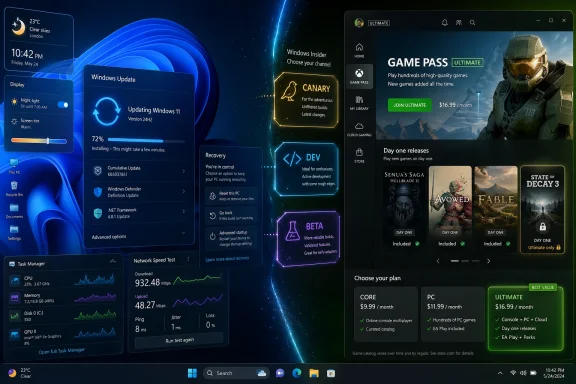
Microsoft spent this week tightening its grip on the Windows and Xbox ecosystems, but the story is bigger than a routine batch of patches and feature tweaks. On the Windows side, the company continued refining Windows Update, preview builds, recovery behavior, and Insider channel changes while also shipping a string of smaller quality-of-life improvements that matter more than they may first appear. On the gaming side, Microsoft reset the economics of Xbox Game Pass in a way that looks consumer-friendly on paper, even as it imposes a very visible trade-off around day-one access to major releases. The result is a week that says a lot about where Microsoft is placing its bets: more platform control, more subscription shaping, and more effort to make its operating systems and gaming services feel interconnected rather than separate.
Microsoft’s recent cadence has become a mix of steady platform maintenance and selective, high-impact product shifts. That matters because Windows, Xbox, and Game Pass are no longer isolated products in the company’s mind; they are increasingly components of a single experience stack, with Windows acting as the default computing layer and Xbox serving as the consumer-facing anchor for gaming. The week’s headlines reflect that strategy, even when the individual changes look modest in isolation.
The Windows 11 story remains a long transition rather than a single release moment. Microsoft has been using cumulative updates, staged feature rollouts, and Insider preview channels to gradually reshape the operating system without forcing one giant jump. That approach helps reduce risk, but it also creates a constantly moving target for users, enterprises, and enthusiasts who want to know whether a fix, feature, or regression belongs to the current stable channel or one of the many preview branches.
At the same time, Microsoft continues to invest in recovery and reliability plumbing, which is often the least glamorous part of the Windows story. Those fixes matter because they address the everyday pain points that define trust in the platform: failed restarts, driver regressions, update quirks, and the sort of low-level instability that can make a modern PC feel brittle. In a world where Windows is expected to support gaming, productivity, cloud workflows, AI features, and enterprise policy in one package, reliability has become a competitive feature.
The Xbox side of the story is more strategic and, frankly, more controversial. Game Pass has long been marketed as one of Microsoft’s strongest value propositions, but the company appears to be recalibrating what that value means and how much it should cost. A lower entry price can widen the funnel, but removing or restricting access to the biggest day-one launches changes the emotional math for subscribers. That tension defines the week’s gaming news far more than any single title addition does.
One notable thread this week was the focus on recovery updates and emergency fixes for repeated restarts. Those are the kinds of problems that immediately destroy user confidence because they turn a normal update cycle into a lockout scenario. Microsoft’s willingness to ship recovery-oriented updates suggests that the company is still trying to balance aggressive servicing with the very real risk of breaking machines that users depend on every day.
Another theme was upgrade hygiene. If users move from Windows 10 to Windows 11 without checking driver compatibility, they can end up with poor storage performance or other regression-like behavior that feels like an operating system bug even when the root cause is older hardware software. That is an uncomfortable truth for Microsoft: the Windows experience is only as good as the driver ecosystem underneath it.
This is why recovery updates and hotfix-style releases matter so much. They are not headline-grabbing in the way feature launches are, but they are essential to keeping the broader Windows update story credible. In practical terms, they reduce the chance that a routine patch turns into a support nightmare.
Key takeaways:
There is also a broader performance narrative developing around Windows 11. Microsoft appears to be preparing or at least signaling additional improvements that should make the shell and core experience feel smoother. That is important because Windows 11’s reputation has been shaped not only by its design choices, but also by the perception that it sometimes adds visual polish without always delivering matching responsiveness.
The other important element is the growing ecosystem of tweaks and helper tools around Windows 11. Whether it is Rufus making clean installs easier, Ventoy simplifying boot media creation, or utility apps helping users reclaim workflow control, the ecosystem is effectively filling gaps that Microsoft has not fully addressed. That tells us something about demand: users want a more flexible Windows, and they are willing to use third-party tools to get it.
The same logic applies to other Windows 11 quality-of-life adjustments. If Microsoft can improve the default experience enough that people reach for external tools less often, it strengthens the case for Windows as a polished platform rather than a collection of shells around legacy subsystems.
Highlights:
The Canary builds reportedly brought Task Manager improvements, sound settings changes, Xbox mode, and other refinements. Those are the kind of features that reveal Microsoft’s broader ambitions for Windows on both desktop and handheld-style devices. A more game-oriented or controller-friendly interface inside Windows hints at a future where PC gaming and console-like interaction feel more tightly integrated.
The Dev Channel updates, meanwhile, focused on Windows Update improvements and channel system changes, along with fixes. That is telling because it shows Microsoft still treats update mechanics as a live feature area. The company is not simply using Insider to test cosmetic changes; it is using it to rework how the platform itself behaves.
This week’s changes suggest the company is trying to make the pathway from experimental features to mainstream availability more predictable. If that works, it would be a major quality-of-life gain for everyone who tracks Windows development closely.
Notable points:
Microsoft has been steadily learning that accessibility features often benefit mainstream users as much as specialized ones. Night Light, captions, focus modes, and other “comfort” settings typically start as accessibility tools and end up as everyday workflow features. Screen Tint appears to fit that pattern, even if it is still early in development.
The likely significance is not the feature name itself, but the direction it implies. Windows is moving toward a more adaptive display environment, one that can respond to user preference, time of day, and possibly even usage context. That would fit Microsoft’s broader push to make Windows feel less static and more personalized.
It is also another sign that Microsoft understands the operating system as a place where small, repeated interactions matter. If a user opens Windows every day, then the subtleties of visual comfort become part of the platform’s overall quality.
Key ideas:
Rufus remains especially important because it gives users more control over installation media, including the ability to strip out components they do not want. That matters in an era when consumers increasingly expect a clean, minimal setup path rather than a one-size-fits-all installer. Ventoy plays a similar role by making multiboot workflows and media flexibility much easier.
Files, meanwhile, illustrates how a modern file manager can evolve without feeling trapped by the constraints of classic Windows Explorer behavior. Customizable toolbar buttons, theme switching shortcuts, and richer media tooltips are not revolutionary on their own, but together they create a more efficient and more pleasant daily experience.
Microsoft can ignore some of that pressure in the short term, but not indefinitely. The popularity of these tools gives the company an informal roadmap of what users value: control, clarity, and fewer unnecessary steps.
Practical effects:
Opera’s update added more streaming integrations and a native volume booster, which may sound niche but reflects a broader trend: browsers are competing on convenience features that reduce context switching. If the browser can surface media controls, embedded services, and productivity shortcuts, it becomes harder for users to justify separate apps for every task.
On the development side, Microsoft’s guidance around TypeScript performance improvements also signals a continuing focus on build speed and tooling efficiency. For developers, tooling performance is not a minor detail. Faster type-checking and better editor responsiveness can shave friction off every workday, especially in large codebases.
That is relevant to Microsoft because Edge, Windows, and its cloud services all benefit when the browser is the place users spend more time. But it is also relevant to rivals, because users increasingly choose browsers based on workflow value rather than brand loyalty.
Important details:
That trade-off matters because day-one access is one of the most emotionally powerful selling points in subscription gaming. It is not merely about savings; it is about feeling included at launch, when attention is highest and the community is most active. Removing that perk changes the value proposition in a way that may not be obvious until the next major release window.
Microsoft’s updated Xbox strategy and revised branding signal a broader attempt to simplify the company’s gaming identity. The introduction of a reportedly upcoming Game Pass Starter Edition suggests segmentation is becoming the new normal. Microsoft wants more pricing tiers, more targeted offers, and more control over which games sit behind which value proposition.
That can work if the company believes the market is too price-sensitive or if it wants to expand Game Pass adoption among users who were previously hesitant. It can also backfire if existing subscribers feel they are paying for less excitement, even if the monthly cost looks better.
Key implications:
This matters because Xbox has spent years trying to balance console hardware, cloud access, PC integration, and now portable-style experiences. In that environment, accessories become symbolic as well as functional. They remind consumers that Xbox is still a hardware ecosystem, not just a storefront or app.
The preorder timing also helps Microsoft create a launch-event feeling around Forza and keeps the brand cycle active. The accessory market may not be as headline-friendly as subscriptions or first-party releases, but it supports margins and keeps enthusiast users engaged. In a mature gaming market, that kind of loyalty signaling is valuable.
It also helps Microsoft compete with console makers and PC accessory brands that lean heavily on exclusivity and design language. Limited editions are a small but effective way to keep the hardware story alive.
Useful observations:
The UGREEN NASync DXP4800 Pro is particularly interesting because NAS devices are increasingly attractive to home users and small offices that want cloud-like storage without surrendering control to the cloud. A better processor, faster memory, and dual PCIe support make this kind of device more than simple network storage. It becomes a local infrastructure node, which aligns with the growing preference for hybrid computing.
The Aulumu M10 power bank review points to a different trend: portable power is becoming more specialized, more design-conscious, and more multi-device aware. When a charger includes MagSafe support, Apple Watch charging, and integrated cables, it reflects the expectation that consumers want fewer accessories that do more. That idea is mirrored in Windows and Xbox as well, where users want platforms that handle more tasks with less configuration.
That means Microsoft is not competing only against other operating systems. It is competing against the convenience standard set by the entire consumer tech market. If a power bank can combine features elegantly, users will expect the same kind of integration from software platforms.
Takeaways:
The most important thing to watch is whether these changes feel connected to users in a coherent way. Microsoft does not have a problem with having too few levers; it has a challenge in making sure the levers it pulls do not confuse the people it wants to serve. In 2026, that is as true for a Windows update as it is for a Game Pass subscription or a new Xbox accessory.
Source: Microsoft Weekly: Windows Update updated, Windows Insider updated, Xbox updated
 Overview
Microsoft’s recent cadence has become a mix of steady platform maintenance and selective, high-impact product shifts. That matters because Windows, Xbox, and Game Pass are no longer isolated products in the company’s mind; they are increasingly components of a single experience stack, with Windows acting as the default computing layer and Xbox serving as the consumer-facing anchor for gaming. The week’s headlines reflect that strategy, even when the individual changes look modest in isolation.The Windows 11 story remains a long transition rather than a single release moment. Microsoft has been using cumulative updates, staged feature rollouts, and Insider preview channels to gradually reshape the operating system without forcing one giant jump. That approach helps reduce risk, but it also creates a constantly moving target for users, enterprises, and enthusiasts who want to know whether a fix, feature, or regression belongs to the current stable channel or one of the many preview branches.
At the same time, Microsoft continues to invest in recovery and reliability plumbing, which is often the least glamorous part of the Windows story. Those fixes matter because they address the everyday pain points that define trust in the platform: failed restarts, driver regressions, update quirks, and the sort of low-level instability that can make a modern PC feel brittle. In a world where Windows is expected to support gaming, productivity, cloud workflows, AI features, and enterprise policy in one package, reliability has become a competitive feature.
The Xbox side of the story is more strategic and, frankly, more controversial. Game Pass has long been marketed as one of Microsoft’s strongest value propositions, but the company appears to be recalibrating what that value means and how much it should cost. A lower entry price can widen the funnel, but removing or restricting access to the biggest day-one launches changes the emotional math for subscribers. That tension defines the week’s gaming news far more than any single title addition does.
Windows Update and the Reliability Push
Windows Update continues to be one of the most important, and least appreciated, parts of Microsoft’s operating system strategy. It is not just a delivery mechanism for security patches anymore; it is the central control plane for feature rollouts, recovery fixes, driver distribution, servicing stack changes, and the gradual transformation of Windows 11 itself. The latest round of updates underscores how much Microsoft depends on that infrastructure to shape user experience over time.One notable thread this week was the focus on recovery updates and emergency fixes for repeated restarts. Those are the kinds of problems that immediately destroy user confidence because they turn a normal update cycle into a lockout scenario. Microsoft’s willingness to ship recovery-oriented updates suggests that the company is still trying to balance aggressive servicing with the very real risk of breaking machines that users depend on every day.
Another theme was upgrade hygiene. If users move from Windows 10 to Windows 11 without checking driver compatibility, they can end up with poor storage performance or other regression-like behavior that feels like an operating system bug even when the root cause is older hardware software. That is an uncomfortable truth for Microsoft: the Windows experience is only as good as the driver ecosystem underneath it.
Why servicing now matters more than ever
Windows servicing has become more complex because Microsoft is trying to do more in the background while showing users less of the machinery. That means more of the burden falls on update orchestration, package staging, and compatibility logic. When those systems work, users barely notice; when they fail, the failures are often hard to diagnose and easy to misattribute.This is why recovery updates and hotfix-style releases matter so much. They are not headline-grabbing in the way feature launches are, but they are essential to keeping the broader Windows update story credible. In practical terms, they reduce the chance that a routine patch turns into a support nightmare.
Key takeaways:
- Windows Update has become a product surface, not just a background service.
- Recovery fixes are increasingly important because they preserve trust in the update pipeline.
- Driver compatibility remains a major factor in whether Windows 11 feels fast or sluggish after an upgrade.
- Silent complexity is rising, even when user-facing change feels incremental.
Windows 11 Feature Refinement
Windows 11 is still in a phase of continuous refinement rather than dramatic reinvention. This week’s discussion around built-in tools and quality-of-life changes shows Microsoft trying to improve the operating system one friction point at a time. The built-in network speed test powered by Ookla is a perfect example: small, convenient, and far more useful than it sounds, because it reduces the need for users to hunt for third-party diagnostics.There is also a broader performance narrative developing around Windows 11. Microsoft appears to be preparing or at least signaling additional improvements that should make the shell and core experience feel smoother. That is important because Windows 11’s reputation has been shaped not only by its design choices, but also by the perception that it sometimes adds visual polish without always delivering matching responsiveness.
The other important element is the growing ecosystem of tweaks and helper tools around Windows 11. Whether it is Rufus making clean installs easier, Ventoy simplifying boot media creation, or utility apps helping users reclaim workflow control, the ecosystem is effectively filling gaps that Microsoft has not fully addressed. That tells us something about demand: users want a more flexible Windows, and they are willing to use third-party tools to get it.
The value of small native additions
A native network speed test may sound trivial, but it reflects a larger philosophical shift. Microsoft is increasingly trying to fold common troubleshooting actions into the OS itself so that users do not need to rely on browser tabs, vendor portals, or separate utilities. That is a sensible direction because it reduces friction at the exact moment users are trying to understand a problem.The same logic applies to other Windows 11 quality-of-life adjustments. If Microsoft can improve the default experience enough that people reach for external tools less often, it strengthens the case for Windows as a polished platform rather than a collection of shells around legacy subsystems.
Highlights:
- Built-in diagnostics reduce support friction.
- Performance improvements matter as much as new features.
- Third-party utilities remain essential because they expose what Windows still lacks.
- Convenience features can have outsized impact on everyday users.
Windows Insider Program Changes
The Insider program remains Microsoft’s laboratory for Windows, but this week’s builds pointed to more than just feature testing. Canary, Dev, and Beta continue to serve different purposes, and Microsoft’s changes to the channel system and update flow suggest it is still trying to make those lanes clearer without losing the flexibility that makes the program useful. That is a difficult balance, especially for power users who track builds closely and expect the naming to map cleanly to risk.The Canary builds reportedly brought Task Manager improvements, sound settings changes, Xbox mode, and other refinements. Those are the kind of features that reveal Microsoft’s broader ambitions for Windows on both desktop and handheld-style devices. A more game-oriented or controller-friendly interface inside Windows hints at a future where PC gaming and console-like interaction feel more tightly integrated.
The Dev Channel updates, meanwhile, focused on Windows Update improvements and channel system changes, along with fixes. That is telling because it shows Microsoft still treats update mechanics as a live feature area. The company is not simply using Insider to test cosmetic changes; it is using it to rework how the platform itself behaves.
A better Insider framework, or just a more complicated one?
Channel restructuring can be a win if it helps users understand risk levels and feature maturity. It can also become a source of confusion if the boundaries between Canary, Dev, Beta, and Release Preview feel too fluid. Microsoft knows that the Insider audience includes enthusiasts, testers, IT admins, and curious consumers, all of whom have different tolerance for instability.This week’s changes suggest the company is trying to make the pathway from experimental features to mainstream availability more predictable. If that works, it would be a major quality-of-life gain for everyone who tracks Windows development closely.
Notable points:
- Canary remains the most experimental lane.
- Dev is increasingly about platform mechanics, not just UI.
- Beta serves as the bridge between experimentation and stabilization.
- Channel clarity is becoming more important as Windows complexity grows.
Emerging UI and Eye-Comfort Features
One of the more interesting findings from the preview channel was Microsoft’s work on a new display-related feature reportedly called Screen Tint. On the surface, it sounds like a modest addition alongside Night Light, but it reflects a broader push toward visual comfort and more granular control over how Windows treats color, contrast, and fatigue. That may matter more than many users expect, especially for people who spend long hours in front of bright, high-contrast displays.Microsoft has been steadily learning that accessibility features often benefit mainstream users as much as specialized ones. Night Light, captions, focus modes, and other “comfort” settings typically start as accessibility tools and end up as everyday workflow features. Screen Tint appears to fit that pattern, even if it is still early in development.
The likely significance is not the feature name itself, but the direction it implies. Windows is moving toward a more adaptive display environment, one that can respond to user preference, time of day, and possibly even usage context. That would fit Microsoft’s broader push to make Windows feel less static and more personalized.
Why display comfort keeps coming back
Modern displays are sharper and brighter than ever, which makes software-level comfort controls more relevant, not less. Users want to reduce eye strain without giving up color fidelity or productivity. A better tinting system could give Microsoft another way to differentiate Windows from more rigid operating environments.It is also another sign that Microsoft understands the operating system as a place where small, repeated interactions matter. If a user opens Windows every day, then the subtleties of visual comfort become part of the platform’s overall quality.
Key ideas:
- Screen comfort is becoming a mainstream feature category.
- Accessibility-first design often becomes broadly useful.
- Adaptive UI controls are part of Windows’ long-term evolution.
- Small visual changes can have a big effect on daily usability.
Third-Party Utilities and the Power User Ecosystem
A recurring truth about Windows is that its best features are often delivered by the ecosystem around it. This week’s updates to tools like Rufus, Ventoy, and Files reinforce that pattern. Power users continue to rely on third-party applications to create bootable media, customize installs, manage files, and work around limitations that the operating system itself does not fully solve.Rufus remains especially important because it gives users more control over installation media, including the ability to strip out components they do not want. That matters in an era when consumers increasingly expect a clean, minimal setup path rather than a one-size-fits-all installer. Ventoy plays a similar role by making multiboot workflows and media flexibility much easier.
Files, meanwhile, illustrates how a modern file manager can evolve without feeling trapped by the constraints of classic Windows Explorer behavior. Customizable toolbar buttons, theme switching shortcuts, and richer media tooltips are not revolutionary on their own, but together they create a more efficient and more pleasant daily experience.
Why these tools matter to Windows itself
These utilities are not just substitutes for missing Microsoft features. They are feedback signals. When large numbers of users depend on third-party tools for installation, file management, or system customization, that suggests the native platform still leaves room for improvement.Microsoft can ignore some of that pressure in the short term, but not indefinitely. The popularity of these tools gives the company an informal roadmap of what users value: control, clarity, and fewer unnecessary steps.
Practical effects:
- Rufus makes custom installs easier.
- Ventoy improves boot media flexibility.
- Files provides a more configurable file browsing experience.
- User demand continues to favor more control, not less.
Browsers, Developer Tools, and Everyday Efficiency
This week also brought important updates outside the Microsoft stack, especially in browsers and developer tooling. Firefox 150.0 added improvements to Split View, PDF editing, translation, and tab sharing, which matters because browser innovation continues to overlap with operating-system-like behavior. As more work happens in the browser, the browser itself becomes part productivity suite, part document tool, and part communication layer.Opera’s update added more streaming integrations and a native volume booster, which may sound niche but reflects a broader trend: browsers are competing on convenience features that reduce context switching. If the browser can surface media controls, embedded services, and productivity shortcuts, it becomes harder for users to justify separate apps for every task.
On the development side, Microsoft’s guidance around TypeScript performance improvements also signals a continuing focus on build speed and tooling efficiency. For developers, tooling performance is not a minor detail. Faster type-checking and better editor responsiveness can shave friction off every workday, especially in large codebases.
The browser as a platform layer
Browsers are quietly becoming one of the most important productivity surfaces in Windows. That means browser features now compete with native app features, not just with each other. When a browser can split views, edit PDFs, translate content, and organize tabs better, it becomes more central to how users perceive the health of their PC.That is relevant to Microsoft because Edge, Windows, and its cloud services all benefit when the browser is the place users spend more time. But it is also relevant to rivals, because users increasingly choose browsers based on workflow value rather than brand loyalty.
Important details:
- Firefox is pushing deeper into utility features.
- Opera is leaning into media and convenience integration.
- TypeScript performance matters directly to developer productivity.
- Browser capabilities are now a meaningful part of desktop experience.
Xbox Game Pass Repricing and the Strategy Shift
The biggest gaming story of the week was Microsoft’s Game Pass reset, and it deserves to be understood as more than a simple price cut. Xbox Game Pass Ultimate reportedly dropped from $29.99 to $22.99, while PC Game Pass fell to $13.99 from $16.49. On paper, that looks like a win for subscribers, but the apparent discount comes with a major condition: no more day-one Call of Duty releases in the cheaper arrangement described this week.That trade-off matters because day-one access is one of the most emotionally powerful selling points in subscription gaming. It is not merely about savings; it is about feeling included at launch, when attention is highest and the community is most active. Removing that perk changes the value proposition in a way that may not be obvious until the next major release window.
Microsoft’s updated Xbox strategy and revised branding signal a broader attempt to simplify the company’s gaming identity. The introduction of a reportedly upcoming Game Pass Starter Edition suggests segmentation is becoming the new normal. Microsoft wants more pricing tiers, more targeted offers, and more control over which games sit behind which value proposition.
What lower prices really mean
Price cuts often sound consumer-friendly because they are easy to understand. But in subscription businesses, price is usually only one lever among many. If Microsoft is lowering the sticker price while narrowing access to premium release benefits, it is effectively reshaping the product into more clearly tiered slices.That can work if the company believes the market is too price-sensitive or if it wants to expand Game Pass adoption among users who were previously hesitant. It can also backfire if existing subscribers feel they are paying for less excitement, even if the monthly cost looks better.
Key implications:
- Lower pricing could broaden the subscriber base.
- Day-one access changes weaken one of Game Pass’s strongest hooks.
- Tier segmentation may become more aggressive.
- Brand simplification can improve clarity, but only if the value story stays strong.
Xbox Hardware, Accessories, and the Console Identity
Microsoft also used the week to spotlight new Xbox-branded accessories tied to Forza Horizon 6, including a limited-edition Xbox Wireless Controller and Headset. That may seem like a routine promotional tie-in, but it is actually part of a larger effort to keep Xbox hardware culturally visible even when the business conversation is dominated by services and pricing. Branded accessories keep the physical identity of Xbox alive in an increasingly subscription-centric world.This matters because Xbox has spent years trying to balance console hardware, cloud access, PC integration, and now portable-style experiences. In that environment, accessories become symbolic as well as functional. They remind consumers that Xbox is still a hardware ecosystem, not just a storefront or app.
The preorder timing also helps Microsoft create a launch-event feeling around Forza and keeps the brand cycle active. The accessory market may not be as headline-friendly as subscriptions or first-party releases, but it supports margins and keeps enthusiast users engaged. In a mature gaming market, that kind of loyalty signaling is valuable.
Why accessories still matter
A branded controller or headset does more than sell a product. It reinforces identity, builds emotional attachment, and gives fans a way to participate in a game launch beyond the software purchase itself. That is especially useful when Microsoft is trying to keep Xbox relevant across multiple screens and form factors.It also helps Microsoft compete with console makers and PC accessory brands that lean heavily on exclusivity and design language. Limited editions are a small but effective way to keep the hardware story alive.
Useful observations:
- Limited-edition gear strengthens brand identity.
- Accessory launches help fill the gaps between major releases.
- Hardware symbolism still matters in a services-first era.
- Collector appeal remains a real part of Xbox marketing.
Reviews, Media Devices, and the Consumer Electronics Layer
The week’s reviews offered a useful reminder that Windows and gaming coverage exist inside a wider consumer electronics ecosystem. Products like the UGREEN NASync DXP4800 Pro, Aulumu M10 power bank, and MIXX Analog Plus all speak to the same audience that follows Windows updates and Xbox strategy: users who care about hardware quality, convenience, and ecosystem fit. These products are not Windows-specific, but they shape the broader PC enthusiast experience.The UGREEN NASync DXP4800 Pro is particularly interesting because NAS devices are increasingly attractive to home users and small offices that want cloud-like storage without surrendering control to the cloud. A better processor, faster memory, and dual PCIe support make this kind of device more than simple network storage. It becomes a local infrastructure node, which aligns with the growing preference for hybrid computing.
The Aulumu M10 power bank review points to a different trend: portable power is becoming more specialized, more design-conscious, and more multi-device aware. When a charger includes MagSafe support, Apple Watch charging, and integrated cables, it reflects the expectation that consumers want fewer accessories that do more. That idea is mirrored in Windows and Xbox as well, where users want platforms that handle more tasks with less configuration.
The hardware ecosystem around Windows
The connection between these reviews and the Microsoft story is subtle but important. Consumers who buy NAS devices, power banks, and media players are often the same people who care about clean Windows installs, build stability, and gaming subscriptions. Their expectations are rising across the board.That means Microsoft is not competing only against other operating systems. It is competing against the convenience standard set by the entire consumer tech market. If a power bank can combine features elegantly, users will expect the same kind of integration from software platforms.
Takeaways:
- NAS devices reflect the shift toward local control and hybrid storage.
- Accessory design is becoming more multifunctional.
- Consumer expectations are shaped by the broader gadget market.
- Windows enthusiasts tend to care about the whole ecosystem, not just the OS.
Strengths and Opportunities
Microsoft’s week had a lot of moving parts, but the common thread is strategic coherence. The company is using Windows to improve reliability, using Insider builds to test future directions, and using Xbox and Game Pass to reshape its consumer gaming model. That creates real opportunities if execution stays disciplined.- Better servicing can restore trust in Windows Update.
- Recovery improvements can reduce the cost of failed patches.
- Insider experimentation can surface better UX ideas before they ship widely.
- Game Pass tiering could attract more price-sensitive users.
- Accessory launches help preserve Xbox’s hardware identity.
- Browser feature competition keeps the wider Windows ecosystem innovative.
- Third-party tools continue to extend Windows in ways users clearly value.
Risks and Concerns
The same changes that create opportunity also introduce tension. Microsoft risks alienating users if the company keeps lowering perceived value while increasing complexity, especially around subscriptions and update channels. There is also the evergreen danger that technical improvements arrive too slowly relative to user frustration.- Game Pass confusion could erode goodwill if pricing changes feel like a downgrade.
- Day-one release restrictions may weaken one of the service’s strongest selling points.
- Windows update regressions can undermine confidence even when the fixes are good.
- Driver-related performance issues may continue to hurt upgrade satisfaction.
- Too many Insider branches can confuse even experienced users.
- Feature fragmentation can make Windows feel inconsistent across channels.
- Reliance on third-party tools suggests gaps Microsoft still has not closed.
Looking Ahead
The next few weeks will show whether Microsoft’s adjustments are a temporary recalibration or the beginning of a more formal reset across Windows and Xbox. If the company can improve update reliability while preserving momentum in Game Pass and Insider innovation, it will have a much stronger story heading into the next product cycle. If not, the week’s changes may be remembered as a sign that Microsoft is still searching for the right balance between ambition and simplicity.The most important thing to watch is whether these changes feel connected to users in a coherent way. Microsoft does not have a problem with having too few levers; it has a challenge in making sure the levers it pulls do not confuse the people it wants to serve. In 2026, that is as true for a Windows update as it is for a Game Pass subscription or a new Xbox accessory.
- Windows Update reliability will remain a top trust issue.
- Insider channel changes may foreshadow broader UI and workflow shifts.
- Game Pass reactions will reveal whether subscribers accept the new trade-off.
- Accessory and hardware launches will test the staying power of Xbox branding.
- Third-party Windows tools will continue to influence what users expect from the platform.
Source: Microsoft Weekly: Windows Update updated, Windows Insider updated, Xbox updated
