

Microsoft will re-add the familiar year‑month date prefix to Windows Update titles after an unexpectedly fierce backlash from IT administrators and support staff who said the October change made triage and patch tracking harder across the enterprise.
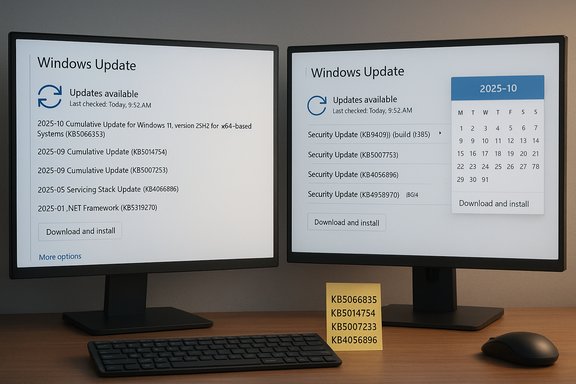
In late October Microsoft began rolling a server‑side simplification of how update names appear in Settings → Windows Update and Update history, stripping the long-standing YYYY‑MM date prefix, the explicit “Cumulative Update” wording on monthly quality releases, and some product/architecture text in favor of short, scannable labels that prioritize a human‑friendly classification plus the KB number and — when relevant — a compact build token. The new labels looked like “Security Update (KB5034123) (26100.4747)” or “Preview Update (KB5062660) (26100.4770)” instead of the verbose, calendar‑anchored names teams have used for years. The change was intended to reduce UI clutter, but it immediately triggered operational pain for admins, and Microsoft has now said it will restore the date (month and year) to update titles. This article explains what changed, why the date and “cumulative” tokens matter for IT operations, how Microsoft responded, and practical steps organizations should take to adapt their update management and documentation. It summarizes community reaction and evaluates the strengths and risks of the simplification and the reversal — all in plain language for sysadmins, help‑desk leads and Windows enthusiasts who rely on clear update metadata.
Why Microsoft made the change
Microsoft’s response, as reported by community and tech outlets, was to acknowledge the feedback and commit to restoring the month‑and‑year date prefix on Windows Update titles displayed to users. The company stated it would “ensure that the date (month and year) remain present on update titles,” while apparently leaving the decision on whether to restore other tokens (chiefly the “Cumulative Update” label and the explicit OS version text) open to further consideration — contingent on demand from administrators. That partial reversal preserves the company’s readability goal for casual users while acknowledging that the date prefix is operationally important for IT professionals.
Two independent threads of reporting backed up the sequence:
Short‑term actions (immediate):
For organizations: treat KB numbers and programmatic metadata (WSUS, Microsoft Update Catalog, Microsoft Graph) as the primary keys for patch tracking and compliance. Update runbooks, train help desks to use KB lookups, and consider building internal mappings to automatically reconstruct verbose titles when human context matters.
Microsoft’s partial reversal — restoring dates but leaving other labels optional — improves things, but the safest path for teams is to eliminate UI dependence altogether and anchor update management on structured metadata. That approach makes your patching posture resilient to future cosmetic experiments and keeps the focus on what matters most: timely, verifiable, auditable security and quality updates that protect users and organizations alike.
Source: Windows Latest After backlash, Microsoft restores dates in Windows 11 updates
 Overview
In late October Microsoft began rolling a server‑side simplification of how update names appear in Settings → Windows Update and Update history, stripping the long-standing YYYY‑MM date prefix, the explicit “Cumulative Update” wording on monthly quality releases, and some product/architecture text in favor of short, scannable labels that prioritize a human‑friendly classification plus the KB number and — when relevant — a compact build token. The new labels looked like “Security Update (KB5034123) (26100.4747)” or “Preview Update (KB5062660) (26100.4770)” instead of the verbose, calendar‑anchored names teams have used for years. The change was intended to reduce UI clutter, but it immediately triggered operational pain for admins, and Microsoft has now said it will restore the date (month and year) to update titles. This article explains what changed, why the date and “cumulative” tokens matter for IT operations, how Microsoft responded, and practical steps organizations should take to adapt their update management and documentation. It summarizes community reaction and evaluates the strengths and risks of the simplification and the reversal — all in plain language for sysadmins, help‑desk leads and Windows enthusiasts who rely on clear update metadata.Background: the naming convention admins rely on
For decades Microsoft’s servicing cadence for Windows used human‑readable update lines that combined:- A release month/year token in YYYY‑MM format (e.g., 2025‑10) so an update could be immediately linked to a Patch Tuesday or hotfix window.
- A descriptor that signaled whether the release was a Cumulative Update (the monthly quality rollup), a Preview (optional, non‑security), or an Out‑of‑Band fix.
- The target product or feature string (for example, “for Windows 11, version 24H2 for x64‑based Systems”).
- The KB article number and the specific build identifier in parentheses (for example, (KB5066835) (26200.6899)).
What Microsoft changed (and why)
On or around October 29, Microsoft started sending shorter, consumer‑facing titles to the Windows Update UI. Examples published by Microsoft and mirrored in community reports showed the switch from verbose names like:- 2025‑10 Cumulative Update for Windows 11, version 25H2 for x64‑based Systems (KB5066835) (26200.6899)
- Security Update (KB5034123) (26100.4747)
- Preview Update (KB5062660) (26100.4770)
Why Microsoft made the change
- Reduce line wrapping and messy, multi‑line entries in the Settings UI.
- Make update history more readable for casual users who mainly need the KB ID.
- Retain machine identifiers (KB/build) while removing duplicate or low‑value strings for non‑technical users.
Why the date and “cumulative” label matter to IT teams
The reaction from system administrators, help‑desk leads and patch managers was rapid and intense, and for good reasons:- Dates provide immediate temporal context. An update title that begins with YYYY‑MM ties a device’s installed update directly to a Patch Tuesday or a specific out‑of‑band emergency fix. Without it, teams must cross‑reference KB numbers or build tokens to determine when the update shipped.
- The word “Cumulative” signals the scope of the package. Monthly cumulative updates historically include all prior fixes for that servicing branch; a “Preview” or “Out‑of‑Band” label signals a different risk profile and deployment policy. Losing that token increases the chance of incorrect risk assessments.
- Many help desks and runbooks use pattern‑matching and human scanning of Update history. Line‑of‑sight recognition of an entry such as “2025‑10 Cumulative Update …” speeds first‑line triage and reduces time‑to‑resolution on tickets.
- Automated parsing and legacy scripts in some environments still rely on display titles as a quick check. Although robust tools parse KB IDs or use API calls and catalog data, smaller organizations or ad‑hoc support teams often depend on the UI text. When that text changes unexpectedly, operational friction increases immediately. Community threads and enterprise forums documented multiple examples of confusion and extra support overhead after the change.
The backlash and Microsoft’s response
Within hours and days of the change being widely noticed, hundreds of admins and forum contributors flagged problems: increased help‑desk calls, more time spent mapping KB IDs back to monthly cycles, and uncertainty when fielding compliance checks. Community posts called the change “a nightmare for service desk & help desk calls” and noted that dates were often the only immediately readable element for many non‑technical users. The volume and specificity of the feedback — across enthusiast forums and professional communities — drove the issue to Microsoft’s attention quickly.Microsoft’s response, as reported by community and tech outlets, was to acknowledge the feedback and commit to restoring the month‑and‑year date prefix on Windows Update titles displayed to users. The company stated it would “ensure that the date (month and year) remain present on update titles,” while apparently leaving the decision on whether to restore other tokens (chiefly the “Cumulative Update” label and the explicit OS version text) open to further consideration — contingent on demand from administrators. That partial reversal preserves the company’s readability goal for casual users while acknowledging that the date prefix is operationally important for IT professionals.
Two independent threads of reporting backed up the sequence:
- Community and forum documentation captured the rollout of the simplified titles and the ensuing pushback.
- Microsoft’s Release Health and update‑history tooling continue to enumerate releases using month‑anchored notation, showing that Microsoft still tracks and publishes dates as authoritative metadata.
Practical implications for IT teams and help desks
Microsoft’s decision to restore the date prefix is welcome but only one piece of the puzzle. IT organizations should plan and act now to reduce disruption and avoid future surprises.Short‑term actions (immediate):
- Update runbooks and knowledge base articles to identify KB numbers as the authoritative lookup for update details rather than relying on UI titles alone.
- Share a quick reference with help‑desk staff: how to convert a KB number or build token to a calendar month using Microsoft’s Release Health pages or the Microsoft Update Catalog.
- Re‑test existing scripts and monitoring rules that parse Update history titles. Where possible, change rules to match on KB ID or update GUID rather than free‑text title fragments.
- Communicate with end users: a brief internal note explaining that Microsoft adjusted the visible formatting and that KB numbers remain the canonical identifier will reduce confusion and ticket volume.
- Pilot any new WSUS/Intune filters or compliance checks to ensure they match the display semantics that the Windows Update client will show once the date restoration is rolled out.
- Consider creating an internal mapping table (KB → YYYY‑MM → update type → build) that can be consumed by dashboards and triage pages to reconstruct the familiar verbose title automatically.
- Prefer machine‑readable update metadata: move monitoring and compliance workflows from visual UI parsing to telemetry/graph APIs (for example, Microsoft Graph for update metadata) that expose explicit fields (release date, update type, cumulative flag). This decouples operations from display changes and makes tooling resilient to UI experiments.
- KB article numbers are immutable and searchable in Microsoft’s knowledge base and catalog.
- Programmatic routes (catalog, WSUS metadata, Intune/Microsoft Graph reporting) expose structured metadata fields that won’t be affected by future cosmetic UI experiments.
Strengths and weaknesses of Microsoft’s simplification (analysis)
Strengths- Improved readability for casual users: shorter labels reduce UI clutter and can be easier to scan on small devices.
- Consistency in consumer UI: a unified short format makes the Update history feel modern and user‑friendly.
- The underlying data remained intact in enterprise channels (Microsoft Update Catalog, WSUS), meaning automation and scripted environments should not break if they relied on back‑end metadata.
- Operational friction: removing the date and “cumulative” token from the immediate UI increased the cognitive load for help desks and admins who depend on quick, visual identification of release context. That translated to more time per ticket and more cross‑referencing to KB pages.
- Fragmented experience: delivering different titles to Settings vs. catalog/WSUS can cause mismatch confusion when staff switch between client UI and catalog pages. Some reports from international communities also noted localization inconsistencies.
- Reliance on KB lookup: requiring teams to map KB → month slows triage and introduces manual steps unless tooling is updated.
- Potential for future regressions: if Microsoft continues to iterate UI formatting server‑side, similar surprises could repeat unless Microsoft provides an explicit switch or admin toggle to control verbosity.
- The UX intent was defensible for average users, but the engineering and rollout underestimated the operational value of those seemingly redundant tokens for IT workflows. Microsoft’s swift course correction on the date prefix is a pragmatic compromise: preserve consumer readability while restoring the calendar context that professionals need.
How to adapt your tools and processes now
Actionable checklist for sysadmins and support managers:- Make KB the canonical key
Store and expose KB numbers prominently in dashboards, tickets, and triage scripts. KB IDs are stable and always resolvable. - Stop relying on UI text for compliance automation
When writing detection rules, query for KB ID or update GUID via your management platform (WSUS, Intune, SCCM, Microsoft Graph). Avoid brittle string matching. - Create a reusable KB‑to‑Month lookup table
Generate an internal mapping by parsing Microsoft Release Health or by downloading the monthly update listing from the Microsoft Update Catalog. Expose this to support staff as a quick lookup web page or a pinned knowledge‑base article. - Update help‑desk macros and training
Teach frontline agents to copy/paste the KB or build into a KB lookup process. Provide a one‑line script or bookmark that returns the canonical verbose title for the KB. - Add a “verbose mode” to internal tools
If you maintain an internal update‑inventory page, add a toggle that displays the reconstructed verbose title (YYYY‑MM + descriptor + OS version + KB + build) for those who prefer the old style. This is a simple UX fix that preserves the short client labels while restoring operational context.
What Microsoft could do next (recommended)
The controversy suggests a design pattern Microsoft could adopt to satisfy both audiences:- Keep the short title for consumer UI but add an opt‑in “Verbose Update Titles” toggle in Settings → Windows Update → Advanced that restores YYYY‑MM and cumulative/preview descriptors for managed devices.
- Expose an easy “Details” chevron on each update title in the Settings UI that pops open a small panel containing fields: Release date (YYYY‑MM‑DD), Update type (Cumulative/Preview/Security/OOB), KB ID, Target OS version, Build. That panel would satisfy power users without cluttering the main list.
- Publish a monthly machine‑readable mapping file (KB → YYYY‑MM → type → build) that third‑party tools can regularly ingest.
- Keep WSUS and Microsoft Update Catalog titles unchanged for an enterprise‑consistent baseline.
Risks and unresolved questions
- Timing and rollout granularity: Microsoft committed to re‑adding the month/year display — but it was not always clear in early reports whether the change would be immediate, staged, or limited to certain languages or SKUs. Teams should expect a staged rollout and validate on pilot rings.
- Other tokens remain optional: Microsoft did not commit to restoring the literal word “Cumulative” or the explicit OS version label in the visible title unless demand warranted it. Organizations that depend on those tokens should press for clarity or build internal mapping tools.
- Localization edge cases: reports from non‑English communities showed inconsistent translation or different behavior across update delivery channels. Local language teams should verify titles in their environment after the change.
Conclusion
Microsoft’s simplification of Windows Update titles was a reasonable UX experiment that underestimated the operational value of date prefixes and the “cumulative” token for administrators and frontline support. The company’s decision to restore the YYYY‑MM date prefix — after sustained, focused feedback — represents a pragmatic reconciliation of consumer UX goals and enterprise needs. However, this episode is a reminder that small UI changes can produce outsized operational consequences when they intersect with long‑standing administrative workflows and compliance practices.For organizations: treat KB numbers and programmatic metadata (WSUS, Microsoft Update Catalog, Microsoft Graph) as the primary keys for patch tracking and compliance. Update runbooks, train help desks to use KB lookups, and consider building internal mappings to automatically reconstruct verbose titles when human context matters.
Microsoft’s partial reversal — restoring dates but leaving other labels optional — improves things, but the safest path for teams is to eliminate UI dependence altogether and anchor update management on structured metadata. That approach makes your patching posture resilient to future cosmetic experiments and keeps the focus on what matters most: timely, verifiable, auditable security and quality updates that protect users and organizations alike.
Source: Windows Latest After backlash, Microsoft restores dates in Windows 11 updates
