

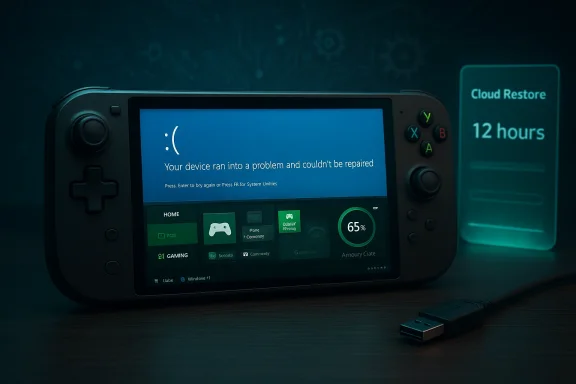
When a routine Windows 11 update left an Xbox Ally X handheld trapped in recovery and forced a 12‑hour Cloud Restore, it wasn’t just a timing annoyance — it exposed the brittle seams where Windows Update, recovery tooling, and a console‑style user expectation collide.
The ROG Xbox Ally family — including the higher‑end Xbox Ally X — launched as Microsoft and ASUS’s bet on a Windows‑based handheld gaming PC that folds Xbox functionality into a pocketable form factor. The devices were positioned to blur the line between console simplicity and PC openness, promising an Xbox‑first user experience on top of Windows 11.
At the same time, Windows 11’s update cadence and servicing model have become more complex, with feature updates, cumulative rollups, and occasional safeguard holds for compatibility. The 24H2 rollout and several cumulative updates produced notable compatibility frictions with games and system subsystems, prompting Microsoft to pause or limit distribution in some scenarios.
Those two realities — a PC OS that updates frequently and a handheld device expected to behave like a console — are the context for the incident described by the Windows Central writer: a Windows update left their Xbox Ally X in a state where Win11 would not boot, and the only recovery path they could access was a cloud reimage (Cloud Restore), which took more than 12 hours despite a high‑speed connection.
This pattern — updates that render recovery flows unusable or that require cloud‑based reimaging — has precedent in the wider Windows ecosystem over the last year, where an August cumulative rollup introduced a recovery regression that prevented Reset/Cloud Recover flows on affected builds. Microsoft eventually shipped an out‑of‑band fix (KB5066189) to restore Reset and cloud recovery services on impacted Windows 10 and Windows 11 builds.
The user’s experience is especially painful on a handheld that’s supposed to “just work” like a console: a long, opaque cloud process is exactly what hardware vendors and first‑time users hope to avoid.
But the underlying OS still behaves like a PC. That creates two fragile failure modes:
When a cumulative or servicing update changes the behavior of the Windows Recovery Environment (WinRE) or the Reset this PC flow, devices that rely on those flows for out‑of‑box recovery — including handhelds — can be left with only the cloud option, which may be slower or less resilient to network interruptions.
Community and forum records show that when recovery flows were broken at scale by a cumulative update, users reported lengthy and inconsistent cloud reimage windows until Microsoft’s fix propagated.
Strengths:
Windows’s scale and flexibility are enormous strengths, and a Windows‑based handheld that offers both PC openness and console ease would be compelling. To get there, stakeholders must accept tradeoffs: prioritize conservative servicing for consumer handheld SKUs, invest in recovery speed and reliability, and design update policies and UX flows that reduce the chance of a user‑facing catastrophe.
Microsoft has tools to address these issues — safeguard holds, emergency OOB fixes, and cloud recovery — and the company has used them in the past to repair broken recovery flows. But relying on reactive fixes after incidents damages trust. The industry needs proactive engineering: SKU‑aware rollout policies, joint OEM testing, and clearer UX around recovery progress.
Microsoft and OEMs have the technical tools to close the gap — but it will require deliberate policy, SKU‑level testing, improved recovery UX, and faster coordination when regressions appear. Until then, owners should be cautious about updates and prepare recovery options proactively.
If the goal is to genuinely make the next generation of Xbox experiences feel like a console that happens to run on Windows, the industry must prioritize reliability and recovery above feature velocity. The hardware can be brilliant; the software must catch up.
Source: Windows Central A buggy Windows 11 update locked my Xbox Ally X for 12 hours
 Background
The ROG Xbox Ally family — including the higher‑end Xbox Ally X — launched as Microsoft and ASUS’s bet on a Windows‑based handheld gaming PC that folds Xbox functionality into a pocketable form factor. The devices were positioned to blur the line between console simplicity and PC openness, promising an Xbox‑first user experience on top of Windows 11.At the same time, Windows 11’s update cadence and servicing model have become more complex, with feature updates, cumulative rollups, and occasional safeguard holds for compatibility. The 24H2 rollout and several cumulative updates produced notable compatibility frictions with games and system subsystems, prompting Microsoft to pause or limit distribution in some scenarios.
Those two realities — a PC OS that updates frequently and a handheld device expected to behave like a console — are the context for the incident described by the Windows Central writer: a Windows update left their Xbox Ally X in a state where Win11 would not boot, and the only recovery path they could access was a cloud reimage (Cloud Restore), which took more than 12 hours despite a high‑speed connection.
What happened: sequence and user experience
The account begins with a routine update and restart. After the update applied, the device presented the message “Your device ran into a problem and couldn’t be repaired.” Attempts to repair locally failed, and the recovery workflow directed the owner toward a Cloud Restore. The Cloud Restore completed only after an extended window of more than half a day, even though the handheld was connected via Ethernet to a gigabit line. The author reports that the failed update likely corrupted boot or system files, leaving WinRE and local repair tools ineffective.This pattern — updates that render recovery flows unusable or that require cloud‑based reimaging — has precedent in the wider Windows ecosystem over the last year, where an August cumulative rollup introduced a recovery regression that prevented Reset/Cloud Recover flows on affected builds. Microsoft eventually shipped an out‑of‑band fix (KB5066189) to restore Reset and cloud recovery services on impacted Windows 10 and Windows 11 builds.
The user’s experience is especially painful on a handheld that’s supposed to “just work” like a console: a long, opaque cloud process is exactly what hardware vendors and first‑time users hope to avoid.
Why this matters: the UX mismatch between consoles and Windows PCs
Handhelds are a usability promise: fast to pick up, simple to update, and instant to play. The Xbox Ally devices explicitly capitalized on that expectation by layering a console‑like UI over Windows 11 while advertising access to Game Pass and the PC game library.But the underlying OS still behaves like a PC. That creates two fragile failure modes:
- Windows Update is designed for a broad range of hardware and complex software stacks. It runs at a depth that can touch boot files, drivers, and firmware interactions — all places where a regression can block startup.
- Windows recovery tooling (WinRE, Reset, Cloud Restore) is powerful but historically has been tested against desktop and enterprise workflows; handheld OEM integrations, device‑specific management software, and third‑party firmware utilities complicate testing matrices.
Technical analysis: what likely went wrong
We can’t prove the exact fault on the author’s unit without vendor logs, but the incident aligns with several observable systemic issues:1. Update‑level regressions affecting recovery layers
Community reports and internal threads show that certain cumulative updates have interfered with Reset/Cloud Recover operations, sometimes producing installer or recovery errors that prevent local repair flows from completing. Microsoft issued an emergency out‑of‑band update in at least one such case to restore recovery functionality.When a cumulative or servicing update changes the behavior of the Windows Recovery Environment (WinRE) or the Reset this PC flow, devices that rely on those flows for out‑of‑box recovery — including handhelds — can be left with only the cloud option, which may be slower or less resilient to network interruptions.
2. Corrupted boot or system files
Failing to apply an update cleanly can leave the OS in a half‑configured state. Boot files, BCD entries, or system drivers might be replaced or removed incorrectly, producing the symptom “couldn’t be repaired.” On devices with custom vendor software (driver filtering layers, Armoury Crate‑like tooling, Xbox overlays), the number of moving parts increases the chance of a dependency mismatch during the update transaction.3. Cloud Restore transfer and orchestration delays
Cloud Restore requires downloading a recovery image from Microsoft’s services and then reapplying OEM drivers/configuration. That process is multi‑step and sensitive to CDN behavior, throttling policies, and local device handling. A gigabit link helps, but network speed alone is not a guarantee: CDN routing, Azure service load, encryption overhead, and the local device’s ability to write large images to internal NVMe storage all factor into elapsed time.Community and forum records show that when recovery flows were broken at scale by a cumulative update, users reported lengthy and inconsistent cloud reimage windows until Microsoft’s fix propagated.
The Xbox Ally X hardware and software interplay
The Ally X is powerful hardware; reviewers and early adopters have praised its performance and ambition. That said, its reliance on Windows 11 gives it unique risks that traditional consoles avoid.- Consoles use tightly coupled firmware and OS images with a single update channel and aggressive end‑to‑end QA for every SKU. The vendor controls the entire stack.
- The Ally X ships with Windows 11 and a vendor layer. That gives users PC flexibility but also adds complexity for servicing and recovery testing across a much larger device matrix.
Analysis of Microsoft’s update and recovery model: strengths and weaknesses
Windows Update and the servicing pipeline are powerful and flexible, supporting everything from security patches to complex feature updates. That model provides benefits for security and feature delivery, but it also introduces systemic risks when applied to consumer electronics that want a console‑like experience.Strengths:
- Centralized security and platform updates for tens of millions of devices.
- Cloud Restore and Reset this PC allow recovery without shipping devices back to OEMs.
- Safeguard holds let Microsoft limit rollout to vulnerable configurations when issues are detected.
- If a shipped cumulative update introduces a recovery regression, the impact is broad and tools for rollback/mitigation are limited until Microsoft ships OOB fixes. This happened before, and an out‑of‑band update was necessary to restore recovery flows.
- The user expectation on handhelds is instant — long cloud reimages create a poor experience that looks unacceptable compared with console behavior.
- OEM customizations (driver stacks, management software) increase the chance of edge cases that Microsoft’s general testing might miss.
Risks for Microsoft and OEMs if this pattern continues
- Erosion of consumer trust: Console buyers expect reliability; if Windows‑based handhelds regularly require long reimages after updates, many users will view the category as an "expensive work in progress," as the author put it.
- Increased support costs: Extended Cloud Restore times and failed local recovery flows will mean higher return rates, helpdesk volume, and warranty claims — a cost borne by OEMs and potentially Microsoft.
- Market fragmentation: If users start preferring alternative OS images (community ROMs, Linux distributions, or console‑style firmware) to avoid these problems, Microsoft’s vision of Windows as the core platform for handheld Xbox devices could be jeopardized. Community discussion around using alternate OS options on handhelds already exists in the broader ecosystem.
- Developer and ecosystem friction: Game developers and middleware vendors may respond to heavy update churn and compatibility potholes by adopting more conservative compatibility baselines, potentially limiting features or delaying releases on Windows handheld targets.
What Microsoft, ASUS, and other vendors should do next
The incident points to several concrete steps that would reduce risk and improve consumer confidence.1. Harden recovery flows for handheld SKUs
- Treat handheld SKUs as a separate QA target with console‑grade validation for update and recovery sequences.
- Add telemetry‑driven gating that detects increased failure rates for specific SKUs and automatically pauses rollouts or remediates faster.
2. Improve Cloud Restore speed visibility and resilience
- Provide clearer progress indicators, estimated time remaining, and retry strategies that handle intermittent CDN issues.
- Offer a local USB recovery image option for handheld users that is simple to create and boot, giving an offline fallback to the cloud flow.
3. Transparent messaging around updates
- Give Ally owners an explicit update policy: which channels (monthly cumulative, optional feature updates, OEM firmware) are recommended and which should be deferred.
- Offer an OEM‑curated "conservative" update ring for consumers who prefer stability over the latest features.
4. Joint testing and pre‑rollout safeguards
- Microsoft and OEMs should run joint pre‑release validation that includes the vendor’s management stack (Armoury Crate, device‑specific drivers, Xbox overlays) so updates are tested in the full production configuration.
Practical advice for owners of Windows handhelds today
- Pause non‑critical updates until the update is vetted for your device or until the vendor confirms compatibility.
- Create a recovery USB image or keep a pre‑created recovery media in case Cloud Restore is slow or blocked.
- Back up save files and any critical configuration off‑device regularly; don’t assume a cloud reimage will preserve user data.
- Follow OEM and Microsoft update advisories and join device‑specific forums — faster remediation and community workarounds often surface there first.
The long view: can Microsoft deliver a console‑grade Windows handheld?
Yes — but only if Microsoft and hardware partners rethink some assumptions.Windows’s scale and flexibility are enormous strengths, and a Windows‑based handheld that offers both PC openness and console ease would be compelling. To get there, stakeholders must accept tradeoffs: prioritize conservative servicing for consumer handheld SKUs, invest in recovery speed and reliability, and design update policies and UX flows that reduce the chance of a user‑facing catastrophe.
Microsoft has tools to address these issues — safeguard holds, emergency OOB fixes, and cloud recovery — and the company has used them in the past to repair broken recovery flows. But relying on reactive fixes after incidents damages trust. The industry needs proactive engineering: SKU‑aware rollout policies, joint OEM testing, and clearer UX around recovery progress.
Strengths and bright spots
- The hardware ambition behind the Ally X is real: powerful silicon, thoughtful ergonomics, and a bridge to Game Pass unlock unique possibilities for portable gaming.
- Windows features like Cloud Restore and Reset this PC are valuable tools when they work — they reduce returns and allow for less friction in recovery scenarios compared with traditional repair channels.
- Microsoft and partners have a track record of shipping hotfixes when large regressions occur, demonstrating a willingness to respond when things go wrong.
Remaining unknowns and cautionary notes
- We cannot definitively attribute the author’s failure to a single KB or update without device logs. There are multiple interacting variables: specific BIOS/firmware revisions, Armoury Crate or vendor driver versions, and the precise update payload applied.
- Anecdotes are powerful but not statistically conclusive. If this was an isolated incident, it’s still painful; if it’s representative of a broader pattern, the implications scale substantially. Community thread activity suggests update‑related regressions have occurred before, but the distribution of affected machines and root causes vary.
Conclusion
The 12‑hour Cloud Restore on an Xbox Ally X after a Windows 11 update is a cautionary tale for the era of Windows‑based handhelds. It highlights a core tension: Windows’s power and ubiquity come with complexity, and that complexity conflicts with the instant reliability buyers expect from a console‑style device.Microsoft and OEMs have the technical tools to close the gap — but it will require deliberate policy, SKU‑level testing, improved recovery UX, and faster coordination when regressions appear. Until then, owners should be cautious about updates and prepare recovery options proactively.
If the goal is to genuinely make the next generation of Xbox experiences feel like a console that happens to run on Windows, the industry must prioritize reliability and recovery above feature velocity. The hardware can be brilliant; the software must catch up.
Source: Windows Central A buggy Windows 11 update locked my Xbox Ally X for 12 hours
