

BGR’s latest Windows-versus-Linux comparison argues that Windows remains the safer default for most PC owners in 2026, while Linux has become the most credible escape route for users angered by Windows 11 requirements, AI integration, subscriptions, and the end of mainstream Windows 10 support. That is the right broad answer, but it undersells the real shift. The argument is no longer “which operating system is better?” in the abstract. It is whether Microsoft’s idea of the personal computer still matches what users think they bought.
For decades, Windows won the desktop because it was the path of least resistance. It ran the games, the printers, the office suites, the weird accounting app from 2007, and the device drivers that shipped on a mini-CD in the box. Linux won the server room, the supercomputer, the router, the Android phone, and the respect of people who thought reinstalling a bootloader sounded like a reasonable Saturday.
That division still matters, but it no longer explains the argument users are having in 2026. The average person comparing Windows and Linux today is not usually weighing kernel architecture or filesystem philosophy. They are deciding whether their existing PC has a future, whether their operating system should advertise to them, whether AI features should be part of the desktop by default, and whether updates should feel like maintenance or a landlord inspection.
Windows remains the stronger answer for the broadest set of mainstream users. It is more compatible, better supported by vendors, easier to buy preinstalled, and still the baseline target for PC gaming and commercial software. But “better for most people” is not the same as “better behaved,” and that distinction is where Linux has gained oxygen.
Linux, by contrast, has become less of a hobbyist dare and more of a practical protest. Modern distributions such as Linux Mint, Ubuntu, Fedora, Zorin OS, and Pop!_OS can install cleanly, browse the web, update safely, and run Steam in a way that would have seemed fanciful during the Windows XP era. The catch is that Linux still asks users to understand more about their machines than Windows does, and that remains a meaningful barrier at exactly the moment basic PC literacy is declining.
Most PC hardware is sold with Windows. Most commercial desktop software assumes Windows. Most support desks, peripheral vendors, enterprise deployment tools, anti-cheat systems, tax programs, CAD packages, and firmware utilities either target Windows first or target Windows only. Even when Linux technically supports the same hardware, the vendor’s official answer often begins and ends with Microsoft’s platform.
That reality is not glamorous, but it is decisive. A user who needs Adobe Creative Cloud, Microsoft 365 desktop apps, a niche VPN client, a specific printer utility, or a multiplayer game with kernel-level anti-cheat may not have a real Linux choice. Compatibility layers, web apps, virtual machines, and dual-boot setups can soften the problem, but they do not erase it.
Windows also benefits from a kind of accumulated familiarity. People know where the Start menu is, even when Microsoft moves pieces of the experience around. They know what an EXE installer is. They know what Control Panel used to be, what Settings is trying to become, and where to find the file they just downloaded. That muscle memory has value, especially for families, schools, small businesses, and anyone who becomes unpaid tech support for relatives.
The BGR piece is right to frame Windows as the safer recommendation for many nontechnical users. A “semi-stable” Windows PC that runs the expected programs is often better than a theoretically cleaner Linux machine that turns one missing app into a weekend of forum searches. The Windows advantage is not that it never breaks. It is that when it breaks, the surrounding ecosystem assumes Windows is the problem to solve.
Microsoft has defensible reasons for raising the baseline. A modern Windows security model depends on stronger hardware roots of trust, virtualization-based protections, measured boot, and a platform that can be serviced at scale. Nobody responsible for enterprise security should romanticize the anything-goes PC era, when malware could thrive across ancient firmware, weak credentials, and unmanaged endpoints.
But the home user staring at an otherwise functional laptop does not experience that as an architectural argument. They experience it as rejection. If a PC can browse, stream, write documents, and run lightweight apps, the distinction between “unsupported” and “useless” feels artificial.
That is where Linux benefits from Microsoft’s hard line. It does not need to convince every Windows user that open source is morally superior. It only needs to offer a respectable second life to machines that Windows 11 leaves behind. For an older PC with an SSD and enough RAM, a friendly Linux distribution can feel not like a downgrade, but like liberation from a forced replacement cycle.
Windows 10’s end of support in October 2025 sharpened that choice. Consumer Extended Security Updates can buy time, but they do not change the direction of travel. Microsoft wants the installed base on Windows 11 and eventually whatever comes next. Linux wants the machine to remain useful as long as drivers, community support, and user expectations allow it.
Copilot, Recall-style debates, cloud-connected features, Microsoft account nudges, subscription prompts, and Start menu recommendations all occupy the same psychological bucket for many users. Some of these features are useful. Some are optional. Some are better governed than their early critics suggest. But they all reinforce the same suspicion: Windows is no longer just an operating system; it is a distribution channel for Microsoft’s ecosystem.
That matters because the PC has historically been the most user-controlled mainstream computing device. A smartphone is locked down by design. A game console is a walled garden. A Chromebook is intentionally cloud-first. A Windows PC, for all its flaws, was the machine where users could install what they wanted, disable what they disliked, and treat the operating system as infrastructure.
Linux now occupies that old psychological territory more convincingly than Windows does. It is not always easier, prettier, or more compatible. But it is far less likely to decide that the next update should insert a new assistant, promote a cloud service, or change the default behavior of a familiar workflow because a corporate roadmap says so.
The irony is that Microsoft understands power users better than most companies. Windows Terminal, PowerToys, WSL, Dev Home, winget, and strong developer tooling show a company that can serve serious PC users extremely well. The problem is that the consumer shell often feels governed by a different Microsoft: one that cannot resist turning the desktop into another engagement surface.
But Linux’s difficulty curve is uneven. The first hour may be easier than expected. The tenth hour may reveal a fingerprint reader that does not work, a sleep-state problem, an Nvidia driver choice, a fractional scaling annoyance, or a work application that assumes Windows. The user then discovers that “Linux” is not one product but a federation of distributions, desktop environments, package formats, release models, community norms, and conflicting advice.
That does not make Linux bad. It makes it different from a consumer platform that hides complexity behind vendor support. Windows users can be very technical, but Windows itself is sold as a finished retail product. Linux distributions are often polished, but the broader Linux desktop remains more transparent about the machinery underneath.
For some users, that transparency is the point. Developers, sysadmins, privacy-conscious users, tinkerers, and people who dislike platform paternalism may prefer a system that exposes its decisions. For others, it is a tax. A user who has never thought about partitions, repositories, display servers, or driver stacks may not want empowerment. They may want the printer to work.
This is why the “basic computer literacy” point in BGR’s article is more important than it first appears. The Linux desktop no longer requires wizard status, but it still rewards curiosity and punishes passivity. Windows, despite its annoyances, remains better suited to people who do not want to learn their operating system.
Modern Windows security is substantially more serious than its reputation from the XP era. Defender is competent, BitLocker is widely deployed, Secure Boot is normal, Smart App Control exists, and enterprise Windows can be hardened to a high standard. Microsoft also operates one of the largest threat-intelligence machines on the planet. The idea that Windows is inherently unserious about security is outdated.
Linux benefits from a different model. Software repositories reduce the need to download random installers from the web. Permissions are stricter by default in many workflows. The smaller desktop target reduces commodity malware pressure. Open source development also allows inspection and rapid community response, though it does not magically prevent vulnerabilities.
The more honest answer is that security depends on the user, the update model, the software source, and the threat profile. A well-maintained Windows 11 machine is safer than an abandoned Linux install. A carefully managed Linux desktop is safer than a Windows box running pirated software and unsigned utilities. Neither operating system exempts users from patching, backups, password hygiene, browser safety, or skepticism.
For enterprises, the choice is even less ideological. Windows has Group Policy, Intune, Defender for Endpoint, identity integration, and a management ecosystem built for fleets. Linux has strong automation, server-grade tooling, and deep value for developers and infrastructure teams. The best security platform is often the one an organization can actually administer consistently.
Microsoft’s recent willingness to give users more update control is therefore not a minor quality-of-life tweak. It is an admission that servicing discipline and user agency have been out of balance. Security patches matter, but so does the owner’s sense that the machine is not going to change state without consent.
Linux distributions vary widely here. Rolling-release systems can deliver the newest software quickly but require more attention. Long-term support distributions move slowly and predictably. Some desktop Linux systems make updates feel almost casual: the package manager lists what is changing, the user approves it, and the computer does not necessarily demand a theatrical reboot.
That model appeals to people who want to know what their OS is doing. It may also intimidate users who do not want to be asked. Windows chooses paternalism because Microsoft is servicing an enormous installed base full of people who will not patch voluntarily. Linux chooses consent more often because its users, historically, were expected to participate in maintenance.
The tradeoff is real. Forced updates can be obnoxious, but unpatched machines are dangerous. User-controlled updates feel respectful, but they can become neglected updates. The best system is not the one that wins a slogan contest. It is the one that keeps people patched without making them feel ambushed.
That is a remarkable achievement. Linux gaming used to mean checking whether a native port existed, lowering expectations, and accepting that most of the mainstream PC catalog was effectively off-limits. Today, a large chunk of Steam’s library can run on Linux with little user intervention, and handheld gaming PCs have made the Linux-based console-like experience feel mainstream.
But Windows is still the safer gaming recommendation. Anti-cheat remains a recurring obstacle. Launchers, mod tools, VR software, driver control panels, and day-one support still lean Windows. The most dedicated Linux gamers can work around a lot, but “can work around” is not the same as “should recommend to everyone.”
This is one of the clearest examples of the broader pattern. Linux has become viable in areas where it used to be dismissed. Viable is not identical to dominant. Windows still owns the default, but Linux has taken enough territory that the old jokes no longer work.
For users whose PC is mostly a Steam machine, Linux is worth testing. For users whose PC is a competitive multiplayer rig, a Game Pass box, a VR station, and a peripheral showcase, Windows remains the path of least pain.
That changes the feel of the operating system. Windows becomes less like a purchased foundation and more like the lobby of a services business. The user may still be in control, but they are constantly reminded that Microsoft has more to sell.
Linux’s appeal here is not only that it is free of charge. It is that it is free of a particular commercial rhythm. A typical Linux distribution does not need to upsell cloud storage, promote a subscription office suite, or push an AI assistant into the taskbar. It may ask for donations, offer enterprise support, or depend on a company with its own interests, but the desktop itself usually feels less monetized.
That difference matters most to users who spend all day at the machine. A small prompt, a changed default, or a cloud nudge may be tolerable once. Repeated over years, it becomes a political statement about ownership. Linux benefits not because every user can explain free software philosophy, but because they can feel the absence of a sales funnel.
Microsoft should be careful here. The company can win the enterprise productivity war and still alienate the enthusiast base that made Windows culturally durable. The people who install PowerToys, build PCs, troubleshoot family machines, and evangelize platforms are not the whole market, but they influence it disproportionately.
If you have older hardware, mostly live in the browser, value privacy and control, dislike Microsoft’s AI and account direction, or want a lightweight environment for development and everyday computing, Linux is no longer a fringe suggestion. It is a serious option, especially if you choose a beginner-friendly distribution and test it before committing.
The smartest migration path is not ideological conversion. It is inventory. Users should list the applications they truly depend on, check hardware support, test a live USB session, and decide whether web apps or alternatives are acceptable. Dual-booting or installing Linux on a secondary machine can answer more questions in an afternoon than a month of online argument.
For businesses, the calculation is even more concrete. Linux desktops can work beautifully in developer teams, kiosks, labs, call centers, and controlled environments. They are harder to justify where users depend on Windows-only line-of-business applications, Microsoft identity workflows, or vendor support contracts. The right answer may be mixed estates rather than one victorious platform.
The Windows-versus-Linux debate becomes clearer once the word “better” is replaced by “better for whom, under what constraints, and at what cost.” That is less satisfying than a winner-takes-all answer, but it is far more useful.
Windows asks users to tolerate Microsoft’s direction in exchange for the broadest ecosystem. Linux asks users to tolerate complexity in exchange for agency. macOS, lurking outside this particular fight, asks users to tolerate Apple’s hardware and platform boundaries in exchange for integration. Every desktop OS is a bargain; the only question is which compromises feel least insulting.
For many WindowsForum readers, the answer may be to keep Windows but reduce dependence. Use local accounts where possible. Audit startup apps. Learn backup and restore properly. Keep a Linux USB drive handy. Try a Linux distribution on an old laptop instead of recycling it. The point is not to rage-switch, but to recover leverage.
That leverage is what Microsoft risks losing. If Windows feels like the inevitable center of PC life, users complain but stay. If Windows feels like one option among several, every forced nudge, failed update, hardware cutoff, or unwanted AI feature becomes a reason to experiment.
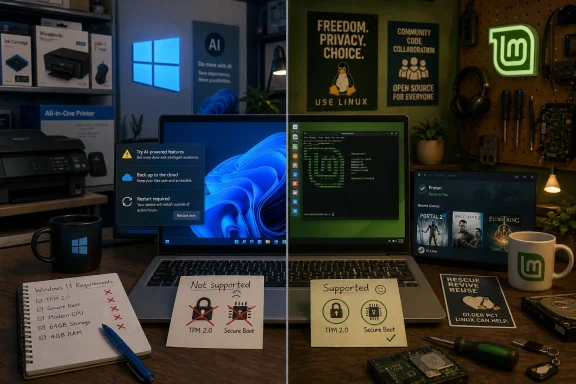 The Old OS War Has Become a Fight Over Control
For decades, Windows won the desktop because it was the path of least resistance. It ran the games, the printers, the office suites, the weird accounting app from 2007, and the device drivers that shipped on a mini-CD in the box. Linux won the server room, the supercomputer, the router, the Android phone, and the respect of people who thought reinstalling a bootloader sounded like a reasonable Saturday.That division still matters, but it no longer explains the argument users are having in 2026. The average person comparing Windows and Linux today is not usually weighing kernel architecture or filesystem philosophy. They are deciding whether their existing PC has a future, whether their operating system should advertise to them, whether AI features should be part of the desktop by default, and whether updates should feel like maintenance or a landlord inspection.
Windows remains the stronger answer for the broadest set of mainstream users. It is more compatible, better supported by vendors, easier to buy preinstalled, and still the baseline target for PC gaming and commercial software. But “better for most people” is not the same as “better behaved,” and that distinction is where Linux has gained oxygen.
Linux, by contrast, has become less of a hobbyist dare and more of a practical protest. Modern distributions such as Linux Mint, Ubuntu, Fedora, Zorin OS, and Pop!_OS can install cleanly, browse the web, update safely, and run Steam in a way that would have seemed fanciful during the Windows XP era. The catch is that Linux still asks users to understand more about their machines than Windows does, and that remains a meaningful barrier at exactly the moment basic PC literacy is declining.
Windows Still Wins Because the PC Industry Was Built Around It
The strongest argument for Windows is not elegance. It is gravity.Most PC hardware is sold with Windows. Most commercial desktop software assumes Windows. Most support desks, peripheral vendors, enterprise deployment tools, anti-cheat systems, tax programs, CAD packages, and firmware utilities either target Windows first or target Windows only. Even when Linux technically supports the same hardware, the vendor’s official answer often begins and ends with Microsoft’s platform.
That reality is not glamorous, but it is decisive. A user who needs Adobe Creative Cloud, Microsoft 365 desktop apps, a niche VPN client, a specific printer utility, or a multiplayer game with kernel-level anti-cheat may not have a real Linux choice. Compatibility layers, web apps, virtual machines, and dual-boot setups can soften the problem, but they do not erase it.
Windows also benefits from a kind of accumulated familiarity. People know where the Start menu is, even when Microsoft moves pieces of the experience around. They know what an EXE installer is. They know what Control Panel used to be, what Settings is trying to become, and where to find the file they just downloaded. That muscle memory has value, especially for families, schools, small businesses, and anyone who becomes unpaid tech support for relatives.
The BGR piece is right to frame Windows as the safer recommendation for many nontechnical users. A “semi-stable” Windows PC that runs the expected programs is often better than a theoretically cleaner Linux machine that turns one missing app into a weekend of forum searches. The Windows advantage is not that it never breaks. It is that when it breaks, the surrounding ecosystem assumes Windows is the problem to solve.
Microsoft’s Hardware Line Turned Linux Into a Lifeboat
The Windows 11 hardware requirements changed the emotional math. TPM 2.0, Secure Boot, supported CPUs, and Microsoft account pressure were not merely technical requirements for many users. They were a message: your working computer may no longer count.Microsoft has defensible reasons for raising the baseline. A modern Windows security model depends on stronger hardware roots of trust, virtualization-based protections, measured boot, and a platform that can be serviced at scale. Nobody responsible for enterprise security should romanticize the anything-goes PC era, when malware could thrive across ancient firmware, weak credentials, and unmanaged endpoints.
But the home user staring at an otherwise functional laptop does not experience that as an architectural argument. They experience it as rejection. If a PC can browse, stream, write documents, and run lightweight apps, the distinction between “unsupported” and “useless” feels artificial.
That is where Linux benefits from Microsoft’s hard line. It does not need to convince every Windows user that open source is morally superior. It only needs to offer a respectable second life to machines that Windows 11 leaves behind. For an older PC with an SSD and enough RAM, a friendly Linux distribution can feel not like a downgrade, but like liberation from a forced replacement cycle.
Windows 10’s end of support in October 2025 sharpened that choice. Consumer Extended Security Updates can buy time, but they do not change the direction of travel. Microsoft wants the installed base on Windows 11 and eventually whatever comes next. Linux wants the machine to remain useful as long as drivers, community support, and user expectations allow it.
The AI Desktop Has Become Microsoft’s Trust Problem
The article’s mention of frustration with Microsoft’s AI direction lands because it connects with a broader mood. Users are not merely objecting to AI as a technology. They are objecting to the feeling that Windows is being repurposed around Microsoft’s strategic priorities rather than their own.Copilot, Recall-style debates, cloud-connected features, Microsoft account nudges, subscription prompts, and Start menu recommendations all occupy the same psychological bucket for many users. Some of these features are useful. Some are optional. Some are better governed than their early critics suggest. But they all reinforce the same suspicion: Windows is no longer just an operating system; it is a distribution channel for Microsoft’s ecosystem.
That matters because the PC has historically been the most user-controlled mainstream computing device. A smartphone is locked down by design. A game console is a walled garden. A Chromebook is intentionally cloud-first. A Windows PC, for all its flaws, was the machine where users could install what they wanted, disable what they disliked, and treat the operating system as infrastructure.
Linux now occupies that old psychological territory more convincingly than Windows does. It is not always easier, prettier, or more compatible. But it is far less likely to decide that the next update should insert a new assistant, promote a cloud service, or change the default behavior of a familiar workflow because a corporate roadmap says so.
The irony is that Microsoft understands power users better than most companies. Windows Terminal, PowerToys, WSL, Dev Home, winget, and strong developer tooling show a company that can serve serious PC users extremely well. The problem is that the consumer shell often feels governed by a different Microsoft: one that cannot resist turning the desktop into another engagement surface.
Linux Is Easier Than Ever, Which Is Not the Same as Easy
Linux advocates sometimes damage their own case by insisting that modern Linux is simple. It can be simple, under the right conditions. Install Linux Mint on a common laptop, use Firefox or Chrome, rely on web apps, install Steam, and stay within the software center, and the experience can be calm, fast, and refreshingly free of nagging.But Linux’s difficulty curve is uneven. The first hour may be easier than expected. The tenth hour may reveal a fingerprint reader that does not work, a sleep-state problem, an Nvidia driver choice, a fractional scaling annoyance, or a work application that assumes Windows. The user then discovers that “Linux” is not one product but a federation of distributions, desktop environments, package formats, release models, community norms, and conflicting advice.
That does not make Linux bad. It makes it different from a consumer platform that hides complexity behind vendor support. Windows users can be very technical, but Windows itself is sold as a finished retail product. Linux distributions are often polished, but the broader Linux desktop remains more transparent about the machinery underneath.
For some users, that transparency is the point. Developers, sysadmins, privacy-conscious users, tinkerers, and people who dislike platform paternalism may prefer a system that exposes its decisions. For others, it is a tax. A user who has never thought about partitions, repositories, display servers, or driver stacks may not want empowerment. They may want the printer to work.
This is why the “basic computer literacy” point in BGR’s article is more important than it first appears. The Linux desktop no longer requires wizard status, but it still rewards curiosity and punishes passivity. Windows, despite its annoyances, remains better suited to people who do not want to learn their operating system.
Security Is Not a Trophy Either Side Gets to Keep
The old claim that Linux is secure and Windows is insecure is too crude for 2026. Windows is attacked more often because it is everywhere, especially in businesses. It also has a massive legacy surface area and a user base that includes everyone from security engineers to people who will run any attachment named “invoice.” That makes Windows a huge target, not necessarily a careless one.Modern Windows security is substantially more serious than its reputation from the XP era. Defender is competent, BitLocker is widely deployed, Secure Boot is normal, Smart App Control exists, and enterprise Windows can be hardened to a high standard. Microsoft also operates one of the largest threat-intelligence machines on the planet. The idea that Windows is inherently unserious about security is outdated.
Linux benefits from a different model. Software repositories reduce the need to download random installers from the web. Permissions are stricter by default in many workflows. The smaller desktop target reduces commodity malware pressure. Open source development also allows inspection and rapid community response, though it does not magically prevent vulnerabilities.
The more honest answer is that security depends on the user, the update model, the software source, and the threat profile. A well-maintained Windows 11 machine is safer than an abandoned Linux install. A carefully managed Linux desktop is safer than a Windows box running pirated software and unsigned utilities. Neither operating system exempts users from patching, backups, password hygiene, browser safety, or skepticism.
For enterprises, the choice is even less ideological. Windows has Group Policy, Intune, Defender for Endpoint, identity integration, and a management ecosystem built for fleets. Linux has strong automation, server-grade tooling, and deep value for developers and infrastructure teams. The best security platform is often the one an organization can actually administer consistently.
Updates Are Where Philosophy Becomes Daily Irritation
Windows Update has improved over the years, but it remains one of the platform’s most emotionally charged features. Users remember forced restarts, long installation screens, driver regressions, and updates that appear at exactly the wrong moment. Even when the system behaves correctly, it often feels like Windows is borrowing the PC.Microsoft’s recent willingness to give users more update control is therefore not a minor quality-of-life tweak. It is an admission that servicing discipline and user agency have been out of balance. Security patches matter, but so does the owner’s sense that the machine is not going to change state without consent.
Linux distributions vary widely here. Rolling-release systems can deliver the newest software quickly but require more attention. Long-term support distributions move slowly and predictably. Some desktop Linux systems make updates feel almost casual: the package manager lists what is changing, the user approves it, and the computer does not necessarily demand a theatrical reboot.
That model appeals to people who want to know what their OS is doing. It may also intimidate users who do not want to be asked. Windows chooses paternalism because Microsoft is servicing an enormous installed base full of people who will not patch voluntarily. Linux chooses consent more often because its users, historically, were expected to participate in maintenance.
The tradeoff is real. Forced updates can be obnoxious, but unpatched machines are dangerous. User-controlled updates feel respectful, but they can become neglected updates. The best system is not the one that wins a slogan contest. It is the one that keeps people patched without making them feel ambushed.
Gaming Has Changed the Linux Conversation, But Not Enough to Crown It
The Steam Deck did more for desktop Linux’s reputation than a thousand forum arguments. Valve’s Proton compatibility layer made it normal to run large numbers of Windows games on a Linux-based system. For many single-player and indie titles, the experience is now good enough that users may forget they are not on Windows.That is a remarkable achievement. Linux gaming used to mean checking whether a native port existed, lowering expectations, and accepting that most of the mainstream PC catalog was effectively off-limits. Today, a large chunk of Steam’s library can run on Linux with little user intervention, and handheld gaming PCs have made the Linux-based console-like experience feel mainstream.
But Windows is still the safer gaming recommendation. Anti-cheat remains a recurring obstacle. Launchers, mod tools, VR software, driver control panels, and day-one support still lean Windows. The most dedicated Linux gamers can work around a lot, but “can work around” is not the same as “should recommend to everyone.”
This is one of the clearest examples of the broader pattern. Linux has become viable in areas where it used to be dismissed. Viable is not identical to dominant. Windows still owns the default, but Linux has taken enough territory that the old jokes no longer work.
For users whose PC is mostly a Steam machine, Linux is worth testing. For users whose PC is a competitive multiplayer rig, a Game Pass box, a VR station, and a peripheral showcase, Windows remains the path of least pain.
The Subscription Backlash Is Really a Backlash Against Renting the PC
The BGR framing also points to a growing resentment of subscriptions. Strictly speaking, Windows itself is not a conventional monthly subscription for most consumer PCs. Users buy a device, the Windows license is baked in, and updates arrive as part of the lifecycle. But the surrounding Microsoft experience increasingly nudges users toward recurring services: Microsoft 365, OneDrive storage, Game Pass, Copilot features, and cloud identity.That changes the feel of the operating system. Windows becomes less like a purchased foundation and more like the lobby of a services business. The user may still be in control, but they are constantly reminded that Microsoft has more to sell.
Linux’s appeal here is not only that it is free of charge. It is that it is free of a particular commercial rhythm. A typical Linux distribution does not need to upsell cloud storage, promote a subscription office suite, or push an AI assistant into the taskbar. It may ask for donations, offer enterprise support, or depend on a company with its own interests, but the desktop itself usually feels less monetized.
That difference matters most to users who spend all day at the machine. A small prompt, a changed default, or a cloud nudge may be tolerable once. Repeated over years, it becomes a political statement about ownership. Linux benefits not because every user can explain free software philosophy, but because they can feel the absence of a sales funnel.
Microsoft should be careful here. The company can win the enterprise productivity war and still alienate the enthusiast base that made Windows culturally durable. The people who install PowerToys, build PCs, troubleshoot family machines, and evangelize platforms are not the whole market, but they influence it disproportionately.
The Best Choice Depends on the Job, Not the Logo
The practical answer remains situational. If you need maximum software compatibility, mainstream peripheral support, Microsoft 365 desktop apps, commercial creative tools, enterprise management, or the broadest gaming safety net, Windows is still the better PC operating system. It may annoy you, but it will probably run what you need.If you have older hardware, mostly live in the browser, value privacy and control, dislike Microsoft’s AI and account direction, or want a lightweight environment for development and everyday computing, Linux is no longer a fringe suggestion. It is a serious option, especially if you choose a beginner-friendly distribution and test it before committing.
The smartest migration path is not ideological conversion. It is inventory. Users should list the applications they truly depend on, check hardware support, test a live USB session, and decide whether web apps or alternatives are acceptable. Dual-booting or installing Linux on a secondary machine can answer more questions in an afternoon than a month of online argument.
For businesses, the calculation is even more concrete. Linux desktops can work beautifully in developer teams, kiosks, labs, call centers, and controlled environments. They are harder to justify where users depend on Windows-only line-of-business applications, Microsoft identity workflows, or vendor support contracts. The right answer may be mixed estates rather than one victorious platform.
The Windows-versus-Linux debate becomes clearer once the word “better” is replaced by “better for whom, under what constraints, and at what cost.” That is less satisfying than a winner-takes-all answer, but it is far more useful.
The Real Verdict Is Written in the Owner’s Patience
The operating system choice in 2026 is not just about features. It is about tolerance. How much friction will a user accept for compatibility? How much learning will they accept for control? How much vendor steering will they accept before a familiar platform starts to feel hostile?Windows asks users to tolerate Microsoft’s direction in exchange for the broadest ecosystem. Linux asks users to tolerate complexity in exchange for agency. macOS, lurking outside this particular fight, asks users to tolerate Apple’s hardware and platform boundaries in exchange for integration. Every desktop OS is a bargain; the only question is which compromises feel least insulting.
For many WindowsForum readers, the answer may be to keep Windows but reduce dependence. Use local accounts where possible. Audit startup apps. Learn backup and restore properly. Keep a Linux USB drive handy. Try a Linux distribution on an old laptop instead of recycling it. The point is not to rage-switch, but to recover leverage.
That leverage is what Microsoft risks losing. If Windows feels like the inevitable center of PC life, users complain but stay. If Windows feels like one option among several, every forced nudge, failed update, hardware cutoff, or unwanted AI feature becomes a reason to experiment.
The Upgrade Path Now Has an Exit Ramp
The concrete lesson from the latest round of Windows-versus-Linux commentary is not that one side has finally defeated the other. It is that the exit ramp is now paved well enough for ordinary users to notice.- Windows remains the best default for users who need guaranteed compatibility with mainstream commercial software, gaming hardware, peripherals, and workplace support.
- Linux is the strongest alternative for older PCs excluded from Windows 11, especially when the user’s workflow is browser-heavy or built around open-source tools.
- Microsoft’s AI and cloud-service strategy is now part of the operating-system decision, not a separate debate about optional features.
- Windows 10’s end-of-support timeline has turned Linux from a hobbyist curiosity into a practical way to extend the life of still-useful hardware.
- Linux gaming has improved dramatically because of Proton and the Steam Deck ecosystem, but Windows still has the advantage for competitive multiplayer, launchers, VR, and day-one support.
- The safest move for curious users is to test Linux before replacing Windows, because the deciding factor is usually one essential app, driver, or workflow.
References
- Primary source: bgr.com
Published: Tue, 19 May 2026 23:47:00 GMT
Linux Vs. Windows: Which Is Better For Your PC?
Discover if Linux vs Windows is better for your PC. We compare Windows 11 compatibility and gaming against popular Linux distros like Bazzite and Mint.bgr.com - Related coverage: windowscentral.com
“Wait, Windows uses less?”: I break down the surprising requirement that flips the Linux vs. Windows script | Windows Central
Ubuntu 26.04 now needs more RAM and CPU than Windows 11, and here's why.www.windowscentral.com - Related coverage: computingforgeeks.com
Linux vs Windows: Security, Performance, Cost Comparison [2026]
Detailed Linux vs Windows comparison covering security, performance, cost, server workloads, gaming, and hardware support. Includes 2026 market share data and use case recommendations.computingforgeeks.com - Related coverage: geekom.ca
Linux vs Windows: Why Windows Wins for Most Users in 2026
Linux vs Windows: Discover why Windows remains the top choice for users in 2026. Explore software compatibility, gaming, and ease of use in our buying guide. www.geekom.ca
- Related coverage: pcworld.com
Microsoft tells Windows Update to chill after years of complaints | PCWorld
Tired of being hit with an unexpected Windows update? Microsoft is tweaking the Windows Update service to minimize reboots, and to allow users to even delay 'mandatory' updates.www.pcworld.com - Related coverage: system.plus
Linux vs Windows in 2026 - System Plus
Linux or Windows in 2026? We compare ease of use, performance, control, and whether it’s worth switching or waiting for Windows 12.system.plus
- Related coverage: tech-insider.org
Windows vs Linux 2026: 74% RAM Gap and 42% Cloud Cost Divide [Tested]
Windows vs Linux 2026 comparison with benchmarks: 74% RAM gap, 39% faster boot, 42% cloud cost divide. Tested on identical hardware with real data.tech-insider.org - Related coverage: techplanet.today

2026: The Year Linux Desktop Finally Breaks Through - Why Windows Users Are Making the Switch | TechPlanet
The long-running joke about "the year of the Linux desktop" may finally be coming to an end. As we enter 2026, a growing number of users are making the switch f...
techplanet.today
- Related coverage: tech.yahoo.com
Over Half A Million Windows Users Are Switching To Linux - Here's Why
With the end of support for Windows 10 finally here, many have (perhaps surprisingly) opted instead to jump to Linux instead of getting Windows 11.tech.yahoo.com - Related coverage: news.tuxmachines.org
Tux Machines — Over Half A Million Windows Users Are Switching To Linux
news.tuxmachines.org
- Related coverage: hippobese.com
- Official source: support.microsoft.com
Windows 11 System Requirements | Microsoft Support
Learn about Windows 11 minimum system requirements and how to assess your upgrade eligibility.support.microsoft.com - Related coverage: notebookcheck.net
Windows 11 continues to grow among Steam users as Linux pulls back - Notebookcheck News
The latest Steam Hardware & Software Survey results are here, and among all, there's an interesting shift happening in the operating system segment. In April 2026, Windows 11 saw another growth, while Linux lost a fair share of the user base. www.notebookcheck.net
- Official source: microsoft.com
Windows 11 Specs and System Requirements | Microsoft Windows
View Windows 11 specs, system requirements, and features from Microsoft. Learn about the device specifications, versions, and languages available for Windows 11.www.microsoft.com - Related coverage: notebookcheck.com
Windows 11 legt unter Steam-Nutzern weiter zu, Linux verliert an Anteil - Notebookcheck News
Die Ergebnisse der neuesten Steam-Hardware- und Software-Umfrage sind veröffentlicht worden, und besonders im Bereich der Betriebssysteme zeigen sich interessante Entwicklungen. Im April 2026 konnte Windows 11 weiter zulegen, während Linux einen spürbaren Rückgang seiner Nutzerbasis verzeichnete. www.notebookcheck.com
- Related coverage: pepelac.news
Steam Survey April 2026: Windows 11 Hits 67.74%, Linux Dips
Steam's April 2026 hardware survey shows Windows 11 at 67.74% share, while Linux drops to 4.52%. RTX 3060 still top GPU, 16GB RAM common. Full breakdown inside.pepelac.news - Related coverage: steamdeckhq.com
Linux Holds Strong in Steam's April Hardware Survey - SDHQ
The Steam Hardware Survey results for April 2026 are here, and Linux is still showing strong form.steamdeckhq.com - Related coverage: ubuntufree.com
Linux reaches over 5% share on Steam Survey for the first time - Ubuntu Free
Key Points Linux reached 5.33% of Steam users in March 2026, up 3.10 points from the previous month. Windows share fell to 92.33% while macOS rose...www.ubuntufree.com - Related coverage: tomshardware.com
Windows 10 support ends today — here's who's affected and what you need to do | Tom's Hardware
Update if you can, upgrade if you can't, or at least get the extended support license.www.tomshardware.com - Related coverage: as.com
Cómo seguir usando Windows 10 después del fin del soporte en octubre de 2025: así funciona el programa ESU de Microsoft - Meristation
Microsoft continuará ofreciendo una alternativa para los usuarios de Windows 10 tras el cese del soporte oficial. Así funciona el programa ESU de W10.as.com - Related coverage: cincodias.elpais.com
Cómo conseguir el soporte extendido para tu ordenador con Windows 10 | Lifestyle | SmartLife | Cinco Días
Es muy fácilcincodias.elpais.com - Related coverage: atomicdata.com
- Related coverage: transparity.com
