

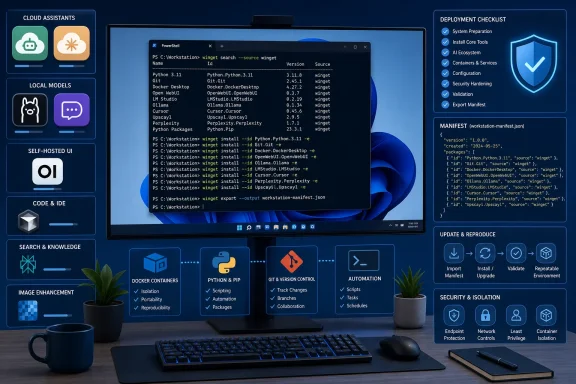
Windows 11 users can install a practical AI workstation—including ChatGPT, Claude, Ollama, LM Studio, Jan, Perplexity, Cursor, Open WebUI, and Upscayl—directly from Windows Terminal with WinGet, replacing a day of browser downloads with reproducible package commands on any supported Windows 10 or Windows 11 PC. The important change is not merely speed; it is that Windows finally has a coherent installation path for an AI ecosystem that otherwise sprawls across app stores, vendor websites, GitHub projects, command-line tools, and easily confused third-party wrappers. Microsoft’s package manager cannot decide which AI products an organization should trust, but it can make the software that administrators do approve easier to identify, deploy, update, remove, and reproduce. For Windows users rebuilding a PC—or IT teams trying to prevent employees from downloading the wrong “ChatGPT”—that distinction matters.
The conventional Windows software ritual is familiar: search for a product, distinguish the vendor’s page from sponsored results, choose among several download buttons, inspect an unfamiliar filename, launch an installer, and hope the publisher has not bundled something unwanted. Multiply that process across local-model runtimes, coding agents, desktop chat clients, Python environments, Git, Docker, and utilities, and a supposedly clean Windows installation becomes an afternoon of inconsistent decisions.
WinGet compresses that process into a package identifier and a command. Microsoft describes Windows Package Manager as a client for discovering, installing, upgrading, removing, exporting, importing, and configuring applications. It arrives through App Installer and is supported on Windows 10 version 1809, build 17763, or later; Windows 11 meets that baseline automatically.
That does not mean every package carrying an AI-related name is official. WinGet’s repository contains community-submitted manifests, and some products are represented by multiple clients, wrappers, editions, or similarly named packages. The practical security improvement comes from using the correct package ID, inspecting its details, and understanding which source WinGet will query.
This is why the package identifier matters more than the friendly display name.
In other words, package identity is security. WinGet reduces exposure to fake download buttons and impersonation pages, but only when the operator selects the intended publisher, package, source, and installer.
How2Shout’s hands-on catalog captures the breadth of the resulting ecosystem: cloud assistants, offline model runners, answer engines, coding tools, image processors, development runtimes, and container infrastructure can all enter Windows through roughly the same management interface. Microsoft’s documentation confirms the broader mechanism, while OpenAI’s own support material confirms that WinGet is a supported installation route for the ChatGPT Windows app through the Microsoft Store source.
Before doing anything else, verify that the client exists:
If Windows returns a version number, the package manager is ready. If the command is not recognized, App Installer may be outdated or may not yet have registered for the user. Microsoft notes that WinGet may not appear until the first user login has triggered that registration process; on an ordinary desktop, updating App Installer through the Microsoft Store is the most straightforward remedy.
Those differences affect account requirements, data handling, hardware demand, administration, storage, and update behavior. A one-line installation command does not make the products interchangeable.
This is the first administrative lesson hidden inside the convenience story: a package list is not yet an architecture. Installing Ollama, LM Studio, and Jan together may be useful for evaluation, but it may also duplicate model stores, background services, interfaces, and user confusion. Installing Claude Desktop and Claude Code may be intentional, but users need to understand why two packages from the same publisher exist.
WinGet makes acquisition uniform. It does not eliminate the need to classify the software being acquired.
The complete interactive installation command is:
For an unattended installation, use:
OpenAI’s support documentation presents WinGet as an installation option for IT departments managing the Windows app. The explicit
This distinction also protects users from a tempting mistake. The package
Once installed, ChatGPT can be opened from the Start menu. Its Companion Window is available with
For enterprise deployment, however, the Store origin remains operationally significant. OpenAI notes that access follows the organization’s Microsoft Store policies. A correct WinGet command will not override a policy that blocks Store applications, nor will it repair a disabled Store source or substitute for account, licensing, retention, and data-governance decisions.
That is the recurring theme of AI deployment on Windows: the command is easy; the surrounding policy is not.
This is the graphical chat application—the product for someone who wants Claude in a dedicated desktop window rather than another browser tab. It should not be confused with Claude Code, Anthropic’s terminal-oriented coding agent:
The distinction is more than cosmetic. Claude Desktop is a general user-facing conversation client, while Claude Code operates inside a development workflow, reading project context, interacting with commands, and working alongside version-control tools. Giving both products to every employee would expand the software estate without necessarily providing useful capability.
Their overlapping branding also makes inventory less intuitive. How2Shout reports that both can share the
For the WinGet-managed Claude Code package, the relevant update command is:
This points to a broader lifecycle problem. Users tend to think of AI clients as continuously updated cloud products because their models and web interfaces change without a traditional desktop upgrade. Native clients and coding agents still contain local binaries, integrations, and security-sensitive components that require ordinary software maintenance.
A company approving Claude Code should therefore approve an update mechanism at the same time. Installation without lifecycle ownership merely turns a known package into a gradually aging one.
After installation, the example command:
downloads the selected model and opens an interactive prompt. Ollama also runs a local service at
The attraction is obvious. Local inference can keep prompts and model execution on the PC, avoid per-request API charges, work without a continuous cloud connection, and give developers a consistent endpoint for experimentation. But “local” does not automatically mean lightweight, private in every respect, or suitable for every company document.
Model files can consume substantial storage. Inference performance depends heavily on model size, available memory, GPU capability, and the amount of context being processed. How2Shout recommends beginning with models in the 3B-to-7B range on a laptop, a sensible limit for avoiding the common first-time experience of downloading a model that technically launches but performs too slowly to be useful.
The size label is only a starting point, not a complete performance forecast. Quantization, context length, acceleration support, memory bandwidth, concurrent workloads, and the rest of the Windows environment all affect responsiveness. An ordinary office laptop may run a smaller model acceptably while struggling with a configuration that a gaming desktop handles comfortably.
LM Studio packages much of this complexity into a graphical interface:
The package ID is a mild trap because the publisher portion is
Jan occupies similar territory while emphasizing an open, privacy-oriented desktop interface:
It can support local models while also connecting to remote APIs, making it useful for people who want one client across offline and hosted workflows. That flexibility requires honest configuration: a conversation is not necessarily local merely because the application can operate locally. The selected backend determines where inference occurs.
The most important planning rule is that local AI is a hardware decision. WinGet can place the runtime on a machine, but it cannot create GPU memory, reclaim disk space, decide whether downloaded models are properly licensed, or tell an employee whether a particular document is allowed to enter a prompt.
The desktop package installs with:
The desktop build was described as version 0.0.20 at the time of writing, which is a warning against treating it as a static, mature endpoint. Its appeal lies in how quickly it can produce a private ChatGPT-style front end, but early desktop builds should be evaluated with the same caution applied to any fast-moving client that stores conversations, connects to model services, and changes frequently.
The logical local stack is Ollama first, Open WebUI second. Ollama handles the model execution and exposes the local service; Open WebUI provides the conversation interface. That separation is useful because either layer can be changed independently, but it also introduces another service relationship to document and troubleshoot.
There is a separate, heavier Open WebUI route using Python or Docker for server-oriented and potentially multi-user installations. The WinGet desktop package is the shorter path for an individual workstation. Administrators should not mistake the desktop build for a managed departmental service merely because both carry the same product name.
The distinction matters for backups, access controls, browser exposure, user separation, and updates. A single-user desktop experiment is not automatically a production-ready internal AI service.
It is an AI-first editor built around a familiar VS Code-derived experience, with chat, completion, and agentic editing integrated into the development surface. Its package identity matters because a user searching only for “Cursor” may encounter an ambiguous word rather than a confidently identified publisher.
How2Shout notes that security software blocking the product’s download infrastructure can produce an installation that appears to complete without leaving the expected application available. That kind of failure illustrates WinGet’s role accurately: it orchestrates the publisher’s installer, but network controls, proxies, endpoint protection, and filtering products still govern whether the payload can be retrieved and executed.
Google Antigravity installs with:
The package is described as an agent-first development platform spanning editor, terminal, and browser tasks. The naming deserves additional scrutiny because the original Google Antigravity tool was renamed Antigravity IDE, leaving a transition in which similar labels may describe different stages or forms of the product. Users should verify the installed application rather than trusting a remembered product name.
Visual Studio Code remains the more modular foundation:
It is not an AI application by itself. Its relevance comes from the extension ecosystem that can turn it into a host for coding assistants and other AI-connected development tools.
This difference carries a governance consequence. Approving VS Code does not approve every AI extension available inside it, just as approving a browser does not approve every web service a user can reach. Extension inventories, authentication methods, workspace access, telemetry, data submission, and repository permissions remain separate controls.
Claude Code sharpens the issue further because terminal agents can act on projects and run commands rather than merely suggest text. The more capable an AI development tool becomes, the less adequate it is to assess it as “just another chat app.”
Search packages carrying the AI tag with:
Keyword searches can target a category rather than a product:
Search output should be treated as discovery, not approval. Tags describe packages but do not prove that the software is official, maintained, secure, appropriate for work data, or even the intended product. The operator should capture the value in the ID column and inspect the package before installing it.
The basic inspection pattern is:
That reveals package and installer details that can help confirm the publisher, version, and selected distribution route. In ambiguous cases, this step is more useful than repeatedly refining a product-name search.
The need for scrutiny is especially clear around ChatGPT, where the official product is reached through a Store ID while the ordinary catalog can contain unofficial wrappers. It also applies to Perplexity, whose desktop application and browser have different identifiers, and to product families such as Claude, where one publisher offers separate desktop and terminal applications.
WinGet makes software searchable. It does not make every search result equivalent.
Python 3.13 can be installed with:
The version in the package ID is deliberate. Python packages in WinGet are version-specific, so scripts should identify the intended runtime instead of assuming that a generic package name will reliably resolve to the desired branch.
For isolated Python environments, Miniconda installs with:
The full Anaconda distribution is available through:
Docker Desktop, which is frequently used for packaged AI services and self-hosted interfaces, installs with:
Git and Windows Terminal complete the basic command-line foundation:
Obsidian and PowerToys occupy the productivity edge of the stack:
Obsidian is a Markdown knowledge tool with an ecosystem that can be extended into AI-assisted workflows. PowerToys is primarily a Windows power-user suite; its AI connection is limited to an optional mode in Advanced Paste that requires an OpenAI key. Neither should be misrepresented as a dedicated AI application.
AnythingLLM demonstrates why availability and recommendability are not the same thing. The package ID
That exception is healthy. A useful package-management guide should not imply that WinGet is always the best distribution channel merely because a manifest exists.
List pending upgrades with:
Apply all available upgrades with:
The update-all command is convenient, but administrators should not mistake convenience for change control. A coding editor, model runtime, desktop assistant, image tool, and container platform can all change behavior in materially different ways. Production workstations may need staged testing, package pinning, or an approved update window rather than a blanket command executed without review.
Removal uses the same package identity model. For example:
Uninstalling the program may not remove every artifact it created. Downloaded local models, caches, settings, logs, conversation databases, container images, and user-profile data can survive application removal. This is particularly important when reclaiming storage or decommissioning a machine that processed sensitive information.
That residue is not necessarily a WinGet defect. Windows uninstallers generally decide which application data remains. But administrators should include those locations in offboarding and sanitization procedures rather than equating “package removed” with “data erased.”
That is useful for a small test stack, although the products should still be selected intentionally. Installing three local-AI interfaces merely because they fit on one command line can create more evaluation overhead than value.
The more powerful approach is to export a machine’s recognized package inventory:
A new PC can then replay that list:
This turns a working setup into something closer to a reproducible baseline. The JSON file can be retained with deployment material, shared among a team, or stored alongside documentation describing the purpose and ownership of each package.
How2Shout cautions that very large imports can behave imperfectly, including cases where packages are checked for upgrades rather than installed as expected. Dividing a large collection into smaller logical batches can make failures easier to isolate. Microsoft also provides the broader
This is where WinGet becomes more than a consumer convenience. A command that saves five minutes is useful; a declarative inventory that cuts hours from workstation recovery and makes software drift visible is operational infrastructure.
Still, exported inventories have limits. They do not preserve cloud subscriptions, sign-in state, API keys, model downloads, extension configuration, Docker data, local policies, or application-specific settings. Installation is not deployment: a package list is one layer of a repeatable environment, not the entire environment.
The other common cause is an incorrect package ID. Check spelling and use the ID shown by search rather than reconstructing it from the product’s display name.
If WinGet reports “A source is unavailable.”, reset the configured sources:
That operation should be used with awareness in managed environments because an organization may intentionally configure additional or restricted sources. Resetting to defaults can undo custom source configuration.
Permission failures may require an elevated Windows Terminal. Microsoft’s documentation notes that installer behavior changes with administrative context: some packages can install per user, while others require elevation. Docker Desktop is among the applications likely to need broader system access.
Download failures can come from proxies, VPNs, DNS controls, web filters, endpoint protection, or a publisher’s unavailable server. WinGet does not necessarily host the underlying installer; the manifest can direct it to the publisher’s distribution endpoint. A valid package can therefore fail because that external transfer is blocked.
The ChatGPT app adds a Microsoft Store dependency. The
 WinGet Turns AI Setup Into an Identity Problem, Not a Download Hunt
The conventional Windows software ritual is familiar: search for a product, distinguish the vendor’s page from sponsored results, choose among several download buttons, inspect an unfamiliar filename, launch an installer, and hope the publisher has not bundled something unwanted. Multiply that process across local-model runtimes, coding agents, desktop chat clients, Python environments, Git, Docker, and utilities, and a supposedly clean Windows installation becomes an afternoon of inconsistent decisions.WinGet compresses that process into a package identifier and a command. Microsoft describes Windows Package Manager as a client for discovering, installing, upgrading, removing, exporting, importing, and configuring applications. It arrives through App Installer and is supported on Windows 10 version 1809, build 17763, or later; Windows 11 meets that baseline automatically.
That does not mean every package carrying an AI-related name is official. WinGet’s repository contains community-submitted manifests, and some products are represented by multiple clients, wrappers, editions, or similarly named packages. The practical security improvement comes from using the correct package ID, inspecting its details, and understanding which source WinGet will query.
This is why the package identifier matters more than the friendly display name.
Anthropic.Claude and Anthropic.ClaudeCode look related because they are, but they install fundamentally different products. Perplexity.Perplexity is the desktop answer engine, while Perplexity.Comet refers to a separate browser. The official ChatGPT app uses a Microsoft Store product code rather than an ordinary publisher-and-product identifier.In other words, package identity is security. WinGet reduces exposure to fake download buttons and impersonation pages, but only when the operator selects the intended publisher, package, source, and installer.
How2Shout’s hands-on catalog captures the breadth of the resulting ecosystem: cloud assistants, offline model runners, answer engines, coding tools, image processors, development runtimes, and container infrastructure can all enter Windows through roughly the same management interface. Microsoft’s documentation confirms the broader mechanism, while OpenAI’s own support material confirms that WinGet is a supported installation route for the ChatGPT Windows app through the Microsoft Store source.
Before doing anything else, verify that the client exists:
winget --versionIf Windows returns a version number, the package manager is ready. If the command is not recognized, App Installer may be outdated or may not yet have registered for the user. Microsoft notes that WinGet may not appear until the first user login has triggered that registration process; on an ordinary desktop, updating App Installer through the Microsoft Store is the most straightforward remedy.
The AI Catalog Now Spans Four Different Kinds of Software
Calling every package in this collection an “AI app” obscures some important differences. ChatGPT and Claude Desktop are hosted-service clients. Ollama and LM Studio can execute models on the PC. Cursor and Claude Code are development tools. Upscayl applies local inference to images rather than providing a conversational interface.Those differences affect account requirements, data handling, hardware demand, administration, storage, and update behavior. A one-line installation command does not make the products interchangeable.
| Application | Package ID | Primary role | Execution model | Important distinction |
|---|---|---|---|---|
| Claude Desktop | Anthropic.Claude | Desktop AI chat | Cloud service | Not Claude Code |
| Claude Code | Anthropic.ClaudeCode | Terminal coding agent | Cloud-connected tool | Separate package from Claude Desktop |
| ChatGPT | 9NT1R1C2HH7J | Desktop AI assistant | Cloud service | Installed from msstore |
| Ollama | Ollama.Ollama | Local-model runtime | Local inference | Exposes a service on port 11434 |
| LM Studio | ElementLabs.LMStudio | Graphical local-model environment | Local inference | Publisher ID is ElementLabs |
| Jan | Jan.Jan | Offline and API-backed chat | Local or remote | Privacy-oriented desktop interface |
| Perplexity | Perplexity.Perplexity | Search-focused answer engine | Cloud service | Not the Perplexity.Comet browser |
| Cursor | Anysphere.Cursor | AI-first code editor | Cloud-connected development | Published under Anysphere |
| Google Antigravity | Google.Antigravity | Agent-oriented development platform | Development environment | Naming remains easy to confuse with Antigravity IDE |
| Open WebUI | OpenWebUI.OpenWebUI | Chat front end for model backends | Local or API-connected | Desktop build was at 0.0.20 at the time of writing |
| Upscayl | Upscayl.Upscayl | AI image enlargement | Local inference | Requires a Vulkan-compatible GPU |
| Visual Studio Code | Microsoft.VisualStudioCode | Editor hosting AI extensions | Extension-dependent | AI platform rather than AI app |
WinGet makes acquisition uniform. It does not eliminate the need to classify the software being acquired.
ChatGPT’s Store Route Is the Exception That Proves the Rule
ChatGPT is the most important edge case because it demonstrates that WinGet can address more than its standard community repository. The official Windows application is distributed through the Microsoft Store, so its identifier is the Store product ID9NT1R1C2HH7J, not a conventional name such as OpenAI.ChatGPT.The complete interactive installation command is:
winget install --id 9NT1R1C2HH7J --source msstore --accept-package-agreements --accept-source-agreementsFor an unattended installation, use:
winget install --id 9NT1R1C2HH7J --source msstore --accept-package-agreements --accept-source-agreements --silentOpenAI’s support documentation presents WinGet as an installation option for IT departments managing the Windows app. The explicit
--source msstore argument is essential because it tells WinGet to query the Microsoft Store rather than the ordinary package repository, while the agreement switches prevent an automated job from stopping for interactive acceptance.This distinction also protects users from a tempting mistake. The package
lencx.ChatGPT is an unofficial third-party wrapper and should not be treated as OpenAI’s Windows application. Its presence illustrates the limit of name-based searching: a package can contain a famous product name without being published as that product’s official client.Once installed, ChatGPT can be opened from the Start menu. Its Companion Window is available with
Alt + Space, giving Windows users a quick overlay-like route into the assistant without first finding an existing browser tab or application window.For enterprise deployment, however, the Store origin remains operationally significant. OpenAI notes that access follows the organization’s Microsoft Store policies. A correct WinGet command will not override a policy that blocks Store applications, nor will it repair a disabled Store source or substitute for account, licensing, retention, and data-governance decisions.
That is the recurring theme of AI deployment on Windows: the command is easy; the surrounding policy is not.
Claude’s Two Packages Expose the Cost of Ambiguous Product Families
Anthropic’s desktop client installs with:winget install Anthropic.ClaudeThis is the graphical chat application—the product for someone who wants Claude in a dedicated desktop window rather than another browser tab. It should not be confused with Claude Code, Anthropic’s terminal-oriented coding agent:
winget install Anthropic.ClaudeCodeThe distinction is more than cosmetic. Claude Desktop is a general user-facing conversation client, while Claude Code operates inside a development workflow, reading project context, interacting with commands, and working alongside version-control tools. Giving both products to every employee would expand the software estate without necessarily providing useful capability.
Their overlapping branding also makes inventory less intuitive. How2Shout reports that both can share the
claude.exe name and that WinGet tracking may not always present the pair as clearly as an administrator expects. That is not a reason to avoid the packages, but it is a reason to validate the installed state rather than assuming that a single list entry describes the full Anthropic footprint.For the WinGet-managed Claude Code package, the relevant update command is:
winget upgrade Anthropic.ClaudeCodeThis points to a broader lifecycle problem. Users tend to think of AI clients as continuously updated cloud products because their models and web interfaces change without a traditional desktop upgrade. Native clients and coding agents still contain local binaries, integrations, and security-sensitive components that require ordinary software maintenance.
A company approving Claude Code should therefore approve an update mechanism at the same time. Installation without lifecycle ownership merely turns a known package into a gradually aging one.
Local AI Is Easy to Install and Expensive to Misunderstand
Ollama has become one of the simplest entry points into local large-language models on Windows:winget install Ollama.OllamaAfter installation, the example command:
ollama run llama3.2downloads the selected model and opens an interactive prompt. Ollama also runs a local service at
[url]http://localhost:11434[/url], allowing compatible interfaces and development tools to submit requests to the runtime.The attraction is obvious. Local inference can keep prompts and model execution on the PC, avoid per-request API charges, work without a continuous cloud connection, and give developers a consistent endpoint for experimentation. But “local” does not automatically mean lightweight, private in every respect, or suitable for every company document.
Model files can consume substantial storage. Inference performance depends heavily on model size, available memory, GPU capability, and the amount of context being processed. How2Shout recommends beginning with models in the 3B-to-7B range on a laptop, a sensible limit for avoiding the common first-time experience of downloading a model that technically launches but performs too slowly to be useful.
The size label is only a starting point, not a complete performance forecast. Quantization, context length, acceleration support, memory bandwidth, concurrent workloads, and the rest of the Windows environment all affect responsiveness. An ordinary office laptop may run a smaller model acceptably while struggling with a configuration that a gaming desktop handles comfortably.
LM Studio packages much of this complexity into a graphical interface:
winget install ElementLabs.LMStudioThe package ID is a mild trap because the publisher portion is
ElementLabs, not a guessed variant of the product name. LM Studio is appropriate for users who want to browse, download, configure, and chat with local models without making a terminal the center of the experience.Jan occupies similar territory while emphasizing an open, privacy-oriented desktop interface:
winget install Jan.JanIt can support local models while also connecting to remote APIs, making it useful for people who want one client across offline and hosted workflows. That flexibility requires honest configuration: a conversation is not necessarily local merely because the application can operate locally. The selected backend determines where inference occurs.
The most important planning rule is that local AI is a hardware decision. WinGet can place the runtime on a machine, but it cannot create GPU memory, reclaim disk space, decide whether downloaded models are properly licensed, or tell an employee whether a particular document is allowed to enter a prompt.
Open WebUI Turns a Runtime Into a Usable Local Stack
Ollama provides a model runtime and local service, but many users want something closer to the polished browser experience of a commercial assistant. Open WebUI supplies that interface and can connect to Ollama or an OpenAI-compatible API.The desktop package installs with:
winget install OpenWebUI.OpenWebUIThe desktop build was described as version 0.0.20 at the time of writing, which is a warning against treating it as a static, mature endpoint. Its appeal lies in how quickly it can produce a private ChatGPT-style front end, but early desktop builds should be evaluated with the same caution applied to any fast-moving client that stores conversations, connects to model services, and changes frequently.
The logical local stack is Ollama first, Open WebUI second. Ollama handles the model execution and exposes the local service; Open WebUI provides the conversation interface. That separation is useful because either layer can be changed independently, but it also introduces another service relationship to document and troubleshoot.
There is a separate, heavier Open WebUI route using Python or Docker for server-oriented and potentially multi-user installations. The WinGet desktop package is the shorter path for an individual workstation. Administrators should not mistake the desktop build for a managed departmental service merely because both carry the same product name.
The distinction matters for backups, access controls, browser exposure, user separation, and updates. A single-user desktop experiment is not automatically a production-ready internal AI service.
The Coding Packages Show Where AI and Development Tooling Converge
Cursor installs through the Anysphere publisher identity:winget install Anysphere.CursorIt is an AI-first editor built around a familiar VS Code-derived experience, with chat, completion, and agentic editing integrated into the development surface. Its package identity matters because a user searching only for “Cursor” may encounter an ambiguous word rather than a confidently identified publisher.
How2Shout notes that security software blocking the product’s download infrastructure can produce an installation that appears to complete without leaving the expected application available. That kind of failure illustrates WinGet’s role accurately: it orchestrates the publisher’s installer, but network controls, proxies, endpoint protection, and filtering products still govern whether the payload can be retrieved and executed.
Google Antigravity installs with:
winget install Google.AntigravityThe package is described as an agent-first development platform spanning editor, terminal, and browser tasks. The naming deserves additional scrutiny because the original Google Antigravity tool was renamed Antigravity IDE, leaving a transition in which similar labels may describe different stages or forms of the product. Users should verify the installed application rather than trusting a remembered product name.
Visual Studio Code remains the more modular foundation:
winget install Microsoft.VisualStudioCodeIt is not an AI application by itself. Its relevance comes from the extension ecosystem that can turn it into a host for coding assistants and other AI-connected development tools.
This difference carries a governance consequence. Approving VS Code does not approve every AI extension available inside it, just as approving a browser does not approve every web service a user can reach. Extension inventories, authentication methods, workspace access, telemetry, data submission, and repository permissions remain separate controls.
Claude Code sharpens the issue further because terminal agents can act on projects and run commands rather than merely suggest text. The more capable an AI development tool becomes, the less adequate it is to assess it as “just another chat app.”
Search Is More Valuable Than Any Static Best-Apps List
AI package collections age quickly. New clients appear, publishers rename products, old manifests fall behind, and formerly separate tools converge. The most durable skill is therefore not memorizing a list but learning to query WinGet.Search packages carrying the AI tag with:
winget search --tag aiKeyword searches can target a category rather than a product:
Code:
winget search llm
winget search "image upscale"The basic inspection pattern is:
winget show <id>That reveals package and installer details that can help confirm the publisher, version, and selected distribution route. In ambiguous cases, this step is more useful than repeatedly refining a product-name search.
The need for scrutiny is especially clear around ChatGPT, where the official product is reached through a Store ID while the ordinary catalog can contain unofficial wrappers. It also applies to Perplexity, whose desktop application and browser have different identifiers, and to product families such as Claude, where one publisher offers separate desktop and terminal applications.
WinGet makes software searchable. It does not make every search result equivalent.
The Useful Stack Extends Below the AI Applications
Most serious AI workstations need more than a chatbot. Python remains the runtime beneath a large share of machine-learning libraries, Git manages development history, Docker packages services, and Windows Terminal provides a more practical command surface.Python 3.13 can be installed with:
winget install Python.Python.3.13The version in the package ID is deliberate. Python packages in WinGet are version-specific, so scripts should identify the intended runtime instead of assuming that a generic package name will reliably resolve to the desired branch.
For isolated Python environments, Miniconda installs with:
winget install Anaconda.Miniconda3The full Anaconda distribution is available through:
winget install Anaconda.Anaconda3Docker Desktop, which is frequently used for packaged AI services and self-hosted interfaces, installs with:
winget install Docker.DockerDesktopGit and Windows Terminal complete the basic command-line foundation:
Code:
winget install Git.Git
winget install Microsoft.WindowsTerminal
Code:
winget install Obsidian.Obsidian
winget install Microsoft.PowerToysAnythingLLM demonstrates why availability and recommendability are not the same thing. The package ID
MintplexLabs.AnythingLLM exists, but How2Shout reports that its WinGet manifest can lag behind the current application and that downloads may fail when the publisher’s installer link does not cooperate. For that product, the official AnythingLLM website or its Docker route may be more dependable than the manifest.That exception is healthy. A useful package-management guide should not imply that WinGet is always the best distribution channel merely because a manifest exists.
Updates and Removal Are Where WinGet Pays Back the Initial Effort
Installation is the visible benefit, but maintenance is the stronger argument. WinGet can identify available upgrades across recognized applications, including some software originally installed outside the package manager.List pending upgrades with:
winget upgradeApply all available upgrades with:
winget upgrade --allThe update-all command is convenient, but administrators should not mistake convenience for change control. A coding editor, model runtime, desktop assistant, image tool, and container platform can all change behavior in materially different ways. Production workstations may need staged testing, package pinning, or an approved update window rather than a blanket command executed without review.
Removal uses the same package identity model. For example:
winget uninstall ElementLabs.LMStudioUninstalling the program may not remove every artifact it created. Downloaded local models, caches, settings, logs, conversation databases, container images, and user-profile data can survive application removal. This is particularly important when reclaiming storage or decommissioning a machine that processed sensitive information.
That residue is not necessarily a WinGet defect. Windows uninstallers generally decide which application data remains. But administrators should include those locations in offboarding and sanitization procedures rather than equating “package removed” with “data erased.”
Reproducibility Changes the Fresh-PC Calculation
WinGet can install multiple packages by placing their IDs in one command:winget install Ollama.Ollama ElementLabs.LMStudio Jan.JanThat is useful for a small test stack, although the products should still be selected intentionally. Installing three local-AI interfaces merely because they fit on one command line can create more evaluation overhead than value.
The more powerful approach is to export a machine’s recognized package inventory:
winget export -o my-ai-apps.jsonA new PC can then replay that list:
winget import -i my-ai-apps.jsonThis turns a working setup into something closer to a reproducible baseline. The JSON file can be retained with deployment material, shared among a team, or stored alongside documentation describing the purpose and ownership of each package.
How2Shout cautions that very large imports can behave imperfectly, including cases where packages are checked for upgrades rather than installed as expected. Dividing a large collection into smaller logical batches can make failures easier to isolate. Microsoft also provides the broader
winget configure model for describing packages and machine configuration in a more deliberate setup file.This is where WinGet becomes more than a consumer convenience. A command that saves five minutes is useful; a declarative inventory that cuts hours from workstation recovery and makes software drift visible is operational infrastructure.
Still, exported inventories have limits. They do not preserve cloud subscriptions, sign-in state, API keys, model downloads, extension configuration, Docker data, local policies, or application-specific settings. Installation is not deployment: a package list is one layer of a repeatable environment, not the entire environment.
Most Failures Come From Sources, Policy, or the Publisher’s Installer
When WinGet returns “No package found matching input criteria.”, first refresh its source cache:winget source updateThe other common cause is an incorrect package ID. Check spelling and use the ID shown by search rather than reconstructing it from the product’s display name.
If WinGet reports “A source is unavailable.”, reset the configured sources:
winget source reset --forceThat operation should be used with awareness in managed environments because an organization may intentionally configure additional or restricted sources. Resetting to defaults can undo custom source configuration.
Permission failures may require an elevated Windows Terminal. Microsoft’s documentation notes that installer behavior changes with administrative context: some packages can install per user, while others require elevation. Docker Desktop is among the applications likely to need broader system access.
Download failures can come from proxies, VPNs, DNS controls, web filters, endpoint protection, or a publisher’s unavailable server. WinGet does not necessarily host the underlying installer; the manifest can direct it to the publisher’s distribution endpoint. A valid package can therefore fail because that external transfer is blocked.
The ChatGPT app adds a Microsoft Store dependency. The
msstore source must be functional, and organizational Store policy can determine whether the installation is allowed. If the Store path is blocked, repeatedly changing the package command will not solve the policy problem.Action checklist for admins
- Confirm the endpoint runs Windows 10 version 1809, build 17763, or later, and verify WinGet with
winget --version. - Search for the application, record its exact package ID, and inspect it with
winget show <id>before approval. - Distinguish ordinary repository packages from Microsoft Store packages such as ChatGPT.
- Test installers under standard-user and elevated contexts, including proxy and endpoint-security controls.
- Classify each product as cloud-only, local, hybrid, coding-agent, or infrastructure software before deployment.
- Define an upgrade process using
winget upgrade, targeted package upgrades, or controlled use ofwinget upgrade --all. - Include model stores, caches, application data, credentials, and container data in removal and decommissioning plans.
- Export the approved package baseline and test its import on a clean Windows system before relying on it for recovery.
The Commands Worth Keeping Beside the New-PC Checklist
The practical case for WinGet is not that it makes every AI product safe or appropriate. It is that it creates one inspectable control surface for software that would otherwise arrive through a dozen unrelated download and update mechanisms.- Install official ChatGPT from the Microsoft Store source with product ID
9NT1R1C2HH7J; avoid treatinglencx.ChatGPTas the official client. - Use
Anthropic.Claudefor Claude Desktop andAnthropic.ClaudeCodefor the separate terminal coding agent. - Build a simple local stack with
Ollama.Ollamaand, if needed,OpenWebUI.OpenWebUI. - Start laptop experimentation with a 3B-to-7B model rather than assuming larger models will run well.
- Use exact package IDs,
winget show <id>, and source checks instead of trusting display names. - Treat export and import as package-baseline tools, not complete backups of AI models, accounts, settings, or data.
References
- Primary source: H2S Media
Published: 2026-07-10T09:03:08.473739
Loading…
www.how2shout.com - Official source: learn.microsoft.com
Loading…
learn.microsoft.com - Official source: help.openai.com
Loading…
help.openai.com - Related coverage: wingetly.io
Loading…
www.wingetly.io - Related coverage: winget.ragerworks.com
Loading…
winget.ragerworks.com - Official source: help-lb.openai.com
Loading…
help-lb.openai.com
- Related coverage: windowsforum.com
Loading…
windowsforum.com