

Microsoft’s
The problem is not whether WinGet can find and install application updates. Microsoft’s documentation says it can. The problem is whether administrators can run those updates predictably across mixed per-user and machine-wide installations while preserving identity, scope, elevation boundaries, and change control.
Microsoft documents
What it does not document is a corresponding filter for elevation requirements. There is no supported switch that means “upgrade only packages that do not require administrator rights,” followed by a second elevated run for packages that do.
That omission has been tracked publicly since GitHub issue #2706 was opened on November 17, 2022. The feature request asks Microsoft to let users batch upgrades according to whether they require elevation, avoiding repeated credential or User Account Control handling for each package. The issue remained open as of its latest visible discussion on May 15, 2026.
The request describes a familiar managed-device arrangement: employees work under standard accounts but must use separate administrative credentials, potentially with additional authentication, when software installation requires elevation. Running the entire operation from an elevated shell can avoid repeated prompts, but it may also execute WinGet under the administrator account rather than the employee’s normal account.
That is not a cosmetic inconvenience. A per-user application belongs to a user profile and may have registration, configuration, shortcuts, data paths, or detection state associated with that identity. Updating it from another account is not automatically equivalent to updating it in place for the signed-in employee.
Installation scope answers where an application is installed: for the current user or for the machine. Elevation describes the privileges an installer needs while performing its work. Those concepts overlap, but they are not interchangeable.
An installer might require elevation because it installs a service, writes to a protected location, changes system-level settings, or performs another privileged action. Another installer might change its behavior when elevated, choosing a machine-wide installation instead of the intended per-user mode. Some installers may request administrator rights even when parts of their work do not appear to need them.
This makes
Microsoft’s current WinGet configuration schema makes the distinction even clearer. Configuration resources that need administrator privileges can declare
That is the standard managed upgrades should meet: elevate only the operations that need it, keep everything else in the intended user context, and make both categories visible before execution. The ordinary
A defensible implementation starts with inventory and package selection rather than a scheduled blanket command. Administrators can use the following operating sequence:
The important control is not the brevity of the command. It is the approved package list surrounding it. A script that loops through ten reviewed IDs is less elegant than
Organizations can also use
This model permits WinGet to do what it does well: locate packages, compare available versions, invoke supported installers, and reduce packaging work. The surrounding management platform or automation process must still provide targeting, rings, maintenance windows, reporting, exception handling, and remediation.
It does not resolve the identity problem described in the issue. If elevation requires switching to a separate administrative account, WinGet is now running in that account’s environment. Packages intended for the employee’s profile may be skipped, detected differently, or installed for the wrong user, depending on the installer and existing registration.
Nor does one elevated shell create enterprise-grade change control. It does not tell administrators in advance which packages genuinely need elevation, prove that each installer will retain its existing scope, or prevent an unreviewed package from entering the batch when WinGet discovers a new upgrade.
The workaround therefore addresses prompt fatigue while leaving the more important questions unanswered:
This distinction is particularly important when administrators are already concerned about policy bypass, unexpected Windows upgrades, or elevation-of-privilege exposure in management components. The safe response to one management gap is not to create another by running every discovered third-party installer with administrator rights.
A curated catalog reverses the trust model. IT decides which applications are managed through WinGet, which package IDs are authoritative, which upgrades need elevation, and which deployment rings receive them. Anything outside that catalog remains subject to another packaging process, vendor updater, manual review, or explicit exception.
The catalog should be small enough to test and specific enough to audit. Packages with inconsistent installer behavior, ambiguous ownership, user-dependent state, or weak detection should not be added merely because
WinGet Configuration points toward a more structured future because it can distinguish resources that need elevated execution and warns against unnecessary privilege. However, configuration files and
The practical enterprise threshold is straightforward: if IT cannot predict the account, scope, privilege level, installer behavior, success signal, and rollback path for a package, that package is not ready for unattended WinGet deployment.
An elevation-aware filter would let standard-user upgrades run normally before a controlled elevated phase handles the remaining packages. Even then, Microsoft would need to account for installers whose behavior changes under elevation and for manifests that do not accurately describe what the installer does.
Until that workflow exists, WinGet remains valuable as an execution component beneath a stronger control plane. It can service known, approved packages efficiently, but
The next meaningful milestone is closure of issue #2706 with a supported way to separate elevated and non-elevated upgrades without redirecting per-user software into an administrator’s context. Until then, managed-PC teams should favor explicit package IDs, staged testing, deliberate elevation, and independently verified results over the seductive simplicity of “upgrade everything.”
winget upgrade --all is useful on managed PCs, but it should not be the primary unattended control for third-party patching. Until WinGet can reliably separate upgrades by elevation requirement without changing the active user context, IT teams should deploy it against a curated, tested package catalog rather than treating “upgrade everything” as an enterprise maintenance strategy.The problem is not whether WinGet can find and install application updates. Microsoft’s documentation says it can. The problem is whether administrators can run those updates predictably across mixed per-user and machine-wide installations while preserving identity, scope, elevation boundaries, and change control.
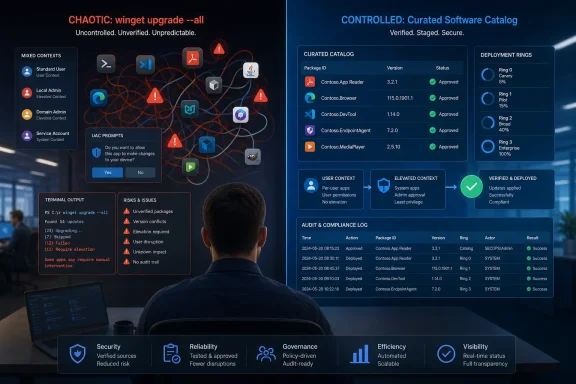 The Missing Filter Changes the Enterprise Decision
Microsoft documents winget upgrade --all as a command that finds installed applications with available upgrades and attempts to install them. The command also supports --scope user and --scope machine, allowing administrators to filter packages by installation scope.What it does not document is a corresponding filter for elevation requirements. There is no supported switch that means “upgrade only packages that do not require administrator rights,” followed by a second elevated run for packages that do.
That omission has been tracked publicly since GitHub issue #2706 was opened on November 17, 2022. The feature request asks Microsoft to let users batch upgrades according to whether they require elevation, avoiding repeated credential or User Account Control handling for each package. The issue remained open as of its latest visible discussion on May 15, 2026.
The request describes a familiar managed-device arrangement: employees work under standard accounts but must use separate administrative credentials, potentially with additional authentication, when software installation requires elevation. Running the entire operation from an elevated shell can avoid repeated prompts, but it may also execute WinGet under the administrator account rather than the employee’s normal account.
That is not a cosmetic inconvenience. A per-user application belongs to a user profile and may have registration, configuration, shortcuts, data paths, or detection state associated with that identity. Updating it from another account is not automatically equivalent to updating it in place for the signed-in employee.
Scope and Elevation Are Different Control Planes
The tempting workaround is to divide packages using--scope user and --scope machine, then assume machine-scope packages require elevation while user-scope packages do not. Microsoft maintainers have explicitly warned that the relationship is not that simple.Installation scope answers where an application is installed: for the current user or for the machine. Elevation describes the privileges an installer needs while performing its work. Those concepts overlap, but they are not interchangeable.
An installer might require elevation because it installs a service, writes to a protected location, changes system-level settings, or performs another privileged action. Another installer might change its behavior when elevated, choosing a machine-wide installation instead of the intended per-user mode. Some installers may request administrator rights even when parts of their work do not appear to need them.
This makes
winget upgrade --all --scope machine an incomplete substitute for an elevation-aware operation. It identifies package scope, not every installer that will request administrative privileges. Conversely, --scope user cannot guarantee that every selected upgrade will remain non-elevated.Microsoft’s current WinGet configuration schema makes the distinction even clearer. Configuration resources that need administrator privileges can declare
securityContext: elevated, while Microsoft warns that adding elevation unnecessarily is a security anti-pattern. The schema therefore recognizes elevation as something that should be assigned deliberately to individual resources, not sprayed across an entire workload for convenience.That is the standard managed upgrades should meet: elevate only the operations that need it, keep everything else in the intended user context, and make both categories visible before execution. The ordinary
upgrade --all workflow does not yet provide that separation.A Safer WinGet Operating Model for Managed PCs
Organizations do not need to remove WinGet from their toolset. They need to stop confusing a package-manager command with a complete patch-management control.A defensible implementation starts with inventory and package selection rather than a scheduled blanket command. Administrators can use the following operating sequence:
- Run
winget upgradewithout additional arguments to preview the upgrades WinGet currently detects. - Identify packages the organization owns operationally, including the expected installer, installed scope, business owner, testing path, and rollback procedure.
- Divide approved packages into explicit user-context and elevated deployment groups based on observed installer behavior, not scope alone.
- Test each upgrade under the same account type, privilege boundary, and device policy used in production.
- Upgrade approved applications by package ID or another tightly controlled selection instead of relying on
winget upgrade --all. - Record command output and verify the installed version using a separate inventory or detection mechanism.
- Add a package to unattended deployment only after its upgrade behavior has remained predictable through testing.
winget upgrade --id <Approved.Package.ID>The important control is not the brevity of the command. It is the approved package list surrounding it. A script that loops through ten reviewed IDs is less elegant than
--all, but it is far easier to test, stage, audit, pause, and troubleshoot.Organizations can also use
--scope user or --scope machine where scope is an intentional selection criterion. Those switches should not be documented internally as elevation filters, because Microsoft does not define them that way.This model permits WinGet to do what it does well: locate packages, compare available versions, invoke supported installers, and reduce packaging work. The surrounding management platform or automation process must still provide targeting, rings, maintenance windows, reporting, exception handling, and remediation.
One Elevated Shell Is a Workaround, Not a Policy
Community discussion around issue #2706 includes a PowerShell workaround that launches an elevated process and runswinget upgrade --all inside it. That can reduce repeated UAC prompts when the same account can approve one elevated session.It does not resolve the identity problem described in the issue. If elevation requires switching to a separate administrative account, WinGet is now running in that account’s environment. Packages intended for the employee’s profile may be skipped, detected differently, or installed for the wrong user, depending on the installer and existing registration.
Nor does one elevated shell create enterprise-grade change control. It does not tell administrators in advance which packages genuinely need elevation, prove that each installer will retain its existing scope, or prevent an unreviewed package from entering the batch when WinGet discovers a new upgrade.
The workaround therefore addresses prompt fatigue while leaving the more important questions unanswered:
- Which security context will each installer receive?
- Which user profile will WinGet inspect and modify?
- Will elevation change the installer’s selected mode?
- Can the organization test and defer one package without stopping every other upgrade?
- Will central reporting distinguish “not applicable,” “not detected,” “failed,” and “installed under another user”?
This distinction is particularly important when administrators are already concerned about policy bypass, unexpected Windows upgrades, or elevation-of-privilege exposure in management components. The safe response to one management gap is not to create another by running every discovered third-party installer with administrator rights.
The Catalog Is the Security Boundary
An unattendedwinget upgrade --all job delegates significant decision-making to the current endpoint state, WinGet’s package matching, package manifests, and individual installer behavior. That may be acceptable on an enthusiast’s personal PC. It is a weak boundary for a regulated or tightly managed fleet.A curated catalog reverses the trust model. IT decides which applications are managed through WinGet, which package IDs are authoritative, which upgrades need elevation, and which deployment rings receive them. Anything outside that catalog remains subject to another packaging process, vendor updater, manual review, or explicit exception.
The catalog should be small enough to test and specific enough to audit. Packages with inconsistent installer behavior, ambiguous ownership, user-dependent state, or weak detection should not be added merely because
winget upgrade lists them.WinGet Configuration points toward a more structured future because it can distinguish resources that need elevated execution and warns against unnecessary privilege. However, configuration files and
winget upgrade --all are not interchangeable workflows. A declarative configuration describing reviewed resources is fundamentally different from asking the client to upgrade every detected application on a changing endpoint.The practical enterprise threshold is straightforward: if IT cannot predict the account, scope, privilege level, installer behavior, success signal, and rollback path for a package, that package is not ready for unattended WinGet deployment.
Microsoft’s Next Step Must Be More Than Fewer Prompts
The open GitHub request has lasted long enough to become a management limitation rather than a minor command-line omission. The required improvement is not merely a single UAC prompt. Administrators need supported selection and reporting based on elevation requirements while preserving the original installation context.An elevation-aware filter would let standard-user upgrades run normally before a controlled elevated phase handles the remaining packages. Even then, Microsoft would need to account for installers whose behavior changes under elevation and for manifests that do not accurately describe what the installer does.
Until that workflow exists, WinGet remains valuable as an execution component beneath a stronger control plane. It can service known, approved packages efficiently, but
winget upgrade --all should not become the patch policy itself.The next meaningful milestone is closure of issue #2706 with a supported way to separate elevated and non-elevated upgrades without redirecting per-user software into an administrator’s context. Until then, managed-PC teams should favor explicit package IDs, staged testing, deliberate elevation, and independently verified results over the seductive simplicity of “upgrade everything.”
References
- Primary source: learn.microsoft.com
WinGet Configuration file v3 schema reference | Microsoft Learn
Reference documentation for creating WinGet Configuration files using the dscv3 processor and DSC v3 schema.learn.microsoft.com - Independent coverage: github.com
winget upgrade all packages requiring admin priviledges at once · Issue #2706 · microsoft/winget-cli · GitHub
Description of the new feature / enhancement I'd like to have the possibility to filter all packages that require admin priviledges and upgrade them in a single command. This way I could run an elevated command prompt and run the upgrade... github.com
- Independent coverage: devblogs.microsoft.com
Windows Package Manager 1.4 - Windows Command Line
The Windows Package Manager team has been busy working on WinGet 1.4. This release introduces support for .zip-based packages. WinGet can now extract anddevblogs.microsoft.com - Independent coverage: reddit.com

Reddit - Please wait for verification
www.reddit.com
- Independent coverage: gist.github.com
Upgrade Selected Apps via Winget · GitHub
Upgrade Selected Apps via Winget. GitHub Gist: instantly share code, notes, and snippets. gist.github.com
- Independent coverage: docs.level.io
Winget Troubleshooting | Level Documentation
Resolve common issues with Level's winget actions, including package scope requirements, SYSTEM user context, and install timeouts.docs.level.io