

Winhance’s latest release marks a decisive shift: the widely used open‑source Windows optimization and debloating utility has migrated its entire user interface from WPF to WinUI 3, delivering a modern, native look, tighter integration with Windows 11 visual language, and a set of usability and performance improvements that change how casual and power users interact with the tool.
Winhance is an open‑source Windows enhancement utility maintained by Marco du Plessis (memstechtips) and a lively GitHub community. Over the past year it has grown from a niche debloater into a full‑featured system utility that handles app removal, privacy hardening, power and update controls, and even ISO/autounattend generation for system deployment workflows. The project is distributed via GitHub releases and a dedicated website, and it offers both installer and portable deployment options so administrators and individual users can adopt it in varied environments.
On February 13, 2026, the project published a milestone release that explicitly moved the UI from WPF (Windows Presentation Foundation) to WinUI 3. A follow‑up maintenance release appeared on February 17, 2026 to address startup resilience and user‑facing polish. The migration is not a cosmetic facelift — it is an architectural choice with implications for resource usage, future maintainability, accessibility, and the project’s alignment with Microsoft’s native Windows UI stack.
A few important caveats for readers evaluating those claims:
Key considerations for security and trust:
For most home users and enthusiasts, the updated interface and structural UX improvements are immediate wins: cleaner navigation, faster UI response, and clearer technical visibility into what tweaks do. For organizations and power users, treat the release as an opportunity to reassess deployment practices, validate behavior across update cycles, and integrate the tool into a well‑documented imaging or provisioning workflow if you plan wide adoption.
If you plan to try the new release, back up first, inspect the technical details for any change that touches registry or scheduled tasks, and adopt a staged rollout approach. The Winhance project’s continued active development and transparent release notes make it straightforward to do so safely, while still benefiting from a more modern and native Windows experience.
Source: Windows Report https://windowsreport.com/winhance-open-source-windows-optimization-app-gets-major-winui-3-upgrade/
 Background
Winhance is an open‑source Windows enhancement utility maintained by Marco du Plessis (memstechtips) and a lively GitHub community. Over the past year it has grown from a niche debloater into a full‑featured system utility that handles app removal, privacy hardening, power and update controls, and even ISO/autounattend generation for system deployment workflows. The project is distributed via GitHub releases and a dedicated website, and it offers both installer and portable deployment options so administrators and individual users can adopt it in varied environments.On February 13, 2026, the project published a milestone release that explicitly moved the UI from WPF (Windows Presentation Foundation) to WinUI 3. A follow‑up maintenance release appeared on February 17, 2026 to address startup resilience and user‑facing polish. The migration is not a cosmetic facelift — it is an architectural choice with implications for resource usage, future maintainability, accessibility, and the project’s alignment with Microsoft’s native Windows UI stack.
Why WinUI 3 matters for a tool like Winhance
WinUI 3 is Microsoft’s modern native UI framework for Windows apps, part of the Windows App SDK. It provides native support for rounded corners, system accent color, transparency effects, and animation behaviors that match the Windows 11 experience. Choosing WinUI 3 for Winhance offers several practical benefits:- Visual parity with Windows 11 — Winhance now respects system accent colors, animations, and transparency settings, producing a more consistent look and feel with the rest of the OS.
- Lower UI maintenance overhead — WinUI’s native controls and theming reduce the need for custom templates and workarounds that WPF developers often implement to mimic modern visuals.
- Performance and resource usage improvement — according to Winhance’s release notes, the Optimize page previously loaded hundreds of settings onto a single long page, consuming roughly 300–400 MB of RAM; the WinUI redesign breaks content into subpages and reduces memory usage to the 200–300 MB range depending on content. These numbers are approximate and device‑dependent, but they illustrate a measurable intent to optimize runtime footprint.
- Forward compatibility — WinUI 3 is the direction Microsoft is prioritizing for native Windows UI development; migrating to it positions Winhance for easier adoption of platform improvements and integrations going forward.
What changed in the release: concrete improvements
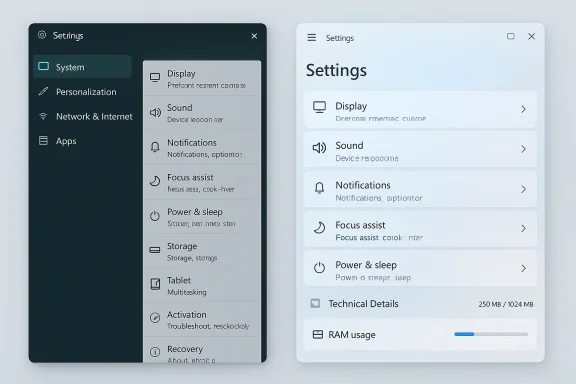
The migration release contains a structured list of UI and UX improvements that go beyond skinning. Key changes include:- Complete migration from WPF to WinUI 3, replacing custom WPF templates with native WinUI components for a modern interface.
- Structural reorganization of the large, previously scroll‑heavy Optimize and Customize pages into multiple subpages, improving navigation and lowering memory consumption.
- New view modes for software management: Card view and Table view, with table sorting and reinstall availability indicators.
- A technical details toggle that exposes registry paths, current values, and recommended values for each tweak. This is off by default, giving casual users a clean experience while allowing power users transparency.
- Direct “Open in Registry Editor” links when technical details are shown, enabling quick jumps into regedit for verification or manual edits.
- More resilient startup behavior in a later patch: the app now bundles a self‑contained App SDK fallback and adds COM timeout handling and backup safeguards to reduce crashes on startup.
- UX additions like a new loading/splash screen, an update info bar that’s dismissible, collapsible navigation pane, and a Documentation button placed in the title bar for quicker access to online docs.
Performance claims and practical impact
One of the more tangible claims in the release notes is a reduction in memory usage for the app’s main optimization UI. Winhance reports that the old WPF implementation rendered the Optimize page as a single long document consuming around 300–400 MB of RAM; the WinUI refactor organizes settings into subpages and reduces that to roughly 200–300 MB, with further gains depending on which pages are loaded.A few important caveats for readers evaluating those claims:
- Memory and responsiveness are affected by many variables: Windows version, display scaling, installed fonts, number and size of installed apps, and hardware (especially RAM and storage speed).
- The cited numbers are approximate and were measured by the Winhance project in its environment; your mileage may vary. Expect differences on low‑memory devices (4–8 GB of RAM) versus modern 16+ GB desktops.
- The move to WinUI 3 can reduce certain UI artifacts common with WPF (such as rendering trails while dragging a window), and can yield faster navigation and animation consistency because WinUI’s rendering pipeline aligns more closely with system composition.
Security, trust, and open‑source governance
Winhance’s identity as an open‑source project is a central part of why many users adopt it. Open code allows security‑minded administrators to inspect scripts that modify the system, confirm there are no backdoors, and audit uninstall and debloat routines.Key considerations for security and trust:
- The project publishes releases and tagged artifacts on GitHub. When installing, prefer downloading signed release assets or using the official installer method provided in the repository to reduce the risk of tampered third‑party builds.
- Even open‑source tools that alter system behavior should be used with caution: creating a system restore point or backup image before applying large batches of changes is recommended.
- The release introduced a technical details toggle for each tweak, improving transparency by exposing registry keys and current values. This is a strong positive for administrators who want to verify each change.
- Some features use scheduled tasks and scripts to prevent Windows from reinstalling certain apps during updates. Techniques that persistently block OS behavior can have unintended consequences when Microsoft changes update mechanics; keep this in mind for systems that require strict update compliance.
Compatibility and deployment: what to expect in mixed environments
Winhance supports Windows 10 and Windows 11 and the repository indicates testing on Windows 10 x64 22H2 and Windows 11 builds through 25H2. Still, a UI migration raises compatibility questions administrators should consider:- Windows 10 compatibility: WinUI 3 apps require the Windows App SDK and appropriate runtime dependencies. While WinUI can run on Windows 10, some visual features (like rounded corners and system transparency) may be unavailable or behave differently on older OS builds. The Winhance team has implemented version compatibility info bars in the UI to highlight which settings apply only to certain OS releases.
- Enterprise imaging and automation: Winhance includes tools for generating Windows ISOs and autounattend.xml files. If you use Winhance in corporate imaging pipelines, validate the new UI installer and the command‑line or unattended install paths in a test environment before rolling to production.
- Portable vs installer: The release provides installer and portable versions. Portable mode is useful for forensic testing or troubleshooting on a single machine without installation footprint. Installer mode is better when centralizing the tool for multiple workstations.
- Winget and package handling: The project replaced a WinGet COM-based install/uninstall step with a bundled CLI approach in a beta release, improving resilience where winget is unavailable or misconfigured. Administrators should verify the behavior in environments with restricted network access or custom package sources.
Developer and contributor implications
Shifting from WPF to WinUI 3 affects more than the binary UI artifact: it changes the contributor experience and the project’s long‑term architecture.- Tooling and builds: WinUI 3 projects typically use the Windows App SDK and may depend on more recent .NET SDKs. Contributors should verify that local development environments are updated to the required SDK versions and the WinUI tooling. The release notes and repository include instructions, but developers must ensure build agents and CI runners reflect those requirements.
- Cross‑platform considerations: The Winhance team noted a consideration between Avalonia (a cross‑platform UI framework) and WinUI 3, but chose WinUI 3 because Winhance is Windows‑centric. That decision narrows the contributor pool to Windows developers but improves fidelity with Windows behaviors and appearance.
- Open source collaboration: With a growing user base and visibility, the project will likely see more issues and pull requests. Migrating to a modern UI stack can lower the barrier for contributors experienced with Microsoft’s modern tooling, but may raise setup complexity for those on non‑Windows hosts.
- Testing and CI: Windows UI tests often require UI‑capable runners or specialized test harnesses. The maintainers’ addition of startup resilience and fallback implementations suggests attention to CI stability, but contributors should expect occasional platform‑specific bugs during the stabilization window.
Risks, tradeoffs, and things to watch
No major platform migration is without tradeoffs. Here are the main risks and what to watch for as Winhance continues to stabilize on WinUI 3:- Regression bugs: Any migration can introduce regressions. The project already published a follow‑up release addressing startup resilience and winget handling; watch the project’s issue tracker for reports about toggles not applying, unexpected reboots, or uninstall behavior.
- OS update interactions: Winhance prevents reinstallation of certain apps via scripts and scheduled tasks. Future Windows updates may change package identities or update mechanisms, which could lead to re‑installation or breakage. Administrators should monitor update behavior after applying persistent preventions.
- Accessibility and input models: WPF and WinUI have different accessibility behaviors. Users relying on assistive technologies should test key workflows to ensure screen readers and keyboard navigation behave correctly under WinUI 3.
- Dependency management: WinUI 3 requires Windows App SDK components and may be sensitive to the host machine’s installed runtimes. The maintainers’ bundling and fallback mechanisms reduce the risk of startup crashes but do not eliminate the need for platform‑compatible environments.
- Community support vs enterprise SLAs: Winhance is community‑driven. While highly capable, it is not a supported commercial product. Organizations that require SLAs should document test results and rollback procedures before deploying Winhance at scale.
Recommended best practices for users and admins
Whether you’re a home user who wants a cleaner system or an admin preparing an image for multiple PCs, follow these practical steps to minimize risk:- Create a full system backup or a restore point before applying broad optimizations.
- Test Winhance on a non‑critical machine first and document which tweaks are applied.
- Use the technical details toggle to inspect registry changes and scheduled tasks before applying them.
- Prefer official GitHub release artifacts or the project’s published installer methods rather than third‑party repackaged binaries.
- If deploying across multiple machines, generate and test a configuration export and use the portable mode for initial validation.
- Monitor Windows Update behavior for the first few update cycles after applying persistent debloat measures.
What this migration signals for the Windows tooling ecosystem
Winhance’s move to WinUI 3 is part of a broader trend: developers are standardizing on the Windows App SDK and WinUI as Microsoft iterates toward a modern native application platform. The practical outcomes are:- Increased visual and behavioral consistency across first‑ and third‑party apps on Windows 11.
- Easier access to modern UI features for community projects that want a native look without heavy custom theming.
- A potential uptick in contributions from developers already familiar with Microsoft’s recent tooling.
Critical analysis: strengths and where caution is warranted
Strengths- User experience: The migration to WinUI 3 immediately improves visual consistency and responsiveness. Breaking long pages into subpages is a clear UX win.
- Transparency: The new technical details toggle and registry links are important for trust and auditing, especially for administrators.
- Active maintenance: Rapid follow‑up releases addressing startup resilience and winget handling show active stewardship and responsiveness to issues.
- Open‑source accountability: Publishing release tags and changelogs on GitHub gives users the ability to inspect changes before applying them.
- Dependency surface: WinUI 3 introduces additional platform dependencies that can complicate portable usage on older or heavily locked‑down systems.
- Non‑persistent tweaks: The app’s own documentation notes that many optimizations are applied once and are not continuously enforced; users expecting persistent changes may be surprised when Windows reverses settings later.
- Operational risk in managed environments: Organizations should be cautious about using Winhance for persistent prevention of updates or app reinstallation without thorough testing.
- Accessibility and automation: Migrations can break existing scripts or accessibility workflows. Test screen reader compatibility and automation hooks if these are part of your toolchain.
Final thoughts
Winhance’s WinUI 3 migration is a thoughtful technical and UX evolution for an already capable Windows optimization tool. The move aligns the project with modern Windows UI paradigms, reduces UI bloat and resource usage, and improves transparency for administrators and power users. At the same time, the change introduces new platform dependencies and underscores the need for careful testing in managed environments.For most home users and enthusiasts, the updated interface and structural UX improvements are immediate wins: cleaner navigation, faster UI response, and clearer technical visibility into what tweaks do. For organizations and power users, treat the release as an opportunity to reassess deployment practices, validate behavior across update cycles, and integrate the tool into a well‑documented imaging or provisioning workflow if you plan wide adoption.
If you plan to try the new release, back up first, inspect the technical details for any change that touches registry or scheduled tasks, and adopt a staged rollout approach. The Winhance project’s continued active development and transparent release notes make it straightforward to do so safely, while still benefiting from a more modern and native Windows experience.
Source: Windows Report https://windowsreport.com/winhance-open-source-windows-optimization-app-gets-major-winui-3-upgrade/
