

Microsoft has formally put the final nail in the coffin for Windows Internet Name Service (WINS): the company announced that WINS will be removed from all Windows Server releases after Windows Server 2025, leaving administrators a finite migration runway that effectively ends native WINS support when Windows Server 2025 reaches the end of its lifecycle in 2034.
Background / Overview
WINS is a legacy NetBIOS name‑to‑IP mapping service introduced in the 1990s to solve short‑name discovery on early Windows networks. Over three decades it served a practical role in environments where DNS usage or conventions were immature. Microsoft first declared WINS deprecated in Windows Server 2022 and has now published a formal removal timeline (KB 5071836) confirming that Windows Server 2025 will be the last Long‑Term Servicing Channel (LTSC) release to ship WINS. Microsoft ties the practical end of WINS to Windows Server 2025’s support lifecycle: the Windows Server 2025 product page indicates Mainstream Support ending in November 2029 and Extended Support ending on November 14, 2034, which is the pragmatic deadline organisations should use when planning WINS retirement. Industry and community outlets have echoed Microsoft’s announcement, summarised the technical rationale, and begun publishing migration guidance. Independent write‑ups and translated coverage are now available across multiple outlets, underscoring that this is an official, platform‑level change rather than a tentative recommendation.Why Microsoft is removing WINS — the technical case
Standards, scale and modern architectures
- DNS is standards‑based and hierarchical. DNS is an RFC‑defined distributed system (RFC 1034/1035 and later updates) that supports delegation, caching and scale models appropriate for modern enterprise and cloud scenarios. WINS was designed for a flat NetBIOS namespace and uses centralized registration/replication semantics that do not map well to large or multi‑site topologies.
- Cloud and modern Windows services expect DNS. Active Directory, Azure services, and many modern Windows APIs use DNS semantics by design. Unifying name resolution on DNS simplifies integration, authentication (Kerberos), and service discovery across hybrid and cloud boundaries.
Security
- DNS enables modern protections such as DNSSEC. DNSSEC provides origin authentication and integrity for DNS responses, reducing the risk of cache‑poisoning and spoofing attacks which are much harder to mitigate at the WINS/NetBIOS level. Microsoft explicitly cites security posture as a major driver for removal.
- Legacy attack surface. WINS and NetBIOS rely on older protocols and on‑LAN discovery mechanisms that increase exposure in poorly segmented or hybrid networks. Microsoft frames removal as a way to reduce maintenance of legacy, higher‑risk components.
Product lifecycle and engineering focus
- No active feature development. WINS was previously marked deprecated and has not received feature investment; Microsoft’s long‑term engineering focus is on DNS and modern name‑resolution patterns. Removing WINS reduces platform complexity and ongoing maintenance burden.
What Microsoft will remove from the OS image
When removal takes effect in Windows Server releases following Windows Server 2025, administrators should expect the following to disappear from the product image and supported management surface:- WINS Server role and associated binaries.
- WINS Microsoft Management Console (MMC) snap‑in and GUI tooling.
- WINS automation APIs and programmatic management interfaces used by scripts, appliances or third‑party tools.
Practical impact — who will feel it and where the risks hide
Many modern estates will see little day‑to‑day disruption: Active Directory domains, current Windows clients and mainstream servers already use DNS. However, the critical impact is concentrated in a persistent long tail of legacy endpoints and operational artefacts:- Embedded devices and appliances that only support NetBIOS/WINS (older network printers, IP phones, building controllers, industrial controllers).
- Vertical or bespoke line‑of‑business applications built before DNS was ubiquitous.
- Backup appliances, monitoring tools and vendor suites that query WINS or integrate with its APIs.
- DHCP scopes and Group Policy objects that still distribute WINS server addresses as DHCP options.
- Scripts, automation, or scheduled jobs that call WINS APIs directly.
A recommended migration playbook (enterprise blueprint)
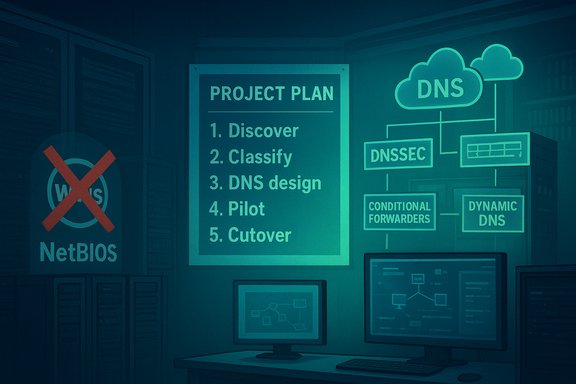
The removal is not immediate, but it is final. Organisations should treat this as a multi‑year infrastructure modernization program rather than a quick patch. The following playbook converts official guidance and community best practice into an actionable sequence.Phase 1 — Discover and quantify (0–3 months)
- Export DHCP scope settings and search for WINS server IPs in scope options.
- Scan for NetBIOS traffic (UDP 137/138) and WINS replication traffic on segments. Packet captures and flow logs will reveal active clients and servers.
- Search configuration management, GPOs, registry settings and automation scripts for WINS/NetBIOS references.
- Build an inventory of devices that cannot be trivially reconfigured (embedded devices, printers, industrial control gear).
- Open vendor tickets for any appliance or third‑party app where the behaviour is unclear.
Phase 2 — Classify and prioritise (1–4 months)
- Create three buckets:
- Easy to migrate: modern servers and clients where DNS registration (DDNS) or DHCP updates are available.
- Moderate effort: third‑party apps, appliances with configurable DNS options, or devices requiring firmware updates.
- Hard / unmanaged: fixed‑function devices with no DNS support (may require replacement or segmentation).
- Assign business owners, impact, and SLAs for each asset.
Phase 3 — DNS design & pilot (3–9 months)
- Design an internal DNS architecture that replaces WINS behaviour:
- Use authoritative internal zones for legacy single‑label names you must preserve.
- Implement split‑horizon (split‑brain) DNS to reconcile internal/external views where needed.
- Configure conditional forwarders for cross‑site or cross‑forest resolution.
- Build suffix/search lists via DHCP and GPO to preserve single‑label resolution for user experience.
- Pilot with a non‑critical segment: reconfigure DHCP to register clients via dynamic DNS, create DNS records for server roles, and validate authentication flows (Kerberos, Kerberos constrained delegation where used).
Phase 4 — Vendor remediation and replacement (6–24 months)
- Patch or upgrade appliances that can support DNS.
- For unpatchable devices, plan network segmentation and compensating controls (ACLs, micro‑segmentation, limited access).
- Replace equipment that cannot be modernised on an acceptable timeline.
Phase 5 — Cutover and decommission (9–36 months)
- Remove WINS server addresses from DHCP scopes and GPOs only after broad verification.
- Retire WINS infrastructure once you confirm that no clients depend on it.
- Maintain a short, well‑documented holdback period for rollback in case of missed dependencies.
Technical patterns to replicate WINS behaviour with DNS
Replacing WINS often means preserving short‑name convenience for users and scripts without sacrificing standards.- Conditional forwarders — forward queries for selected namespaces to another DNS server (useful for multi‑site or vendor DNS that must be reached selectively).
- Split‑horizon DNS — serve different responses internally vs externally to keep internal names private while preserving FQDNs.
- DNS suffix/search lists — distribute DNS suffixes via DHCP/GPO so users can continue to use short names while the underlying resolution resolves to FQDNs.
- Dynamic DNS (DDNS) + DHCP integration — ensure endpoints register their records dynamically so DHCP reassignment doesn’t disrupt name resolution.
- Static DNS records only as a temporary measure — acceptable for a small number of stubborn devices, but not scalable as a permanent solution. Microsoft explicitly cautions against hosts files and other static workarounds as long‑term strategies.
Why not use hosts files or LMHOSTS permanently
- Management overhead: Hosts files don’t scale and create configuration drift across thousands of endpoints.
- Lack of auditability: There’s no central way to track who changed what, when.
- Operational risk: Static entries lead to out‑of‑date records, causing silent failures or credential misdirections.
Verification, testing and monitoring
- Traffic and registration baselines: Capture pre‑migration NetBIOS/WINS traffic and maintain a baseline so you can detect lingering WINS use after changes.
- DNS query telemetry: Enable logging and query analytics on authoritative DNS servers to find unresolved single‑label queries or atypical response patterns.
- Synthetic tests: Automate synthetic checks for FQDN resolution, Kerberos ticket acquisition, and application‑level connectivity for critical services.
- Staged cutovers: Use VLANs or pilot OUs to validate DNS‑first behaviour at scale before sweeping DHCP/GPO changes.
Security controls and compensations during migration
- DNSSEC where possible: Deploy DNSSEC for zones that can be signed to add response integrity guarantees — beneficial for internal‑to‑external trust boundaries. (Note: wider adoption inside enterprise DNS varies; plan and test the chain of trust carefully.
- Network segmentation: Isolate legacy devices that cannot be migrated to reduce attack surface.
- Endpoint hardening: Enforce least privilege and limit exposure of management ports during transition.
- Vendor SLAs: Require vendors to provide migration plans or replacement timelines for embedded devices.
Operational and business risks — a concise risk matrix
- High risk: Industrial control systems, medical devices, POS systems, or tape libraries that only understand NetBIOS/WINS and cannot be updated. These often require replacement or long‑term segmentation.
- Medium risk: Vendor appliances with configuration changes available but requiring vendor coordination, testing, and maintenance windows.
- Low risk: Modern servers and clients that already register DNS or can be reconfigured via DHCP/GPO with minimal work.
Cost and resource considerations
- Budget for device replacement where vendor remediation is not possible.
- Allocate engineering time for discovery, DNS design, pilot, and rollouts.
- Factor in vendor support tickets, potential firmware upgrades, and lab testing overhead.
- Consider phased purchase plans so high‑risk, high‑impact devices are prioritized.
Cross‑checks and verification of the announcement
- Microsoft’s support article “WINS removal: Moving forward with modern name resolution” (KB 5071836) is the authoritative announcement and contains an edit log documenting language changes in November 2025. The KB explicitly states WINS will be removed from Windows Server releases after Windows Server 2025 and that WINS will remain under the Windows Server 2025 lifecycle through November 2034.
- The Windows Server 2025 lifecycle page confirms mainstream and extended support end dates; Extended Support is listed as ending November 14, 2034 — the practical endpoint organisations should reference for WINS support through the last LTSC that ships the feature.
- Independent reporting (community and tech press) has summarised Microsoft’s guidance and echoed the migration recommendations, reinforcing that this is a broad, public platform decision rather than a localized guidance update. Examples include coverage from BleepingComputer and specialist community posts that condense the KB into a migration narrative.
Quick checklist for administrators (actionable takeaways)
- Audit DHCP scopes and GPOs for WINS options today.
- Scan networks for NetBIOS/WINS traffic and register findings.
- Prioritise remediation for embedded devices and vendor‑controlled appliances.
- Design DNS zones to replace WINS behaviour (conditional forwarders, split‑horizon, suffix lists).
- Avoid hosts files as a permanent solution; use them only as short‑term emergency fallbacks.
- Schedule pilots and synthetic tests; document rollback procedures.
- Set vendor engagement deadlines relative to Windows Server 2025 lifecycle milestones.
Long view and conclusions
Microsoft’s formal removal of WINS from future server images is a definitive signal that the Windows Server ecosystem is consolidating around DNS‑first name resolution. This decision aligns platform engineering with internet standards, security practices and cloud integration patterns — and it converts a long‑running deprecation into a fixed timetable tied to the Windows Server 2025 lifecycle. Administrators gain a predictable migration window that extends to November 14, 2034, but they also face a firm deadline: after Windows Server 2025’s lifecycle expires, WINS will no longer be available as a native server role. For organisations, the sensible response is immediate and methodical: inventory comprehensively, prioritise devices and applications by migration difficulty, design robust DNS replacements for WINS behaviour, and treat vendor engagement as first‑class work. The technical benefits are real — DNS scales, interoperates with modern services, and supports security features unavailable to WINS — but the devil remains in the details of discovery and remediation. Migration is not optional for systems that will still be in production beyond Windows Server 2025’s lifecycle end; it is an operational necessity that can — and should — be planned and executed without drama if started early and treated as a structured program.Source: igor´sLAB Microsoft ends WINS support in the long term and relies entirely on DNS | igor´sLAB
