Microsoft’s 2025 cleanup of Windows reached deep into the operating system this year, touching everything from long‑standing network services to small in‑box consumer apps — and in many cases the company didn’t just deprecate functionality, it removed binaries from fresh images or published firm removal timelines tied to Windows 11, version 24H2 and Windows Server 2025. The changes are broad, security‑driven, and deliberate: expect fewer legacy runtimes, older authentication paths gone for good, and a smaller set of in‑box utilities maintained going forward.
The net effect should be a leaner, more secure platform that is easier to maintain and integrate with cloud services and modern toolchains. The tradeoff is migration cost and the loss of some convenient in‑box tools for users, which must be handled with good change management and clear communication. The operational imperative for 2026 is simple: inventory everything, prioritize the risky legacy paths (auth and name resolution), and treat removal timelines as hard deadlines for migration planning.
(If any specific detail — a KB number, exact support‑end date, or the presence of a particular binary in a given build — is mission critical for your compliance calendar or deployment freeze, verify that single fact on Microsoft’s official lifecycle and support pages before finalizing your project schedule.
Source: Neowin https://www.neowin.net/amp/every-windows-feature-microsoft-removed-or-deprecated-in-2025/
 Background
How Microsoft handles deprecation and removal
Microsoft’s lifecycle for old features follows a predictable arc: a feature is first documented as deprecated (no new development, customers are warned), then discouraged (recommendations and migration options issued), and finally removed (binaries and APIs stripped from new images or the feature is disabled). In 2025 several features reached that terminal stage — often tied to specific OS releases so enterprises and administrators had a defined migration runway. Many of the most visible removals were scheduled around Windows 11, version 24H2 and Windows Server 2025.Why this matters now
Removal of in‑box components is more than cosmetic. When Microsoft strips a binary, disables an API, or ends availability of a legacy client, it can break automated scripts, management workflows, appliances using old auth schemes, and niche admin tooling — particularly in brownfield environments. Administrators must therefore treat 2025’s list as operational risk: inventory dependencies, test migrations, and apply mitigation plans well before rolling new images into production.Overview: The headline removals and deprecations in 2025
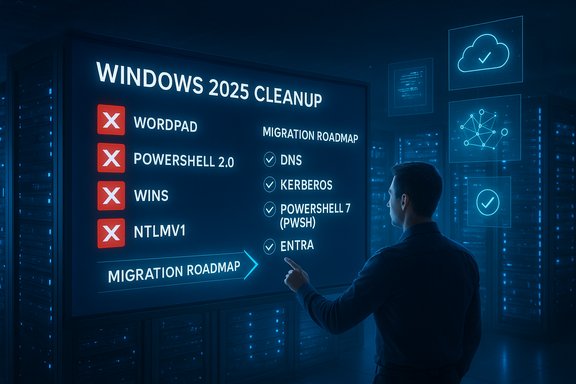
Below is a concise catalog of the most consequential items Microsoft removed or placed into formal retirement timelines during 2025. Each entry summarizes status, reason, and practical migration advice.- WordPad — Removed
Status: WordPad binaries (wordpad.exe, wordpadfilter.dll, write.exe) were removed from fresh Windows 11 24H2 and Windows Server 2025 images. Impact: any scripts or management tools that launch wordpad.exe will fail on clean installs. Migration: use Microsoft Word for rich text formats or Notepad / third‑party viewers for plain text; update automation to use file associations or higher‑level libraries. - Windows PowerShell 2.0 engine — Removed
Status: The legacy PowerShell 2.0 engine (long deprecated) was removed from Windows 11 24H2 and Windows Server 2025 images during mid‑2025; Microsoft published KB guidance for migration. Impact: scripts that explicitly call a v2 engine (powershell.exe -Version 2) will break on new images. Migration: convert scripts to PowerShell 5.1 or PowerShell 7.x (pwsh); use the compatibility guidance and any Microsoft‑provided stopgap installers sparingly. - WINS (Windows Internet Name Service) — Removal tied to Server 2025
Status: Microsoft formalized that Windows Server 2025 is the last LTSC release to ship WINS; the WINS server role and management interfaces will not be included in post‑2025 server images. Impact: legacy devices and appliances that rely on NetBIOS/WINS short‑name resolution must be migrated or replaced. Migration: move to DNS-based naming, use DNS suffixes/conditional forwarding, or provide interim DNS wrappers for legacy endpoints. Microsoft’s articles and KBs explain the timeline and migration steps. - NTLMv1 and legacy NTLM elements — Removed / Deprecated
Status: NTLMv1 was explicitly removed starting with Windows 11 24H2 and Windows Server 2025, and the broader NTLM family has been marked deprecated in many contexts. Impact: appliances or applications that only support NTLMv1 will fail authentication against updated clients/servers. Migration: move to Kerberos, modern NTLMv2 as a short stopgap, or — ideally — modern identity: Microsoft Entra (Azure AD), OAuth/OIDC and conditional access. - Classic Microsoft Teams (desktop client) — End of availability
Status: Microsoft enforced the transition to the New Teams client and declared the classic client unavailable as of July 1, 2025. Impact: organizations still on the classic client needed to migrate meeting integrations, add‑ins, and training to avoid disruption. Microsoft supplied migration tooling and web/new‑client fallbacks. - Windows Mixed Reality & AllJoyn — Removed / Retired
Status: Mixed Reality components and Microsoft’s AllJoyn implementation were removed or retired in the 24H2/2025 timeframe, reflecting low adoption. Impact: applications dependent on these runtimes must be replatformed. Migration: adopt modern cross‑platform AR/VR toolchains or cloud alternatives. - Suggested Actions, Paint 3D, and other low‑usage features — Deprecated or removed
Status: A collection of lower‑usage features were deprecated or removed during 2024–2025, including Suggested Actions and Paint 3D. Impact: usability changes for end users and potential loss of lightweight tools; Microsoft often offers replacements (e.g., Snipping Tool video capture replacing Steps Recorder). - IIS 6 Management Console, SMTP Server, WMIC, Computer Browser, DirectAccess and assorted server/legacy tools — Deprecated or removed
Status: Several legacy server roles and management tools were removed or deprecated in Server 2025 (IIS 6 MMC removed, SMTP server discontinued, WMIC deprecated). Impact: organizations still depending on vintage management consoles or protocols need to adopt modern equivalents or alternate tooling.
Deep dives: what changed, why, and how to migrate
WordPad — small app, outsized friction
WordPad’s removal was notable mostly for user sentiment; it was a staple small editor that millions used for quick RTF edits. The practical consequence is script and tool breakage where processes called wordpad.exe directly. For most users, the migration path is straightforward — use a modern word processor or a lightweight editor — but at scale (imaging labs, education deployments) administrators must update deployment images and training materials.PowerShell 2.0 — closing the downgrade attack vector
PowerShell v2 lacks modern defensive integrations like AMSI, script‑block logging, and constrained language modes. Microsoft’s decision to remove the legacy engine targets security: leaving an old engine in images is an enduring downgrade vector for attackers. Migration is nontrivial only when scripts rely on legacy CLR hosting semantics; the recommended path is to test and port scripts to PowerShell 5.1 or the cross‑platform PowerShell 7.x (pwsh). Microsoft reportedly provided guidance and a temporary reinstall package for extremely constrained cases, but that option is a stopgap not a long‑term solution. Administrators should inventory calls to powershell.exe -Version 2 and plan conversion projects.WINS — the final chapter for NetBIOS short names
WINS removal is a classic enterprise migration problem: WINS solved short‑name discovery in the IPv4-era LAN, and many embedded devices and legacy apps still assume NetBIOS semantics. By declaring Windows Server 2025 the last LTSC to ship WINS, Microsoft gave organizations a long runway (the Server 2025 lifecycle extends many years), but the end state is clear: native WINS support will not be present in post‑2025 server images. Migration strategies include DNS mapping, RFC‑compliant DNS deployment with conditional forwarders and suffixes, and interim DNS wrappers for unmanaged appliances. The stated rationale is stability, RFC alignment, scale and security — DNS supports DNSSEC and modern operational capabilities that WINS cannot offer.NTLMv1 and NTLM changes — compatibility versus security
NTLMv1’s removal reflects a long push to rid the platform of weak authentication. NTLMv1 is vulnerable to credential capture and relay attacks; removing it forces legacy systems to adopt safer protocols. Enterprises must inventory authentication flows (service accounts, appliances, SMB shares) and test compatibility with Kerberos and modern token‑based identity mechanisms. Where impossible, NTLMv2 can be an interim measure but is not a long‑term cure. Modern identity systems (Entra/Azure AD and OAuth/OIDC) are Microsoft’s recommended destination.Classic Teams — enforced client consolidation
For organizations still using the classic Teams client, Microsoft’s July 1, 2025 cutoff required accelerated rollouts or fallback to the web client. The operational work here is classic change‑management: validate integrations, repackage add‑ins where needed, ensure meeting join flows work with the new client, and prepare end‑user communications. Microsoft supplied deployment tooling to help large fleets.Consumer niceties: Suggested Actions, Paint 3D, Steps Recorder
These removals reflect telemetry‑driven decisions. Features with low usage — Suggested Actions, Paint 3D — were deprecated or removed, and Microsoft has reallocated development to higher‑impact features. In many cases modern alternatives exist (e.g., Snipping Tool with video capture supplanting Steps Recorder), but the loss of convenience can be felt by users who relied on small, in‑box tools. Administrators should communicate changes to users and ensure acceptable replacement tools are available in managed fleets.Server tooling and management — moving toward modern consoles and APIs
IIS 6 tooling, SMTP server role, WMIC deprecation, and other server updates are part of a long arc moving administrators to more secure, modern toolchains: IIS newer management APIs, Exchange/SMTP modern replacements, and PowerShell or Microsoft Graph API replacements for WMIC and legacy modules. These transitions often require testing of automation and third‑party management integrations.Why Microsoft made these choices — strengths and the logic
- Security first — Many removals close known attack vectors: PowerShell v2, NTLMv1 and legacy TLS settings are all risk reductions that allow Microsoft to bake stronger defaults into the platform. This reduces the platform's long‑tail exposure to known exploits.
- Lower maintenance surface — Fewer in‑box components simplifies testing matrices and reduces regression risk across rapid‑release cycles. That helps Microsoft invest engineering resources on higher‑value features (Copilot integrations, Notepad improvements, New Teams client).
- Standards alignment — Moving services to RFC‑backed standards (DNS vs. WINS) improves cross‑vendor interoperability and enables modern defenses like DNSSEC. It brings Windows into line with networking best practices.
- Predictable timelines — Tying removals to OS releases (24H2 / Server 2025) gives enterprises measurable windows to migrate, rather than sudden cutoffs. This is better for planning, although the migration work itself can be heavy.
Risks, friction points, and what to watch for
- Brownfield environments are the hardest hit — Industrial control systems, point‑of‑sale appliances, and other embedded devices often lack easy firmware or software updates. If those devices rely on WINS, NTLMv1, or other deprecated features, remediation can be costly or require hardware replacement.
- Undocumented dependencies — Scripts that invoke removed binaries, management tooling relying on legacy MMC snap‑ins, or third‑party apps using unsupported APIs are common and often undocumented. The discovery phase is time‑consuming but essential.
- Operational windowing complexity — Multiple deprecations across client, server, and cloud (e.g., Teams, Office lifecycle intersections, Windows 10 EOL) create calendar complexity for lifecycle managers. Coordinated cross‑team planning is required to avoid overlap issues.
- Perception and user experience — End users can feel that "useful" utilities are being snatched away. The risk is morale and increased helpdesk loads when users can no longer find small tools like WordPad or Suggested Actions. Proper communication and easy replacements mitigate this.
Practical migration checklist — a prioritized plan for IT
- Inventory and discovery
- Run a rapid dependency scan across endpoints and servers for: calls to wordpad.exe or write.exe, powershell.exe -Version 2, NetBIOS traffic / WINS usage, NTLM auth flows, classic Teams clients, and any lingering IIS 6/SMTP/WMIC dependencies. Use AD logs, NAC tooling, and endpoint telemetry.
- Triage risk by business impact
- Categorize findings: mission‑critical systems requiring custom remediation, replaceable devices, and low‑impact consumer feature gaps. Prioritize mission‑critical items first.
- Build test plans and emulation
- Create labs that replicate legacy dependencies. Test migration to Kerberos/Entra (for auth), DNS mapping (for WINS), and PowerShell 7 compatibility. Validate third‑party vendor compatibility and obtain vendor roadmaps for embedded devices.
- Apply mitigations and stopgaps
- Where immediate migration is impossible, use interim measures: DNS wrappers for WINS lookups, conditional Kerberos fallback strategies, or controlled use of Microsoft’s limited stopgap installers (where Microsoft provides them). Treat stopgaps as temporary.
- Communicate and train
- Notify end users of changes to small utilities (WordPad, Suggested Actions), provide alternatives, and prepare helpdesk scripts. For large projects (Teams migration), run pilot groups and create training materials.
- Schedule rollouts aligned with OS lifecycle windows
- Time migrations with image refresh cycles — the OS release‑tied removals give a predictable runway, so align upgrade projects with release and patch schedules.
Cross‑checks and cautions about specific claims
The items cataloged above are drawn from Microsoft lifecycle documentation and community reporting consolidated during 2024–2025. Some lists and Knowledge Base numbers (for example, reports referencing KB IDs for PowerShell 2.0 removal or WINS removal) were circulated in vendor posts and community threads; administrators should verify exact KB and lifecycle text on Microsoft’s official support and lifecycle pages before executing final remediation plans. If a specific KB or timeline is critical to your compliance or change windows, confirm the number and wording on Microsoft’s support site because article text or change logs can be updated over time.Final assessment — what this means for Windows adoption moving forward
Microsoft’s 2025 cleanup is, in many ways, a necessary modernization: it reduces attack surface, shrinks the in‑box maintenance burden, and forces migration to standards and modern identity. For administrators who planned ahead, the changes are predictable and manageable. For organizations with significant legacy dependencies, the work will be real and at times expensive — but predictable timelines and published guidance mean the pain can be scheduled and mitigated.The net effect should be a leaner, more secure platform that is easier to maintain and integrate with cloud services and modern toolchains. The tradeoff is migration cost and the loss of some convenient in‑box tools for users, which must be handled with good change management and clear communication. The operational imperative for 2026 is simple: inventory everything, prioritize the risky legacy paths (auth and name resolution), and treat removal timelines as hard deadlines for migration planning.
(If any specific detail — a KB number, exact support‑end date, or the presence of a particular binary in a given build — is mission critical for your compliance calendar or deployment freeze, verify that single fact on Microsoft’s official lifecycle and support pages before finalizing your project schedule.
Source: Neowin https://www.neowin.net/amp/every-windows-feature-microsoft-removed-or-deprecated-in-2025/