

Winslop arrives as the latest, deliberately plain‑spoken answer to a growing frustration: Microsoft’s push to fold AI into every corner of Windows 11 has left a meaningful minority of users wanting a simple, durable way to turn those additions off — and Winslop promises exactly that with a checkbox-driven, low-footprint interface that inspects your system and toggles a long list of AI surfaces, telemetry knobs, app removals and policy flips.
Windows 11’s transition into what Microsoft calls the “AI PC” — with Copilot, Recall, AI actions inside built‑in apps, and on‑device model services — has been a major product shift for the platform. For many users this is a net positive. For others, the additions read as bloat: intrusive UI nudges, telemetry hooks, feature reprovisioning after updates, and new services that are hard to opt out of persistently. That tension has given rise to a family of community projects that aim to restore a minimal, privacy‑focused experience.
Two projects sit at the center of the current conversation: RemoveWindowsAI, a script-based community tool that orchestrates registry, Appx/MSIX and servicing‑store changes to strip AI features across a system; and Winslop, a compact, GUI‑centric fork created by the developer behind FlyOOBE and CrapFixer that exposes checkboxes to inspect and remove those same kinds of “slop” from Windows 11. The RemoveWindowsAI repository and supporting site document the script’s layered approach and options; Winslop publishes as a small, local, reversible tool that surfaces those same actions in a user‑friendly interface.
At the same time, the prevalence of such tools should push platform owners toward better, supported opt‑outs. Durable, documented controls that are easy for users and enterprises to enforce — without risking servicing integrity — would reduce the need for community “nukes.” The current dynamic underscores an important design principle: when a platform becomes opinionated about built‑in experiences, it must also offer clearly supported and durable ways for users to opt out.
Microsoft’s public comments (and the cultural moment that followed Merriam‑Webster’s selection of “slop” as a notable meme of 2025) sharpened the debate, producing reactions from both corporate leadership and independent developers. The CEO’s call to “get beyond the arguments of slop vs sophistication” and to treat AI as a cognitive amplifier sparked both defense and parody — and tools like Winslop are part of the counter‑response from users who prize a quieter desktop.
That said, they are not for casual users, unbacked laptops or production fleets without governance. The servicing‑store edits and blocker techniques carry operational risk that can affect updates and long‑term supportability. Enterprises, IT administrators and any users who rely on vendor support should treat these tools as exploratory: useful for proof‑of‑concept and testing, but not a blanket replacement for supported configuration management.
Winslop is shorthand for a wider user demand: clearer, supported ways to choose how much AI Windows should surface. It’s a small, practical tool that works for people who want an old‑school, deterministic desktop and the responsibility of maintaining that state. For everyone else — particularly enterprises and less technical users — the safer route is still supported policies, careful provisioning, and incremental, well‑tested tweaks rather than the nuclear option of servicing surgery. The existence and popularity of Winslop and RemoveWindowsAI should nudge platform vendors: if enough users want fewer baked‑in AI experiences, the answer ought not to be a third‑party toolkit — it should be a supported, simple switch from the vendor that doesn’t require rewriting the servicing inventory to work.
Source: PCMag UK Sick of All the AI in Windows 11? This Tool Can Help You Burn It All Down
 Background / Overview
Windows 11’s transition into what Microsoft calls the “AI PC” — with Copilot, Recall, AI actions inside built‑in apps, and on‑device model services — has been a major product shift for the platform. For many users this is a net positive. For others, the additions read as bloat: intrusive UI nudges, telemetry hooks, feature reprovisioning after updates, and new services that are hard to opt out of persistently. That tension has given rise to a family of community projects that aim to restore a minimal, privacy‑focused experience.Two projects sit at the center of the current conversation: RemoveWindowsAI, a script-based community tool that orchestrates registry, Appx/MSIX and servicing‑store changes to strip AI features across a system; and Winslop, a compact, GUI‑centric fork created by the developer behind FlyOOBE and CrapFixer that exposes checkboxes to inspect and remove those same kinds of “slop” from Windows 11. The RemoveWindowsAI repository and supporting site document the script’s layered approach and options; Winslop publishes as a small, local, reversible tool that surfaces those same actions in a user‑friendly interface.
What Winslop and RemoveWindowsAI actually do
A layered reality: toggles, removals, servicing surgery
Both tools operate across multiple technical layers. Knowing what each layer touches makes it easier to judge benefits and risks.- Registry / Group Policy flips (low‑risk): These changes hide UI elements and gate activation paths (for example, removing the Copilot taskbar button). They are usually reversible and similar to what administrators can do with supported policy templates.
- Appx / MSIX removals (moderate risk): The tools call PowerShell Appx management to uninstall first‑party packages (Copilot front ends, Paint/Notepad AI bits, optional inbox apps) from the current user and to remove provisioned manifests so new user profiles don’t automatically receive them.
- Scheduled task and local data cleanup (destructive): Features like Recall maintain scheduled tasks and local snapshot indices. Removing them deletes local history and may be irreversible for those who rely on it.
- Component‑Based Servicing (CBS) edits and blocker packages (high risk): This is the controversial layer. RemoveWindowsAI offers optional operations to remove or neutralize CBS entries and to install a custom “blocker” into the servicing inventory so Windows Update skips re‑provisioning targeted AI packages. That makes removals more durable but intentionally diverges a device’s servMicrosoft’s expected baseline.
What Winslop’s interface exposes
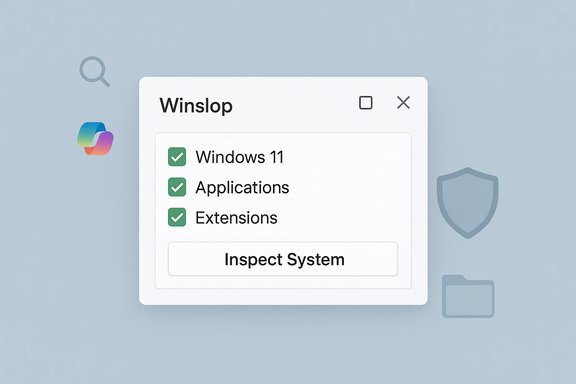
Winslop presents a compact WinForms UI with checkboxes organized into categories such as Windows 11, Applications and Extensions. Typical options confirmed in the repository and community coverage include:- Disable or remove Copilot UI and taskbar button.
- Disable Recall and delete its data.
- Remove Click to Do and other Copilot+ shortcuts.
- Disable telemetry, activity history, and location tracking.
- Remove ads and suggestions in Start and File Explorer.
- Uninstall bundled apps (Clipchamp, Bing News, OneDrive prompts, preinstalled games).
- Clean up the Start menu (remove “Recommended”, restore list view).
- Toggle hibernation, Game DVR, network throttling and other defaults.
Why these tools exist: politics, UX and user agency
The demand that birthed RemoveWindowsAI and Winslop is practical, not purely ideological. Three forces have combined:- Microsoft’s product strategy increasingly layers AI experiences into the shell and inbox apps.
- Some of those surfaces are provisioned or reinstalled through servicing mechanisms that survive simple uninstalls.
- A vocal group of privacy‑conscious and traditional desktop users want durable opt‑outs that go beyond transient UI toggles.
Strengths: what these tools get right
- Transparency and openness. Both projects are open source and publish their behavior in readable form: the GitHub README and the tool’s UI show exactly which keys, packages, and tasks will be affected. That transparency reduces the “black box” fear common to installers that run arbitrary scripts.
- Convenience for power users. Rather than hunting through multiple Settings pages, package manifests, scheduled tasks, and servicing metadata, Winslop and RemoveWindowsAI consolidate repeated, error‑prone actions into a single, auditable workflow.
- Granularity and reversibility (when used correctly). Winslop’s checkbox model encourages selective action. RemoveWindowsAI includes backup and revert modes that — if used before destructive changes — improve the odds of safe recovery.
- Addresses a real operational pain. Users have reported features reappearing after cumulative updates because Windows reprovisions provisioned packages; the blocker techniques attempt to make opt‑outs durable, which is precisely what motivated many people to seek these tools in the first place. Independent coverage and community tests confirm the tools remove visible Copilot/Recall UI and unparty Appx packages on targeted stable builds.
Risks and limitations: when convenience collides with system integrity
The benefits come with clear trade‑offs. Anyone considering these tools must understand the primary dangers.1) Update fragility and servicing conflicts (the biggest single risk)
Modifying the CBS servicing inventory or installing blocker packages creates a durable divergence from Microsoft’s expected package baseline. That can lead to:- Failed cumulative updates or feature updates that encounter inventory mismatches.
- Forced repair operations that are complex to undo.
- Unexpected behavior when future features expect the removed packages.
2) Potential for data loss
Deleting Recall indices, scheduled tasks, or other artifacts is destructive. Users who rely on local snapshots, histories, or app state can lose recoverable information unless they back it up first.3) False positives and endpoint detection
Tools that modify servicing metadata and remove provisioned packages frequently trigger antivirus or endpoint protection engines. RemoveWindowsAI’s README warns of false positives and recommends temporary exclusions or running in controlled environments. That operational friction adds a security decision point.4) Supportability and warranty concerns
These tools perform system-level edits that Microsoft does not support. While hardware manufacturers seldom void warranties for software modifications, using such tools complicates vendor and corporate support: remote diagnostics, automated management, and warranty workflows can be hampered by non‑standard servicing inventory.5) Incomplete coverage and the moving targcontinues to add AI features across Insider and stable channels. No community script or app can guarantee complete or permanent removal across all future releases. Tools must be updated to keep pace; results will vary by Windows build, OEM customizations, and servicing state. Independent testing consistently notes this variability.
How to use these tools safely: a practical playbook
If you decide to try Winslop or RemoveWindowsAI, follow a conservative, test‑driven approach.- Audit first. Use Winslop’s “Inspect system” step (or manual inspection) to see what the tool will change. Don’t run everything blindly. Winslop explicitly shows detected items before you apply changes.
- Back up the whole drive. Create a full disk image or at minimum a system restore point. For enterprise use, image a test device or VM with a snapshot.
- Test in a VM or non‑production hardware. Confirm effects on a disposable image that simulates your hardware and the update cadence you run (e.g., stable vs Insider channels).
- Apply minimal, reversible changes first. Start with registry policy flips and hide UI toggles before removing provisioned packages or deleting servicing store entries.
- Avoid CBS surgery unless you accept long‑term maintenance burden. If your goal is a temporary cleanup, skip the blocker package and servicing edits. If you must use the blocker, understand how to roll it back or reinstall a clean image.
- Record changes and keep logs. Keep a plain text list of what you changed and when. That list is invaluable if you need to restore a device or explain actions to support technicians.
- Plan for rollback. Tools offer revert modes — but reversion is only reliable when a full backup was captured first. The RemoveWindowsAI README documents backup and revert options and warns that reversion may be imperfect if updates have already changed the servicing state.
Alternatives and complementary strategies
For most users and especially for managed fleets, there are safer alternatives that avoid servicing‑store surgery:- Official Group Policy / ADMX controls and CSPs. Microsoft exposes many of the same toggles (Copilot/Recall policy controls) in administrative templates; these are supported and reversible through enterprise tooling.
- Endpoint configuration tools. O&O ShutUp10++ and curated debloat utilities that focus on user‑level app removal and privacy tweaks can accomplish a lot without high‑risk servicing edits.
- Win11Debloat and similar community scripts. These aim to be lighter‑weight and focus on removing bloatware and toggling telemetry without editing CBS.
- Image customization during provisioning. For large deployments, bake desired state into an image or provisioning pipeline so new devices never see the unwanted components.
- Manual selective uninstallation and policies. Where possible, prefer supported policy flips and manual app removal over aggressive service inventory interventions.
The broader picture: platform design, user agency, and community tooling
Winslop and RemoveWindowsAI are symptoms of a larger product and social debate: as the OS integrates more AI features, users demand durable, transparent opt‑outs. Community tooling performs an essential role in that ecosystem: it signals unmet needs to vendors and provides tactical workarounds where vendor controls feel inadequate.At the same time, the prevalence of such tools should push platform owners toward better, supported opt‑outs. Durable, documented controls that are easy for users and enterprises to enforce — without risking servicing integrity — would reduce the need for community “nukes.” The current dynamic underscores an important design principle: when a platform becomes opinionated about built‑in experiences, it must also offer clearly supported and durable ways for users to opt out.
Microsoft’s public comments (and the cultural moment that followed Merriam‑Webster’s selection of “slop” as a notable meme of 2025) sharpened the debate, producing reactions from both corporate leadership and independent developers. The CEO’s call to “get beyond the arguments of slop vs sophistication” and to treat AI as a cognitive amplifier sparked both defense and parody — and tools like Winslop are part of the counter‑response from users who prize a quieter desktop.
Final assessment: who should — and should not — use Winslop or RemoveWindowsAI
Winslop and RemoveWindowsAI are powerful, transparent community tools that meet a real user demand: to reclaim a minimal, privacy‑focused Windows desktop. Their strengths are real: auditability, granularity, and convenience. For knowledgeable, experienced users who accept the maintenance trade‑offs and follow conservative safeguards (full backups, VM testing), these tools can restore a tidy, less intrusive Windows experience.That said, they are not for casual users, unbacked laptops or production fleets without governance. The servicing‑store edits and blocker techniques carry operational risk that can affect updates and long‑term supportability. Enterprises, IT administrators and any users who rely on vendor support should treat these tools as exploratory: useful for proof‑of‑concept and testing, but not a blanket replacement for supported configuration management.
Practical checklist before you click “Apply selected changes”
- Make a full image backup of the system drive (not just files).
- Test the removal steps in a VM with the same Windows build and update channel.
- Start by applying only registry/policy changes; confirm behavior for 1–2 updates.
- Document every change and keep a restore plan.
- Avoid CBS blocker packages unless you can recreate recovery media and accept reimage as the fallback.
- Keep an eye on the tool’s issue tracker and release notes for fixes or reported update conflicts.
Winslop is shorthand for a wider user demand: clearer, supported ways to choose how much AI Windows should surface. It’s a small, practical tool that works for people who want an old‑school, deterministic desktop and the responsibility of maintaining that state. For everyone else — particularly enterprises and less technical users — the safer route is still supported policies, careful provisioning, and incremental, well‑tested tweaks rather than the nuclear option of servicing surgery. The existence and popularity of Winslop and RemoveWindowsAI should nudge platform vendors: if enough users want fewer baked‑in AI experiences, the answer ought not to be a third‑party toolkit — it should be a supported, simple switch from the vendor that doesn’t require rewriting the servicing inventory to work.
Source: PCMag UK Sick of All the AI in Windows 11? This Tool Can Help You Burn It All Down
