

Winslop arrives as a one-click answer for users tired of Windows 11’s expanding AI surfaces — a tiny, checkbox-driven utility that exposes and disables Copilot, Recall, Click‑to‑Do and a raft of telemetry- and ad-related defaults so you can reclaim a quieter, more private desktop.
Windows 11 has rapidly evolved from a streamlined desktop into a platform with pervasive AI integrations: Copilot anchored on the taskbar, Recall-style snapshot indexing, generative tools baked into Paint and other first‑party apps, and an increasing number of UI nudges and promoted experiences. For a subset of users — privacy-minded individuals, lightweight‑hardware owners, and those who prefer a classical desktop — these additions are unwanted friction rather than productivity gains. The developer community has responded with tools that range from scriptable removers to GUI wrappers that make opting out easier. Winslop is the latest GUI‑centric tool in that lineage. Built by the author known as builtbybel — the same developer behind FlyOOBE and a smaller fork of CrapFixer — Winslop packages a curated set of toggles to de‑slop Windows 11: it shows what AI/advertising/telemetry features are present, lets you pick exact items to disable or remove, and reports a preview of changes before applying them. The project is published on GitHub under an MIT license and, at the time of writing, shows a recent release labeled “Winslop - Drop 3” dated January 16, 2026.
Source: PCMag Australia Sick of All the AI in Windows 11? This Tool Can Help You Burn It All Down
 Background
Windows 11 has rapidly evolved from a streamlined desktop into a platform with pervasive AI integrations: Copilot anchored on the taskbar, Recall-style snapshot indexing, generative tools baked into Paint and other first‑party apps, and an increasing number of UI nudges and promoted experiences. For a subset of users — privacy-minded individuals, lightweight‑hardware owners, and those who prefer a classical desktop — these additions are unwanted friction rather than productivity gains. The developer community has responded with tools that range from scriptable removers to GUI wrappers that make opting out easier. Winslop is the latest GUI‑centric tool in that lineage. Built by the author known as builtbybel — the same developer behind FlyOOBE and a smaller fork of CrapFixer — Winslop packages a curated set of toggles to de‑slop Windows 11: it shows what AI/advertising/telemetry features are present, lets you pick exact items to disable or remove, and reports a preview of changes before applying them. The project is published on GitHub under an MIT license and, at the time of writing, shows a recent release labeled “Winslop - Drop 3” dated January 16, 2026. What Winslop does — feature overview
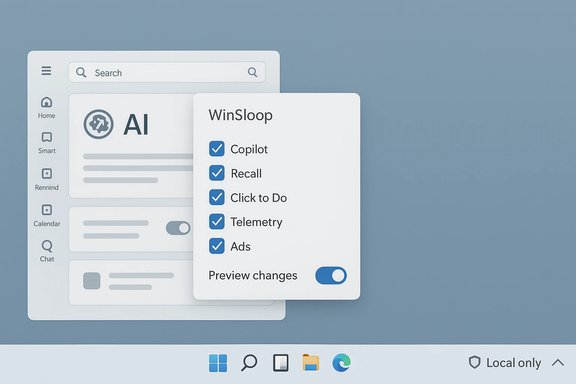
Winslop presents a compact, WinForms-style UI that is intentionally plain and low‑demand; the README emphasizes local, deterministic and reversible actions rather than flashy interfaces. The tool’s surface exposes a set of discrete options that collectively target common complaint areas in modern Windows installations:- Disable or remove the Copilot UI and the Copilot taskbar button.
- Disable Recall (timeline and snapshot indexing) and remove its local indices.
- Remove Click to Do and other Copilot+ PC shortcuts that OEMs or builds sometimes provision.
- Uninstall or unprovision inbox Appx/MSIX packages that ship with Windows (Clipchamp, certain preinstalled games, Bing/News applets, etc..
- Turn off telemetry, activity history, location tracking, and other tracking hooks.
- Remove ads, tips, and Start/Explorer suggestions.
- Restore more classic Start menu behaviors and remove “Recommended” clutter.
- Toggle non-AI defaults such as hibernation, Game DVR, and network throttling.
How the removals actually work — technical breakdown
Community debloat tooling doesn’t operate by “turning off AI models.” Instead, these tools operate in familiar administrative layers. Understanding those layers is essential to weigh benefits against risks.1. Registry and Group Policy edits (low risk)
Many UI elements are controlled by registry keys or Group Policy. Flipping a key can hide the Copilot taskbar button or stop a settings redirect. These actions are generally reversible and carry the least risk if changes are recorded.2. Appx / MSIX removal (moderate risk)
Windows’ inbox features are commonly packaged as Appx/MSIX. Tools call PowerShell commands such as Remove‑AppxPackage and Remove‑AppxProvisionedPackage to uninstall these for the current user and to remove provisioned manifests so new user profiles do not receive them. This is moderately invasive: reinstallation is usually possible via the Microsoft Store or DISM, but provisioning edits change the default state for new accounts and can impact OEM customizations.3. Scheduled-task and local data cleanup (destructive)
Features like Recall build local snapshot indices and scheduled tasks. Deleting those artifacts removes local history (a win for privacy) but is destructive and irreversible unless the user has backups. Winslop exposes options to remove these indices, and the community documentation warns users to back up first if they rely on those features.4. Component‑Based Servicing (CBS) surgery and blocker packages (highest risk)
The most controversial approach used by scripts such as RemoveWindowsAI is to alter the Component‑Based Servicing (CBS) inventory or install a small “blocker” package that prevents Windows Update from re‑provisioning removed components. While this can make removals durable across updates, it intentionally diverges a device from Microsoft’s expected servicing inventory and is the primary vector for future update failures and complex repair scenarios. Winslop and companion tools expose these techniques as explicit options and typically make them opt-in because of the associated risk.Verification: what we checked and why it matters
A responsible technical article verifies important claims against authoritative sources. Key confirmations made for this piece:- Project authorship, public repo and license — confirmed on the Winslop GitHub repository: builtbybel/Winslop, MIT license. The repo shows multiple commits, documentation and a public release tagged “Winslop - Drop 3” dated January 16, 2026.
- Feature claims (disable Copilot, remove Recall, uninstall Appx packages, telemetry toggles) — documented in repository README and independently reproduced in technical coverage from multiple outlets that tested the tool’s behavior. These include step‑by‑step writeups and hands‑on testing notes showing Copilot and Recall UI elements can be hidden or unprovisioned on tested builds.
- Lineage and relationship to other tools — Winslop is explicitly described by its author as a focused fork of CrapFixer and a companion to FlyOOBE’s OOBE/debloat approach; community writeups corroborate this lineage and show integration points and overlapping techniques.
- The principal operational risk — altering CBS or installing blocker packages can make update and feature upgrades fragile. This is corroborated by RemoveWindowsAI documentation and multiple community tests that report upgrade or servicing anomalies in cases where servicing edits were applied. The evidence is strong enough to treat this as the single largest long‑term risk.
Strengths: why Winslop appeals
Winslop’s adoption and positive reception in enthusiast circles rests on a few real strengths:- Simplicity and clarity. The tick‑box UI removes the guesswork of PowerShell one‑liners or hunting registry keys, making well‑understood actions accessible without scripting mistakes. The repo and UI emphasize transparency by showing the planned changes before applying them.
- Local, deterministic operation. Winslop’s README repeatedly stresses that nothing is uploaded to the cloud and that the tool doesn’t use AI; all changes are local and user‑directed. For privacy‑minded users, this is a clear advantage over cloud-first services.
- Granularity. Users can disable only the features they dislike, rather than applying a shotgun approach. For many, toggling the Copilot UI and telemetry without touching other system behavior is the right balance.
- Time saved. The automation replaces dozens of manual steps (uninstalling inbox apps, flipping policies, removing scheduled tasks), which is a practical convenience for technicians and power users who redeploy systems regularly. Community writeups report measurable time savings for repetitive tasks.
- Open development and small footprint. The project is open on GitHub and intentionally compact, which helps with auditing and encourages community scrutiny. The README’s fork/lineage notes make motivations explicit.
Risks and limitations — practical, technical, legal
Winslop is effective, but it’s not risk‑free. These are the concrete downsides to weigh:- Update and feature‑upgrade fragility. The most serious operational hazard is making the system diverge from Microsoft’s servicing baseline. Editing the CBS store or installing blocker packages can cause cumulative updates or feature upgrades to fail or roll back, and resolving those states often requires repair installs or full reimaging. This risk is well documented in community repositories and independent testing.
- Potential data loss. Actions that delete Recall indices, scheduled tasks, or other local snapshots are destructive. Users who rely on those histories for recovery or productivity must back up first; the tool’s backup/revert modes are helpful but not a guaranteed complete restore in all servicing states.
- Supportability and warranty concerns. Aggressively modifying provisioning and servicing can complicate vendor or Microsoft support. Enterprises should not treat a community debloat tool as a supported management mechanism; instead, MDM, Group Policy and AppLocker remain the supported ways to enforce configuration at scale.
- False positives and supply‑chain risk. Small system tools that perform servicing edits sometimes trigger antivirus heuristics. Worse, popular utilities spawn copycats and tampered binaries; always prefer canonical GitHub releases, verify checksums/signatures where provided, and avoid random mirrors. Previous community incidents with FlyOOBE clones illustrate the real-world danger of running binaries from untrusted sources.
- Incomplete coverage and moving target. Microsoft continues to add AI features across channels, Insider rings and OEM images. No community script guarantees complete or permanent removal across future releases — Winslop and similar projects require ongoing maintenance to keep pace with platform changes.
Practical guidance — a safe workflow for power users
If you are drawn to Winslop, follow a defensive sequence rather than rushing in:- Make a full disk image backup (not just files) and create bootable recovery media.
- Test changes in a virtual machine or a spare device that mirrors your Windows build and update channel.
- Start with low‑risk actions: registry/Group Policy toggles and uninstalling non‑essential Appx packages for the current user.
- Avoid CBS edits and blocker packages until you have validated the tool’s behavior across at least one cumulative update cycle on a test system.
- Use Winslop’s inspection scan to produce an audit trail before applying changes; read every checkbox label and understand whether the action is reversible.
- Keep the Winslop release channel under watch: monitor the repository’s issue tracker and release notes for reports of update conflicts.
The politics of choice: why these tools exist
Winslop is as much a social statement as a technical utility. The tool’s name — a deliberate riff on public debate about AI “slop vs sophistication” — and the timing of its release reflect a wider user frustration at platform vendors that ship persistent nudges, telemetry defaults, and re‑provisioned features that reappear after updates. Microsoft’s CEO publicly urged a move beyond labeling AI as “slop” — a comment that in practice crystallized the reaction by many users who feel their desktops are being turned into ad- and AI-first surfaces. Community tools like Winslop are a practical expression of the desire for durable opt‑outs and clearer vendor-level controls. That said, the existence of Winslop is also an argument for better vendor-supported options. A safer, more sustainable solution at scale would be for Microsoft to provide documented, supported, and durable opt‑outs for core AI surfaces — not because debloat tools are illegitimate, but because they signal a real market need that vendor policy should address.Final assessment: who should use Winslop?
Winslop is a well‑constructed, transparent tool targeted at technical users who understand Windows servicing and who accept the maintenance trade‑offs that come with active system modification. It is a valuable convenience for:- Power users rebuilding or provisioning machines frequently.
- Privacy‑focused users who want to remove telemetry and local snapshot artifacts.
- Technicians and enthusiasts who can test in VMs and restore images if things go wrong.
- Casual users who lack reliable backups or recovery skills.
- Managed corporate fleets without formal change control processes.
- Devices under warranty or vendor support where servicing edits could complicate supportability.
Closing note — transparency and a few caveats
This article verified the main claims about Winslop against the project’s GitHub repository and multiple independent hands‑on writeups and community audits. The repo shows the author, project purpose, and a public release on January 16, 2026; independent guides and tests corroborate that Winslop can hide Copilot and Recall UI artifacts and remove many inbox Appx packages on tested builds. At the same time, community documentation repeatedly flags the servicing‑store (CBS) edits and blocker package techniques as the single greatest operational risk — a finding that is consistent across the tool’s README, RemoveWindowsAI documentation and independent coverage. A final caution: the mechanics and effects of these tools depend heavily on your exact Windows build, OEM provisioning and update history. If you plan to run Winslop on a primary system, follow the defensive workflow above and treat servicing edits as a last resort. Where a claim could not be independently verified for every download artifact (for example, the compiled vs. script-only makeup of distributed binaries on third‑party mirrors), that ambiguity is called out — prefer canonical GitHub releases and verify checksums where provided before executing any system‑level tool. Winslop gives users an on‑ramp to reclaiming a quieter Windows 11 experience — and it also lays bare an uncomfortable truth about modern platforms: when platform defaults and provisioning decisions are used to reintroduce unwanted features, motivated communities will build tools to restore agency. The safer, long‑term fix is product design that natively respects durable opt‑out and clear user choice — until then, Winslop will be an effective, if advanced, instrument for those willing to manage its trade‑offs.Source: PCMag Australia Sick of All the AI in Windows 11? This Tool Can Help You Burn It All Down
