

Winslop arrives as a compact, checkbox‑driven answer to a precise user complaint: Microsoft has baked AI into so many visible corners of Windows 11 that a vocal minority of users want a simple, auditable way to roll those changes back — and Winslop promises exactly that while exposing the operational trade‑offs any such tool necessarily carries. view
Windows 11’s steady transformation into what Microsoft sometimes markets as an “AI PC” has placed features like Copilot, Recall, AI‑assisted editing in built‑in apps, and contextual AI actions at the center of user experience debates. Many users appreciate the productivity gains; others see persistent UI nudges, telemetry defaults, and reprovisioning after updates as unwanted “slop.” That tension has created an ecosystem of community tools designed to de‑slop Windows — with Winslop one of the most visible recent entries.
The arrival of Winslroader platform inflection point: Windows 10 reached end of support on October 14, 2025, creating migration pressure to Windows 11 and, in turn, exposing more users to Microsoft’s AI integrations. Microsoft’s official lifecycle notices confirm that date and the ESU options that followed. Winslop is positioned as a focused, local, and (mostly) reversible utility authored by “builtbybel,” published on GitHub, mirrored on community download sites, and packaged as a light GUI wrapper around well‑understood administrative operations (registry/policy edits, Appx/MSIX uninstallations, scheduled task cleanups, and — optionally — servicing‑store work). Independent coverage and community testing show Winslop can his, remove many inbox Appx packages, and toggle telemetry defaults on tested systems.
Winslop’s README and hands‑on writeups enumerate a compact set of targets and capabilities. The tool emphasizes inspection first, then user selection, and presents operations as discrete toggles to reduce accidental wide‑scale deletion. Typical actions include:
Winslop is a credible, well‑designed community tool that addresses a real pain point: unwanted AI surfaces, telemetry defaults, and reprovisioning annoyances. For technically competent users who accept the operational trade‑offs and follow a conservative workflow (inspect, test in VMs, backup, avoid CBS edits unless necessary), Winslop is a useful instrument for reclaiming a quieter Windows 11 experience. The tool’s UI, transparency goals, and modular toggles are notable strengths.
But Winslop is not the systemic solutionprises and for users who cannot tolerate servicing fragility — the right answers are:
Winslop is an effective community response to one of modern desktop computing’s more political problems: how much control should the vendor keep, and how much should the user reclaim? It is a useful, pragmatic tool for the technically literate who prioritize privacy and a quieter UI. It is not, and should not be treated as, a universal solution to Microsoft’s AI strategy. The healthier outcome remains vendor‑provided, auditable opt‑outs and administrative controls that make tools like Winslop a convenience rather than a necessity.
Source: MSN https://www.msn.com/en-gb/money/tec...-ai-oversaturation-in-windows-11/ar-AA1UlUsx]
Windows 11’s steady transformation into what Microsoft sometimes markets as an “AI PC” has placed features like Copilot, Recall, AI‑assisted editing in built‑in apps, and contextual AI actions at the center of user experience debates. Many users appreciate the productivity gains; others see persistent UI nudges, telemetry defaults, and reprovisioning after updates as unwanted “slop.” That tension has created an ecosystem of community tools designed to de‑slop Windows — with Winslop one of the most visible recent entries.
The arrival of Winslroader platform inflection point: Windows 10 reached end of support on October 14, 2025, creating migration pressure to Windows 11 and, in turn, exposing more users to Microsoft’s AI integrations. Microsoft’s official lifecycle notices confirm that date and the ESU options that followed. Winslop is positioned as a focused, local, and (mostly) reversible utility authored by “builtbybel,” published on GitHub, mirrored on community download sites, and packaged as a light GUI wrapper around well‑understood administrative operations (registry/policy edits, Appx/MSIX uninstallations, scheduled task cleanups, and — optionally — servicing‑store work). Independent coverage and community testing show Winslop can his, remove many inbox Appx packages, and toggle telemetry defaults on tested systems.
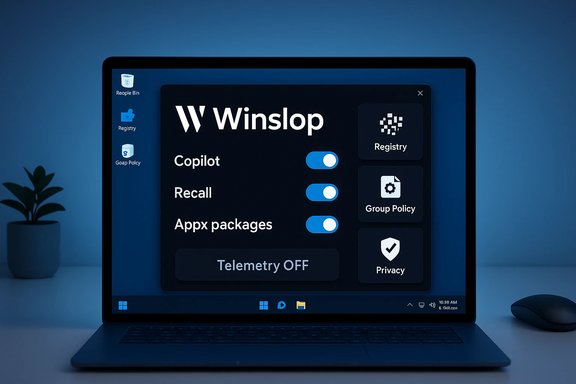 What Winslop actually does — feature checklist
Winslop’s README and hands‑on writeups enumerate a compact set of targets and capabilities. The tool emphasizes inspection first, then user selection, and presents operations as discrete toggles to reduce accidental wide‑scale deletion. Typical actions include:- Disable or hide the Copilot taskbar button and supporting UI affordances.
- Remove or deactivate Recall (the local snapshot/timeline indexing service) and purge its local indices.
- Uninstall user‑level and provisioned Appx/MSIX packages (Copilot front‑ends, some preinstalled apps, news/weather widgets).
- Flip registry and Group Policy settings to hide AI‑driven UI elements and telemetry hooks.
- Remove tips, ads, and promoted "Recommended" content from Start and Explorer.
- Turn off activity history, location, diagnost tracking hooks.
- Optional aggressive steps: edit the Component‑Based Servicing (CBS) store or install a blocker package to prevent reprovisioning.
How Winslop achieves removals — technical layers explained
Removing or hiding modern Windows features is not magical; it is a set of well‑documented administrative tactics stacked across multiple layers of the OS. Understanding these layers is crucial to judging benefits and risks.1) Registry and Group Policy flips — low risk
Many UI elements and activation gates are controlled by regiicy settings. Flipping these hides UI affordances and prevents shortcuts from appearing, and these changes are typically reversible through supported admin templates. Winslop exposes many such flips.2) Appx / MSIX uninstallations — moderate risk
Uninstalling inbox or provisioned Appx packages at the user level removes the visible application pieces but marovisioning for new profiles. Winslop automates per‑user uninstalls and can attempt to remove provisioned manifests to avoid re‑provisioning, which raises the next level of risk.3) Scheduled tasks and local data deletion — destructive
Services such as Recall create local indices and scheduled maintenance tasks. Deleting those data stores is : it removes local history and recovery artifacts. Winslop’s UI highlights those operations, but the deletions are often irreversible without prior backups.4) Component‑Based Servicing (CBS) edits and blocker packages — high risk
The most controversial techniques operate inside Windows’ servicing inventory (CBS). Some community tools — notably RemoveWindowsAI — optionally purge servicing entries or install custom “blocker” packages that prevent Windows Update or provisioning from reinstalling targeted packages. These edits can persistently prevent reprovisioning but also intentionally diverge a machine’s servicing inventory from Microsoft’s expected state, which is the primary source of upgrade and support fragility. Winslop’s documentation and community commentary treat such servicing edits as optional and high‑risk; whether a particular Winslop release performs them by default is a key question for would‑be users.Why Winslop matters — strengths and pragmatic benefits
Winslop’s arrival is not merely another “debloater” drop; it crystallizes several important market realities and offers tangible benefits for the right audience.- Usability and transparency: Unlike opaque one‑click scripts, Winslop emphasizes inspection, previews, andThat design reduces accidental runs and makes the tool approachable for technically competent users.
- Local, deterministic operation: Winslop’s author and independent reviews stress that the tool does not upload system data or run external AI — operations are local and reproducible. For privacy‑focused users, this matters.
- Time s: Manual cleanup of dozens of settings, Appx packages, and scheduled tasks is tedious. Winslop automates standard patterns and documents what it will change before applying operations.
- Ecosystem signal: Tools like Winslop publicly document the pain points users face (persistent reprovisioning). That visibility pressures vendors to provide supported, durable opt‑outs. The existence of Winslop is itself a signpost for better vendor controls.
The ache: why many users want Winslop
Several converging factors created the demand for tools like Winslop:- Microsoft’s strategic push to embed AI broadly across the shell and first‑party apps, including Copilot and Recall, has made AI features highly visible and in some cases persistent.
- Windows 10’s end of support (October 14, 2025) forced many users to upgrade; newer Windows 11 builds increasingly ship AI surfaces by default, exposing a broader audience to unwanted changes.
- Vendor provisioning and OEM images can reintroduce packages after updates or new user profile creation, making one‑time manual removals brittle.
- Enterprises want supported, auditable controls for fleet governance rather than ad‑hoc scripts. Microsoft has begun responding — for example, the new RemoveMicrosoftCopilotApp Group Policy appeared in Insider previews as a conservative, one‑time admin uninstall for specific scenarios — but that control is intentionally narrow and gated.
The largest risks — where Winslop can hurt more than help
Winslop can be a valuable tool in the hands of a knowledgeable user. It can be dangerous in the hands of casual users or deployed at scale without validation. Key risks to call out explicitly:- Upgrade and servicing fragility (primary risk): Editing CBS or installing blocker packages deliberately diverges the servicing inventory from Microsoft’s expected state. That divergence can cause cumulative update failures, failed feature upgrades, or repair loops that may require an offline servicing fix or full reimage. The community consensus is clear: servicing edits are the single largest long‑term danger.
- Dependency breakage: Some inbox packages share families or runtime dependencies. Removing one component labeled “AI” may silently break another feature or OEM utility that depends on it.
- Permanent data loss: Deleting Recall indices or scheduled tasks removes local history and is irreversible without backups. Users should assume that any deleted local snapshot data is gone for good unless pre‑archived.
- Supportability and warranty impacts: Heavily modified servicing metadata complicates interactions with Microsoft and OEM support channels. For managed fleets, this can leadce states and increased operational cost.
- Binary trust ambiguity: While the Winslop repository is public, third‑party mirrors and compiled binaries may not match the canonical source. Users must prefer verified GitHub releases and checksums; any unverified binary should be treated with suspicion. Community notes explicitly flag this ambiguity.
Verification: which claims are verified and by whom
A responsible technical assessment cross‑checks core claims against multiple independent sources.- The existence of a public Winslop repository and public releases is verifiable on GitHub and mirrored release aggregators. Public release dates (including a drop in mid‑January 2026) are visible in the project’s release history.
- Softpedia and several independent blogs reviewed winslop builds and confirmed its capability to toggle Copilot UI elements, remove Appx packages, and flip telemetry settings. Those hands‑on reviews align with the repository documentation.
- The principal technical risk — editing the CBS servicing store and installing blocker packages — is not unique to Winslop. The same technique is discussed, documented and criticized in RemoveWindowsAI community documentation and independent writeups; those sources demonstrate the same upgrade fragility concerns. This confirms the risk is real and widely observed.
- Microsoft’s official lifecycle timeline confirms Windows 10’s October 14, 2025 end of support, which contextualizes migration pressure that may be driving user frustration with Windows 11 defaults.
- Microsoft’s admin path for removing Copilot (RemoveMicrosoftCopilotApp) exists in Insider channel documentation and reporting; it is deliberately narrow, conditional, and conservative — a sign that Microsoft prefers controlled, auditable mechanisms for enterprises rather than broad, unilateral removals.
Practical guidance — how to evaluate and use Winslop safely
For readers considering Winslop, here is aybook that balances benefits and risk:- Clone and inspect the canonical GitHub repo first. Prefer running from source when feasible and review the tool’s filter list and changelog. Always prefer the official release on the project’s GitHub page.
- Test in a disposable VM or a non‑production image. Observe exactly what the tool removes and whether it affects updates or provisioning. This will reveal side effects before you touch a daily‑driver machine.
- Start with low‑risk actions only (registry/policy flips, per‑user Appx uninstalls, hiding UI elements). Confirm user experience and functionality.
- Create full backups, a System Restore point, and a bootable recovery image before any destructive operation. If available, capture an image of the entire disk so you can restore a known good state.
- Avoid servicing edits (CBS changes, blocker package installs) unless you are a seasoned sysadmin, have image‑level fallbacks, and accept the possibility of reimaging to recover. Treat servicing edits as a last resort.
- For fleets, use supported controls: image hygiene, MDM (Intune) policies, AppLocker/WDAC, and Microsoft’s documented admin removal paths (e.g., RemoveMicrosoftCopilotApp in Insider builds) rather than community debloaters deployed at scale.
Enterprise implications — why Winslop is not an enterprise panacea
Winslop addresses an individual user problem: reclaiming a quieter, more private desktop. Enterprises operate under different constraints:- Fleet scale and auditability demand supported, deterministic controls: Microsoft’s policy mechanisms, MDM configs and image‑first strategies provide predictable outcomes and vendor supportability. Winslop cannot substitute for these.
- Support and warranty obligations mean that devices in a managed environment should not be intentionally placed into an unsupported servicing state. Using servicing edits broadly would expose fleets to patching failures and higher support costs.
- Where Microsoft has provided targeted admin mechanisms (the RemoveMicroson Insider builds is an example), organizations should pilot those in controlled rings before relying on community tools.
Policy and product design — the bigger picture
Winslop is symptomatic of a broader platform issue: when vendors ship persistent nudges and provisioning behaviors that lack durable opt‑outs, communities will build tools to restore agency. That dynamic pressures vendors in three ways:- Product design: Provide well‑documented, durable, and supported opt‑outs for high‑visibility features that affect privacy or system behavior.
- Admin tooling: Deliver enterprise‑grade controls that are auditable, reversible, and suitable for lifecycle management.
- Transparency: Make provisioning and servicing behaviors transparent so users and admins can plan for updates and maintenance.
Final verdict — is Winslop the answer to AI oversaturation?
Short answer: Not by itself.Winslop is a credible, well‑designed community tool that addresses a real pain point: unwanted AI surfaces, telemetry defaults, and reprovisioning annoyances. For technically competent users who accept the operational trade‑offs and follow a conservative workflow (inspect, test in VMs, backup, avoid CBS edits unless necessary), Winslop is a useful instrument for reclaiming a quieter Windows 11 experience. The tool’s UI, transparency goals, and modular toggles are notable strengths.
But Winslop is not the systemic solutionprises and for users who cannot tolerate servicing fragility — the right answers are:
- Microsoft delivering durable, supported opt‑outs and clearer provisioning controls.
- Administrators using MDM, image‑first strategies, AppLocker/WDAC and vendor‑supported policies (e.g., RemoveMicrosoftCopilotApp where applicable) to achieve long‑term governance.
Practical takeaway — quick checklist
- For power users: use Winslop only after cloning the GitHub repo, testing in a VM, and enabling only low‑risk toggles first. Prefer source builds and verify checksums.
- For sysadmins: pilot supported Microsoft admin controls in Insider rings; prefer image hygiene, MDM, and AppLocker for production fleets rather than community servicing edits.
- For casual users: address visible annoyances via Settings and supported toggles first; avoid third‑party servicing edits unless you have reliable backups and technical support.
Winslop is an effective community response to one of modern desktop computing’s more political problems: how much control should the vendor keep, and how much should the user reclaim? It is a useful, pragmatic tool for the technically literate who prioritize privacy and a quieter UI. It is not, and should not be treated as, a universal solution to Microsoft’s AI strategy. The healthier outcome remains vendor‑provided, auditable opt‑outs and administrative controls that make tools like Winslop a convenience rather than a necessity.
Source: MSN https://www.msn.com/en-gb/money/tec...-ai-oversaturation-in-windows-11/ar-AA1UlUsx]
