Winslop: Reclaim Windows 11 AI Control with a Small Debloat Tool

  • Thread Author
Microsoft’s AI push has turned Windows 11 into a battleground between corporate vision and user control — and Winslop, a compact open‑source “de‑slop” utility, has emerged as the user-facing counterpunch that promises to strip back the very AI surfaces Microsoft is baking into the OS.

Windows desktop with a dark Winslop settings panel and a person coding on a laptop.Background / Overview​

Windows 11’s evolution from a user interface refresh into what Microsoft calls an “AI PC” has been aggressive and highly visible: Copilot, Recall, AI Actions and a growing set of model-powered features have been folded into the shell and first‑party apps. For many users that’s a productivity promise; for a vocal and technically savvy minority it’s a creeping loss of control. The timing only sharpened tensions — Windows 10 reached end of support on October 14, 2025, and Microsoft’s Extended Security Updates (ESU) program became a visible lever for migration decisions. Microsoft documented the end‑of‑support date and the ESU enrollment options on its site. Into that context comes Winslop: a small, intentionally plain fork of the developer’s earlier CrapFixer project that bills itself as “De‑slop Windows.” Winslop is publicly hosted on GitHub and distributed via community download sites; its README and release drops are explicit about intent — reduce forced or unnecessary components, show the user exactly what will change, and keep everything local and reversible. This article dissects what Winslop actually accomplishes, why it matters, how it compares to Microsoft’s own admin controls, and — crucially — what the real risks are when users or admins start surgically editing a platform as sprawling and update‑driven as Windows 11.

Why Winslop exists: the user backlash to AI in Windows​

Windows 11’s AI sprint is a strategic bet: embed assistants and model‑powered features across the OS to reduce friction and deliver new experiences. But the rollout hasn’t been frictionless.
  • Many users resent the ubiquity of Copilot UI affordances (taskbar buttons, contextual entries) and first‑party features that feel preinstalled rather than optional.
  • Privacy and telemetry concerns linger, particularly around features that index user content or create searchable snapshots (Recall).
  • Performance and compatibility worries persist for older devices, which still make up a large portion of the installed base.
That backlash has produced a flourishing ecosystem of scripts and GUI utilities that promise to “remove AI” from Windows 11. Winslop sits alongside PowerShell projects and longer‑running debloat tools in that ecosystem, but it intentionally frames itself as small, transparent, and reversible. Community discussion and forum analysis reflect that combination of frustration and pragmatism: users want durable opt‑outs and clearer controls, and many feel Microsoft’s current toggles are inadequate.

What Winslop is and how it works​

Origins, design goals, and distribution​

Winslop is an open repository authored by "builtbybel" on GitHub. The README is candid: Winslop is a focused fork of a larger project, intentionally simple (no fancy UI), and designed to make slop visible and removable. The project presents itself as:
  • Open source under an MIT license with a small codebase to ease auditing;
  • A local, deterministic tool that does not upload telemetry or run AI models;
  • A GUI exposing toggles, per‑item previews and a promise of rollback support.
The project has seen public releases and is mirrored on third‑party download sites such as Softpedia, which lists a recent build (v0.25.11) and summarizes the utility as a compact bloat remover for Windows 10/11. That distribution footprint confirms Winslop’s availability to users beyond GitHub watchers.

What the tool claims to change​

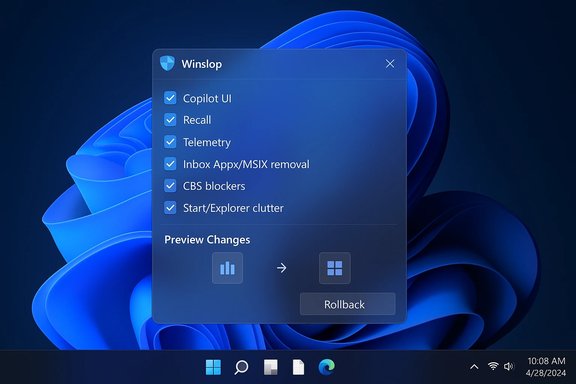
Winslop’s UI and docs emphasize targeted, user‑approved actions rather than blind mass deletion. Typical actions shown in documentation and community write‑ups include:
  • Uninstalling user‑level Appx/MSIX packages (Store apps, Copilot front ends).
  • Disabling telemetry, built‑in advertising, and UI affordances (search suggestions, taskbar entries).
  • Exposing and removing provisioned packages that would otherwise reappear for new profiles.
  • Presenting a rollback path (System Restore point or revertable manifest) and logging what was changed.
These are the same layers community debloaters have historically targeted — and the success and risk of each action depends on precisely which Windows layers the tool touches.

The technical reality: layers of Windows and where risk lives​

Understanding Winslop’s value (and danger) requires knowing how Windows organizes components:
  • Appx/MSIX packages: typically removable per user with documented, reversible commands (Get‑AppxPackage / Remove‑AppxPackage).
  • Provisioned packages: manifests that cause apps to be installed for new user profiles; removing them reduces reappearance risk but is more brittle.
  • Component‑Based Servicing (CBS) / WinSxS: the servicing store is authoritative for features and updates. Editing CBS or installing “blocker” packages that try to trick provisioning is the biggest source of long‑term upgrade fragility.
Community audits repeatedly warn that any tool claiming permanent removal or “blocker” behavior must be inspected carefully: servicing edits are the primary vector for update failures, repair loops, or broken OS states. Winslop’s public messaging emphasizes safety and local, reversible actions, but independent reviewers note that whether the project edits servicing artifacts cannot be assumed safe without reading the exact filter lists or the code for each action.

Microsoft’s response: admin controls, policy options, and limits​

Microsoft has not been oblivious to the backlash. Recent Insider previews (Build 26220.7535 / KB5072046) introduced a conservative admin control: a Group Policy titled RemoveMicrosoftCopilotApp that allows administrators on managed Pro/Enterprise/Education devices to uninstall the consumer Copilot app under a specific set of conditions. That policy behaves as a one‑time uninstall and includes gating checks (both Microsoft 365 Copilot and the consumer Copilot app present; the app wasn’t user‑installed; it hasn’t been launched in the last 28 days). Microsoft’s Insider blog and broad press coverage document the feature and its guarded design. Why the caveats? Microsoft is deliberately conservative:
  • The policy avoids removing paid, tenant‑managed Copilot experiences.
  • The one‑time uninstall model is meant to clean up provisioned copies, not impose permanent bans that could break workflows or licensing.
  • Server‑side gating and staged rollout mean visibility can vary across machines even after the update is applied.
In short: Microsoft is responding with supported, limited controls aimed at managed environments, not a wholesale reversal of the platform‑level AI integration.

Winslop vs Microsoft admin tools: where each fits​

  • Winslop (community tool)
  • Strengths: granular GUI, local operation, open repo for audit, quick adoption for power users and testers.
  • Weaknesses: variable defaults, potential to unintentionally edit delicate servicing artifacts if shipped filters are aggressive, supply‑chain concerns if binaries aren’t verified.
  • Microsoft RemoveMicrosoftCopilotApp (official policy)
  • Strengths: supported Group Policy path, limited risk profile, designed to preserve paid tenant capabilities and avoid surprise removals.
  • Weaknesses: gating conditions limit applicability, one‑time uninstall is not a persistent block, admins still need layered enforcement for durable fleet control.
For everyday users who want a smaller, cleaner desktop, Winslop can offer immediate, visible changes. For organizations and admins, the Microsoft policy and MDM/Intune controls remain the more supportable route — with one caveat: many admins remain dissatisfied with the piecemeal nature of Microsoft’s controls and still use image‑based or MDM strategies to ensure deterministic outcomes. Community guidance strongly recommends preferring image/MDM approaches for fleets rather than ad‑hoc debloat tools.

The risks you must accept (and how to mitigate them)​

Winslop and similar utilities can feel liberating — but they demand discipline. Key risks and mitigations:
  • Servicing and update fragility
  • Risk: editing servicing metadata or installing blocker packages can break future cumulative updates or feature upgrades.
  • Mitigation: avoid any action labeled “edit servicing store” or “install blocker” unless you can audit the exact commands. Prefer non‑servicing removals first.
  • Broken dependencies and subtle feature loss
  • Risk: removing a provisioned package that other features reference can disable codecs, accessibility services, or OEM integrations.
  • Mitigation: review filter lists line‑by‑line; run removals in a VM first.
  • Supply‑chain and binary integrity
  • Risk: downloading unsigned binaries or prebuilt installers carries tamper risk.
  • Mitigation: prefer building from source, verify checksums and signatures, or use releases that publish reproducible build artifacts. Winslop’s GitHub repo and release notes make verification possible; users should prefer signed releases when available.
  • Enterprise supportability and warranty/SLA implications
  • Risk: modifying devices outside supported channels can void managed support or complicate troubleshooting.
  • Mitigation: for fleet devices, implement desired removals in images or through MDM/Intune; use Microsoft’s new admin policy for limited, supported uninstalls where applicable.

A practical, defensible playbook for testing Winslop safely​

If you decide to try Winslop, follow this conservative checklist used by experienced community testers:
  • Verify provenance
  • Clone the GitHub repo and inspect the README and Help.md. Prefer to run a locally built binary rather than a prebuilt download when possible.
  • Test in an isolated environment
  • Use a VM snapshot or a non‑production machine to run the tool and verify outcomes. Never start on a single production workstation.
  • Start with lowest‑risk actions
  • Uninstall visible user apps and toggle telemetry/privacy switches first. Defer any provisioned or servicing actions until you’ve validated behavior.
  • Capture full backups and restore points
  • Create a System Restore point and, for fleets, a full image so you can revert if servicing issues arise.
  • Inspect logs and export manifests
  • Ensure Winslop produces a change log or an exportable manifest of removed packages so you can re‑provision components via DISM or Store if needed.
  • For managed fleets, prefer image‑first or MDM approaches
  • If your organization wants a cleaner baseline, bake changes into an image or manage them via Intune policies instead of running one‑off tools on production devices.
This stepwise approach balances user desire for control with the hard reality that Windows is a continuously serviced platform.

The broader picture: policy, trust and user choice​

Winslop is a symptom and a signal. It signals that a subset of Windows users wants stronger, more durable user‑level control over what Microsoft adds to the system by default. It also demonstrates the community’s willingness to build tools when vendor controls feel insufficient. But it’s also a symptom of a deeper tension in modern consumer platform design:
  • Platform makers prize integration — tightly coupled features create compelling experiences, but they also remove lines of user control.
  • Regulators and consumer advocates push for transparency and meaningful opt‑outs, especially in regions with strong consumer protections (the Windows 10 ESU adjustments in the European Economic Area are evidence of regulatory pressure shaping vendor behavior).
  • Community tools will continue to proliferate while Microsoft iterates on admin controls and opt‑out mechanisms.
That interplay — community countermeasures, vendor policy adjustments, and regulatory nudges — will shape Windows’ next phase more than any single tool.

Final analysis: is Winslop the answer?​

Winslop is a pragmatic, neatly focused tool that fulfills a definable user need: make opaque or forced components visible and removable, and do it transparently and locally. For technically savvy users who accept the cautionary rules above, Winslop is a reasonable choice and a welcome short‑term remedy. Its open‑source presence on GitHub and its modular GUI are notable strengths. But “the answer” depends on what question you’re asking.
  • If the question is “How do I remove visible Copilot UI elements or certain in‑box apps from a personal machine?” — Winslop delivers a fast, auditable path and is a credible option when used cautiously.
  • If the question is “How do businesses retain long‑term, supported control across thousands of endpoints without compromising updateability?” — the right answer is still images, MDM policies, and supported Microsoft admin mechanisms (including the new RemoveMicrosoftCopilotApp policy for targeted cleanups). Winslop is not a substitute for an enterprise‑grade lifecycle and update strategy.
  • If the question is “Will third‑party tools force Microsoft to backtrack on AI integration?” — unlikely. Microsoft’s platform strategy and business objectives push the OS toward deeper AI integration, and the company has responded with conservative admin tools rather than wholesale retreat. Community projects will continue to provide opt‑outs, but they are mitigations, not replacements for supported vendor controls.

Practical takeaway (short checklist)​

  • For power users: clone and inspect Winslop’s repo, test in a VM, run low‑risk removals first, and keep full backups.
  • For IT admins: pilot Microsoft’s RemoveMicrosoftCopilotApp in an Insider ring where feasible, but prefer deterministic imaging or MDM policies for fleet‑wide changes.
  • For everyone: treat any tool that claims to “permanently block” Windows provisioning with skepticism unless its exact mechanisms are documented and auditable; servicing edits are the primary vector for breakage.

Winslop isn’t a magic bullet — it’s a community tool that restores a measure of control for users who value a leaner, more deterministic Windows 11. That role is important and legitimate. But it’s not a substitute for robust, supported administrative controls or a long‑term update strategy. The healthiest outcome would be a future in which Microsoft delivers clearer, durable opt‑outs and admins gain the deterministic tools they need — while community projects like Winslop continue to hold platform makers accountable by making the cost of overreach visible and reversible.

Source: Windows Central Is "Winslop" the answer to Microsoft’s AI oversaturation in Windows 11?
 

Winslop’s arrival is the clearest sign yet that a sizable segment of the Windows community has stopped asking Microsoft to dial back AI in Windows 11 and has started building tactical tools to do it themselves.

A Windows-style settings panel showing toggle options and a Rollback button.Background​

Windows 10 reached its official end of support on October 14, 2025, forcing a difficult migration choice for millions of users: upgrade hardware to meet Windows 11 requirements, accept a paid or conditional Extended Security Updates (ESU) path, or run unsupported systems. Microsoft’s own consumer-facing documentation and lifecycle notices confirm the October 14, 2025 end-of-support date and detail ESU pathways for customers who need extra time. Against that policy backdrop Microsoft has also pushed Windows 11 aggressively toward an “AI PC” vision: Copilot tightly integrated into the shell, Recall-style local snapshot indexing and search, AI actions in File Explorer, generative tools inside Paint and Notepad, and experimental agentic experiences that can act on users’ behalf. Microsoft’s official Windows Experience Blog and numerous technical writeups describe these agentic capabilities, and the company has publicly acknowledged both the ambition and the new security surface area it introduces. The convergence of forced migration pressure (Windows 10 EoS + ESU) and deep AI integration in Windows 11 has created friction. Complaints cluster around three themes: perceived bloat and intrusive UI nudges, privacy and telemetry concerns from features that index user content, and long-term maintenance risk for older hardware. In response, community projects have proliferated to restore a more traditional, quieter Windows experience for those who want it.

Overview: What Winslop is and why it matters​

Winslop is a compact, opesurfaced publicly in early January 2026. Built and published by the developer known as “builtbybel” (also associated with projects such as FlyOOBE and CrapFixer), Winslop is intentionally tiny — a few hundred kilobytes in released builds — and designed as a focused “de‑slop” tool for Windows 11. Third‑party coverage and download portals describe the utility as a WinForms-style GUI with checkboxes that expose and toggle a curated list of AI surfaces, telemetry knobs, and inbox app provisioning entries. Why this matters: Winslop packages months of manual auditing into a single discovery-and-action flow. For power users, system builders, and technicians who frequently image or rebuild PCs, a small, local, reversible tool that shows exactly what will change has pragmatic appeal. But the tool also crystallizes the risk calculus that comes with community debloaters: convenience vs. servicing integrity.

Background: the lineage — FlyOOBE, RemoveWindowsAI and the debloat ecosystem​

Winslop didn’t appear from nowhere. It sits in a lineage of community projects that make Windows more minimal and privacy-respecting:
  • FlyOOBE and CrapFixer are earlier projects by the same developer that focus on out-of-box experience tweaks and bloat removal. Winslop is described as a distilleimed at AI, telemetry, and provisioning “slop.”
  • RemoveWindowsAI is a widely referenced open‑source PowerShell repository that orchestrates registry edits, Appx/MSIX removals, scheduled-task and local-data cleanup, and — optionally — servicing-store (Component‑Based Servicing, CBS) edits designed to make removals persiThat repository and its README explicitly enumerate these layers and warn about the upgrade fragility that comes with servicing modifications. The repo is public and maintained under the handle “zoicware.”
Winslop intentionally targets the GUI-first audience by packaging inspection, selective toggles, and rollback/logging UI into a small app while relying on the same underlying technical techniques the script community has used for months. The result is a low-friction on‑ramp to what used to be a complex manual workflow.

What Winslop actually does — features and mechanics​

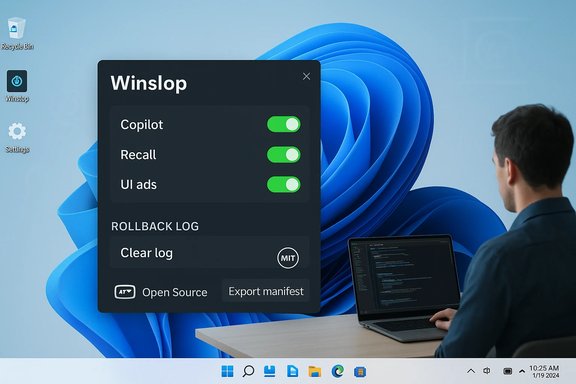
Winslop’s public documentation and community hands‑ons show a consistent feature set:
  • Remove or hide the Copilot UI affordances (taskbar button, shell entries) and related Copilot front‑end packages.
  • Disable Recall and purge its local snapshoed tasks.
  • Uninstall or unprovision first‑party Appx/MSIX inbox packages (Clipchamp, some bundled games, news widgets, etc..
  • Turn off telemetry, activity history, and location hooks.
  • Remove Start/Explorer suggestions, ads, and “Recommended” clutter.
  • Expose additional non‑AI defaults (hibernation, Game DVR, certain network throttling behavior them.
  • Offer a scan/inspect phase that previews exactly what will be changed and provide rollback assistance when possible (System Restore, logging, or revert scripts).
Under the hood Winslop operates across the same technical layers every serious debloater touches. Those layers — and the associated risk profileurate assessment:
  • Registry keys and Group Policy flips (low risk). Many Copilot/Recall UI toggles are controlled by keys or policy templates. Reversing these is generally safe if tracked.
  • Appx / MSIX package removal (mod user‑installed Appx packages is straightforward. Removing provisioned packages (the manifests that cause an app to be deployed to new profiles) changes default provisioning for future accounts and can interact with OEM customization. Reinstall is often possible via the Store or DISM, but provisioning edits can be brittle.
  • Scheduled task and local data cleanup (destructive). Features like Recall store indices and histories. Removing those artifacts is destructive (irreversible without backup) and should be explicitly consented to by the user.
  • Component‑Based Servicing (CBS) edits and blocker packages (high risk). The most controversial tactic is to alter the servicing inventory or install a small “blocker” package that prevents Windows Update or provisioning from re‑adding removed components. While this can make removals durable, it also intentionally diverges a device from Microsoft’s expected servicing baseline and has been the source of real-world upgrade and update failures in prior community experimencuments these steps as optional because of the evident risk.
Multiple independent writeups and community audits of Winslop emphasize that the app’s value is in transparency and selective controls — but that the safety of any specific run depends on which checkboxes are chosen (especially anything that touches CBS). The canonical advice from community audits is repeatable: test in a VM or an image clone, create backups, and avoid servicing edits unless you fully accept the operational tradeoffs.

Verification: what is independently verifiable today​

To meet journalistic standards the most load‑bearing claims require cross‑checks:
  • Winslop’s existence, author attribution, and distribution on GitHub and community portals are independently verifiable across multiple outlets and package directories (CHIP, PC Games Hardware, localized writeups) and by inspecting the public repository referenced by the developer. These sources consistently report versions around v0.25 and a tiny binary footprint in the ~160–180 KB range for early public releases.
  • RemoveWindowsAI’s repository and its approach to registry, Appx, and optional servicing edits are public on GitHub; its README enumerates the exact strategies and warns about servicing-level operations. That repository is a primary source for understanding the most aggressive techniques available to community scripts.
  • Microsoft’s platform changes and the Oct 14, 2025 Windows 10 end‑of‑support date are canonical and published by Microsoft, with the company documenting ESU enrollment and the options consumers have. Independent reporting and Microsoft’s own support pages confirm the ESU timeline and program details.
  • The recent introduction of a Group Policy to let administrators remove the consumer Copilot app (RemoveMicrosoftCopilotApp) appears in Insider previews and is reported by mainstream outlets. The policy is narrow and gated (e.g., it applies to managed Pro/Enterprise/Education devices, the Copilot app must not have been used in the last 28 days, and it does not remove Microsoft 365 Copilot). This is an important official alternative to third‑party debloaters for managed environments.
  • Microsoft’s public framing of Windows as increasingly “AI‑centric” or moving toward agentic, task‑performing features is well documented in the Windows team’s communications and independent reporting. The company also flaggesociated with agentic features (novel risks such as cross‑prompt injection and constrained agent workspaces) during the rollout. Those warnings underscore why some power users prefer to disable agentic surfaces entirely.
Where claims were ambiguous in community reports (for example, whether a given release includes servicing‑store modifications by default), the safe approach is to mark those claims as conditional — they may be present as opt‑in options or implemented thro posts and the Winslop README urge explicit consent for any plugin that executes external scripts or that modifies servicing artifacts.

Strengths: why Winslop resonates​

  • Transparency and auditability. Winslop’s UI explicitly previews actions, and the project is open source, making it possible for technically savvy users to review filter lists and code before running the tool. That’s a meaningful improvement over opaque installers that run arbitrary scripts.
  • Convenience for power users. What once required many manual registry edits, package queries, DISM commands and scheduled‑task deletions is now presented as a selectable checklist. That reduces human error and speeds repeatable workflows for system builders and technicians.
  • Choice and agency. For privacy‑minded users who value a minimal desktop with fewer telemetry hooks and ads, Wiee of control that Microsoft’s present UI and provisioning model do not always make easily accessible. That agency is the primary cultural driver behind community debloating efforts.

Risks: where wins become brittle​

No review of Winslop is complete without listing concrete risks — and the community has t to:
  • Update and upgrade fragility. The single biggest documented danger is that servicing‑store edits or installed “blocker” packages break the assumptions Windows Update and feature updates rely on. That can produce failed cumulative updates, feature‑update errors, or repair loops that require advanced recovery. This risk is not theoretical: community issue trackers and hands‑on reports show update anomalies tiking techniques.
  • Loss of data and irreversible actions. Deleting Recall indices and scheduled tasks destroys local snapshot history. Users who rely on these features for search or recovery must back up first or accept permanent data loss.
  • Supportability and warranty concerns. Devices modified outside vendor‑supported channels may face repair or warranty complications — especially on OEM images where provisioned packages carry vendor-supplied integrations. For enterprise fleets, unilateral, unmana SLAs and auditability.
  • False sense of “permanent” removal. Some community sites and third‑party mirrors present “one‑click removal” headlines without clarifying optional servicing edits. Users mussts and default settings to see whether durable blocking is opt‑in or automatic. If a tool’s defaults enable servicing surgery, that tool should be treated as an advanced sysadmin utility — not a consumer one‑click fix.

A prac for anyone considering Winslop​

  • Verify the canonical repository and release checksums. Prefer the GitHub release authored by the project owner rather than third‑party mirrors.
  • Read the filter list and changelog in full. Confirm whether any option writes to the Component‑Based Servicing (CBS) inventory or installs a blocker. If servicing edits exist, treat them as explicit, separate actions that you only run after making an image‑level backup.
  • Test in a virtual machine or a cloned image first. Run the tool with inspection-only mode, review the planned changes, then create a restore point or full image before applying anything destructive.
  • Disable only the low‑risk layer first: registry/policy flips and per‑user Appx removal. Observe behavior across updates for a few weekly cycles. Only consider provisioning or servicing edits if you fully accept the upgrade risks.
  • For managed fleets, use Microsoft‑supported controls (for example, the new RemoveMicrosoftCopilotApp Group Policy in Insider builds) combined with AppLocker/Intune for durable governance — do not run community servicing blockers in a production environment.

Microsoft’s official responses and the policy context​

Microsoft has not ignored the backlash: the company documented Windows 10’s EoS and ESU options, made concessions for consumers in the European Economic Area (EEA) by offering a free ESU pathway under defined conditions, and introduced narrowly scoped administrative policy controls to allow managed uninstalls of the consumer Copilot app in Insider channels. Those changes reflect both regulatory pressure and customer feedback, but they stop short of offering a single global “kill switch” for all AI surfaces. Meanwhile, Microsoft’s leadership — including CEO messages that asked people to stop framing AI as “slop” — signaled a product vision that treats AI as a core operating system capability rather than a peripheral feature. That messaging has political and product-management consequences: users pushing back with community tools are arguing for durable user choice, not just temporary opt‑outs.

What this means for Windows users and device buyers​

  • For the average consumer who is uncomfortable with aggressive system modification: try supported Settings toggles and Microsoft’s documented policies first, enroll in the ESU program where eligible, and plan hardware refreshes only where practical. Microsoft’s EEA ESU concession buys time for many European consumers; the specific enrollment mechanics vary by region and require Microsoft account re‑authentication in some flows.
  • For power users, enthusiasts, and technicians: Winslop and similar GUIs are valuable time‑savers and discovery tools — but they should be treated as part of a disciplined workflow that includes image backups, VM testing, and a clear rollback plan. If durability across updates is critical, prefer managed policy + AppLocker solutions for fleets.
  • For enterprises and managed IT: third‑party debloaters are risky for fleet health. Use Microsoft’s supported MDM and Group Policy paths, and pilot any removal strategy extensively before broad deployment. The new RemoveMicrosoftCopilotApp Group Policy provides a narrow, supported path to uninstall the consumer Copilot app in eligible organizational scenarios; it is intentionally conservative and limited.

The bigger picture: product design, regulation, and user agency​

Winslop is more than a utility: it’s a market signal. When a major vendor moves platform functionality behind hard‑to‑change provisioning or recurrent provisioning flows, motivated users will build tools to restore control. That dynamic is a form of demand-side feedback that product managers and regulatory bodies should heed.
  • Product design lesson: vendors should make durable opt‑outs available and documented for features that index personal content or alter user privacy boundaries. A clearer, supported “opt‑out” story reduces the need for community workarounds and the attendant update fragility those workarounds risk.
  • Regulatory angle: Microsoft’s EEA ESU concession shows regulators can influence vendor behavior on consumer protections and access to updates. The EEA decision removed some of the previously required enrollment friction for consumers there; similar pressure could push vendors toward clearer, supported opt‑outs globally.
  • Communiojects like Winslop and RemoveWindowsAI do contribute transparency and auditing benefits, but they also shift the burden of maintenance, testing, and recovery to users. In an ideal world, vendors and communities collaborate on supported toggles and hardened admin controls rather than forcing end users to choose between opacity and breakage.

Conclusion​

Winslop is a precise, well‑timed answer to a specific user need: remove AI surfaces from Windows 11 without hunting dozens of scattered settings. It is small, transparent, and effective at the feature layer — and it packages a complex manual workflow into a usable GUI. At the same time, the high‑risk techniques that deliver durable removals (servicing edits and blocker packages) remain the same tradeoff they always were: convenience for control versus upgrade stability and vendor‑expected servicing integrity.
For anyone considering Winslop, the practical path is simple and uncompromising: verify the release from the canonical repo, scan the filter lists, test in an isolated VM or image, back up everything, and avoid servicing‑store edits unless you are fully prepared to manage the long‑term upgrade and recovery implications. For organizations, the recommended approach is to prefer Microsoft’s supported policies and MDM controls and to treat community tools as a last resort for individual, non‑critical machines.
Winslop’s popularity — and the broader trend of community debloaters — is a blunt message to Microsoft: there is a real market demand for durable, documented opt‑outs and for product design that respects users who prefer a quieter, more private, and less agentic Windows desktop. Until Microsoft provides those mechanisms universally, tools like Winslop will continue to prosper — bringing choice to users at the cost of additional maintenance responsibility.
Source: filmogaz.com Developer Launches Winslop to Remove AI from Windows 11
 

Back
Top