
 Background
Windows has always shipped with a set of bundled applications, background services, and telemetry hooks that some users call “bloat.” Over the last two years Microsoft’s push to integrate more on‑device and cloud‑assisted AI — Copilot, Recall, contextual suggestions, and new promoted experiences — changed the calculus: what was once optional bloat increasingly looks like default platform behavior, and a vocal segment of Windows users and IT admins want durable ways to opt out. Winslop was created in that context as an open‑source, local utility that wraps documented removal and policy steps into a single, auditable GUI aimed at non‑script users and power users alike.
The tool’s lineage is important. Winslop is closely related to a family of community projects — RemoveWindowsAI, CrapFixer, and FlyOOBE — that emerged from the same impulse: give users transparent, reversible ways to reduce telemetry, advertising, and nonessential UI surfaces. The author behind FlyOOBE is also credited as the developer of Winslop, and the project has been published on GitHub under permissive licensing and an explicit “local, no‑telemetry” design goal. These facts are publicly verifiable in the repository and independent reporting about the project.
What Winslop is — at a glance
Winslop bills itself as a compact, audit‑first utility to “remove system slop” from modern Windows installs while keeping changes reversible whenever possible. Key characteristics reported across independent write‑ups and community threads:
- Open source and local: published on GitHub with releases that can be downloaded and inspected locally before running.
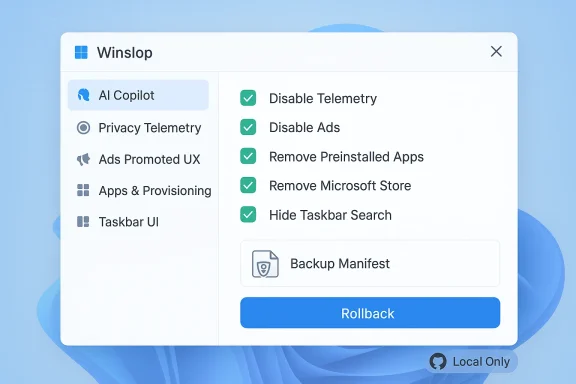
- Modular, checkbox UI: actions are grouped into categories (AI/Copilot, Privacy/Telemetry, Ads/Promoted UX, Apps & Provisioning, Taskbar/UI tweaks), allowing selective application and preview of exact changes.
- Rollback and backup: the tool emphasizes revertibility and generates manifests and backup snapshots for many changes. Users are repeatedly advised to rely on these features before applying broad edits.
- Servicing‑aware actions: some toggles modify servicing store or provisioning behavior so removed components do not immediately reappear — a powerful but delicate technique that escalates both persistence and risk.
- Small footprint and offline operation: binaries and release artifacts are intentionally small, and the author underscores that Winslop performs actions locally without calling home.
These design choices make Winslop attractive: it exposes familiar administrative actions through a friendly UI, reduces the need for complex PowerShell knowledge, and attempts to balance convenience with transparency. That same convenience is what prompts heated debates about safety, servicing fragility, and the long‑term viability of community debloat tools.
Technical anatomy — what Winslop actually changes
To assess any tool that tugs at the inner workings of Windows, you must understand the technical surface it touches. Winslop’s operations fall into five broad buckets, each with distinct mechanics and consequences:
1) Taskbar and UI affordances
Winslop exposes toggles to hide or remove on‑screen AI affordances (taskbar Copilot button, “recommended” UI elements), disable Widgets/News & Interests, and clean pinned taanges are largely cosmetic and registry/policy driven, but they affect user discoverability and may be surfaced again by future updates unless paired with provisioning edits.
2) Inbox apps and packaged components
The utility enumerates packaged apps (AppX / MSIX) and offers removal or disablement for inbox apps that ship with Windows. Removing Inbox apps is effective for reclaiming UI space and reducing background ng or unregistering provisioned packages can make certain update or repair flows fail if Windows expects those packages during servicing. Winslop typically warns users before such destructive operations.
3) Telemetry and background services
Many options map to long‑standing registry keys, scheduled task changes, and service startup policy flips used by administrators to dial down telemetry. These are low‑risk when applied carefully, but some telemetry gates are interwoven with Windows Update and diagnostic subsystems; indiscriminate toggles can reduce observability for troubleshooting or break compatibility with enterprise management.
4) Provisioning and servicing store edits
Winslop includes actions that adjust the servicing store or install dummy/blocker packages to prevent Windows from re‑provisioning removed components. This is the technical trick that makes removals persistent — but it is also the most brittle. Changes that interfere with provisioning can trigger unexpected behavior during feature updates or OEM recovery flows and may reduce the reliability of in‑place repairs. Multiple community write‑ups flag this as the largest single operational risk.
5) Recovery and rollback tooling
Winslop exposes reversion modes and scripts; when used, these often rely on snapshots, exported manifests, and PowerShell rollback logic. The availability and reliability of these rollbacks depend on which actions were applied — some removals are reversible with relative ease, others (especially removals of stateful indexing like Recall) are effectively destructive unless the user has separate backups.
Strengths: why the community is paying attention
There are clear, practical reasons Winslop has gained traction in tech media and enthusiast forums.
- Clarity and transparency: Winslop previews changes and produces manifests, which reduces the “mystery binary” problem that plagued earlier one‑liner scripts. Users can see the exact registry keys, packages, and tasks the tool will change. This shift toward auditable tooling raises the bar for responsible third‑party debloat utilities.
- Accessibility: not every user can safely run PowerShell snippets and parse verbose logs. By putting the checks and choices behind a GUI, Winslop opens debloating to a broader audieer features available to advanced users. Several how‑to guides emphasize its approachable interface.
- Revertibility focus: the tool’s emphasis on backups and rollbacks is more robust than many older scripts, which often offered only one‑way destructive commands. Winslop’s backups aren’t perfect — there are edge cases — but they represent an important design tradeoff for safety.
- Offline operation and size: developers intent on privacy will appreciate that Winslop performs local edits and is distributed as a compact executable; there are no hidden telemetry endpoints or cloud dependencies in the default behavior. This reduces the attack surface from a network perspective.
These strengths explain why IT hobbyists, power users, and privacy advocates are experimenting with Winslop: it provides practical control over an OS whose vendor is increasingly opinionated about default experience.
Risks, fragility, and the worst‑case scenarios
The very techniques that make Winslop effective also create risks. Responsible coverage—and responsible usage—requires naming those risks clearly.
- Servicing fragility and update breakage: edits that touch the servicing store or block provisioned packages are persistent but brittle. Feature updates, OEM recovery, or even minor cumulative updates can encounter missing or modified artifacts, producing UI glitches, failed repairs, or blocked updates. Multiple community advisories highlight that the more a tool interferes with provisioning, the more likely it will cause future compatibility problems.
- Malicious mirroring and tampered binaries: tools that grow popular are targets for imitation and repackaging. The developer behind FlyOOBE (the same author family) has publicly warned about fake mirrors distributing modified builds; reputable outlets have repeated the warning and urged downloads only from the official GitHub releases. Running a tampered Winslop binary with admin rights is a high‑impact risk.
- Admin‑level blast radius: Winslop runs with elevated privileges to perform system edits. Any bug or malicious code executed at that privilege level can cause severe data loss or system compromise. That risk is real for any debloat tool and is amplified when a user applies many high‑impact toggles in one session.
- False sense of permanence: some users assume a removal equals permanent opt‑out. In practice, Microsoft and OEM provisioning flows can reintroduce removed features unless the blocking technique survives updates. Conversely, blocking re‑provisioning can leave the system in states where expected system behaviors no longer work as designed. Winslop’s documentation and community posts repeatedly call out this tradeoff.
- Data loss for local features: certain removals — especially local indices like Recall or other historical caches — destroy user history that cannot be simply rebuilt. Users relying on those systems for productivity must be aware that enabling an action can be destructive.
Cross‑checking the claims — how we verified key facts
When reporting about tooling that touches system internals, accuracy matters. Key claims we verified and the independent sources that corroborate them:
- Winslop exists, is open‑source, and has public releases. Verified by the project’s GitHub presence and multiple third‑party write‑ups and release aggregators noting public drops.
- The developer lineage ties to FlyOOBE / Flyby11. Reported by Windows Central and corroborated by the FlyOOBE releases discussion and community write‑ups.
- Winslop exposes AI‑specific removals (Copilot, Recall, Click‑to‑Do) and provisioning edits. Verified by detailed tool breakdowns in independent guides and forum posts describing the categories of changes and specific actions.
- There are active warnings about fake mirrors and malicious repackaging. Confirmed by developer statements and reporting from reputable outlets that traced malicious mirrors and urged official downloads.
- Rollback exists but is not uniformly guaranteed for all actions. Confirmed by the project manifests and community testing notes describing which actions are reversible and which are destructive.
Where claims were more speculative — for example, whether a given toggle will break a specific OEM recovery flow — we flagged those as conditional and recommended validation steps; such outcomes depend on the device, OEM provisioning, and the exact Windows build.
Practical guidance — how to evaluate Winslop for your environment
If you’re considering Winslop for a personal device, a test fleet, or as a troubleshooting tool, follow a risk‑aware checklist.
- Start in a virtual machine. Clone your typical build into a VM and run winslop there first. Confirm that the actions you intend to use behave as expected; observe update behavior after the next cumulative/feature preview.
- Read the manifests before clicking Apply. Winslop previews changes. Treat that preview as the authoritative manifest and only enable the smallest set of toggles you need.
- Prefer reversible, non‑servicing edits first. Disable telemetry and hide UI elements before touching provisioning or installing blockers. If you must modify servicing, test update and recovery flows immediately afterward.
- Create independent backups. Winslop’s internal rollback is helpful, but maintain a full system image or restore point before making sweeping changes. Cloud download vs local reset behavior can affect whether removed components return during a reset operation — test both paths if you might need recovery.
- Verify downloads and checksums. Always download releases from the official GitHub repository and verify the release notes and checksums. Do not rely on third‑party mirrors.
- Incrementally apply and observe. Make a change, use the machine for a day or two, and then test updates and basic repair scenarios. Repeat as needed.
- Document and export the manifest. Keep an exported change list and a copy of the backup manifests in a safe place; this will speed reversion and help troubleshooting later. ([windowsforum.com](Winslop Debloat for Windows 11: Targeted AI Removal with Rollback
Enterprise and IT‑pro considerations
Winslop’s target audience is primarily enthusiasts and power users, but system administrators will encounter it in the wild. For managed environments:
- Do not use Winslop as a blanket management tool. Enterprise fleets should rely on supported management configurations (Group Policy, Intune, ADMX-backed policies) and manage feature sets through sanctioned channels. Winslop edits can diverge a device from its compliance baseline.
- If you must support Winslop‑altered devices, document exceptions. Create a clear exception process that includes a rollback path and recovery testing plan.
- Treat servicing edits as a remediation defect. If a user applied servicing blockers and then experiences update/repair issues, treat that as a user‑applied configuration problem. Recovery may require manual restoration of provisioned packages or a cloud download reset.
- Monitor for tampered builds. Corporate security teams should educate users about official release channels and consider network controls that prevent installation from unvetted sources. Tom’s Hardware and other outlets reported malicious mirrors that mimicked FlyOOBE/Winslop pages — a real distribution vector to defend against.
The broader debate: user choice vs platform stewardship
Winslop sits at the intersection of two competing values: a user’s right to control their device and a platform vendor’s responsibility to deliver a consistent, secure, and supported experience.
On one hand, users and administrators have legitimate reasons to strip unwanted features, reduce attack surface, and reclaim resources. Winslop acknowledges that by offering audit trails and reversibility, and by framing its purpose as user choice rather than anti‑AI ideology.
On the other hand, operating systems are complex services with interlinked subsystems. Features that seem optional today (local search indices, background ingest pipelines, notification advertisers) may be relied upon tomorrow by other components or by OEM utilities. Aggressive community debloating can create a maintenance burden for both users and support teams, and it can increase the risk surface if done haphazardly. The correct balance is not technical alone; it’s a conversation about how vendors, enterprises, and individuals define acceptable defaults and opt‑out mechanisms.
The existence and popularity of Winslop — and similar tools — is a policy signal. If users consistently reach for third‑party tools to control default behaviors, vendors may need to respond either with more granular, user‑facing controls or with better documentation and supported management tools that satisfy those needs without requiring system hacks.
What to watch next
- Microsoft’s response and policy tools. If platform vendors provide clearer, supported opt‑out mechanisms for telemetry and AI affordances, demand for tools like Winslop may shrink. Watch official policy updates and Group Policy templates.
- Repository evolution and signing. Winslop’s security posture depends on transparent releases and code review. A move to signed releases and reproducible builds would materially reduce the tampering risk. Track GitHub releases and changelogs closely.
- Third‑party mirrors and social engineering. Bad actors will continue to exploit curiosity around debloat tools. The developer community and security reporters have already flagged fake mirrors; this is an ongoing threat that requires vigilance from users and defenders.
- Real‑world compatibility reports. Community testing will surface the combinations of toggles that cause update or recovery problems. Monitor community threads and test your device classes in a lab before wider adoption.
Conclusion
Winslop is a notable milestone in the Windows ecosystem: a compact, auditable GUI tool that packages community knowledge about disabling AI surfaces, removing preinstalled noise, and reclaiming control over the user experience. Its strengths are obvious — clarity, modularity, and a focus on reversibility — and so are its limits: servicing fragility, the risk of tampered builds, and the reality that some removals are destructive by design.
If you choose to use Winslop, do so deliberately: test in a VM, prefer non‑servicing edits first, maintain separate backups, and always download official releases. For administrators and security teams, Winslop is a reminder of where user frustration is concentrated and an argument for more transparent, vendor‑supported opt‑out controls. The tool does not settle the debate about the right balance between innovation and choice; but it does make the tradeoffs visible — and that visibility, for many users, is the point.
