

The long, messy era of mismatched Windows apps — where polished system UI sat beside half-finished, inconsistent third‑party windows — may finally be getting a pragmatic, developer‑facing fix: Microsoft’s WinUI Gallery has been updated to version 2.8, and the changes are squarely aimed at making it easier for app authors to build consistent, Windows 11‑polished applications that behave like first‑party software.
Windows has suffered from a fragmentation problem for years: a single operating system surface that runs apps built with many UI frameworks, patterns, and assumptions. The result is an ecosystem where users constantly run into UI inconsistency — differing title bars, mismatched controls, poor dark‑mode support, and erratic window behavior. Microsoft’s answer to this for modern native apps is WinUI (the Windows UI Library) and the Windows App SDK (formerly Project Reunion), which together give developers the controls, materials, and windowing APIs needed to produce apps that feel like they belong on Windows 11.
For developers, the WinUI Gallery has long been a practical, living reference: a sample app that demonstrates controls, patterns, and working code that you can copy into your project. The Gallery functions as both a visual catalog and a sample repository, letting developers inspect XAML, run examples, and learn idiomatic ways to adopt Fluent Design and WinUI APIs. Microsoft maintains the project on GitHub and ships a Store version so that the widest possible audience can try examples quickly.
By surfacing a Jump List sample inside WinUI Gallery, Microsoft gives developers:
Reliable clipboard handling matters in productivity apps where users expect data continuity across sessions and devices. A clear set of examples decreases the chance that a developer ships an app that frequently “drops” copied content or misuses clipboard formats.
Why does adoption matter? Because the visual and behavioral consistency Microsoft wants across Windows depends on app authors choosing the same building blocks. When more developers use WinUI 3 and the Windows App SDK:
(For context, independent coverage and community discussion about Gallery releases and WinUI adoption are visible across the developer ecosystem; the Gallery is actively maintained and updated as the Windows App SDK evolves.)
If Microsoft keeps expanding the Gallery with real‑world scenarios (jump lists, window management, shell integration, clipboard patterns, and accessibility checks), and if the company continues to simplify naming and provide migration tooling, we will see a steady, measurable improvement in app polish across Windows 11. That’s when the many small annoyances that add up to “ugly apps” will start to fade — not because a single update fixed everything, but because a combination of clear guidance, example code, and platform evolution made it easier for developers to do the right thing.
For developers: run the Gallery, copy the samples, and test against the lowest supported Windows build you intend to target.
For users: expect gradual improvements — polished apps won’t appear overnight, but the building blocks to make them consistent are finally in a more usable place.
Windows has always been a platform where diversity of apps is a strength — but that diversity should not mean inconsistent UX. WinUI Gallery 2.8 is a welcome, practical step toward a more unified Windows app identity: small targeted samples that solve real problems and lower the friction to adopt them. If Microsoft continues to build and maintain that bridge between platform APIs and developer ship‑ready examples, the next few years could be the moment when “apps that don’t feel like Windows” start to become an exception instead of the rule.
Source: Windows Central I’m tired of ugly Windows apps. Microsoft is finally fixing them.
 Background
Windows has suffered from a fragmentation problem for years: a single operating system surface that runs apps built with many UI frameworks, patterns, and assumptions. The result is an ecosystem where users constantly run into UI inconsistency — differing title bars, mismatched controls, poor dark‑mode support, and erratic window behavior. Microsoft’s answer to this for modern native apps is WinUI (the Windows UI Library) and the Windows App SDK (formerly Project Reunion), which together give developers the controls, materials, and windowing APIs needed to produce apps that feel like they belong on Windows 11.For developers, the WinUI Gallery has long been a practical, living reference: a sample app that demonstrates controls, patterns, and working code that you can copy into your project. The Gallery functions as both a visual catalog and a sample repository, letting developers inspect XAML, run examples, and learn idiomatic ways to adopt Fluent Design and WinUI APIs. Microsoft maintains the project on GitHub and ships a Store version so that the widest possible audience can try examples quickly.
What changed in WinUI Gallery 2.8
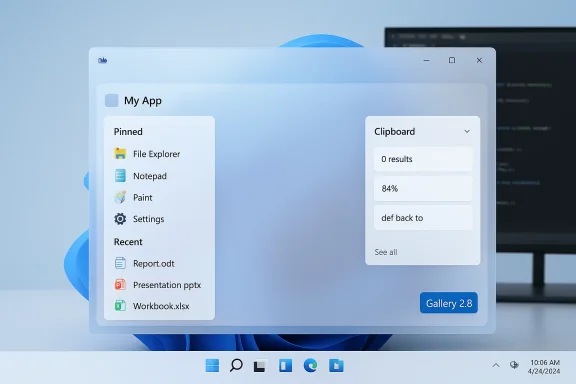
WinUI Gallery 2.8 is not a cosmetic point release: it adds concrete samples and host‑side integrations that demonstrate how to make apps behave like well‑crafted Windows 11 first‑party experiences. The release notes and repository activity show three headline changes you need to know about:- Jump List integration — the Gallery now supports and demonstrates taskbar jump lists, letting users pin favorite or recently viewed samples directly to the app’s taskbar entry. That brings the Gallery samples into the taskbar muscle memory users already have for first‑party apps.
- AppWindow TitleBar customization sample — a concrete, runnable demonstration of how to customize a window’s non‑client area using the AppWindow APIs. This sample goes beyond theoretical docs and shows practical code that developers can adapt to build polished, rounded title bars and integrate system behaviors like snap‑group flyouts.
- Improved Clipboard samples — Clipboard usage is surprisingly tricky across app models; the Gallery now includes clearer, ported Clipboard examples so developers can avoid pitfalls when implementing clipboard history, data formats, and delayed rendering. This was explicitly ported into the project as part of the 2.8 changes.
Why these specific changes matter
Jump Lists: more than a convenience
Jump lists are a small UX affordance with outsized benefits. They let users pin routines, jump to recents, and maintain continuity between invocations of an app. For developers, implementing jump lists correctly involves working with the OS shell and managing metadata for recent/favorite items — not something most UI tutorials cover in depth.By surfacing a Jump List sample inside WinUI Gallery, Microsoft gives developers:
- A tested recipe to integrate jump lists following platform best practices.
- A way to see how pinning and recent items behave under different system states (e.g., multiple windows, taskbar grouping).
- A demonstrable example to copy into production apps with confidence that it will interact correctly with the taskbar and Start menu.
AppWindow TitleBar: closing the non‑client gap
Title bars and window chrome are where a lot of the visible inconsistency in Windows apps lives. The AppWindow APIs (exposed via the Windows App SDK and demonstrated in the Gallery’s windowing samples) provide a supported, future‑facing path to:- Customize title text and controls while preserving system behavior.
- Support rounded corners, snap group flyouts, and theming that matches Windows 11’s visuals.
- Avoid fragile, custom hacks that break on OS updates or platform changes.
Clipboard improvements: small API, big headaches
Clipboard behavior differs between app models and can be a source of intermittent bugs — lost items, format mismatches, and race conditions when apps rely on delayed rendering. The Gallery’s effort to port UWP clipboard examples into the WinUI Gallery is intentionally pragmatic: it gives developers patterns that work with the modern API surface and explains common failure modes, so simple copy/paste becomes reliable across apps.Reliable clipboard handling matters in productivity apps where users expect data continuity across sessions and devices. A clear set of examples decreases the chance that a developer ships an app that frequently “drops” copied content or misuses clipboard formats.
The technical context: WinUI 3 and Windows App SDK adoption
WinUI has two related but distinct tracks that confuse even experienced developers: WinUI 2.x (a UWP‑focused control library) and WinUI 3 (the modern UI layer used with the Windows App SDK). The Gallery supports both control families across branches and demonstrates patterns for each environment, but it's WinUI 3 — coupled with the Windows App SDK — that represents Microsoft’s recommended path for modern native desktop apps.Why does adoption matter? Because the visual and behavioral consistency Microsoft wants across Windows depends on app authors choosing the same building blocks. When more developers use WinUI 3 and the Windows App SDK:
- Apps inherit system themes and materials (mica, acrylic), typography, and control geometry more easily.
- Windowing behavior — including snap‑to layouts, rounded corners, and title bar integrations — can be implemented in a uniform, documented way.
- Microsoft can evolve platform capabilities and expect developer apps to opt in without fragile, bespoke implementations.
Strengths of the update
- Tangible, runnable examples: The Gallery no longer just shows controls; it shows platform behaviors (jump lists, windowing) that were previously under-documented, making the jump from “I read the docs” to “I shipped the feature” smaller.
- Lowered developer friction: By porting Clipboard and TitleBar samples and centralizing versioning and sample code, the Gallery removes many of the “gotchas” that discourage devs from adopting WinUI 3.
- Alignment with Windows App SDK guidance: The Gallery now shows patterns that are directly compatible with Microsoft’s recommended Windows App SDK APIs, which increases the likelihood of forward compatibility as the platform evolves.
- Open, inspectable source: Because the project is hosted on GitHub, teams can examine exact implementation choices, raise issues, and submit PRs — a crucial advantage for production adoption.
Risks, limitations, and what to watch for
No single tool or sample can magically standardize an ecosystem as sprawling as Windows. Here are realistic caveats developers and users should keep in mind.1) Adoption lag across the ecosystem
Even with polished samples, many existing apps are built on legacy frameworks (Win32, WPF, Electron, older UWP) and won’t switch overnight. Rewriting or porting a mature codebase is expensive; incremental migration strategies will be the norm. Expect the ecosystem to be heterogeneous for years.2) Performance tradeoffs and developer perception
WinUI 3 apps have sometimes been criticized for higher startup times or larger footprints compared to mature frameworks. The Gallery helps illustrate patterns, but teams focused on ultra‑low startup latency may evaluate tradeoffs carefully before migrating entire products. Community discussions have repeatedly noted performance differences between WinUI 2.x and WinUI 3 that are still being iteratively improved. This is a practical consideration, not a blocker — but a real one.3) Versioning and naming confusion
Microsoft maintains multiple version sequences (WinUI 2.x, WinUI 3, Windows App SDK versions, and Gallery release numbers). That has led to confusion about what “2.8” refers to — the Gallery release, the WinUI 2 control set, or something else entirely. Clearer naming and documentation from Microsoft would reduce onboarding friction for new devs. The Gallery’s maintainers have started to address this in release notes and GitHub metadata, but the underlying complexity remains.4) Platform constraints and fragmentation
Some AppWindow features depend on OS version, device family, or shell support. Samples include runtime checks for customization support because not every combination of Windows 10/11 and hardware supports every cosmetic option. Developers should validate support matrices before shipping UI that assumes features will always exist. The Gallery highlights these checks in practice, but it’s a reminder that “works in the sample” is necessary but not sufficient for broad compatibility.Practical guidance for developers who want polished apps
If your goal is to ship an app that looks and behaves like a modern Windows 11 program, follow this practical, sequential approach:- Study the Gallery samples — run WinUI Gallery locally, explore the Jump List, TitleBar, and Clipboard pages, and copy the relevant code into a sandbox project. The runnable examples reduce guesswork.
- Target the Windows App SDK + WinUI 3 — align your project to the Windows App SDK for windowing and platform integrations; use WinUI 3 controls for client UI. This gives you access to AppWindow APIs and other modern platform features.
- Add runtime feature detection — guard title bar customizations and jump list registration with checks so your app degrades gracefully on older OS builds. The Gallery samples show exactly how to do this safely.
- Test clipboard interactions across scenarios — verify copy/paste behavior across other apps, background/foreground transitions, and fast copy sequences. Use the Gallery’s clipboard examples as a baseline for robust handling.
- Measure and iterate on performance — if startup or memory is a concern, profile both your app and a Gallery sample to understand where costs originate. Incremental optimization is often enough to match user expectations without sacrificing modern UI.
Why users should care
From a user perspective, the benefits are straightforward:- More predictable behaviors: pinning, recents, and windowing will act consistently across apps that adopt these samples.
- Visual polish: apps that use system materials and title bar customizations look native and feel more trustworthy.
- Fewer UX surprises: clipboard continuity and taskbar integrations reduce small but infuriating interruptions in workflows.
Broader implications for the Windows app ecosystem
The Gallery update is a small but meaningful step in a larger platform transition. Microsoft’s WinUI and Windows App SDK roadmap emphasizes convergence: a single set of APIs for modern desktop apps and a design system that can be relied upon by both first‑party and third‑party experiences. As the Gallery grows with practical, copyable examples, we should expect:- Faster adoption of platform features among indie devs and ISVs.
- Better third‑party parity with first‑party apps in day‑to‑day UX patterns.
- A healthier ecosystem where visual polish is not limited to deep‑pocketed vendors because high‑quality patterns are shared and maintained openly.
Where this update falls short (and what Microsoft should do next)
The Gallery is a good start, but the platform needs a few additional moves to maximize adoption and impact:- Unify naming and documentation: simplify versioning labels so that developers can quickly understand compatibility (for example, clearly separating Gallery release numbers from WinUI control versions).
- Ship more migration guides: real apps have tangled dependencies; Microsoft should publish step‑by‑step migration guides (with perf tips) for common real‑world scenarios.
- Expand sample coverage for cross‑stack apps: provide guidance for WPF and Win32 apps that want to adopt surface‑level WinUI features without abandoning the underlying framework overnight.
- Drive tooling improvements: continue to invest in Visual Studio templates, hot‑reload workflows, and a designer that lowers the friction for UI iteration.
Quick reality check: verifying the facts
The WinUI Gallery project is public and maintained on GitHub; the 2.8 release and its change log are visible in repository activity and release notes. Microsoft’s documentation and Windows App SDK materials document AppWindow windowing APIs and the recommended approach to title bar customization. The Gallery’s update material (including the Jump List and Clipboard ports) is present in the project release stream and accompanied by the dev blog announcement for the Gallery series. These claims are verifiable from Microsoft’s sample repositories and release notes.(For context, independent coverage and community discussion about Gallery releases and WinUI adoption are visible across the developer ecosystem; the Gallery is actively maintained and updated as the Windows App SDK evolves.)
Final analysis: will this end the “ugly apps” era?
Not by itself. But WinUI Gallery 2.8 is exactly the kind of practical infrastructure that nudges the ecosystem in the right direction. It addresses the classic adoption gap — documentation ≠ adoption — by providing runnable, copy‑pasteable, production‑friendly examples that show developers how to ship native behaviors without tribal knowledge or guesswork.If Microsoft keeps expanding the Gallery with real‑world scenarios (jump lists, window management, shell integration, clipboard patterns, and accessibility checks), and if the company continues to simplify naming and provide migration tooling, we will see a steady, measurable improvement in app polish across Windows 11. That’s when the many small annoyances that add up to “ugly apps” will start to fade — not because a single update fixed everything, but because a combination of clear guidance, example code, and platform evolution made it easier for developers to do the right thing.
For developers: run the Gallery, copy the samples, and test against the lowest supported Windows build you intend to target.
For users: expect gradual improvements — polished apps won’t appear overnight, but the building blocks to make them consistent are finally in a more usable place.
Quick reference: concrete next steps for teams
- Clone and run the WinUI Gallery to explore the Jump List, TitleBar, and Clipboard examples.
- Migrate a small module of your app to the Windows App SDK + WinUI 3 to validate title bar and windowing behavior.
- Implement jump lists for a single, high‑value command (recent document or a favorite task) and ship it as a minor release to measure user uptake.
- Use the Gallery’s clipboard samples as a test harness for any copy/paste flows in your app.
Windows has always been a platform where diversity of apps is a strength — but that diversity should not mean inconsistent UX. WinUI Gallery 2.8 is a welcome, practical step toward a more unified Windows app identity: small targeted samples that solve real problems and lower the friction to adopt them. If Microsoft continues to build and maintain that bridge between platform APIs and developer ship‑ready examples, the next few years could be the moment when “apps that don’t feel like Windows” start to become an exception instead of the rule.
Source: Windows Central I’m tired of ugly Windows apps. Microsoft is finally fixing them.
