

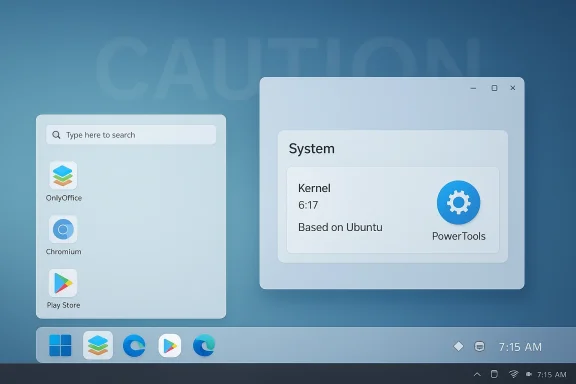
Winux’s latest build, labeled 11.26.03 and stamped “Pre‑March 2026,” is now publicly available — a 6.2 GB ISO that packages a Windows‑like KDE desktop, a 6.17 kernel, Android Play Store support, bundled proprietary apps (OnlyOffice, Microsoft Edge), and the PowerTools customization suite — but the distribution’s checkered history and lingering technical and legal concerns mean this release deserves cautious scrutiny before anyone installs it on a production machine. (notebookcheck.net)
Winux is the latest name for a lineage that traces back to Wubuntu and LinuxFX, projects that set out to make Kubuntu look and feel like Microsoft Windows. That lineage is part of why this distro attracts attention: the visual fidelity to Windows and inclusion of Windows‑style tooling are the project’s selling points, but they also generated controversies — ranging from alleged trademark overreach to a documented security incident in earlier LinuxFX releases.
The fresh Winux 11.26.03 release is being distributed via SourceForge as a single ISO; project metadata describes it as “Windows Theme Over Linux” and lists features such as Active Directory support, Android/Play Store integration, and builtin PowerTools. Notebookcheck’s coverage of the release highlights the 6.17 Linux kernel, PowerTools themes inspired by Windows 10/11, and a set of bundled apps including OnlyOffice, Microsoft Edge, Heroic and more. Those parallel project materials and independent reports are the basis for this article’s technical verification. (sourceforge.net)
However, the project’s history of an exposed activation backend, the presence of proprietary closed components that can gate or alter desktop behavior, and repeated community warnings about pay‑to‑unlock mechanics make it a poor choice for sensitive or production environments. Do not install this on machines that contain irreplaceable data or that are joined to corporate networks without rigorous vetting. If the PowerTools activation server or other central services are operating in the same form as past LinuxFX incarnations, you may be opening yourself or your users to unexpected privacy and security issues.
If you want a safe transition from Windows to Linux with a familiar UI, mainstream alternatives such as Zorin OS, Linux Mint, KDE Neon, or a custom‑themed Ubuntu/Kubuntu build give you similar aesthetic familiarity without the same downstream trust questions. Those projects are transparent about what’s proprietary and have large community and enterprise audiences supporting code, packaging, and security updates.
In short: Winux 11.26.03 is technically interesting and convenient for users who want a Windows look on an Ubuntu base, but its lineage, prior security failures, and closed activation components create real and verifiable reasons to be cautious. Test in a VM, inspect the image and network behavior, and do not trust paid activation prompts until the project publishes verifiable, auditable evidence that past problems have been corrected. (notebookcheck.net)
Source: Notebookcheck Ubuntu-based Winux 11.26.03 arrives with multiple package updates
 Background / Overview
Winux is the latest name for a lineage that traces back to Wubuntu and LinuxFX, projects that set out to make Kubuntu look and feel like Microsoft Windows. That lineage is part of why this distro attracts attention: the visual fidelity to Windows and inclusion of Windows‑style tooling are the project’s selling points, but they also generated controversies — ranging from alleged trademark overreach to a documented security incident in earlier LinuxFX releases.The fresh Winux 11.26.03 release is being distributed via SourceForge as a single ISO; project metadata describes it as “Windows Theme Over Linux” and lists features such as Active Directory support, Android/Play Store integration, and builtin PowerTools. Notebookcheck’s coverage of the release highlights the 6.17 Linux kernel, PowerTools themes inspired by Windows 10/11, and a set of bundled apps including OnlyOffice, Microsoft Edge, Heroic and more. Those parallel project materials and independent reports are the basis for this article’s technical verification. (sourceforge.net)
What’s actually in Winux 11.26.03 (technical verification)
Kernel, base and point‑release alignment
- Notebookcheck reports Winux 11.26.03 is built atop Ubuntu/Kubuntu 24.04.4 LTS and ships a Linux 6.17 kernel. Canonical’s Ubuntu 24.04.4 LTS point release and its HWE (hardware enablement) stack do indeed include a 6.17 HWE kernel in February 2026 — so the kernel claim is consistent with what an Ubuntu‑based remix would reasonably inherit. (notebookcheck.net)
Desktop, themes and bundled UI
- Winux continues the project’s long practice of using KDE Plasma with custom themes designed to mimic Windows 10/11 (PowerTools’ RedSand themes are specifically named in reporting). The SourceForge project page and the Winux readme list KDE as the UI and call out Windows‑like icon and theme packs as part of the distribution. If your priority is a Windows‑familiar visual environment on top of a Linux base, Winux delivers that out of the box. (sourceforge.net)
Bundled apps and platform extras
- Notebookcheck lists preinstalled user‑facing applications: OnlyOffice, Microsoft Edge, Heroic Launcher for Epic/GOG/Amazon games, Steam, 4K Video Downloader+, and Mozilla Thunderbird, plus “Play Store” support and OpenGL passthrough described as part of PowerTools. The SourceForge readme corroborates Android / Play Store support and Active Directory integration in the distro’s feature list, though it doesn’t enumerate every bundled application. If these applications matter to you, check the ISO in a sandbox to confirm what’s included and whether it’s configured the way you expect. (notebookcheck.net)
Packaging details: ISO size and checksums
- The Winux 11.26.03 ISO on SourceForge is listed at 6.2 GB; Notebookcheck repeats that figure in its coverage. That’s a relatively large live/installation image and suggests an extensive preinstalled application set. However, several community posts have raised concerns in the past about the project’s distribution metadata and checksum practices — a detail worth verifying before trusting an image. Always verify checksums and, when possible, prefer images signed with a verifiable GPG key. (sourceforge.net)
Mesa and graphics stack: conflicting reporting
- Notebookcheck reports MESA 26.0.0 in the Winux release notes, but Canonical’s 24.04.4 HWE landing (as rolled into Ubuntu 24.04.4 ISOs) was widely reported to include Mesa 25.2.x at the time the point release shipped. That mismatch is important: Winux may have backported or otherwise altered the graphics stack, or the Notebookcheck note could reflect a downstream change in Winux packaging. Either way, confirm the Mesa version in the ISO before relying on any specific GPU driver behavior; mismatched driver/mesa versions are a common source of instability on Linux. (notebookcheck.net)
Why this isn’t simply “another Linux remix”: the reputation and risk history
The LinuxFX activation / data‑exposure episode
- The franchise behind Winux (previously LinuxFX / WindowsFX / Wubuntu) has an established reputation problem going back to mid‑2022: independent investigators and community reporting documented an exposed activation backend and an exposed registration database containing user registrations, keys, and identifying metadata. Multiple community writeups and a technical post analyzing the activation client showed unauthenticated endpoints and plaintext credentials used by the activation mechanism. That incident is not a rumor — there is archived technical analysis and broad community discussion about the data exposure. Those are the hard facts to keep in mind when evaluating any distribution that reuses the same activation/telemetry components.
Paywalled “Pro” features and user‑facing coercion
- Independent technology coverage (ZDNet’s investigative piece and later repeats) described a workflow where the distro’s UI would push users toward entering a product key for PowerTools and that a lack of a valid key could lock or degrade the desktop experience — behavior many users and commentators described as coercive and at odds with normal expectations for a free Linux distribution. Reports and follow‑ups criticized the project for licensed, closed‑source components that gate cosmetic and functionality features behind a paywall. Those reports were serious enough to prompt cautionary coverage; treat any request for payment through a nonstandard installer or popup with suspicion.
Trademark and branding questions
- The Register and other commentators have flagged the project for closely copying Windows look/feel and potentially infringing on Canonical and Microsoft trademarks, or at least for using Windows trademarks and branding in ways that could draw legal attention. That risk is primarily reputational for end users, but in an enterprise or educational setting it could complicate support and procurement decisions. There is no public court judgment (to my knowledge) that declares the project unlawful, but the trademark and branding posture is a real vector of uncertainty.
Security and privacy analysis — what to watch for
Closed‑source control plane: PowerTools and telemetry
- PowerTools is core to the Winux experience: it provides the Windows‑like Settings, Android integration, theming and other “desktop glue.” But PowerTools is a proprietary component and therefore not audit‑friendly by default. That raises two problems:
- Auditability gap: closed binaries controlling UI/OS features can collect or transmit data without public source artifacts to inspect.
- Supply‑chain risk: if PowerTools performs network calls (for activation, updates, telemetry), an insecure or unauthenticated channel can leak user data or be manipulated.
- Historical evidence from LinuxFX’s prior activation implementation shows how these failure modes played out in practice — a central activation backend and unauthenticated endpoints were leveraged to enumerate keys and, in some reporting, to expose user records. That is the exact category of problem you must audit or avoid for production use. (sourceforge.net)
Network behavior and on‑device telemetry
- If you test Winux, observe its network behavior on first boot. Check for unexpected DNS queries, outgoing HTTP traffic, or unencrypted activation lookups. If the distribution calls home for activation or feature checks, capture and analyze that traffic in a controlled environment (air‑gapped VM with monitoring or with a transparent proxy like mitmproxy). Given prior issues in the project lineage, an abundance of caution is warranted.
Application provenance and updates
- The inclusion of Microsoft Edge and other proprietary apps is convenient, but it also means you’re trusting binaries from multiple vendors who maintain their own update channels. Confirm how the distro applies updates: does it rely on Ubuntu/Kubuntu repositories, third‑party repos, or bundled debs? The upgrade surface (Canonical base + downstream packaging + proprietary additions) increases the number of places things can break or be misconfigured. Notebookcheck and SourceForge list the apps; verify origins locally in the ISO. (notebookcheck.net)
Legal and ethical considerations
- The distribution’s strong Windows look and use of Microsoft‑like branding elements raised concerns about trademark and copyright overreach. The Register and other outlets have documented those issues in their coverage. For most individual users the practical consequence is minimal (you can run a themed OS locally), but organizations should weigh legal risk as part of procurement and compliance reviews. If you supply machines to employees, check your legal team’s stance before deploying a Windows‑themed, closed‑component distro at scale.
- The moral and community aspect matters too: many users consider the open‑source ethos a component of trust. When a project uses closed activation servers or paid gates, it shifts that trust model — and, as prior incidents show, it can translate into data‑risk for end users. If you value open source, prefer distributions that are transparent about what is proprietary and how user data is handled.
Practical guidance: how to evaluate Winux safely (recommended checklist)
Before you install Winux 11.26.03 on any system you care about, follow these steps:- Download the ISO from SourceForge and verify the file size (6.2 GB reported). Confirm the checksum if the project publishes one. If only weak checksums are offered, treat that as a warning sign. (sourceforge.net)
- Run the ISO in a virtual machine (VM) first — don’t install to a primary workstation. Use snapshots and a network‑monitoring VM to capture outbound connections. (sourceforge.net)
- Inspect running processes and network endpoints on first boot. Look for HTTP endpoints, activation checks, or unencrypted traffic. If you find suspicious endpoints, block them and escalate to a safe analysis environment.
- Check the versions of kernel and Mesa: run uname -r and glxinfo / vulkaninfo to verify what is actually installed. Notebookcheck’s article and Canonical’s HWE notes are helpful references, but the ISO contents are authoritative. (notebookcheck.net)
- Confirm where Microsoft Edge, OnlyOffice and other apps are coming from (official repos vs bundled debs). That determines your update trust boundary. (notebookcheck.net)
- If you must test Android Play Store support, do so in a sandbox and review containerization/VM boundaries — mixing Android and Linux stacks raises permission and binder/kernel surface area that can affect security. (sourceforge.net)
- Avoid purchasing a “Pro” license through any nonstandard flow until you’ve confirmed who operates the activation servers and how payment collection is handled. Multiple independent reports advise against paying for features until you are confident of the project’s security posture.
Strengths and potential appeal
- Winux is unapologetically targeted: it gives Windows‑minded users an immediate, familiar desktop with minimal tweaking required. For those supporting nontechnical users who refuse to learn a new UI, that can be a short‑term win.
- The distro bundles a broad application set (productivity, gaming frontends, Android support) that would otherwise require manual setup — attractive for users wanting an out‑of‑the‑box experience.
- Based on Ubuntu 24.04.4 LTS and the HWE kernel 6.17, a properly built Winux could offer modern hardware support and a stable upstream base — provided the downstream packaging is done cleanly. (notebookcheck.net)
Weaknesses and risks (summary)
- Proprietary activation and closed‑source components (PowerTools) reduce auditability and increase risk, especially given the project’s prior data exposure.
- Reports of paywall‑style popups that can degrade the desktop experience are inconsistent with community expectations for a free Linux distro and have been documented in prior reporting and reviews. That creates a usability and trust problem.
- Trademark/branding exposure — while not an immediate functional risk for every user — adds legal uncertainty for organizations.
- The mixed messaging about software stacks (e.g., Notebookcheck’s note of Mesa 26.0.0 vs Ubuntu’s more widely reported Mesa 25.2.x for 24.04.4) shows the downstream project can diverge from the upstream base in ways that aren’t always transparent; check the actual shipped versions locally. (notebookcheck.net)
Final verdict and editorial recommendation
Winux 11.26.03 is an attention‑grabbing release: it bundles modern kernel support, a Windows‑familiar KDE experience, Android/Play Store integration and a long list of convenience software. For hobbyists or experimenters who want a Windows‑like shell on a Linux base and are comfortable doing their own risk analysis, trying the ISO in a VM to evaluate the user experience is reasonable. (notebookcheck.net)However, the project’s history of an exposed activation backend, the presence of proprietary closed components that can gate or alter desktop behavior, and repeated community warnings about pay‑to‑unlock mechanics make it a poor choice for sensitive or production environments. Do not install this on machines that contain irreplaceable data or that are joined to corporate networks without rigorous vetting. If the PowerTools activation server or other central services are operating in the same form as past LinuxFX incarnations, you may be opening yourself or your users to unexpected privacy and security issues.
If you want a safe transition from Windows to Linux with a familiar UI, mainstream alternatives such as Zorin OS, Linux Mint, KDE Neon, or a custom‑themed Ubuntu/Kubuntu build give you similar aesthetic familiarity without the same downstream trust questions. Those projects are transparent about what’s proprietary and have large community and enterprise audiences supporting code, packaging, and security updates.
What we will do next and a reader advisory
We will seek direct confirmation from the Winux maintainers about the following items and publish updates if we receive replies:- Whether PowerTools uses any centralized activation or telemetry endpoints and the exact domains involved.
- If the Winux 11.26.03 ISO ships Mesa 26.x or another Mesa version, and whether that was backported from Ubuntu 25.10 components.
- What checksum and signing mechanisms the project uses to verify downloads (GPG signatures and SHA256/GPG are best practice).
In short: Winux 11.26.03 is technically interesting and convenient for users who want a Windows look on an Ubuntu base, but its lineage, prior security failures, and closed activation components create real and verifiable reasons to be cautious. Test in a VM, inspect the image and network behavior, and do not trust paid activation prompts until the project publishes verifiable, auditable evidence that past problems have been corrected. (notebookcheck.net)
Source: Notebookcheck Ubuntu-based Winux 11.26.03 arrives with multiple package updates
