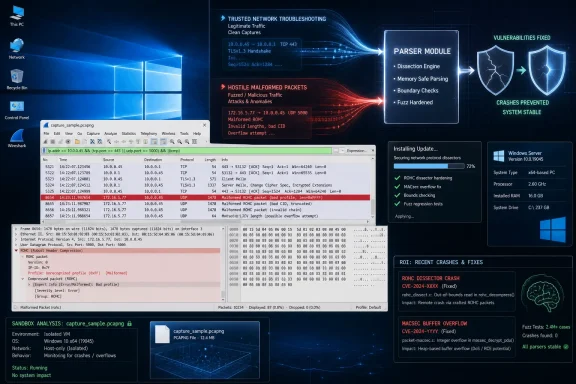
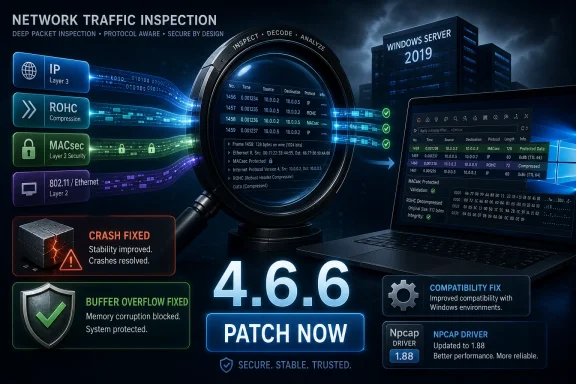
Wireshark 4.6.6, released May 19, 2026, fixes a ROHC protocol dissector crash in the 4.6 and 4.4 branches, corrects a MACsec global-buffer-overflow bug, and rolls in Windows stability fixes including Npcap 1.88 and repairs for Windows Server 2019-era compatibility. That makes this less a flashy feature release than a cleanup build with real operational weight. For anyone who opens packet captures from customers, vendors, field engineers, malware sandboxes, or hostile networks, the lesson is familiar: the tool used to inspect danger is also part of the attack surface.
The Wireshark Foundation’s latest point release is a reminder that packet analyzers occupy an awkward place in security infrastructure. They are trusted because they look passive, but they are also enormous parsers of adversary-controlled input. Wireshark does not merely display packets; it interprets layer after layer of protocols, file formats, metadata, compression schemes, and edge cases that many production applications never touch.
The main security item in Wireshark 4.6.6 is wnpa-sec-2026-51, a ROHC protocol dissector crash tracked as Issue 21243. ROHC, or Robust Header Compression, is used to compress IP and transport headers in bandwidth-sensitive environments, especially where wireless or constrained links make header overhead expensive. In Wireshark, the ROHC dissector’s job is to decode those compressed headers so an analyst can see what the traffic means.
The vulnerability is not described as remote code execution, and Wireshark’s advisory says the project is unaware of active exploitation. But that should not cause administrators to file it under “harmless crash.” A packet analyzer that falls over when it sees a malformed packet can still become a denial-of-analysis tool, especially in incident response, telecom troubleshooting, lab validation, and security monitoring workflows.
The exploit path is also exactly the one defenders should care about. A malformed packet may be injected into live traffic, or a user may be persuaded to open a crafted packet trace file. That second scenario is particularly mundane: support teams exchange
This is the paradox of Wireshark’s usefulness. The more valuable it is to analysts, the more likely it is to be fed strange traffic from strange places. A web browser is expected to defend itself against hostile input; a packet analyzer deserves the same mental model.
Fuzzing is especially effective against software like Wireshark because protocol analyzers must accept ambiguity. They cannot simply reject every odd packet without becoming useless; analysts often need to inspect corrupted, partial, proprietary, or deliberately evasive traffic. That tolerance creates a wide input surface where a length field, state assumption, signedness conversion, or decompression edge case can become a crash.
The release notes also list two fuzz-job issues from May 2026, separate from the ROHC advisory, along with the MACsec global-buffer-overflow fix. These are not glamorous bugs, but they are the sort of defects that determine whether Wireshark remains trustworthy under hostile conditions. The ideal analyzer does not just decode well-formed traffic beautifully; it fails safely when the traffic is ugly.
For defenders, the significance is less about one protocol than about a pattern. Wireshark’s maintainers are still finding parser faults through systematic fuzzing, and they are shipping fixes quickly. That is healthy engineering, but it also tells enterprise users not to treat packet-analysis workstations as exempt from patch discipline.
This is where the “niche protocol” argument breaks down. Wireshark’s strength is precisely that it understands a sprawling catalog of protocols, including the ones only a subset of administrators use. A bug in an obscure dissector may be irrelevant to one organization and highly relevant to another, depending on whether that traffic appears in their captures.
The danger is not that every Wireshark user is suddenly exposed to MACsec traffic. The danger is that teams often do not know in advance what protocol structures a trace will contain. A capture collected from a trunk, a mirrored port, a lab device, or a provider edge can include traffic that the analyst did not expect to parse.
That is why dissector vulnerabilities deserve attention even when they are not wrapped in dramatic exploit language. They live at the boundary between “we are merely looking at data” and “we are running complex native code against untrusted input.” Wireshark’s user interface may feel like an observation deck, but underneath it is a large decoding engine.
The fix is important because Wireshark is often installed on administrator workstations, jump boxes, diagnostic laptops, and server-adjacent systems that do not follow consumer Windows cadence. A regression that breaks launch behavior on older supported or long-lived Windows builds can create friction at exactly the moment someone needs a packet capture to solve a production problem.
Wireshark 4.6.6 also addresses a Windows installer problem in which upgrades did not retain existing optional features unless users explicitly requested them. That kind of issue is easy to underestimate until it hits managed deployments. Optional components are often baked into deployment assumptions, documentation, and help-desk procedures; silently losing them during an upgrade can produce confusing breakage that looks like user error.
The release additionally fixes a packaging problem that made
Npcap also moves from 1.87 to 1.88 in the Windows installers. Npcap is the capture driver layer many Windows users depend on for live packet capture, so even a minor bundled update matters to deployment teams. The driver is often the most sensitive part of the installation because it interacts with the network stack below the comfort layer of ordinary application updates.
Many organizations do not deploy every Wireshark release immediately. They package versions into endpoint management systems, test against standard images, validate capture-driver behavior, and then roll out to analysts. The problem is that waiting too long leaves known parser bugs exposed, while moving too quickly can pick up regressions like the 4.6.5 Windows compatibility problem.
That tension is especially sharp for tools used by security and network teams. Wireshark is not always treated like production software because it is often run by power users rather than delivered as part of a centralized service. Yet those users may have elevated access, sensitive captures, and contact with untrusted evidence. In that context, a dissector crash is not merely an inconvenience.
The lesson is not “never update quickly.” It is that Wireshark deserves a real update channel, not ad hoc downloads from whichever analyst happens to need it first. Enterprises should know which version is installed, whether Npcap is bundled or managed separately, and how packet captures from outside the organization are handled.
A crafted capture file can be safer than a live malicious packet only in the sense that the user has to open it. In real workflows, that is a low bar. Packet traces travel through ticketing systems, email, cloud drives, customer portals, and incident-response channels, and they are often opened under time pressure by people trying to solve an outage or breach.
This is also why “only a crash” can have consequences. If a malformed trace repeatedly crashes Wireshark, it can slow analysis, obscure evidence, interrupt monitoring, or force an investigator to switch tools midstream. In a security incident, denial of visibility is not a harmless outcome.
A sensible posture is to separate capture ingestion from everyday work. High-risk traces can be opened in disposable virtual machines, sandboxed analysis systems, or non-privileged environments. That may sound heavy-handed for routine troubleshooting, but it is increasingly appropriate for packet captures supplied by unknown third parties or pulled from compromised systems.
A crash in a browser tab is irritating. A crash in the tool being used to decode suspicious traffic can break an investigative chain. If the same malformed packet also exists in live traffic, it can interrupt repeated analysis attempts until the traffic is filtered, sanitized, or opened with a patched build.
Wireshark’s advisory language is appropriately restrained. The project does not claim observed exploitation, and the known impact is a dissector crash. Still, restraint from the vendor should not translate into complacency from operators. The right response is not panic; it is timely patching and better handling of untrusted captures.
There is also a broader software-engineering point here. Wireshark is written for performance, breadth, and deep protocol visibility, and it includes native code that must parse hostile inputs at speed. Memory-safety bugs and parser assumptions are exactly the class of problem fuzzing is designed to expose. The fact that fuzzing is producing fixes is good news, but it is not a reason to delay installing them.
Organizations that deploy Wireshark should decide whether Npcap is updated with Wireshark or managed independently. Bundled installers are convenient, but they can obscure driver version drift across a fleet. Conversely, separately managing Npcap gives administrators more control but adds another package to test and document.
The optional-feature retention fix in 4.6.6 also deserves attention from deployment teams. If an earlier upgrade removed components unexpectedly, simply installing 4.6.6 may not restore every local expectation unless the package configuration is reviewed. Silent deployment scripts should be checked rather than assumed.
For smaller shops and individual power users, the advice is simpler. If you are on Wireshark 4.6.0 through 4.6.5, the security advisory says to move to 4.6.6 or later. If you are tracking the 4.4 branch, the corresponding fixed version is 4.4.16. If you handle untrusted packet captures, do not wait for a convenient maintenance window measured in months.
Every mature IT environment has tools that are allowed to inspect dangerous material because they are considered defensive. Debuggers open crash dumps. Forensic tools parse disk images. EDR consoles ingest telemetry. Wireshark opens packet traces. Each one becomes a privileged interpreter of hostile data.
Attackers understand this, and so do fuzzers. The same complexity that lets Wireshark decode obscure traffic gives malformed traffic room to exercise code paths rarely touched by ordinary users. The more protocols an analyzer understands, the more places there are for length fields, state machines, and buffer assumptions to go wrong.
The answer is not to distrust Wireshark. It remains one of the most important tools in networking and security. The answer is to stop pretending passive analysis is risk-free. In 2026, the act of looking at evidence can still involve executing complex parsing logic against attacker-controlled input.
The Wireshark Foundation’s latest point release is a reminder that packet analyzers occupy an awkward place in security infrastructure. They are trusted because they look passive, but they are also enormous parsers of adversary-controlled input. Wireshark does not merely display packets; it interprets layer after layer of protocols, file formats, metadata, compression schemes, and edge cases that many production applications never touch.
 The Analyzer Is Not Outside the Blast Radius
The main security item in Wireshark 4.6.6 is wnpa-sec-2026-51, a ROHC protocol dissector crash tracked as Issue 21243. ROHC, or Robust Header Compression, is used to compress IP and transport headers in bandwidth-sensitive environments, especially where wireless or constrained links make header overhead expensive. In Wireshark, the ROHC dissector’s job is to decode those compressed headers so an analyst can see what the traffic means.The vulnerability is not described as remote code execution, and Wireshark’s advisory says the project is unaware of active exploitation. But that should not cause administrators to file it under “harmless crash.” A packet analyzer that falls over when it sees a malformed packet can still become a denial-of-analysis tool, especially in incident response, telecom troubleshooting, lab validation, and security monitoring workflows.
The exploit path is also exactly the one defenders should care about. A malformed packet may be injected into live traffic, or a user may be persuaded to open a crafted packet trace file. That second scenario is particularly mundane: support teams exchange
.pcap files constantly, vendors ask for captures, customers upload samples, and analysts pull traces from unfamiliar systems. The workflow itself creates the exposure.This is the paradox of Wireshark’s usefulness. The more valuable it is to analysts, the more likely it is to be fed strange traffic from strange places. A web browser is expected to defend itself against hostile input; a packet analyzer deserves the same mental model.
Fuzzing Keeps Finding the Places Protocol Logic Gets Weird
The ROHC crash was found during fuzzing, and several of the other fixes in 4.6.6 also carry the fingerprints of automated malformed-input testing. That matters because Wireshark is not a single parser. It is a large ecosystem of dissectors, file readers, capture helpers, display logic, and platform integration code, much of it built around the messy reality of protocols as they exist on networks rather than as they appear in standards documents.Fuzzing is especially effective against software like Wireshark because protocol analyzers must accept ambiguity. They cannot simply reject every odd packet without becoming useless; analysts often need to inspect corrupted, partial, proprietary, or deliberately evasive traffic. That tolerance creates a wide input surface where a length field, state assumption, signedness conversion, or decompression edge case can become a crash.
The release notes also list two fuzz-job issues from May 2026, separate from the ROHC advisory, along with the MACsec global-buffer-overflow fix. These are not glamorous bugs, but they are the sort of defects that determine whether Wireshark remains trustworthy under hostile conditions. The ideal analyzer does not just decode well-formed traffic beautifully; it fails safely when the traffic is ugly.
For defenders, the significance is less about one protocol than about a pattern. Wireshark’s maintainers are still finding parser faults through systematic fuzzing, and they are shipping fixes quickly. That is healthy engineering, but it also tells enterprise users not to treat packet-analysis workstations as exempt from patch discipline.
MACsec Turns a Niche Parser Bug Into a Broader Warning
The MACsec issue in Wireshark 4.6.6 is listed as a global-buffer-overflow in the MACsec dissector, tracked as Issue 21235. MACsec, formally IEEE 802.1AE, protects Ethernet links at Layer 2 and is widely relevant in environments that care about switch-to-switch, host-to-switch, or data-center link security. Even if many desktop users never inspect MACsec traffic, infrastructure teams and network security engineers may.This is where the “niche protocol” argument breaks down. Wireshark’s strength is precisely that it understands a sprawling catalog of protocols, including the ones only a subset of administrators use. A bug in an obscure dissector may be irrelevant to one organization and highly relevant to another, depending on whether that traffic appears in their captures.
The danger is not that every Wireshark user is suddenly exposed to MACsec traffic. The danger is that teams often do not know in advance what protocol structures a trace will contain. A capture collected from a trunk, a mirrored port, a lab device, or a provider edge can include traffic that the analyst did not expect to parse.
That is why dissector vulnerabilities deserve attention even when they are not wrapped in dramatic exploit language. They live at the boundary between “we are merely looking at data” and “we are running complex native code against untrusted input.” Wireshark’s user interface may feel like an observation deck, but underneath it is a large decoding engine.
Windows Users Get More Than a Security Patch
For WindowsForum readers, the most immediately visible part of Wireshark 4.6.6 may not be ROHC at all. The update fixes a regression that prevented Wireshark 4.6.5 from running properly on Windows 10 version 1809, Windows Server 2019, and some LTSC installations. That is not an edge case in the enterprise world; Server 2019 remains common in conservative environments, and LTSC builds exist precisely where change is tightly controlled.The fix is important because Wireshark is often installed on administrator workstations, jump boxes, diagnostic laptops, and server-adjacent systems that do not follow consumer Windows cadence. A regression that breaks launch behavior on older supported or long-lived Windows builds can create friction at exactly the moment someone needs a packet capture to solve a production problem.
Wireshark 4.6.6 also addresses a Windows installer problem in which upgrades did not retain existing optional features unless users explicitly requested them. That kind of issue is easy to underestimate until it hits managed deployments. Optional components are often baked into deployment assumptions, documentation, and help-desk procedures; silently losing them during an upgrade can produce confusing breakage that looks like user error.
The release additionally fixes a packaging problem that made
Wireshark.exe in version 4.6.5 nearly twice the size of the 4.6.4 executable. Disk space is not the story here. The story is build hygiene, update confidence, and the way anomalous binaries trigger questions from software inventory tools, endpoint controls, and administrators who compare versions before broad rollout.Npcap also moves from 1.87 to 1.88 in the Windows installers. Npcap is the capture driver layer many Windows users depend on for live packet capture, so even a minor bundled update matters to deployment teams. The driver is often the most sensitive part of the installation because it interacts with the network stack below the comfort layer of ordinary application updates.
The 4.6 Branch Is Still Settling Into Enterprise Life
Wireshark 4.6.6 arrives in a branch that has already seen a steady rhythm of maintenance. The 4.6 line introduced new protocol support and platform changes, but point releases have carried the usual mixture of security advisories, parser fixes, UI corrections, packaging updates, and compatibility repairs. That is normal for a mature open-source application with a large input surface, but it complicates enterprise timing.Many organizations do not deploy every Wireshark release immediately. They package versions into endpoint management systems, test against standard images, validate capture-driver behavior, and then roll out to analysts. The problem is that waiting too long leaves known parser bugs exposed, while moving too quickly can pick up regressions like the 4.6.5 Windows compatibility problem.
That tension is especially sharp for tools used by security and network teams. Wireshark is not always treated like production software because it is often run by power users rather than delivered as part of a centralized service. Yet those users may have elevated access, sensitive captures, and contact with untrusted evidence. In that context, a dissector crash is not merely an inconvenience.
The lesson is not “never update quickly.” It is that Wireshark deserves a real update channel, not ad hoc downloads from whichever analyst happens to need it first. Enterprises should know which version is installed, whether Npcap is bundled or managed separately, and how packet captures from outside the organization are handled.
The Pcap File Is an Attachment With Teeth
The most practical security takeaway from this release is that.pcap and related capture files should be treated as untrusted documents. That sounds obvious in theory, but operational culture often treats packet traces as neutral evidence. Analysts drag them into Wireshark because that is what Wireshark is for.A crafted capture file can be safer than a live malicious packet only in the sense that the user has to open it. In real workflows, that is a low bar. Packet traces travel through ticketing systems, email, cloud drives, customer portals, and incident-response channels, and they are often opened under time pressure by people trying to solve an outage or breach.
This is also why “only a crash” can have consequences. If a malformed trace repeatedly crashes Wireshark, it can slow analysis, obscure evidence, interrupt monitoring, or force an investigator to switch tools midstream. In a security incident, denial of visibility is not a harmless outcome.
A sensible posture is to separate capture ingestion from everyday work. High-risk traces can be opened in disposable virtual machines, sandboxed analysis systems, or non-privileged environments. That may sound heavy-handed for routine troubleshooting, but it is increasingly appropriate for packet captures supplied by unknown third parties or pulled from compromised systems.
Dissector Crashes Are Reliability Bugs With Security Consequences
Security teams tend to rank vulnerabilities by exploitability, and that is understandable. Remote code execution commands attention; application crashes often sink into the backlog. But protocol analyzer crashes live in a gray area because the affected application is used to understand security events, network failures, and adversarial behavior.A crash in a browser tab is irritating. A crash in the tool being used to decode suspicious traffic can break an investigative chain. If the same malformed packet also exists in live traffic, it can interrupt repeated analysis attempts until the traffic is filtered, sanitized, or opened with a patched build.
Wireshark’s advisory language is appropriately restrained. The project does not claim observed exploitation, and the known impact is a dissector crash. Still, restraint from the vendor should not translate into complacency from operators. The right response is not panic; it is timely patching and better handling of untrusted captures.
There is also a broader software-engineering point here. Wireshark is written for performance, breadth, and deep protocol visibility, and it includes native code that must parse hostile inputs at speed. Memory-safety bugs and parser assumptions are exactly the class of problem fuzzing is designed to expose. The fact that fuzzing is producing fixes is good news, but it is not a reason to delay installing them.
Administrators Should Patch the Toolchain, Not Just the Tool
Updating Wireshark is only part of the operational story. On Windows, packet capture depends on driver installation, service behavior, privileges, and sometimes reboot planning. A Wireshark upgrade that touches Npcap can have effects outside the application window, particularly in managed desktops and server environments where capture capability is carefully controlled.Organizations that deploy Wireshark should decide whether Npcap is updated with Wireshark or managed independently. Bundled installers are convenient, but they can obscure driver version drift across a fleet. Conversely, separately managing Npcap gives administrators more control but adds another package to test and document.
The optional-feature retention fix in 4.6.6 also deserves attention from deployment teams. If an earlier upgrade removed components unexpectedly, simply installing 4.6.6 may not restore every local expectation unless the package configuration is reviewed. Silent deployment scripts should be checked rather than assumed.
For smaller shops and individual power users, the advice is simpler. If you are on Wireshark 4.6.0 through 4.6.5, the security advisory says to move to 4.6.6 or later. If you are tracking the 4.4 branch, the corresponding fixed version is 4.4.16. If you handle untrusted packet captures, do not wait for a convenient maintenance window measured in months.
The Real Story Is Trust Boundaries, Not ROHC Alone
It is tempting to frame Wireshark 4.6.6 as a ROHC fix with a few Windows repairs attached. That is accurate, but incomplete. The release is really about the expanding trust boundary around diagnostic software.Every mature IT environment has tools that are allowed to inspect dangerous material because they are considered defensive. Debuggers open crash dumps. Forensic tools parse disk images. EDR consoles ingest telemetry. Wireshark opens packet traces. Each one becomes a privileged interpreter of hostile data.
Attackers understand this, and so do fuzzers. The same complexity that lets Wireshark decode obscure traffic gives malformed traffic room to exercise code paths rarely touched by ordinary users. The more protocols an analyzer understands, the more places there are for length fields, state machines, and buffer assumptions to go wrong.
The answer is not to distrust Wireshark. It remains one of the most important tools in networking and security. The answer is to stop pretending passive analysis is risk-free. In 2026, the act of looking at evidence can still involve executing complex parsing logic against attacker-controlled input.
The Patch Notes Tell Windows Shops Exactly Where to Look
This release gives administrators a compact checklist of concrete actions, and most of them are more practical than dramatic. The security fix matters, but so do the Windows launch regression, installer behavior, executable-size anomaly, and bundled Npcap version. Together, they make 4.6.6 the sort of point release that should move through enterprise packaging queues quickly rather than linger as an optional analyst upgrade.- Organizations running Wireshark 4.6.0 through 4.6.5 should prioritize an upgrade to 4.6.6 or newer because the ROHC dissector crash affects that range.
- Teams that remain on the 4.4 branch should move to 4.4.16 or newer rather than assuming the long-term branch is unaffected.
- Administrators supporting Windows 10 version 1809, Windows Server 2019, or LTSC systems should treat 4.6.6 as a compatibility repair for the 4.6.5 regression.
- Deployment owners should review Wireshark installer options because an earlier upgrade bug could remove optional features unless they were explicitly retained.
- Analysts who receive packet captures from outside their organization should open suspicious traces in patched, isolated, and preferably non-privileged environments.
- Windows packaging teams should note that the bundled Npcap version changes to 1.88 and test capture-driver behavior before broad deployment.
References
- Primary source: secnews.gr
Published: 2026-05-25T14:40:07.698280
Wireshark 4.6.6: Fixes for ROHC and Memory Overflow Vulnerabilities
Wireshark 4.6.6 fixes critical vulnerabilities in the ROHC parser and memory overflow, improving security and stability.www.secnews.gr - Related coverage: wireshark.org
Wireshark • Go Deep | Wireshark • wnpa-sec-2026-51 ROHC protocol dissector crash
The website for Wireshark, the world's leading network protocol analyzer. Wireshark lets you dive deep into your network traffic - free and open source.www.wireshark.org
- Related coverage: thecyberexpress.com
Wireshark 4.6.6 Resolves ROHC Parser and Buffer Overflow Vulnerabilities
The Wireshark Foundation has released Wireshark 4.6.6, delivering an important round of security and stability updates that address a seriousthecyberexpress.com - Related coverage: cryptika.com
- Related coverage: linuxiac.com
Wireshark 4.6.6 Packet Analyzer Released with ROHC Security Fix
Wireshark 4.6.6 network protocol analyzer fixes a ROHC dissector crash, updates Npcap to 1.88, and resolves several Windows and protocol-related bugs.linuxiac.com - Related coverage: softexia.com
Wireshark 4.6.6 / 4.4.16 | Free Download
Wireshark - world's foremost network protocol analyzer that lets capture and interactively browse the traffic running on a computer networkwww.softexia.com

- Related coverage: sharkfest.wireshark.org
- Related coverage: ftp.yz.yamagata-u.ac.jp
- Related coverage: community.rti.com
- Related coverage: wireshark.zing.org
- Related coverage: 1.as.dl.wireshark.org