

A GigWise post published in May 2026 argues that administrators can change the Security Identifier on cloned Windows Server 2019 and 2022 systems with a third-party utility called Wittytool Disk Clone instead of reinstalling or running Sysprep after deployment. The claim lands at a moment when old Windows deployment folklore is colliding with newer authentication hardening, and that makes it worth treating carefully rather than dismissing as yet another cloning-tool advertorial. The useful lesson is not that every admin should rush to rewrite SIDs on live servers. It is that casual server cloning has become harder to defend, while Microsoft’s officially supported repair path remains painfully blunt.
For more than a decade, the Windows world lived with a strange compromise around machine SIDs. Microsoft documentation said administrators should use Sysprep before duplicating Windows installations, while many practitioners absorbed Mark Russinovich’s famous 2009 argument that duplicate machine SIDs were widely misunderstood and often harmless in domain environments. Both things could be true, which is precisely why the issue became one of those infrastructure debates that never quite died.
The GigWise piece reopens that argument through a familiar small-business scenario: a consultant clones one carefully prepared Windows Server 2022 installation into multiple branch-office servers, then discovers that the cloned machines are not as interchangeable as the virtualization platform made them look. The story is written as a practical rescue narrative, but the subtext is more important than the advertised fix. Windows servers are not just disks with names attached; they are security principals, activation clients, management agents, service hosts, and domain participants.
Microsoft’s current line remains conservative. If you duplicate or image Windows, the supported method is to generalize the installation with Sysprep before capture, not to clone a fully configured production server and clean up identity afterward. That position is not merely bureaucratic. Sysprep removes or regenerates machine-specific state, including the computer SID, and prepares Windows Setup to specialize the image on next boot.
The problem is that real administrators often meet this rule after the mistake has already happened. A VM template was copied too late. A branch server was duplicated because the deadline was real and the maintenance window was short. A one-off “temporary” clone became production. At that point, the official answer can feel less like guidance and more like a bill for rebuilding the environment.
That distinction matters because Sysprep is often discussed as if it were simply “the thing that changes the SID.” It is more than that. It is an image-generalization process that strips system-specific information and moves Windows back toward a deployment-ready state. On a reference image, that is exactly what you want. On a configured server running SQL Server, file services, management agents, scheduled tasks, certificates, and domain-bound security settings, it can be a very different experience.
GigWise’s author says Sysprep removed the domain join, disrupted activation, and left installed roles and SQL Server in a broken state. That account is plausible as a field report, even if the exact failure modes will vary by workload and configuration. The broader point is not that Sysprep is unreliable. The point is that Sysprep is designed to be used at a specific phase in the lifecycle, and using it after the server has become unique can be operationally expensive.
That is why third-party SID changers continue to have a market despite Microsoft’s position. They promise the one thing administrators want in the panic phase: change the identity value without unwinding the machine. Whether that promise is wise, supportable, or safe across workloads is the real question.
That is the sort of claim that will make overworked admins pay attention. It is also exactly the sort of claim that should make them slow down. Rewriting a machine SID and chasing dependent references across registry and file-system permissions is deep surgery. The fact that it works in one consultant’s four-server experience does not make it a universal recovery method for every workload, every domain policy, every security product, and every Microsoft support case.
There is a practical distinction between “this worked” and “this is supported.” Microsoft’s documentation still treats Sysprep as the supported route for duplicated Windows installations. If a third-party SID changer repairs a broken environment, that may be a rational business decision in a time crunch. It does not magically turn the resulting server into a deployment pattern Microsoft will bless.
That distinction is especially important for regulated environments, heavily audited domains, and enterprises with support contracts. A small branch-office file server may be a reasonable candidate for a carefully backed-up emergency fix. A domain controller, certificate authority, SQL cluster node, or server hosting line-of-business authentication dependencies is a different matter.
But “not automatically catastrophic” is not the same as “always irrelevant.” Windows systems carry many identifiers beyond the local machine SID, and modern enterprise management stacks care deeply about uniqueness. WSUS, MECM, security agents, backup tools, EDR products, licensing systems, and monitoring platforms all maintain their own sense of endpoint identity. A cloned system that preserves too much state can confuse those systems even when the machine SID itself is not the sole culprit.
The GigWise article lists symptoms such as WSUS clients reporting as the same machine, Group Policy weirdness, domain join trouble, and licensing issues. Some of these may stem from duplicate SIDs in certain circumstances, while others can also come from duplicated machine names, cloned WSUS client IDs, duplicated certificates, stale domain trust state, or application-specific identifiers. In the real world, admins often experience the problem as a blob of “clone identity breakage,” then use SID as shorthand.
That shorthand is dangerous because it can lead to the wrong fix. If two cloned servers share a WSUS SusClientId, changing the machine SID alone may not solve the reporting collision. If a security agent was cloned with its enrollment token intact, it may need re-registration. If a domain join was cloned instead of performed cleanly, the computer account password and trust relationship may be the real failure point.
Still, the renewed attention to SIDs is not baseless. Recent Microsoft support material has described authentication failures involving duplicate SIDs created by unsupported cloning, particularly as Windows hardening changes land in newer systems and updates. That does not erase Russinovich’s old point; it narrows its comfort zone. The industry has moved from “duplicate machine SIDs are usually misunderstood” to “unsupported cloning can now trip more visible security enforcement.”
A reference image should be boring. It should contain the operating system, patches, baseline configuration, maybe common agents, and as little environment-specific identity as possible. It should not already be a domain-joined branch server with roles installed, SQL configured, application state present, and production assumptions baked into the registry. Once those things exist, the machine is no longer a template. It is an individual.
Virtualization makes that line easy to blur. Hypervisors allow administrators to copy, export, import, checkpoint, revert, and clone machines with a few clicks. Storage platforms make block-level duplication feel like a normal deployment primitive. But Windows identity is not only stored in the disk layout. It is distributed across the registry, services, local security database, certificates, domain relationships, application configuration, management agents, and sometimes external systems that have already met the machine.
This is where the “six-minute fix” can become seductive. If a tool can patch enough of that identity to avoid a rebuild, it is tempting to treat post-clone SID changing as a normal workflow. GigWise even notes that Wittytool can reportedly generate a new SID during the clone operation, which is better than trying to remediate after first boot. But the cleanest workflow remains the least dramatic one: prepare images properly before duplication, then let each deployed system specialize itself before it becomes production.
A good clone process should assume uniqueness from the start. That includes the computer SID where required, but it also includes hostnames, domain joins, Windows activation, update client IDs, management enrollment, certificates, monitoring agents, and application-level identifiers. If your cloning process only asks “did the SID change?” it is too narrow.
Active Directory has its own object SIDs, domain SID, replication metadata, invocation IDs, USNs, database state, service principal names, certificates, DNS records, SYSVOL contents, and assumptions about who is allowed to authenticate whom. Treating a domain controller as a cloneable appliance is how small mistakes become directory-wide incidents. Even if a SID-changing tool behaves perfectly at the local Windows layer, that does not mean it understands the full state of a domain controller.
The safer rule is simple: do not use third-party SID surgery as a casual repair technique on domain controllers. If a DC was cloned improperly, the remediation path should be planned around Active Directory health, replication integrity, backups, FSMO roles, and clean promotion or demotion. The machine SID is only one identifier in a much larger trust fabric.
The same caution extends to servers that function as identity anchors even when they are not DCs. Certificate authorities, ADFS servers, RADIUS servers, privileged access workstations, jump hosts, and systems running security tooling are all bad places to improvise. The cost of rebuilding them correctly may be lower than the cost of proving later that a clever repair did not create a hidden trust problem.
But supportability and operational reality do not always meet cleanly. If a small consultancy has three branch servers already deployed, users waiting, and a cloned identity problem blocking authentication, “rebuild them all properly” may be the clean answer and the impossible answer. That is where tools like Wittytool, SIDCHG, and older utilities enter the conversation—not as best practice, but as damage control.
The danger is that success stories tend to flatten risk. A tool that works on four servers becomes a blog post. A blog post becomes a vendor talking point. A vendor talking point becomes a habit. Six months later, an admin is changing SIDs on production workloads because “that article said it was fine.”
A more honest framing is this: third-party SID changers may be useful emergency tools for specific cloned systems after backups and testing, but they should not replace a proper image pipeline. If the server is disposable, rebuild it cleanly. If the server is important, test the repair on a clone of the clone. If the server is an identity system, stop and design a recovery plan instead of clicking the utility panel.
That environment rewards tools that promise continuity. A six-minute reboot beats a weekend reinstall. Preserving SQL Server and installed roles beats reconstructing a brittle vendor application from old notes. Avoiding a domain rejoin beats explaining to a client why a simple branch rollout turned into a service interruption.
But small environments are also where documentation debt hurts most. If a third-party SID change succeeds, the admin should record what changed, when it changed, which tool was used, which backups existed, and how the server was verified afterward. That may sound excessive for a three-server deployment, but it is precisely the kind of note that saves the next incident.
The test plan should also be broader than
If the server touches users, the real test is not identity purity. It is whether the system behaves as a unique, supportable, manageable Windows host after the repair.
The scenario is credible: cloned Windows servers can carry duplicate or stale identity state, Sysprep can be disruptive after configuration, and administrators want a less destructive remediation option. The conclusion is less settled: one third-party tool is not proven “best” because a contributor says it worked on four systems. WindowsForum readers should treat that as an anecdote, not a benchmark.
The more interesting claim is that the utility updates registry hives, ACL entries, and user profile references. If true, that is exactly the hard part and exactly where admins need confidence. Which references are changed? Which are intentionally left alone? How are domain SIDs distinguished from machine SIDs? How are service ACLs handled? What happens to encrypted files, certificates, scheduled task principals, local group memberships, and application-specific permissions?
Those are not academic questions. A blunt SID replacement can break access control in subtle ways, while an overly conservative one can leave duplicate identity state behind. Without transparent documentation and strong rollback options, administrators are trusting the tool’s interpretation of Windows internals.
The safest way to use such a tool is therefore not in production first. Snapshot the system. Clone it into an isolated test network. Run the SID change there. Validate the workloads. Review logs. Only then decide whether the production risk is acceptable. If that process sounds almost as much work as rebuilding, that is the point: unsupported identity surgery is still surgery.
Microsoft does not have to endorse every third-party SID changer to acknowledge the operational gap. The company could provide better diagnostics for duplicate identity state, clearer guidance on what identifiers matter for modern Windows authentication, and safer remediation playbooks for systems that were cloned incorrectly. “Rebuild using supported methods” may be correct, but it is not always sufficient incident-response guidance.
The recent hardening around authentication makes that gap more urgent. If future Windows updates increasingly reject or warn on duplicated machine identity, administrators need tools to discover exposure before users discover broken access. They need a way to inventory cloned systems, identify which identifiers collide, and understand whether the fix is Sysprep, rejoin, re-enrollment, agent reset, or rebuild.
The industry has spent years treating SID duplication as either a myth or a catastrophe. The reality is less satisfying: it depends on the workload, the Windows version, the update level, the domain posture, and the surrounding management stack. That is exactly the kind of nuance administrators need from first-party tools, not just forum lore and vendor blog posts.
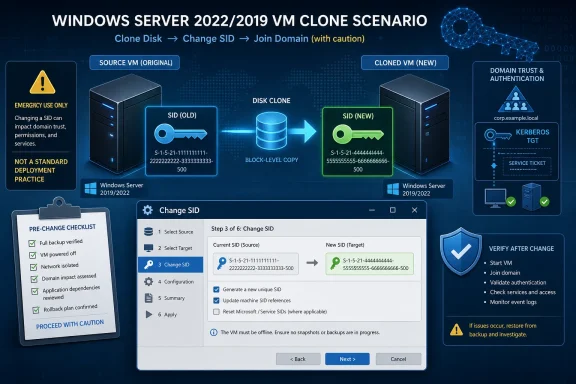 The Old SID Argument Has Become New Again
For more than a decade, the Windows world lived with a strange compromise around machine SIDs. Microsoft documentation said administrators should use Sysprep before duplicating Windows installations, while many practitioners absorbed Mark Russinovich’s famous 2009 argument that duplicate machine SIDs were widely misunderstood and often harmless in domain environments. Both things could be true, which is precisely why the issue became one of those infrastructure debates that never quite died.The GigWise piece reopens that argument through a familiar small-business scenario: a consultant clones one carefully prepared Windows Server 2022 installation into multiple branch-office servers, then discovers that the cloned machines are not as interchangeable as the virtualization platform made them look. The story is written as a practical rescue narrative, but the subtext is more important than the advertised fix. Windows servers are not just disks with names attached; they are security principals, activation clients, management agents, service hosts, and domain participants.
Microsoft’s current line remains conservative. If you duplicate or image Windows, the supported method is to generalize the installation with Sysprep before capture, not to clone a fully configured production server and clean up identity afterward. That position is not merely bureaucratic. Sysprep removes or regenerates machine-specific state, including the computer SID, and prepares Windows Setup to specialize the image on next boot.
The problem is that real administrators often meet this rule after the mistake has already happened. A VM template was copied too late. A branch server was duplicated because the deadline was real and the maintenance window was short. A one-off “temporary” clone became production. At that point, the official answer can feel less like guidance and more like a bill for rebuilding the environment.
Sysprep Is a Deployment Tool, Not a Time Machine
The strongest part of the GigWise story is its description of Sysprep used at the wrong moment. Runningsysprep /generalize after a server has joined a domain, taken roles, installed applications, and accumulated service dependencies is not the same as running it against a clean reference image. It can reset more than the administrator intended.That distinction matters because Sysprep is often discussed as if it were simply “the thing that changes the SID.” It is more than that. It is an image-generalization process that strips system-specific information and moves Windows back toward a deployment-ready state. On a reference image, that is exactly what you want. On a configured server running SQL Server, file services, management agents, scheduled tasks, certificates, and domain-bound security settings, it can be a very different experience.
GigWise’s author says Sysprep removed the domain join, disrupted activation, and left installed roles and SQL Server in a broken state. That account is plausible as a field report, even if the exact failure modes will vary by workload and configuration. The broader point is not that Sysprep is unreliable. The point is that Sysprep is designed to be used at a specific phase in the lifecycle, and using it after the server has become unique can be operationally expensive.
That is why third-party SID changers continue to have a market despite Microsoft’s position. They promise the one thing administrators want in the panic phase: change the identity value without unwinding the machine. Whether that promise is wise, supportable, or safe across workloads is the real question.
The Wittytool Claim Is Useful, but It Is Not the Same as Microsoft Support
The GigWise post centers on Wittytool Disk Clone, which the author says includes a “Change SID” function under its utilities panel. According to the account, the tool generated a new machine SID, updated registry hives, adjusted ACL references and user profile references, rebooted, and left the server’s domain trust, SQL Server installation, and roles intact. The reported downtime was about six minutes.That is the sort of claim that will make overworked admins pay attention. It is also exactly the sort of claim that should make them slow down. Rewriting a machine SID and chasing dependent references across registry and file-system permissions is deep surgery. The fact that it works in one consultant’s four-server experience does not make it a universal recovery method for every workload, every domain policy, every security product, and every Microsoft support case.
There is a practical distinction between “this worked” and “this is supported.” Microsoft’s documentation still treats Sysprep as the supported route for duplicated Windows installations. If a third-party SID changer repairs a broken environment, that may be a rational business decision in a time crunch. It does not magically turn the resulting server into a deployment pattern Microsoft will bless.
That distinction is especially important for regulated environments, heavily audited domains, and enterprises with support contracts. A small branch-office file server may be a reasonable candidate for a carefully backed-up emergency fix. A domain controller, certificate authority, SQL cluster node, or server hosting line-of-business authentication dependencies is a different matter.
Duplicate SIDs Were Once Mostly a Local Problem, but the Edges Are Moving
The older argument against SID panic rested on a key technical fact: a machine SID is most important for local accounts and local security, while domain identities are governed by Active Directory SIDs created when accounts and computer objects join the domain. That is why duplicate local machine SIDs historically did not automatically cause the domain-wide chaos that some administrators feared.But “not automatically catastrophic” is not the same as “always irrelevant.” Windows systems carry many identifiers beyond the local machine SID, and modern enterprise management stacks care deeply about uniqueness. WSUS, MECM, security agents, backup tools, EDR products, licensing systems, and monitoring platforms all maintain their own sense of endpoint identity. A cloned system that preserves too much state can confuse those systems even when the machine SID itself is not the sole culprit.
The GigWise article lists symptoms such as WSUS clients reporting as the same machine, Group Policy weirdness, domain join trouble, and licensing issues. Some of these may stem from duplicate SIDs in certain circumstances, while others can also come from duplicated machine names, cloned WSUS client IDs, duplicated certificates, stale domain trust state, or application-specific identifiers. In the real world, admins often experience the problem as a blob of “clone identity breakage,” then use SID as shorthand.
That shorthand is dangerous because it can lead to the wrong fix. If two cloned servers share a WSUS SusClientId, changing the machine SID alone may not solve the reporting collision. If a security agent was cloned with its enrollment token intact, it may need re-registration. If a domain join was cloned instead of performed cleanly, the computer account password and trust relationship may be the real failure point.
Still, the renewed attention to SIDs is not baseless. Recent Microsoft support material has described authentication failures involving duplicate SIDs created by unsupported cloning, particularly as Windows hardening changes land in newer systems and updates. That does not erase Russinovich’s old point; it narrows its comfort zone. The industry has moved from “duplicate machine SIDs are usually misunderstood” to “unsupported cloning can now trip more visible security enforcement.”
The Real Mistake Was Turning a Server Into a Template
The GigWise author’s most valuable admission is not that Sysprep went badly. It is that the server was cloned after it had already become a server. That is the original sin in most of these stories.A reference image should be boring. It should contain the operating system, patches, baseline configuration, maybe common agents, and as little environment-specific identity as possible. It should not already be a domain-joined branch server with roles installed, SQL configured, application state present, and production assumptions baked into the registry. Once those things exist, the machine is no longer a template. It is an individual.
Virtualization makes that line easy to blur. Hypervisors allow administrators to copy, export, import, checkpoint, revert, and clone machines with a few clicks. Storage platforms make block-level duplication feel like a normal deployment primitive. But Windows identity is not only stored in the disk layout. It is distributed across the registry, services, local security database, certificates, domain relationships, application configuration, management agents, and sometimes external systems that have already met the machine.
This is where the “six-minute fix” can become seductive. If a tool can patch enough of that identity to avoid a rebuild, it is tempting to treat post-clone SID changing as a normal workflow. GigWise even notes that Wittytool can reportedly generate a new SID during the clone operation, which is better than trying to remediate after first boot. But the cleanest workflow remains the least dramatic one: prepare images properly before duplication, then let each deployed system specialize itself before it becomes production.
A good clone process should assume uniqueness from the start. That includes the computer SID where required, but it also includes hostnames, domain joins, Windows activation, update client IDs, management enrollment, certificates, monitoring agents, and application-level identifiers. If your cloning process only asks “did the SID change?” it is too narrow.
Domain Controllers Remain the Bright Red Line
The GigWise post briefly cautions that domain controllers are a special case and suggests demoting before changing the SID and re-promoting afterward. That caveat deserves more emphasis than the article gives it. A domain controller is not just a Windows server with a role installed; it is a replica of the directory’s identity system.Active Directory has its own object SIDs, domain SID, replication metadata, invocation IDs, USNs, database state, service principal names, certificates, DNS records, SYSVOL contents, and assumptions about who is allowed to authenticate whom. Treating a domain controller as a cloneable appliance is how small mistakes become directory-wide incidents. Even if a SID-changing tool behaves perfectly at the local Windows layer, that does not mean it understands the full state of a domain controller.
The safer rule is simple: do not use third-party SID surgery as a casual repair technique on domain controllers. If a DC was cloned improperly, the remediation path should be planned around Active Directory health, replication integrity, backups, FSMO roles, and clean promotion or demotion. The machine SID is only one identifier in a much larger trust fabric.
The same caution extends to servers that function as identity anchors even when they are not DCs. Certificate authorities, ADFS servers, RADIUS servers, privileged access workstations, jump hosts, and systems running security tooling are all bad places to improvise. The cost of rebuilding them correctly may be lower than the cost of proving later that a clever repair did not create a hidden trust problem.
The Supported Path and the Practical Path Are Diverging
Microsoft’s supported path is clear enough: use Sysprep before capturing and deploying a duplicated Windows image. That is defensible guidance, and it is the advice enterprises should build into their standard operating procedures. It gives Microsoft a known state to support and gives administrators a repeatable deployment lifecycle.But supportability and operational reality do not always meet cleanly. If a small consultancy has three branch servers already deployed, users waiting, and a cloned identity problem blocking authentication, “rebuild them all properly” may be the clean answer and the impossible answer. That is where tools like Wittytool, SIDCHG, and older utilities enter the conversation—not as best practice, but as damage control.
The danger is that success stories tend to flatten risk. A tool that works on four servers becomes a blog post. A blog post becomes a vendor talking point. A vendor talking point becomes a habit. Six months later, an admin is changing SIDs on production workloads because “that article said it was fine.”
A more honest framing is this: third-party SID changers may be useful emergency tools for specific cloned systems after backups and testing, but they should not replace a proper image pipeline. If the server is disposable, rebuild it cleanly. If the server is important, test the repair on a clone of the clone. If the server is an identity system, stop and design a recovery plan instead of clicking the utility panel.
Small Shops Are Where Unsupported Fixes Become Infrastructure Policy
The GigWise story resonates because small IT shops live in the gap between enterprise ideals and budget reality. They do not always have golden-image pipelines, lab domains, privileged access workstations, automated validation, and maintenance windows with redundant capacity. They often have one consultant, one client deadline, and a virtualization host full of machines that look easier to copy than rebuild.That environment rewards tools that promise continuity. A six-minute reboot beats a weekend reinstall. Preserving SQL Server and installed roles beats reconstructing a brittle vendor application from old notes. Avoiding a domain rejoin beats explaining to a client why a simple branch rollout turned into a service interruption.
But small environments are also where documentation debt hurts most. If a third-party SID change succeeds, the admin should record what changed, when it changed, which tool was used, which backups existed, and how the server was verified afterward. That may sound excessive for a three-server deployment, but it is precisely the kind of note that saves the next incident.
The test plan should also be broader than
whoami /user. A changed SID prefix proves that something changed. It does not prove that the server is healthy. Administrators should verify domain trust, Kerberos authentication, SMB access, scheduled tasks, service accounts, SQL Server startup, application licensing, event logs, update reporting, backup registration, EDR enrollment, and remote management.If the server touches users, the real test is not identity purity. It is whether the system behaves as a unique, supportable, manageable Windows host after the repair.
The Vendor Story Needs More Skepticism Than the Admin Story
GigWise presents Wittytool Disk Clone as the hero of the incident, and the article’s phrasing often reads like promotional copy. That does not automatically make the experience false. It does mean readers should separate the technical scenario from the marketing conclusion.The scenario is credible: cloned Windows servers can carry duplicate or stale identity state, Sysprep can be disruptive after configuration, and administrators want a less destructive remediation option. The conclusion is less settled: one third-party tool is not proven “best” because a contributor says it worked on four systems. WindowsForum readers should treat that as an anecdote, not a benchmark.
The more interesting claim is that the utility updates registry hives, ACL entries, and user profile references. If true, that is exactly the hard part and exactly where admins need confidence. Which references are changed? Which are intentionally left alone? How are domain SIDs distinguished from machine SIDs? How are service ACLs handled? What happens to encrypted files, certificates, scheduled task principals, local group memberships, and application-specific permissions?
Those are not academic questions. A blunt SID replacement can break access control in subtle ways, while an overly conservative one can leave duplicate identity state behind. Without transparent documentation and strong rollback options, administrators are trusting the tool’s interpretation of Windows internals.
The safest way to use such a tool is therefore not in production first. Snapshot the system. Clone it into an isolated test network. Run the SID change there. Validate the workloads. Review logs. Only then decide whether the production risk is acceptable. If that process sounds almost as much work as rebuilding, that is the point: unsupported identity surgery is still surgery.
The Lesson Microsoft Should Hear
There is also a vendor lesson here for Microsoft. If administrators keep reaching for unsupported SID-changing utilities, it is partly because the supported tooling does not cover the messy middle. Sysprep is excellent before imaging. It is a poor comfort after a production clone has gone wrong.Microsoft does not have to endorse every third-party SID changer to acknowledge the operational gap. The company could provide better diagnostics for duplicate identity state, clearer guidance on what identifiers matter for modern Windows authentication, and safer remediation playbooks for systems that were cloned incorrectly. “Rebuild using supported methods” may be correct, but it is not always sufficient incident-response guidance.
The recent hardening around authentication makes that gap more urgent. If future Windows updates increasingly reject or warn on duplicated machine identity, administrators need tools to discover exposure before users discover broken access. They need a way to inventory cloned systems, identify which identifiers collide, and understand whether the fix is Sysprep, rejoin, re-enrollment, agent reset, or rebuild.
The industry has spent years treating SID duplication as either a myth or a catastrophe. The reality is less satisfying: it depends on the workload, the Windows version, the update level, the domain posture, and the surrounding management stack. That is exactly the kind of nuance administrators need from first-party tools, not just forum lore and vendor blog posts.
The Six-Minute Reboot Is Not the Whole Story
The GigWise account is useful because it captures the admin’s dilemma in concrete terms: a cloned server, a broken identity assumption, a risky Sysprep attempt, and a third-party utility that reportedly fixed the issue without a rebuild. But the operational lesson is narrower than the headline suggests. Changing a SID without reinstalling may be possible; making that your deployment strategy would be a mistake.- Administrators should still use Sysprep before capturing Windows Server images intended for reuse.
- A post-deployment SID changer should be treated as an emergency remediation tool, not a normal provisioning step.
- Duplicate machine identity problems often involve more than the SID, including update agents, certificates, domain trust, security tools, and application licensing.
- Domain controllers and identity infrastructure should not be repaired with casual SID-changing utilities.
- Any live SID change should be preceded by a tested backup or snapshot and followed by workload-specific validation.
- The most durable fix is a cloning process that creates uniqueness before the first production boot.
References
- Primary source: GigWise
Published: Mon, 25 May 2026 10:52:16 GMT

How I Changed the SID on My Windows Server Without Reinstalling (And Why You Should Care)
Struggling with duplicate SIDs after cloning Windows Server 2022/2019? Here's how I fixed mine in minutes using Wittytool Disk Clone - no reinstall, no data loss. www.gigwise.com
- Official source: learn.microsoft.com

Disk duplication of Windows installations - Windows Server
Describes the SID and supported methods for cloning or duplicating a Windows installation.learn.microsoft.com - Related coverage: woshub.com
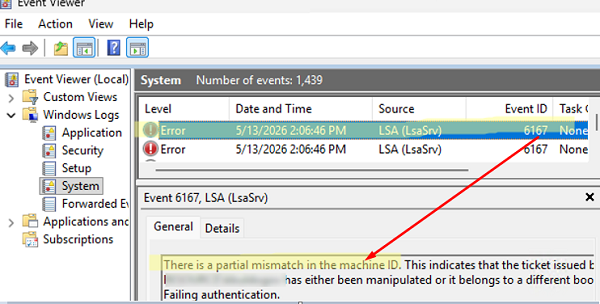
Fixing Duplicate Security Identifier (SID) Issues in Windows | Windows OS Hub
Strict uniqueness requirements for local machine Security Identifiers (SIDs) were enforced in security updates released by Microsoft in autumn 2025 for Windows 11 25H2, 24H2, and Windows Server 2025. These…woshub.com