

WSL 2.7.x should advance beyond an enterprise pilot only when the exact package build has passed the required host-and-guest regression scenarios on both x64 and Windows on ARM devices. A successful distro launch is useful, but it is not approval evidence for DNS, HTTPS, proxy/PAC access, VPN-only resources, localhost workflows, containers, or recovery after restart and suspend events.
“WSL 2.7.x” describes a release family, not a deployable artifact. The pilot record, deployment configuration, and support ticket must identify the exact WSL package version under test. Before selecting that version, review the candidate’s release entry in the Microsoft WSL GitHub Releases page. If the deployment target changes, the prior pilot does not automatically approve the replacement build.
WindowsForum readers discussing WSL 2.7.10 have emphasized the practical concern: do not freeze a deployment decision around a broad version family when the package actually entering the ring may differ from the one originally tested. The same applies to the earlier WindowsForum coverage of WSL 2.7.0 and its kernel rebase: component changes are a reason to identify the package precisely, not a reason to assume a particular workload will pass.
Treat the pilot as validation of an integrated Windows-and-Linux experience. The test scope should reflect the workflows your organization supports rather than assumptions about a specific networking implementation. In particular, do not infer that a NAT-oriented smoke test covers proxy, VPN, localhost, or container traffic. If virtio-backed or other networking components are relevant to your environment, make them a test concern and validate the affected traffic patterns; do not treat them as a documented change for every 2.7.x build without confirming the selected release notes.
Put the complete output, or at minimum the WSL package version, in the test record. Do not record a result merely as “2.7.x.”
Start the distribution again and repeat the defined test. Record whether the failure occurs before or after a lifecycle transition.
This evidence set is compact enough for routine pilot work and detailed enough to search the issue tracker effectively. When checking for an existing report, search with the package version, Windows build, architecture, distribution, and the affected scenario—not just a short error string.
The last two rows reflect a useful point raised in WindowsForum pilot discussions: VHD restoration and KVM boot should be tested when they are real supported workflows, not assumed to work because a standard distribution launches.
Record the commands, target names, return codes, and whether the failure is DNS-only, HTTPS-only, or both. Repeat the same test after:
Then restart the distribution and repeat. Run the test again after suspend/resume if that state is in the deployment population.
If your organization restores VHD-based distributions or uses KVM-based workloads, add those scenarios to the matrix. Confirm that the restored or booted environment starts and completes the same approved DNS, HTTPS, and application checks required for daily work. Do not convert these conditional tests into universal rollout gates unless they are part of your supported estate.
Hold the build when a required scenario fails, results are intermittent, evidence is incomplete, or the pilot omitted a production dependency such as a proxy/PAC path, VPN workflow, container workflow, or Windows on ARM coverage.
Rollback the pilot ring when a previously working supported workflow fails after the candidate package is deployed and cannot be mitigated within the pilot. Preserve the evidence first, then compare it with reports in WSL Issues. Include the issue URL in the worksheet whether the team finds an existing report or opens a new one.
Is a successful
No. It confirms that WSL can start, but it does not validate the organization’s DNS, HTTPS, proxy/PAC, VPN, localhost, container, or lifecycle requirements.
A disciplined WSL 2.7.x pilot produces a deployment decision rather than a launch-test impression. Exact-version records, separate x64 and Windows on ARM coverage, and reproducible network-path evidence let teams find blockers while the change remains contained to the pilot ring.
 Why the pilot must be build-specific
“WSL 2.7.x” describes a release family, not a deployable artifact. The pilot record, deployment configuration, and support ticket must identify the exact WSL package version under test. Before selecting that version, review the candidate’s release entry in the Microsoft WSL GitHub Releases page. If the deployment target changes, the prior pilot does not automatically approve the replacement build.WindowsForum readers discussing WSL 2.7.10 have emphasized the practical concern: do not freeze a deployment decision around a broad version family when the package actually entering the ring may differ from the one originally tested. The same applies to the earlier WindowsForum coverage of WSL 2.7.0 and its kernel rebase: component changes are a reason to identify the package precisely, not a reason to assume a particular workload will pass.
Treat the pilot as validation of an integrated Windows-and-Linux experience. The test scope should reflect the workflows your organization supports rather than assumptions about a specific networking implementation. In particular, do not infer that a NAT-oriented smoke test covers proxy, VPN, localhost, or container traffic. If virtio-backed or other networking components are relevant to your environment, make them a test concern and validate the affected traffic patterns; do not treat them as a documented change for every 2.7.x build without confirming the selected release notes.
Build a pilot that can make a rollout decision
Use the following ordered process for every candidate package.- Select and verify the candidate build.
Review the package in GitHub Releases, then install it only in the pilot ring. On each pilot device, capture the local version with:
wsl --versionPut the complete output, or at minimum the WSL package version, in the test record. Do not record a result merely as “2.7.x.”
- Record the Windows host and Linux guest context.
Capture the Windows build, host architecture, installed distribution, and any WSL configuration that affects the scenario. This makes it possible to distinguish a package result from a device-specific configuration. - Create separate x64 and Windows on ARM result columns.
The provided pilot approach calls for distinct coverage on x64 and Windows on ARM. A pass on x64 is not evidence for Windows on ARM devices. Require a separate Windows on ARM result whenever that architecture is in scope for deployment. - Define the network personas that production users actually use.
At minimum, include:
- Standard corporate network access
- Proxy or PAC-based access
- An active supported VPN connection
- A local Windows/WSL service workflow where applicable
- The supported container workflow, if developers use one
- Define expected results before running tests.
For each scenario, specify the approved internal host, approved HTTPS endpoint, VPN-only resource, local port, or container operation that should succeed. This prevents a tester from reporting “networking worked” without identifying what was actually tested. - Run lifecycle checks using the same workload.
Test the required scenario after initial startup, after a WSL restart, and after suspend/resume. To reset the WSL environment between runs, use:
wsl --shutdownStart the distribution again and repeat the defined test. Record whether the failure occurs before or after a lifecycle transition.
- Preserve reproducible evidence before changing the device.
If a workflow fails, do not immediately reinstall, reset networking, or switch package versions. First save the version, configuration, commands, timestamps, expected result, actual result, and any relevant output. Then search or file a correlation report in the Microsoft WSL GitHub Issues tracker.
Use this copyable pilot evidence worksheet
Paste one block into the pilot ticket for each scenario. A separate entry is more useful than a single overall “pass” for a device.
Code:
WSL package version:
Windows build:
Host architecture: x64 / Windows on ARM
Linux distribution and version:
Network mode/configuration:
VPN state: disconnected / connected / reconnect tested
Proxy state: none / proxy / PAC
Scenario:
Commands or reproduction steps:
Expected result:
Actual result:
Lifecycle state: initial start / after wsl --shutdown / after suspend-resume
Date and time:
Issue URL: [Issues · microsoft/WSL · GitHub](https://github.com/microsoft/WSL/issues/)<issue-number-or-N/A>
Notes and attached output:Required regression scenarios
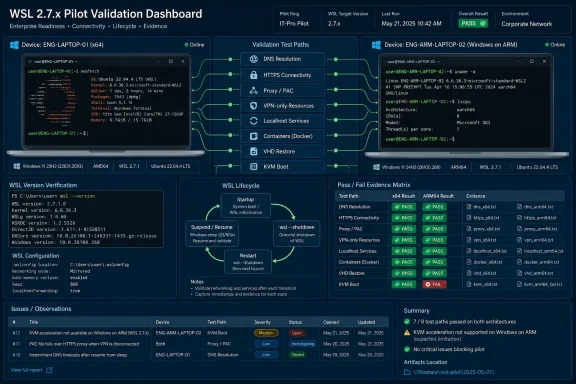
The following matrix is decision-oriented. Mark every required cell as Pass, Fail, Blocked, or Not Applicable, and provide a worksheet entry for every Fail or Blocked result.| Scenario | x64 | Windows on ARM | Required evidence |
|---|---|---|---|
| Distro startup and basic command execution | Required | Required | wsl --version, distro name, result |
| DNS and outbound HTTPS | Required | Required | Hostname tested, DNS result, HTTPS result |
| Proxy or PAC workflow | If supported | If supported | Proxy/PAC state and approved workflow |
| VPN-only resource | If supported | If supported | DNS and HTTPS or application result |
| Windows-to-WSL localhost access | If used | If used | Direction, port, restart result |
| WSL-to-Windows localhost access | If used | If used | Direction, port, restart result |
| Supported container workflow | If used | If used | DNS, endpoint, local port result |
| WSL restart and suspend/resume | Required | Required | Before/after comparison |
| VHD restore workflow | If used | If used | Restore, mount, and workload result |
| KVM boot workflow | If used | If used | Boot and workload result |
DNS and outbound HTTPS
Use approved destinations rather than public test sites that may not reflect policy. From the distribution, run a DNS query and an HTTPS header request where the required tools are installed:
Code:
nslookup <approved-host>
curl -I https://<approved-endpoint>wsl --shutdownThen restart the distribution and repeat. Run the test again after suspend/resume if that state is in the deployment population.
Proxy and PAC behavior
- Place the device on the organization’s normal proxy or PAC configuration.
- Start WSL and run the approved HTTPS workflow that requires that configuration.
- Record the proxy/PAC state and expected authentication or access behavior.
- Run
wsl --shutdown, restart WSL, and repeat the workflow. - Enter separate results for x64 and Windows on ARM.
VPN-connected access
- Connect to the supported VPN.
- Start WSL after the VPN connection is established.
- Resolve an approved VPN-only host:
nslookup <approved-vpn-host>- Test the approved service endpoint:
curl -I https://<approved-vpn-endpoint>- Disconnect and reconnect the VPN, then repeat the test.
- Repeat after suspend/resume where supported.
Localhost interoperability
Test both directions when the organization supports both:- Start the approved local service on Windows or in WSL.
- Access it from the other side of the boundary.
- Record the direction: Windows-to-WSL or WSL-to-Windows.
- Stop and restart the service.
- Run
wsl --shutdown, restart WSL, and repeat.
Containers, VHD restores, and KVM boot
For supported container workflows, verify that the container can resolve required names, reach approved HTTPS endpoints, and use required local ports. Test the workload again after restarting the container environment and WSL.If your organization restores VHD-based distributions or uses KVM-based workloads, add those scenarios to the matrix. Confirm that the restored or booted environment starts and completes the same approved DNS, HTTPS, and application checks required for daily work. Do not convert these conditional tests into universal rollout gates unless they are part of your supported estate.
Set advance, hold, and rollback criteria
Advance the build when the exact package version passes every required matrix row on both in-scope architectures, and the evidence worksheet shows successful results across the required network and lifecycle states.Hold the build when a required scenario fails, results are intermittent, evidence is incomplete, or the pilot omitted a production dependency such as a proxy/PAC path, VPN workflow, container workflow, or Windows on ARM coverage.
Rollback the pilot ring when a previously working supported workflow fails after the candidate package is deployed and cannot be mitigated within the pilot. Preserve the evidence first, then compare it with reports in WSL Issues. Include the issue URL in the worksheet whether the team finds an existing report or opens a new one.
Frequently Asked Questions
Is a successful wsl launch enough to approve WSL 2.7.x?
No. It confirms that WSL can start, but it does not validate the organization’s DNS, HTTPS, proxy/PAC, VPN, localhost, container, or lifecycle requirements.Can x64 testing cover Windows on ARM devices?
No. When Windows on ARM is in the rollout scope, it needs its own results in the pilot matrix using the same required scenarios.Should we test only the newest WSL 2.7.x build?
Test the exact build you intend to deploy. Verify that candidate in GitHub Releases. If the target package changes, repeat the applicable validation for the new build.What is the most useful information to collect for a WSL regression?
Capture the package version, Windows build, architecture, distribution, network mode, VPN and proxy/PAC state, scenario, expected result, actual result, reproduction steps, and a related WSL issue URL if one exists.A disciplined WSL 2.7.x pilot produces a deployment decision rather than a launch-test impression. Exact-version records, separate x64 and Windows on ARM coverage, and reproducible network-path evidence let teams find blockers while the change remains contained to the pilot ring.
References
- Primary source: github.com
Releases · microsoft/WSL · GitHub
Windows Subsystem for Linux. Contribute to microsoft/WSL development by creating an account on GitHub. github.com
- Primary source: WindowsForum
WSL 2.7.10: Test VHD Restores, KVM Boot and DNS Before Deployment | Windows Forum
A proposed freeze at WSL 2.7.8 is already stale: Microsoft marked WSL 2.7.10 as the Latest release on June 26, 2026. The practical decision is to deploy...windowsforum.com