

Microsoft is changing Windows Subsystem for Linux resource management so a runaway compiler, container build, or other memory-heavy Linux process cannot starve the services keeping WSL itself alive. The redesign places user distributions behind narrowly reduced memory and CPU ceilings, reserving a small but critical slice of the WSL 2 virtual machine for Microsoft’s supporting processes.
As first reported by Neowin, the change responds to Out-of-Memory failures that could do more than terminate the workload responsible. Once user processes consumed the resources needed by WSL’s own engine and communications layer, the entire Linux environment could stop responding and remain stuck after the original resource spike had passed.
The protection is implemented through Linux control groups rather than another user-facing Windows memory slider. Microsoft’s code establishes a
Those limits are deliberately close to the maximum. Microsoft is not trying to materially throttle Linux development workloads; it is creating an emergency reserve large enough for essential WSL processes to keep scheduling work, exchanging messages, and recovering when an application reaches the ceiling.
Previously, a sufficiently demanding task could push the WSL 2 virtual machine into an ugly failure mode. Compiling a large codebase, running several parallel builds, processing a large dataset, or launching an unconstrained container workload could trigger Linux’s Out-of-Memory handling while also depriving WSL’s infrastructure of the resources needed to respond cleanly.
That distinction matters. An application being killed because it requested more memory than the environment can supply is an expected failure condition; the entire WSL session freezing is not. Developers can restart a failed compiler or reduce its parallelism, but a dead WSL environment may require
Under the redesigned hierarchy, ordinary Linux processes run inside
The CPU limit follows the same logic. Holding back 0.01 of a core is not intended to create visible headroom for normal computing. It prevents user workloads from consuming literally all schedulable CPU capacity inside the environment, giving WSL’s orchestration and communication components a route forward under extreme contention.
For Windows users, this is best understood as fault containment rather than performance management. It does not eliminate Out-of-Memory errors, nor does it make an undersized machine capable of completing a workload that genuinely requires more RAM. It narrows the blast radius when the workload exceeds what the WSL virtual machine can provide.
Cgroup v2 provides a unified hierarchy and more consistent resource accounting than the older cgroup v1 model. For WSL, that makes it possible to separate Microsoft’s infrastructure from processes launched inside user distributions while applying predictable limits across the environment.
The compatibility cost is that older software built around cgroup v1 assumptions may no longer behave correctly. This is most likely to affect legacy container configurations, older orchestration scripts, low-level monitoring tools, and software that directly inspects or manipulates the cgroup filesystem instead of relying on current systemd or container-runtime interfaces.
Microsoft provides an escape hatch through the Windows-side
After changing
Administrators testing the change should therefore verify more than whether an Ubuntu, Debian, Fedora, or Arch terminal opens. Container engines such as Docker Engine and Podman, systemd services, monitoring agents, build runners, and scripts that read
The trade-off is direct: restoring the old cgroup arrangement may get a legacy workload running, but it also restores the possibility that user processes can consume resources required by WSL itself. Microsoft’s default makes platform survivability the priority.
This addresses a different class of reliability problem. A slow, blocked, or misconfigured service in one distribution should be less able to delay another distribution that the user starts at the same time. Someone running Ubuntu 24.04 for development, Kali Linux for security tooling, and a separate distribution for container testing should see cleaner isolation between their systemd startup processes.
It does not turn every distribution into a completely separate virtual machine. WSL 2 still provides an integrated architecture designed to avoid the cost of running a traditional VM for every Linux installation. The cgroup changes instead introduce firmer internal boundaries where resource pressure and service startup previously had wider consequences.
That becomes increasingly important as WSL expands beyond interactive shells. Linux GUI applications, IDE back ends, local AI tools, databases, Kubernetes development environments, and container workloads can all coexist inside WSL, often without users tracking exactly how much memory or CPU each component consumes.
Microsoft’s Windows Command Line team has positioned WSL Containers as a built-in option rather than a declaration that Docker Desktop, Podman Desktop, or Rancher Desktop is obsolete. Those products provide broader workflows and management layers, while Microsoft is building container primitives directly into WSL.
The company has also said the underlying improvements can benefit third-party container tools built on WSL. More reliable memory reclaim, stronger cgroup isolation, VirtioFS changes, and networking work all matter more when WSL is expected to host persistent container services rather than an occasional Bash session.
Microsoft has separately pushed back on suggestions that these changes constitute “WSL 3.” The current work remains an evolution of WSL 2, even as the architecture gains container APIs, new networking paths, better filesystem performance, and tighter resource controls.
WSL Containers is currently a prerelease feature, with Microsoft targeting general availability in fall 2026. Microsoft has also said the container capability will extend to Windows 10, consistent with the Store-delivered WSL model that allows supported WSL updates to reach both Windows 10 and Windows 11 without waiting for a full operating-system feature release.
The immediate operational takeaway is narrower: users should not expect the new limits to prevent an oversized build from failing. They should expect that failure to leave WSL usable. For developers and administrators who have previously watched one Linux process freeze every active distribution, that small 32 MiB and 0.01-core reserve could be the difference between restarting a job and restarting the entire subsystem.
As first reported by Neowin, the change responds to Out-of-Memory failures that could do more than terminate the workload responsible. Once user processes consumed the resources needed by WSL’s own engine and communications layer, the entire Linux environment could stop responding and remain stuck after the original resource spike had passed.
The protection is implemented through Linux control groups rather than another user-facing Windows memory slider. Microsoft’s code establishes a
wsl-user cgroup with access to all but 32 MiB of the virtual machine’s available memory and all but 0.01 CPU cores of its processing capacity.Those limits are deliberately close to the maximum. Microsoft is not trying to materially throttle Linux development workloads; it is creating an emergency reserve large enough for essential WSL processes to keep scheduling work, exchanging messages, and recovering when an application reaches the ceiling.
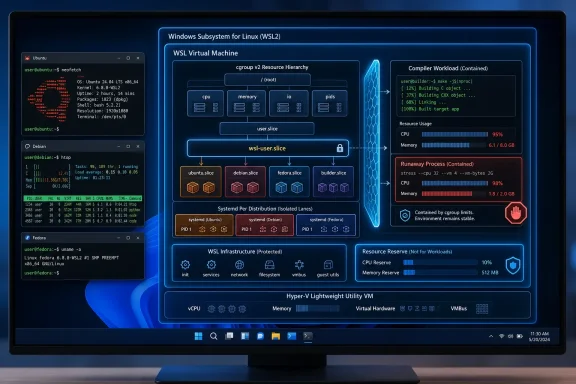 WSL Now Lets the Workload Fail Without Taking the Platform With It
Previously, a sufficiently demanding task could push the WSL 2 virtual machine into an ugly failure mode. Compiling a large codebase, running several parallel builds, processing a large dataset, or launching an unconstrained container workload could trigger Linux’s Out-of-Memory handling while also depriving WSL’s infrastructure of the resources needed to respond cleanly.That distinction matters. An application being killed because it requested more memory than the environment can supply is an expected failure condition; the entire WSL session freezing is not. Developers can restart a failed compiler or reduce its parallelism, but a dead WSL environment may require
wsl --shutdown, the termination of active distributions, and the loss of unrelated work.Under the redesigned hierarchy, ordinary Linux processes run inside
wsl-user. If those processes exhaust their allocation, the immediate workload can still fail or be selected by the Linux OOM killer, but WSL’s protected processes retain their reserved capacity.The CPU limit follows the same logic. Holding back 0.01 of a core is not intended to create visible headroom for normal computing. It prevents user workloads from consuming literally all schedulable CPU capacity inside the environment, giving WSL’s orchestration and communication components a route forward under extreme contention.
For Windows users, this is best understood as fault containment rather than performance management. It does not eliminate Out-of-Memory errors, nor does it make an undersized machine capable of completing a workload that genuinely requires more RAM. It narrows the blast radius when the workload exceeds what the WSL virtual machine can provide.
The New Boundary Depends on cgroup v2
Microsoft’s implementation moves WSL fully onto Linux control group version 2, or cgroup v2, for the affected resource hierarchy. Cgroups are the kernel mechanism used to organize processes and apply controls such as memory, CPU, and process-count limits; they are also fundamental to modern container runtimes.Cgroup v2 provides a unified hierarchy and more consistent resource accounting than the older cgroup v1 model. For WSL, that makes it possible to separate Microsoft’s infrastructure from processes launched inside user distributions while applying predictable limits across the environment.
The compatibility cost is that older software built around cgroup v1 assumptions may no longer behave correctly. This is most likely to affect legacy container configurations, older orchestration scripts, low-level monitoring tools, and software that directly inspects or manipulates the cgroup filesystem instead of relying on current systemd or container-runtime interfaces.
Microsoft provides an escape hatch through the Windows-side
.wslconfig file:
Code:
[wsl2]
IsolateDistroCgroup=false.wslconfig, users typically need to run wsl --shutdown from PowerShell or Command Prompt before starting a distribution again. The setting disables the distribution cgroup isolation that enables the new protection, so it should be treated as a compatibility workaround rather than a routine performance tweak.Administrators testing the change should therefore verify more than whether an Ubuntu, Debian, Fedora, or Arch terminal opens. Container engines such as Docker Engine and Podman, systemd services, monitoring agents, build runners, and scripts that read
/sys/fs/cgroup deserve specific regression testing.The trade-off is direct: restoring the old cgroup arrangement may get a legacy workload running, but it also restores the possibility that user processes can consume resources required by WSL itself. Microsoft’s default makes platform survivability the priority.
Each Distribution Gets a Cleaner Startup Lane
The redesign also changes how multiple WSL distributions are organized. Each distribution’s systemd instance now receives a separate cgroup, allowing distributions to initialize more independently instead of competing within a less clearly divided startup hierarchy.This addresses a different class of reliability problem. A slow, blocked, or misconfigured service in one distribution should be less able to delay another distribution that the user starts at the same time. Someone running Ubuntu 24.04 for development, Kali Linux for security tooling, and a separate distribution for container testing should see cleaner isolation between their systemd startup processes.
It does not turn every distribution into a completely separate virtual machine. WSL 2 still provides an integrated architecture designed to avoid the cost of running a traditional VM for every Linux installation. The cgroup changes instead introduce firmer internal boundaries where resource pressure and service startup previously had wider consequences.
That becomes increasingly important as WSL expands beyond interactive shells. Linux GUI applications, IDE back ends, local AI tools, databases, Kubernetes development environments, and container workloads can all coexist inside WSL, often without users tracking exactly how much memory or CPU each component consumes.
Resource Protection Arrives as WSL Takes On Containers
The architectural work lands alongside Microsoft’s public preview of WSL Containers, announced at Build 2026 and made available in a WSL prerelease in late June. The preview adds thewslc.exe command-line tool and an API through which Windows applications can launch and manage Linux containers without requiring a separate third-party container desktop.Microsoft’s Windows Command Line team has positioned WSL Containers as a built-in option rather than a declaration that Docker Desktop, Podman Desktop, or Rancher Desktop is obsolete. Those products provide broader workflows and management layers, while Microsoft is building container primitives directly into WSL.
The company has also said the underlying improvements can benefit third-party container tools built on WSL. More reliable memory reclaim, stronger cgroup isolation, VirtioFS changes, and networking work all matter more when WSL is expected to host persistent container services rather than an occasional Bash session.
Microsoft has separately pushed back on suggestions that these changes constitute “WSL 3.” The current work remains an evolution of WSL 2, even as the architecture gains container APIs, new networking paths, better filesystem performance, and tighter resource controls.
WSL Containers is currently a prerelease feature, with Microsoft targeting general availability in fall 2026. Microsoft has also said the container capability will extend to Windows 10, consistent with the Store-delivered WSL model that allows supported WSL updates to reach both Windows 10 and Windows 11 without waiting for a full operating-system feature release.
The immediate operational takeaway is narrower: users should not expect the new limits to prevent an oversized build from failing. They should expect that failure to leave WSL usable. For developers and administrators who have previously watched one Linux process freeze every active distribution, that small 32 MiB and 0.01-core reserve could be the difference between restarting a job and restarting the entire subsystem.
References
- Primary source: Windows Report
Published: 2026-07-14T08:42:33+00:00
Microsoft Redesigns WSL Resource Management to Prevent Crashes
Microsoft adds CPU and memory limits to WSL, reducing crashes caused by heavy Linux workloads and improving multi-distribution support. windowsreport.com
