Microsoft released the first public preview of WSL Containers, or WSLC, with WSL 2.9.3 for Windows 11 on June 29, 2026, adding a native
WSL Containers is a small name for a strategic move. For years, Linux containers on Windows have been possible, popular, and slightly awkward: Docker Desktop, Podman, Rancher Desktop, and other tools have filled the gap between Windows as a workstation and Linux as the deployment target. Microsoft’s new preview collapses part of that gap into WSL itself.
The
That distinction matters because containers have become the lingua franca of modern development. The laptop is no longer just where code is written; it is where production-like environments are assembled, torn down, and tested repeatedly. If Windows cannot make that loop feel native, it loses developer mindshare to Linux desktops, macOS, cloud workstations, and remote development environments.
WSLC is Microsoft’s answer to that pressure. It says the Windows developer machine should be able to run Linux containers as a platform feature, not as a tolerated guest.
That compromise now looks prescient. Containers need kernel behavior, filesystem semantics, networking, cgroups, namespaces, and enough Linux reality to avoid strange edge cases. WSL 2’s architecture gave Microsoft the foundation to make containers less of an add-on and more of a natural extension.
The irony is that the more “Linux” WSL became under the hood, the more valuable it became to Windows. Microsoft did not win developers back by pretending Windows and Linux were the same. It won them back by admitting that Linux had become the standard runtime for huge parts of modern infrastructure and then building a bridge that did not require abandoning Windows.
WSLC is the next span of that bridge. WSL already made it normal to install Ubuntu, Debian, Fedora, Arch, and other distributions from a Windows prompt. Containers push the idea further: the unit of work is no longer a distro session but a disposable, scriptable environment that looks more like production.
The
Command-line naming is never just naming. Microsoft could have hidden the feature behind Windows Terminal integration, a Visual Studio button, or a Dev Home workflow. Instead, the public preview centers on
That matters because the container audience is not waiting for a wizard. Developers and DevOps engineers judge these tools by whether they fit into scripts, CI-adjacent workflows, documentation snippets, and muscle memory. A native command tells users that this is meant to be automated, not merely demonstrated.
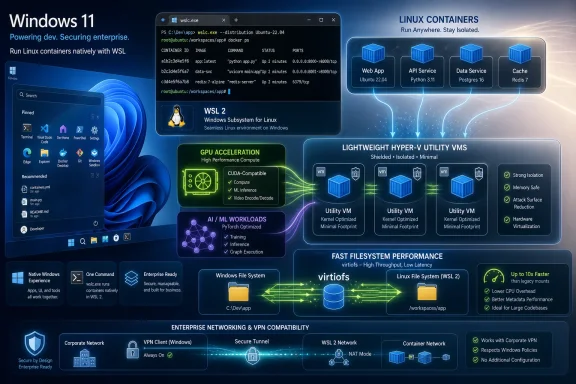
The preview reportedly includes lifecycle management, multiple networking options, GPU support from the start, SDK integration for C++ and C#/WinRT, and other tooling. That breadth is important. A container runtime without networking flexibility is a toy; one without GPU support misses a fast-growing class of AI, simulation, and media workloads; one without API hooks remains a command-line island.
Microsoft is therefore not shipping a bare minimum demo. It is shipping the outline of a platform.
But WSLC does weaken the idea that Windows needs a separate heavyweight container product for every local Linux container use case. If a developer wants to run an image, bind a port, test a service, or automate a disposable environment, Microsoft now wants the first answer to be built into WSL. That shifts the baseline.
The pressure will be felt most in the casual and intermediate layers of the market. Students, individual developers, open-source contributors, and teams with simple local container needs may find a first-party runtime “good enough” once it stabilizes. Enterprises will move more slowly because policy, support, compliance, and existing tooling matter more than elegance.
For Docker, Podman, and others, the question becomes how much value they add above the runtime. The winners will be the tools that make complex workflows easier, not the ones that merely make containers possible on Windows. Microsoft has just claimed the “possible” layer for itself.
That fight is about where AI development happens before it reaches the cloud. Microsoft wants Windows PCs, especially high-end laptops and workstations, to be credible places to build and test AI-adjacent workloads. WSL already helped by giving Windows developers access to Linux-first tooling. Containers make those environments easier to reproduce and discard.
This is also where Microsoft’s broader Windows developer push becomes visible. The company has been adding Linux-flavored command-line tools, improving terminal experiences, integrating AI assistance, and packaging developer machine setup into more repeatable forms. WSLC fits that pattern: reduce friction, make Windows feel less foreign to cloud-native developers, and keep the local machine relevant.
There will still be hardware and driver caveats. GPU passthrough, container device visibility, and vendor-specific acceleration stacks are never as simple as marketing slides imply. But support in the initial preview is a clear statement of intent: Microsoft knows that a modern container runtime without accelerator support is already behind.
On the troublesome side, containers are executable environments by design. They pull images, expose ports, mount filesystems, run privileged processes if allowed, and blur the line between workstation and server. A native container feature inside WSL gives developers power, but it also expands the security surface that endpoint teams must understand.
This is not a reason to panic. It is a reason to inventory. Organizations that already allow Docker Desktop or Podman on Windows have been living with many of these issues for years. What changes is that WSLC may become easier to install, easier to script, and more broadly available as part of the WSL update stream.
The enterprise question is therefore not “Should we block it?” but “What policy model governs it?” Administrators will want clarity on image sources, network exposure, filesystem mounts, GPU access, logging, Defender visibility, update cadence, and whether container activity can be monitored with the same confidence as other local workload execution.
That is normal for a first preview, especially one touching containers, networking, GPUs, and Windows-Linux interoperability at the same time. The issue is not whether the first build is perfect. The issue is whether Microsoft can iterate quickly enough to make the preview feel inevitable rather than experimental.
The Store-delivered WSL model helps. Since WSL moved into a faster update channel, Microsoft has been able to ship features without waiting for a full Windows release train. That makes WSLC more plausible as a fast-moving component. It also means administrators must pay closer attention to WSL versions, because major developer capabilities can now arrive through WSL updates rather than only through Windows feature updates.
For enthusiasts, that is exciting. For managed environments, it is another reminder that Windows is becoming more modular, and modular systems require more deliberate governance.
The company is not turning Windows into Linux. It is making Windows a host for Linux-shaped workflows. That distinction is politically useful and technically accurate. Windows remains the desktop shell, the enterprise management target, the commercial software platform, and the endpoint security boundary. Linux becomes the runtime grammar for development.
WSLC makes that grammar more fluent. Instead of running a full distro for every task, developers can run images that mirror production services. Instead of explaining to newcomers why they need a separate container stack before following a tutorial, maintainers may eventually be able to say: install WSL, update it, run
That is the ideal, at least. The hard part will be compatibility. Developers do not want “almost Docker” if the missing pieces break common Compose files, networking assumptions, or volume semantics. Microsoft can win trust only by being boringly compatible where compatibility matters and clearly different where Windows integration requires it.
Microsoft has learned this lesson gradually. WSL began as a surprising Windows feature and has become a public engineering project with visible issues, release notes, and community scrutiny. That does not erase skepticism, especially from Linux users who remember older Microsoft behavior. But it changes the terms of the debate.
With WSLC, transparency will be especially important. Containers sit at the intersection of developer productivity and security policy. If something fails, users need to debug it. If something is exposed, administrators need to understand it. If something diverges from OCI expectations, tool authors need to adapt.
The more Microsoft documents the internals and accepts community pressure, the more likely WSLC is to become infrastructure rather than novelty.
Because the local loop still matters. Developers want fast iteration, offline capability, hardware access, cheap experiments, and the psychological comfort of owning their environment. Enterprises want productivity without sending every test workload to the cloud. Students and hobbyists want to learn without a subscription meter running in the background.
WSLC gives Microsoft a stronger answer for that local loop. It says Windows can be the machine where code is written, Linux containers are run, GPUs are exercised, ports are mapped, and services are tested before anything leaves the laptop. That is not glamorous, but it is the daily grind where platform loyalty is built.
If Microsoft gets this right, Windows becomes less of a compromise for cloud-native development. If it gets it wrong, WSLC becomes another preview feature that enthusiasts admire and teams route around.
That last piece could become quietly significant. If Windows apps can treat Linux containers as manageable local resources, a new class of hybrid developer tools becomes easier to build. IDEs, test harnesses, database tools, AI workbenches, and enterprise utilities could spin up Linux environments without instructing users to install and configure a separate runtime first.
This is where WSLC could become more than a Docker alternative. It could become a Windows API surface for Linux workload execution. The command line gets the headlines because developers can see it immediately, but the SDK story may determine how deeply the feature embeds into the Windows ecosystem.
The risk is fragmentation. If
Microsoft’s WSLC preview is early, incomplete, and almost certainly rough around the edges, but it points toward a Windows that treats Linux containers as a native workload rather than an imported habit. If the company can make the runtime compatible, governable, and boringly reliable, Windows 11 gains a stronger claim on the cloud-native workstation; if not, developers will keep installing the tools they already trust. Either way, the direction is unmistakable: the future of Windows development is not Windows versus Linux, but Windows deciding how much Linux it can absorb without ceasing to be Windows.
wslc command-line tool for building, running, and managing Linux containers inside the Windows Subsystem for Linux. The preview matters because it turns WSL from a compatibility layer and developer convenience into something closer to a first-party Linux container substrate for Windows. Microsoft is not merely smoothing the path for Docker Desktop users; it is trying to own more of the developer workflow that has historically leaked out of Windows. For sysadmins and developers, the question is no longer whether Windows can run Linux workloads, but how much of that Linux machinery Microsoft wants to make native to Windows itself.
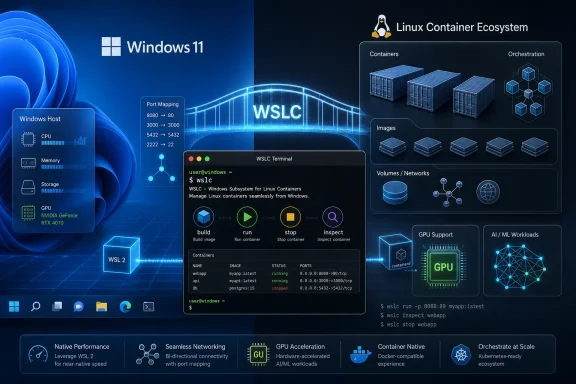 Microsoft Makes the Container Runtime a Windows Feature
WSL Containers is a small name for a strategic move. For years, Linux containers on Windows have been possible, popular, and slightly awkward: Docker Desktop, Podman, Rancher Desktop, and other tools have filled the gap between Windows as a workstation and Linux as the deployment target. Microsoft’s new preview collapses part of that gap into WSL itself.The
wslc command is the visible piece. It gives Windows users a first-party way to create, run, stop, inspect, and manage Linux containers without making a separate container platform the center of gravity. That does not mean Docker Desktop suddenly disappears, nor does it mean every enterprise pipeline will pivot overnight. But it does mean Microsoft is no longer content to let the container experience on Windows be defined primarily by third-party runtimes.That distinction matters because containers have become the lingua franca of modern development. The laptop is no longer just where code is written; it is where production-like environments are assembled, torn down, and tested repeatedly. If Windows cannot make that loop feel native, it loses developer mindshare to Linux desktops, macOS, cloud workstations, and remote development environments.
WSLC is Microsoft’s answer to that pressure. It says the Windows developer machine should be able to run Linux containers as a platform feature, not as a tolerated guest.
WSL’s Original Compromise Has Become Its Advantage
The first era of WSL was about permission. Microsoft had to convince developers that running Linux tools on Windows was not a party trick and not a betrayal of either platform. WSL 1 did that by translating Linux system calls, while WSL 2 moved to a real Linux kernel in a lightweight virtual machine, trading architectural purity for compatibility and speed.That compromise now looks prescient. Containers need kernel behavior, filesystem semantics, networking, cgroups, namespaces, and enough Linux reality to avoid strange edge cases. WSL 2’s architecture gave Microsoft the foundation to make containers less of an add-on and more of a natural extension.
The irony is that the more “Linux” WSL became under the hood, the more valuable it became to Windows. Microsoft did not win developers back by pretending Windows and Linux were the same. It won them back by admitting that Linux had become the standard runtime for huge parts of modern infrastructure and then building a bridge that did not require abandoning Windows.
WSLC is the next span of that bridge. WSL already made it normal to install Ubuntu, Debian, Fedora, Arch, and other distributions from a Windows prompt. Containers push the idea further: the unit of work is no longer a distro session but a disposable, scriptable environment that looks more like production.
The wslc Command Is the Product Message
Command-line naming is never just naming. Microsoft could have hidden the feature behind Windows Terminal integration, a Visual Studio button, or a Dev Home workflow. Instead, the public preview centers on wslc, a terse command that looks at home beside wsl, docker, podman, and kubectl.That matters because the container audience is not waiting for a wizard. Developers and DevOps engineers judge these tools by whether they fit into scripts, CI-adjacent workflows, documentation snippets, and muscle memory. A native command tells users that this is meant to be automated, not merely demonstrated.
The preview reportedly includes lifecycle management, multiple networking options, GPU support from the start, SDK integration for C++ and C#/WinRT, and other tooling. That breadth is important. A container runtime without networking flexibility is a toy; one without GPU support misses a fast-growing class of AI, simulation, and media workloads; one without API hooks remains a command-line island.
Microsoft is therefore not shipping a bare minimum demo. It is shipping the outline of a platform.
Docker Desktop Is Not Dead, but Its Default Status Is Under Pressure
The obvious temptation is to frame WSLC as a Docker Desktop killer. That is too simple, and probably wrong in the short term. Docker Desktop is more than a runtime launcher; it includes an ecosystem, a UI, Compose workflows, extensions, registry integration, enterprise management features, and years of operational familiarity.But WSLC does weaken the idea that Windows needs a separate heavyweight container product for every local Linux container use case. If a developer wants to run an image, bind a port, test a service, or automate a disposable environment, Microsoft now wants the first answer to be built into WSL. That shifts the baseline.
The pressure will be felt most in the casual and intermediate layers of the market. Students, individual developers, open-source contributors, and teams with simple local container needs may find a first-party runtime “good enough” once it stabilizes. Enterprises will move more slowly because policy, support, compliance, and existing tooling matter more than elegance.
For Docker, Podman, and others, the question becomes how much value they add above the runtime. The winners will be the tools that make complex workflows easier, not the ones that merely make containers possible on Windows. Microsoft has just claimed the “possible” layer for itself.
The GPU Story Is Bigger Than Developer Convenience
GPU support arriving on day one is not a checkbox; it is a signal. The local developer workstation has become an AI workstation, and containers are now a common way to package machine learning frameworks, inference servers, CUDA-dependent tools, and reproducible research environments. If WSLC had launched without GPU support, it would have looked like a web developer feature. With GPU support, it is aimed at a much larger fight.That fight is about where AI development happens before it reaches the cloud. Microsoft wants Windows PCs, especially high-end laptops and workstations, to be credible places to build and test AI-adjacent workloads. WSL already helped by giving Windows developers access to Linux-first tooling. Containers make those environments easier to reproduce and discard.
This is also where Microsoft’s broader Windows developer push becomes visible. The company has been adding Linux-flavored command-line tools, improving terminal experiences, integrating AI assistance, and packaging developer machine setup into more repeatable forms. WSLC fits that pattern: reduce friction, make Windows feel less foreign to cloud-native developers, and keep the local machine relevant.
There will still be hardware and driver caveats. GPU passthrough, container device visibility, and vendor-specific acceleration stacks are never as simple as marketing slides imply. But support in the initial preview is a clear statement of intent: Microsoft knows that a modern container runtime without accelerator support is already behind.
Enterprise IT Gets a New Control Plane and a New Risk Surface
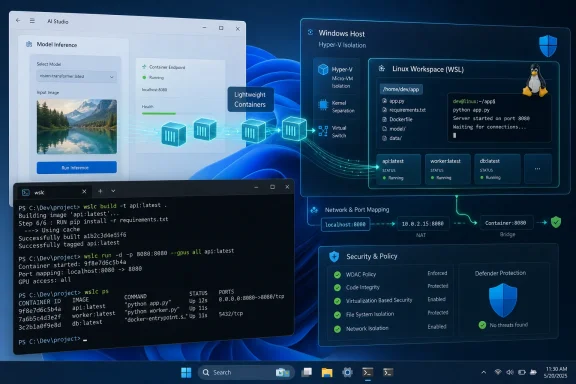
For IT administrators, WSLC is both welcome and troublesome. On the welcome side, first-party integration can mean more predictable updates, better Windows policy hooks, and fewer unsupported runtime combinations scattered across developer machines. If Microsoft exposes the right controls, enterprises may prefer a WSL-native container layer over a patchwork of locally installed tools.On the troublesome side, containers are executable environments by design. They pull images, expose ports, mount filesystems, run privileged processes if allowed, and blur the line between workstation and server. A native container feature inside WSL gives developers power, but it also expands the security surface that endpoint teams must understand.
This is not a reason to panic. It is a reason to inventory. Organizations that already allow Docker Desktop or Podman on Windows have been living with many of these issues for years. What changes is that WSLC may become easier to install, easier to script, and more broadly available as part of the WSL update stream.
The enterprise question is therefore not “Should we block it?” but “What policy model governs it?” Administrators will want clarity on image sources, network exposure, filesystem mounts, GPU access, logging, Defender visibility, update cadence, and whether container activity can be monitored with the same confidence as other local workload execution.
Preview Means Promise, Not Permission to Standardize
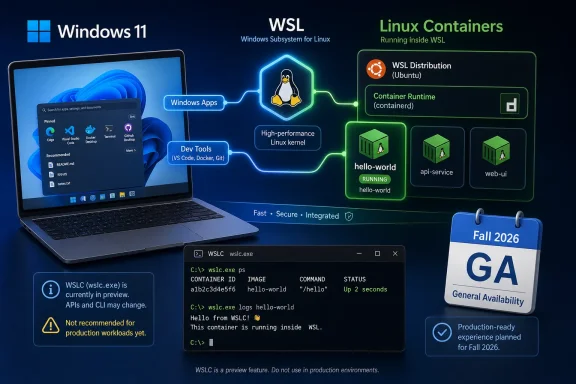
The public preview label is doing real work here. WSLC may be available through WSL 2.9.3, but that does not make it a production standard. Developers should expect rough edges, incomplete documentation, breaking behavior, and gaps between Docker-compatible habits and whatwslc actually supports.That is normal for a first preview, especially one touching containers, networking, GPUs, and Windows-Linux interoperability at the same time. The issue is not whether the first build is perfect. The issue is whether Microsoft can iterate quickly enough to make the preview feel inevitable rather than experimental.
The Store-delivered WSL model helps. Since WSL moved into a faster update channel, Microsoft has been able to ship features without waiting for a full Windows release train. That makes WSLC more plausible as a fast-moving component. It also means administrators must pay closer attention to WSL versions, because major developer capabilities can now arrive through WSL updates rather than only through Windows feature updates.
For enthusiasts, that is exciting. For managed environments, it is another reminder that Windows is becoming more modular, and modular systems require more deliberate governance.
The Windows Developer Machine Is Being Rebuilt Around Linux Assumptions
Microsoft’s developer strategy has changed from “make Windows different and better” to “make Windows familiar enough that developers do not leave.” That is a profound shift. Core Unix-style utilities, WSL distributions, Linux GUI apps, systemd support, GPU compute, and now containers all point in the same direction.The company is not turning Windows into Linux. It is making Windows a host for Linux-shaped workflows. That distinction is politically useful and technically accurate. Windows remains the desktop shell, the enterprise management target, the commercial software platform, and the endpoint security boundary. Linux becomes the runtime grammar for development.
WSLC makes that grammar more fluent. Instead of running a full distro for every task, developers can run images that mirror production services. Instead of explaining to newcomers why they need a separate container stack before following a tutorial, maintainers may eventually be able to say: install WSL, update it, run
wslc.That is the ideal, at least. The hard part will be compatibility. Developers do not want “almost Docker” if the missing pieces break common Compose files, networking assumptions, or volume semantics. Microsoft can win trust only by being boringly compatible where compatibility matters and clearly different where Windows integration requires it.
Open Source Trust Is Now Part of the Windows Feature Checklist
WSL’s open-source evolution matters in this story because container users are allergic to opaque magic. They want to know how isolation works, what kernel is involved, how networking is implemented, and why a workload behaves differently on one host than another. A black-box container runtime would struggle to earn credibility with this audience.Microsoft has learned this lesson gradually. WSL began as a surprising Windows feature and has become a public engineering project with visible issues, release notes, and community scrutiny. That does not erase skepticism, especially from Linux users who remember older Microsoft behavior. But it changes the terms of the debate.
With WSLC, transparency will be especially important. Containers sit at the intersection of developer productivity and security policy. If something fails, users need to debug it. If something is exposed, administrators need to understand it. If something diverges from OCI expectations, tool authors need to adapt.
The more Microsoft documents the internals and accepts community pressure, the more likely WSLC is to become infrastructure rather than novelty.
The Real Fight Is the Local Development Loop
Cloud development environments are improving, and remote workstations are increasingly viable. GitHub Codespaces, Dev Box, cloud-hosted IDEs, and remote containers all promise consistency without local setup pain. In that world, why keep investing in local Windows container support?Because the local loop still matters. Developers want fast iteration, offline capability, hardware access, cheap experiments, and the psychological comfort of owning their environment. Enterprises want productivity without sending every test workload to the cloud. Students and hobbyists want to learn without a subscription meter running in the background.
WSLC gives Microsoft a stronger answer for that local loop. It says Windows can be the machine where code is written, Linux containers are run, GPUs are exercised, ports are mapped, and services are tested before anything leaves the laptop. That is not glamorous, but it is the daily grind where platform loyalty is built.
If Microsoft gets this right, Windows becomes less of a compromise for cloud-native development. If it gets it wrong, WSLC becomes another preview feature that enthusiasts admire and teams route around.
The First Preview Draws the Map, Not the Destination
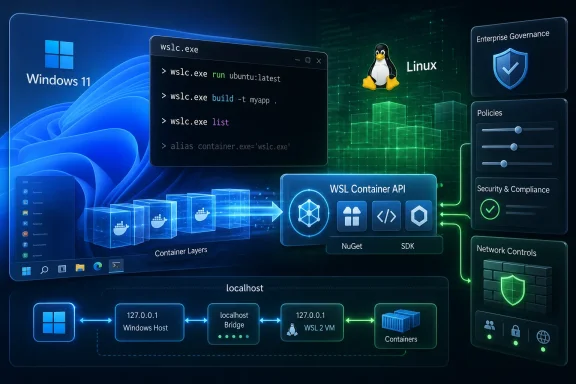
The concrete details of the preview are useful, but the direction is more important. Microsoft is creating a first-party path from Windows to Linux containers, complete with command-line management, networking, GPU awareness, and SDK integration. That combination says WSLC is not just for terminal users; it is also for Windows applications that may want to launch, embed, or manage Linux container workloads programmatically.That last piece could become quietly significant. If Windows apps can treat Linux containers as manageable local resources, a new class of hybrid developer tools becomes easier to build. IDEs, test harnesses, database tools, AI workbenches, and enterprise utilities could spin up Linux environments without instructing users to install and configure a separate runtime first.
This is where WSLC could become more than a Docker alternative. It could become a Windows API surface for Linux workload execution. The command line gets the headlines because developers can see it immediately, but the SDK story may determine how deeply the feature embeds into the Windows ecosystem.
The risk is fragmentation. If
wslc behaves differently enough from established container tools, developers will resist writing Windows-specific instructions. Microsoft’s challenge is to make WSLC feel native to Windows without making it feel alien to the container world.The Preview Gives Windows Power Users a New Checklist
WSLC is not something every Windows user needs to install today. It is, however, something Windows enthusiasts and IT pros should start tracking now, because it changes the assumptions around WSL and local development.- WSL Containers arrives through WSL 2.9.3 as a public preview for Windows 11, so early adopters should treat it as testable but not yet standard infrastructure.
- The new
wslccommand gives Microsoft a first-party Linux container interface rather than leaving that role entirely to Docker Desktop, Podman, or similar tools. - GPU support in the initial preview makes WSLC relevant to AI, compute, and media workloads, not just simple web service testing.
- Enterprise administrators should evaluate policy, monitoring, image trust, networking behavior, and update control before allowing broad use on managed devices.
- Developers should watch compatibility with existing container workflows closely, because the feature’s long-term value depends on whether it reduces friction rather than creating a Windows-only dialect.
Microsoft’s WSLC preview is early, incomplete, and almost certainly rough around the edges, but it points toward a Windows that treats Linux containers as a native workload rather than an imported habit. If the company can make the runtime compatible, governable, and boringly reliable, Windows 11 gains a stronger claim on the cloud-native workstation; if not, developers will keep installing the tools they already trust. Either way, the direction is unmistakable: the future of Windows development is not Windows versus Linux, but Windows deciding how much Linux it can absorb without ceasing to be Windows.
References
- Primary source: Phoronix
Published: 2026-06-29T15:49:14.107105
Microsoft Announces Public Preview For Linux Containers On WSL - Phoronix
Microsoft today shipped the first public preview of WSL Containers 'WSLC' as their latest extension of the Windows Subsystem for Linux on Windows 11.www.phoronix.com
- Related coverage: allthings.how
WSL Containers: How Windows Runs Linux Containers With wslc
Microsoft's new wslc tool and NuGet API let Windows apps build and run Linux containers without separate software.allthings.how - Related coverage: heise.de
Microsoft brings Linux containers to WSL | heise online
Microsoft is integrating its own container platform into the Windows Subsystem for Linux – complete with CLI, API, and SDK for Windows applications. www.heise.de
- Related coverage: techradar.com
Microsoft reveals Azure Linux is available now | TechRadar
Microsoft’s Linux distro is now generally availablewww.techradar.com - Related coverage: boxofcables.dev
wslc: A native Linux container runtime for Windows
wslc brings native OCI-compatible Linux containers to WSL: a Docker-compatible CLI, GPU passthrough via CDI, a full C/WinRT/C# SDK, and a plugin API that lets Windows applications mount folders, spawn processes, and react to container lifecycle events as native Windows handles. www.boxofcables.dev
- Related coverage: winbuzzer.com
Microsoft Announces WSL Upgrades for Windows 11
Microsoft has announced planned WSL upgrades targeting faster file performance, improved networking, streamlined onboarding, and enterprise controls.winbuzzer.com
- Related coverage: pureinfotech.com
Microsoft's WSL Containers could make Linux an invisible layer inside Windows - Pureinfotech
Microsoft unveils WSL Containers for Windows, bringing built-in Linux containers, GPU support, APIs, and enterprise controls. pureinfotech.com
- Official source: devblogs.microsoft.com
OneAPI/L0, OpenVINO and OpenCL coming to the Windows Subsystem for Linux for Intel GPUs - Windows Command Line
We are happy to announce, that in partnership with Intel, we are bringing support for hardware accelerated OneAPI/L0, OpenVINO and OpenCL on Intel GPUs todevblogs.microsoft.com - Related coverage: windowscentral.com
I break down 4 new Windows 11 tools from Build 2026 that genuinely stood out and show where the OS is heading | Windows Central
Microsoft unveiled a lot of AI projects at Build 2026, but these four Windows 11 tools caught my attention the most.www.windowscentral.com - Official source: info.microsoft.com
- Official source: techcommunity.microsoft.com