

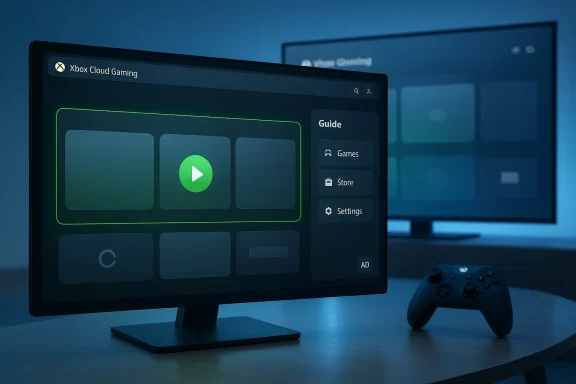
Microsoft has quietly rolled out a public preview of a dramatically reworked Xbox Cloud Gaming web dashboard that looks, navigates, and behaves far more like an Xbox console than the lightweight browser port it used to be — and that shift arrives at a pivotal moment for Xbox’s cloud strategy, because Microsoft is also actively testing a free, ad‑supported cloud tier that could make streamed Xbox play broadly accessible without a Game Pass subscription.
Xbox Cloud Gaming began life as Project xCloud and evolved into a central layer of Microsoft’s Xbox Game Pass ecosystem: a low‑friction way to play console and Game Pass titles on phones, tablets, TVs, and PCs without installing them locally. Over time the service matured — server hardware moved to Series‑class blades, bitrates rose, publisher support for streaming increased, and Microsoft added features such as “stream your own game” and higher‑quality streaming tiers for Game Pass Ultimate subscribers. Those engineering and catalog investments set the stage for the new web preview and the experiments around a free, ad‑supported plan.
The new preview is being made available via play.xbox.com and is explicitly opt‑in: sign in, flip the Preview Features toggle in Settings, and the updated UI will appear (it may take up to a few minutes to propagate). Microsoft frames this as a fast‑iteration channel to gather feedback before wider rollouts to the Xbox app on PC, consoles, and other surfaces.
Streaming owned digital titles (the “stream your own game” program) has also been expanded beyond early test phases to additional apps and consoles, letting Ultimate members stream some of their own purchases without installs — another practical way Microsoft reduces friction for players who don’t want to manage huge downloads. That entitlement model remains gated by subscription level and publisher cooperation, however.
The ad‑supported free tier is strategically bold and probably necessary as Microsoft seeks scale and reach following Game Pass pricing changes. Early tests show a pragmatic compromise — short preroll ads and per‑session caps — but economics and publisher cooperation are the principal unknowns. If Microsoft can design sensible session caps, respectful ad loads, and clear conversion paths to paid tiers, the model could expand Xbox’s footprint. If the ads are intrusive, the economics unsustainable, or publishers opt out, the experiment could stall or harm player goodwill.
Source: Windows Central Hands on: The new Xbox Cloud Gaming dashboard is FRESH
 Background / Overview
Xbox Cloud Gaming began life as Project xCloud and evolved into a central layer of Microsoft’s Xbox Game Pass ecosystem: a low‑friction way to play console and Game Pass titles on phones, tablets, TVs, and PCs without installing them locally. Over time the service matured — server hardware moved to Series‑class blades, bitrates rose, publisher support for streaming increased, and Microsoft added features such as “stream your own game” and higher‑quality streaming tiers for Game Pass Ultimate subscribers. Those engineering and catalog investments set the stage for the new web preview and the experiments around a free, ad‑supported plan. The new preview is being made available via play.xbox.com and is explicitly opt‑in: sign in, flip the Preview Features toggle in Settings, and the updated UI will appear (it may take up to a few minutes to propagate). Microsoft frames this as a fast‑iteration channel to gather feedback before wider rollouts to the Xbox app on PC, consoles, and other surfaces.
What’s actually changed in the web preview
A console‑first visual and navigation language
The most immediate and obvious change is visual: the web client now mirrors the console experience with a top navigation bar, large tiles, an Xbox‑style Guide overlay, and controller‑first focus states. The dashboard animates and flows like a modern console UI rather than an app‑style web page, with new transitions, rounded Fluent‑inspired elements, and clearer affordances for primary actions such as Play and Add to Library. Early hands‑on reporting finds the layout both familiar to Series X|S owners and markedly faster than the previous browser UI.Two display modes: Full Screen (TV/handheld) and Desktop
Microsoft ships two presentation modes inside the preview:- Full Screen Mode: a console‑style, controller‑optimized layout that’s ideal for TVs and handhelds — large, easily targeted UI elements and a Guide overlay you can bring up with the Xbox icon or controller button.
- Desktop Mode: an app‑like layout with a persistent sidebar and denser use of screen real estate for keyboard/mouse users on larger monitors.
Progressive Web App (PWA) and tighter Windows integration
If you use Microsoft Edge or any Chromium browser, the new play.xbox.com experience can be installed as a Progressive Web App, giving it a windowed, app‑like presence on Windows without browser chrome. That helps handheld Windows devices — which often struggle with tiny touch targets and a full desktop UI — by providing a near‑native app experience while keeping the fast iteration cycle of a web product. The PWA option is specifically called out in Microsoft’s rollout notes.Library, store pages, and guide parity
The store and product detail pages on the new web preview adopt the cleaner, card‑focused design common to the Xbox PC/app experiences, while the Guide and library feel closer to the console. That brings together the best elements of Microsoft’s fragmented surfaces into a single web entry point: discoverability and store fidelity from the PC app, plus guide and controller navigation from the console. Reporters who tested the preview described the result as “clean, fast, and very usable” — a real upgrade for people who use the web client as their primary Xbox front end.How to try it today — step‑by‑step
- Open a modern, up‑to‑date browser (Microsoft Edge recommended).
- Visit xbox.com/play and sign in with your Microsoft/Xbox account.
- Open your profile menu in the top‑right and choose Settings.
- Toggle Preview features on, confirm, and wait up to 10 minutes for the preview to activate. If it doesn’t appear, log out and back in or clear the browser cache.
- Either follow the on‑screen prompts or navigate to play.xbox.com to launch the new experience. You can exit the preview from the top‑right if you prefer the legacy UI.
The bigger context: why this matters for Xbox’s cross‑device strategy
Unifying “Xbox Everywhere”
Microsoft has long described Xbox as a platform more than a console — a goal expressed in the “Xbox Everywhere” ambition to let purchases, saves, and play travel across devices. Until now, that ambition was complicated by divergent UIs across Xbox Series X|S, the Xbox PC app, Windows Full Screen Experience (FSE), and the browser. The new web preview moves the browser closer to the console mental model while keeping the clean, app‑style polish. That reduces cognitive friction and could make cloud play feel like a natural extension of a player’s existing Xbox habits — a key retention lever for Game Pass.A faster iteration channel
A web preview lets Microsoft test UI and monetization experiments without firmware updates or Store cycles. That speed matters when the company is experimenting with significant business model changes, such as ad‑supported free access to cloud play (more on that below). By trying ideas first in the browser, Microsoft can iterate quickly on telemetry and feedback before committing them to native clients.Handhelds and Windows PCs get a serious usability upgrade
Windows handhelds like the ROG Xbox Ally family and other compact devices suffer from desktop UI bloat. The PWA + Full Screen Mode combination gives users a controller‑forward, resource‑lighter entry point into their Game Pass library — one that’s closer to the console home experience and better suited to small screens. The web preview has been praised for being more controller‑friendly and more stable than some native shells that still struggle with focus and input issues on handheld hardware.Cloud quality, entitlements, and the streaming ceiling
A critical, and often asked, technical question is: what quality can you expect? Microsoft removed the beta tag from Xbox Cloud Gaming in late 2025 and announced an upgraded streaming ceiling for Game Pass Ultimate subscribers that can reach 1440p on supported titles and devices, with bitrates observed to peak in the mid‑20s Mbps for specific content. Those quality tiers remain selectively applied — not every game, region, or endpoint supports 1440p yet — but the technical uplift is real and meaningful for users prioritizing visual fidelity.Streaming owned digital titles (the “stream your own game” program) has also been expanded beyond early test phases to additional apps and consoles, letting Ultimate members stream some of their own purchases without installs — another practical way Microsoft reduces friction for players who don’t want to manage huge downloads. That entitlement model remains gated by subscription level and publisher cooperation, however.
The quiet, strategic secret: ad‑supported free cloud gaming
Microsoft isn’t just redesigning the UI. It’s also been testing a separate, free, ad‑supported tier of Xbox Cloud Gaming that would let people stream select games without a Game Pass subscription. This isn’t mere rumor: internal tests have been reported and Microsoft has acknowledged testing the model, and outlets such as The Verge have detailed what those trials look like — short preroll ad breaks, one‑hour session limits, and an overall cap of about five free hours per month in early tests. The offering would include a curated set of playable experiences: certain owned titles, Free Play Days, and retro classics, backed by ads rather than subscription revenue.What early reports indicate (and what is still uncertain)
- Reported test behavior: roughly two minutes of preroll ads before gameplay, one‑hour sessions, and a monthly free play cap such as five hours. Those numbers are test parameters and may change before any final launch.
- Coverage and confirmation: multiple outlets have corroborated The Verge’s reporting and Microsoft acknowledged internal testing; GameSpot and others reported Microsoft’s confirmation. Still, Microsoft hasn’t posted formal consumer pricing or a firm launch date on Xbox Wire for a general free‑with‑ads product at the time of writing. Treat the current parameters as early test metrics.
Why Microsoft would do this
- User acquisition: a free tier lowers the barrier to trying cloud gaming and could expose lapsed or undecided gamers to Xbox content, potentially converting them to paid tiers over time.
- Market economics: ad revenue can subsidize server costs and broaden reach when subscription penetration is constrained by price sensitivity — particularly after recent Game Pass price increases that motivated both criticism and churn.
- Distribution leverage: a free, widely available cloud option helps Microsoft compete in territories and demographics where console ownership is low but smartphone or TV adoption is high.
The risks and limits of a free‑with‑ads model
- Monetization vs. cost: cloud gaming is capital intensive — compute, GPU blades, egress bandwidth — and ad revenue per user may be far lower than subscription ARPU. Microsoft will need to carefully balance ad load, session caps, and content eligibility to avoid negative unit economics.
- Publisher and platform friction: streaming owned titles or even Free Play Days via an ad model raises licensing and revenue‑share questions for publishers. Some studios may demand higher revenue participation or opt out of ad‑supported access.
- User experience: preroll ads and session limits change the UX calculus. If ad load is intrusive or session caps are too constraining, the free tier could simply frustrate users and damage perception of Microsoft’s paid tiers.
Strengths: what the preview and free‑with‑ads test get right
- Lower barrier to entry: a PWA web client and a free ad tier give Microsoft a huge reach advantage — virtually any modern device with a browser becomes a potential Xbox endpoint. That ubiquity is the primary strategic advantage of cloud gaming.
- Consistent UX across devices: the console‑like web UI reduces cognitive friction for players who own an Xbox, helping Microsoft convert console familiarity into cloud engagement.
- Faster product iteration: web previews mean Microsoft can test features and monetization quickly and roll back problematic experiments without firmware cycles.
- Tunable quality options: with 1440p ceilings for Ultimate and selectable streaming profiles, Microsoft can present clear upsell paths from free/ad tiers to paid subscriptions.
Risks, trade‑offs and governance concerns
Economics and sustainability
Cloud gaming costs money. GPUs, datacenter capacity, licensing, and bandwidth add up. If ad revenue and session caps don’t offset those costs, Microsoft risks subsidizing non‑paying users at scale. The company has previously tolerated subsidized experiences to acquire customers, but a sustained free tier must show a path to conversion or ad profitability. Analysts and reporting repeatedly flag the delicate balance between reach and per‑user economics.Privacy and telemetry
Any ad‑supported product raises privacy questions: what signals are used to target ads, how long are telemetry and viewing logs retained, and whether gameplay screenshots or contextual signals are used to personalize ads. Microsoft’s privacy guardrails for Copilot and other AI features remain a point of scrutiny; similar transparency will be essential here. Expect regulators and privacy‑minded users to ask for explicit, auditable controls for ad personalization and data retention.Fragmentation and feature parity
Microsoft still runs multiple Xbox experiences (console firmware, Xbox PC app, Full Screen Experience on Windows, and the web). The new preview narrows the experience gap for web users, but inconsistent rollouts and per‑device feature gating risk confusing customers. Unified design and parity across surfaces should be a priority if Microsoft wants a genuinely cohesive “Xbox Everywhere” identity.Publisher and anti‑cheat considerations
Streaming owned titles or retro collections via a free ad tier intersects with publisher economics and anti‑cheat systems. Some multiplayer titles require kernel‑level anti‑cheat or publisher‑approved gating; Microsoft will need to coordinate closely with studios to avoid creating loopholes or frustrated players.Practical advice for Windows users and IT owners
- If you want to try the preview, use Microsoft Edge and enable the Preview Features toggle in your Xbox account settings on xbox.com/play; installing the PWA will give you a cleaner, windowed experience on Windows machines.
- For privacy‑minded users, review Xbox app and browser permissions before engaging with ad‑supported tests. Avoid consenting to screenshot or camera capture unless you understand retention policies.
- If you rely on cloud streaming for competitive play, be cautious about free/ad‑supported sessions: session caps and ad prerolls create predictable interruption patterns that may not suit esports or strict practice regimens. Paid tiers will remain the more consistent option for longer sessions and higher priority access.
What this could mean for the broader market
- Lower friction = bigger addressable market. A compelling free entry point could make Xbox Cloud Gaming a mainstream alternative for casual players or those in emerging markets where consoles and gaming PCs are expensive.
- Competition heats up. Nvidia, Amazon, and Google have their own cloud strategies; an ad‑supported Xbox product would recalibrate competitive dynamics, particularly on mobile and smart TV platforms.
- Pressure on publishers and storefront economics. If cloud access becomes widespread and ad‑funded, studios will need clearer monetization agreements and potentially new revenue‑share models for streamed ownership experiences.
Verdict — cautious optimism with real caveats
The new Xbox Cloud Gaming web preview is legitimately fresh: it solves practical UX problems, brings console familiarity to the web, and offers tangible utility for handheld and desktop users through a PWA and Full Screen/ Desktop modes. That’s a substantive product win on the user experience front.The ad‑supported free tier is strategically bold and probably necessary as Microsoft seeks scale and reach following Game Pass pricing changes. Early tests show a pragmatic compromise — short preroll ads and per‑session caps — but economics and publisher cooperation are the principal unknowns. If Microsoft can design sensible session caps, respectful ad loads, and clear conversion paths to paid tiers, the model could expand Xbox’s footprint. If the ads are intrusive, the economics unsustainable, or publishers opt out, the experiment could stall or harm player goodwill.
Final thoughts and what to watch next
- Watch for a formal Microsoft announcement or Xbox Wire post that moves ad‑supported testing from internal trials to public beta; that will reveal updated caps, ad formats, and eligible content.
- Look for design parity updates: whether Microsoft propagates the web preview’s visual language to the Xbox PC app and Full Screen Experience on Windows devices — a real unification would lower fragmentation complaints.
- Monitor publisher responses and technical notes about anti‑cheat and multiplayer support for streamed owned games; those operational details will determine how broad the catalog can be.
Source: Windows Central Hands on: The new Xbox Cloud Gaming dashboard is FRESH
