

Microsoft’s console‑style Xbox full screen experience (FSE) is no longer an ROG exclusive: the interface is now rolling out to MSI Claw handhelds via the Windows 11 Insider Preview, with Microsoft confirming that additional OEMs will enable FSE on their handheld PCs in the coming months. This is a clear signal that Microsoft intends the Xbox‑branded launcher and its controller‑first, low‑overhead session model to become a multiplatform standard across Windows handhelds — and it raises practical questions for buyers, developers and OEMs about performance, compatibility and the future of handheld PC gaming.
The Xbox full screen experience (FSE) is a console‑oriented, controller‑first UI layer for Windows 11 handhelds that treats a chosen gaming app (most commonly the Xbox PC app) as the device’s home launcher. When FSE is active, the system reduces background activity, defers non‑essential tasks, and presents a streamlined full‑screen interface designed for gamepad navigation and fast game switching.
FSE debuted as an integrated feature for the new ROG Xbox Ally family — the ROG Xbox Ally and the high‑end ROG Xbox Ally X — which launched alongside Microsoft’s handheld‑focused Windows 11 updates in mid‑October. Microsoft then delivered FSE as a staged feature in the Windows 11 Insider Preview (Build 26220.7051 / KB5067115). In late October and early November, Microsoft expanded the preview to include additional Windows 11 handhelds in market; MSI Claw models were the first non‑Asus devices included in that staged rollout.
That Windows Insider build is explicitly framed as a controlled roll‑out: the binaries are broadly available to Insiders, but visibility of features like FSE is gated by hardware compatibility checks, OEM enablement, and Microsoft’s staged feature‑flagging. In short: the capability is coming to more devices, but not everyone will see it immediately.
That matters because it reduces the primary user argument for switching to SteamOS (simplicity + performance): with FSE, Windows handhelds can offer an immediate console‑style interface and keep Windows compatibility for titles that require it. For the ecosystem this is an attractive compromise: users get a console feel without losing access to Windows‑only games and services like Game Pass or publisher launchers.
That strategy is sensible. On hardware with constrained thermal and memory budgets, trimming background services and providing a controller‑first launcher is a tangible win. For users who frequently switch between cloud and local play or who rely on Game Pass, FSE simplifies the handheld experience and reduces friction.
At the same time, early adopters should expect the usual preview caveats: staged rollouts, occasional instability, and OEM utility conflicts. Some user reports indicate boot and compatibility headaches; these are generally confined to Insider builds and can often be traced to driver/utility mismatches or experimental registry tweaks. Those reports are valuable signals but are not definitive proof of long‑term problems; Microsoft and OEMs are actively iterating.
The debut on Asus ROG Xbox Ally devices was the theatrical opening; the extension to MSI Claw via the Insider Preview is the second act. Over the next year, expect more OEM announcements, iterative performance tuning, and a gradual smoothing of the early preview wrinkles. For people who want the convenience of console UX without sacrificing Windows compatibility, FSE is one of the most significant additions to handheld Windows in recent memory — but like all platform shifts, it’s a measured roll‑out, not an instant fix.
In short: FSE is here, it works, and it will matter — just not uniformly, not immediately, and not without the occasional insider‑era headache.
Source: Gadgets 360 https://www.gadgets360.com/games/ne...ce-msi-claw-windows-11-handhelds-9571752/amp/
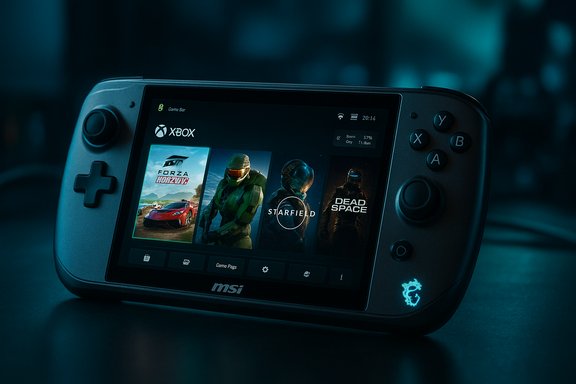 Background: what the Xbox full screen experience is and how it started
The Xbox full screen experience (FSE) is a console‑oriented, controller‑first UI layer for Windows 11 handhelds that treats a chosen gaming app (most commonly the Xbox PC app) as the device’s home launcher. When FSE is active, the system reduces background activity, defers non‑essential tasks, and presents a streamlined full‑screen interface designed for gamepad navigation and fast game switching.FSE debuted as an integrated feature for the new ROG Xbox Ally family — the ROG Xbox Ally and the high‑end ROG Xbox Ally X — which launched alongside Microsoft’s handheld‑focused Windows 11 updates in mid‑October. Microsoft then delivered FSE as a staged feature in the Windows 11 Insider Preview (Build 26220.7051 / KB5067115). In late October and early November, Microsoft expanded the preview to include additional Windows 11 handhelds in market; MSI Claw models were the first non‑Asus devices included in that staged rollout.
That Windows Insider build is explicitly framed as a controlled roll‑out: the binaries are broadly available to Insiders, but visibility of features like FSE is gated by hardware compatibility checks, OEM enablement, and Microsoft’s staged feature‑flagging. In short: the capability is coming to more devices, but not everyone will see it immediately.
What enabling FSE actually does on a handheld
At a user level FSE is deceptively simple: the device boots into a fullscreen, Xbox‑centric launcher instead of the Windows desktop. Under the hood, though, Microsoft shifts how Windows loads sessions:- The system allows the user to choose a gaming home app (for example, Xbox) that acts as the primary launcher.
- When enabled, Windows postpones the automatic start of many background processes and limits desktop‑oriented services until the user switches out of FSE.
- Task switching and controller navigation are reworked to be smoother and more predictable for handheld play, with the Game Bar and Task View offering the usual exit and switch paths.
- The experience is explicitly designed to maximize available memory and CPU headroom for games by deferring non‑essential work and reducing background noise.
How to enable FSE (step‑by‑step)
Enabling the Xbox full screen experience on a compatible Windows handheld is straightforward once your device has the requisite Insider or OEM update.- Enroll in the Windows Insider program and switch to the appropriate channel if required (Dev or Beta during this staged rollout).
- Update Windows to the preview build that includes FSE (the recent staged preview is Build 26220.7051 / KB5067115).
- Open Settings > Gaming > Full screen experience.
- Set Xbox (or another compatible gaming app listed) as your home app.
- (Optional) Toggle Enter full screen experience on startup to boot straight into the launcher.
- Use Game Bar (Win + G), the Xbox app’s home button, or Task View (Win + Tab) to enter/exit FSE during a session.
Why this matters: strategic and practical implications
This expansion matters on several fronts — for users, for OEMs and for Microsoft.- For users: FSE promises a simpler, more immediate handheld gaming session that minimizes the friction of navigating Windows with a controller. For handheld enthusiasts who want Steam, Epic and Game Pass all accessible from a single launcher without desktop distractions, FSE is an attractive compromise.
- For OEMs: Microsoft offering a built‑in controller‑first surface reduces the incentive to create bespoke startup shell replacements. It standardizes a handheld UX across vendors while preserving Windows’ openness.
- For Microsoft: the move broadens the reach of Xbox’s ecosystem. FSE funnels users toward the Xbox PC app and Game Pass while keeping Windows as the underlying platform. It’s a strategic attempt to make Windows handhelds feel like console alternatives without forcing a lock‑in.
Strengths: what FSE gets right
Several practical benefits make FSE appealing on handheld Windows PCs.- Reduced system overhead. By deferring non‑essential background services until the desktop is needed, FSE frees RAM and CPU headroom for games — a real advantage on systems with tight thermal budgets.
- Controller‑first navigation. The UI design is tuned for gamepad use: larger focus targets, predictable button mappings and a home‑first layout similar to a console improve usability on a handheld.
- Unified launcher option. FSE centralizes access to the Xbox PC app and, through it, access to Game Pass, cloud streaming (where available), and library aggregation — helping some players avoid wrestling with multiple storefronts while on the go.
- Faster, smoother initial game launches for supported titles. On some ROG Ally hardware Microsoft and OEM partners have already added features like shader pre‑caching to make first‑run game launches faster and more battery‑efficient on handheld hardware.
- OEM alignment. Rather than competing shell replacements, OEMs can ship a consistent Xbox experience that users recognize and that supports Microsoft’s performance optimizations.
Known problems, reports and risk factors
The rollout so far is not friction‑free. Several risks and issues have emerged that prospective adopters should weigh. Because much of the early feedback comes from Insider builds and user reports, some items remain anecdotal and require further confirmation.- Staged availability and unpredictability. FSE is gated by Microsoft and OEMs. Even identical devices may see different rollout schedules. Expect A/B staging; don’t assume instant access just because a friend sees the toggle.
- Bugs and instability in preview builds. Community reports indicate odd behavior: FSE sometimes fails to launch on boot, combinations of OEM utilities (MSI Center, quick‑settings overlays) can interfere, and certain updates may temporarily remove the FSE toggle until a subsequent update restores it. These are known risks of Insider software.
- Sign‑in and PIN friction. There are user reports where FSE did not bypass the Windows sign‑in flow cleanly; some Insiders reported temporary workarounds that required disabling the Windows sign‑in PIN or using registry/vivetool tweaks — actions that carry security and stability trade‑offs. Those workarounds are not recommended for most users.
- Compatibility gaps for some games and stores. Anecdotal reports have surfaced of particular titles not launching cleanly under FSE or requiring desktop mode to resolve DRM or launcher issues (some publishers’ launchers and anti‑cheat layers are still desktop‑centric). These are largely game‑specific and not a universal failure, but worth flagging.
- OEM utility conflicts. Tools that assume a desktop session (MSI Center overlays, custom OSDs, quick‑settings) can conflict with FSE’s minimized desktop model. Expect some OEM‑specific tuning over the coming months.
- Telemetry and privacy considerations. FSE is an integrated Microsoft and OEM feature. While it doesn’t imply anything beyond standard Windows telemetry, users sensitive to data collection should be mindful of the usual Windows privacy settings when enabling new features.
Troubleshooting tips and best practices
If you’re an early adopter and want to try FSE on an MSI Claw or another supported handheld, follow these best practices to reduce risk and improve the chance of a smooth experience.- Back up your profile and system image before switching channels or installing preview builds.
- Enroll in Windows Insider Beta or Dev channel only if you’re comfortable with occasional instability.
- Update OEM drivers and utilities (MSI Center, GPU drivers) to the latest versions before enabling FSE — many glitches stem from mismatched driver/utility versions.
- If FSE fails to boot on startup, check Windows Hello / PIN settings; avoid removing sign‑in methods in production devices just to force FSE.
- If an OEM utility conflicts with FSE on boot, try temporarily disabling or updating that utility rather than wholesale removal.
- Use the Feedback Hub — Microsoft is actively monitoring Insiders’ feedback for staged rollouts; filing detailed bug reports helps prioritize fixes.
How FSE fits into the handheld ecosystem (Steam Deck, SteamOS, Valve)
Microsoft’s FSE is an explicit attempt to make Windows handhelds feel like console alternatives without giving up Windows’ flexibility. Valve’s Steam Deck and SteamOS offer a Linux‑based, console‑like launcher that many handheld enthusiasts favor for its direct gamepad UX and low overhead. FSE is Microsoft’s Windows‑native counterpoint: it keeps Windows compatibility with native Windows games and Windows‑only anti‑cheat systems while delivering a similar controller‑first launcher experience.That matters because it reduces the primary user argument for switching to SteamOS (simplicity + performance): with FSE, Windows handhelds can offer an immediate console‑style interface and keep Windows compatibility for titles that require it. For the ecosystem this is an attractive compromise: users get a console feel without losing access to Windows‑only games and services like Game Pass or publisher launchers.
OEM timelines and what to expect next
Microsoft has been explicit: FSE is rolling out gradually. The near‑term roadmap looks like this:- ASUS launched the ROG Xbox Ally family with FSE integrated on day one.
- Microsoft issued a Windows 11 Insider Preview (Build 26220.7051 / KB5067115) that extends FSE visibility to additional handhelds; MSI Claw models are part of that preview.
- OEMs such as Lenovo have publicly confirmed plans to enable FSE on devices like the Legion Go 2, with Lenovo indicating a spring 2026 timeline for a manual enablement option on that platform.
- Microsoft has said other OEMs will enable FSE “in the coming months” — which implies 2026 rollouts across more handheld SKUs as OEMs validate firmware, drivers and OEM utilities.
Developer and publisher considerations
For developers and publishers, FSE creates a couple of practical considerations:- Launcher and DRM compatibility. Publishers that rely on separate desktop launchers or legacy DRM layers should test their titles under FSE to ensure predictable behavior when run from within the Xbox PC app or when the desktop is minimized.
- Controller UX and UI scaling. FSE emphasizes controller navigation and full‑screen assets. Developers releasing handheld‑friendly updates should test controller focus states, text legibility at handheld resolutions, and input mapping.
- Performance profile shifts. Because FSE changes background behavior, developers should account for the possibility that background services will not be present in the same way as in desktop sessions — beneficial for game performance but different for features that expect desktop‑resident helpers.
Verdict: a welcome feature with predictable early‑adopter friction
The expansion of the Xbox full screen experience to MSI Claw handhelds marks a logical next step in Microsoft’s handheld strategy: take the console‑style UX that debuted on tightly integrated ROG devices and make it a supported option across the Windows handheld ecosystem.That strategy is sensible. On hardware with constrained thermal and memory budgets, trimming background services and providing a controller‑first launcher is a tangible win. For users who frequently switch between cloud and local play or who rely on Game Pass, FSE simplifies the handheld experience and reduces friction.
At the same time, early adopters should expect the usual preview caveats: staged rollouts, occasional instability, and OEM utility conflicts. Some user reports indicate boot and compatibility headaches; these are generally confined to Insider builds and can often be traced to driver/utility mismatches or experimental registry tweaks. Those reports are valuable signals but are not definitive proof of long‑term problems; Microsoft and OEMs are actively iterating.
Practical recommendations for buyers, tinkerers and OEMs
- Consumers buying a new handheld primarily for stable, daily use should prefer models with vendor‑announced FSE support on a production (non‑Insider) channel, or wait until the OEM issues a stable update.
- Power users who enjoy Insider previews can experiment with FSE on MSI Claw devices today, but they should back up data, update firmware and drivers, and be prepared to revert if necessary.
- Developers and publishers must test titles inside FSE sessions and under minimized desktop conditions to catch launch, DRM and input edge cases.
- OEMs should prioritize driver, firmware and utility compatibility testing and publish clear guidance on known issues with FSE to reduce user confusion.
The bigger picture: Windows handhelds are maturing
Microsoft’s full screen experience moves Windows handhelds closer to a polished, console‑like portable gaming platform while preserving Windows’ strengths as a general‑purpose OS. That balance — low‑overhead launcher plus full Windows compatibility — is a compelling proposition for gamers who want both ease of use and a broad game catalog.The debut on Asus ROG Xbox Ally devices was the theatrical opening; the extension to MSI Claw via the Insider Preview is the second act. Over the next year, expect more OEM announcements, iterative performance tuning, and a gradual smoothing of the early preview wrinkles. For people who want the convenience of console UX without sacrificing Windows compatibility, FSE is one of the most significant additions to handheld Windows in recent memory — but like all platform shifts, it’s a measured roll‑out, not an instant fix.
In short: FSE is here, it works, and it will matter — just not uniformly, not immediately, and not without the occasional insider‑era headache.
Source: Gadgets 360 https://www.gadgets360.com/games/ne...ce-msi-claw-windows-11-handhelds-9571752/amp/
