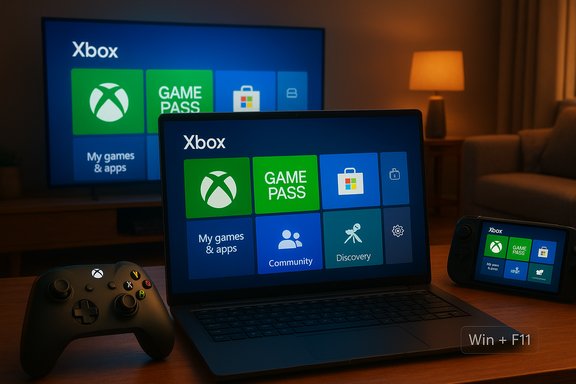
Microsoft has quietly extended its console‑style Xbox Full Screen Experience (FSE) beyond handheld exclusives, making a controller‑first, full‑screen Xbox shell available as a preview on a broader set of Windows 11 PCs through the Windows Insider and Xbox Insider programs.
Microsoft introduced the Full Screen Experience as a session‑level shell for Windows 11 to give handhelds and controller‑centric PCs a more console‑like front door without creating a separate operating system. In practice, FSE launches a chosen “home app” (the Xbox PC app by default) in full screen and intentionally defers or suppresses many desktop ornaments and non‑essential background services for that session. That design preserves Windows’ kernel, drivers, DRM and anti‑cheat stacks while changing which userland components run and which UI is presented.
The feature first shipped as the out‑of‑box experience on dedicated handhelds (notably the ASUS ROG Xbox Ally family). Microsoft has since folded the necessary plumbing into Windows 11 preview builds and begun a staged rollout so Insiders on qualifying builds can test FSE on laptops, desktops and tablets. The rollout is gated by OEM entitlements and server‑side flags, so installing the preview build does not guarantee that the toggle will appear on every device.
However, the rollout remains a staged preview and is gated by OEM entitlements for good reason. Compatibility with overlays, third‑party anti‑cheat, and driver stacks remains the primary practical risk, and reported resource‑savings should be treated as hardware‑dependent observations rather than promises. Enthusiasts can experiment through Windows and Xbox Insider programs, but mainstream users and competitive players should wait for OEM‑validated, stable releases.
For players who want a more console‑like way to consume their PC games, FSE is a strong, measured step forward; its eventual success will depend on careful vendor validation, clear messaging, and continued polish from Microsoft and its OEM partners.
Source: thewincentral.com Xbox full‑screen experience now available to Windows 11 PCs
 Background / Overview
Microsoft introduced the Full Screen Experience as a session‑level shell for Windows 11 to give handhelds and controller‑centric PCs a more console‑like front door without creating a separate operating system. In practice, FSE launches a chosen “home app” (the Xbox PC app by default) in full screen and intentionally defers or suppresses many desktop ornaments and non‑essential background services for that session. That design preserves Windows’ kernel, drivers, DRM and anti‑cheat stacks while changing which userland components run and which UI is presented.The feature first shipped as the out‑of‑box experience on dedicated handhelds (notably the ASUS ROG Xbox Ally family). Microsoft has since folded the necessary plumbing into Windows 11 preview builds and begun a staged rollout so Insiders on qualifying builds can test FSE on laptops, desktops and tablets. The rollout is gated by OEM entitlements and server‑side flags, so installing the preview build does not guarantee that the toggle will appear on every device.
What the Xbox Full Screen Experience actually is
Session posture, not a kernel rewrite
At its core, FSE is a session posture: it does not alter Windows kernels, driver models, or anti‑cheat/DRM subsystems. Instead, it instructs Windows to start an alternate user‑space shell where the Xbox app serves as the home UI and a number of Explorer‑centric elements and startup apps are deferred. This distinction is important because it means games still run on the same kernel and GPU drivers they always did, reducing the risk of low‑level incompatibilities while offering a different UX for gaming sessions.Key visible behaviors
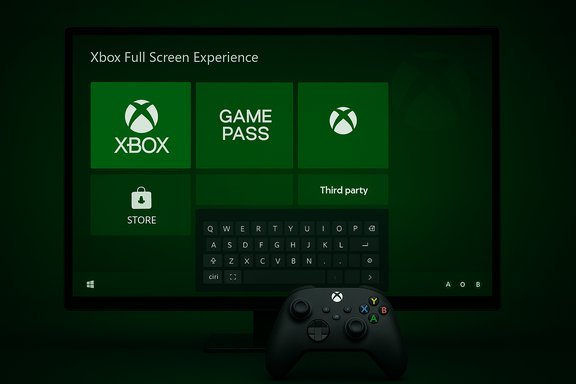
- A full‑screen, tile‑based launcher centered on the Xbox PC app that aggregates Game Pass, Microsoft Store purchases, Xbox Play Anywhere titles, and detected installs from other storefronts like Steam, Epic, and Battle.net.
- Controller‑first navigation: large tiles, an on‑screen controller keyboard for text entry, Xbox‑button long‑press task switching, and a Task View optimized for bumpers and sticks.
- Options to boot directly into FSE at startup, making the device behave like a turn‑on‑and‑play console if the user chooses.
- Multiple entry/exit methods: Settings → Gaming → Full screen experience, Task View, Game Bar settings, or a hotkey (Win + F11). Exiting the mode quickly returns you to the normal desktop.
Where it appears (availability and builds)
The FSE expansion has been included in Windows 11 preview builds in the 25H2 preview stream—specifically reported in builds around Build 26220.7271 (KB5070307)—and is being exposed on a staged basis to Insiders in the Dev and Beta channels who are also registered with the Xbox Insider program. OEM gating and entitlement checks control visibility.How it works under the hood
What FSE suppresses or defers
When you enter FSE, Windows applies session‑level policies that delay or avoid loading Explorer decorations (wallpaper, some taskbar ornaments) and non‑essential startup apps and background services. The practical effect is to reduce idle CPU wakeups and free user‑space RAM that would otherwise be consumed by desktop processes. This is particularly useful on thermally constrained handhelds and battery‑sensitive laptops.What FSE does not change
- The Windows kernel, GPU drivers, kernel‑mode anti‑cheat and DRM frameworks remain unchanged. Games still run with the same low‑level protections and drivers. FSE simply changes what layers of the userland shell are active at session start.
Performance and resource claims — measured, not guaranteed
Hands‑on reports and early testing mention directional gains in reclaimed RAM (commonly cited around 1–2 GB on tuned handhelds) and improved battery/thermal behavior in real scenarios. Those numbers vary widely by hardware configuration, installed apps, drivers and OEM tuning. Microsoft does not publish a universal “GB saved” guarantee; testers should treat headline figures as empirical, hardware‑dependent observations rather than guaranteed improvements.User‑facing features in detail
Library aggregation and discovery
FSE surfaces a consolidated game library that attempts to aggregate content across Game Pass, the Microsoft Store, and discovered installs from other stores. That single surface reduces friction when choosing a game on a controller‑first device, although local discovery still relies on the Xbox app’s heuristics for detecting non‑Store installs.Controller navigation and shortcuts
- Xbox button long‑press acts as a fast task switch between games and apps in many builds.
- On‑screen controller keyboard simplifies PIN or password entry without a physical keyboard.
- Win + F11 toggles the experience on/off on supported devices.
- Game Bar becomes a more central overlay for captures and quick toggles within FSE.
Boot‑to‑FSE option
Users can choose “Enter full screen experience on startup” so devices boot straight into the Xbox home app. Windows may recommend a restart to apply runtime optimizations after enabling this option. This is what allows a Windows handheld to emulate a console’s “turn on and play” feeling.Supported devices and OEM gating
Handhelds first, then broader previews
FSE was deliberately field‑tested on handheld partners such as the ASUS ROG Xbox Ally family, and Microsoft declared general availability for supported Windows handhelds before opening a preview path for more traditional PC form factors. Early supported device mentions include ROG Ally, MSI Claw, Lenovo Legion Go, and other enthusiast handhelds where OEMs have worked to validate firmware and drivers.Why OEM gating matters
Because FSE changes session policies and timing for background services, OEMs and driver vendors need to validate thermal behavior, firmware interactions, display drivers, and third‑party overlays. Microsoft’s staged, entitlement‑based rollout reduces the likelihood of a widespread compatibility surprise on unsupported hardware. Enthusiasts will be able to push the feature onto unsupported devices, but the safest path remains vendor‑enabled releases.Strengths — what FSE brings to Windows gaming
- Console‑like simplicity: For controller‑first users and handheld owners, FSE reduces friction and makes game discovery and launching feel immediate and familiar.
- Better resource posture for constrained hardware: Deferring desktop services and startup tasks can free RAM and reduce background wakeups, yielding steadier framerates and better battery life on modest hardware.
- Unified library and Game Pass prominence: Aggregating Game Pass and local installs into one navigable surface encourages faster time‑to‑game and curates Xbox ecosystem services more prominently on Windows.
- Non‑destructive and reversible: Because FSE is a session option that can be toggled or disabled, it gives users an opt‑in console‑style pathway without permanently changing their Windows installation.
Risks, unknowns, and compatibility concerns
Anti‑cheat, overlays and eSports use
Although FSE does not change kernel‑level anti‑cheat modules, real‑world compatibility with third‑party anti‑cheat systems, overlays (Discord, Steam overlay) and capture tools must be validated. Competitive and eSports players should avoid preview builds until vendors confirm support. Early reports highlight the need for vendor validation across driver stacks.Fragmentation and user confusion
The staged, OEM‑gated rollout and the session nature of FSE create a risk of fragmentation: similar hardware might show different behavior depending on OEM entitlements or preview flags. That can confuse consumers who expect a uniform “Xbox mode” across all Windows gaming devices. Clear OEM and Microsoft messaging will be required to avoid mismatched expectations.Feature completeness and accessibility gaps
Some testers have reported missing or inconsistent on‑screen keyboard behavior on non‑touch devices and other edge cases where controller‑only workflows are incomplete. The Xbox team documents these issues in build notes; they’re solvable but worth flagging for non‑technical users who expect a polished console experience. Treat FSE in preview as a work in progress.Telemetry and privacy considerations
Because FSE is still governed by server‑side entitlements and telemetry used to refine the rollout, privacy‑minded users and enterprise IT teams should understand what diagnostics are enabled by Insider and Xbox Insider participation. Organizations should control FSE exposure via group policies or by avoiding preview channels on production machines.Practical advice — how to test FSE safely
- Back up your system image and user data before enrolling in Insider channels or toggling boot‑to‑FSE.
- Use a secondary or non‑critical device for early testing (handhelds or a spare laptop).
- Join both the Windows Insider Program (Dev or Beta channel) and the Xbox Insider Program, install the Xbox Insider Hub, and opt into the PC Gaming preview as directed to gain access.
- Keep GPU, chipset and firmware drivers up to date and consult OEM guidance for vendor‑tuned images.
- If you rely on anti‑cheat for competitive play, wait for vendor confirmations before using FSE on your primary competitive rig.
Strategic analysis — why Microsoft is doing this
Product strategy and market positioning
FSE is a pragmatic attempt to bring console clarity to the fractured PC ecosystem while preserving Windows’ openness. By implementing FSE as a session posture instead of a different OS, Microsoft can deliver a distinct console‑like UX to targeted hardware without alienating PC storefronts or breaking compatibility—arguably the least disruptive way to sell “console feeling” on Windows. The move reinforces Game Pass and Xbox services as first‑class discovery channels on PC.Competitive context
The expansion of FSE aligns with broader market trends: Valve’s Steam Deck and other handhelds have driven interest in turn‑on‑and‑play experiences on PC hardware. Microsoft’s path allows OEMs to differentiate with tuned firmware (e.g., Ally‑style devices) while giving mainstream laptops and desktops an optional console posture. The key test will be whether OEMs, driver vendors and developers coalesce around consistent support.Developer and indie implications
A single, controller‑first surface that elevates Game Pass and Xbox discovery could help indie developers by exposing titles to casual discovery on handhelds and living‑room PCs. However, developers should watch for subtle changes to overlays, input handling and lifecycle notifications that may affect how their games present store pages and achievements in FSE.What to watch next
- OEM enablement timelines and which mainstream laptops and tablets will gain official FSE support beyond handhelds.
- Explicit driver and anti‑cheat vendor statements from NVIDIA, AMD and Intel confirming validated interactions with FSE.
- Microsoft’s formal guidance on stable‑channel availability and whether the feature will migrate from preview to broad rollout with a specific Windows Update schedule.
Conclusion
The Xbox Full Screen Experience is a thoughtful engineering compromise: it offers a console‑like, controller‑first front end for Windows 11 without splitting the platform or rewriting kernels. For handheld owners and controller‑centric players, FSE promises a meaningful UX improvement—faster time‑to‑game, reduced desktop noise and a unified discovery surface that highlights Game Pass and local libraries.However, the rollout remains a staged preview and is gated by OEM entitlements for good reason. Compatibility with overlays, third‑party anti‑cheat, and driver stacks remains the primary practical risk, and reported resource‑savings should be treated as hardware‑dependent observations rather than promises. Enthusiasts can experiment through Windows and Xbox Insider programs, but mainstream users and competitive players should wait for OEM‑validated, stable releases.
For players who want a more console‑like way to consume their PC games, FSE is a strong, measured step forward; its eventual success will depend on careful vendor validation, clear messaging, and continued polish from Microsoft and its OEM partners.
Source: thewincentral.com Xbox full‑screen experience now available to Windows 11 PCs