

Microsoft began rolling out Xbox Mode for Windows 11 PCs on April 30, 2026, expanding a controller-first, full-screen gaming interface beyond Asus ROG Xbox Ally handhelds to select desktops, laptops, tablets, and handheld PCs in supported markets. The pitch is simple: make a Windows machine feel less like a Windows machine when all the user wants to do is play. The complication is equally simple: Xbox Mode can cover the desktop, but it cannot erase the operating system underneath it. Microsoft has finally admitted that PC gaming needs a console layer; now it has to prove that layer is more than a polite curtain over Windows 11’s clutter.
For years, Microsoft’s PC gaming strategy had a strange gap at its center. Windows was the default platform for PC games, Xbox was the console brand, Game Pass was the subscription glue, and yet the living-room experience was left to Steam Big Picture, SteamOS, third-party handheld launchers, and the patience of users willing to juggle updates with a controller balanced on the couch.
Xbox Mode is the clearest sign yet that Microsoft sees that gap as a strategic liability. It gives Windows 11 a console-style surface: a full-screen Xbox interface, controller navigation, access to the Xbox app, Game Bar, cloud gaming, Game Pass, and a growing effort to pull in libraries from other PC storefronts. For someone already paying for Game Pass or buying Xbox Play Anywhere titles, that is not a cosmetic change. It is the difference between a PC that merely can play games and a PC that presents itself as a gaming device first.
The move also says something about Microsoft’s next hardware era. Project Helix, widely reported as the internal direction for the next-generation Xbox, points toward a hybrid device that can run traditional console software and PC games on one box. Xbox Mode looks like the software rehearsal for that future: not quite a console dashboard, not quite a Windows shell replacement, but something in between.
That middle ground is both the opportunity and the problem. Microsoft wants the flexibility of Windows, the simplicity of Xbox, and the economics of a cross-device gaming ecosystem. Users want the same thing, but without the pop-ups, background services, AI panels, app promotions, login nags, driver detours, and “just one more update” rituals that have become part of the Windows experience.
The addition of a gamepad cursor is a particularly practical concession. PC games, installers, launchers, mod tools, and store clients were not all designed for a console-like environment, and pretending otherwise would make Xbox Mode brittle. Translating thumbstick movement into mouse control is not elegant in the pure console sense, but it is honest about the PC ecosystem Microsoft is trying to tame.
That honesty only goes so far. Xbox Mode may improve the path into games, but it cannot eliminate the need for third-party launchers if the game lives on Steam, Epic Games Store, Ubisoft Connect, EA’s app, or another storefront. A unified library is welcome, but it is not the same as unified ownership, unified patching, or unified rights management. The icon may sit neatly in one place; the maintenance burden still belongs to the user.
This is where the console comparison gets dangerous for Microsoft. A console dashboard is backed by a tightly controlled platform where storage, updates, controllers, suspend behavior, save sync, and store entitlement generally follow one governing logic. Windows has decades of accumulated freedom, and freedom produces exceptions. Xbox Mode can smooth the first five minutes, but the sixth minute still belongs to PC gaming.
By pulling third-party game libraries into a single Xbox-facing experience, Microsoft is accepting reality rather than trying to wish it away. That is a notable change for a company that spent years treating the Microsoft Store as if it could become the natural home of PC gaming by force of bundling and persistence. The Xbox app has improved, but Steam remains the gravitational center of PC games because it earned trust in the boring places: downloads, updates, refunds, compatibility notes, input handling, community features, and sales.
Xbox Mode does not need to beat Steam at being Steam. It needs to make the Xbox ecosystem feel less isolated on Windows. If Game Pass titles, Xbox Play Anywhere purchases, cloud saves, and third-party libraries appear in one controller-friendly interface, Microsoft gets closer to the thing it has wanted for years: Xbox as a service layer rather than a box under the television.
Still, aggregation has limits. Launching a game from a single library view is not the same as managing mods, reshade presets, save locations, controller profiles, launch options, community patches, or alternate executables. PC gamers value precisely the kinds of control that make a console-style interface harder to perfect. The more Xbox Mode courts serious PC players, the more it runs into the messiness that made PC gaming powerful in the first place.
But the numbers also reveal the ceiling of the approach. If Xbox Mode shaves off a measurable slice of memory use while still leaving a multi-gigabyte Windows footprint, the achievement is real but incomplete. A console-like gaming appliance does not become truly console-like when it starts from a general-purpose desktop OS and then asks a shell to quiet the room.
This is why the “bloat” criticism sticks, even when it is sometimes imprecise. Users use the word to describe several different things: preinstalled consumer apps, background services, telemetry, advertising surfaces, cloud integration, widgets, AI features, account nudges, Teams remnants, OneDrive prompts, Edge tie-ins, and Windows components they did not ask for but cannot easily remove. Not all of these have the same performance cost, but together they create a feeling that the machine is never entirely the user’s.
That feeling is especially poisonous for gaming. A game console is allowed to be limited because it is focused. A Windows PC is allowed to be complicated because it is flexible. Xbox Mode asks users to believe they can have both, but the bargain weakens every time the experience drops back into a normal Windows dialog, a launcher update, a driver panel, or an AI-branded feature that feels orthogonal to the act of playing a game.
For gamers, that concern lands with unusual force. Performance culture on PC is obsessive because the platform makes tradeoffs visible. Frame rates, latency, CPU utilization, VRAM pressure, shader compilation, background recording, overlays, anti-cheat services, and driver versions are part of the daily vocabulary. Anything that looks like an unnecessary process becomes suspect, whether or not it is the true cause of a stutter.
The reported retreat from Gaming Copilot is therefore notable not because one AI feature would have made or broken Xbox Mode, but because it suggests Xbox leadership understands the mood. Players want Microsoft to fix login friction, controller behavior, library confusion, mod support, store reliability, cloud sync clarity, handheld sleep, docked display switching, and performance overhead before it tries to insert an assistant into the session.
That is the right instinct. The fastest way to make Xbox Mode credible is not to make it more futuristic. It is to make it quieter. In gaming, especially on a living-room screen, the best system software is the software that gets out of the way.
The timing makes sense. Handheld PCs are constrained by power and thermals, and docked handhelds expose those compromises on larger displays. A game that looks acceptable at 720p on a small screen may look soft on a television. If Auto SR can help bridge that gap while preserving playable frame rates, it gives Windows handhelds a feature that feels closer to console convenience.
But OS-level upscaling has inherent disadvantages. DLSS, FSR, and XeSS can use game-engine information when properly integrated, including motion vectors and temporal data that help reconstruct cleaner frames. A screen-space solution applied later in the pipeline has less context. It may work impressively in some games and stumble in others, especially when UI clarity, fine detail, motion stability, or input latency becomes noticeable.
The broader lesson is that Xbox Mode cannot rely on one layer of magic to normalize PC diversity. Upscaling, HDR handling, controller translation, sleep behavior, library aggregation, and docking improvements all help. None of them erase the underlying truth that Windows gaming is a matrix of hardware, drivers, stores, engines, anti-cheat systems, and user modifications.
Windows handhelds have historically struggled there. External displays can trigger resolution weirdness, refresh-rate confusion, HDR mismatches, controller priority problems, audio routing issues, and games that do not gracefully adapt to the new screen. A handheld PC can be more powerful and more open than a console while still feeling clumsier at the exact moment a living-room user expects simplicity.
Xbox Mode’s docking improvements are therefore not peripheral. They are central to the hybrid pitch. If Microsoft wants an Xbox-branded Windows device to move between handheld, desk, and TV, it must make display transitions feel deterministic. The user should not need to wonder whether the game will open on the wrong screen, whether the controller will be recognized, or whether the TV has entered the right latency mode.
This is also where Project Helix becomes more than a codename. A future Xbox that runs PC games will live or die by how well it hides PC ceremony without sacrificing PC capability. Docking is one of the places where that philosophy becomes measurable.
That coherence matters. The Steam Deck proved that PC gamers will accept a curated, console-like interface if it respects their library, exposes useful compatibility information, and still permits tinkering when desired. Desktop mode is there, but it is not constantly leaking into the primary experience. The machine has a center of gravity.
Xbox Mode is Microsoft’s attempt to create a similar center without abandoning Windows. That is a harder engineering problem and a harder product problem. Windows compatibility is Microsoft’s greatest advantage, but it is also the source of the friction Xbox Mode is trying to reduce.
The question is not whether Xbox Mode can be better than Steam Big Picture in isolation. Microsoft can build a polished launcher. The deeper question is whether Windows 11 can become a credible appliance OS when invoked in gaming mode. That requires discipline across Windows, Xbox, Store, Game Bar, driver partners, OEMs, and app developers. A shell cannot do that work alone.
The staged availability in select markets is sensible from Microsoft’s perspective, but it creates the usual Windows confusion. Some users install the latest update and see the feature. Others do not. Some find it labeled one way, others see older terminology, and some discover that the code exists but the switch has not been enabled for their device or region. That may be normal for a controlled rollout, but normal is not the same as satisfying.
For administrators, families, streamers, and power users who maintain multiple machines, the practical questions come quickly. Can Xbox Mode be disabled? Can it be enforced? Does it change startup behavior? How does it interact with local accounts, child accounts, kiosk-like setups, remote management, overlays, capture tools, third-party security software, and accessibility settings? Microsoft does not need to answer every edge case on day one, but the history of Windows suggests edge cases become mainstream faster than product teams expect.
There is also a security angle. A console-like experience can encourage users to treat a PC as if it were an appliance, but it remains a general-purpose computer with browsers, stores, launchers, mods, unsigned utilities, kernel-level anti-cheat drivers, and account tokens. If Microsoft wants Windows gaming devices to feel simpler, it also needs to make safe defaults clearer.
Xbox Mode can launch a modded game, but it cannot fully absorb the culture around it. Mod managers, load orders, dependencies, file permissions, script hooks, and community tools were built for desktop workflows. Trying to hide all of that behind a controller-first dashboard risks either breaking the power-user experience or giving new users a false sense of simplicity.
Microsoft has been here before with the Microsoft Store’s historical packaging restrictions and the rocky early years of Game Pass PC mod support. The company has improved, but trust lingers behind capability. PC gamers remember when access to files was awkward, when installs behaved differently from Win32 expectations, and when the Xbox app felt like a console service awkwardly stapled to Windows.
If Xbox Mode is to mature, it should not pretend every game is a sealed console package. It needs graceful exits into desktop tools, clear indicators when a game depends on an external launcher, and honest messaging around what the unified interface can and cannot manage. The worst outcome would be a glossy UI that makes troubleshooting harder.
Those questions are valid, but they are not the whole story. Xbox Mode’s larger significance is that Microsoft is finally designing a Windows experience around intent. When the user chooses Xbox Mode, the system should infer that gaming is the priority. That should affect notifications, updates, background tasks, input behavior, display settings, audio routing, capture tools, power profiles, and the visibility of non-gaming features.
This is where Microsoft has the chance to do something more ambitious than mimic Steam Big Picture. Windows knows a great deal about the hardware, the power state, the display, the account, the installed apps, and the running game. A well-designed gaming mode could become an orchestration layer for the whole system, not just a launcher.
But intent cuts both ways. If the user says “this is a gaming session,” Microsoft must resist the urge to treat that session as an opportunity to promote unrelated services. No Copilot interruptions. No app recommendations. No account upsell. No surprise UI experiments. The bargain has to be clean: the user gives Xbox Mode the foreground, and Xbox Mode gives the user focus.
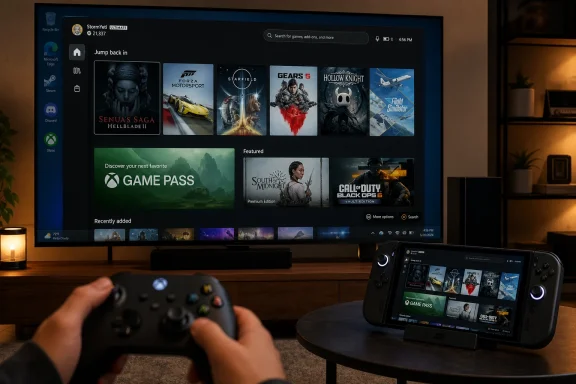 Microsoft Finally Builds the Living-Room Windows It Kept Hinting At
For years, Microsoft’s PC gaming strategy had a strange gap at its center. Windows was the default platform for PC games, Xbox was the console brand, Game Pass was the subscription glue, and yet the living-room experience was left to Steam Big Picture, SteamOS, third-party handheld launchers, and the patience of users willing to juggle updates with a controller balanced on the couch.Xbox Mode is the clearest sign yet that Microsoft sees that gap as a strategic liability. It gives Windows 11 a console-style surface: a full-screen Xbox interface, controller navigation, access to the Xbox app, Game Bar, cloud gaming, Game Pass, and a growing effort to pull in libraries from other PC storefronts. For someone already paying for Game Pass or buying Xbox Play Anywhere titles, that is not a cosmetic change. It is the difference between a PC that merely can play games and a PC that presents itself as a gaming device first.
The move also says something about Microsoft’s next hardware era. Project Helix, widely reported as the internal direction for the next-generation Xbox, points toward a hybrid device that can run traditional console software and PC games on one box. Xbox Mode looks like the software rehearsal for that future: not quite a console dashboard, not quite a Windows shell replacement, but something in between.
That middle ground is both the opportunity and the problem. Microsoft wants the flexibility of Windows, the simplicity of Xbox, and the economics of a cross-device gaming ecosystem. Users want the same thing, but without the pop-ups, background services, AI panels, app promotions, login nags, driver detours, and “just one more update” rituals that have become part of the Windows experience.
The Console Illusion Works Best When You Do Not Touch the Edges
At its best, Xbox Mode understands the assignment. A controller-first interface matters because the normal Windows desktop is still hostile territory from ten feet away. Tiny taskbar icons, nested settings pages, launcher windows, account prompts, and inconsistent focus behavior are not minor annoyances when the primary input device is a gamepad.The addition of a gamepad cursor is a particularly practical concession. PC games, installers, launchers, mod tools, and store clients were not all designed for a console-like environment, and pretending otherwise would make Xbox Mode brittle. Translating thumbstick movement into mouse control is not elegant in the pure console sense, but it is honest about the PC ecosystem Microsoft is trying to tame.
That honesty only goes so far. Xbox Mode may improve the path into games, but it cannot eliminate the need for third-party launchers if the game lives on Steam, Epic Games Store, Ubisoft Connect, EA’s app, or another storefront. A unified library is welcome, but it is not the same as unified ownership, unified patching, or unified rights management. The icon may sit neatly in one place; the maintenance burden still belongs to the user.
This is where the console comparison gets dangerous for Microsoft. A console dashboard is backed by a tightly controlled platform where storage, updates, controllers, suspend behavior, save sync, and store entitlement generally follow one governing logic. Windows has decades of accumulated freedom, and freedom produces exceptions. Xbox Mode can smooth the first five minutes, but the sixth minute still belongs to PC gaming.
The Storefront War Has Become a Library Management War
The most important part of Xbox Mode may not be its visual design. It is the assumption that players no longer think in terms of one store. A modern PC gaming library is scattered across Steam sales, Epic giveaways, Game Pass installs, Battle.net accounts, itch.io purchases, publisher launchers, cloud saves, and console cross-buy entitlements.By pulling third-party game libraries into a single Xbox-facing experience, Microsoft is accepting reality rather than trying to wish it away. That is a notable change for a company that spent years treating the Microsoft Store as if it could become the natural home of PC gaming by force of bundling and persistence. The Xbox app has improved, but Steam remains the gravitational center of PC games because it earned trust in the boring places: downloads, updates, refunds, compatibility notes, input handling, community features, and sales.
Xbox Mode does not need to beat Steam at being Steam. It needs to make the Xbox ecosystem feel less isolated on Windows. If Game Pass titles, Xbox Play Anywhere purchases, cloud saves, and third-party libraries appear in one controller-friendly interface, Microsoft gets closer to the thing it has wanted for years: Xbox as a service layer rather than a box under the television.
Still, aggregation has limits. Launching a game from a single library view is not the same as managing mods, reshade presets, save locations, controller profiles, launch options, community patches, or alternate executables. PC gamers value precisely the kinds of control that make a console-style interface harder to perfect. The more Xbox Mode courts serious PC players, the more it runs into the messiness that made PC gaming powerful in the first place.
A Leaner Shell Cannot Fully Disguise a Heavy OS
Microsoft and its partners have been eager to talk about reduced background activity and freed memory in Xbox Mode, and that matters. On handheld PCs especially, every background task competes with limited CPU headroom, battery life, thermals, and shared memory. A mode that trims desktop overhead before a game launches is not just marketing; it can be felt in frame pacing, responsiveness, and fan noise.But the numbers also reveal the ceiling of the approach. If Xbox Mode shaves off a measurable slice of memory use while still leaving a multi-gigabyte Windows footprint, the achievement is real but incomplete. A console-like gaming appliance does not become truly console-like when it starts from a general-purpose desktop OS and then asks a shell to quiet the room.
This is why the “bloat” criticism sticks, even when it is sometimes imprecise. Users use the word to describe several different things: preinstalled consumer apps, background services, telemetry, advertising surfaces, cloud integration, widgets, AI features, account nudges, Teams remnants, OneDrive prompts, Edge tie-ins, and Windows components they did not ask for but cannot easily remove. Not all of these have the same performance cost, but together they create a feeling that the machine is never entirely the user’s.
That feeling is especially poisonous for gaming. A game console is allowed to be limited because it is focused. A Windows PC is allowed to be complicated because it is flexible. Xbox Mode asks users to believe they can have both, but the bargain weakens every time the experience drops back into a normal Windows dialog, a launcher update, a driver panel, or an AI-branded feature that feels orthogonal to the act of playing a game.
Copilot Became the Symbol of a Larger Windows Trust Problem
The backlash to Copilot in Windows was never only about one sidebar or one assistant. It was about Microsoft’s habit of turning operating-system real estate into a strategic billboard. Even users who like AI tools often object to the sense that Windows is being reshaped around corporate priorities before it is being refined around user needs.For gamers, that concern lands with unusual force. Performance culture on PC is obsessive because the platform makes tradeoffs visible. Frame rates, latency, CPU utilization, VRAM pressure, shader compilation, background recording, overlays, anti-cheat services, and driver versions are part of the daily vocabulary. Anything that looks like an unnecessary process becomes suspect, whether or not it is the true cause of a stutter.
The reported retreat from Gaming Copilot is therefore notable not because one AI feature would have made or broken Xbox Mode, but because it suggests Xbox leadership understands the mood. Players want Microsoft to fix login friction, controller behavior, library confusion, mod support, store reliability, cloud sync clarity, handheld sleep, docked display switching, and performance overhead before it tries to insert an assistant into the session.
That is the right instinct. The fastest way to make Xbox Mode credible is not to make it more futuristic. It is to make it quieter. In gaming, especially on a living-room screen, the best system software is the software that gets out of the way.
Auto SR Shows the Promise and the Peril of OS-Level Gaming Magic
Automatic Super Resolution is exactly the kind of feature Microsoft should be experimenting with if it wants Windows to become a smarter gaming platform. The idea is attractive: upscale at the operating-system level, improve perceived image quality, reduce the need for per-game integration, and help handheld hardware punch above its native rendering resolution. On devices with NPUs, Microsoft also gets to argue that AI hardware has a practical gaming use beyond chatbots and content generation.The timing makes sense. Handheld PCs are constrained by power and thermals, and docked handhelds expose those compromises on larger displays. A game that looks acceptable at 720p on a small screen may look soft on a television. If Auto SR can help bridge that gap while preserving playable frame rates, it gives Windows handhelds a feature that feels closer to console convenience.
But OS-level upscaling has inherent disadvantages. DLSS, FSR, and XeSS can use game-engine information when properly integrated, including motion vectors and temporal data that help reconstruct cleaner frames. A screen-space solution applied later in the pipeline has less context. It may work impressively in some games and stumble in others, especially when UI clarity, fine detail, motion stability, or input latency becomes noticeable.
The broader lesson is that Xbox Mode cannot rely on one layer of magic to normalize PC diversity. Upscaling, HDR handling, controller translation, sleep behavior, library aggregation, and docking improvements all help. None of them erase the underlying truth that Windows gaming is a matrix of hardware, drivers, stores, engines, anti-cheat systems, and user modifications.
Docking Is Where the Hybrid Dream Meets the HDMI Cable
Improved docking sounds mundane until you remember that the Nintendo Switch built an empire on making docking feel obvious. Pick up the device, play on the couch, drop it into a dock, continue on the television. The technical work underneath that experience is less visible than the behavioral promise: the device understands what the user is trying to do.Windows handhelds have historically struggled there. External displays can trigger resolution weirdness, refresh-rate confusion, HDR mismatches, controller priority problems, audio routing issues, and games that do not gracefully adapt to the new screen. A handheld PC can be more powerful and more open than a console while still feeling clumsier at the exact moment a living-room user expects simplicity.
Xbox Mode’s docking improvements are therefore not peripheral. They are central to the hybrid pitch. If Microsoft wants an Xbox-branded Windows device to move between handheld, desk, and TV, it must make display transitions feel deterministic. The user should not need to wonder whether the game will open on the wrong screen, whether the controller will be recognized, or whether the TV has entered the right latency mode.
This is also where Project Helix becomes more than a codename. A future Xbox that runs PC games will live or die by how well it hides PC ceremony without sacrificing PC capability. Docking is one of the places where that philosophy becomes measurable.
SteamOS Remains the Unspoken Benchmark
Microsoft’s real competitor here is not only Sony, Nintendo, or even Valve’s storefront. It is Valve’s argument that the best way to make PC gaming feel console-like is to stop putting traditional Windows in the foreground. SteamOS is not perfect, and it gives up some compatibility compared with Windows, particularly around certain anti-cheat implementations and non-Steam edge cases. But on the Steam Deck, the system has a coherence Windows handhelds have struggled to match.That coherence matters. The Steam Deck proved that PC gamers will accept a curated, console-like interface if it respects their library, exposes useful compatibility information, and still permits tinkering when desired. Desktop mode is there, but it is not constantly leaking into the primary experience. The machine has a center of gravity.
Xbox Mode is Microsoft’s attempt to create a similar center without abandoning Windows. That is a harder engineering problem and a harder product problem. Windows compatibility is Microsoft’s greatest advantage, but it is also the source of the friction Xbox Mode is trying to reduce.
The question is not whether Xbox Mode can be better than Steam Big Picture in isolation. Microsoft can build a polished launcher. The deeper question is whether Windows 11 can become a credible appliance OS when invoked in gaming mode. That requires discipline across Windows, Xbox, Store, Game Bar, driver partners, OEMs, and app developers. A shell cannot do that work alone.
Enterprise Lessons Apply Even in the Game Room
WindowsForum readers know the pattern from enterprise deployments. A feature can be useful and still fail if it arrives wrapped in policy ambiguity, uneven rollout behavior, inconsistent documentation, and unclear support boundaries. Xbox Mode is a consumer gaming feature, but it is still Windows, which means rollout mechanics matter.The staged availability in select markets is sensible from Microsoft’s perspective, but it creates the usual Windows confusion. Some users install the latest update and see the feature. Others do not. Some find it labeled one way, others see older terminology, and some discover that the code exists but the switch has not been enabled for their device or region. That may be normal for a controlled rollout, but normal is not the same as satisfying.
For administrators, families, streamers, and power users who maintain multiple machines, the practical questions come quickly. Can Xbox Mode be disabled? Can it be enforced? Does it change startup behavior? How does it interact with local accounts, child accounts, kiosk-like setups, remote management, overlays, capture tools, third-party security software, and accessibility settings? Microsoft does not need to answer every edge case on day one, but the history of Windows suggests edge cases become mainstream faster than product teams expect.
There is also a security angle. A console-like experience can encourage users to treat a PC as if it were an appliance, but it remains a general-purpose computer with browsers, stores, launchers, mods, unsigned utilities, kernel-level anti-cheat drivers, and account tokens. If Microsoft wants Windows gaming devices to feel simpler, it also needs to make safe defaults clearer.
The Modding Problem Will Not Fit Neatly Inside Xbox Mode
Modding is the clearest example of why PC gaming resists console simplification. For many players, mods are not an advanced hobby; they are the reason to buy the PC version. Texture packs, bug fixes, total conversions, script extenders, reshade profiles, accessibility tweaks, unofficial patches, and save editors all sit outside the clean console model.Xbox Mode can launch a modded game, but it cannot fully absorb the culture around it. Mod managers, load orders, dependencies, file permissions, script hooks, and community tools were built for desktop workflows. Trying to hide all of that behind a controller-first dashboard risks either breaking the power-user experience or giving new users a false sense of simplicity.
Microsoft has been here before with the Microsoft Store’s historical packaging restrictions and the rocky early years of Game Pass PC mod support. The company has improved, but trust lingers behind capability. PC gamers remember when access to files was awkward, when installs behaved differently from Win32 expectations, and when the Xbox app felt like a console service awkwardly stapled to Windows.
If Xbox Mode is to mature, it should not pretend every game is a sealed console package. It needs graceful exits into desktop tools, clear indicators when a game depends on an external launcher, and honest messaging around what the unified interface can and cannot manage. The worst outcome would be a glossy UI that makes troubleshooting harder.
The Real Win Is Not Performance, It Is Intent
The performance discussion around Xbox Mode will attract the most heated arguments because numbers are easy to fight over. How much RAM is saved? How many frames are gained? Which background tasks stop? Which devices benefit? Does it matter on a high-end desktop with 64GB of memory? Does it matter on an entry-level handheld sharing RAM with integrated graphics?Those questions are valid, but they are not the whole story. Xbox Mode’s larger significance is that Microsoft is finally designing a Windows experience around intent. When the user chooses Xbox Mode, the system should infer that gaming is the priority. That should affect notifications, updates, background tasks, input behavior, display settings, audio routing, capture tools, power profiles, and the visibility of non-gaming features.
This is where Microsoft has the chance to do something more ambitious than mimic Steam Big Picture. Windows knows a great deal about the hardware, the power state, the display, the account, the installed apps, and the running game. A well-designed gaming mode could become an orchestration layer for the whole system, not just a launcher.
But intent cuts both ways. If the user says “this is a gaming session,” Microsoft must resist the urge to treat that session as an opportunity to promote unrelated services. No Copilot interruptions. No app recommendations. No account upsell. No surprise UI experiments. The bargain has to be clean: the user gives Xbox Mode the foreground, and Xbox Mode gives the user focus.
The Xbox Shell Is Only as Good as the Windows It Silences
The early verdict on Xbox Mode should be neither triumphalist nor dismissive. Microsoft has built something Windows gaming plainly needed, but it has built it on top of the very platform habits that made the need so obvious. The feature’s success will depend less on the splash screen than on the discipline behind it.- Xbox Mode began rolling out to Windows 11 PCs on April 30, 2026, after earlier life as the Xbox Full Screen Experience on Asus ROG Xbox Ally hardware.
- The interface gives Microsoft a stronger living-room and handheld answer to Steam Big Picture, especially for Game Pass and Xbox Play Anywhere users.
- Unified library views reduce launcher clutter, but they do not remove the need for third-party stores, update systems, mod tools, and desktop troubleshooting.
- Reduced background activity is useful, especially on handhelds, but Windows 11’s broader reputation for clutter remains a strategic problem.
- Auto SR and improved docking show Microsoft is thinking beyond a launcher, though both features must prove themselves across messy real-world hardware and games.
- The reported retreat from Gaming Copilot is a healthy sign if it means Xbox leadership is prioritizing friction, reliability, and player control over AI branding.
References
- Primary source: aol.com
Published: 2026-05-25T09:10:08.352507
Loading…
www.aol.com - Related coverage: windowscentral.com
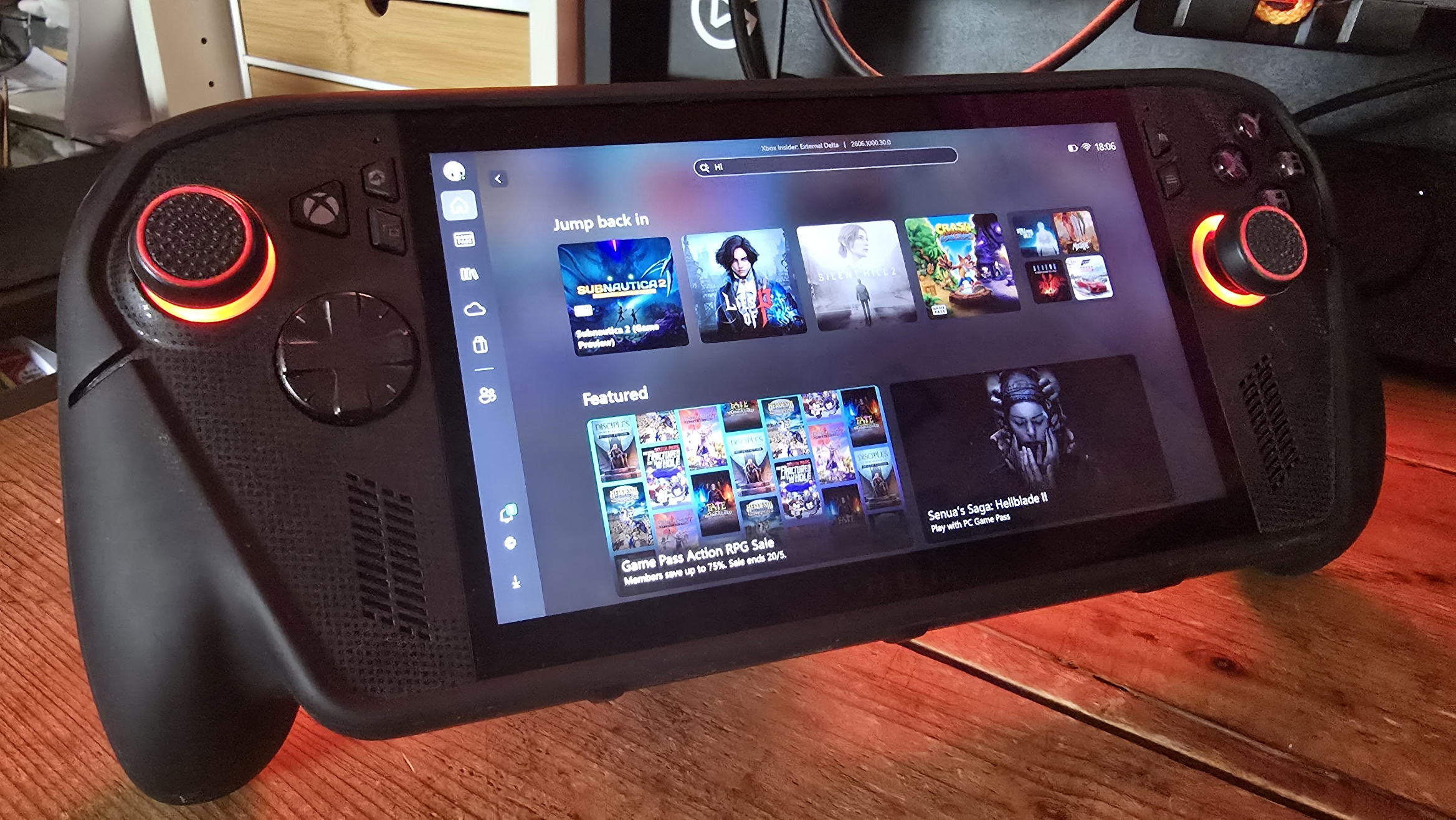
Xbox Ally in 2026: The state of "Xbox Mode" on PC, AutoSR tested, and more
I often think I'm the only "game journalist" on Earth actively using the Xbox Ally and Xbox Mode on PC. Here's how it's going so far. www.windowscentral.com
- Related coverage: news.xbox.com
Loading…
news.xbox.com - Related coverage: gamespot.com

Xbox Mode, Formerly Xbox Full Screen Experience, Finally Launches On Windows 11 In April
Xbox Mode, formerly known as Xbox Fullscreen Experience, will start shipping on Windows 11 in April. www.gamespot.com
- Official source: blogs.windows.com

Windows 11 PC gamers: Xbox mode rolls out and ROG Xbox Ally updates include Auto SR preview
Xbox mode will begin rolling out in select markets to Windows 11 PCs, including laptops, desktops and tablets, bringing a console-inspired Xbox experience to more players than ever. Xbox mode is designed for the moments when you want your games blogs.windows.com
- Related coverage: tomshardware.com
Loading…
www.tomshardware.com
- Related coverage: purexbox.com
Loading…
www.purexbox.com - Related coverage: games.gg
Loading…
games.gg - Related coverage: techrepublic.com

Microsoft Plans ‘Xbox Mode’ for Windows 11 PCs Starting in April
Microsoft says Xbox mode is coming to Windows 11 in April, bringing a console-style interface, faster game loading tools, and a unified PC strategy.www.techrepublic.com
- Related coverage: technobezz.com

Microsoft Launches Xbox Mode for All Windows 11 Devices Starting April 30
Windows 11 devices become gaming consoles with a new controller-first interface, unified game library, and Quick Resume starting April 30. www.technobezz.com
- Related coverage: techradar.com
Loading…
www.techradar.com - Related coverage: pcgamer.com
Loading…
www.pcgamer.com
