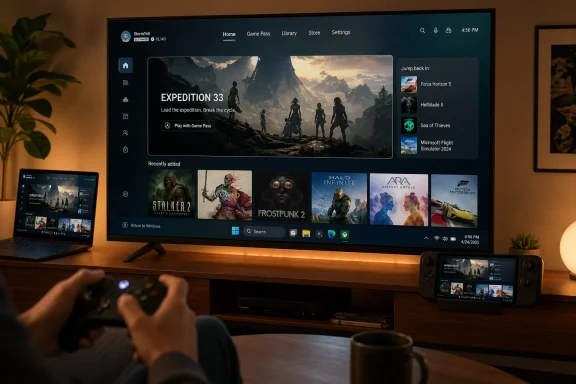
Microsoft began rolling out Xbox Mode to Windows 11 PCs on April 30, 2026, in select markets, extending its controller-optimized, full-screen gaming interface beyond handhelds to desktops, laptops, and tablets through a gradual Windows update release. The feature is less a new “mode” than a statement of intent: Windows is being asked to behave more like a console when the player wants one. For Microsoft, that is both overdue and risky, because the company is trying to make the PC feel simpler without making Windows feel less like Windows. The real story is not the launcher; it is Microsoft’s attempt to turn Xbox from a box under the TV into a posture that Windows can assume.
For decades, the PC’s greatest gaming advantage has also been its greatest living-room liability. It can run storefronts, mods, launchers, overlays, drivers, Discord, capture tools, anti-cheat services, and a browser with 42 tabs open. That freedom is why PC gaming won the high end, but it is also why Windows remains a poor fit for a couch, a controller, and a ten-foot display.
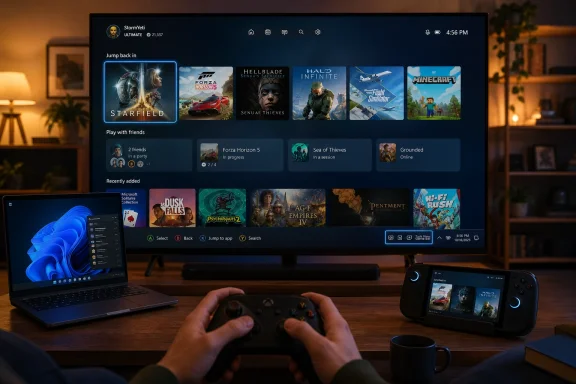
Xbox Mode is Microsoft’s most direct answer yet to that contradiction. It gives Windows 11 a console-inspired, full-screen interface designed around a controller, with access points through Game Bar, Task View, the Xbox app, and a Windows shortcut. The pitch is simple: when you want to play, Windows should stop behaving like a productivity environment and start behaving like a game machine.
That sounds obvious until you remember how reluctantly Microsoft has historically altered the Windows shell for specific contexts. Tablet Mode in Windows 10 was a blunt instrument. Game Mode was largely invisible. The Xbox app has often felt like an application layered on top of Windows rather than a first-class expression of it. Xbox Mode is different because it asks Windows to organize itself around a player’s intent, not merely expose another gaming feature.
The timing matters. Valve’s Steam Deck proved that a PC can be sold as a console-like appliance if the operating environment gets out of the way. Windows handhelds, by contrast, have often shipped with more power and more compatibility but a worse first five minutes. Microsoft did not need another benchmark win; it needed an answer to the question every handheld buyer quietly asks: why am I using a desktop OS with a thumbstick?
Under the hood, the requirements are less glamorous than the branding. Microsoft’s support documentation places Xbox Mode on Windows 11 version 24H2 or later in supported markets, while current reporting around the latest builds points to broader availability arriving through 25H2-era updates and Insider-tested paths. The practical advice is mundane but important: this is not a downloadable “Xbox OS” and it is not a replacement shell that magically appears on every PC at once.
The experience itself is deliberately familiar. Xbox Mode starts a gaming home app, runs games full screen where possible, and presents a controller-optimized surface for browsing and launching titles. It can aggregate the Xbox Game Pass catalog and installed games from major PC storefronts, which is essential if Microsoft wants this to be more than a Game Pass billboard.
The feature also includes escape hatches back to the desktop. You can move between Xbox Mode and Windows, use Task View, invoke Game Bar, and return to normal desktop behavior when the session demands it. That duality is the entire bet: Microsoft wants the console feel without surrendering the PC’s messy openness.
On a handheld, the case for a console-style interface is nearly impossible to dispute. Tiny screens, analog sticks, touch targets, and battery constraints make the traditional Windows desktop feel like a tax paid before playing. The handheld category exposed Windows at its least graceful: technically compatible with almost everything, emotionally optimized for almost nothing.
The full-screen experience attacked that problem by reducing friction. It emphasized a gaming home, controller navigation, and fewer background distractions. On handhelds, Microsoft also ties startup behavior and background process limits to the experience, which can improve battery life and performance by delaying or suppressing nonessential startup activity.
On desktops and laptops, the case is subtler. A tower PC under a desk does not need to hide Windows from a mouse and keyboard user. But a gaming laptop connected to a TV, a small-form-factor PC in a media cabinet, or a tablet used as a portable game machine absolutely benefits from a mode that treats the controller as a first-class input device. Microsoft is not just chasing handhelds; it is trying to make Windows plausible in every place a console currently feels easier.
Microsoft’s version has a different burden. Valve can make a curated gaming appliance and treat desktop mode as an advanced option. Microsoft has to graft a console posture onto the dominant desktop operating system without breaking the expectations of businesses, power users, anti-cheat vendors, accessibility tools, peripheral makers, and the billion habits that orbit Windows.
That makes Xbox Mode both less pure and more ambitious. It is not trying to replace the desktop. It is trying to make the desktop context-sensitive. When you are writing an email, Windows should be Windows. When you pick up a controller, Windows should know enough to get out of the way.
This is where the feature becomes more strategically interesting than its current interface. If Windows can shift between operating moods — work, gaming, tablet, handheld, presentation, kiosk — then Xbox Mode is not an endpoint. It is the most emotionally resonant test case for a Windows shell that changes its assumptions based on intent.
That skepticism is earned. Windows gaming PCs often boot into a carnival of launchers, updaters, RGB utilities, cloud sync agents, telemetry services, audio control panels, and OEM helper apps. A console’s advantage is not only hardware efficiency; it is that the system is socially and technically organized around one main job at a time.
Xbox Mode cannot fix every third-party excess. It cannot make a poorly optimized game good, rewrite a GPU driver, or stop every vendor from treating startup as a land grab. But if Microsoft can create a blessed gaming session state where certain background behavior is deferred, startup activity is constrained, and the UI assumes full-screen play, it can begin to repair a decade-old confidence problem.
That matters most on portable devices. Battery life is a brutal teacher. A background process that is merely annoying on a desktop becomes a betrayal on a handheld. If Xbox Mode can make Windows feel less wasteful in those moments, it gives hardware partners a reason to keep betting on Windows rather than conceding the category to SteamOS-like alternatives.
PC gaming’s identity depends on openness. Players expect multiple storefronts, arbitrary executables, mod managers, community patches, reshade tools, emulators, Discord overlays, streaming utilities, and weird peripherals from companies that may or may not still exist. A console-like interface that blocks too much becomes a cage. One that blocks too little becomes a skin.
Microsoft is walking that line by making Xbox Mode a layer rather than a lockdown. The support documentation makes clear that apps may behave differently: one window at a time, full screen where possible, some shortcuts disabled, some multi-window apps constrained. That is the cost of making Windows behave coherently through a controller.
The risk is that edge cases will define perception. A game launcher that opens a tiny authentication window. A mod tool that expects desktop focus. A storefront update prompt that does not play nicely with the full-screen shell. These annoyances are survivable on a keyboard-and-mouse desktop, but they feel amateurish from ten feet away.
Microsoft’s success will depend less on the first-party Xbox app than on the dull, difficult work of making third-party PC behavior tolerable in a controller-first environment. The dream is a unified library. The nightmare is a full-screen launcher that drops players into three more launchers.
The company’s Project Helix messaging points toward a next-generation Xbox strategy that is less about a sealed-off console generation and more about compatibility across PC and console-like hardware. Microsoft has talked about a next-generation first-party console, custom AMD silicon, and a future in which developers can target a more unified Xbox and Windows ecosystem. Xbox Mode is the consumer-facing expression of that developer strategy.
For developers, the attraction is obvious. If a game can be built, tested, distributed, and optimized across Windows PCs, handhelds, and future Xbox hardware with fewer platform-specific forks, Microsoft can make its ecosystem more attractive even when the traditional console install base is under pressure. The company wants developers to think of Windows not as the unruly sibling of Xbox, but as part of the same continuum.
That is why Advanced Shader Delivery, DirectStorage work, graphics tooling, and controller-first shell improvements belong in the same conversation. One reduces stutter. One improves loading and asset flow. One improves diagnostics. One improves the moment the player sits down. Individually, they are incremental; together, they are Microsoft trying to make Windows gaming feel less accidental.
Sony still has immense strength in console identity and exclusive software culture. Nintendo remains the master of integrated hardware and software design. Valve has become the unlikely champion of frictionless PC gaming on handheld hardware. Microsoft’s advantage is different: it owns Windows, Xbox, DirectX, Game Pass, Azure, and the developer tools that sit beneath much of modern PC gaming.
Xbox Mode is an attempt to turn that sprawl into a coherent user experience. It says that the Xbox ecosystem is not confined to the console and that Windows PCs can become Xbox-like when the player wants them to. That is powerful if it works and embarrassing if it feels like a themed launcher.
The competitive pressure is obvious. SteamOS has shown that gamers will accept a non-Windows environment if it gives them a better appliance experience. Microsoft cannot allow the most exciting PC gaming hardware category to normalize around an operating system it does not control. Xbox Mode is not just a feature for players; it is a defensive perimeter around Windows’ relevance in gaming hardware.
The word mode also carries expectations. Airplane Mode disables radios. Dark Mode changes the system’s visual assumptions. Tablet Mode, for all its flaws, implied an alternate posture. Xbox Mode tells users that Windows can enter a state where gaming is primary and everything else is subordinate.
That is a bigger promise than a launcher can satisfy. A true Xbox Mode should eventually touch update timing, notification behavior, power profiles, input handling, display configuration, audio routing, HDR management, capture settings, cloud saves, and background tasks. Some of those pieces already exist elsewhere in Windows; the challenge is making them feel orchestrated rather than scattered.
This is where Microsoft’s tendency to ship overlapping features could become a liability. Game Bar, the Xbox app, Windows Settings, Task View, Store, Game Pass, and OEM utilities already compete for attention. Xbox Mode needs to become the organizing surface, not another place where settings go to hide.
Windows is increasingly being shaped by context-specific experiences. Gaming is the friendly version because the user benefit is obvious and the stakes are low. But the same logic can apply to education, frontline work, shared devices, developer workstations, or secure desktop states. Microsoft’s willingness to tune the shell around a specific task is a signal about where Windows may be headed.
There are also practical concerns. Any feature that changes startup behavior, full-screen app handling, keyboard shortcuts, and background processes is something administrators will eventually want policy control over. Gaming PCs in schools, esports labs, training environments, and shared entertainment spaces are not imaginary edge cases. They are exactly the kind of machines where a controlled full-screen gaming posture could be useful or disruptive depending on who manages it.
The security angle is less dramatic than it may sound. Xbox Mode is not a new privilege boundary or a sandbox. It is a user experience and process-management posture running on Windows. But as Microsoft adds more mode-based behavior to the OS, administrators will need clear documentation, predictable policy surfaces, and the ability to keep consumer affordances from bleeding into managed environments.
The best version of Xbox Mode would treat the PC like a console without pretending it is one. It would preserve access to Steam, Epic, GOG, Battle.net, Ubisoft Connect, EA, itch.io, emulators where legal, local executables, mods, and cloud services. It would also make all of that feel less like a rummage sale.
Microsoft has some advantages here. The Xbox app’s aggregated library work gives the company a starting point. Game Bar already provides an overlay layer. Windows Update can deliver OS-side improvements. DirectX and developer tooling can address performance problems closer to the metal. Few companies could attack the problem from so many layers at once.
But that breadth is also why failure would be so damning. If Microsoft cannot make Windows gaming feel coherent with control of the OS, store, app, subscription, APIs, and hardware partnerships, then the conclusion will not be that the problem was impossible. It will be that Microsoft was too internally fragmented to solve it.
Consoles win the living room because they reduce ceremony. Turn on the device, pick a game, play. The PC traditionally asks for a login, an update, a launcher, another launcher, a driver notice, a display quirk, and perhaps a Bluetooth controller that has chosen this moment to rediscover itself.
Xbox Mode does not eliminate all of that. But it directly targets the ceremony problem by giving Windows a more legible destination for play. If a user can sit down, press a controller button, land in a coherent gaming surface, and launch the game they wanted, the living-room PC becomes less of a hobby project and more of a product category.
The opportunity is not limited to enthusiasts. A midrange gaming laptop connected to a television is already a console substitute for many households. A mini PC with a capable GPU can be a living-room machine. A handheld docked to a TV can behave like a Switch with a PC library. Xbox Mode gives these scenarios a Microsoft-sanctioned front door.
Windows cannot automatically inherit that trust. PC versions may differ from console versions. Some Xbox console games are not available on PC. Licensing, anti-cheat, storefront fragmentation, and publisher choices still shape what users can actually play. Xbox Mode does not mean every Xbox console title suddenly runs on a Windows PC.
That distinction will need relentless clarity. If mainstream users see “Xbox Mode” and assume it turns a laptop into an Xbox Series console, disappointment will follow. Microsoft’s messaging so far leans toward “console-inspired” and “controller-optimized,” which is accurate. The company should keep using that language, even if marketing would prefer the more magical interpretation.
The payoff, if Microsoft manages expectations well, is brand expansion without brand dilution. Xbox can become the gaming layer across Microsoft devices, while dedicated Xbox hardware remains the curated appliance for people who do not want Windows involved at all. That is a delicate balance, but Microsoft has little choice: the market has already moved beyond a single-box definition of gaming.
The more important test comes in the updates that follow. Does Microsoft iterate quickly? Does it improve third-party storefront handling? Does it expose better settings? Does it give OEMs and administrators sane controls? Does it reduce the number of moments where the user needs to reach for a keyboard?
Microsoft’s Windows gaming problem has rarely been a lack of announcements. It has been follow-through. Features arrive, branding changes, settings migrate, apps are redesigned, and users are left wondering which piece is supposed to be authoritative. Xbox Mode will need continuity if it is to become a habit rather than a curiosity.
The company should also resist the temptation to make Xbox Mode too aggressively promotional. If the surface becomes a Game Pass billboard first and a user’s library second, PC players will reject it. The mode’s credibility depends on respecting the fact that Windows gamers often have libraries spread across years, stores, drives, and launchers.
Source: GameLuster Xbox Mode Is Now Rolling Out on Windows 11 PCs | GameLuster
 Microsoft Finally Admits the Desktop Is Bad at Being a Console
For decades, the PC’s greatest gaming advantage has also been its greatest living-room liability. It can run storefronts, mods, launchers, overlays, drivers, Discord, capture tools, anti-cheat services, and a browser with 42 tabs open. That freedom is why PC gaming won the high end, but it is also why Windows remains a poor fit for a couch, a controller, and a ten-foot display.Xbox Mode is Microsoft’s most direct answer yet to that contradiction. It gives Windows 11 a console-inspired, full-screen interface designed around a controller, with access points through Game Bar, Task View, the Xbox app, and a Windows shortcut. The pitch is simple: when you want to play, Windows should stop behaving like a productivity environment and start behaving like a game machine.
That sounds obvious until you remember how reluctantly Microsoft has historically altered the Windows shell for specific contexts. Tablet Mode in Windows 10 was a blunt instrument. Game Mode was largely invisible. The Xbox app has often felt like an application layered on top of Windows rather than a first-class expression of it. Xbox Mode is different because it asks Windows to organize itself around a player’s intent, not merely expose another gaming feature.
The timing matters. Valve’s Steam Deck proved that a PC can be sold as a console-like appliance if the operating environment gets out of the way. Windows handhelds, by contrast, have often shipped with more power and more compatibility but a worse first five minutes. Microsoft did not need another benchmark win; it needed an answer to the question every handheld buyer quietly asks: why am I using a desktop OS with a thumbstick?
The Rollout Is Bigger Than the Button
Microsoft says Xbox Mode is rolling out gradually in select markets to Windows 11 PCs, including laptops, desktops, tablets, and handhelds. Availability will expand over the next several weeks, and users are being steered toward Windows Update’s “get the latest updates as soon as they are available” toggle. That phrasing is classic Microsoft: cautious, staged, and designed to preserve room for telemetry-driven throttling if something breaks.Under the hood, the requirements are less glamorous than the branding. Microsoft’s support documentation places Xbox Mode on Windows 11 version 24H2 or later in supported markets, while current reporting around the latest builds points to broader availability arriving through 25H2-era updates and Insider-tested paths. The practical advice is mundane but important: this is not a downloadable “Xbox OS” and it is not a replacement shell that magically appears on every PC at once.
The experience itself is deliberately familiar. Xbox Mode starts a gaming home app, runs games full screen where possible, and presents a controller-optimized surface for browsing and launching titles. It can aggregate the Xbox Game Pass catalog and installed games from major PC storefronts, which is essential if Microsoft wants this to be more than a Game Pass billboard.
The feature also includes escape hatches back to the desktop. You can move between Xbox Mode and Windows, use Task View, invoke Game Bar, and return to normal desktop behavior when the session demands it. That duality is the entire bet: Microsoft wants the console feel without surrendering the PC’s messy openness.
The Full-Screen Experience Was the Prototype
Xbox Mode did not arrive from nowhere. It began life as the Xbox full screen experience, first positioned for Windows gaming handhelds and later previewed on more PC form factors. That origin story explains both the feature’s strengths and its limits.On a handheld, the case for a console-style interface is nearly impossible to dispute. Tiny screens, analog sticks, touch targets, and battery constraints make the traditional Windows desktop feel like a tax paid before playing. The handheld category exposed Windows at its least graceful: technically compatible with almost everything, emotionally optimized for almost nothing.
The full-screen experience attacked that problem by reducing friction. It emphasized a gaming home, controller navigation, and fewer background distractions. On handhelds, Microsoft also ties startup behavior and background process limits to the experience, which can improve battery life and performance by delaying or suppressing nonessential startup activity.
On desktops and laptops, the case is subtler. A tower PC under a desk does not need to hide Windows from a mouse and keyboard user. But a gaming laptop connected to a TV, a small-form-factor PC in a media cabinet, or a tablet used as a portable game machine absolutely benefits from a mode that treats the controller as a first-class input device. Microsoft is not just chasing handhelds; it is trying to make Windows plausible in every place a console currently feels easier.
This Is Microsoft’s Steam Big Picture Moment, but With Higher Stakes
The lazy comparison is Steam Big Picture, and it is not wrong. Valve has spent years proving that a game library can be navigated from a couch if the interface is built for it. SteamOS went further by making that experience the default, turning Linux into something many players never have to think about.Microsoft’s version has a different burden. Valve can make a curated gaming appliance and treat desktop mode as an advanced option. Microsoft has to graft a console posture onto the dominant desktop operating system without breaking the expectations of businesses, power users, anti-cheat vendors, accessibility tools, peripheral makers, and the billion habits that orbit Windows.
That makes Xbox Mode both less pure and more ambitious. It is not trying to replace the desktop. It is trying to make the desktop context-sensitive. When you are writing an email, Windows should be Windows. When you pick up a controller, Windows should know enough to get out of the way.
This is where the feature becomes more strategically interesting than its current interface. If Windows can shift between operating moods — work, gaming, tablet, handheld, presentation, kiosk — then Xbox Mode is not an endpoint. It is the most emotionally resonant test case for a Windows shell that changes its assumptions based on intent.
The Performance Claim Is Really a Trust Claim
Microsoft describes Xbox Mode as a way to minimize background distractions and prioritize play. On handhelds, the company is more explicit that limiting background processes can improve performance and battery life. Some early commentary has focused on claims that the mode can free roughly 2 GB of memory by reducing background activity, but the larger issue is not the exact number. It is whether players believe Windows can restrain itself.That skepticism is earned. Windows gaming PCs often boot into a carnival of launchers, updaters, RGB utilities, cloud sync agents, telemetry services, audio control panels, and OEM helper apps. A console’s advantage is not only hardware efficiency; it is that the system is socially and technically organized around one main job at a time.
Xbox Mode cannot fix every third-party excess. It cannot make a poorly optimized game good, rewrite a GPU driver, or stop every vendor from treating startup as a land grab. But if Microsoft can create a blessed gaming session state where certain background behavior is deferred, startup activity is constrained, and the UI assumes full-screen play, it can begin to repair a decade-old confidence problem.
That matters most on portable devices. Battery life is a brutal teacher. A background process that is merely annoying on a desktop becomes a betrayal on a handheld. If Xbox Mode can make Windows feel less wasteful in those moments, it gives hardware partners a reason to keep betting on Windows rather than conceding the category to SteamOS-like alternatives.
The Open PC Is the Feature Microsoft Cannot Break
The most important sentence in Microsoft’s pitch is the one that reassures players that Xbox Mode is still built on Windows. That is not boilerplate. It is a warning label and a promise.PC gaming’s identity depends on openness. Players expect multiple storefronts, arbitrary executables, mod managers, community patches, reshade tools, emulators, Discord overlays, streaming utilities, and weird peripherals from companies that may or may not still exist. A console-like interface that blocks too much becomes a cage. One that blocks too little becomes a skin.
Microsoft is walking that line by making Xbox Mode a layer rather than a lockdown. The support documentation makes clear that apps may behave differently: one window at a time, full screen where possible, some shortcuts disabled, some multi-window apps constrained. That is the cost of making Windows behave coherently through a controller.
The risk is that edge cases will define perception. A game launcher that opens a tiny authentication window. A mod tool that expects desktop focus. A storefront update prompt that does not play nicely with the full-screen shell. These annoyances are survivable on a keyboard-and-mouse desktop, but they feel amateurish from ten feet away.
Microsoft’s success will depend less on the first-party Xbox app than on the dull, difficult work of making third-party PC behavior tolerable in a controller-first environment. The dream is a unified library. The nightmare is a full-screen launcher that drops players into three more launchers.
Xbox Mode Is Also a Developer Signal
Microsoft did not unveil the broader Xbox Mode push in isolation. At GDC 2026, the company tied its Windows gaming work to a larger platform message: Xbox, Windows, DirectX, Game Pass, and future console hardware are converging around shared assumptions. That is the business story underneath the user interface.The company’s Project Helix messaging points toward a next-generation Xbox strategy that is less about a sealed-off console generation and more about compatibility across PC and console-like hardware. Microsoft has talked about a next-generation first-party console, custom AMD silicon, and a future in which developers can target a more unified Xbox and Windows ecosystem. Xbox Mode is the consumer-facing expression of that developer strategy.
For developers, the attraction is obvious. If a game can be built, tested, distributed, and optimized across Windows PCs, handhelds, and future Xbox hardware with fewer platform-specific forks, Microsoft can make its ecosystem more attractive even when the traditional console install base is under pressure. The company wants developers to think of Windows not as the unruly sibling of Xbox, but as part of the same continuum.
That is why Advanced Shader Delivery, DirectStorage work, graphics tooling, and controller-first shell improvements belong in the same conversation. One reduces stutter. One improves loading and asset flow. One improves diagnostics. One improves the moment the player sits down. Individually, they are incremental; together, they are Microsoft trying to make Windows gaming feel less accidental.
The Console War Is Turning Into an Operating-System War
The old console war was about boxes: PlayStation under one TV, Xbox under another, Nintendo wherever Nintendo wanted to be. The new contest is stranger. It is about ecosystems that can follow players across screens, subscriptions, stores, handhelds, clouds, and living rooms.Sony still has immense strength in console identity and exclusive software culture. Nintendo remains the master of integrated hardware and software design. Valve has become the unlikely champion of frictionless PC gaming on handheld hardware. Microsoft’s advantage is different: it owns Windows, Xbox, DirectX, Game Pass, Azure, and the developer tools that sit beneath much of modern PC gaming.
Xbox Mode is an attempt to turn that sprawl into a coherent user experience. It says that the Xbox ecosystem is not confined to the console and that Windows PCs can become Xbox-like when the player wants them to. That is powerful if it works and embarrassing if it feels like a themed launcher.
The competitive pressure is obvious. SteamOS has shown that gamers will accept a non-Windows environment if it gives them a better appliance experience. Microsoft cannot allow the most exciting PC gaming hardware category to normalize around an operating system it does not control. Xbox Mode is not just a feature for players; it is a defensive perimeter around Windows’ relevance in gaming hardware.
The Name Change Reveals the Ambition
“Full screen experience” sounded like a feature. “Xbox Mode” sounds like a destination. That rebrand matters because Microsoft is trying to make Xbox a behavior, not merely a device brand.The word mode also carries expectations. Airplane Mode disables radios. Dark Mode changes the system’s visual assumptions. Tablet Mode, for all its flaws, implied an alternate posture. Xbox Mode tells users that Windows can enter a state where gaming is primary and everything else is subordinate.
That is a bigger promise than a launcher can satisfy. A true Xbox Mode should eventually touch update timing, notification behavior, power profiles, input handling, display configuration, audio routing, HDR management, capture settings, cloud saves, and background tasks. Some of those pieces already exist elsewhere in Windows; the challenge is making them feel orchestrated rather than scattered.
This is where Microsoft’s tendency to ship overlapping features could become a liability. Game Bar, the Xbox app, Windows Settings, Task View, Store, Game Pass, and OEM utilities already compete for attention. Xbox Mode needs to become the organizing surface, not another place where settings go to hide.
Enterprise IT Will Mostly Watch, but Not Ignore
For WindowsForum readers managing fleets, Xbox Mode may sound like consumer fluff. In most office environments, it will be just that: something disabled, ignored, or irrelevant. But the pattern behind it is worth watching.Windows is increasingly being shaped by context-specific experiences. Gaming is the friendly version because the user benefit is obvious and the stakes are low. But the same logic can apply to education, frontline work, shared devices, developer workstations, or secure desktop states. Microsoft’s willingness to tune the shell around a specific task is a signal about where Windows may be headed.
There are also practical concerns. Any feature that changes startup behavior, full-screen app handling, keyboard shortcuts, and background processes is something administrators will eventually want policy control over. Gaming PCs in schools, esports labs, training environments, and shared entertainment spaces are not imaginary edge cases. They are exactly the kind of machines where a controlled full-screen gaming posture could be useful or disruptive depending on who manages it.
The security angle is less dramatic than it may sound. Xbox Mode is not a new privilege boundary or a sandbox. It is a user experience and process-management posture running on Windows. But as Microsoft adds more mode-based behavior to the OS, administrators will need clear documentation, predictable policy surfaces, and the ability to keep consumer affordances from bleeding into managed environments.
The Best Version of Xbox Mode Has Not Shipped Yet
The first public rollout should be judged as a foundation, not a finish line. A full-screen, controller-friendly interface is necessary, but it is not sufficient. The history of Windows gaming is littered with features that were technically present and emotionally absent.The best version of Xbox Mode would treat the PC like a console without pretending it is one. It would preserve access to Steam, Epic, GOG, Battle.net, Ubisoft Connect, EA, itch.io, emulators where legal, local executables, mods, and cloud services. It would also make all of that feel less like a rummage sale.
Microsoft has some advantages here. The Xbox app’s aggregated library work gives the company a starting point. Game Bar already provides an overlay layer. Windows Update can deliver OS-side improvements. DirectX and developer tooling can address performance problems closer to the metal. Few companies could attack the problem from so many layers at once.
But that breadth is also why failure would be so damning. If Microsoft cannot make Windows gaming feel coherent with control of the OS, store, app, subscription, APIs, and hardware partnerships, then the conclusion will not be that the problem was impossible. It will be that Microsoft was too internally fragmented to solve it.
The Living-Room PC Gets a Second Chance
The living-room PC has been declared the future so many times that the phrase itself feels haunted. Windows Media Center, Steam Machines, small-form-factor PCs, HDMI gaming rigs, cloud gaming sticks, and countless OEM experiments all took turns promising that the PC would finally move under the TV. The problem was never raw capability. It was ceremony.Consoles win the living room because they reduce ceremony. Turn on the device, pick a game, play. The PC traditionally asks for a login, an update, a launcher, another launcher, a driver notice, a display quirk, and perhaps a Bluetooth controller that has chosen this moment to rediscover itself.
Xbox Mode does not eliminate all of that. But it directly targets the ceremony problem by giving Windows a more legible destination for play. If a user can sit down, press a controller button, land in a coherent gaming surface, and launch the game they wanted, the living-room PC becomes less of a hobby project and more of a product category.
The opportunity is not limited to enthusiasts. A midrange gaming laptop connected to a television is already a console substitute for many households. A mini PC with a capable GPU can be a living-room machine. A handheld docked to a TV can behave like a Switch with a PC library. Xbox Mode gives these scenarios a Microsoft-sanctioned front door.
Microsoft Still Has to Earn the Word “Xbox”
There is a branding danger in calling this Xbox Mode. For many players, “Xbox” means more than a UI. It means console games, backward compatibility, achievements, friends, quick resume, consistent controller behavior, and the expectation that if a game is in the Xbox world, it works like an Xbox game.Windows cannot automatically inherit that trust. PC versions may differ from console versions. Some Xbox console games are not available on PC. Licensing, anti-cheat, storefront fragmentation, and publisher choices still shape what users can actually play. Xbox Mode does not mean every Xbox console title suddenly runs on a Windows PC.
That distinction will need relentless clarity. If mainstream users see “Xbox Mode” and assume it turns a laptop into an Xbox Series console, disappointment will follow. Microsoft’s messaging so far leans toward “console-inspired” and “controller-optimized,” which is accurate. The company should keep using that language, even if marketing would prefer the more magical interpretation.
The payoff, if Microsoft manages expectations well, is brand expansion without brand dilution. Xbox can become the gaming layer across Microsoft devices, while dedicated Xbox hardware remains the curated appliance for people who do not want Windows involved at all. That is a delicate balance, but Microsoft has little choice: the market has already moved beyond a single-box definition of gaming.
The Update That Matters Is the One After the Rollout
The first wave of Xbox Mode will generate predictable reactions. Some users will praise the cleaner interface. Some will call it Steam Big Picture with Microsoft branding. Some will complain that it does not run console-only games. Some will find bugs with multi-monitor setups, launchers, overlays, or unusual input devices. All of that is normal.The more important test comes in the updates that follow. Does Microsoft iterate quickly? Does it improve third-party storefront handling? Does it expose better settings? Does it give OEMs and administrators sane controls? Does it reduce the number of moments where the user needs to reach for a keyboard?
Microsoft’s Windows gaming problem has rarely been a lack of announcements. It has been follow-through. Features arrive, branding changes, settings migrate, apps are redesigned, and users are left wondering which piece is supposed to be authoritative. Xbox Mode will need continuity if it is to become a habit rather than a curiosity.
The company should also resist the temptation to make Xbox Mode too aggressively promotional. If the surface becomes a Game Pass billboard first and a user’s library second, PC players will reject it. The mode’s credibility depends on respecting the fact that Windows gamers often have libraries spread across years, stores, drives, and launchers.
The Concrete Shape of Microsoft’s Bet
Xbox Mode is still early enough that its significance can be overstated, but concrete enough that it should not be dismissed. The feature gives Microsoft a visible answer to SteamOS, a better story for Windows handhelds, and a bridge toward its next-generation Xbox strategy.- Xbox Mode is rolling out gradually to Windows 11 PCs in select markets, so availability will vary by device, region, and update timing.
- The feature is a controller-optimized, full-screen gaming environment, not a separate Xbox operating system or a guarantee of console-game compatibility.
- Microsoft is positioning the mode across desktops, laptops, tablets, and handhelds because the company wants Xbox to describe an experience across screens rather than a single box.
- The most important technical promise is reduced friction, including fewer background distractions and better handling of gaming-focused sessions.
- The hardest unsolved problem is third-party PC complexity, especially launchers, overlays, multi-window apps, and storefront behavior inside a console-style shell.
- The rollout matters because it connects Windows gaming, Xbox branding, handheld competition, and Microsoft’s next-generation console strategy into one visible product move.
Source: GameLuster Xbox Mode Is Now Rolling Out on Windows 11 PCs | GameLuster