

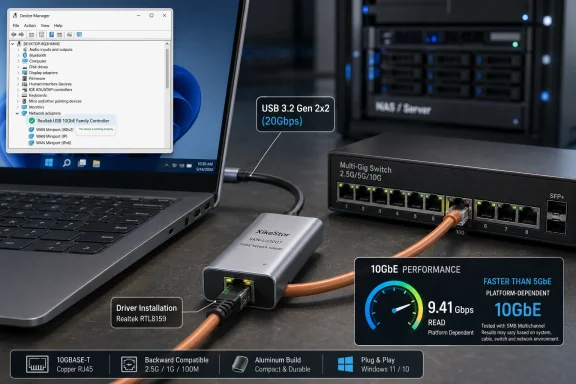
ServeTheHome’s April 28, 2026 review of the XikeStor SKN-U310GT shows a Realtek RTL8159-based USB-C 10Gbase-T adapter working in Windows 11 after driver installation, appearing properly in Device Manager as a network adapter. That small Device Manager screenshot is the least glamorous image in the review, but it is also the most important one. It marks the moment where USB 10GbE stops being a curiosity for lab benches and starts looking like a practical upgrade path for Windows laptops, mini PCs, and desktops that were never designed for serious wired networking. The catch is that this new convenience still depends on the old realities of drivers, USB bandwidth, thermals, and host-controller roulette.
For years, 10GbE on a Windows machine meant commitment. You needed a PCIe slot, airflow, a switch that did not sound like a small vacuum cleaner, and at least some willingness to troubleshoot NIC drivers that were written for workstations and servers rather than consumer laptops. If the target machine was a notebook, a NUC-style mini PC, or one of the increasingly popular compact homelab boxes, the answer was usually Thunderbolt, an expensive dock, or simply giving up and living with 2.5GbE.
The XikeStor SKN-U310GT points at a different model: plug a small aluminum USB-C dongle into a Windows 11 machine, attach copper Ethernet, install the right Realtek driver, and get meaningfully faster-than-5GbE networking without opening the chassis. It is not magic, and it is not a replacement for every PCIe 10GbE card. But it does change the threshold for experimentation.
That matters because 10GbE has been stuck in an awkward middle age. It is old enough to be affordable in switches and used enterprise gear, but still new enough to be absent from most consumer motherboards and laptops. The bottleneck has shifted from the network itself to the last meter between a machine and the wall jack.
ServeTheHome’s review is interesting not because it declares the SKN-U310GT perfect, but because it shows the category maturing. A USB 10Gbase-T adapter that can appear cleanly in Windows 11 Device Manager, run without obvious thermal throttling in testing, and sell near the sub-$100 zone is not just another dongle. It is a sign that multi-gigabit networking is becoming casual.
In ServeTheHome’s test, the answer was yes — but not necessarily out of the box. The RTL8159 requires appropriate Windows 11 drivers, and the review notes that Windows may not automatically recognize the adapter until the correct driver is installed from XikeStor, Realtek, or Windows Update. That is the difference between a consumer-friendly product and an enthusiast-friendly one.
This is where the adapter’s promise becomes conditional. The hardware may be compact and the physical connection may be as simple as USB-C, but the experience still passes through Realtek’s driver stack. Windows Update may get users to a working state if another network connection is available, but anyone depending on this adapter as the only NIC should download drivers in advance.
That is not a fatal flaw. It is the same practical advice IT departments have followed for years with storage controllers, Wi-Fi cards, and USB Ethernet adapters used during OS deployment. But it punctures the fantasy that USB 10GbE is merely a faster version of the old $12 gigabit dongle in the laptop bag. At 10GbE, the software layer matters again.
The real test for this product category will not be whether reviewers can make it work. It will be whether a normal Windows 11 user can plug it in six months from now, receive the right driver automatically, and avoid learning what a USB host controller is. Until then, Device Manager remains the first checkpoint.
ServeTheHome’s review makes the bandwidth math plain. A 10Gbps USB connection sounds like it should be a natural fit for a 10GbE adapter, but USB protocol overhead means it is not enough for full line-rate 10GbE. On a 10Gbps USB host, users can exceed 5GbE-class performance, but they should not expect a clean 10Gbps Ethernet result.
That distinction is going to cause confusion because the consumer PC industry has spent years turning USB branding into a fog machine. USB 3.2 Gen 1, Gen 2, Gen 2x2, USB4, Thunderbolt, Type-C, and vendor-specific port icons all coexist in ways that punish even informed buyers. A user may see USB-C and assume the adapter can stretch its legs; the machine may quietly offer only 10Gbps signaling.
This is not merely a benchmark concern. A NAS user copying large video files, a developer moving VM images, or a Windows workstation backing up to a ZFS box will feel the difference between “faster than 5GbE” and “nearly full 10GbE.” The adapter may be capable, but the host port decides how much of that capability survives.
In that sense, the SKN-U310GT is also a diagnostic tool for the state of PC I/O. It exposes which systems were built with real high-speed USB and which ones merely adopted the connector. The adapter does not create the USB naming problem, but it makes the problem visible in megabytes per second.
The RTL8159 is an opportunity to reset some of that conversation. A low-power USB 10GbE controller that can run inside a compact passive enclosure is exactly the kind of chip that expands the market. It brings 10Gbase-T to laptops, temporary workstations, crash carts, field kits, and mini PCs without requiring vendors to redesign motherboards.
But price and convenience do not erase operational skepticism. A PCIe Intel or Mellanox NIC in a server is boring in the best possible way. It is supported by years of enterprise deployment, predictable thermals, mature offload behavior, and driver stacks that administrators understand. A Realtek USB NIC is more flexible, but flexibility is not the same as confidence.
That does not mean the SKN-U310GT should be dismissed. It means buyers should match it to the right job. For a Windows 11 workstation that occasionally needs high-speed access to a NAS, it is compelling. For a laptop used to ingest media on-site, it is extremely attractive. For a production Hyper-V host or storage server where uptime and determinism matter more than convenience, a PCIe NIC still looks like the conservative choice.
The most interesting possibility is that Realtek may drag 10GbE into the same mainstream tier where its gigabit and 2.5GbE chips already live. If that happens, the first wave will be messy, uneven, and full of forum threads. That is how commodity hardware becomes boring.
ServeTheHome measured the adapter in roughly the 2.0W to 2.89W range depending on platform, slightly above the listed 1.95W figure but still reasonable for a 10GbE copper device. The review also found no thermal throttling on its unit. That is a promising result, especially because compact 10Gbase-T gear has often struggled with heat.
The aluminum enclosure is not just aesthetic. At these speeds, the case is part of the thermal design. A plastic shell that was fine for gigabit Ethernet would be a liability here, especially for sustained transfers where the PHY is working continuously and the adapter is hanging off the side of a laptop or mini PC.
Still, buyers should not treat “no throttling in one review sample” as a universal guarantee. Ambient temperature, cable quality, switch PHY behavior, USB port power delivery, and workload all matter. A short benchmark on a desk is different from a multi-hour backup in a warm equipment closet.
The larger lesson is that 10GbE over copper has never been free. The SKN-U310GT makes it portable, but it does not abolish the physics. It simply packages those physics in a more convenient and apparently more efficient form.
This is one of those cases where Apple’s port simplicity hides a technical trade-off. A Mac user sees a fast Type-C port and expects a fast Type-C accessory to behave optimally. But USB4 and Thunderbolt compatibility do not automatically mean USB 3.2 Gen 2x2 support, and that matters for a device whose best-case performance depends on the latter.
Windows PCs are more chaotic, but that chaos can be useful. Some desktop motherboards and mini PCs expose USB 3.2 Gen 2x2 ports explicitly. Some Windows laptops do too. The ecosystem is inconsistent, but it gives this adapter a place to land.
Linux is its own story. Enthusiasts will want current drivers and current kernels, and they will test heavily before trusting the adapter in a storage path. That is normal for new Realtek network silicon and doubly normal when USB is involved.
For WindowsForum readers, the practical conclusion is straightforward: this is most interesting on Windows 11 systems with verified 20Gbps USB. If the machine has only 10Gbps USB, the adapter can still be useful. It just becomes a very fast multi-gig dongle rather than a true 10GbE endpoint.
A USB 10GbE adapter changes the upgrade calculus. Instead of hunting for a mini PC with an internal PCIe slot, OCuLink expansion, or factory 10GbE, a buyer can choose a small system with a capable USB 3.2 Gen 2x2 port and add networking externally. That opens the door to quieter, smaller, and cheaper lab nodes.
This is especially relevant for Windows 11 Pro and Windows Server-adjacent home setups. A compact machine used for Hyper-V experiments, backup staging, media work, or software builds often needs fast access to shared storage more than it needs enterprise-grade networking features. The SKN-U310GT fits that middle ground.
There is also a support advantage. External NICs are replaceable without opening the machine, and they can move between systems. For consultants, enthusiasts, and small offices, the ability to carry 10GbE in a bag has value that does not show up in iperf charts.
The risk is that people will overdeploy it. A dongle is not a data-center fabric strategy. It is a flexible endpoint adapter. Used that way, it looks useful; used as a substitute for proper server networking, it invites disappointment.
For many home and small-office users, the bottleneck is now endpoint diversity. The NAS may have 10GbE. The main desktop may have a PCIe NIC. The switch may be ready. But the laptop, mini PC, test bench, or temporary workstation remains stuck at Wi-Fi, gigabit, or 2.5GbE.
That is why a portable USB 10GbE adapter is more consequential than it first appears. It does not need to be the primary NIC for every machine. It only needs to make 10GbE available where it was previously inconvenient.
This will appeal to creators moving large media files, admins imaging machines, enthusiasts benchmarking NAS builds, and small offices trying to accelerate backups without buying new workstations. It also gives Windows users a straightforward way to test whether 10GbE is worth building around before committing to permanent hardware.
The technology is entering the “why not?” phase. That is where adoption accelerates. Not because every user needs it, but because the cost and friction fall low enough that experimentation becomes easy.
That complexity is manageable, but it deserves respect. Users should confirm that the adapter appears under Network adapters in Device Manager, not as an unknown USB device. They should verify driver version, link speed, USB connection speed, and switch negotiation. They should test with known-good Cat6a cabling if they expect full 10Gbase-T performance.
The strongest argument for the SKN-U310GT is not that it eliminates troubleshooting. It is that it makes the troubleshooting worth doing. If the reward were merely gigabit Ethernet, no one would care. When the reward is dramatically faster access to a NAS or workstation, a few minutes in Device Manager becomes a reasonable tax.
Windows has improved substantially at finding drivers, but relying entirely on Windows Update remains risky for a device class this new. A sensible buyer will keep a copy of the Realtek driver package handy, especially if the adapter is intended for clean installs, field work, or machines without another network path.
This is the hidden sysadmin lesson in ServeTheHome’s review. The screenshot is not just proof that the adapter works. It is proof that the deployment sequence matters.
A PCIe NIC asks users to plan. Does the system have a slot? Is there clearance? Does the case have airflow? Is the machine a laptop or sealed mini PC? Does the BIOS behave? Is the card supported by the OS? A USB-C NIC asks a simpler first question: is there a fast enough port?
That reduction in friction expands the market. It does not replace the need for serious NICs in serious systems, but it creates a new tier between onboard 2.5GbE and internal 10GbE expansion. That middle tier has been underserved.
The SKN-U310GT is also part of a broader shift toward modular computing. External GPUs, Thunderbolt storage, USB capture devices, and high-speed docks have trained users to think of capabilities as attachable. Networking has lagged behind, partly because latency, drivers, and thermals make NICs less forgiving than storage readers or display adapters.
If Realtek and its board partners can make this class reliable, Windows machines become more adaptable. A laptop can be a field ingestion station in the morning and a normal mobile PC in the afternoon. A mini PC can become a lab node without being selected around its NIC. A desktop can gain 10GbE without surrendering a PCIe slot needed for something else.
That is the real story. The adapter is not revolutionary because it is the fastest possible way to do 10GbE. It is important because it makes 10GbE less permanent.
That distinction is not marketing nitpicking. It is the difference between being delighted and feeling misled. A buyer who understands the host requirement will see the adapter as a clever and affordable way to unlock dormant network capability. A buyer who thinks every USB-C port is equal may blame the adapter for limitations imposed by the PC.
The Windows 11 driver situation is similar. Once installed, the device can appear normally in Device Manager and behave like a network adapter should. Before that, it may be invisible, incomplete, or dependent on another connection to fetch software.
This is the shape of early mainstream hardware: useful, imperfect, and slightly ahead of the support assumptions around it. Enthusiasts will tolerate that. Businesses will wait for stronger vendor packaging, driver maturity, and perhaps OEM validation.
But enthusiasts are often where the next default begins. The first people buying these adapters are not merely solving today’s problem. They are proving that tomorrow’s cheap mini PC should probably ship with a port fast enough to use one well.
Source: ServeTheHome XikeStor SKN U310GT Windows 11 Device Manager - ServeTheHome
 A Tiny Adapter Has Put 10GbE Back Into the Windows Conversation
For years, 10GbE on a Windows machine meant commitment. You needed a PCIe slot, airflow, a switch that did not sound like a small vacuum cleaner, and at least some willingness to troubleshoot NIC drivers that were written for workstations and servers rather than consumer laptops. If the target machine was a notebook, a NUC-style mini PC, or one of the increasingly popular compact homelab boxes, the answer was usually Thunderbolt, an expensive dock, or simply giving up and living with 2.5GbE.The XikeStor SKN-U310GT points at a different model: plug a small aluminum USB-C dongle into a Windows 11 machine, attach copper Ethernet, install the right Realtek driver, and get meaningfully faster-than-5GbE networking without opening the chassis. It is not magic, and it is not a replacement for every PCIe 10GbE card. But it does change the threshold for experimentation.
That matters because 10GbE has been stuck in an awkward middle age. It is old enough to be affordable in switches and used enterprise gear, but still new enough to be absent from most consumer motherboards and laptops. The bottleneck has shifted from the network itself to the last meter between a machine and the wall jack.
ServeTheHome’s review is interesting not because it declares the SKN-U310GT perfect, but because it shows the category maturing. A USB 10Gbase-T adapter that can appear cleanly in Windows 11 Device Manager, run without obvious thermal throttling in testing, and sell near the sub-$100 zone is not just another dongle. It is a sign that multi-gigabit networking is becoming casual.
Device Manager Is the Gatekeeper, Not the Finish Line
The Windows 11 Device Manager image is a mundane artifact, but every Windows admin knows what it represents. Before performance graphs, iperf runs, SMB transfers, jumbo-frame experiments, or switch-port tuning, the first question is brutally simple: does the operating system recognize the thing?In ServeTheHome’s test, the answer was yes — but not necessarily out of the box. The RTL8159 requires appropriate Windows 11 drivers, and the review notes that Windows may not automatically recognize the adapter until the correct driver is installed from XikeStor, Realtek, or Windows Update. That is the difference between a consumer-friendly product and an enthusiast-friendly one.
This is where the adapter’s promise becomes conditional. The hardware may be compact and the physical connection may be as simple as USB-C, but the experience still passes through Realtek’s driver stack. Windows Update may get users to a working state if another network connection is available, but anyone depending on this adapter as the only NIC should download drivers in advance.
That is not a fatal flaw. It is the same practical advice IT departments have followed for years with storage controllers, Wi-Fi cards, and USB Ethernet adapters used during OS deployment. But it punctures the fantasy that USB 10GbE is merely a faster version of the old $12 gigabit dongle in the laptop bag. At 10GbE, the software layer matters again.
The real test for this product category will not be whether reviewers can make it work. It will be whether a normal Windows 11 user can plug it in six months from now, receive the right driver automatically, and avoid learning what a USB host controller is. Until then, Device Manager remains the first checkpoint.
USB 3.2 Gen 2x2 Is the Feature Everyone Will Miss
The SKN-U310GT’s most important requirement is also the easiest one to misunderstand. It uses USB-C, but USB-C is only a connector shape. The performance story depends on whether the host system actually supports USB 3.2 Gen 2x2 at 20Gbps, not merely whether it has an oval port that accepts the cable.ServeTheHome’s review makes the bandwidth math plain. A 10Gbps USB connection sounds like it should be a natural fit for a 10GbE adapter, but USB protocol overhead means it is not enough for full line-rate 10GbE. On a 10Gbps USB host, users can exceed 5GbE-class performance, but they should not expect a clean 10Gbps Ethernet result.
That distinction is going to cause confusion because the consumer PC industry has spent years turning USB branding into a fog machine. USB 3.2 Gen 1, Gen 2, Gen 2x2, USB4, Thunderbolt, Type-C, and vendor-specific port icons all coexist in ways that punish even informed buyers. A user may see USB-C and assume the adapter can stretch its legs; the machine may quietly offer only 10Gbps signaling.
This is not merely a benchmark concern. A NAS user copying large video files, a developer moving VM images, or a Windows workstation backing up to a ZFS box will feel the difference between “faster than 5GbE” and “nearly full 10GbE.” The adapter may be capable, but the host port decides how much of that capability survives.
In that sense, the SKN-U310GT is also a diagnostic tool for the state of PC I/O. It exposes which systems were built with real high-speed USB and which ones merely adopted the connector. The adapter does not create the USB naming problem, but it makes the problem visible in megabytes per second.
Realtek Is Winning the Price War, But Trust Takes Longer
Realtek has long occupied a strange place in networking. Its chips are everywhere, its prices are aggressive, and its devices are good enough for an enormous portion of the market. Yet among sysadmins and homelab users, Realtek still carries baggage: driver quirks, inconsistent Linux experiences, and a reputation that trails Intel and Mellanox in serious deployments.The RTL8159 is an opportunity to reset some of that conversation. A low-power USB 10GbE controller that can run inside a compact passive enclosure is exactly the kind of chip that expands the market. It brings 10Gbase-T to laptops, temporary workstations, crash carts, field kits, and mini PCs without requiring vendors to redesign motherboards.
But price and convenience do not erase operational skepticism. A PCIe Intel or Mellanox NIC in a server is boring in the best possible way. It is supported by years of enterprise deployment, predictable thermals, mature offload behavior, and driver stacks that administrators understand. A Realtek USB NIC is more flexible, but flexibility is not the same as confidence.
That does not mean the SKN-U310GT should be dismissed. It means buyers should match it to the right job. For a Windows 11 workstation that occasionally needs high-speed access to a NAS, it is compelling. For a laptop used to ingest media on-site, it is extremely attractive. For a production Hyper-V host or storage server where uptime and determinism matter more than convenience, a PCIe NIC still looks like the conservative choice.
The most interesting possibility is that Realtek may drag 10GbE into the same mainstream tier where its gigabit and 2.5GbE chips already live. If that happens, the first wave will be messy, uneven, and full of forum threads. That is how commodity hardware becomes boring.
The Copper Port Still Carries Old Heat
The SKN-U310GT uses 10Gbase-T, which is both its greatest strength and its biggest engineering burden. RJ45 Ethernet is familiar, backward-compatible, and already wired into many homes and offices. It also draws more power and generates more heat than many users expect from something that looks like a USB dongle.ServeTheHome measured the adapter in roughly the 2.0W to 2.89W range depending on platform, slightly above the listed 1.95W figure but still reasonable for a 10GbE copper device. The review also found no thermal throttling on its unit. That is a promising result, especially because compact 10Gbase-T gear has often struggled with heat.
The aluminum enclosure is not just aesthetic. At these speeds, the case is part of the thermal design. A plastic shell that was fine for gigabit Ethernet would be a liability here, especially for sustained transfers where the PHY is working continuously and the adapter is hanging off the side of a laptop or mini PC.
Still, buyers should not treat “no throttling in one review sample” as a universal guarantee. Ambient temperature, cable quality, switch PHY behavior, USB port power delivery, and workload all matter. A short benchmark on a desk is different from a multi-hour backup in a warm equipment closet.
The larger lesson is that 10GbE over copper has never been free. The SKN-U310GT makes it portable, but it does not abolish the physics. It simply packages those physics in a more convenient and apparently more efficient form.
The Mac Caveat Reveals Why Windows Is the Natural Beachhead
ServeTheHome’s review notes that Windows and Linux are the more natural environments for this adapter, while Mac users face a more complicated story. In particular, Macs with USB4 may not expose the same USB 3.2 Gen 2x2 behavior that the adapter needs for its best performance. That makes the SKN-U310GT a Windows-first story even if the packaging claims broader platform support.This is one of those cases where Apple’s port simplicity hides a technical trade-off. A Mac user sees a fast Type-C port and expects a fast Type-C accessory to behave optimally. But USB4 and Thunderbolt compatibility do not automatically mean USB 3.2 Gen 2x2 support, and that matters for a device whose best-case performance depends on the latter.
Windows PCs are more chaotic, but that chaos can be useful. Some desktop motherboards and mini PCs expose USB 3.2 Gen 2x2 ports explicitly. Some Windows laptops do too. The ecosystem is inconsistent, but it gives this adapter a place to land.
Linux is its own story. Enthusiasts will want current drivers and current kernels, and they will test heavily before trusting the adapter in a storage path. That is normal for new Realtek network silicon and doubly normal when USB is involved.
For WindowsForum readers, the practical conclusion is straightforward: this is most interesting on Windows 11 systems with verified 20Gbps USB. If the machine has only 10Gbps USB, the adapter can still be useful. It just becomes a very fast multi-gig dongle rather than a true 10GbE endpoint.
Mini PCs Are the Real Audience
The laptop use case is obvious, but the more disruptive audience may be mini PC owners. The last few years have produced a flood of compact Windows and Linux boxes with strong CPUs, NVMe storage, and one or two onboard Ethernet ports. Many ship with 2.5GbE, which is good enough for general use but increasingly inadequate for storage-heavy homelab work.A USB 10GbE adapter changes the upgrade calculus. Instead of hunting for a mini PC with an internal PCIe slot, OCuLink expansion, or factory 10GbE, a buyer can choose a small system with a capable USB 3.2 Gen 2x2 port and add networking externally. That opens the door to quieter, smaller, and cheaper lab nodes.
This is especially relevant for Windows 11 Pro and Windows Server-adjacent home setups. A compact machine used for Hyper-V experiments, backup staging, media work, or software builds often needs fast access to shared storage more than it needs enterprise-grade networking features. The SKN-U310GT fits that middle ground.
There is also a support advantage. External NICs are replaceable without opening the machine, and they can move between systems. For consultants, enthusiasts, and small offices, the ability to carry 10GbE in a bag has value that does not show up in iperf charts.
The risk is that people will overdeploy it. A dongle is not a data-center fabric strategy. It is a flexible endpoint adapter. Used that way, it looks useful; used as a substitute for proper server networking, it invites disappointment.
The Switch Port Is Now Cheaper Than the Assumption
One reason this category matters now is that the rest of the 10GbE ecosystem has softened. Eight-port 10Gbase-T switches, used enterprise gear, and multi-gig consumer switches have become far more attainable than they were a decade ago. The adapter arrives into a market where the network side is no longer the only expensive piece.For many home and small-office users, the bottleneck is now endpoint diversity. The NAS may have 10GbE. The main desktop may have a PCIe NIC. The switch may be ready. But the laptop, mini PC, test bench, or temporary workstation remains stuck at Wi-Fi, gigabit, or 2.5GbE.
That is why a portable USB 10GbE adapter is more consequential than it first appears. It does not need to be the primary NIC for every machine. It only needs to make 10GbE available where it was previously inconvenient.
This will appeal to creators moving large media files, admins imaging machines, enthusiasts benchmarking NAS builds, and small offices trying to accelerate backups without buying new workstations. It also gives Windows users a straightforward way to test whether 10GbE is worth building around before committing to permanent hardware.
The technology is entering the “why not?” phase. That is where adoption accelerates. Not because every user needs it, but because the cost and friction fall low enough that experimentation becomes easy.
Drivers Are the New Cable Test
The old advice for 10GbE was to check the cable. With USB 10GbE, the new advice is to check the driver, the port, the cable, and the switch — in that order if Windows does not see the adapter, and in a different order if Windows sees it but performance disappoints.That complexity is manageable, but it deserves respect. Users should confirm that the adapter appears under Network adapters in Device Manager, not as an unknown USB device. They should verify driver version, link speed, USB connection speed, and switch negotiation. They should test with known-good Cat6a cabling if they expect full 10Gbase-T performance.
The strongest argument for the SKN-U310GT is not that it eliminates troubleshooting. It is that it makes the troubleshooting worth doing. If the reward were merely gigabit Ethernet, no one would care. When the reward is dramatically faster access to a NAS or workstation, a few minutes in Device Manager becomes a reasonable tax.
Windows has improved substantially at finding drivers, but relying entirely on Windows Update remains risky for a device class this new. A sensible buyer will keep a copy of the Realtek driver package handy, especially if the adapter is intended for clean installs, field work, or machines without another network path.
This is the hidden sysadmin lesson in ServeTheHome’s review. The screenshot is not just proof that the adapter works. It is proof that the deployment sequence matters.
The SKN-U310GT Turns 10GbE From Installation Into Accessory
The most persuasive thing about this adapter is not its peak speed. It is the way it changes 10GbE from an installation project into an accessory decision. That distinction has real consequences.A PCIe NIC asks users to plan. Does the system have a slot? Is there clearance? Does the case have airflow? Is the machine a laptop or sealed mini PC? Does the BIOS behave? Is the card supported by the OS? A USB-C NIC asks a simpler first question: is there a fast enough port?
That reduction in friction expands the market. It does not replace the need for serious NICs in serious systems, but it creates a new tier between onboard 2.5GbE and internal 10GbE expansion. That middle tier has been underserved.
The SKN-U310GT is also part of a broader shift toward modular computing. External GPUs, Thunderbolt storage, USB capture devices, and high-speed docks have trained users to think of capabilities as attachable. Networking has lagged behind, partly because latency, drivers, and thermals make NICs less forgiving than storage readers or display adapters.
If Realtek and its board partners can make this class reliable, Windows machines become more adaptable. A laptop can be a field ingestion station in the morning and a normal mobile PC in the afternoon. A mini PC can become a lab node without being selected around its NIC. A desktop can gain 10GbE without surrendering a PCIe slot needed for something else.
That is the real story. The adapter is not revolutionary because it is the fastest possible way to do 10GbE. It is important because it makes 10GbE less permanent.
The Practical Verdict Is Faster Than 5GbE, Conditional at 10GbE
The fairest way to frame the SKN-U310GT is as a high-ceiling adapter with a platform-dependent floor. On the right Windows 11 machine with USB 3.2 Gen 2x2, proper drivers, and a clean 10Gbase-T link, it can approach the performance users expect from 10GbE. On a more common 10Gbps USB port, it may still outperform 5GbE adapters, but it should not be sold mentally as full 10GbE.That distinction is not marketing nitpicking. It is the difference between being delighted and feeling misled. A buyer who understands the host requirement will see the adapter as a clever and affordable way to unlock dormant network capability. A buyer who thinks every USB-C port is equal may blame the adapter for limitations imposed by the PC.
The Windows 11 driver situation is similar. Once installed, the device can appear normally in Device Manager and behave like a network adapter should. Before that, it may be invisible, incomplete, or dependent on another connection to fetch software.
This is the shape of early mainstream hardware: useful, imperfect, and slightly ahead of the support assumptions around it. Enthusiasts will tolerate that. Businesses will wait for stronger vendor packaging, driver maturity, and perhaps OEM validation.
But enthusiasts are often where the next default begins. The first people buying these adapters are not merely solving today’s problem. They are proving that tomorrow’s cheap mini PC should probably ship with a port fast enough to use one well.
The Little Device Manager Screenshot Tells Buyers Almost Everything
The most concrete lessons from this review are not buried in synthetic benchmarks. They are in the setup details, host requirements, and physical design choices that determine whether the SKN-U310GT is a smart purchase or an avoidable headache.- The adapter can work properly in Windows 11, but users should plan on installing current Realtek or vendor drivers rather than assuming perfect plug-and-play behavior.
- Full 10GbE-class performance depends on a host with USB 3.2 Gen 2x2 at 20Gbps, not merely a USB-C connector.
- Systems limited to 10Gbps USB can still see strong multi-gigabit performance, but they should not be expected to deliver true line-rate 10GbE over the adapter.
- The aluminum enclosure and measured power draw suggest the design is more practical than earlier hot-running copper dongles, though sustained workloads still deserve thermal awareness.
- The best fit is a Windows laptop, desktop, or mini PC that needs portable high-speed access to a 10GbE network without committing to an internal PCIe NIC.
- Production servers and always-on storage hosts should still treat PCIe Intel, Broadcom, or Mellanox-class NICs as the safer default when reliability matters more than portability.
Source: ServeTheHome XikeStor SKN U310GT Windows 11 Device Manager - ServeTheHome
