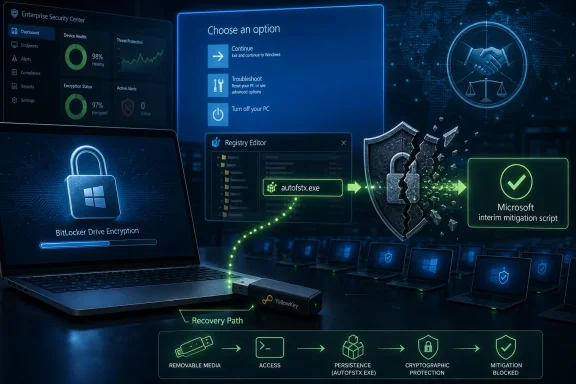
Microsoft has issued temporary mitigation guidance for YellowKey, a publicly disclosed BitLocker security-feature bypass tracked as CVE-2026-45585, after a researcher demonstrated that some Windows 11 and Windows Server systems could expose encrypted drives through Windows Recovery Environment behavior and a prepared USB device. The uncomfortable part is not merely that BitLocker can be bypassed under specific physical-access conditions. It is that the bypass lands precisely in the gray zone where Windows’ recovery machinery, TPM trust, and enterprise convenience have always quietly negotiated with one another. YellowKey is being argued in public as a “backdoor,” but the more useful reading for administrators is colder: this is what happens when a recovery path becomes part of the threat model too late.
BitLocker’s public promise is simple enough for a sticker on a laptop: lose the machine, keep the data. The engineering reality has always been messier. Windows must be able to boot, repair itself, service updates, recover from bad drivers, and hand administrators a way back from disaster without turning every failed boot into a help-desk catastrophe.
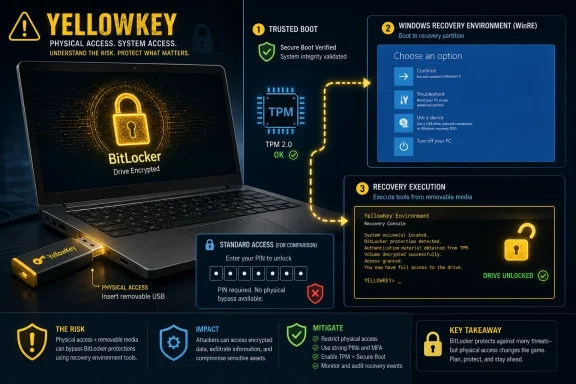
YellowKey appears to abuse that bargain. The reported proof of concept involves placing specific transaction-related files on removable storage, entering the Windows Recovery Environment, and reaching an elevated command prompt with access to a drive that users would reasonably believe was still protected by BitLocker. That is not a remote code execution nightmare; it is a physical-access nightmare. But for full-disk encryption, physical access is exactly the exam.
The distinction matters because BitLocker is not just a cryptographic product. It is a boot trust product. If the TPM, Secure Boot state, recovery environment, and early-boot components line up in ways Windows considers trustworthy, the machine can release secrets without asking the user for more. YellowKey is alarming because it seems to exploit the trusted path, not because AES suddenly became weak.
This is why the “backdoor” framing has caught fire. A classic bug looks accidental: a buffer overrun, a bad permission check, an unexpected parser edge case. YellowKey, as described by the researcher and tested by others, looks more like an obscure feature path doing something too powerful at the wrong time. That does not prove intent. It does explain why intent is now the argument.
The mitigation centers on removing an
That is also why the guidance will make many enterprise admins wince. Mounting and modifying WinRE images at scale is the sort of operation that belongs in a deployment runbook, not in an emergency bulletin. It touches recovery partitions, registry hives, boot-time execution, and BitLocker validation. One mistake can trade a theoretical confidentiality failure for a very real fleet recovery problem.
Microsoft’s recommendation to move from TPM-only BitLocker to TPM+PIN is equally important. TPM-only mode is popular because it is transparent. Users turn on the device, Windows boots, and encryption quietly protects against simple offline drive removal. TPM+PIN changes the social contract: the machine now needs a pre-boot secret from the user before the drive decrypts.
That extra prompt is annoying, especially for mobile fleets and shared-device scenarios. It is also the point. YellowKey’s lesson is that if the platform can unlock itself under too many “trusted” circumstances, then the user’s pre-boot knowledge becomes the missing control.
YellowKey does not make TPM useless. It does, however, puncture the marketing shorthand that hardware-backed trust automatically means practical data protection against hands-on attackers. A TPM can protect a key beautifully and still release it when the platform tells it the boot state is acceptable. If the platform’s definition of acceptable includes a compromised or abusable recovery path, the cryptography has done its job while the system has failed.
That is the conceptual trap in TPM-only BitLocker. It is strong against certain attacks, especially casual drive removal. It is weaker against an attacker who can interact with the original machine, influence boot flow, and convince the device that it is still in a trusted state. In other words, the TPM binds the secret to the machine, but the machine remains a living, sprawling Windows system with recovery features, compatibility obligations, and boot-time automation.
This is why security professionals have long treated TPM+PIN as meaningfully different from TPM-only. The PIN does not make the encryption algorithm stronger. It changes the release policy. It tells the machine that hardware state alone is not enough.
The uncomfortable implication is that many Windows 11 devices may have been “encrypted” in the way organizations could deploy easily, not in the way their threat models silently assumed. YellowKey is not the first reminder of that gap. It is simply a vivid one, because the alleged exploit path is so physical, so repeatable, and so embarrassing.
The public evidence, as of now, does not prove Microsoft deliberately installed a secret BitLocker bypass for privileged actors. It does show that a Windows recovery mechanism could, under reported conditions, be manipulated into undermining the confidentiality expectation of BitLocker-protected systems. That is bad enough without needing to win the motive trial.
The more interesting question is why Windows 11 and recent Windows Server releases are reportedly affected while Windows 10 is not. If that holds across independent testing and Microsoft’s eventual patch notes, it points toward a newer recovery, boot, servicing, or transaction-handling behavior rather than some ancient BitLocker flaw finally surfacing. That would align with the broader direction of modern Windows: more automated recovery, more resilient servicing, more trust decisions made below the user interface.
Those are not inherently sinister goals. In fact, they are often security goals. A system that can recover from broken updates is more likely to stay patched. A system that can validate boot state without user friction is more likely to have encryption enabled by default. A system that reduces help-desk tickets is more likely to survive contact with real organizations.
But every invisible convenience has a failure mode. YellowKey’s political charge comes from the possibility that Microsoft built a recovery convenience so privileged that it functioned like a bypass when placed under adversarial control. Whether that was intentional, negligent, or simply a tragic interaction between components, the operational result is the same for a stolen laptop.
BitLocker exists in large part because laptops are lost, stolen, seized, repaired, resold, or left unattended. Executives leave them in airport lounges. Field staff keep them in vehicles. Contractors carry them through hotels. Developers travel with source code. A physical-access bypass does not need to scale like ransomware to matter; it only needs to work on the one machine with the right data.
That is especially true because the victim may not know anything happened. If an attacker can access files from a recovery context and leave little obvious trace, the incident response problem becomes uglier than a simple theft. An organization may recover the device and assume encryption preserved confidentiality, when in fact the drive may have been browsed or copied.
This is where the Windows ecosystem’s default-encryption story becomes double-edged. Microsoft has spent years nudging more devices into automatic or near-automatic BitLocker-style protection. That is broadly good. The alternative is millions of laptops with no meaningful protection after theft.
But defaults shape assumptions. A user who never configured BitLocker may still believe “Windows 11 encrypts my drive.” An admin who sees TPM-backed protection may assume lost-device data exposure is contained. YellowKey is a reminder that encryption status is not the same as encryption posture.
The hardest part is that the cleanest security recommendation is also the least popular with users. TPM+PIN adds friction at every boot. It complicates remote reboot workflows, unattended maintenance, accessibility scenarios, and support calls from people who forget pre-boot credentials. The modern endpoint-management dream is silent security; TPM+PIN is security that makes itself known before Windows even loads.
Still, organizations with serious lost-device risk should not treat the PIN as optional theater. If YellowKey-style attacks operate before or around the normal Windows sign-in boundary, then Windows Hello, account passwords, EDR agents, and post-boot controls are downstream of the failure. They may matter after the operating system is running. They do not necessarily protect the drive at the point of release.
The mitigation guidance also raises a deployment question. Manual WinRE modification may be acceptable for a small fleet or a high-risk subset of machines. It is harder for sprawling organizations with mixed hardware, remote workers, recovery partition drift, and inconsistent firmware states. The operational reality is that many admins will wait for a formal Windows update unless their risk profile forces immediate action.
That delay is understandable, but it should be explicit. “We are waiting for a patch” is a risk decision. “We did not understand which machines were exposed” is a governance failure.
That does not mean consumers should ignore YellowKey. People who travel with sensitive material, handle client data, store private keys, or face targeted theft should consider stronger BitLocker settings once Microsoft’s guidance is digested by mainstream support channels. But the average person should be cautious about applying registry-and-recovery-image surgery copied from social media.
The more realistic consumer posture is physical control plus prompt patching. Do not leave a powered-off laptop unattended in environments where targeted access is plausible. Keep firmware and Windows updates current. Make sure recovery keys are backed up before changing BitLocker settings. Understand that a Windows login password is not the same thing as pre-boot disk protection.
The gap between consumer simplicity and enterprise-grade confidentiality has always existed. YellowKey merely drags it into public view. Microsoft wants Windows to be secure by default for hundreds of millions of people, but the last mile of high-assurance protection still requires choices that are too sharp for many default setups.
Both things can be true in the most dispiriting way. Vendors can frustrate researchers with dismissive triage, slow responses, or opaque bounty decisions. Researchers can also endanger users by dropping working exploit paths before a patch exists. The result is not accountability; it is a race between administrators, attackers, and vendor engineers.
The security industry often talks about disclosure as if it were a clean moral framework. In practice, it is a pressure system. Vendors move faster when embarrassed. Researchers gain leverage by proving impact. Users become collateral when proof becomes weaponized before mitigation becomes manageable.
YellowKey’s public release is especially fraught because the exploit class touches lost-device confidentiality. Unlike a server-side bug that defenders can sometimes monitor through logs, a physical-access BitLocker bypass is hard to detect after the fact. Once the method is public, the value of every temporarily exposed laptop changes overnight.
Microsoft cannot control every researcher’s choices. It can control how quickly and clearly it responds, how much technical detail it gives defenders, and whether its eventual patch explains the underlying trust failure. A vague fix will close the immediate hole but leave the credibility wound open.
YellowKey sits at the intersection of those decisions. It suggests that a component designed to preserve recoverability could be used to defeat confidentiality, at least under certain configurations. That is not a weird corner of Windows. That is one of the central tensions of Windows as a mass-market operating system.
A purist might say recovery should never get this kind of access without user-held authorization. A fleet administrator might respond that users lose credentials, updates fail, disks corrupt, and remote workers cannot be expected to debug boot chains from hotel rooms. Microsoft lives between those positions, and Windows is full of compromises born there.
The lesson is not that recovery features are bad. The lesson is that recovery features are security features, whether product teams label them that way or not. Anything that runs before the user logs in and can influence access to encrypted data belongs inside the threat model from the beginning.
That is where Microsoft’s eventual patch will matter less than its explanation. If the company treats YellowKey as a narrow bug in an obscure boot-execution path, admins will patch and move on uneasily. If it explains how WinRE trust is being tightened, why the affected versions differ, and what assumptions TPM-only BitLocker can and cannot support, it can turn an embarrassing incident into a useful reset.
 YellowKey Turns Recovery Into the Attack Surface
BitLocker’s public promise is simple enough for a sticker on a laptop: lose the machine, keep the data. The engineering reality has always been messier. Windows must be able to boot, repair itself, service updates, recover from bad drivers, and hand administrators a way back from disaster without turning every failed boot into a help-desk catastrophe.YellowKey appears to abuse that bargain. The reported proof of concept involves placing specific transaction-related files on removable storage, entering the Windows Recovery Environment, and reaching an elevated command prompt with access to a drive that users would reasonably believe was still protected by BitLocker. That is not a remote code execution nightmare; it is a physical-access nightmare. But for full-disk encryption, physical access is exactly the exam.
The distinction matters because BitLocker is not just a cryptographic product. It is a boot trust product. If the TPM, Secure Boot state, recovery environment, and early-boot components line up in ways Windows considers trustworthy, the machine can release secrets without asking the user for more. YellowKey is alarming because it seems to exploit the trusted path, not because AES suddenly became weak.
This is why the “backdoor” framing has caught fire. A classic bug looks accidental: a buffer overrun, a bad permission check, an unexpected parser edge case. YellowKey, as described by the researcher and tested by others, looks more like an obscure feature path doing something too powerful at the wrong time. That does not prove intent. It does explain why intent is now the argument.
Microsoft’s Mitigation Says More Than Its Statement
Microsoft’s response is pragmatic and terse: acknowledge the security feature bypass, assign a CVE, provide manual mitigation, and recommend stronger BitLocker configuration while a security update is pending. That is the standard incident playbook. But the contents of the workaround are revealing.The mitigation centers on removing an
autofstx.exe entry from the Session Manager BootExecute registry value inside the Windows Recovery Environment image, then restoring BitLocker’s trust relationship with WinRE. In plain English, administrators are being asked to alter what the recovery environment automatically runs at boot. That is not a normal consumer-facing fix. It is a surgical edit to the recovery substrate beneath Windows.That is also why the guidance will make many enterprise admins wince. Mounting and modifying WinRE images at scale is the sort of operation that belongs in a deployment runbook, not in an emergency bulletin. It touches recovery partitions, registry hives, boot-time execution, and BitLocker validation. One mistake can trade a theoretical confidentiality failure for a very real fleet recovery problem.
Microsoft’s recommendation to move from TPM-only BitLocker to TPM+PIN is equally important. TPM-only mode is popular because it is transparent. Users turn on the device, Windows boots, and encryption quietly protects against simple offline drive removal. TPM+PIN changes the social contract: the machine now needs a pre-boot secret from the user before the drive decrypts.
That extra prompt is annoying, especially for mobile fleets and shared-device scenarios. It is also the point. YellowKey’s lesson is that if the platform can unlock itself under too many “trusted” circumstances, then the user’s pre-boot knowledge becomes the missing control.
The TPM Was Never a Magic Amulet
Microsoft made TPM 2.0 one of the symbolic dividing lines of Windows 11. To consumers, it was one of the reasons older PCs were stranded. To Microsoft, it was part of a broader security baseline: measured boot, hardware-backed keys, virtualization-based security, and a cleaner foundation for modern Windows defenses.YellowKey does not make TPM useless. It does, however, puncture the marketing shorthand that hardware-backed trust automatically means practical data protection against hands-on attackers. A TPM can protect a key beautifully and still release it when the platform tells it the boot state is acceptable. If the platform’s definition of acceptable includes a compromised or abusable recovery path, the cryptography has done its job while the system has failed.
That is the conceptual trap in TPM-only BitLocker. It is strong against certain attacks, especially casual drive removal. It is weaker against an attacker who can interact with the original machine, influence boot flow, and convince the device that it is still in a trusted state. In other words, the TPM binds the secret to the machine, but the machine remains a living, sprawling Windows system with recovery features, compatibility obligations, and boot-time automation.
This is why security professionals have long treated TPM+PIN as meaningfully different from TPM-only. The PIN does not make the encryption algorithm stronger. It changes the release policy. It tells the machine that hardware state alone is not enough.
The uncomfortable implication is that many Windows 11 devices may have been “encrypted” in the way organizations could deploy easily, not in the way their threat models silently assumed. YellowKey is not the first reminder of that gap. It is simply a vivid one, because the alleged exploit path is so physical, so repeatable, and so embarrassing.
The Backdoor Claim Is Explosive, but the Evidence Is Still Circumstantial
The researcher’s claim that this appears intentional deserves to be treated seriously but not swallowed whole. Security history is full of features that looked like backdoors after researchers found the wrong edge of them. It is also full of vendor decisions that prioritized supportability, recovery, manufacturing, diagnostics, or law-enforcement-adjacent ambiguity over the cleanest possible security boundary.The public evidence, as of now, does not prove Microsoft deliberately installed a secret BitLocker bypass for privileged actors. It does show that a Windows recovery mechanism could, under reported conditions, be manipulated into undermining the confidentiality expectation of BitLocker-protected systems. That is bad enough without needing to win the motive trial.
The more interesting question is why Windows 11 and recent Windows Server releases are reportedly affected while Windows 10 is not. If that holds across independent testing and Microsoft’s eventual patch notes, it points toward a newer recovery, boot, servicing, or transaction-handling behavior rather than some ancient BitLocker flaw finally surfacing. That would align with the broader direction of modern Windows: more automated recovery, more resilient servicing, more trust decisions made below the user interface.
Those are not inherently sinister goals. In fact, they are often security goals. A system that can recover from broken updates is more likely to stay patched. A system that can validate boot state without user friction is more likely to have encryption enabled by default. A system that reduces help-desk tickets is more likely to survive contact with real organizations.
But every invisible convenience has a failure mode. YellowKey’s political charge comes from the possibility that Microsoft built a recovery convenience so privileged that it functioned like a bypass when placed under adversarial control. Whether that was intentional, negligent, or simply a tragic interaction between components, the operational result is the same for a stolen laptop.
Physical Access Is Not a Comforting Limitation
Vendors often describe physical-access requirements as a severity reducer, and in some vulnerability classes that is fair. If an attacker must sit at the keyboard, the risk is different from a wormable network bug. But for disk encryption, “requires physical access” is not a footnote. It is the whole scenario.BitLocker exists in large part because laptops are lost, stolen, seized, repaired, resold, or left unattended. Executives leave them in airport lounges. Field staff keep them in vehicles. Contractors carry them through hotels. Developers travel with source code. A physical-access bypass does not need to scale like ransomware to matter; it only needs to work on the one machine with the right data.
That is especially true because the victim may not know anything happened. If an attacker can access files from a recovery context and leave little obvious trace, the incident response problem becomes uglier than a simple theft. An organization may recover the device and assume encryption preserved confidentiality, when in fact the drive may have been browsed or copied.
This is where the Windows ecosystem’s default-encryption story becomes double-edged. Microsoft has spent years nudging more devices into automatic or near-automatic BitLocker-style protection. That is broadly good. The alternative is millions of laptops with no meaningful protection after theft.
But defaults shape assumptions. A user who never configured BitLocker may still believe “Windows 11 encrypts my drive.” An admin who sees TPM-backed protection may assume lost-device data exposure is contained. YellowKey is a reminder that encryption status is not the same as encryption posture.
Enterprises Now Have a Runbook Problem
For enterprise IT, YellowKey is not primarily a debate about whether Microsoft is malicious. It is an inventory and enforcement problem. Which devices are Windows 11 or Windows Server 2022/2025? Which have WinRE enabled? Which are using TPM-only BitLocker? Which carry regulated or high-value data locally? Which can realistically move to TPM+PIN without breaking operations?The hardest part is that the cleanest security recommendation is also the least popular with users. TPM+PIN adds friction at every boot. It complicates remote reboot workflows, unattended maintenance, accessibility scenarios, and support calls from people who forget pre-boot credentials. The modern endpoint-management dream is silent security; TPM+PIN is security that makes itself known before Windows even loads.
Still, organizations with serious lost-device risk should not treat the PIN as optional theater. If YellowKey-style attacks operate before or around the normal Windows sign-in boundary, then Windows Hello, account passwords, EDR agents, and post-boot controls are downstream of the failure. They may matter after the operating system is running. They do not necessarily protect the drive at the point of release.
The mitigation guidance also raises a deployment question. Manual WinRE modification may be acceptable for a small fleet or a high-risk subset of machines. It is harder for sprawling organizations with mixed hardware, remote workers, recovery partition drift, and inconsistent firmware states. The operational reality is that many admins will wait for a formal Windows update unless their risk profile forces immediate action.
That delay is understandable, but it should be explicit. “We are waiting for a patch” is a risk decision. “We did not understand which machines were exposed” is a governance failure.
Home Users Get the Worst Explanation
For ordinary Windows 11 users, the advice is less satisfying. Microsoft can tell people to use TPM+PIN, but many consumer devices were sold on the promise that security would be largely automatic. Asking home users to manage pre-boot BitLocker PINs is a recipe for lockouts, recovery-key confusion, and panicked searches through Microsoft account pages.That does not mean consumers should ignore YellowKey. People who travel with sensitive material, handle client data, store private keys, or face targeted theft should consider stronger BitLocker settings once Microsoft’s guidance is digested by mainstream support channels. But the average person should be cautious about applying registry-and-recovery-image surgery copied from social media.
The more realistic consumer posture is physical control plus prompt patching. Do not leave a powered-off laptop unattended in environments where targeted access is plausible. Keep firmware and Windows updates current. Make sure recovery keys are backed up before changing BitLocker settings. Understand that a Windows login password is not the same thing as pre-boot disk protection.
The gap between consumer simplicity and enterprise-grade confidentiality has always existed. YellowKey merely drags it into public view. Microsoft wants Windows to be secure by default for hundreds of millions of people, but the last mile of high-assurance protection still requires choices that are too sharp for many default setups.
Disclosure Became Part of the Blast Radius
The researcher’s decision to publish a proof of concept rather than proceed through coordinated disclosure has become its own subplot. Microsoft says the public release violated coordinated vulnerability best practices. The researcher, according to reporting, framed the release as a protest against Microsoft’s handling of prior reports.Both things can be true in the most dispiriting way. Vendors can frustrate researchers with dismissive triage, slow responses, or opaque bounty decisions. Researchers can also endanger users by dropping working exploit paths before a patch exists. The result is not accountability; it is a race between administrators, attackers, and vendor engineers.
The security industry often talks about disclosure as if it were a clean moral framework. In practice, it is a pressure system. Vendors move faster when embarrassed. Researchers gain leverage by proving impact. Users become collateral when proof becomes weaponized before mitigation becomes manageable.
YellowKey’s public release is especially fraught because the exploit class touches lost-device confidentiality. Unlike a server-side bug that defenders can sometimes monitor through logs, a physical-access BitLocker bypass is hard to detect after the fact. Once the method is public, the value of every temporarily exposed laptop changes overnight.
Microsoft cannot control every researcher’s choices. It can control how quickly and clearly it responds, how much technical detail it gives defenders, and whether its eventual patch explains the underlying trust failure. A vague fix will close the immediate hole but leave the credibility wound open.
The Real Scandal Is the Trust Boundary
The backdoor accusation is dramatic, but the durable issue is architectural. Windows Recovery Environment is trusted because it must be powerful. BitLocker trusts early boot state because otherwise transparent encryption becomes unusable at scale. TPM-only deployment is common because organizations and consumers punish friction.YellowKey sits at the intersection of those decisions. It suggests that a component designed to preserve recoverability could be used to defeat confidentiality, at least under certain configurations. That is not a weird corner of Windows. That is one of the central tensions of Windows as a mass-market operating system.
A purist might say recovery should never get this kind of access without user-held authorization. A fleet administrator might respond that users lose credentials, updates fail, disks corrupt, and remote workers cannot be expected to debug boot chains from hotel rooms. Microsoft lives between those positions, and Windows is full of compromises born there.
The lesson is not that recovery features are bad. The lesson is that recovery features are security features, whether product teams label them that way or not. Anything that runs before the user logs in and can influence access to encrypted data belongs inside the threat model from the beginning.
That is where Microsoft’s eventual patch will matter less than its explanation. If the company treats YellowKey as a narrow bug in an obscure boot-execution path, admins will patch and move on uneasily. If it explains how WinRE trust is being tightened, why the affected versions differ, and what assumptions TPM-only BitLocker can and cannot support, it can turn an embarrassing incident into a useful reset.
The USB Stick Is a Warning Label for Default Security
The concrete facts are still evolving, but the practical direction is already clear. YellowKey is not a reason to abandon BitLocker. It is a reason to stop treating “BitLocker enabled” as a complete sentence.- Organizations should identify Windows 11 and Windows Server systems using TPM-only BitLocker and decide whether those devices need TPM+PIN protection.
- Administrators should review Microsoft’s mitigation guidance carefully before modifying WinRE at scale, because recovery-environment changes can create their own availability risks.
- Lost-device policies should assume that physical-access attacks against encrypted laptops are plausible, not theoretical.
- Users handling sensitive data should understand that a Windows sign-in password does not necessarily protect a drive before the operating system boots.
- Microsoft’s eventual patch should be judged not only by whether it blocks YellowKey, but by whether it clarifies the recovery trust boundary that made the bypass possible.
References
- Primary source: Windows Central
Published: Thu, 21 May 2026 19:57:42 GMT
Microsoft issues mitigation for critical Windows 11 BitLocker flaw exploited with a USB key — "Can't come up with an explanation beside the fact that this was intentional." | Windows Central
Microsoft shares mitigation measures for a critical Windows 11 BitLocker flaw that lets hackers bypass encryption with a simple USB key.www.windowscentral.com - Related coverage: thecybersignal.com
YellowKey: BitLocker Bypass CVE-2026-45585 — TPM+PIN Mitigation
YellowKey (CVE-2026-45585) bypasses BitLocker via a WinRE flaw. Microsoft's only fix is switching TPM-only devices to TPM+PIN — a config change, not a patch. www.thecybersignal.com
- Related coverage: techspot.com
A security researcher says Microsoft secretly built a backdoor into BitLocker, releases an exploit to prove it | TechSpot
According to the researcher, YellowKey appears unusual for a previously unknown security bug. Nightmare-Eclipse explained that the flaw can be reproduced by copying an attached "FsTx" folder...www.techspot.com - Related coverage: cisonode.com
Microsoft Issues Emergency Mitigation for “YellowKey” BitLocker Bypass Vulnerability (CVE-2026-45585) – Cyber Security News
Microsoft Issues Emergency Mitigation for “YellowKey” BitLocker Bypass Vulnerability (CVE-2026-45585) – Cyber Security Newswww.cisonode.com - Related coverage: computerworld.com
Microsoft is working on a patch for 'YellowKey' attack on Bitlocker, offers temporary fix – Computerworld
Exploitation requires physical access, so enterprises should look to their device security policies. www.computerworld.com
- Official source: learn.microsoft.com
BitLocker countermeasures | Microsoft Learn
Learn about technologies and features to protect against attacks on the BitLocker encryption key.learn.microsoft.com
- Related coverage: technobezz.com
Microsoft Issues Manual Mitigation Steps for YellowKey BitLocker Bypass Exploit | Technobezz
Microsoft released manual mitigation steps for the YellowKey BitLocker bypass exploit after a researcher publicly disclosed the vulnerability.www.technobezz.com - Related coverage: europapress.es
Microsoft corrige una vulnerabilidad de día cero en BitLocker de la que hay una prueba de concepto
Microsoft ha mitigado una vulnerabilidad de día cero presente en BitLocker que fue identificada por el...www.europapress.es
- Related coverage: windowsforum.com
YellowKey BitLocker Bypass: Microsoft WinRE Mitigation for CVE-2026-45585 | Windows Forum
Microsoft has issued manual mitigation guidance for YellowKey, a publicly disclosed BitLocker bypass tracked as CVE-2026-45585, after proof-of-concept...windowsforum.com - Related coverage: csirt.telconet.net
Vulnerabilidad crítica en Windows BitLocker – Telconet CSIRT
 csirt.telconet.net
- Related coverage: windowsnews.ai
YellowKey Bug Exposes WinRE Trust Flaw in BitLocker on Windows 11 - Windows News
Microsoft patches CVE-2026-45585 (YellowKey), a BitLocker bypass affecting Windows 11 24H2-26H1 and Server 2025. Attackers exploit WinRE trust to extract...windowsnews.ai - Related coverage: tomshardware.com
Microsoft BitLocker-protected drives can now be opened with just some files on a USB stick — YellowKey zero-day exploit demonstrates an apparent backdoor | Tom's Hardware
Also, it's a twofer with the GreenPlasma zero-day local privilege escalation.www.tomshardware.com - Related coverage: techradar.com
This worrying Microsoft BitLocker backdoor can grant full access to a locked drive — and all you need is a USB stick | TechRadar
Chaotic Eclipse is wreaking havoc across the Windows landscapewww.techradar.com - Official source: csrc.nist.gov
- Related coverage: cow-prod-www-v3.azurewebsites.net