

Microsoft is facing fresh scrutiny after reports on May 13–14, 2026 described YellowKey, a publicly disclosed BitLocker bypass aimed at Windows recovery behavior, alongside GreenPlasma, a separate alleged Windows local privilege-escalation flaw tied to CTFMon and Object Manager internals. The claims remain partly unverified, and Microsoft had not issued a public advisory at the time of writing. But the disclosures strike at a particularly sensitive assumption in modern Windows security: that a lost, locked, encrypted laptop is meaningfully useless to an attacker. The uncomfortable lesson is not that BitLocker is suddenly worthless; it is that Windows’ recovery path has become part of the attack surface administrators can no longer treat as plumbing.
The initial wave of coverage around YellowKey was easy to misread. The most sensational version made it sound as if a BitLocker-protected SSD could simply be pulled from one machine, attached to another, and opened like a forgotten USB stick. That is not what the better descriptions of the exploit currently suggest.
BitLocker’s normal trust model still matters. On TPM-protected systems, the secrets that allow the operating system volume to unlock are bound to measurements and state on the original machine. Moving the drive to unrelated hardware should not magically carry that trust relationship with it.
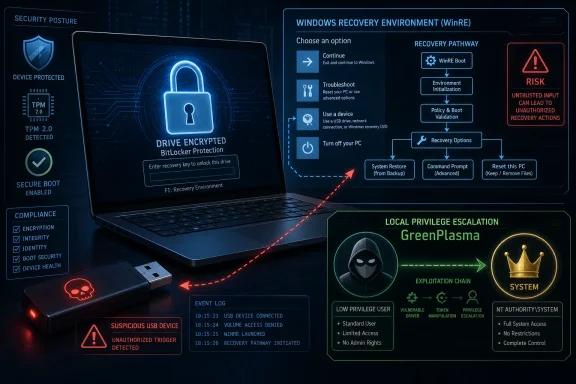
YellowKey’s more interesting—and more worrying—claim is narrower. It reportedly targets the original device by abusing behavior in the Windows Recovery Environment, or WinRE, after booting with a prepared USB device or otherwise influencing the recovery path. In other words, the attack is not a universal skeleton key for every detached BitLocker disk. It is a physical-access attack against a machine whose own trusted boot and recovery machinery can allegedly be coaxed into doing the attacker’s work.
That distinction matters because it changes the operational risk. A hotel-room theft, an unattended executive laptop, a shared lab workstation, or a branch-office server with weak physical controls suddenly looks different from a drive-forensics scenario. The threat is less “BitLocker encryption has been mathematically broken” and more “Windows may be willing to unlock itself under conditions defenders assumed were safe.”
That is still serious. Full-disk encryption is sold, deployed, audited, and trusted precisely because it is supposed to survive physical possession of powered-off hardware. If the recovery environment becomes a path around that guarantee, the weak point is not AES or the TPM in isolation. It is the orchestration layer around them.
That recovery machinery is not optional scenery. It is part of the product.
Microsoft’s own guidance has long differentiated TPM-only BitLocker from TPM-plus-PIN and other multifactor startup configurations. TPM-only unlock is attractive because it is seamless: the device boots, the TPM validates what it expects to validate, and the user lands at the Windows sign-in screen. TPM-plus-PIN adds friction by requiring a human secret before the drive contents become accessible. That friction is exactly why many organizations avoid it at scale.
The industry has repeatedly chosen the convenient setting because it works well enough for the most common loss scenario. A thief who steals a powered-off laptop cannot normally log in without credentials, and the disk is encrypted at rest. For fleets of thousands of devices, avoiding pre-boot support calls has obvious value.
YellowKey, if the public reporting and proof-of-concept behavior are accurate, attacks the space between those assumptions. It does not need to defeat the idea of encryption. It needs to find a trusted Windows component, inside a trusted recovery context, that can be made to unlock or expose what the user never explicitly authorized.
That is why the alleged WinRE angle is so politically explosive. Administrators think of recovery as a safety net. Attackers think of it as code that runs before normal defenses are awake.
Reports describe YellowKey as involving files or folder structures placed where WinRE logic will notice them, with some discussion of a test-like or transaction-like path that can influence BitLocker relocking behavior. Details are still emerging, and researchers and defenders should be careful not to overstate specifics until Microsoft or independent reverse engineers publish a definitive root-cause analysis. But the shape of the claim is familiar: an internal maintenance pathway, designed for system repair or servicing, behaves too trustingly when exposed to physical manipulation.
That kind of bug is not glamorous in the Hollywood sense. It is worse. It lives in the part of the platform that must be privileged because repair tools need unusual access, yet must also be paranoid because repair tools are reachable when the normal OS is not in control.
The reported cleanup behavior—files disappearing from the USB device after successful execution—adds a stranger wrinkle. It could indicate that the exploit is triggering some expected transaction or staging behavior. It could also complicate forensic reconstruction, because the device used to trigger the condition may not retain every artifact after the fact. Either way, it is precisely the kind of behavior that makes enterprise incident response teams uneasy.
For IT administrators, the practical point is not whether the exploit feels elegant. It is whether a machine that was considered protected while powered off can be accessed by someone with hands-on time and a prepared device. That is the standard BitLocker is judged against.
But silence is costly when proof-of-concept material is public.
Administrators need to know which Windows versions are affected, which BitLocker protector combinations are exposed, whether Windows 10 is outside the blast radius, whether Windows 11 24H2 behaves differently from earlier builds, and whether Windows Server 2022 or Server 2025 systems are affected in the same way as clients. They also need to know whether disabling WinRE, changing boot order, enforcing firmware passwords, requiring TPM-plus-PIN, or tightening USB boot policies meaningfully reduces risk.
In the absence of vendor guidance, the vacuum fills with forum speculation, exaggerated headlines, and improvised hardening advice. Some of that advice will be useful. Some of it will break recovery workflows. Some of it will give users confidence without reducing the actual attack path.
Microsoft has been here before. BitLocker lives at the intersection of security, manageability, firmware, recovery, and user support. Every meaningful change can trigger recovery prompts, lockouts, help desk spikes, or failed boots. That makes quick mitigation harder than telling customers to toggle a cloud setting.
Still, the company’s security credibility increasingly depends on response speed and clarity. A public exploit against disk encryption is not just another Windows bug. It touches compliance language, cyber-insurance assumptions, device-loss procedures, and executive trust.
That trade-off now deserves fresh scrutiny.
A TPM-only system can be secure against many realistic threats. It can protect against casual drive removal. It can integrate with Secure Boot. It can keep keys sealed unless expected boot measurements pass. For a managed fleet, it is often the difference between widespread encryption and an exception-riddled policy that users fight.
But TPM-only also means the device itself can unlock the disk without the user supplying a secret before Windows starts. That is the core convenience. It is also the core concern when an attacker can influence the pre-boot or recovery environment.
A pre-boot PIN changes that equation because the encryption key should not become available until the user enters something not stored on the machine. If YellowKey only affects TPM-only deployments, the mitigation story is comparatively straightforward, though still operationally painful. If the researcher’s additional claim is accurate—that TPM-and-PIN configurations may also be vulnerable through an unpublished variation—the risk calculus becomes more severe.
That unpublished variation is currently the unresolved center of gravity. Publicly demonstrated behavior is one thing; a claimed private variant is another. Defenders should not assume the worst as fact, but they also should not design policy around the hope that the worst is impossible.
That places it in a familiar but still dangerous category: a bug that may require an attacker to already have code execution or local access, but then lets that attacker cross a privilege boundary. In enterprise reality, that is often enough. Phishing gets a foothold. A malicious insider has a standard account. A compromised kiosk or shared workstation runs under limited privileges. Local privilege escalation turns that foothold into control.
CTFMon is not some obscure third-party utility. It is tied to Windows text input and language services, the kind of always-there component users never think about and administrators rarely disable outright. Windows Object Manager internals, meanwhile, are part of the operating system’s security boundary machinery. If a crafted object or section interaction can confuse privilege checks, the result is not a cosmetic bug; it is a path around the separation between ordinary users and the most powerful local identity on the machine.
The combined disclosure of YellowKey and GreenPlasma is what makes the week feel larger than any single vulnerability. One alleged flaw threatens offline protection. The other threatens live privilege separation. Together they form a bleak pairing: get physical access and attack recovery, or get local execution and attack privilege boundaries.
The two vulnerabilities should not be conflated technically. A BitLocker bypass and a CTFMon-based elevation path live in different parts of Windows. But from the defender’s chair, they rhyme. Both concern trusted Windows components behaving in ways that attackers can repurpose.
Security research has always had a complicated relationship with disclosure style. Vendors prefer coordinated timelines, private validation, and advisories that land alongside patches. Researchers sometimes choose public release when they believe a vendor has ignored them, mishandled reports, or failed to credit or compensate work. The public rarely sees the full correspondence, and the most dramatic narrative is not always the most accurate one.
But the effect on defenders is the same. Once exploit details are public, the clock changes. Attackers no longer need to find the bug. They need to reproduce it, adapt it, and operationalize it.
The names can also distort risk perception. A memorable exploit name may make a narrow bug sound apocalyptic. Conversely, a dry CVE title can make a serious flaw sound routine. The job for Windows administrators is to look past the color palette and ask boring questions: What versions are affected? What privileges or physical conditions are required? What logs exist? What mitigations are available? What breaks if we apply them?
Right now, too many of those answers remain provisional.
Windows is a vast accumulation of compatibility layers, deployment tooling, recovery code, manufacturing needs, enterprise servicing features, and emergency repair paths. The presence of privileged recovery behavior can be explained by mundane engineering requirements. Mundane engineering can still produce catastrophic security failures.
The more responsible framing is that YellowKey appears to raise questions about unintended trust in the recovery environment. If a component accepts attacker-controlled input and uses it to alter BitLocker state, that is a security design failure whether or not it began life as debug code, a servicing shortcut, or a legitimate recovery feature. Intent matters for accountability. Impact matters for defense.
The backdoor accusation also risks distracting from the fix. If the public debate becomes a referendum on conspiracy, administrators may miss the practical tasks: inventory protectors, test PIN feasibility, lock down boot paths, review WinRE exposure, and prepare for a Microsoft update that could alter recovery behavior.
A good postmortem, when one arrives, should answer whether this was dead code left reachable, an undocumented servicing interface, a validation mistake, or a regression. Until then, certainty is cheap and not especially useful.
Laptops are stolen from cars, airports, hotels, conferences, and offices. Field devices sit unattended. Retail and industrial systems run in spaces where many people can touch them. Branch servers may live in closets with weaker controls than the central data center. Shared workstations often have a rotating cast of semi-trusted users.
For those environments, “requires physical access” is not a dismissal. It is the threat model.
The nuance is time and skill. A theoretical attack requiring soldering, custom hardware, a cold-boot race, and expert handling sits in one category. A reproducible attack using a prepared USB drive and known recovery behavior sits in another. The public reporting around YellowKey suggests something closer to the latter, though the exact reliability and version coverage still need independent confirmation.
That is why IT teams should resist both panic and complacency. This is not necessarily a remote worm. It is also not irrelevant because the attacker needs to touch the machine. It is a physical-access bypass claim against a security feature designed to protect physically possessed hardware.
Yet security is often the art of reintroducing friction exactly where automation has become too trusting. If a fleet contains executives, developers with signing keys, administrators with privileged tooling, finance staff, legal teams, or field devices with regulated data, TPM-only BitLocker may no longer be a comfortable default for every class of machine.
That does not mean every Windows laptop in every organization should immediately be forced into a PIN workflow by Friday afternoon. A rushed policy can lock users out, break unattended reboot cycles, and overwhelm help desks. It does mean organizations should segment risk instead of treating encryption state as a binary checkbox.
High-risk systems may justify pre-boot authentication even if general office devices do not. Shared workstations and servers may need tighter physical controls. Devices with sensitive cached credentials, local secrets, developer tokens, or privileged access tools deserve special attention. Recovery key escrow should be verified before any sweeping change, because a hardened BitLocker policy without reliable recovery is an outage waiting to happen.
Administrators should also review firmware settings, boot order, external boot allowances, Secure Boot configuration, and whether users can alter UEFI settings without supervision. None of those measures should be marketed internally as a confirmed fix for YellowKey until Microsoft says so. But they are part of the same physical-access defense story.
For home users, YellowKey is unlikely to be a reason to disable encryption. Turning off BitLocker because of a reported bypass would usually make the machine less secure, not more. A thief who can no longer exploit a niche recovery path still benefits if the drive is simply unencrypted.
The more practical advice is dull but important. Users should keep Windows updated, ensure recovery keys are backed up somewhere they can actually access, avoid leaving laptops unattended in untrusted places, and treat firmware or boot prompts seriously. If Microsoft ships a fix, it will almost certainly arrive through normal Windows update channels.
Power users with especially sensitive systems may consider enabling a startup PIN after understanding the recovery implications. That is not a casual toggle. If the PIN is forgotten and the recovery key is missing, the data may be gone. Security that users cannot recover from becomes self-inflicted data loss.
The consumer problem is that Microsoft has optimized much of Windows security to be automatic and quiet. That is good until the quiet part fails. Then users discover they were depending on a complicated stack they never knew existed.
Those fixes matter. But they will not settle the broader issue.
The recurring pattern in Windows security is that convenience features become security boundaries after enough customers rely on them. Recovery environments, input services, endpoint security tools, auto-unlock mechanisms, cloud key backup, and seamless device encryption all exist to make Windows manageable. Attackers study them because manageability requires privilege.
The harder task for Microsoft is architectural communication. Customers need to know what TPM-only BitLocker is meant to defend against in 2026, what it is not meant to defend against, and when pre-boot authentication is recommended despite the user-experience cost. They need clearer language than “more secure” versus “more convenient.” They need threat models that map to stolen laptops, evil-maid attacks, shared workstations, remote malware, and insider misuse.
WindowsForum readers know the uncomfortable truth: most organizations do not run the strongest possible configuration. They run the strongest configuration they can support. If Microsoft wants stronger defaults, it has to make them supportable.
Source: www.guru3d.com Microsoft Faces New BitLocker Security Concerns With YellowKey
 YellowKey Turns the Recovery Environment Into the Main Event
The initial wave of coverage around YellowKey was easy to misread. The most sensational version made it sound as if a BitLocker-protected SSD could simply be pulled from one machine, attached to another, and opened like a forgotten USB stick. That is not what the better descriptions of the exploit currently suggest.BitLocker’s normal trust model still matters. On TPM-protected systems, the secrets that allow the operating system volume to unlock are bound to measurements and state on the original machine. Moving the drive to unrelated hardware should not magically carry that trust relationship with it.
YellowKey’s more interesting—and more worrying—claim is narrower. It reportedly targets the original device by abusing behavior in the Windows Recovery Environment, or WinRE, after booting with a prepared USB device or otherwise influencing the recovery path. In other words, the attack is not a universal skeleton key for every detached BitLocker disk. It is a physical-access attack against a machine whose own trusted boot and recovery machinery can allegedly be coaxed into doing the attacker’s work.
That distinction matters because it changes the operational risk. A hotel-room theft, an unattended executive laptop, a shared lab workstation, or a branch-office server with weak physical controls suddenly looks different from a drive-forensics scenario. The threat is less “BitLocker encryption has been mathematically broken” and more “Windows may be willing to unlock itself under conditions defenders assumed were safe.”
That is still serious. Full-disk encryption is sold, deployed, audited, and trusted precisely because it is supposed to survive physical possession of powered-off hardware. If the recovery environment becomes a path around that guarantee, the weak point is not AES or the TPM in isolation. It is the orchestration layer around them.
BitLocker Was Always a Chain, Not a Vault
BitLocker is often described as disk encryption, but in practice it is a chain of components that have to agree about whether a machine is in a trusted state. The TPM measures early boot components. Secure Boot attempts to keep unsigned or untrusted code out of the pre-OS path. Windows decides which protectors are acceptable. Recovery mechanisms exist because real machines break, firmware changes, boot files get altered, users forget PINs, and administrators need a way back in.That recovery machinery is not optional scenery. It is part of the product.
Microsoft’s own guidance has long differentiated TPM-only BitLocker from TPM-plus-PIN and other multifactor startup configurations. TPM-only unlock is attractive because it is seamless: the device boots, the TPM validates what it expects to validate, and the user lands at the Windows sign-in screen. TPM-plus-PIN adds friction by requiring a human secret before the drive contents become accessible. That friction is exactly why many organizations avoid it at scale.
The industry has repeatedly chosen the convenient setting because it works well enough for the most common loss scenario. A thief who steals a powered-off laptop cannot normally log in without credentials, and the disk is encrypted at rest. For fleets of thousands of devices, avoiding pre-boot support calls has obvious value.
YellowKey, if the public reporting and proof-of-concept behavior are accurate, attacks the space between those assumptions. It does not need to defeat the idea of encryption. It needs to find a trusted Windows component, inside a trusted recovery context, that can be made to unlock or expose what the user never explicitly authorized.
That is why the alleged WinRE angle is so politically explosive. Administrators think of recovery as a safety net. Attackers think of it as code that runs before normal defenses are awake.
The USB Stick Is a Prop, Not the Whole Plot
The image of a “simple USB stick” opening BitLocker-protected drives is powerful, and it will dominate discussion because it is easy to understand. But the USB device is better understood as a delivery mechanism than as the vulnerability itself. The more important question is why Windows recovery logic would process attacker-controlled structure in a way that affects BitLocker state.Reports describe YellowKey as involving files or folder structures placed where WinRE logic will notice them, with some discussion of a test-like or transaction-like path that can influence BitLocker relocking behavior. Details are still emerging, and researchers and defenders should be careful not to overstate specifics until Microsoft or independent reverse engineers publish a definitive root-cause analysis. But the shape of the claim is familiar: an internal maintenance pathway, designed for system repair or servicing, behaves too trustingly when exposed to physical manipulation.
That kind of bug is not glamorous in the Hollywood sense. It is worse. It lives in the part of the platform that must be privileged because repair tools need unusual access, yet must also be paranoid because repair tools are reachable when the normal OS is not in control.
The reported cleanup behavior—files disappearing from the USB device after successful execution—adds a stranger wrinkle. It could indicate that the exploit is triggering some expected transaction or staging behavior. It could also complicate forensic reconstruction, because the device used to trigger the condition may not retain every artifact after the fact. Either way, it is precisely the kind of behavior that makes enterprise incident response teams uneasy.
For IT administrators, the practical point is not whether the exploit feels elegant. It is whether a machine that was considered protected while powered off can be accessed by someone with hands-on time and a prepared device. That is the standard BitLocker is judged against.
Microsoft’s Silence Creates Its Own Risk Window
As of the latest public reporting, Microsoft had not published a dedicated advisory, CVE assignment, mitigation document, or formal statement for YellowKey or GreenPlasma. That absence does not prove neglect. Vendors often investigate privately, validate exploitability across supported builds, coordinate fixes, and avoid saying too much before a patch is ready.But silence is costly when proof-of-concept material is public.
Administrators need to know which Windows versions are affected, which BitLocker protector combinations are exposed, whether Windows 10 is outside the blast radius, whether Windows 11 24H2 behaves differently from earlier builds, and whether Windows Server 2022 or Server 2025 systems are affected in the same way as clients. They also need to know whether disabling WinRE, changing boot order, enforcing firmware passwords, requiring TPM-plus-PIN, or tightening USB boot policies meaningfully reduces risk.
In the absence of vendor guidance, the vacuum fills with forum speculation, exaggerated headlines, and improvised hardening advice. Some of that advice will be useful. Some of it will break recovery workflows. Some of it will give users confidence without reducing the actual attack path.
Microsoft has been here before. BitLocker lives at the intersection of security, manageability, firmware, recovery, and user support. Every meaningful change can trigger recovery prompts, lockouts, help desk spikes, or failed boots. That makes quick mitigation harder than telling customers to toggle a cloud setting.
Still, the company’s security credibility increasingly depends on response speed and clarity. A public exploit against disk encryption is not just another Windows bug. It touches compliance language, cyber-insurance assumptions, device-loss procedures, and executive trust.
TPM-Only BitLocker Is Convenient Because It Moves the Burden Elsewhere
The most immediate debate will center on TPM-only BitLocker. Microsoft’s documentation has long acknowledged the trade-off: TPM-only startup is more convenient and less interactive, while PINs and startup keys provide an additional factor before the drive unlocks. The industry’s default posture has been to accept TPM-only on many modern devices because the alternative creates usability and support costs.That trade-off now deserves fresh scrutiny.
A TPM-only system can be secure against many realistic threats. It can protect against casual drive removal. It can integrate with Secure Boot. It can keep keys sealed unless expected boot measurements pass. For a managed fleet, it is often the difference between widespread encryption and an exception-riddled policy that users fight.
But TPM-only also means the device itself can unlock the disk without the user supplying a secret before Windows starts. That is the core convenience. It is also the core concern when an attacker can influence the pre-boot or recovery environment.
A pre-boot PIN changes that equation because the encryption key should not become available until the user enters something not stored on the machine. If YellowKey only affects TPM-only deployments, the mitigation story is comparatively straightforward, though still operationally painful. If the researcher’s additional claim is accurate—that TPM-and-PIN configurations may also be vulnerable through an unpublished variation—the risk calculus becomes more severe.
That unpublished variation is currently the unresolved center of gravity. Publicly demonstrated behavior is one thing; a claimed private variant is another. Defenders should not assume the worst as fact, but they also should not design policy around the hope that the worst is impossible.
GreenPlasma Moves the Story From Lost Laptops to Live Systems
YellowKey is dramatic because it attacks the promise of encrypted-at-rest protection. GreenPlasma is different. It reportedly targets local privilege escalation, using CTFMon behavior and crafted memory section objects within the Windows Object Manager subsystem to gain SYSTEM-level privileges.That places it in a familiar but still dangerous category: a bug that may require an attacker to already have code execution or local access, but then lets that attacker cross a privilege boundary. In enterprise reality, that is often enough. Phishing gets a foothold. A malicious insider has a standard account. A compromised kiosk or shared workstation runs under limited privileges. Local privilege escalation turns that foothold into control.
CTFMon is not some obscure third-party utility. It is tied to Windows text input and language services, the kind of always-there component users never think about and administrators rarely disable outright. Windows Object Manager internals, meanwhile, are part of the operating system’s security boundary machinery. If a crafted object or section interaction can confuse privilege checks, the result is not a cosmetic bug; it is a path around the separation between ordinary users and the most powerful local identity on the machine.
The combined disclosure of YellowKey and GreenPlasma is what makes the week feel larger than any single vulnerability. One alleged flaw threatens offline protection. The other threatens live privilege separation. Together they form a bleak pairing: get physical access and attack recovery, or get local execution and attack privilege boundaries.
The two vulnerabilities should not be conflated technically. A BitLocker bypass and a CTFMon-based elevation path live in different parts of Windows. But from the defender’s chair, they rhyme. Both concern trusted Windows components behaving in ways that attackers can repurpose.
The Researcher’s Naming Scheme Is Becoming a Signal
YellowKey and GreenPlasma arrive after earlier disclosures from the same researcher under names including BlueHammer and RedSun, which were reportedly tied to Windows Defender-related behavior and later addressed through Windows updates. The branding is theatrical, but it has a useful side effect: it makes the pattern harder to ignore.Security research has always had a complicated relationship with disclosure style. Vendors prefer coordinated timelines, private validation, and advisories that land alongside patches. Researchers sometimes choose public release when they believe a vendor has ignored them, mishandled reports, or failed to credit or compensate work. The public rarely sees the full correspondence, and the most dramatic narrative is not always the most accurate one.
But the effect on defenders is the same. Once exploit details are public, the clock changes. Attackers no longer need to find the bug. They need to reproduce it, adapt it, and operationalize it.
The names can also distort risk perception. A memorable exploit name may make a narrow bug sound apocalyptic. Conversely, a dry CVE title can make a serious flaw sound routine. The job for Windows administrators is to look past the color palette and ask boring questions: What versions are affected? What privileges or physical conditions are required? What logs exist? What mitigations are available? What breaks if we apply them?
Right now, too many of those answers remain provisional.
The Backdoor Accusation Needs More Evidence Than Outrage
Some reports and commentary have leaned into the idea of YellowKey as an “apparent backdoor.” That phrase is incendiary, and it should be handled carefully. A vulnerability that looks like an internal test hook, recovery pathway, or servicing mechanism is not automatically evidence of an intentional government-access backdoor.Windows is a vast accumulation of compatibility layers, deployment tooling, recovery code, manufacturing needs, enterprise servicing features, and emergency repair paths. The presence of privileged recovery behavior can be explained by mundane engineering requirements. Mundane engineering can still produce catastrophic security failures.
The more responsible framing is that YellowKey appears to raise questions about unintended trust in the recovery environment. If a component accepts attacker-controlled input and uses it to alter BitLocker state, that is a security design failure whether or not it began life as debug code, a servicing shortcut, or a legitimate recovery feature. Intent matters for accountability. Impact matters for defense.
The backdoor accusation also risks distracting from the fix. If the public debate becomes a referendum on conspiracy, administrators may miss the practical tasks: inventory protectors, test PIN feasibility, lock down boot paths, review WinRE exposure, and prepare for a Microsoft update that could alter recovery behavior.
A good postmortem, when one arrives, should answer whether this was dead code left reachable, an undocumented servicing interface, a validation mistake, or a regression. Until then, certainty is cheap and not especially useful.
Physical Access Is Not a Footnote
There is a reflex in some security discussions to downgrade any attack that requires physical access. That reflex is understandable in cloud and remote-compromise scenarios, but it is badly mismatched to BitLocker’s purpose. Disk encryption exists largely because physical access happens.Laptops are stolen from cars, airports, hotels, conferences, and offices. Field devices sit unattended. Retail and industrial systems run in spaces where many people can touch them. Branch servers may live in closets with weaker controls than the central data center. Shared workstations often have a rotating cast of semi-trusted users.
For those environments, “requires physical access” is not a dismissal. It is the threat model.
The nuance is time and skill. A theoretical attack requiring soldering, custom hardware, a cold-boot race, and expert handling sits in one category. A reproducible attack using a prepared USB drive and known recovery behavior sits in another. The public reporting around YellowKey suggests something closer to the latter, though the exact reliability and version coverage still need independent confirmation.
That is why IT teams should resist both panic and complacency. This is not necessarily a remote worm. It is also not irrelevant because the attacker needs to touch the machine. It is a physical-access bypass claim against a security feature designed to protect physically possessed hardware.
Enterprise IT Has to Revisit the Settings Nobody Wanted to Revisit
The obvious mitigation conversation begins with TPM-plus-PIN. It is also the conversation many organizations have spent years avoiding. Pre-boot PINs create user friction, accessibility concerns, remote-support complications, travel headaches, and device-recovery edge cases.Yet security is often the art of reintroducing friction exactly where automation has become too trusting. If a fleet contains executives, developers with signing keys, administrators with privileged tooling, finance staff, legal teams, or field devices with regulated data, TPM-only BitLocker may no longer be a comfortable default for every class of machine.
That does not mean every Windows laptop in every organization should immediately be forced into a PIN workflow by Friday afternoon. A rushed policy can lock users out, break unattended reboot cycles, and overwhelm help desks. It does mean organizations should segment risk instead of treating encryption state as a binary checkbox.
High-risk systems may justify pre-boot authentication even if general office devices do not. Shared workstations and servers may need tighter physical controls. Devices with sensitive cached credentials, local secrets, developer tokens, or privileged access tools deserve special attention. Recovery key escrow should be verified before any sweeping change, because a hardened BitLocker policy without reliable recovery is an outage waiting to happen.
Administrators should also review firmware settings, boot order, external boot allowances, Secure Boot configuration, and whether users can alter UEFI settings without supervision. None of those measures should be marketed internally as a confirmed fix for YellowKey until Microsoft says so. But they are part of the same physical-access defense story.
Home Users Are Caught Between Invisible Encryption and Invisible Risk
Windows 11 has made device encryption more common for ordinary users, especially on modern hardware tied to Microsoft accounts. That has improved baseline protection for lost consumer laptops, but it has also made BitLocker-like behavior something many users rely on without understanding.For home users, YellowKey is unlikely to be a reason to disable encryption. Turning off BitLocker because of a reported bypass would usually make the machine less secure, not more. A thief who can no longer exploit a niche recovery path still benefits if the drive is simply unencrypted.
The more practical advice is dull but important. Users should keep Windows updated, ensure recovery keys are backed up somewhere they can actually access, avoid leaving laptops unattended in untrusted places, and treat firmware or boot prompts seriously. If Microsoft ships a fix, it will almost certainly arrive through normal Windows update channels.
Power users with especially sensitive systems may consider enabling a startup PIN after understanding the recovery implications. That is not a casual toggle. If the PIN is forgotten and the recovery key is missing, the data may be gone. Security that users cannot recover from becomes self-inflicted data loss.
The consumer problem is that Microsoft has optimized much of Windows security to be automatic and quiet. That is good until the quiet part fails. Then users discover they were depending on a complicated stack they never knew existed.
The Patch Will Be Only Half the Answer
Assuming Microsoft validates YellowKey and GreenPlasma, patches are likely to focus on specific trust-boundary failures. For YellowKey, that could mean changing WinRE behavior, removing or hardening a recovery transaction pathway, adding signature checks, altering when BitLocker volumes are relocked, or blocking attacker-controlled external media from influencing sensitive recovery actions. For GreenPlasma, it could mean tightening CTFMon interactions, Object Manager validation, section object permissions, or related privilege checks.Those fixes matter. But they will not settle the broader issue.
The recurring pattern in Windows security is that convenience features become security boundaries after enough customers rely on them. Recovery environments, input services, endpoint security tools, auto-unlock mechanisms, cloud key backup, and seamless device encryption all exist to make Windows manageable. Attackers study them because manageability requires privilege.
The harder task for Microsoft is architectural communication. Customers need to know what TPM-only BitLocker is meant to defend against in 2026, what it is not meant to defend against, and when pre-boot authentication is recommended despite the user-experience cost. They need clearer language than “more secure” versus “more convenient.” They need threat models that map to stolen laptops, evil-maid attacks, shared workstations, remote malware, and insider misuse.
WindowsForum readers know the uncomfortable truth: most organizations do not run the strongest possible configuration. They run the strongest configuration they can support. If Microsoft wants stronger defaults, it has to make them supportable.
The YellowKey Moment Narrows the Excuses
The concrete lesson from this disclosure cycle is not that every Windows system is doomed. It is that defenders should stop treating BitLocker enablement as the end of the conversation. The specific exploit still needs formal confirmation and vendor guidance, but the risk category is real enough to act on.- Organizations should inventory which systems use TPM-only BitLocker and which require a PIN, startup key, or other additional startup authentication.
- Administrators should prioritize higher-friction BitLocker configurations for devices whose loss would expose privileged credentials, regulated data, source code, legal material, or executive communications.
- Security teams should review whether users can boot from external media, alter firmware settings, or access recovery environments without meaningful control.
- Help desks should verify that BitLocker recovery keys are escrowed and retrievable before any policy change that could increase recovery events.
- Defenders should treat GreenPlasma as a separate local privilege-escalation concern and monitor for Microsoft guidance rather than assuming BitLocker mitigations address it.
- Everyone should be cautious about calling YellowKey a backdoor until root-cause evidence supports that claim, because accidental privileged recovery behavior can be damaging enough without a conspiracy theory attached.
Source: www.guru3d.com Microsoft Faces New BitLocker Security Concerns With YellowKey
