

Hi everyone. I have installed windows 8 preview and I love it. There are a few minor things that need to be improve ,but that's alright. I downloaded media center and installed it. They have another video player that is troubling me. You can play videos without the media center extension in this player, but where is the path the videos come from? I went to Zune and Xbox, but the videos are not there. I cannot find them on my pc. I am dual booting windows 7 and windows 8. I also checked windows 7 for the videos that are displayed in the player and they cannot be found. They should be on my computer some where. My question is where are the videos? The video is $R3XAX14. I want to delete it, but I cannot find it. Can anyone please help me. deanie44
📎 AI Summary:
The user deanie44 inquires about the location of videos played in a video player on Windows 8 Preview, noting they cannot find these videos on their PC, even across dual boot with Windows 7. Kemical responds by explaining that these videos are likely just links and not stored locally, and provides instructions on how to adjust settings to view only personal videos in the app. The overall tone is helpful and positive, with deanie44 expressing gratitude for the assistance.
The user deanie44 inquires about the location of videos played in a video player on Windows 8 Preview, noting they cannot find these videos on their PC, even across dual boot with Windows 7. Kemical responds by explaining that these videos are likely just links and not stored locally, and provides instructions on how to adjust settings to view only personal videos in the app. The overall tone is helpful and positive, with deanie44 expressing gratitude for the assistance.
Solution

Hi Deanie,
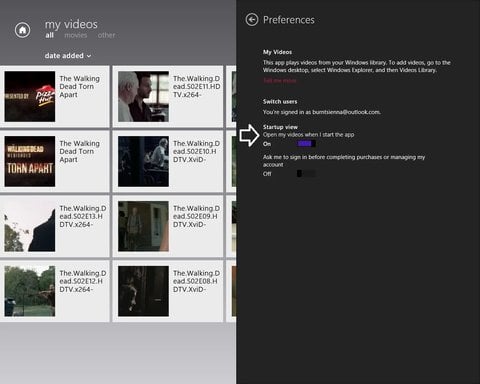
I assume you mean the video's that are displayed when you open the video app and not your own? As your probably aware these are nothing more than links really and so thats perhaps why you cannot find them on your machine. If you would rather just see your video's displayed then open the video app, place the cursor in the top right or bottom right of your screen and click settings from the revealed charms. If you click 'preferences' you'll see this:
Link Removed
I've arrowed the setting you need to change. Once done, you will only see your own collection when opening the app.
I assume you mean the video's that are displayed when you open the video app and not your own? As your probably aware these are nothing more than links really and so thats perhaps why you cannot find them on your machine. If you would rather just see your video's displayed then open the video app, place the cursor in the top right or bottom right of your screen and click settings from the revealed charms. If you click 'preferences' you'll see this:
Link Removed
I've arrowed the setting you need to change. Once done, you will only see your own collection when opening the app.

kemical
Essential Member
Member details
- Joined
- Aug 28, 2007
- Messages
- 36,163
Hi Deanie,
I assume you mean the video's that are displayed when you open the video app and not your own? As your probably aware these are nothing more than links really and so thats perhaps why you cannot find them on your machine. If you would rather just see your video's displayed then open the video app, place the cursor in the top right or bottom right of your screen and click settings from the revealed charms. If you click 'preferences' you'll see this:
Link Removed
I've arrowed the setting you need to change. Once done, you will only see your own collection when opening the app.
I assume you mean the video's that are displayed when you open the video app and not your own? As your probably aware these are nothing more than links really and so thats perhaps why you cannot find them on your machine. If you would rather just see your video's displayed then open the video app, place the cursor in the top right or bottom right of your screen and click settings from the revealed charms. If you click 'preferences' you'll see this:
Link Removed
I've arrowed the setting you need to change. Once done, you will only see your own collection when opening the app.
Attachments
-
 Microsoft Defender: No threats detected Scan detailsvids.webp61.7 KB · Views: 459