📎 AI Summary:
The WindowsForum thread discusses a user’s issue with only being able to use about 1.91GB of RAM on a second-hand Dell Inspiron 15-3552 laptop with 4GB installed. The original poster seeks solutions after unsuccessful attempts from online methods, and others suggest checking the "Maximum memory" setting in Windows msconfig, confirming it’s a Windows configuration issue rather than BIOS. Overall, the conversation highlights troubleshooting steps for RAM utilization problems, with the consensus that adjusting Windows settings can resolve the limited memory access.

NerferMC

Well-Known Member
Joined
May 1, 2018
Messages
71
Thread Author #1
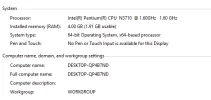
I have bought this second hand laptop. I checked the systems specs and I saw that 1.91GB RAM can be only used out of 4GB.
I was looking many methods on youtube and the internet and it's not working.

PC: Dell Inspiron 15-3552
 

Attachments

  • Capture.webp
    Capture.webp
    18.9 KB · Views: 213

Neemobeer

Windows Forum Team
Staff member
Joined
Jul 4, 2015
Messages
8,995
I would open msconfig and go to the Boot tab then "Advanced Options" make sure "Maximum memory" is not checked.
 

Solution