rafiDccj

New Member
Joined
May 1, 2010
Messages
12
My hard drive is not showing in my computer. I installed partition magic and it showed to fix some errors and i clicked yes it fixed 2 errors and then showed some problem.........and my laptop restarted and after it was reboot my two other drives not showing in my computer.......i tried to give it drive letter through drive manage option....but it is showing error........What can i do? please help me
 

Solution
I think you friend is right, but I did get one user denying this.

Partition Wizard has a partition recovery utility. If it was me, I would try that. It also can rewrite the Master Boot Record if you right click on the actual drive name you should be given that option.

If you wanted to check the *Link Removed*, they are into hard drive repair utilities, but it might take a purchase...or perhaps there is a free download.

I don't have any other suggestions. Just go slow and be careful.

Saltgrass

Excellent Member
Microsoft Community Contributor
Joined
Oct 16, 2009
Messages
15,155
What version of Partition Magic did you use?

Do you have the ability to download another utility? If so, try Partition Wizard. There is a home version that is bootable. It seems to work well in Win 7 although if the other utility caused a problem, it may not be able to fix it.

After you get it burned, boot to the CD and look at your drives from outside Win 7. Maybe it can fix the problems.
 

rafiDccj

New Member
Joined
May 1, 2010
Messages
12
but i have lost of information on those two drives.............its 270 gb........::-(........i dont want to lose those data.................
 

rafiDccj

New Member
Joined
May 1, 2010
Messages
12
i used partition magic 8.0...............after that my one frnd told it is not compatible with windows 7............................
 

Attachments

  • Untitled.webp
    Untitled.webp
    33.4 KB · Views: 394
  • Untitled2.webp
    Untitled2.webp
    25.6 KB · Views: 378
  • Untitled3.webp
    Untitled3.webp
    29.6 KB · Views: 403

Saltgrass

Excellent Member
Microsoft Community Contributor
Joined
Oct 16, 2009
Messages
15,155
I think you friend is right, but I did get one user denying this.

Partition Wizard has a partition recovery utility. If it was me, I would try that. It also can rewrite the Master Boot Record if you right click on the actual drive name you should be given that option.

If you wanted to check the *Link Removed*, they are into hard drive repair utilities, but it might take a purchase...or perhaps there is a free download.

I don't have any other suggestions. Just go slow and be careful.
 

Last edited:
Solution

rafiDccj

New Member
Joined
May 1, 2010
Messages
12
u helped me much.............but did u mean there is possibility to lose my data?
 

rafiDccj

New Member
Joined
May 1, 2010
Messages
12
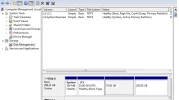
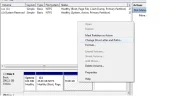
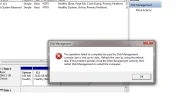
i have attached some print screen images...check those......i tried wat u told .........but i cannot change drive letter in that way......there is not even this option............i need to change drive letter and path.......................and it is missing
 

Saltgrass

Excellent Member
Microsoft Community Contributor
Joined
Oct 16, 2009
Messages
15,155
Have you downloaded Partition Wizard?

If you booted to the Partition Wizard CD, were you given the option to recover a partition?

And yes, you are at risk of losing your data....

Since the error message in Disk Management requests the computer be restarted, I must assume you have already done that....
 

Last edited:

rafiDccj

New Member
Joined
May 1, 2010
Messages
12
hey i have regained to see my two drives.............i used partition wizard home edition........not using the bootable cd.............with the simple home edition....................thank you for helping me..........:-D