techker

Well-Known Member
Joined
Feb 28, 2010
Messages
50
Hey guys glade to have a found a specialized seven forum!

i have a litle issue..

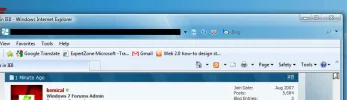
i have windows seven ultimate .my Ei adress bar is black!so when i type an adress i cant see anything..nomather how many themes i tryed still the same?any suggestions?
 

Solution
I'd try booting from your windows 7 disk then when at the install screen click 'Repair' instead. If that doesn't work then you could do an 'upgrade' installation which would keep your files and folders intact whilst reinstalling win 7..

kemical

Essential Member
Joined
Aug 28, 2007
Messages
36,160
Hi,
I did some googling on this issue and it seems your not alone. Solutions seem many and varied but a few are included in this link here:
Link Removed - Invalid URL
 

techker

Well-Known Member
Joined
Feb 28, 2010
Messages
50
thx for the info..that i s the first page that pup up for me before i posted here.whent tru it and still nothing..its odd ah!there seem to be issue's poping up slowely..
 

techker

Well-Known Member
Joined
Feb 28, 2010
Messages
50
Ya..i seem to have lost the factory theme..is there a way to get it back?
 

kemical

Essential Member
Joined
Aug 28, 2007
Messages
36,160
If you rightclick on your desktop and click 'Personalise' you should see the other themes available... (check the screenshot)

Link Removed due to 404 Error
 

techker

Well-Known Member
Joined
Feb 28, 2010
Messages
50
screen..webp

here it is..
 

kemical

Essential Member
Joined
Aug 28, 2007
Messages
36,160
Thankyou. :)

Have you tried rebuilding IE8? Open the control panel and click on 'Programs' and then 'Turn windows features on or off'. In the revealed box untick IE8 and then reboot. Once you've rebooted then reverse the process and re-install it.

Link Removed due to 404 Error
 

techker

Well-Known Member
Joined
Feb 28, 2010
Messages
50
good idea.just did it but still the same..

i need to find an origianale OEM factory out of the box theme.
 

kemical

Essential Member
Joined
Aug 28, 2007
Messages
36,160
Hmm... you could try booting from the win 7 disk and choosing 'Repair' once at the install screen?
 

techker

Well-Known Member
Joined
Feb 28, 2010
Messages
50
umm could be dangerous..lol

were can i get a factory theme?
 

kemical

Essential Member
Joined
Aug 28, 2007
Messages
36,160
You could also try pressing F8 when you boot up and then choosing 'Last good known configuration'.. Also check out the settings I've highlighted in the screenshot... What does yours say?

Link Removed due to 404 Error
 

techker

Well-Known Member
Joined
Feb 28, 2010
Messages
50
same thing.
i was looking arround and seen that there is some themes that you need to replace the explorer.exe and theme files..maybe thats what happend..
 

kemical

Essential Member
Joined
Aug 28, 2007
Messages
36,160
Try the system file checker.. Rightclick on cmd prompt and 'run as administrator'. The type:

sfc /scannow

Then press enter. The file checker will then cycle through repairing anything it finds out of order..
 

techker

Well-Known Member
Joined
Feb 28, 2010
Messages
50
i was just reading up on that..lol

when i whent to start run and put sfc /scannow only a black box pop up for like 1 second and thats it?
 

kemical

Essential Member
Joined
Aug 28, 2007
Messages
36,160
Hmm.. It doesn't sound like your running the file checker.. See attached screenshot as to what your looking for

Link Removed due to 404 Error