

📎 AI Summary:
The user initially reports encountering a blue screen with troubleshooting options on startup, but the issue does not appear to be a classic Blue Screen of Death. Multiple community members suggest different troubleshooting steps, including system restore and checking startup settings; however, the user indicates that some options, like system restore and rollback, are unavailable or unsuccessful. Overall, the troubleshooting process is ongoing, with the user attempting various options based on community advice to resolve the startup issue.
The user initially reports encountering a blue screen with troubleshooting options on startup, but the issue does not appear to be a classic Blue Screen of Death. Multiple community members suggest different troubleshooting steps, including system restore and checking startup settings; however, the user indicates that some options, like system restore and rollback, are unavailable or unsuccessful. Overall, the troubleshooting process is ongoing, with the user attempting various options based on community advice to resolve the startup issue.
Solution
The most important Blue Screen of Death troubleshooting step you can take is to ask yourself what you just did before the device stopped working.
OPTION 1
>Did you just install a new program or a piece of hardware, update a driver, install a Windows update, etc.? If so, there's a very good chance that the change you made caused the BSOD.
>Undo the change you made and test again for the STOP Error. Depending on what it was that changed, some solutions might include:
>Starting up using Last Known Good Configuration to undo recent registry and driver changes.
OPTION 2
>Use System Restore to undo recent system changes.
OPTION 3
>Roll back the device driver to a version prior to your driver update.
OPTION 4
>Check that there's enough free...
OPTION 1
>Did you just install a new program or a piece of hardware, update a driver, install a Windows update, etc.? If so, there's a very good chance that the change you made caused the BSOD.
>Undo the change you made and test again for the STOP Error. Depending on what it was that changed, some solutions might include:
>Starting up using Last Known Good Configuration to undo recent registry and driver changes.
OPTION 2
>Use System Restore to undo recent system changes.
OPTION 3
>Roll back the device driver to a version prior to your driver update.
OPTION 4
>Check that there's enough free...

boxgenk
New Member
Member details
- Joined
- Apr 8, 2019
- Messages
- 6
Sorry for it being in estonian, but I think you can tell by the pictures what they are . ty for your time. (sorry for bad quality)Is there any error code?
Can you take a picture of that blue screen and post it here?
Attachments
-
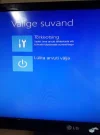 Microsoft Defender: No threats detected Scan detailsarvuti viga.webp17.1 KB · Views: 176
The most important Blue Screen of Death troubleshooting step you can take is to ask yourself what you just did before the device stopped working.
OPTION 1
>Did you just install a new program or a piece of hardware, update a driver, install a Windows update, etc.? If so, there's a very good chance that the change you made caused the BSOD.
>Undo the change you made and test again for the STOP Error. Depending on what it was that changed, some solutions might include:
>Starting up using Last Known Good Configuration to undo recent registry and driver changes.
OPTION 2
>Use System Restore to undo recent system changes.
OPTION 3
>Roll back the device driver to a version prior to your driver update.
OPTION 4
>Check that there's enough free space left on the drive Windows is installed on. Blue Screens of Death and other serious issues, like data corruption, can occur if there's not enough free space on your primary partition used for the Windows operating system.
OPTION 1
>Did you just install a new program or a piece of hardware, update a driver, install a Windows update, etc.? If so, there's a very good chance that the change you made caused the BSOD.
>Undo the change you made and test again for the STOP Error. Depending on what it was that changed, some solutions might include:
>Starting up using Last Known Good Configuration to undo recent registry and driver changes.
OPTION 2
>Use System Restore to undo recent system changes.
OPTION 3
>Roll back the device driver to a version prior to your driver update.
OPTION 4
>Check that there's enough free space left on the drive Windows is installed on. Blue Screens of Death and other serious issues, like data corruption, can occur if there's not enough free space on your primary partition used for the Windows operating system.
boxgenk
New Member
Member details
- Joined
- Apr 8, 2019
- Messages
- 6
hi , i dont have the option to restore the system and rollback isnt working , ty for ur time tho.The most important Blue Screen of Death troubleshooting step you can take is to ask yourself what you just did before the device stopped working.
OPTION 1
>Did you just install a new program or a piece of hardware, update a driver, install a Windows update, etc.? If so, there's a very good chance that the change you made caused the BSOD.
>Undo the change you made and test again for the STOP Error. Depending on what it was that changed, some solutions might include:
>Starting up using Last Known Good Configuration to undo recent registry and driver changes.
OPTION 2
>Use System Restore to undo recent system changes.
OPTION 3
>Roll back the device driver to a version prior to your driver update.
OPTION 4
>Check that there's enough free space left on the drive Windows is installed on. Blue Screens of Death and other serious issues, like data corruption, can occur if there's not enough free space on your primary partition used for the Windows operating system.
boxgenk
New Member
Member details
- Joined
- Apr 8, 2019
- Messages
- 6
Translations
1. System Restore 4. Startup Repair
2. Go back to the previous build 5. Command prompt
3. System image recovery 6. UEFI settings (i think)
Ty for your time

boxgenk
New Member
Member details
- Joined
- Apr 8, 2019
- Messages
- 6
didnt work.Try 4

livix07
Honorable Member
Member details
- Joined
- Feb 19, 2018
- Messages
- 585
that also doesn't work.
Did you get an error message or what happened when you tried it?
Do you have important files on that disk?
foggybottom
New Member
Member details
- Joined
- May 11, 2019
- Messages
- 2
My START UP TIME was halved and a few silly things stopped annoying me when I DISCONTINUED MY MICROSOFT ACCOUNT. I don't know if this will help your problems, but it was very easy and not permanent if you don't like the results
Just follow the instruction in "Search". For me this account was a bother since I didn't need anything it offered and I don't need MS nagging me.
Just follow the instruction in "Search". For me this account was a bother since I didn't need anything it offered and I don't need MS nagging me.


