📎 AI Summary:
The thread discusses how to fully clear the Reliability Monitor in Windows 10, with the original poster seeking to remove event dots (Red and Blue with X's) beyond just the report history. A suggested method involves clearing problem reports via "View All Problem Reports," but the original poster confirms this does not remove the events themselves. Other users mention manually clearing logs in Event Viewer but note it requires multiple steps, yet a definitive, simple solution remains elusive.

HyperSonic1

Well-Known Member
Member details
Joined
Mar 14, 2020
Messages
13
Thread Author #1
Windows10

I am trying to completely clear the Reliability Monitor after changing MoBo and components but all I can clear is the Report History.

How do I also clear the events (Red and Blue Dots with X's)

Thanks
 

Solution
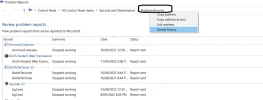
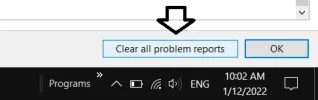
you have to right click up the top
then there should be a option in the bottom right

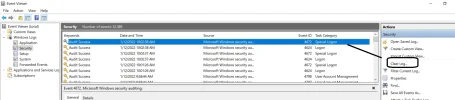
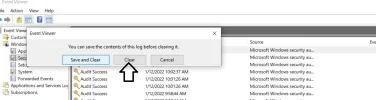
to clear events too you need to open them in the viewer and clear each log so repeat 5 times

Josephur

Windows Forum Admin
Staff member
Premium Supporter
Microsoft Certified Professional
Member details
Joined
Aug 3, 2010
Messages
1,283
If you click on Start, and type Problem Reports, click on View All Problem Reports and clear them, does that clear the events?
 

ussnorway

Windows Forum Team
Staff member
Member details
Joined
May 22, 2012
Messages
4,599
you have to right click up the top
then there should be a option in the bottom right

to clear events too you need to open them in the viewer and clear each log so repeat 5 times
 

Attachments

  • Screenshot (1056).webp
    Screenshot (1056).webp
    46.7 KB · Views: 27
  • Screenshot (1057).webp
    Screenshot (1057).webp
    5.3 KB · Views: 22
  • 1.webp
    1.webp
    68.1 KB · Views: 23
  • 2.webp
    2.webp
    36.4 KB · Views: 22
Solution

HyperSonic1

Well-Known Member
Member details
Joined
Mar 14, 2020
Messages
13
Thread Author #4
If you click on Start, and type Problem Reports, click on View All Problem Reports and clear them, does that clear the events?

Unfortunately no.
some versions of this explanation say there is an option to ALSO clear events but I have never seen this option on my system