
📎 AI Summary:
The original poster requests a tool to count how many times a specific service or process runs on Windows, using an example where a service named XX is used twice. The second responder indicates that no single tool perfectly fits this need but suggests third-party options that monitor resource usage, recommending Microsoft System Center for managing multiple Windows systems, especially in network or cluster environments. Overall, the discussion centers on finding suitable tools for process and service usage tracking, with a focus on practicality and context.

ahmad abusleh

New Member
Joined
Oct 17, 2014
Messages
1
Thread Author #1
Hello all,
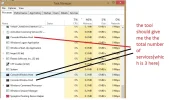
i need a tool or a method to count how many that a service or a process ( in the task manger )running please see the example
such ass if a service named XX is used by the system twice i need a tool that tells me the the total number is 2
Link Removed
 

Attachments

  • 1ser.webp
    1ser.webp
    54.6 KB · Views: 383
Solution
As you already know about the task manager I'm going to assume you want a 3rd party tool.

The simple answeer is no, there isn't a one tool fits every job solution but there are some options if you are willing to allow them into your system, give them a % of the cpu and ram to run (at all times) and learn how to read the data they give back.

My advice is; if this is for a single windows 8 system then don't waist your time, however for a network or cluster of windows 8 systems then have a look at microsft system centre --- it's partly built into hyper-v for montoring V-systems.

ussnorway

Windows Forum Team
Staff member
Joined
May 22, 2012
Messages
4,597
As you already know about the task manager I'm going to assume you want a 3rd party tool.

The simple answeer is no, there isn't a one tool fits every job solution but there are some options if you are willing to allow them into your system, give them a % of the cpu and ram to run (at all times) and learn how to read the data they give back.

My advice is; if this is for a single windows 8 system then don't waist your time, however for a network or cluster of windows 8 systems then have a look at microsft system centre --- it's partly built into hyper-v for montoring V-systems.
 

Solution