📎 AI Summary:
The thread discusses a issue where Windows 10 users experience errors when running .exe files after a system reset due to malware removal. The original poster seeks help with the problem, and another user suggests checking and editing specific registry entries related to application handling. The original poster confirms that implementing the suggested registry edits successfully resolved the issue.

Nimit

Honorable Member
Joined
Feb 20, 2015
Messages
141
Thread Author #1
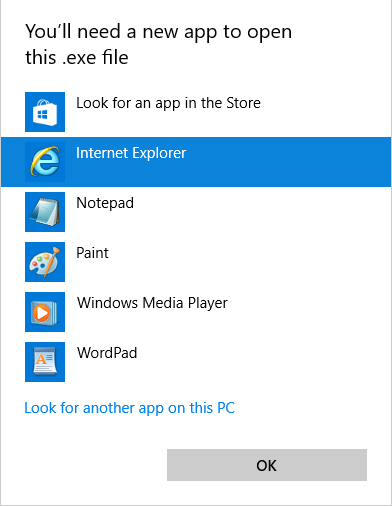
My laptop with Windows 10 had some viruses/malwares so I decided to reset it. After successfully resetting whenever I run any .exe file it says this:
8TJeDQU.png
but when I run as administrator it works as usually it should, please help, some applications won't work running as administrator.
 

Solution
Try checking the following registry entries (or save the contents to a .reg file using notepad and then double clicking on the reg file).

Code:
Windows Registry Editor Version 5.00

[HKEY_CLASSES_ROOT\exefile]
@="Application"
"EditFlags"=hex:38,07,00,00
"FriendlyTypeName"=hex(2):40,00,25,00,53,00,79,00,73,00,74,00,65,00,6d,00,52,\
  00,6f,00,6f,00,74,00,25,00,5c,00,53,00,79,00,73,00,74,00,65,00,6d,00,33,00,\
  32,00,5c,00,73,00,68,00,65,00,6c,00,6c,00,33,00,32,00,2e,00,64,00,6c,00,6c,\
  00,2c,00,2d,00,31,00,30,00,31,00,35,00,36,00,00,00

[HKEY_CLASSES_ROOT\exefile\DefaultIcon]
@="%1"

[HKEY_CLASSES_ROOT\exefile\shell]

[HKEY_CLASSES_ROOT\exefile\shell\open]
"EditFlags"=hex:00,00,00,00

[HKEY_CLASSES_ROOT\exefile\shell\open\command]...

Josephur

Windows Forum Admin
Staff member
Premium Supporter
Microsoft Certified Professional
Joined
Aug 3, 2010
Messages
1,283
Try checking the following registry entries (or save the contents to a .reg file using notepad and then double clicking on the reg file).

Code:
Windows Registry Editor Version 5.00

[HKEY_CLASSES_ROOT\exefile]
@="Application"
"EditFlags"=hex:38,07,00,00
"FriendlyTypeName"=hex(2):40,00,25,00,53,00,79,00,73,00,74,00,65,00,6d,00,52,\
  00,6f,00,6f,00,74,00,25,00,5c,00,53,00,79,00,73,00,74,00,65,00,6d,00,33,00,\
  32,00,5c,00,73,00,68,00,65,00,6c,00,6c,00,33,00,32,00,2e,00,64,00,6c,00,6c,\
  00,2c,00,2d,00,31,00,30,00,31,00,35,00,36,00,00,00

[HKEY_CLASSES_ROOT\exefile\DefaultIcon]
@="%1"

[HKEY_CLASSES_ROOT\exefile\shell]

[HKEY_CLASSES_ROOT\exefile\shell\open]
"EditFlags"=hex:00,00,00,00

[HKEY_CLASSES_ROOT\exefile\shell\open\command]
@="\"%1\" %*"
"IsolatedCommand"="\"%1\" %*"

[HKEY_CLASSES_ROOT\exefile\shell\runas]
"HasLUAShield"=""

[HKEY_CLASSES_ROOT\exefile\shell\runas\command]
@="\"%1\" %*"
"IsolatedCommand"="\"%1\" %*"

[HKEY_CLASSES_ROOT\exefile\shell\runasuser]
@="@shell32.dll,-50944"
"Extended"=""
"SuppressionPolicyEx"="{F211AA05-D4DF-4370-A2A0-9F19C09756A7}"

[HKEY_CLASSES_ROOT\exefile\shell\runasuser\command]
"DelegateExecute"="{ea72d00e-4960-42fa-ba92-7792a7944c1d}"

[HKEY_CLASSES_ROOT\exefile\shellex]

[HKEY_CLASSES_ROOT\exefile\shellex\ContextMenuHandlers]
@="Compatibility"

[HKEY_CLASSES_ROOT\exefile\shellex\ContextMenuHandlers\Compatibility]
@="{1d27f844-3a1f-4410-85ac-14651078412d}"

[HKEY_CLASSES_ROOT\exefile\shellex\DropHandler]
@="{86C86720-42A0-1069-A2E8-08002B30309D}"

[HKEY_CLASSES_ROOT\exefile\shellex\PropertySheetHandlers]

[HKEY_CLASSES_ROOT\exefile\shellex\PropertySheetHandlers\ShimLayer Property Page]
@="{513D916F-2A8E-4F51-AEAB-0CBC76FB1AF8}"

[HKEY_CLASSES_ROOT\exefile\shellex\PropertySheetHandlers\{B41DB860-64E4-11D2-9906-E49FADC173CA}]
@=""

[HKEY_CLASSES_ROOT\exefile\shellex\PropertySheetHandlers\{B41DB860-8EE4-11D2-9906-E49FADC173CA}]
@=""

 

Solution

Nimit

Honorable Member
Joined
Feb 20, 2015
Messages
141
Thread Author #3
Try checking the following registry entries (or save the contents to a .reg file using notepad and then double clicking on the reg file).

Code:
Windows Registry Editor Version 5.00

[HKEY_CLASSES_ROOT\exefile]
@="Application"
"EditFlags"=hex:38,07,00,00
"FriendlyTypeName"=hex(2):40,00,25,00,53,00,79,00,73,00,74,00,65,00,6d,00,52,\
  00,6f,00,6f,00,74,00,25,00,5c,00,53,00,79,00,73,00,74,00,65,00,6d,00,33,00,\
  32,00,5c,00,73,00,68,00,65,00,6c,00,6c,00,33,00,32,00,2e,00,64,00,6c,00,6c,\
  00,2c,00,2d,00,31,00,30,00,31,00,35,00,36,00,00,00

[HKEY_CLASSES_ROOT\exefile\DefaultIcon]
@="%1"

[HKEY_CLASSES_ROOT\exefile\shell]

[HKEY_CLASSES_ROOT\exefile\shell\open]
"EditFlags"=hex:00,00,00,00

[HKEY_CLASSES_ROOT\exefile\shell\open\command]
@="\"%1\" %*"
"IsolatedCommand"="\"%1\" %*"

[HKEY_CLASSES_ROOT\exefile\shell\runas]
"HasLUAShield"=""

[HKEY_CLASSES_ROOT\exefile\shell\runas\command]
@="\"%1\" %*"
"IsolatedCommand"="\"%1\" %*"

[HKEY_CLASSES_ROOT\exefile\shell\runasuser]
@="@shell32.dll,-50944"
"Extended"=""
"SuppressionPolicyEx"="{F211AA05-D4DF-4370-A2A0-9F19C09756A7}"

[HKEY_CLASSES_ROOT\exefile\shell\runasuser\command]
"DelegateExecute"="{ea72d00e-4960-42fa-ba92-7792a7944c1d}"

[HKEY_CLASSES_ROOT\exefile\shellex]

[HKEY_CLASSES_ROOT\exefile\shellex\ContextMenuHandlers]
@="Compatibility"

[HKEY_CLASSES_ROOT\exefile\shellex\ContextMenuHandlers\Compatibility]
@="{1d27f844-3a1f-4410-85ac-14651078412d}"

[HKEY_CLASSES_ROOT\exefile\shellex\DropHandler]
@="{86C86720-42A0-1069-A2E8-08002B30309D}"

[HKEY_CLASSES_ROOT\exefile\shellex\PropertySheetHandlers]

[HKEY_CLASSES_ROOT\exefile\shellex\PropertySheetHandlers\ShimLayer Property Page]
@="{513D916F-2A8E-4F51-AEAB-0CBC76FB1AF8}"

[HKEY_CLASSES_ROOT\exefile\shellex\PropertySheetHandlers\{B41DB860-64E4-11D2-9906-E49FADC173CA}]
@=""

[HKEY_CLASSES_ROOT\exefile\shellex\PropertySheetHandlers\{B41DB860-8EE4-11D2-9906-E49FADC173CA}]
@=""
Thank you very much, it worked!