📎 AI Summary:
The thread discusses how to grant access to the local service account NT Service\MSSQLSERVER on Windows Server 2012. The original poster struggles with the GUI method, and a suggested workaround is to use 'nt service\ms', but they encounter issues with listing principals. The conversation clarifies that the problem may be due to selecting the wrong object types, with advice to enable "Built-in security principals," but it appears the user might need to differentiate between sharing and setting permissions, as indicated by the final response.

timcstl

New Member
Joined
Sep 15, 2022
Messages
3
Thread Author #1
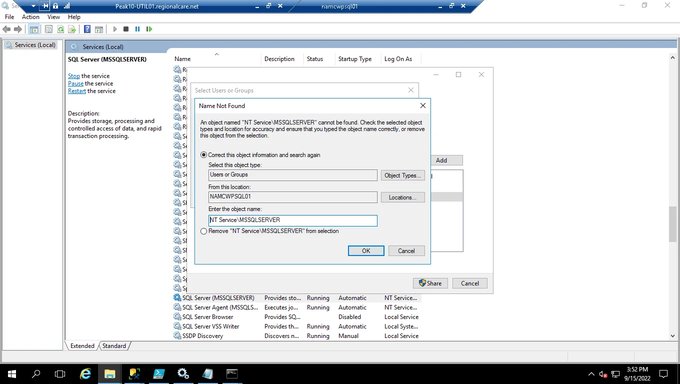
I have a windows server 2012, I have a folder that I need to grant access to a local service account. Cant seem to do it through gui. The service account is
NT Service\MSSQLSERVER. Is this possible?
 

Attachments

  • 1663276324502.webp
    1663276324502.webp
    70.5 KB · Views: 46

Neemobeer

Windows Forum Team
Staff member
Joined
Jul 4, 2015
Messages
8,995
Try just 'nt service\ms' it should give you a list of principals to select from
 

Neemobeer

Windows Forum Team
Staff member
Joined
Jul 4, 2015
Messages
8,995
Oh heh I see your problem. Click 'Object Types' and check 'Built-in security principals'
 

Solution

timcstl

New Member
Joined
Sep 15, 2022
Messages
3
Thread Author #5
so if you choose the computer/server name for this built in does not show
An image from 'grant rights to share to local service account'. Windows desktop showing SQL Server Management Studio with jobs, file explorer, and user/group selection dialogs.
 

Last edited by a moderator:

Neemobeer

Windows Forum Team
Staff member
Joined
Jul 4, 2015
Messages
8,995
Looks like you're trying to share and not set permissions