BROTHYAM

New Member
Joined
Jan 23, 2010
Messages
6
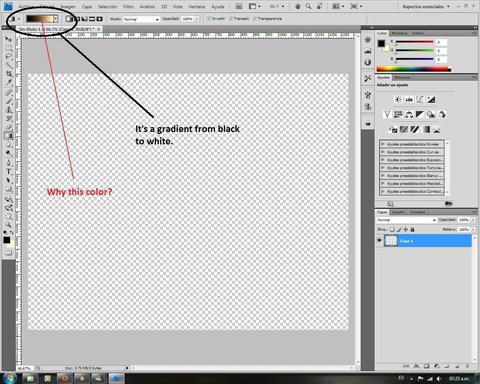
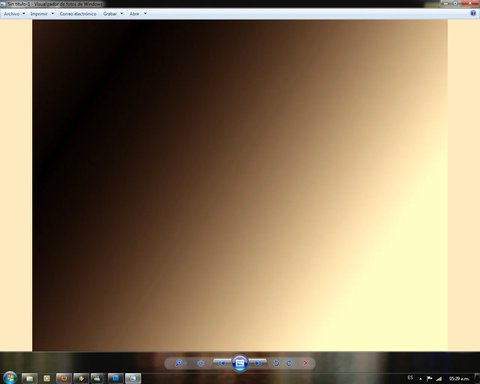
How can I extract the yellowish color?
Bad color!.webp

It should turn this way:
Sin título-1.webp

The same thing happens in Photoshop, One sees as the first image, but save as the last image.

Has someone some idea to fix it?

I have a LCD monitor Samsung, Nvidia Geforce 8500 Gt video, Core 2 quad, 4Gb ram.
 

Last edited:
Solution
I don't use photoshop. But it looks like you need to select another "save as " option. It is either saving , as default, in two-tone, or in 8bit RGB.

reghakr

Essential Member
Joined
Jan 26, 2009
Messages
14,185
Could you please provide more specs about you computer especially the exact make and model of your graphics card.
 

BROTHYAM

New Member
Joined
Jan 23, 2010
Messages
6
I have a LCD monitor Samsung, Nvidia Geforce 8500 Gt video, Core 2 quad, 4Gb ram.
 

reghakr

Essential Member
Joined
Jan 26, 2009
Messages
14,185
Sorry I thought it was a Windows 7 problem.

You'll need a accomplished Photoshop user for a solution.
 

Joe S

Excellent Member
Joined
Jan 12, 2009
Messages
3,781
Did you check on the Adobe site and see if there were any updates?
Joe
 

RAK

Extraordinary Member
Joined
Jul 6, 2009
Messages
2,491
I don't use photoshop. But it looks like you need to select another "save as " option. It is either saving , as default, in two-tone, or in 8bit RGB.
 

Solution