📎 AI Summary:
The thread discusses the loss of sortable column headers, such as "sort by," in Windows 7's icon views, which were available in Vista. The original poster expresses frustration that the sorting options are limited to the "Details" view and seeks a way to retain or enable these headers in all views. Several users acknowledge the issue, with some suggesting that the headers only appear in "Details" view or when using specific themes, and no definitive solution is provided. Overall, the sentiment reflects a common wish for improved file sorting features across all Windows 7 views.

thedesigndept

New Member
Joined
Jan 29, 2010
Messages
6
Thread Author #1
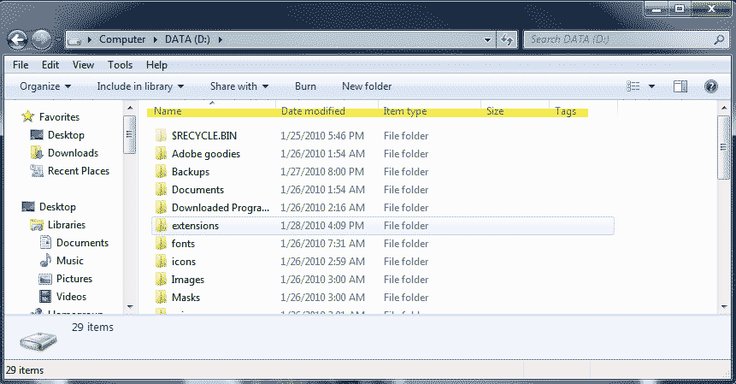
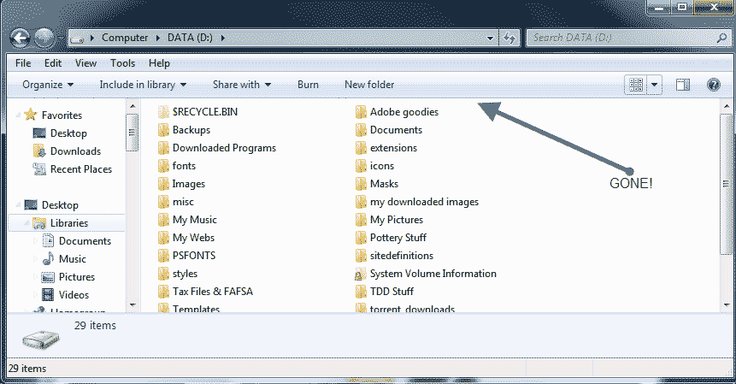
Vista allowed the contents of a window to be sorted by name, date modified, etc in any view -- but it appears Windows 7 drops that menu bar for all views other than "details" view. I can right-click within the box to sort, but it's very inefficient. Any way to retain that detail bar in all views?

Thanks!
 

Solution
Has anyone found a solution to this problem?

I too really miss the "sort by" column headers in ALL views.

Again, right now (as far as I know), the only way to display those column headers, is to be in DETAILS view, or switch to the Windows Classic theme.

Thanks...

Saltgrass

Excellent Member
Microsoft Community Contributor
Joined
Oct 16, 2009
Messages
15,152
I guess I do not understand exactly what you need. Is this a toolbar menu you are looking for? Otherwise, I haven't noticed much difference.

Certain folders may behave differently so you might check other types.
 

thedesigndept

New Member
Joined
Jan 29, 2010
Messages
6
Thread Author #3
screenshots to explain missing sort options

I've highlighted in yellow the bar that seems to disappear when I am in icon view. My Vista machine displays that handy bar no matter what view I've chosen.

Thank you!
 

Attachments

  • sample2.gif
    sample2.gif
    27.9 KB · Views: 682
  • sample1.gif
    sample1.gif
    26.7 KB · Views: 505

Saltgrass

Excellent Member
Microsoft Community Contributor
Joined
Oct 16, 2009
Messages
15,152
I see what you mean, but right now all I might say is there is only one category on the other views, so the top line would have no meaning.

I will look for a way to add other information to those views which could be annoted across the top, but right now I do not know how.
 

thedesigndept

New Member
Joined
Jan 29, 2010
Messages
6
Thread Author #5
Thank you for looking into this. I'm adding a link here with a snapshot of how the sort menu is shown in Vista, even in icon mode where there is only one category. It was just so easy to sort by file name or date modified this way.....

Link Removed due to 404 Error
 

wsalopek

New Member
Joined
May 16, 2011
Messages
6
Has anyone found a solution to this problem?

I too really miss the "sort by" column headers in ALL views.

Again, right now (as far as I know), the only way to display those column headers, is to be in DETAILS view, or switch to the Windows Classic theme.

Thanks...
 

Last edited:
Solution