📎 AI Summary:
The thread discusses a user's concern about the absence of a browser on their Windows 8 Toshiba laptop, with replies confirming that Internet Explorer is included in all Windows 8 versions and instructions on how to locate and pin it. The user later seeks advice on changing the default homepage from MSN to Google and removing MSN as the homepage, with suggestions to update the homepage settings and add Google as a search provider. Overall, the discussion provides troubleshooting steps, confirming IE's presence, and guidance on customizing browser settings.

chazz

New Member
Member details
Joined
Jan 14, 2013
Messages
4
Thread Author #1
Is it possible my new windows 8 computer does not have a browser installed? It's been a week, I keep searching, can't find one anywhere. I installed chrome on it, that works. I assume I can download IE free from MS, But IE has to already be on this thing someplace. Where is it?

Toshiba notebook, p875-s7102


Where do you change user name for the forum?
 

Last edited by a moderator:
Solution
Is there a way of getting rid of that msn page?

Link Removed

Above is a sort of set it and forget it policy for making Google.com your homepage.

In addition...
If you prefer Google, you may also want to access Search Providers in Internet Explorer 10 by going here, more directly, while in IE:

Link Removed

This will add Google as a search provider that you can set as default.

Mike

Windows Forum Admin
Staff member
Premium Supporter
Member details
Joined
Jul 22, 2005
Messages
9,271
Even Windows 8 N has Internet Explorer built-in. From the desktop, try Windows Key + R to get the "Run" dialogue and type iexplore.exe.

If nothing comes up, something is afoot with your system. Please reply so we can determine the next step you'd want to take. Bottom line: Every edition has it, even the legally limited edition in Europe, so it should be there.
 

davehc

Essential Member
Premium Supporter
Member details
Joined
May 1, 2008
Messages
5,546
Take a look in the File explorer program files or program files (x86),. There should be a folder there for Internet explorer. If you find it, right click the executive (iexplorer.exe) and select to pin to the task bar or start menu (or both)
 

chazz

New Member
Member details
Joined
Jan 14, 2013
Messages
4
Thread Author #4
A thousand thanks. That brought it up and now it is in the list of programs. If it was there before now, I somehow didn't see it. After closing it I could not find another way to reopen it other than repeating run, iexplore.exe, but then when the E icon appeared in the taskbar I was able to pin it and that reopens it.

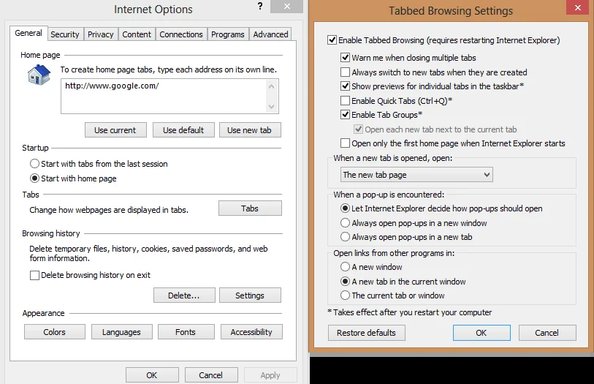
I tried to change the home page, added Google and tried to set to that, this only adds a tab you can click to open the google page. I went to tools and edited out the msn page, it autorestores. Tried changing the order, moving Google above the msn page, that didn't work, it immediately switched back. Is there a way of getting rid of that msn page? Thanks in advance.
 

Mike

Windows Forum Admin
Staff member
Premium Supporter
Member details
Joined
Jul 22, 2005
Messages
9,271
Is there a way of getting rid of that msn page?

Link Removed

Above is a sort of set it and forget it policy for making Google.com your homepage.

In addition...
If you prefer Google, you may also want to access Search Providers in Internet Explorer 10 by going here, more directly, while in IE:

Link Removed

This will add Google as a search provider that you can set as default.
 

Attachments

  • ie10tab-settings-for-google.webp
    ie10tab-settings-for-google.webp
    54.1 KB · Views: 446
Solution

davehc

Essential Member
Premium Supporter
Member details
Joined
May 1, 2008
Messages
5,546
First you must open the google page, if that is your wanted default.

If you haven't yet found it, a right click on the top bar offers you the "Menu bar" option.
With this, click "Tools" - "Internet options".
In the "General" tab, select "Use current"
"Apply" and Ok.